edge client
30 Topics
Wayland support on Linux Edge client
What I did Booted Debian bookworm version 12.12 Started the Wayland compositor kwin-wayland version 4:5.27.5-3 Launched f5vpn version 7262.0.0.2 Expected result f5vpn GUI starts Actual result Did not start, and printed an error: qt.qpa.plugin: Could not find the Qt platform plugin "wayland" in "" More info In order to support Wayland, the Wayland qt6 libraries need to be bundled with the Linux Edge client. In particular, the /opt/f5/vpn/platforms/ directory should include libqwayland.so .378Views0likes0Comments
Username is not filled in EdgeClient in the Modern customization
We trying to use the new "Modern" Customization page in PReact with the VPN SSL. We use the EdgeClient (16.1.6.0), but in standard mode the username field is filled with the previous one, and saved in the client.f5c file, but not in the Modern mode maybe because of the Preact way to build the form. Is there a lot of user of the "Modern Customization" ?? Thank you137Views0likes1CommentBig-Ip Edge Client specials characters problems
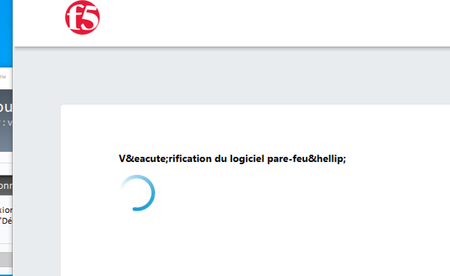
Hello, I have installed the big-ip edge client version 7.2.4.5 with APM modern and I have some problem with specials characters in FRENCH as shown on the screenshot. What do I need to do ? I tried to modify the text on the general customization but I got an script error after that. Regards, Miguel Campos469Views0likes3Comments
F5OS share APM VPN licence across tenant clusters
Hello, I have deployed a pair of r5900 series appliances. On these appliances, I have an Active/Standby tenant cluster of F5 BIG IP running with the APM module provisioned and an APM configuration dedicated to SSL VPN using the F5 Edge Client. The F5OS chassis are using 3 licences : r5900 Best bundle APM 1000 VPN Users (x2) This means that the production environment can handle up to 2000 concurrent users connected at the same time, on the APM-enabled BIG-IP tenants. My question is the following : Can I create 2 new tenants running BIG-IP with APM module and create a new APM configuration for VPN testing purposes ? How are the "APM 1000 VPN Users" licence shared across tenants running on the same r5900 chassis ? In the official F5OS documentation, I have noticed that every tenants inherits the licences provisionned on the F5OS chassis. But there is no explanation regarding the sharing of the VPN seats included in the APM VPN licences. Thank you.Solved369Views0likes4CommentsEdge Client OAuth with Azure
Hello All, I tried OAuth feature on Edge Client with Azure as IDP. It works, I receive the Access Token and connect successfully. The problem is that Policy does not parse the JWT token and just stores it as secure variable. So I have no information about the user. I can parse it with an irule, but I expected to be parsed automatically, lilke when you use an OAuth Client in VPE. Am I missing something?154Views0likes0CommentsF5 APM Syslog-NG parser
Hello everybody, I use the VPN big-ip Edge client F5 and I would like to generate a log with all theses session variables "session.ldap.last.attr.userPrincipalName + session.check_machinecert.last.cert.subject + session.assigned.clientip". My problem is that the "session.assigned.clientip" isn't populate in the session variable so I can't use a log message to make a custom log with all of theses values. So my question is , is it possible to parse theses logs with syslog-ng and concatenate all the syslog trame with the session ID ? and forward the log concatenated to an another syslog instance ? Don't know if my question is very undertandable ? Regards, Miguel172Views0likes0CommentsEdgeClient Version Display Mismatch
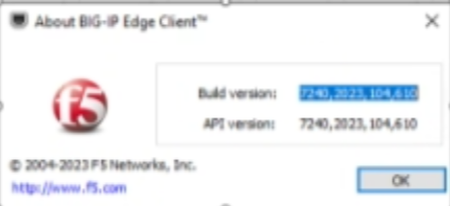
We observe there is a mismatch to the EdgeClient version displayed on the Application and on the Windows control panel programs. For example: On the EdgeClient application of v7240, it displays full version details. But on the same windows machine under control panel - Programs, it does not display the exact same version of EdgeClient. Is this a expected behaviour or an issue.260Views0likes3CommentsBig-IP Edge client installation fails on Windows 11
Hello Team, I'm having an issue within installation of Edge Client on Windows 11 Both versions 7244 and 7245 fails with the same error during installation " Unable to load driver on this device. F5Fltdrv.sys A security setting prevents this driver from loading. You must adjust your settings to load this driver" Any idea what might be the problem? The issue is not present on Windows 10. Best Regards,1.6KViews0likes1Comment
Deploy BIG-IP Edge Client (iOS) with configuration string
Greetings all, I'm very new to F5 (only responsible for deploying Edge Client with MDM) and need some basic assistance. Are there any more examples available for Configuration XML strings used to deploy the Edge Client via MDM and VPP to iOS devices with connection settings already established? Specifically we are utilizing JAMF as our MDM. Apps can be given configuration settings in their deployment. I was attempting to use the below string but I'm getting an error - 'Incorrect Format'. Help is appreciated. Thanks! We are using user name and password for authentication, and it is an SSL appliance. IPv4 UserDefinedName The Name of our connection VPN AuthName $USERNAME RemoteAddress our F5 Address OnDemandMatchAppEnabled VPNSubType [com.f5.F5-Edge-Client.vpnplugin](//com.f5.F5-Edge-Client.vpnplugin) VPNType VPN453Views0likes0Comments
Machine Certificate Check - why does it fail?
Hi, I am trying to implement machine certificate check for Edge Client users. The machine certificate is stored in the default MY store and I assume I have configured the APM action correctly with: MY / LocalMachine / CA Bundle / YES to right elevation prompts. The connection fails always on machine certificate check with these entries in APM log: debug /Common/ap_edge_client:Common:4d76a881: MachineCert agent: ENTER Function executeInstance info /Common/ap_edge_client:Common:4d76a881: Executed agent '/Common/empty_act_machinecert_auth_ag', return value 0 info /Common/ap_edge_client:Common:4d76a881: Following rule 'fallback' from item 'Machine Cert Auth' to item 'Log F' info /Common/ap_edge_client:Common:4d76a881: Session variable 'session.check_machinecert./Common/empty_act_machinecert_auth_ag.result' set to '-2' info /Common/ap_edge_client:Common:4d76a881: Session variable 'session.check_machinecert.last.result' set to '-2' Edge client log file contains these entries: 0,2018-08-09,11:04:34:936,APPCTRL,7384,8484,Starting pending session ID: 4d76a881 48,2018-08-09,11:04:35:431,APPCTRL,7384,8484,URL: https:///my.policy 48,2018-08-09,11:04:36:330,APPCTRL,7384,8484,Cookie MRHSession not set 1,2018-08-09,11:04:36:498,APPCTRL,7384,8484,Authentication failure 1,2018-08-09,11:04:36:498,APPCTRL,7384,8484,Authentication failed - redirect (0x80070005) 0,2018-08-09,11:04:36:498,APPCTRL,7384,8484,Failed to establish session 4d76a881 I set the logging levels for this APM policy to debug for everything, but still none of the logs tell me what could be causing the problems. Is it my VPE action setting, is it perhaps something with CA, or the client rights? How should I identify the root cause here? What more can I do more to troubleshoot beside trying every possible set of settings in the APM machine certificate check action? Any help really appreciated! thx.3.8KViews0likes17Comments