Forum Discussion

Two Arm Deployment mode using PBR

 MVP
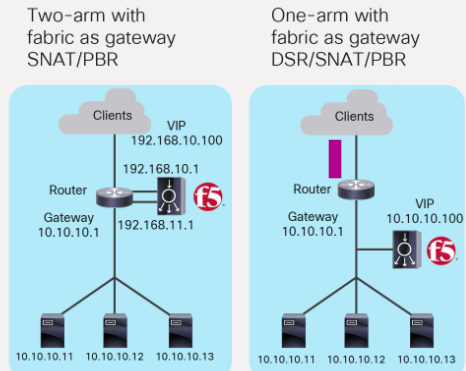
MVPI now saw your picture as I did not see that you attached one. For the VIP as it is on interface 1 with ip address 192.168.10.x , so PBR or SNAT should be only for the return traffic.
Using SNAT to change the traffic to be sourced from 192.168.11.x will be easier but maybe you want the servers to see the original client ip address and this is why you look at PBR. Keep in mind that F5 can add XFF header for HTTP/HTTPS traffic or use option TCP 28 or proxy protocol for tcp traffic but then you need to sync with the server team if they are ok with this.
Inserting X-Forwarded-Host HTTP header
Original IP address sent to backend servers for non HTTP traffic when SNAT configured
For PBR to be used for the return traffic if SNAT is not enabled then with PBR you can configure the router to send the traffic to the F5 192.168.11.1 or just modify routing on the router with a static route maybe. What I see as issue is the server intiated traffic (server upgrade or app upgrade, ntp etc.) that is not reply of a client traffic may be redirected to F5 . You can have F5 Layer 3 forwarding VIP to capture that traffic and send it to the router if you can't exclude it from being send to the F5 device. If you know the client source ip addresses (if only internal clients use the servers) as if it not the entire internet then it will be easier as PBR or static route can send the server traffic that is just the client subnet to the F5 device. You can use WCCP as a replacement of PBR but it depends on your topology. Try SNAT if the server team agrees and then PBR and if you need more control WCCP.
 anish_6190May 14, 2025
Nimbostratus
Thanks for the broader view and perspective on this



Recent Discussions
Related Content
* Getting Started on DevCentral
* Community Guidelines
* Community Terms of Use / EULA
* Community Ranking Explained
* Community Resources
* Contact the DevCentral Team
* Update MFA on account.f5.com