ssl
287 Topics
An Irule for Client Ssl Profile that Allows Unassigned TLS Extension Values (17516)
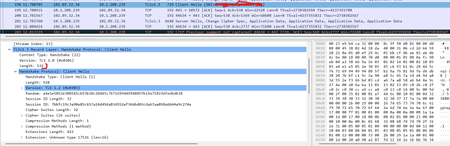
Hello Community, I have a requirement to allow enriched https header enrichment. The SSL negotiation (I'm doing ssl termination on F5) fails because the enriched header from client contains reserved tls extension values. (https://www.iana.org/assignments/tls-extensiontype-values/tls-extensiontype-values.xhtmltls-extensiontype-values-1). The Client Hello request in the SSL Handshake was captured and contained an Extensions list, which included a reserved TLS Extension value (17156), which the F5 isn't presenting in Server Hello. I need an irule that can allow that Extension to be added on the client ssl profile so the ssl handshake doesn't fail.3.4KViews0likes28Comments
Force Client-SSL Profile to X25519, Instead of Post-Quantum Cryptography
There is a TLS implementation that was working perfectly before, even though, there is SSL ClientHello extension addition, by a middle-box device. With Clienthello packets of 540bytes, this worked perfectly. An example is the "Extension Unknown Type 17516" added there. Recent tests show the extension addition is no longer working. The only significant change is that CLIENTSSL HELLO packets are now fragmented on TLS 1.3 with the Post-Quantum Cryptography implementation on clients (browsers), with CLIENTSSL HELLO now regularly abover 1500 bytes causing fragmentation. How is it possible if F5 is Client-side server to force all clients to use X25519 ciphers instead of X25519Kyber512Draft00 and X25519Kyber768Draft00 to ensure that full flow is not broken. is there any changes on CLIENTSSL Profile to implement this. Traffic Flow is Mobile browser--Mobile Packet gateway (header enrichment)-- F5 (Server)9Views0likes0Comments
SSL & persistence configurations from qkview or UCS files
Is there any quick way to extract (into, for example, an Excel file) the following configuration details from qkview or UCS files? 1. list of SSL certificates, including: - SSL certificate expiration status / dates - which virtual servers or SSL profiles are using each SSL certificate 2. list of persistence configurations78Views0likes2Comments
Struggling with Node.js API for Searching Profiles Across Multiple F5 Devices
Hey everyone, I’m working on a Node.js API that connects to my frontend and allows users to search for an SSL or LTM profile by name and get back all the relevant details. The twist is that the profile could live on any one of 40+ F5 devices (different mgmt IPs). Here’s what I’ve done so far: I’m using the F5 REST API and creating a session token for each mgmt IP to avoid basic auth on every call. I built a loop to query each device, aggregate results, and return the profile details if it exists. The problem: It’s not consistent. Sometimes the profile is found; other times it’s missed—even though it’s definitely there. I’m getting timeouts pretty frequently, which adds to the frustration. Feels like I’m doing too many sequential calls and maybe hitting performance or token issues. Has anyone tackled something similar? How do you structure your calls to make them reliable across multiple devices? Is there a recommended pattern for handling large-scale F5 REST calls in Node.js (parallelization, rate limits, caching)? Should I stick to session tokens or consider another auth pattern? Any tricks for minimizing timeouts when calling multiple mgmt IPs? Any examples, best practices, or lessons learned would be hugely appreciated. At this point, I’m looking for a clean way to make this work reliably before I refactor again. Thanks297Views0likes1CommentF5 Device Certificate renewal process on Active and Standby devices
Hi Team, The SSL certificates on the load balancers we manage (both Active and Passive) are set to expire in July. Could you please share the recommended steps to renew them correctly and ensure a smooth implementation without any service impact? Certificate Expiry Details Active Load Balancer: Expires on July 26th, 2025 Passive Load Balancer: Expires on July 27th, 2025 Please note that in our case, both load balancers are using different certificates.436Views0likes4CommentsTCL error: _cgc_pick_clientside
Hi, in an ASM-LTM (Perimeter) Setup I see frquently the following logs: ***err: tmm3[19962]: 01220001:3: TCL error: _cgc_pick_clientside - unknown cgc sni: f5-bei1.xxxx.xx (line 49) invoked from within "CGC::sni $tls_servername"*** Any idea what this TCL error causes? The clientssl is quite Basic: one certificate chain, no Server Name set. Thanks, Rolf1.7KViews1like5CommentsSNI Sites not taking correct certificate.
I have configured one VIP with two certificate aks.test.com aks4.test.com On SSL profile for aks.test.com i have enabled SNI feature and aks.test.com is working fine taking correct certificate (aks.test.com). but aks4.test.com having not secure error on browser and taking the certificate of (aks.test.com). Could someone please help what could be the issue in this case.569Views0likes8CommentsHow to Renew F5 Device Certificate
Hi Team , We have self-signed device certificate which is going to expire soon. Can you please let me know if I can click on renew and update the expiry date ? Please let me know the correct procedure to renew the device certificate . System ›› Certificate Management : Device Certificate Management : Device Certificate ›› server.crtSolved1.9KViews0likes6Comments
SSL Renewal / Orchestration?
What are people who use F5 LTM using for SSL ordering/orchestration/renewal? We don't have BIGIP but are running BIGIP Os 16.x.x and I see some integration in the webUI for GOdady, Digicert., etc.. But we mostly use Globalsign / Globalsign API for cert ordering. I'm hoping to have an easy/secure way to renew/order/install certs to the F5 vCMP guests from Globalsign183Views0likes2CommentsSSL Server Side Profile
I am looking for some help with SSL Server Profiles. I am looking to decrypt/ASM/re-encrypt If I connect directly to my backend server, everything works I have installed CA cert and configured my SSL client. If I set my backend connections to HTTP and do not apply a SSL server profile, everything works If I then add a custom SSL server, with a parent profile of serverssl I then switch to a pool of HTTPS and get a HTTP error 404 . The requested resource is not found If I remove the server SSL profile and move back, everything is fine. I'm unsure what if anything I am missing: Should I under configuration >> certificate >> key Server Authentication Server certificate >> required >> Trusted cert authorities (what cert do I need here) Any help would be greatly appreciated287Views0likes3Comments