ssl
452 Topics
Force Client-SSL Profile to X25519, Instead of Post-Quantum Cryptography
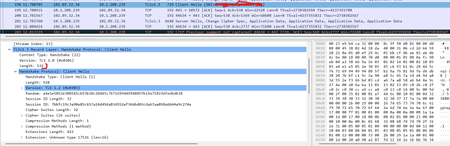
There is a TLS implementation that was working perfectly before, even though, there is SSL ClientHello extension addition, by a middle-box device. With Clienthello packets of 540bytes, this worked perfectly. An example is the "Extension Unknown Type 17516" added there. Recent tests show the extension addition is no longer working. The only significant change is that CLIENTSSL HELLO packets are now fragmented on TLS 1.3 with the Post-Quantum Cryptography implementation on clients (browsers), with CLIENTSSL HELLO now regularly abover 1500 bytes causing fragmentation. How is it possible if F5 is Client-side server to force all clients to use X25519 ciphers instead of X25519Kyber512Draft00 and X25519Kyber768Draft00 to ensure that full flow is not broken. is there any changes on CLIENTSSL Profile to implement this. Traffic Flow is Mobile browser--Mobile Packet gateway (header enrichment)-- F5 (Server)115Views0likes2Comments
An Irule for Client Ssl Profile that Allows Unassigned TLS Extension Values (17516)
Hello Community, I have a requirement to allow enriched https header enrichment. The SSL negotiation (I'm doing ssl termination on F5) fails because the enriched header from client contains reserved tls extension values. (https://www.iana.org/assignments/tls-extensiontype-values/tls-extensiontype-values.xhtmltls-extensiontype-values-1). The Client Hello request in the SSL Handshake was captured and contained an Extensions list, which included a reserved TLS Extension value (17156), which the F5 isn't presenting in Server Hello. I need an irule that can allow that Extension to be added on the client ssl profile so the ssl handshake doesn't fail.3.5KViews0likes28Comments
SSL & persistence configurations from qkview or UCS files
Is there any quick way to extract (into, for example, an Excel file) the following configuration details from qkview or UCS files? 1. list of SSL certificates, including: - SSL certificate expiration status / dates - which virtual servers or SSL profiles are using each SSL certificate 2. list of persistence configurations92Views0likes2CommentsThe End of ClientAuth EKU…Oh Mercy…What to do?
If you’ve spent any time recently monitoring the cryptography and/or public key infrastructure (PKI) spaces…beyond that ever-present “post-quantum” thing, you may have read that starting in May of 2026, Google Chrome Root Program Policy will start requiring public certificate authorities (CAs) to stop issuing certificates with the Client Authentication Extended Key Usage (ClientAuth EKU) extension. While removing ClientAuth EKU from TLS server certificates correctly reduces the scope of these certificates, some internal client certificate authenticated TLS machine-to-machine and API workloads could fail when new/renewed certificates are received from a public CA. Read more here for details and options.6.1KViews12likes9CommentsAutomate Let's Encrypt Certificates on BIG-IP
To quote the evil emperor Zurg: "We meet again, for the last time!" It's hard to believe it's been six years since my first rodeo with Let's Encrypt and BIG-IP, but (uncompromised) timestamps don't lie. And maybe this won't be my last look at Let's Encrypt, but it will likely be the last time I do so as a standalone effort, which I'll come back to at the end of this article. The first project was a compilation of shell scripts and python scripts and config files and well, this is no different. But it's all updated to meet the acme protocol version requirements for Let's Encrypt. Here's a quick table to connect all the dots: Description What's Out What's In acme client letsencrypt.sh dehydrated python library f5-common-python bigrest BIG-IP functionality creating the SSL profile utilizing an iRule for the HTTP challenge The f5-common-python library has not been maintained or enhanced for at least a year now, and I have an affinity for the good work Leo did with bigrest and I enjoy using it. I opted not to carry the SSL profile configuration forward because that functionality is more app-specific than the certificates themselves. And finally, whereas my initial project used the DNS challenge with the name.com API, in this proof of concept I chose to use an iRule on the BIG-IP to serve the challenge for Let's Encrypt to perform validation against. Whereas my solution is new, the way Let's Encrypt works has not changed, so I've carried forward the process from my previous article that I've now archived. I'll defer to their how it works page for details, but basically the steps are: Define a list of domains you want to secure Your client reaches out to the Let’s Encrypt servers to initiate a challenge for those domains. The servers will issue an http or dns challenge based on your request You need to place a file on your web server or a txt record in the dns zone file with that challenge information The servers will validate your challenge information and notify you You will clean up your challenge files or txt records The servers will issue the certificate and certificate chain to you You now have the key, cert, and chain, and can deploy to your web servers or in our case, to the BIG-IP Before kicking off a validation and generation event, the client registers your account based on your settings in the config file. The files in this project are as follows: /etc/dehydrated/config # Dehydrated configuration file /etc/dehydrated/domains.txt # Domains to sign and generate certs for /etc/dehydrated/dehydrated # acme client /etc/dehydrated/challenge.irule # iRule configured and deployed to BIG-IP by the hook script /etc/dehydrated/hook_script.py # Python script called by dehydrated for special steps in the cert generation process # Environment Variables export F5_HOST=x.x.x.x export F5_USER=admin export F5_PASS=admin You add your domains to the domains.txt file (more work likely if signing a lot of domains, I tested the one I have access to). The dehydrated client, of course is required, and then the hook script that dehydrated interacts with to deploy challenges and certificates. I aptly named that hook_script.py. For my hook, I'm deploying a challenge iRule to be applied only during the challenge; it is modified each time specific to the challenge supplied from the Let's Encrypt service and is cleaned up after the challenge is tested. And finally, there are a few environment variables I set so the information is not in text files. You could also move these into a credential vault. So to recap, you first register your client, then you can kick off a challenge to generate and deploy certificates. On the client side, it looks like this: ./dehydrated --register --accept-terms ./dehydrated -c Now, for testing, make sure you use the Let's Encrypt staging service instead of production. And since I want to force action every request while testing, I run the second command a little differently: ./dehydrated -c --force --force-validation Depicted graphically, here are the moving parts for the http challenge issued by Let's Encrypt at the request of the dehydrated client, deployed to the F5 BIG-IP, and validated by the Let's Encrypt servers. The Let's Encrypt servers then generate and return certs to the dehydrated client, which then, via the hook script, deploys the certs and keys to the F5 BIG-IP to complete the process. And here's the output of the dehydrated client and hook script in action from the CLI: # ./dehydrated -c --force --force-validation # INFO: Using main config file /etc/dehydrated/config Processing example.com + Checking expire date of existing cert... + Valid till Jun 20 02:03:26 2022 GMT (Longer than 30 days). Ignoring because renew was forced! + Signing domains... + Generating private key... + Generating signing request... + Requesting new certificate order from CA... + Received 1 authorizations URLs from the CA + Handling authorization for example.com + A valid authorization has been found but will be ignored + 1 pending challenge(s) + Deploying challenge tokens... + (hook) Deploying Challenge + (hook) Challenge rule added to virtual. + Responding to challenge for example.com authorization... + Challenge is valid! + Cleaning challenge tokens... + (hook) Cleaning Challenge + (hook) Challenge rule removed from virtual. + Requesting certificate... + Checking certificate... + Done! + Creating fullchain.pem... + (hook) Deploying Certs + (hook) Existing Cert/Key updated in transaction. + Done! This results in a deployed certificate/key pair on the F5 BIG-IP, and is modified in a transaction for future updates. This proof of concept is on github in the f5devcentral org if you'd like to take a look. Before closing, however, I'd like to mention a couple things: This is an update to an existing solution from years ago. It works, but probably isn't the best way to automate today if you're just getting started and have already started pursuing a more modern approach to automation. A better path would be something like Ansible. On that note, there are several solutions you can take a look at, posted below in resources. Resources https://github.com/EquateTechnologies/dehydrated-bigip-ansible https://github.com/f5devcentral/ansible-bigip-letsencrypt-http01 https://github.com/s-archer/acme-ansible-f5 https://github.com/s-archer/terraform-modular/tree/master/lets_encrypt_module (Terraform instead of Ansible) https://community.f5.com/t5/technical-forum/let-s-encrypt-with-cloudflare-dns-and-f5-rest-api/m-p/292943 (Similar solution to mine, only slightly more robust with OCSP stapling, the DNS instead of HTTP challenge, and with bash instead of python)33KViews6likes19Comments
Struggling with Node.js API for Searching Profiles Across Multiple F5 Devices
Hey everyone, I’m working on a Node.js API that connects to my frontend and allows users to search for an SSL or LTM profile by name and get back all the relevant details. The twist is that the profile could live on any one of 40+ F5 devices (different mgmt IPs). Here’s what I’ve done so far: I’m using the F5 REST API and creating a session token for each mgmt IP to avoid basic auth on every call. I built a loop to query each device, aggregate results, and return the profile details if it exists. The problem: It’s not consistent. Sometimes the profile is found; other times it’s missed—even though it’s definitely there. I’m getting timeouts pretty frequently, which adds to the frustration. Feels like I’m doing too many sequential calls and maybe hitting performance or token issues. Has anyone tackled something similar? How do you structure your calls to make them reliable across multiple devices? Is there a recommended pattern for handling large-scale F5 REST calls in Node.js (parallelization, rate limits, caching)? Should I stick to session tokens or consider another auth pattern? Any tricks for minimizing timeouts when calling multiple mgmt IPs? Any examples, best practices, or lessons learned would be hugely appreciated. At this point, I’m looking for a clean way to make this work reliably before I refactor again. Thanks302Views0likes1CommentF5 Device Certificate renewal process on Active and Standby devices
Hi Team, The SSL certificates on the load balancers we manage (both Active and Passive) are set to expire in July. Could you please share the recommended steps to renew them correctly and ensure a smooth implementation without any service impact? Certificate Expiry Details Active Load Balancer: Expires on July 26th, 2025 Passive Load Balancer: Expires on July 27th, 2025 Please note that in our case, both load balancers are using different certificates.457Views0likes4CommentsTCL error: _cgc_pick_clientside
Hi, in an ASM-LTM (Perimeter) Setup I see frquently the following logs: ***err: tmm3[19962]: 01220001:3: TCL error: _cgc_pick_clientside - unknown cgc sni: f5-bei1.xxxx.xx (line 49) invoked from within "CGC::sni $tls_servername"*** Any idea what this TCL error causes? The clientssl is quite Basic: one certificate chain, no Server Name set. Thanks, Rolf1.7KViews1like5CommentsSNI Sites not taking correct certificate.
I have configured one VIP with two certificate aks.test.com aks4.test.com On SSL profile for aks.test.com i have enabled SNI feature and aks.test.com is working fine taking correct certificate (aks.test.com). but aks4.test.com having not secure error on browser and taking the certificate of (aks.test.com). Could someone please help what could be the issue in this case.607Views0likes8CommentsHow to Renew F5 Device Certificate
Hi Team , We have self-signed device certificate which is going to expire soon. Can you please let me know if I can click on renew and update the expiry date ? Please let me know the correct procedure to renew the device certificate . System ›› Certificate Management : Device Certificate Management : Device Certificate ›› server.crtSolved1.9KViews0likes6Comments