nginx plus
64 Topics
Better together - F5 Container Ingress Services and NGINX Plus Ingress Controller Integration
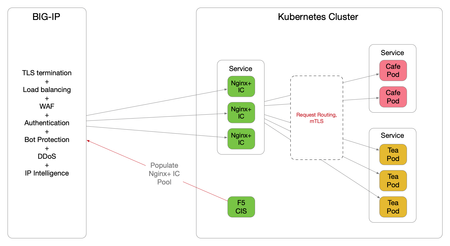
Introduction The F5 Container Ingress Services (CIS) can be integrated with the NGINX Plus Ingress Controllers (NIC) within a Kubernetes (k8s) environment. The benefits are getting the best of both worlds, with the BIG-IP providing comprehensive L4 ~ L7 security services, while leveraging NGINX Plus as the de facto standard for micro services solution. This architecture is depicted below. The integration is made fluid via the CIS, a k8s pod that listens to events in the cluster and dynamically populates the BIG-IP pool pointing to the NIC's as they scale. There are a few components need to be stitched together to support this integration, each of which is discussed in detail over the proceeding sections. NGINX Plus Ingress Controller Follow this (https://docs.nginx.com/nginx-ingress-controller/installation/building-ingress-controller-image/) to build the NIC image. The NIC can be deployed using the Manifests either as a Daemon-Set or a Service. See this ( https://docs.nginx.com/nginx-ingress-controller/installation/installation-with-manifests/ ). A sample Deployment file deploying NIC as a Service is shown below, apiVersion: apps/v1 kind: Deployment metadata: name: nginx-ingress namespace: nginx-ingress spec: replicas: 3 selector: matchLabels: app: nginx-ingress template: metadata: labels: app: nginx-ingress #annotations: #prometheus.io/scrape: "true" #prometheus.io/port: "9113" spec: serviceAccountName: nginx-ingress imagePullSecrets: - name: abgmbh.azurecr.io containers: - image: abgmbh.azurecr.io/nginx-plus-ingress:edge name: nginx-plus-ingress ports: - name: http containerPort: 80 - name: https containerPort: 443 #- name: prometheus #containerPort: 9113 securityContext: allowPrivilegeEscalation: true runAsUser: 101 #nginx capabilities: drop: - ALL add: - NET_BIND_SERVICE env: - name: POD_NAMESPACE valueFrom: fieldRef: fieldPath: metadata.namespace - name: POD_NAME valueFrom: fieldRef: fieldPath: metadata.name args: - -nginx-plus - -nginx-configmaps=$(POD_NAMESPACE)/nginx-config - -default-server-tls-secret=$(POD_NAMESPACE)/default-server-secret - -ingress-class=sock-shop #- -v=3 # Enables extensive logging. Useful for troubleshooting. #- -report-ingress-status #- -external-service=nginx-ingress #- -enable-leader-election #- -enable-prometheus-metrics Notice the ‘- -ingress-class=sock-shop’ argument, it means that the NIC will only work with an Ingress that is annotated with ‘sock-shop’. The absence of this annotation makes NIC the default for all Ingress created. Below shows the counterpart Ingress with the ‘sock-shop’ annotation. apiVersion: extensions/v1beta1 kind: Ingress metadata: name: sock-shop-ingress annotations: kubernetes.io/ingress.class: "sock-shop" spec: tls: - hosts: - socks.ab.gmbh secretName: wildcard.ab.gmbh rules: - host: socks.ab.gmbh http: paths: - path: / backend: serviceName: front-end servicePort: 80 This Ingress says if hostname is socks.ab.gmbh and path is ‘/’, send traffic to a service named ‘front-end’, which is part of the socks application itself. The above concludes Ingress configuration with the NIC. F5 Container Ingress Services The next step is to leverage the CIS to dynamically populate the BIG-IP pool with the NIC addresses. Follow this ( https://clouddocs.f5.com/containers/v2/kubernetes/kctlr-app-install.html ) to deploy the CIS. A sample Deployment file is shown below, apiVersion: extensions/v1beta1 kind: Deployment metadata: name: k8s-bigip-ctlr-deployment namespace: kube-system spec: # DO NOT INCREASE REPLICA COUNT replicas: 1 template: metadata: name: k8s-bigip-ctlr labels: app: k8s-bigip-ctlr spec: # Name of the Service Account bound to a Cluster Role with the required # permissions serviceAccountName: bigip-ctlr containers: - name: k8s-bigip-ctlr image: "f5networks/k8s-bigip-ctlr" env: - name: BIGIP_USERNAME valueFrom: secretKeyRef: # Replace with the name of the Secret containing your login # credentials name: bigip-login key: username - name: BIGIP_PASSWORD valueFrom: secretKeyRef: # Replace with the name of the Secret containing your login # credentials name: bigip-login key: password command: ["/app/bin/k8s-bigip-ctlr"] args: [ # See the k8s-bigip-ctlr documentation for information about # all config options # https://clouddocs.f5.com/products/connectors/k8s-bigip-ctlr/latest "--bigip-username=$(BIGIP_USERNAME)", "--bigip-password=$(BIGIP_PASSWORD)", "--bigip-url=https://x.x.x.x:8443", "--bigip-partition=k8s", "--pool-member-type=cluster", "--agent=as3", "--manage-ingress=false", "--insecure=true", "--as3-validation=true", "--node-poll-interval=30", "--verify-interval=30", "--log-level=INFO" ] imagePullSecrets: # Secret that gives access to a private docker registry - name: f5-docker-images # Secret containing the BIG-IP system login credentials - name: bigip-login Notice the following arguments below. They tell the CIS to consume AS3 declaration to configure the BIG-IP. According to PM, CCCL (Common Controller Core Library) – used to orchestrate F5 BIG-IP, is getting removed this sprint for the CIS 2.0 release. '--manage-ingress=false' means CIS is not doing anything for Ingress resources defined within the k8s, this is because that CIS is not the Ingress Controller, NGINX Plus is, as far as k8s is concerned. The CIS will create a partition named k8s_AS3 on the BIG-IP, this is used to hold L4~7 configuration relating to the AS3 declaration. The best practice is also to manually create a partition named 'k8s' (in our example), where networking info will be stored (e.g., ARP, FDB). "--bigip-url=https://x.x.x.x:8443", "--bigip-partition=k8s", "--pool-member-type=cluster", "--agent=as3", "--manage-ingress=false", "--insecure=true", "--as3-validation=true", To apply AS3, the declaration is embedded within a ConfigMap applied to the CIS pod. kind: ConfigMap apiVersion: v1 metadata: name: as3-template namespace: kube-system labels: f5type: virtual-server as3: "true" data: template: | { "class": "AS3", "action": "deploy", "persist": true, "declaration": { "class": "ADC", "id":"1847a369-5a25-4d1b-8cad-5740988d4423", "schemaVersion": "3.16.0", "Nginx_IC": { "class": "Tenant", "Nginx_IC_vs": { "class": "Application", "template": "https", "serviceMain": { "class": "Service_HTTPS", "virtualAddresses": [ "10.1.0.14" ], "virtualPort": 443, "redirect80": false, "serverTLS": { "bigip": "/Common/clientssl" }, "clientTLS": { "bigip": "/Common/serverssl" }, "pool": "Nginx_IC_pool" }, "Nginx_IC_pool": { "class": "Pool", "monitors": [ "https" ], "members": [ { "servicePort": 443, "shareNodes": true, "serverAddresses": [] } ] } } } } } They are telling the BIG-IP to create a tenant called ‘Nginx_IC’, a virtual named ‘Nginx_IC_vs’ and a pool named ‘Nginx_IC_pool’. The CIS will update the serverAddresses with the NIC addresses dynamically. Now, create a Service to expose the NIC’s. apiVersion: v1 kind: Service metadata: name: nginx-ingress namespace: nginx-ingress labels: cis.f5.com/as3-tenant: Nginx_IC cis.f5.com/as3-app: Nginx_IC_vs cis.f5.com/as3-pool: Nginx_IC_pool spec: type: ClusterIP ports: - port: 443 targetPort: 443 protocol: TCP name: https selector: app: nginx-ingress Notice the labels, they match with the AS3 declaration and this allows the CIS to populate the NIC’s addresses to the correct pool. Also notice the kind of the manifest ‘Service’, this means only a Service is created, not an Ingress, as far as k8s is concerned. On the BIG-IP, the following should be created. The end product is below. Please note that this article is focused solely on control plane, that is, how to get the CIS to populate the BIG-IP with NIC's addresses. The specific mechanisms to deliver packets from the BIG-IP to the NIC's on the data plane is not discussed, as it is decoupled from control plane. For data plane specifics, please take a look here ( https://clouddocs.f5.com/containers/v2/ ). Hope this article helps to lift the veil on some integration mysteries.7.1KViews11likes27CommentsAgility sessions announced
Good news, everyone! This year's virtual Agility will have over 100 sessions for you to choose from, aligned to 3 pillars. There will be Breakouts (pre-recorded 25 minutes, unlimited audience) Discussion Forums (live content up to 45 minutes, interactive for up to 75 attendees) Quick Hits (pre-recorded 10 minutes, unlimited audience) So, what kind of content are we talking about? If you'd like to learn more about how to Simplify Delivery of Legacy Apps, you might be interested in Making Sense of Zero Trust: what’s required today and what we’ll need for the future (Discussion Forum) Are you ready for a service mesh? (breakout) BIG-IP APM + Microsoft Azure Active Directory for stronger cybersecurity defense (Quick Hits) If you'd like to learn more about how to Secure Digital Experiences, you might be interested in The State of Application Strategy 2022: A Sneak Peak (Discussion Forum) Security Stack Change at the Speed of Business (Breakout) Deploy App Protect based WAF Solution to AWS in minutes (Quick Hits) If you'd like to learn more about how to Enable Modern App Delivery at Scale, you might be interested in Proactively Understanding Your Application's Vulnerabilities (Discussion Forum Is That Project Ready for you? Open Source Maturity Models (Breakout) How to balance privacy and security handling DNS over HTTPS (Quick Hits) The DevCentral team will be hosting livestreams, and the DevCentral lounge where we can hang out, connect, and you can interact directly with session presenters and other technical SMEs. Please go to https://agility2022.f5agility.com/sessions.html to see the comprehensive list, and check back with us for more information as we get closer to the conference.624Views7likes1Comment2021 DevCentral MVP Announcement
Congratulations to the 2021 DevCentral MVPs! The DevCentral MVP Award is given annually to an exclusive group of expert users in the technical community who go out of their way to engage with the community by sharing their experience and knowledge with others. This is our way of recognizing their significant contributions, because while all of our users collectively make DevCentral one of the top community sites around and a valuable resource for everyone, MVPs regularly go above and beyond in assisting fellow F5 users both on- and offline.We understand that 2020 was difficult for everyone, and we are extra-grateful to this year's MVPs for going out of their ways to help others. MVPs get badges in their DevCentral profiles so everyone can see that they are recognized experts (you'll also see this if you hover over their name in a thread). This year’s MVPs will receive a glass award, certificate, exclusive thank-you gifts, and invitations to exclusive webinars and behind-the-scenes looks at things like roadmaps and new product sneak-previews. The 2021 DevCentral MVPs (by username) are: · Andy McGrath · Austin Geraci · Amine Kadimi · Boneyard · Dario Garrido · EAA · FrancisD · Hamish Marson · Iaine · Jad Tabbara (JTI) · jaikumar_f5 · JG · JuniorC · Kai Wilke · Kees van den Bos · Kevin Davies · Leonardo Souza · lidev · Manthey · Mayur Sutare · Nathan Britton · Niels van Sluis · Patrik Jonsson · Philip Jönsson · Piotr Lewandowski · Rob_carr · Samir Jha · Sebastian Maniak · TimRiker · Vijay · What Lies Beneath · Yann Desmaret · Youssef1KViews6likes3CommentsModern Application Architecture - Cloud-Native Architecture Platform - Part 1 of 3
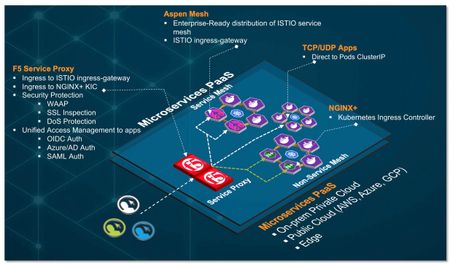
Overview In this multi part series of articles, I will be sharing with you on how to leverage F5’s BIG-IP (BIG-IP), Aspen Mesh service mesh and NGINX ingress controller to create a cloud-agnostic, resilient and secure cloud-native architecture platform to support your cloud-native applications requirement. Cloud-native is a term used to describe container-based environment. Microservices is an architectural pattern/approach/style where application are structured into multiple loosely couple, independent services delivered in a containerized form factor. Hence, for simplicity, in this series of articles, cloud-native architecture and microservices architecture platform (cPaaS) are use interchangeably. Note: Although BIG-IP is not in the category of a cloud-native apps (in comparison with F5's Service Proxy for Kubernetes (SPK) - which is cloud-native), currently, BIG-IP is feature rich and play a key role in this reference architecture pattern. For existing customer who has BIG-IP, this could be a first step for an organic transition from existing BIG-IP to cloud-native SPK. Part 1 – Cloud-Native Architecture Platform Formulate a cloud-agnostic architecture pattern. Architect/Build Kubernetes Platform for development (based on k3d with k3s). Architect and integrate keys technologies for this pattern. BIG-IP Aspen Mesh Service Mesh + Jaeger distributed tracing NGINX Ingress Controller Container Ingress Services (CIS) Application Services v3 (AS3) Grafana/Prometheus Monitoring Part 2 – Traffic Management, Security and Observability Establish common ingress/egress architecture pattern For HTTP based application (e.g., http/http2 web application) For non-HTTP (e.g. TCP/UDP) based application (e.g., MQTT) Uplift cloud-native apps protection with Web Application Firewall. Aspen Mesh Service Mesh Bookinfo apps Httpbin apps NGINX Ingress controller Grafana apps Grafana and Prometheus monitoring for Aspen Mesh and NGINX Part 3 – Unified Authentication (AuthN) and Authorization (AuthZ) for cloud-native apps. OAUTH authentication (Azure AD and Google) Legacy Windows AD Authentication Why cloud-native architecture platform? The proliferation of Internet based applications, software and usage on mobile devices has grown substantially over the years. It is no longer a prediction. It is a fact. According to 2021 Global Digital suite of reports from “We Are Social” and “Hootsuite”, there are over 5 billion unique mobile users and over 4 billion users actively connected to the Internet. This excludes connected devices such as Internet of Things, servers that power the internet and etc. With COVID-19 and the rise of 5G rollout, edge and cloud computing, connected technologies became and event more important and part of people’s lives. As the saying goes, “Application/Software powered the Internet and Internet is the backbone of the world economy”. Today organization business leaders require their IT and digital transformation teams to be more innovative by supporting the creation of business-enabling applications, which means they are no longer just responsible for availability of the networks and servers, but also building a robust platform to support the software development and application delivery that are secure, reliable and innovative. To support that vision, organization need a robust platform to support and deliver application portfolio that are able to support the business. Because a strong application portfolio is crucial for the success of the business and increase market value, IT or Digital transformation team may need to ask: "What can we do to embrace and support the proliferation of applications, empower those with creative leadership, foster innovative development, and ultimately help create market value?" Robust and secure cloud-native platform for modern application architecture and frictionless consumption of application services are some of the requirement for success. As of this writing (April 2021), cloud-native / microservices architecture is an architecture pattern of choice for modern developer and Kubernetes Platform is the industry de-facto standard for microservices/containers orchestration. What is the GOAL in this series of articles? Strategies, formulate and build a common, resilient and scalable cloud-native reference architecture and Platform as a Service to handle modern applications workload. This architecture pattern is modular and cloud-agnostic and deliver a consistent security and application services. To established the reference architecture, we are leveraging an open source upstream Kubernetes platform on a single Linux VM with multitude of open source and commercial tools and integrate that with F5's BIG-IP as the unified Ingress/Egress and unified access to cloud-native application hosted on the following type of workload:- Service Mesh workload Non-Service Mesh workload TCP/UDP workload Note: We can leverage F5's Service Proxy for Kubernetes (SPK) as the unified ingress/egress. However, F5's BIG-IP will be used in this article. You can skip steps of building Kubernetes cluster if you already have an existing multi-node Kubernetes cluster, minikube or any public cloud hosted Kubernetes (e.g. EKS/AKS/GKE) Requirement 1 x Ubuntu VM (ensure you have a working Ubuntu 20.x with docker installed) vCPU: 8 (can runs with 4 or 6 vCPU with reduce functionality) HDD: Ideal 80G. (Only required for persistent storage. Can run with 40G). Need to update persistent volume size appropriately. Modern Application Architecture (cPaaS) - Reference Architecture BIG-IP - Service Proxy Central ingress and/or egress for cloud-native workload. For applications deployed in service mesh namespaces, F5 service proxy, proxied ingress traffic to Aspen Mesh ingressgateway. For applications deployed in non-service mesh namespaces, F5 service proxy, proxied ingress traffic to NGINX ingress controller. For applications that required bypass of ingress (e.g. TCP/UDP apps), F5 service proxy, proxied directly to those pods IP. F5 Service Proxy provides centralized security protection by enforcing Web Application and API Protection (WAAP) firewall policy on cloud-native workloads. F5 Service Proxy provided SSL inspection (SSL bridge and/or offload) to Aspen Mesh ingressgateway and/or NGINX ingress controller. F5 Service Proxy can be deploy to send to multiple Kubernetes cluster - for inter and/or intra cluster resiliency. Global Server Load Balancing (F5's DNS) can be enabled on F5 Service Proxy to provides geo-redundancy for multi-cloud workload. F5 Service Proxy act as the unified access management with F5's Access Policy Manager (APM). Cloud-native application can delegate AuthN to F5 Service Proxy (multiple AuthN mechanism such as OIDC/OAuth/NTLM/SAML and etc) and cloud-native application perform AuthZ. F5 Service-Proxy ingress are only need to setup once. Cloud-native apps FQDN are all mapped to the same ingress. Aspen Mesh Service Mesh Centralized ingress for service mesh namespaces Enterprise ready, hardened and fully supported Istio-based service mesh by F5. Provides all capabilities delivered by Istio (Connect, Secure, Control and Observe). Provide traffic management and security for East-West communication. Reduce operational complexities of managing service mesh Aspen Mesh Rapid Resolve / MTTR - Mean Time To Resolution - quickly detect and identify causes of cluster and application errors. Service and Health indicator Graph for service visibility and observability. ISTIO Vet Enhance security Secure by Default with zero trust policy Secure Ingress Enhance RBAC Carrier-grade feature Aspen Mesh Packet Inspector NGINX Ingress Controller Centralized ingress for non-service mesh namespaces Works with both NGINX and NGINX Plus and supports the standard ingress features - content-based routing and TLS/SSL termination Support load balancing WebSocket, gRPC, TCP and UDP applications Container Ingress Services (CIS) Works with container orchestration environment (e.g. Kubernetes) to dynamically create L4/L7 services on BIG-IP and load balance network traffic across those services. It monitor the orchestration API server (e.g. lifecycle of Kubernetes pods) and dynamically update BIG-IP configuration based on changes made on containerized application. In this setup, it monitor Aspen Mesh ingressgateway, NGINX ingress controller and TCP/UDP based apps and dynamically updates BIG-IP configuration. AS3 Application Services 3 extension is a flexible, low-overhead mechanism for managing application-specific configuration on BIG-IP system. Leveraging a declarative model with a single JSON declaration. High Resiliency Cloud-Native Apps The reference architecture above can be treated as an "atomic" unit or a "repeatable pattern". This "atomic" unit can be deploy in multiple public cloud (e.g. EKS/AKS/GKE and etc) or private cloud. Multiple "atomic" unit can be constructed to form a high service resiliency clusters. F5 DNS/GSLB can be deploy to monitor health of each individual cloud-native apps inside each individual "atomic" cluster and dynamically redirect user to a healthy apps. Each cluster can runs as active-active and application can be distributed to both clusters. How applications achieve high resiliency with F5 DNS. Multi-Cloud, Multi-Cluster Service Resiliency Conceptual view on how an "atomic" unit / cPaaS can be deployed in multi-cloud and each of this clusters can be constructed to form a service resiliency mesh by leveraging F5 DNS and F5 BIG-IP. Note: Subsequent section will be a hands-on guide to build the reference architecture describe above (the "atomic" unit) with the exception of multi-cloud, multi-cluster service resiliency mesh. K3D + K3S will be use for the sole purpose of development and testing. Conceptual Architecture for this setup Note: The following instructions are use as a quick start guide. Please refer to respective installation guide for details. Scripts use in this setup can be found on github Install Docker sudo apt-get update sudo apt-get -y install \ apt-transport-https \ ca-certificates \ curl \ gnupg-agent \ software-properties-common curl -fsSL https://download.docker.com/linux/ubuntu/gpg | sudo apt-key add - sudo add-apt-repository \ "deb [arch=amd64] https://download.docker.com/linux/ubuntu \ $(lsb_release -cs) \ stable" sudo apt-get update -y sudo apt-get install docker-ce=5:19.03.15~3-0~ubuntu-focal docker-ce-cli=5:19.03.15~3-0~ubuntu-focal -y fbchan@sky:~$ docker ps CONTAINER ID IMAGE COMMAND CREATED STATUS PORTS NAMES fbchan@sky:~$ sudo systemctl enable --now docker.service Install Helm curl -fsSL -o get_helm.sh https://raw.githubusercontent.com/helm/helm/master/scripts/get-helm-3 chmod 700 get_helm.sh ./get_helm.sh Install calico binary curl -O -L https://github.com/projectcalico/calicoctl/releases/download/v3.15.0/calicoctl chmod u+x calicoctl sudo mv calicoctl /usr/local/bin/ Install kubectl binary curl -LO https://dl.k8s.io/release/v1.19.9/bin/linux/amd64/kubectl chmod u+x kubectl sudo mv kubectl /usr/local/bin Install supporting tools sudo apt install jq -y sudo apt install net-tools -y Install k9s This component is optional. It is a terminal based UI to interact with Kubernetes clusters. wget https://github.com/derailed/k9s/releases/download/v0.24.2/k9s_Linux_x86_64.tar.gz tar zxvf k9s_Linux_x86_64.tar.gz sudo mv k9s /usr/local/bin/ Ensure Linux volume group expanded Depend on your setup, by default, your Ubuntu 20.x VM may not expand all your allocated volume. Hence, this setup is to expand all allocated disk space. fbchan@sky:~$ sudo lvm lvm> lvextend -l +100%FREE /dev/ubuntu-vg/ubuntu-lv Size of logical volume ubuntu-vg/ubuntu-lv changed from 39.50 GiB (10112 extents) to <79.00 GiB (20223 extents). Logical volume ubuntu-vg/ubuntu-lv successfully resized. lvm> quit Exiting. fbchan@sky:~$ sudo resize2fs /dev/ubuntu-vg/ubuntu-lv resize2fs 1.45.5 (07-Jan-2020) Filesystem at /dev/ubuntu-vg/ubuntu-lv is mounted on /; on-line resizing required old_desc_blocks = 5, new_desc_blocks = 10 The filesystem on /dev/ubuntu-vg/ubuntu-lv is now 20708352 (4k) blocks long. fbchan@sky:~$ df -kh Filesystem Size Used Avail Use% Mounted on udev 7.8G 0 7.8G 0% /dev tmpfs 1.6G 1.2M 1.6G 1% /run /dev/mapper/ubuntu--vg-ubuntu--lv 78G 7.1G 67G 10% / .. Disable Ubuntu Firewall sudo ufw disable sudo apt-get remove ufw -y Ubuntu VM fbchan@sky:~$ ip a 1: lo: <LOOPBACK,UP,LOWER_UP> mtu 65536 qdisc noqueue state UNKNOWN group default qlen 1000 link/loopback 00:00:00:00:00:00 brd 00:00:00:00:00:00 inet 127.0.0.1/8 scope host lo valid_lft forever preferred_lft forever inet6 ::1/128 scope host valid_lft forever preferred_lft forever 2: ens160: <BROADCAST,MULTICAST,UP,LOWER_UP> mtu 1500 qdisc mq state UP group default qlen 1000 link/ether 00:0c:29:6c:ab:0b brd ff:ff:ff:ff:ff:ff inet 10.10.2.10/24 brd 10.10.2.255 scope global ens160 valid_lft forever preferred_lft forever inet6 fe80::20c:29ff:fe6c:ab0b/64 scope link valid_lft forever preferred_lft forever 3: docker0: <NO-CARRIER,BROADCAST,MULTICAST,UP> mtu 1500 qdisc noqueue state DOWN group default link/ether 02:42:4c:15:2e:1e brd ff:ff:ff:ff:ff:ff inet 172.17.0.1/16 brd 172.17.255.255 scope global docker0 valid_lft forever preferred_lft forever fbchan@sky:~$ ip r default via 10.10.2.1 dev ens160 proto static 10.10.2.0/24 dev ens160 proto kernel scope link src 10.10.2.10 172.17.0.0/16 dev docker0 proto kernel scope link src 172.17.0.1 linkdown Install k3d + k3s K3D in a nutshell. K3D is a lightweight wrapper to run k3s (Rancher Lab's minimal Kubernetes distribution) in docker. K3D makes it very easy to create single- and multi-node K3S clusters in docker, e.g. for local development on Kubernetes. For details please refer to here Install k3d wget -q -O - https://raw.githubusercontent.com/rancher/k3d/main/install.sh | TAG=v4.2.0 bash Create k3s cluster Spin up 1 x server/master and 3 x agent/worker nodes Disable traefik and service load balancer as we don't need it as we are leveraging BIG-IP as the unified ingress/egress. Replace with calico CNI instead of default flannel CNI Setup TLS SAN certificate so that we can access K3S api remotely. k3d cluster create cpaas1 --image docker.io/rancher/k3s:v1.19.9-k3s1 \ --k3s-server-arg "--disable=servicelb" \ --k3s-server-arg "--disable=traefik" \ --k3s-server-arg --tls-san="10.10.2.10" \ --k3s-server-arg --tls-san="k3s.foobz.com.au" \ --k3s-server-arg '--flannel-backend=none' \ --volume "$(pwd)/calico-k3d.yaml:/var/lib/rancher/k3s/server/manifests/calico.yaml" \ --no-lb --servers 1 --agents 3 ### Run above command or cluster-create.sh script provided ### ############################################################## fbchan@sky:~/Part-1$ ./cluster-create.sh WARN[0000] No node filter specified INFO[0000] Prep: Network INFO[0000] Created network 'k3d-cpaas1' INFO[0000] Created volume 'k3d-cpaas1-images' INFO[0001] Creating node 'k3d-cpaas1-server-0' INFO[0001] Creating node 'k3d-cpaas1-agent-0' INFO[0001] Creating node 'k3d-cpaas1-agent-1' INFO[0001] Creating node 'k3d-cpaas1-agent-2' INFO[0001] Starting cluster 'cpaas1' INFO[0001] Starting servers... INFO[0001] Starting Node 'k3d-cpaas1-server-0' INFO[0014] Starting agents... INFO[0014] Starting Node 'k3d-cpaas1-agent-0' INFO[0024] Starting Node 'k3d-cpaas1-agent-1' INFO[0034] Starting Node 'k3d-cpaas1-agent-2' INFO[0045] Starting helpers... INFO[0045] (Optional) Trying to get IP of the docker host and inject it into the cluster as 'host.k3d.internal' for easy access INFO[0052] Successfully added host record to /etc/hosts in 4/4 nodes and to the CoreDNS ConfigMap INFO[0052] Cluster 'cpaas1' created successfully! INFO[0052] --kubeconfig-update-default=false --> sets --kubeconfig-switch-context=false INFO[0052] You can now use it like this: kubectl config use-context k3d-cpaas1 kubectl cluster-info ### Docker k3d spun up multi-node Kubernetes using docker ### ############################################################# fbchan@sky:~/Part-1$ docker ps CONTAINER ID IMAGE COMMAND CREATED STATUS PORTS NAMES 2cf40dca2b0a rancher/k3s:v1.19.9-k3s1 "/bin/k3s agent" About a minute ago Up 52 seconds k3d-cpaas1-agent-2 d5c49bb65b1a rancher/k3s:v1.19.9-k3s1 "/bin/k3s agent" About a minute ago Up About a minute k3d-cpaas1-agent-1 6e5bb6119b61 rancher/k3s:v1.19.9-k3s1 "/bin/k3s agent" About a minute ago Up About a minute k3d-cpaas1-agent-0 ea154b36e00b rancher/k3s:v1.19.9-k3s1 "/bin/k3s server --d…" About a minute ago Up About a minute 0.0.0.0:37371->6443/tcp k3d-cpaas1-server-0 ### All Kubernetes pods are in running states ### ################################################# fbchan@sky:~/Part-1$ kubectl get pod -A NAMESPACE NAME READY STATUS RESTARTS AGE kube-system calico-node-95gqb 1/1 Running 0 5m11s kube-system calico-node-fdg9f 1/1 Running 0 5m11s kube-system calico-node-klwlq 1/1 Running 0 5m6s kube-system local-path-provisioner-7ff9579c6-mf85f 1/1 Running 0 5m11s kube-system metrics-server-7b4f8b595-7z9vk 1/1 Running 0 5m11s kube-system coredns-66c464876b-hjblc 1/1 Running 0 5m11s kube-system calico-node-shvs5 1/1 Running 0 4m56s kube-system calico-kube-controllers-5dc5c9f744-7j6gb 1/1 Running 0 5m11s Setup Calico on Kubernetes For details please refer to another devcentral article. Note: You do not need to setup calico for Kubernetes in EKS, AKS (Azure CNI with advance networking mode) or GKE deployment. Cloud Provider managed Kubernetes underlay will provides the required connectivity from BIG-IP to Kubernetes pods. sudo mkdir /etc/calico sudo vi /etc/calico/calicoctl.cfg Content of calicoctl.cfg. (replace /home/xxxx/.kube/config with the location of you kubeconfig file) --------------------------------------- apiVersion: projectcalico.org/v3 kind: CalicoAPIConfig metadata: spec: datastoreType: "kubernetes" kubeconfig: "/home/xxxx/.kube/config" -------------------------------------- fbchan@sky:~/Part-1$ sudo calicoctl create -f 01-bgpconfig.yml Successfully created 1 'BGPConfiguration' resource(s) fbchan@sky:~/Part-1$ sudo calicoctl create -f 02-bgp-peer.yml Successfully created 1 'BGPPeer' resource(s) fbchan@sky:~/Part-1$ sudo calicoctl get node -o wide NAME ASN IPV4 IPV6 k3d-cpaas1-agent-1 (64512) 172.19.0.4/16 k3d-cpaas1-server-0 (64512) 172.19.0.2/16 k3d-cpaas1-agent-2 (64512) 172.19.0.5/16 k3d-cpaas1-agent-0 (64512) 172.19.0.3/16 On BIG-IP Setup BGP peering with Calico Ensure you enabled Advance Networking on BIG-IP (Network >> Route Domains >> 0, under "Dynamic Routing Protocol", Enabled: BGP) [root@mel-prod:Active:Standalone] config # [root@mel-prod:Active:Standalone] config # imish mel-prod.foobz.com.au[0]>en mel-prod.foobz.com.au[0]#config t Enter configuration commands, one per line. End with CNTL/Z. mel-prod.foobz.com.au[0](config)#router bgp 64512 mel-prod.foobz.com.au[0](config-router)#bgp graceful-restart restart-time 120 mel-prod.foobz.com.au[0](config-router)#neighbor calico-k8s peer-group mel-prod.foobz.com.au[0](config-router)#neighbor calico-k8s remote-as 64512 mel-prod.foobz.com.au[0](config-router)#neighbor 172.19.0.2 peer-group calico-k8s mel-prod.foobz.com.au[0](config-router)#neighbor 172.19.0.3 peer-group calico-k8s mel-prod.foobz.com.au[0](config-router)#neighbor 172.19.0.4 peer-group calico-k8s mel-prod.foobz.com.au[0](config-router)#neighbor 172.19.0.5 peer-group calico-k8s mel-prod.foobz.com.au[0](config-router)#wr Building configuration... [OK] mel-prod.foobz.com.au[0](config-router)#end mel-prod.foobz.com.au[0]#show running-config ! no service password-encryption ! router bgp 64512 bgp graceful-restart restart-time 120 neighbor calico-k8s peer-group neighbor calico-k8s remote-as 64512 neighbor 172.19.0.2 peer-group calico-k8s neighbor 172.19.0.3 peer-group calico-k8s neighbor 172.19.0.4 peer-group calico-k8s neighbor 172.19.0.5 peer-group calico-k8s ! line con 0 login line vty 0 39 login ! end Validate Calico pod network advertised to BIG-IP via BGP Calico pod network routes advertised onto BIG-IP routing table. Because BIG-IP route every pods network to single Ubuntu VM (10.10.2.10) , we need to ensure that Ubuntu VM route those respective pod networks to the right docker container agent/worker nodes. In an environment where master/worker on a dedicated VM/physical host with different IP, BIG-IP BGP will send to the designated host. Hence, the following only require for this setup, where all Kubernetes nodes running on the same VM. Base on my environment, here are the additional route I need to add on my Ubuntu VM. fbchan@sky:~/Part-1$ sudo ip route add 10.53.68.192/26 via 172.19.0.4 fbchan@sky:~/Part-1$ sudo ip route add 10.53.86.64/26 via 172.19.0.3 fbchan@sky:~/Part-1$ sudo ip route add 10.53.115.0/26 via 172.19.0.5 fbchan@sky:~/Part-1$ sudo ip route add 10.53.194.192/26 via 172.19.0.2 If everything working properly, from BIG-IP, you should be able to ping Kubernetes pods IP directly. You can find those pods network IP via 'kubectl get pod -A -o wide' root@(mel-prod)(cfg-sync Standalone)(Active)(/Common)(tmos)# ping -c 2 10.53.86.66 PING 10.53.86.66 (10.53.86.66) 56(84) bytes of data. 64 bytes from 10.53.86.66: icmp_seq=1 ttl=62 time=1.59 ms 64 bytes from 10.53.86.66: icmp_seq=2 ttl=62 time=1.33 ms --- 10.53.86.66 ping statistics --- 2 packets transmitted, 2 received, 0% packet loss, time 1000ms rtt min/avg/max/mdev = 1.336/1.463/1.591/0.133 ms root@(mel-prod)(cfg-sync Standalone)(Active)(/Common)(tmos)# ping -c 2 10.53.86.65 PING 10.53.86.65 (10.53.86.65) 56(84) bytes of data. 64 bytes from 10.53.86.65: icmp_seq=1 ttl=62 time=1.03 ms 64 bytes from 10.53.86.65: icmp_seq=2 ttl=62 time=24.5 ms --- 10.53.86.65 ping statistics --- 2 packets transmitted, 2 received, 0% packet loss, time 1001ms rtt min/avg/max/mdev = 1.036/12.786/24.537/11.751 ms Note: Do not persist those Linux route on the VM. The routing will change when you reboot or restart your VM. You required to query the new route distribution and re-create the Linux route whenever you reboot your VM. Summary on Part-1 What we achieved so far: Basic understanding on why cloud-native architecture platform so important. Established a cloud-agnostic and cloud-native reference architecture and understand those key components and it roles. Have a working environment for our Part 2 series - Traffic Management, Security and Observability.1.4KViews6likes0CommentsWhat’s New in the NGINX Plus R36 Native OIDC Module
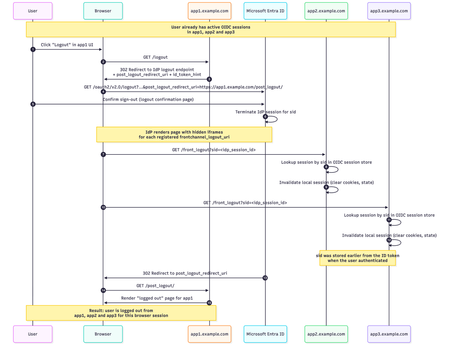
NGINX Plus R36 is out, and with it we hit a really important milestone for the native `ngx_http_oidc_module`, which now supports a broad set of OpenID Connect (OIDC) features commonly relied on in production environments. In this release, we add: Support for OIDC Front‑Channel Logout 1.0, enabling proper single sign‑out across multiple apps Built‑in PKCE (Proof Key for Code Exchange) support Support for the `client_secret_post` client authentication method at the token endpoint R35 gave the native module RP‑initiated logout and a UserInfo integration, R36 builds on that and closes several important gaps. In this post I’ll walk through all the new features in detail, using Microsoft’s Entra ID as the concrete example IdP. Front‑Channel Logout: Real Single Sign‑Out Why RP‑initiated logout alone isn’t enough Until now, `ngx_http_oidc_module` supported only RP‑initiated logout (per OpenID Connect RP‑Initiated Logout 1.0). That gave us a standards‑compliant “logout button”: when the user clicks “Logout” in your app, Nginx Plus sends them to the IdP’s logout endpoint, and the IdP tears down its own session. The catch is that RP‑initiated logout only reliably logs you out of: The current application (the RP that initiated the logout), and The IdP session itself Other applications that share the same IdP session typically stay logged in unless they also have a custom logout flow that goes through the IdP. That’s not what most people think of as “single sign‑out”. Imagine you borrow your partner’s personal laptop, log into a few internal apps that are all protected by NGINX Plus, finish your work, and hit “Logout” in one of them. You really want to be sure you’re logged out of all of those apps, not just the one where you pressed the button. That’s exactly what front‑channel logout is for. What front‑channel logout does The OpenID Connect Front‑Channel Logout 1.0 spec defines a way for the OP (the OpenID Provider) to notify all RPs that share a user’s session that the user has logged out. At a high level: The user logs out (either from an app using RP‑initiated logout, or directly on the IdP). The OP figures out which RPs are part of that single sign‑on session. The OP renders a page with one `<iframe>` per RP, each pointing at the RP’s `frontchannel_logout_uri`. Each RP receives a front‑channel logout request in its own back‑end and clears its local session. The browser coordinates this via iframes, but the session termination logic lives entirely in Nginx Plus, see diagram below: Configuring Front‑Channel Logout in NGINX Plus Let’s start with the NGINX Plus configuration. The change is intentionally minimal: you only need to add one directive to your existing `oidc_provider` block: oidc_provider entra_app1 { issuer https://login.microsoftonline.com/<tenant_id>/v2.0; client_id your_client_id; client_secret your_client_secret; logout_uri /logout; post_logout_uri /post_logout/; logout_token_hint on; frontchannel_logout_uri /front_logout; # Enables front-channel logout userinfo on; } That’s all that’s required on the NGINX Plus side to enable a single logout for this provider: `logout_uri` - path in your app that starts RP‑initiated logout `post_logout_uri` - where the IdP will send the browser after logout `logout_token_hint on;` - instructs NGINX Plus to send `id_token_hint` when calling the IdP’s logout endpoint `frontchannel_logout_uri` - path that will receive front‑channel logout requests from the IdP You’ll repeat that pattern for every app/provider block that should participate in single sign‑out. Configuring Front‑Channel Logout in Microsoft Entra ID On the Microsoft Entra ID side, you need to register a Front‑channel logout URL for each application. For each app: Go to Microsoft Entra admin center -> App registrations -> Your application -> Authentication. In Front‑channel logout URL, enter the URL that corresponds to your NGINX configuration, for example: `https://app1.example.com/front_logout`. This must match the URI you configured with `frontchannel_logout_uri` in `oidc_provider` configuration. Repeat for `app2.example.com`, `app3.example.com`, and any other RP that should take part in single sign‑out. End‑to‑End Flow with Three Apps Assume you have three apps configured the same way: https://app1.example.com https://app2.example.com https://app3.example.com All of them: Use `ngx_http_oidc_module` with the same Microsoft Entra tenant Have `frontchannel_logout_uri` configured in Nginx Have the same URL registered as Front‑channel logout URL in Entra ID User signs in to multiple apps The user navigates to `app1.example.com` and gets redirected to Microsoft’s Entra ID for authentication. After a successful login, NGINX Plus establishes a local OIDC session, and the user can access app1. They then repeat this process for app2 and app3. At this point, the user has active sessions in all three apps: User clicks `Logout` in app1 -> HTTP GET `https://app1.example.com/logout` Nginx redirects to Entra logout endpoint -> HTTP GET `https://login.microsoftonline.com/<tenant_id>/oauth2/v2.0/logout?...` User confirms logout at Microsoft IdP renders iframes that call all registered `frontchannel_logout_uri` values: GET `https://app1.example.com/front_logout?sid=...` GET `https://app2.example.com/front_logout?sid=...` GET `https://app3.example.com/front_logout?sid=...` `ngx_http_oidc_module` maps these `sid` values to Nginx sessions and deletes them IdP redirects browser back to https://app1.example.com/post_logout/ How Nginx Maps a sid to a Session? So how does the module know which session to terminate when it receives a front‑channel logout request like: GET /front_logout?sid=ec91a1f3-... HTTP/1.1 Host: app2.example.com The key is the `sid` claim in the ID token. Per the Front‑Channel Logout spec, when an OP supports session‑based logout it: Includes a `sid` claim in ID tokens May send `sid` (and `iss`) as query parameters to the `frontchannel_logout_uri` When `ngx_http_oidc_module` authenticates a user, it: Obtains an ID token from the provider. Extracts the sid claim (if present). Stores that sid alongside the rest of the session data in the module’s session store. Later, when a front‑channel logout request arrives: The module inspects the `sid` query parameter. It looks up any active session in its session store that matches this `sid` for the current provider. If it finds a matching active session, it terminates that session (clears cookies, removes data). If there’s no match, it ignores the request. This makes the module resilient to bogus or replayed logout requests: a random `sid` that doesn’t match any active session is simply discarded. Where is the iss Parameter? If you’ve studied the Front‑Channel Logout spec carefully, you might be wondering: where is `iss` (issuer)? The spec says: The OP MAY add `iss` and `sid` query parameters when rendering the logout URI, and if either is included, both MUST be. The reason is that the `sid` value is only guaranteed to be unique per issuer, combining `iss + sid` makes the pair globally unique. In practice, though, reality is messy. For example, Microsoft Entra ID sends a sid in front‑channel logout requests but does not send iss, even though its discovery document advertises `frontchannel_logout_session_supported: true`. This behavior has been reported publicly and has been acknowledged by Microsoft. If `ngx_http_oidc_module` strictly required iss, you simply couldn’t use front‑channel logout with Entra ID and some other providers. Instead, the module takes a pragmatic approach: It does not require iss in the logout request It already knows which provider it’s dealing with (from the `oidc_provider` context) It stores sid values per provider, so sid collisions across providers can’t happen inside that context So while this is technically looser than what the spec recommends for general‑purpose RPs, it’s safe given how the module scopes sessions and it makes the feature usable with real‑world IdPs. Cookie‑Only Front‑Channel Logout (and why you probably don’t want it) Front‑channel logout has another mode that doesn’t rely on sid at all. The spec allows an OP to call the RP’s `frontchannel_logout_uri` without any query parameters and relies entirely on the browser sending the RP’s session cookie. The RP then just checks, “do I have a session cookie?” and if yes, logs that user out. ngx_http_oidc_module supports this. However, modern browser behavior makes this approach very fragile: Recent browser versions treat cookies without a SameSite attribute as SameSite=Lax. Front‑channel logout uses iframes, which are third‑party / cross‑site contexts. SameSite=Lax cookies do not get sent on these sub‑requests, so your RP will never see its own session cookie in the front‑channel iframe request. To make cookie‑only front‑channel logout work, your session cookie would need: Set-Cookie: NGX_OIDC_SESSION=...; SameSite=None; Secure …and that has some serious downsides: SameSite=None opens you up to cross‑site request forgery (CSRF). The current version of `ngx_http_oidc_module` does not expose a way to set `SameSite=None` on its session cookie directly. Even if you tweak cookies at a lower level, you might not want to weaken your CSRF posture just to accommodate this logout variant. Because of that, the recommended and practical approach is the sid‑based mechanism: It doesn’t rely on third‑party cookies. It works in modern browsers with strict SameSite behaviors. It’s easy to reason about and debug. Is Relying on sid Secure Enough? It’s a fair question: if you no longer rely on your own session cookie, how safe is it to accept a logout request based solely on a sid received from the IdP? A few points to keep in mind: The spec defines `sid` as an opaque, high-entropy session identifier generated by the IdP. Implementations are expected to use cryptographically strong randomness with enough entropy to prevent guessing or brute force. Even if an attacker somehow learned a valid sid and sent a fake front‑channel logout request, the worst they can do is log a user out of your application. Providers like Microsoft Entra ID treat sid as a session‑scoped identifier. New sessions get new sid values, and sessions expire over time. `ngx_http_oidc_module` validates that the sid from the logout request matches an active session in its session store for that provider. A random or stale sid that doesn’t match anything is ignored. Taken together, a sid‑based front‑channel logout is a very reasonable trade‑off: you get robust single sign‑out without weakening cookie security, and the remaining risks are small and easy to understand. Front‑Channel Logout Troubleshooting If you’ve wired everything up and a single logout still doesn’t work as expected, here’s a quick checklist. Confirm that your IdP actually issues front‑channel requests Make sure: The provider’s discovery document (.well-known/openid-configuration) includes `frontchannel_logout_supported: true`. You have configured the Front‑channel logout URL for each application in your IdP. If Entra ID doesn’t send requests to your `frontchannel_logout_uri`, the RP will never know that it should log out the user. Ensure the ID token contains a sid claim Many IdPs, including Microsoft Entra ID, don’t include sid in ID tokens by default, even if they support front‑channel logout. For Entra ID you typically need to: Open your app registration -> go to Token configuration -> click add optional claim -> select Token type: ID, then select sid and add it. After that, new ID tokens will carry a sid claim, which ngx_http_oidc_module can store and later match on logout. Check what the IdP actually sends on front‑channel logout If you rely on the sid‑based mechanism, inspect the HTTP requests your app receives at frontchannel_logout_uri: Do you see a sid and iss query parameter? Does your provider also advertise `frontchannel_logout_session_supported: true` in the metadata? If all of the above is in place, front‑channel logout should “just work.” PKCE Support in ngx_http_oidc_module In earlier versions of the `ngx_http_oidc_module`, we did not support PKCE because it is not required for confidential clients, such as nginx, which are able to securely store and transmit a client_secret. However, as the module gained popularity and with the release of the OAuth 2.1 draft specification recommending the use of PKCE for all client types, we decided to add PKCE support to ngx_http_oidc_module. PKCE is an extension to OAuth 2.0 that adds an additional layer of security to the authorization code flow. The core idea is that the client generates a random code_verifier and derives a code_challenge from it, which is sent with the authorization request. When the client later exchanges the authorization code for tokens, it must send back the original code_verifier. The authorization server validates that the code_verifier matches the previously supplied code_challenge, preventing attacks such as authorization code interception. This is a brief overview of PKCE. If you’d like to learn more, I recommend reviewing the official RFC 7636 specification: https://datatracker.ietf.org/doc/html/rfc7636. How is PKCE support implemented in the ngx_http_oidc_module? The implementation of PKCE support in ngx_http_oidc_module is straightforward and intuitive. Moreover, if your identity provider supports PKCE and includes the parameter `code_challenge_methods_supported = S256` in its OIDC metadata, the module automatically enables PKCE with no configuration changes required. When initiating the authorization flow, the module generates a random code_verifier and derives a code_challenge from it using the S256 method. These parameters are sent with the authorization request. When the module later receives the authorization code, it sends the original code_verifier when requesting tokens, ensuring the authorization code exchange remains secure. If your identity provider does not support automatic PKCE discovery, you can explicitly enable PKCE in your provider configuration by adding the `pkce on;` directive inside the oidc_provider block. For example: oidc_provider entra_app2 { issuer https://login.microsoftonline.com/<tenant_id>/v2.0; client_id your_client_id; client_secret your_client_secret; pkce on; # <- this directive enables PKCE support } That is all you need to do to enable PKCE support in the ngx_http_oidc_module. client_secret_post Client Authentication Another important enhancement in the ngx_http_oidc_module is the addition of support for the client_secret_post client authentication method. Previously, the module supported only client_secret_basic, which requires sending the client_id and client_secret in the Authorization header. According to the OAuth 2.0 specification, all providers must support client_secret_basic; however, for some providers, the use of client_secret_basic may be restricted due to security or policy considerations. For this reason, we added support for client_secret_post. This method allows sending the client_id and client_secret in the body of the POST request when exchanging the authorization code for tokens. To use the client_secret_post method in ngx_http_oidc_module, you don’t need to do anything at all - the module automatically determines which method to use based on the identity provider’s metadata. If the provider indicates that it supports only client_secret_post, the module will use this method when exchanging authorization codes for tokens. If the provider supports both client_secret_basic and client_secret_post, the module will use client_secret_basic by default. Verifying this is simple - check the value of `token_endpoint_auth_methods_supported` in the provider’s OIDC metadata: $ curl https://login.microsoftonline.com/<tenant_id>/v2.0/.well-known/openid-configuration | jq { ... "token_endpoint_auth_methods_supported": [ "client_secret_post", "private_key_jwt", "client_secret_basic", "self_signed_tls_client_auth" ], ... } In this example, Microsoft Entra ID supports both methods, so the module will use client_secret_basic by default. Wrapping Up As you can see, in this release, we have significantly expanded the functionality of the ngx_http_oidc_module by adding support for front-channel logout, PKCE, and the client_secret_post client authentication method. These enhancements make the module more flexible and secure, enabling better integration with various OpenID Connect providers and offering a higher level of security for your applications. I hope this overview was useful and informative for you! See you soon!1.1KViews3likes0CommentsF5 NGINX Plus R33 Licensing and Usage Reporting
Beginning with F5 NGINX Plus version R33, all customers are required to deploy a JSON Web Token (JWT) license for each commercial instance of NGINX Plus. Each instance is responsible for validating its own license status. Furthermore, NGINX Plus will report usage either to the F5 NGINX licensing endpoint or to the F5 NGINX Instance Manager for customers who are connected. For those customers who are disconnected or operate in an air-gapped environment, usage can be reported directly to the F5 NGINX Instance Manager. To learn more about the latest features of NGINX R33, please check out the recent blog post. Install or Upgrade NGINX Plus R33 To successfully upgrade to NGINX Plus R33 or perform a fresh installation, begin by downloading the JWT license from your F5 account. Once you have the license, place it in the F5 NGINX directory before proceeding with the upgrade. For a fresh installation, after completing the installation, also place the JWT license in the NGINX directory. For further details, please refer to the provided instructions. This video provides a step-by-step guide on installing or upgrading to NGINX Plus R33. Report Usage to F5 in Connected Environment To effectively report usage data to F5 within a connected environment using NGINX Instance Manager, it's important to ensure that port 443 is open. The default configuration directs the usage endpoint to send reports directly to the F5 licensing endpoint at product.connect.nginx.com. By default, usage reporting is enabled, and it's crucial to successfully send at least one report on installation for NGINX to process traffic. However, you can postpone the initial reporting requirement by turning off the directive in your NGINX configuration. This allows NGINX Plus to handle traffic without immediate reporting during a designated grace period. To configure usage reporting to F5 using NGINX Instance Manager, update the usage endpoint to reflect the fully qualified domain name (FQDN) of the NGINX Instance Manager. For further details, please refer to the provided instructions. This video shows how to report usage in the connected environment using NGINX Instance Manager. Report Usage to F5 in Disconnected Environment using NGINX Instance Manager In a disconnected environment without an internet connection, you need to take certain steps before submitting usage data to F5. First, in NGINX Plus R33, update the `usage report` directive within the management block of your NGINX configuration to point to your NGINX Instance Manager host. Ensure that your NGINX R33 instances can access the NGINX Instance Manager by setting up the necessary DNS entries. Next, in the NMS configuration in NGINX Instance Manager, modify the ‘mode of operation’ to disconnected, save the file, and restart NGINX Instance Manager. There are multiple methods available for adding a license and submitting the initial usage report in this disconnected environment. You can use a Bash script, REST API, or the web interface. For detailed instructions on each method, please refer to the documentation. This video shows how to report usage in disconnected environments using NGINX Instance Manager. Conclusion The transition to NGINX Plus R33 introduces important enhancements in licensing and usage reporting that can greatly improve your management of NGINX instances. With the implementation of JSON Web Tokens (JWT), you can validate your subscription and report telemetry data more effectively. To ensure compliance and optimize performance, it’s crucial to understand the best practices for usage reporting, regardless of whether you are operating in a connected or disconnected environment. Get started today with a 30-day trial, and contact us if you have any questions. Resources NGINX support documentation Blog announcement providing a comprehensive summary of the new features in this release.1.5KViews3likes3CommentsF5 NGINX Plus R33 Release Now Available
We’re excited to announce the availability of NGINX Plus Release 33 (R33). The release introduces major changes to NGINX licensing, support for post quantum cryptography, initial support for QuickJS runtime in NGINX JavaScript and a lot more.3.3KViews3likes3CommentsNGINX Virtual Machine Building with cloud-init
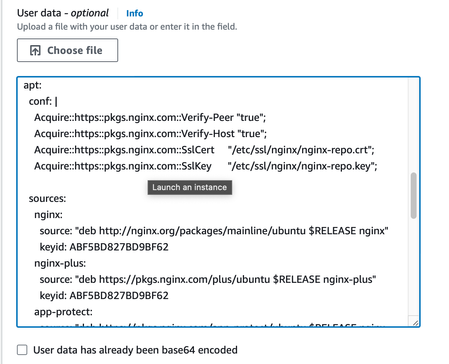
Traditionally, building new servers was a manual process. A system administrator had a run book with all the steps required and would perform each task one by one. If the admin had multiple servers to build the same steps were repeated over and over. All public cloud compute platforms provide an automation tool called cloud-init that makes it easy to automate configuration tasks while a new VM instance is being launched. In this article, you will learn how to automate the process of building out a new NGINX Plus server using cloud-init.1.4KViews3likes4CommentsAccelerating Digital Transformation in Banking and Financial Services
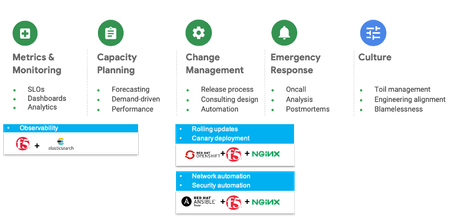
Introduction A recent survey from Forrester’s Business Technographics shows that 33% of BFSI tech leaders are currently undertaking a digital transformation within their organizations. That’s 13 points ahead of the average across industries. Still, many enterprises worry that they aren't moving fast enough. For banking and financial services organizations, there is intense pressure to transform their enterprises to remain more competitive in an age of disruption. Evolving regulatory requirements, rapidly advancing technology, increasing customer demands, COVID-19 and competition from fintech’s are all forcing financial services firms to rethink the way they operate. Digital Transformation Challenges This digital transformation imperative requires banking and financial services organizations to improve their technical capabilities. But true transformation demands more than just new technologies. It requires strategic vision and commitment from the top of the organization to rethink and retool its culture, its processes, and its technology. Admittedly, the financial industry has a long history of not collaborating, lack of transparency, and resistance to adaptability, favoring instead confidentiality, siloed organizational structures, and risk aversion. For many years, that heritage enabled financial services firms to succeed. Existing cultural, behavioral, and organizational hurdles can be hard to overcome because they are so entrenched. New processes and technology are also necessary for digital transformation. Traditional development practices are common in the industry and are built on segmented and monolithic team structures that lack the agility required to achieve transformation. Additionally, very few possess the infrastructure and application architectures required to rapidly innovate. The Benefits of an Open Approach Digital transformation is not merely about adopting new technologies but also establishing new cultural practices and ‘ways of working’ within the IT organization. By taking an open approach to architecture, process, and culture, you can transform the way your entire organization operates. Modular architecture To create a more modular environment, banking and financial services institutions will require integration across the entire legacy network, as well as integration with partner systems, networks, and other external services such as Software-as-a-Service (SaaS) solutions. An open and composable architecture gives customers access to a growing range of ‘Best of Breed’ technologies from industry leaders, consumable in a frictionless “single-stack” feel. Agile process In the open organization model, collaboration is key. Modern, agile practices establish common goals and empower teams to move forward together. According to the Harvard Business Review article “Reassessing Digital Transformation: The Culture and Process Change Imperative”, financial services were more apt to say that DevOps was important than other industries, and were also more likely to have implemented agile development, project management processes, CI/CD, and DevOps. These new processes are necessary as financial services firms seek faster time to value and leverage microservices to effect this change. Open culture Open organizations are more transparent, inclusive, adaptive, collaborative, and community focused. When you view digital transformation as a continuous process—and emphasize the importance of culture in parallel to, not at the expense of, technology and process— you’re positioning your organization for a successful transformation. Technologies that Enable Digital Transformation The pandemic has accelerated the need for digital transformation in the BFSI segment. Not only have workforces become remote, but person to person contact has become less frequent. Financial organizations have not only had to scale up infrastructure and security to support a remote workforce but have also had to simultaneously scale to support a fully remote customer base. Inherent in this approach is a hybrid cloud strategy that allows the ability to scale up or down resources to meet application needs. Architectural design and practices must also align with these new cloud infrastructures. There is a need to balance the requirements for speed with the absolute necessity for security and availability. There are a few key best practices that BFSI organizations have used to balance these competing demands: · Establish a foundation of resilience by adopting site reliability engineering (SRE) concepts. · Rapidly deploy new services quickly based on market demand. · Consolidated, consistent, and controlled security and access, including identity management, intrusion protection, anti-virus, predictive threat capabilities · Application performance (response time and latency), on-demand scalability, and disaster recovery and backup • Automation for efficiency and to speed delivery, with consistency in operations and tools, continuous integration and continuous delivery (CI/CD) • System-wide business monitoring, reporting, and alerting. An Open Architecture with F5 and Red Hat Now that we have established the open approach for implementing a financial service platform and the capabilities needed for a successful digital transformation, we can examine the architecture needed to support it. It starts on the path toward site reliability engineering (SRE). In the SRE model, the operations team and the business give developers free rein to deploy new code—but only until the error budget is exceeded. At that point, development stops, and all efforts are redirected to technical debt. As shown in Figure 1, it boils down to 5 areas that an SRE team should be doing to achieve the balancing goal. Figure 1. Enabling SRE Best Practices Together, F5, Red Hat, Elasticsearch, and other ecosystem partners can deliver a suite of technologies to fulfill the extension and transformation of existing architecture to an agile financial service platform. Figure 2. SRE Microservice Architecture with F5, Red Hat, and Elasticsearch The following describes the most fundamental components of Figure 2 in more detail, to enable the SRE best practices: 1. Red Hat OpenShift Container Platform (container PaaS) provides a modular, scalable, cloud-ready, enterprise open-source platform. It includes a rich set of features to build and deploy containerized solutions and a comprehensive PaaS management portal that together extend the underlying Kubernetes platform. 2. Combining BIG-IP and NGINX, this architecture allows SRE to optimize the balance between agility and stability, by implementing blue-green and targeted canary deployment. It’s a good way to release beta features to users and gather their feedback, and test your ideas in a production environment, with reduced risk. 3. BIG-IP combined NGINX Plus also gives SRE the flexibility to adapt to the changing conditions of the application environments, address the needs of NetOps, DevOps, DevSecOps, and app developers 4. ELK is utilized to analyze and visualize application performance through a centralized dashboard. A dashboard enables end-users to easily correlate North-South traffic with East-West traffic for end-to-end performance visibility. 5. F5’s WAF offerings, including F5 Advanced WAF and NGINX App Protect, deployed across hybrid clouds, protect OpenShift clusters against exploits of web application vulnerabilities as well as malware attempting to move laterally. 6. Equally important is integration with Red Hat Ansible that enables the automated configuration of security policy enforcement for immediate remediation. 7. Built into CI/CD pipeline so that any future changes to the application are built and deployed automatically. Conclusion Digital transformation has been accelerated by the dual challenges of Covid and the emergence of Fintech. Traditional BFSI organizations have had to respond to these enormous challenges by accelerating their deployment timelines and adopting agile processes without compromising security and availability. These practices also dovetail with the greater adoption of microservices architectures that allow for scale up and scale out of application services. F5 & NGINX helps aid this transformation by providing world class performance and security combined with a flexible microservices ADC (NGINX+). This hybrid architecture allows for Kubernetes deployments to become ‘production grade’.2.2KViews3likes0Comments
What is NGINX?
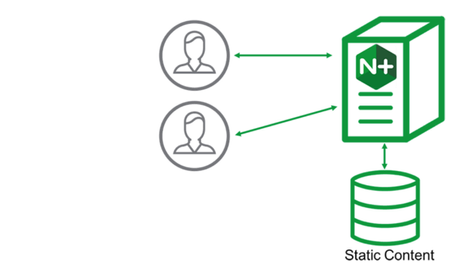
Introduction NGINX started out as a high performance web-server and quickly expanded adding more functionality in an integrated manner. Put simply, NGINX is an open source web server, reverse proxy server, cache server, load balancer, media server and much more. The enterprise version of NGINX has exclusive production ready features on top of what's available, including status monitoring, active health checks, configuration API, and live dashboard for metrics. Think of this article as a quick introduction to each product but more importantly, as our placeholder for NGINX articles on DevCentral. If you're interested in NGINX, you can use this article as the place to find DevCentral articles broken down by functionality in the near future. By the way, this article here has also links to a bunch of interesting articles published on AskF5 and some introductory NGINX videos. NGINX as a Webserver The most basic use case of NGINX. It can handle hundreds of thousands of requests simultaneously by using an event-drive architecture (as opposed to process-driven one) to handle multiple requests within one thread. NGINX as a Reverse Proxy and Load Balancer Both NGINX and NGINX+ provide load balancing functionality and work as reverse-proxy by sitting in front of back-end servers: Similar to F5, traffic comes in, NGINX load balances the requests to different back-end servers. In NGINX Plus version, it can even do session persistence and health check monitoring. Published Content: Server monitoring - some differences between BIG-IP and NGINX NGINX as Caching Server NGINX content caching improves efficiency, availability and capacity of back end servers. When caching is on, NGINX checks if content exists in its cache and if that's the case, content is served to client without the need to contact back end server. Otherwise, NGINX reaches out to backend server to retrieve content. A content cache sits between a client and back-end server and saves copies of pre-defined cacheable content. Caching improves performance as strategically, content cache is supposed to be closer to client. It also has the benefit of offloads requests from back-end servers. NGINX Controller NGINX controller is a piece of software that centralises and simplifies configuration, deployment and monitoring of NGINX Plus instances such as load balancers, API gateway and even web server. By the way, NGINX Controller 3.0 has just been released. Published Content: Introducing NGINX Controller 3.0 Setting up NGINX Controller Use of NGINX Controller to Authenticate API Calls Publishing an API using NGINX Controller NGINX as Kubernetes Ingress Controller NGINX Kubernetes Ingress Controller is a software that manages all Kubernetes ingress resources within a Kubernetes cluster. It monitors and retrieves all ingress resources running in a cluster and configure the corresponding L7 proxy accordingly. There are 2 versions of NGINX Ingress Controllers. One is maintained by the community and the other by NGINX itself. Published Content: Lightboard Lesson: NGINX Kubernetes Ingress Controller Overview NGINX as API Gateway An API Gateway is a way of abstracting application services interaction from client by providing a single entry-point into the system. Clients may issue a simple request to the application, for example, by requesting to load some information from a specific product. In the background, API gateway may contact several different services to bundle up the information requested and fulfil client's request. NGINX API management module for NGINX Controller can do request routing, composition, applying rate limiting to prevent overloading, offloading TLS traffic to improve performance, authentication, and real-time monitoring and alerting. NGINX as Application Server (Unit) NGINX Unit provides all sorts of functionalities to integrate applications and even to migrate and split services out of older monolithic applications. A key feature of Unit is that we don't need to reload processes once they're reconfigured. Unit only changes part of the memory associated to the changes we made. In later versions, NGINX Unit can also serve as intermediate node within a web framework, accepting all kinds of traffic and maintaining dynamic configuration and acting as a reverse proxy for back-end servers. NGINX as WAF NGINX uses ModSecurity module to protect applications from L7 attacks. NGINX as Sidecar Proxy Container We can also use NGINX as side car proxy container in Service Mesh architecture deployment (e.g. using Istio with NGINX as sidecar proxy container). A service mesh is an infrastructure layer that is supposed to be configurable and fast for the purposes of network-based interprocess communication using APIs. NGINX can be configured as a Sidecar proxy to handle inter-service communication, monitoring and security-related features. This is a way of ensuring developers only handle development, support and maintenance while platform engineers (ops team) can handle the service mesh maintenance.2.3KViews3likes2Comments