f5os
37 Topics
R5600 LAG question
Is is recommended to add ports into LAG from different pipelines? If we configure a LAG with port 3 from pipeline 1 and port 7 from pipeline 2. What will happen if port 3 from pipeline 1 goes down? Would it impact the traffic? I am trying to understand pros and cons of adding ports into LAG from same pipeline and different pipelines. I could not find a clear F5 reference document or SK article.112Views0likes2CommentsF5OS cloud-init on 21.1 does tenants come with DO and AS3 RPM installed?
Hello Everyone, This great new feature https://techdocs.f5.com/en-us/bigip-21-1-0/big-ip-f5os-cloud-init-support-velos-rseries/cloud-init-support-velos-rseries.html is not very well described. I think F5 making a demo session or a Guide with pictures will be helpful. For example do the F5os Tenants come with RPM AS3 and DO installed by default for this to work ? Other than that it is mentioned that the DO yaml file needs to be hosted on F5OS ? Where exactly ?310Views1like6CommentsF5OS using Ansible Linux Shell with remote users as iCall replacement(works with banner as well).
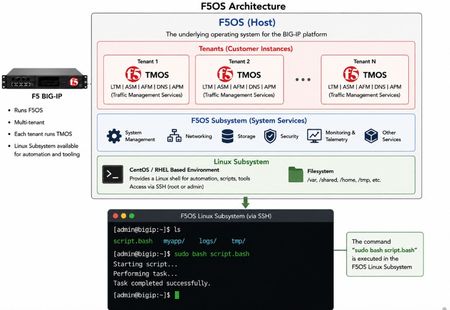
(AI Made picture so don't take it as 100% truth) In F5OS 1.8.0 and up remote users can automatically enter the Linux Shell if they have the correct remote group parameters and if this is system level enabled as shown in https://clouddocs.f5.com/training/community/rseries-training/html/rseries_security.html#superuser-role The superuser role if enabled can still trigger F5OS commands with "f5sh" that is similar to "tmsh" in TMOS and described in https://my.f5.com/manage/s/article/K000148922 . Code version: The code was tested on F5OS 1.8.4 rSeries 5900 Ansible Example without banner: --- - name: Restart docker container hosts: f5os gather_facts: no vars: container_name: tcpdumpd_manager tasks: - name: Restart the specified docker container ansible.builtin.shell: | docker restart {{ container_name }} become: false args: executable: /bin/bash Cronjobs also can be edited through shell Ansible playbook for scheduling transferred scripts. - name: Add cron job ansible.builtin.shell: | (crontab -l 2>/dev/null | grep -Fv '/opt/check_service.sh'; \ echo '*/5 * * * * /opt/check_service.sh') | crontab - become: false args: executable: /bin/bash Great Ansible F5OS automation article with cool examples that even has file transfer for transferring script file to the F5OS: Five Ways to Automate F5OS with Ansible: A Practical Guide | DevCentral Ansible Example with banner: The F5OS ssh banner is inserted between the username and password and that breaks the shell module as I did found out. I suspect that Ansible uses the PEXPECT Python package that spans SSH session and it is similar to TCL EXPECT and most people dealing with iRules will find this interesting. You need to add sudo in-front of each command. - name: Restart container hosts: localhost gather_facts: false tasks: - name: Run docker command ansible.builtin.expect: command: >- ssh -tt -o StrictHostKeyChecking=no -o ConnectTimeout=10 -o ServerAliveInterval=5 -o ServerAliveCountMax=2 {{ ansible_user }}@{{ ansible_host }} responses: '(?i)password:': {{ ansible_pass }} '(?m)\$\s*$': "sudo docker restart {{ container_name }}\nexit\n" timeout: 20 echo: true delegate_to: localhost register: out Also SCP file transfer can be done through the EXPEC module. From Linux bash you can use f5sh to trigger F5OS commands. Examples are f5sh "show interface" and to chain commands f5sh "config; vlan 500; commit; exit" . If you just write f5sh, you will enter the F5os from the Linux. This is like tmsh for TMOS. Summary! This is great feature. TMOS also has cronjobs but after upgrade the cronjob is lost but not on F5OS, this is why icall scripts still are better for TMOS Tenants. iCall has the option to be triggered by logs and that in F5OS will be harder as it will need a bash script that is sitting as a background process as to monitor the logs and a cronjob can check if the script is still running as a device reboot will cause the script to stop running. The script can be transferred and started the way I have shown with RESTCONF REST-API with Ansible/AWX as the best option.173Views2likes1CommentF5OS restarting container services through REST API
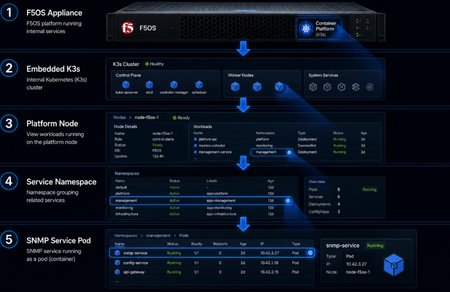
(The Image is made with ChatGPT AI just to highlight the F5OS kubernetes cluster, for exact list of the kubernetes pods see https://my.f5.com/manage/s/article/K000134978) Most of the F5OS services are in docker containers as F5OS is made of kubernetes cluster. If there is a memory or CPU leakage or another issue that needs a container to be restarted then this feature will be helpful. With F5OS 1.8.4 the option to restart those services is available and here is a short demonstration. Code version: The code was tested on F5OS 1.8.4 rSeries 5900 CURL example: (:8888/restconf can be used or /api as I prefer the send one 🙂 ) curl -k -X POST -H'Content-Type: application/yang-data+json' -u <USERNAME>:<PASSWORD> "https://<MANAGEMENT-IP>:8888/restconf/data/openconfig-system:system/f5-system-diagnostics-qkview:diagnostics/f5-system-diagnostics-docker:os-utils/f5-system-diagnostics-docker:docker/f5-system-diagnostics-docker:restart" -d '{ "node" : "platform" , "service" : "snmpd" }' POSTMAN example: Ansible Example: Automating the F5OS token authentication as to not use basic authentication as it is better than sending username and password each time https://my.f5.com/manage/s/article/K000148418 - name: Resart Service ansible.builtin.uri: url: "https://10.10.10.12/api/data/openconfig-system:system/f5-system-diagnostics-qkview:diagnostics/f5-system-diagnostics-docker:os-utils/f5-system-diagnostics-docker:docker/f5-system-diagnostics-docker:restart" method: POST headers: Content-Type: application/yang-data+json X-Auth-Token: "{{ token }}" validate_certs: false status_code: - 200 body_format: json body: node: platform service: snmpd register: primary_key Great Ansible F5OS automation article with cool examples: Five Ways to Automate F5OS with Ansible: A Practical Guide | DevCentral F5OS API reference: https://clouddocs.f5.com/api/rseries-api/F5OS-A-1.8.4-api.html?section=f5-system-diagnostics-docker#operation/data_openconfig_system_system_f5_system_diagnostics_qkview_diagnostics_f5_system_diagnostics_docker_os_utils_f5_system_diagnostics_docker_docker_f5_system_diagnostics_docker_restart_post Github Repo Link: https://github.com/Nikoolayy1/F5OS-API-Ansible/blob/main/README.md Summary! This automation can be used for triggering process/service restart through the API. For example the logs a metrics can be send to a SIEM/SOAR server that then through Automation can trigger the restart. For more complex tasks needing the Linux access the new superuser role could be used https://clouddocs.f5.com/training/community/rseries-training/html/rseries_security.html#superuser-role and Automatons like Ansible playbooks that use the native shell module. There could be 2 ansible playbboks as one uploading a script and other executing or scheduling it through cronjob edition.278Views2likes2CommentsPartially reachabilty issues with VS in F5OS tenant
As preparation of our service migration from iSeries to rSeries, we created a test-VS without a pool, but with an iRule responding with a simple static html-website. This works fine so far, but we must notice, that sometimes this VS is not reachable in the F5OS tenant. For now we could at least identify that the issue seems to be on the border between F5OS and tenant, because we see incoming packets with tcpdump on F5OS level, but they will not be forwarded into the tenant, because with the tcpdump there it's missing. Is this behavior related to the VS type of just using an iRule or is there something wrong/corrupt in our configuration? How can I further verify/troubleshot this, once the issue occurs again? Or which settings should I double check? We want to be sure to have the correct basic setup available, before migrating the first productive VS to the new platform. For your reference, we are using route domains in combination with partitions within the tenant. So we created the VLANs on F5OS level, then deleted them in the Common partition in the tenant and then re-created them again with the same name, but in the correct partition/route domain. And finally created the selfips within the partition/route domain within the tenant. F5OS: 1.8.3EHF1, TMOS: 17.5.1.3 Thank you! Regards, StefanSolved237Views0likes4Comments
F5 Software Downgrade from version 17.x.x to 15.x.x
After upgrading from version 15.x.x to 17.x.x, I attempted to downgrade from 17.x.x back to 15.x.x. However, the log continuously displayed “logger[xxxxx]:Re-stating devmgmtd”, and the prompt remained in the “INOPERATIVE” state. Could you please provide the correct procedure for performing a version downgrade?Solved556Views0likes3CommentsCPU utilization of F5OS on r2600
We have installed a new r2600 cluster and configured successful SNMP-monitoring. Here I must notice, that the CPU utilization of the F5OS with an average of more than 50% and peaks up to 90% is relatively high. The CPU utilization of the tenant looks fine with an average of around 15%. There is currently no active configuration on it nor any virtual server traffic passing the device. Is this a normal behavior, especially in comparison to the r5600 platform, where the F5OS CPU utilization average is at around 10%? Thank you! Regards, Stefan :)247Views0likes2CommentsF5OS VLAN naming length restrictions
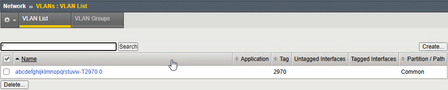
I must notice, that there seems to be a length restriction when creating VLANs on F5OS. I'm allowed to enter long names on F5OS-level without any warnings or errors, but when assigning them to a tenant, the name within the tenant will be truncated if its longer than 31 characters. It looks like this, means there is a suffix in the format of "-T<VLAN-ID>.0" On F5OS-level it looks like this: Is this a normal behavior? Can or will this be fixed? And are there any other such restrictions for other configuration items? For your reference, we are running F5OS 1.8.3 and BIG-IP 17.5.1.3. Thank you! Regards, Stefan :)335Views0likes4CommentsF5 BIG-IP SSL Orchestrator Layer 2 Services with rSeries & VELOS
Introduction F5 rSeries & VELOS are rearchitected, next-generation hardware platforms that scale application delivery performance and automate application services to address many of today’s most critical business challenges. F5 rSeries & VELOS are key components of the F5 Application Delivery and Security Platform (ADSP). rSeries & VELOS rely on a Kubernetes-based platform layer (F5OS) that is tightly integrated with F5 TMOS software. Going to a microservice-based platform layer allows rSeries & VELOS to provide additional functionality that was not possible in previous generations of F5 BIG-IP platforms. The introduction of a new tenant-based architecture changes many things, including how you configure BIG-IP. Some of these changes affect the network configuration for Inline Layer 2 Services. By default, BIG-IP tenants only have a small set of internal MAC addresses available to them. However, Layer 2 Services (or Bridging) require additional MAC addresses. You must assign an adequate number of MAC addresses to what is called a “MAC pool”. A single Layer 2 Service requires two unique MAC addresses. The MAC Pool must have sufficient MAC addresses based on the number of Layer 2 Services you need. The following KB articles contain additional information on configuring MAC Pools on a BIG-IP rSeries or VELOS platform: K000133655: MAC address assignment in VELOS and rSeries systems K000135389: Configure the MAC Block Size for an existing BIG-IP tenant on the VELOS and rSeries systems Demo Video F5OS Configuration Let’s review the Network configuration on F5OS for a BIG-IP Tenant. From Network Settings select VLANs. Here you can see I have 6 Interfaces configured with VLANs. There’s a Lan VLAN for connectivity from the internal network to the BIG-IP. A Wan VLAN for connectivity from the BIG-IP to the internet. Then there are 4 “L2” VLANs configured to support two Inline Layer 2 Services with SSL Orchestrator. From the Interfaces screen you can associate the VLANs with the physical Interfaces. Next, allocate the VLANs to your BIG-IP Tenant. This is also where you configure the MAC Pool Size for your current BIG-IP Tenant. The MAC Pool can only be changed when the Tenant is not running. From Tenant Management > Tenant Deployments, you can stop the current Tenant if it is already running. Do this with caution during a change window or prior to deployment. Check the box next to the name of the Tenant you wish to configure, “big-ip-kevin” in this example. Then click Configure. Click OK to stop the Tenant When it’s stopped click the name of the Tenant to edit the configuration. Note the VLANs that are allocated to this BIG-IP Tenant: Find the section on MAC Data/MAC Block Size. Set the allocation to Small (8), Medium (16), or Large (32) depending upon your needs. I set mine to Medium. A Small allocation would be sufficient for this deployment but I want to leave room to add more Layer 2 Services in the future. Click Save & Close Click OK to update the configuration You can Deploy the Tenant now that the changes have been made Click OK to Deploy F5 BIG-IP Configuration Minimal configuration is needed on the BIG-IP since F5OS handles the underlying physical interfaces and VLANs. Check the status of the VLANs from Network > VLANs. From here we can see the VLAN configuration from F5OS is reflected in the BIG-IP. Define any Self IPs from Network > Self IPs Now we’re ready to configure SSL Orchestrator. In the interest of time, I will skip to the Network and Services configuration. From Services List click Add Service Double-click on Generic Inline Layer 2 Under Network Configuration click Add Select the L2 VLANs for this Inline L2 Service. Click Done. Click Add again and select the L2 VLANs for this Inline L2 Service. Click Done. It should look like the following: Click Save at the bottom For the Interception Rule select the Lan VLAN under Ingress Network and move it to the right. Click Save & Next at the bottom The Network configuration is now complete. SSL Orchestrator is configured with a Generic Inline Layer 2 Service that contains two Layer 2 “servers” Conclusion F5 rSeries & VELOS are hardware platforms that scale application delivery performance and automate application services to address many of today’s most critical business challenges. They are key components of the F5 Application Delivery and Security Platform (ADSP). In this article, you learned how to configure MAC Pools on rSeries and VELOS in order to create Layer 2 Inline Services with SSL orchestrator. Related Content K000133655: MAC address assignment in VELOS and rSeries systems K000135389: Configure the MAC Block Size for an existing BIG-IP tenant on the VELOS and rSeries systems SSL Orchestrator CloudDocs: Creating an Inline Layer 2 Service F5 rSeries: Next-Generation Fully Automatable Hardware F5 VELOS: A Next-Generation Fully Automatable Platform 320Views0likes0Comments