f5os
37 TopicsF5OS using Ansible Linux Shell with remote users as iCall replacement(works with banner as well).
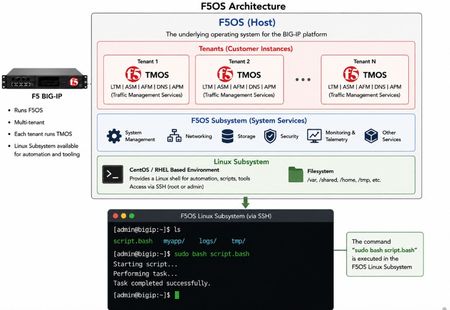
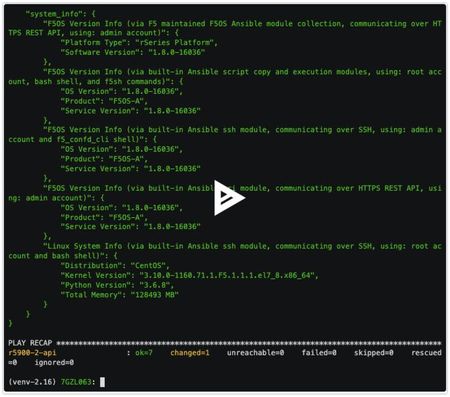
(AI Made picture so don't take it as 100% truth) In F5OS 1.8.0 and up remote users can automatically enter the Linux Shell if they have the correct remote group parameters and if this is system level enabled as shown in https://clouddocs.f5.com/training/community/rseries-training/html/rseries_security.html#superuser-role The superuser role if enabled can still trigger F5OS commands with "f5sh" that is similar to "tmsh" in TMOS and described in https://my.f5.com/manage/s/article/K000148922 . Code version: The code was tested on F5OS 1.8.4 rSeries 5900 Ansible Example without banner: --- - name: Restart docker container hosts: f5os gather_facts: no vars: container_name: tcpdumpd_manager tasks: - name: Restart the specified docker container ansible.builtin.shell: | docker restart {{ container_name }} become: false args: executable: /bin/bash Cronjobs also can be edited through shell Ansible playbook for scheduling transferred scripts. - name: Add cron job ansible.builtin.shell: | (crontab -l 2>/dev/null | grep -Fv '/opt/check_service.sh'; \ echo '*/5 * * * * /opt/check_service.sh') | crontab - become: false args: executable: /bin/bash Great Ansible F5OS automation article with cool examples that even has file transfer for transferring script file to the F5OS: Five Ways to Automate F5OS with Ansible: A Practical Guide | DevCentral Ansible Example with banner: The F5OS ssh banner is inserted between the username and password and that breaks the shell module as I did found out. I suspect that Ansible uses the PEXPECT Python package that spans SSH session and it is similar to TCL EXPECT and most people dealing with iRules will find this interesting. You need to add sudo in-front of each command. - name: Restart container hosts: localhost gather_facts: false tasks: - name: Run docker command ansible.builtin.expect: command: >- ssh -tt -o StrictHostKeyChecking=no -o ConnectTimeout=10 -o ServerAliveInterval=5 -o ServerAliveCountMax=2 {{ ansible_user }}@{{ ansible_host }} responses: '(?i)password:': {{ ansible_pass }} '(?m)\$\s*$': "sudo docker restart {{ container_name }}\nexit\n" timeout: 20 echo: true delegate_to: localhost register: out Also SCP file transfer can be done through the EXPEC module. From Linux bash you can use f5sh to trigger F5OS commands. Examples are f5sh "show interface" and to chain commands f5sh "config; vlan 500; commit; exit" . If you just write f5sh, you will enter the F5os from the Linux. This is like tmsh for TMOS. Summary! This is great feature. TMOS also has cronjobs but after upgrade the cronjob is lost but not on F5OS, this is why icall scripts still are better for TMOS Tenants. iCall has the option to be triggered by logs and that in F5OS will be harder as it will need a bash script that is sitting as a background process as to monitor the logs and a cronjob can check if the script is still running as a device reboot will cause the script to stop running. The script can be transferred and started the way I have shown with RESTCONF REST-API with Ansible/AWX as the best option.173Views2likes1CommentF5OS restarting container services through REST API
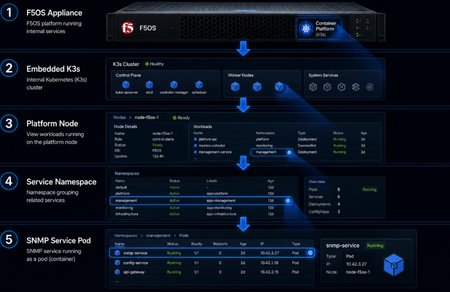
(The Image is made with ChatGPT AI just to highlight the F5OS kubernetes cluster, for exact list of the kubernetes pods see https://my.f5.com/manage/s/article/K000134978) Most of the F5OS services are in docker containers as F5OS is made of kubernetes cluster. If there is a memory or CPU leakage or another issue that needs a container to be restarted then this feature will be helpful. With F5OS 1.8.4 the option to restart those services is available and here is a short demonstration. Code version: The code was tested on F5OS 1.8.4 rSeries 5900 CURL example: (:8888/restconf can be used or /api as I prefer the send one 🙂 ) curl -k -X POST -H'Content-Type: application/yang-data+json' -u <USERNAME>:<PASSWORD> "https://<MANAGEMENT-IP>:8888/restconf/data/openconfig-system:system/f5-system-diagnostics-qkview:diagnostics/f5-system-diagnostics-docker:os-utils/f5-system-diagnostics-docker:docker/f5-system-diagnostics-docker:restart" -d '{ "node" : "platform" , "service" : "snmpd" }' POSTMAN example: Ansible Example: Automating the F5OS token authentication as to not use basic authentication as it is better than sending username and password each time https://my.f5.com/manage/s/article/K000148418 - name: Resart Service ansible.builtin.uri: url: "https://10.10.10.12/api/data/openconfig-system:system/f5-system-diagnostics-qkview:diagnostics/f5-system-diagnostics-docker:os-utils/f5-system-diagnostics-docker:docker/f5-system-diagnostics-docker:restart" method: POST headers: Content-Type: application/yang-data+json X-Auth-Token: "{{ token }}" validate_certs: false status_code: - 200 body_format: json body: node: platform service: snmpd register: primary_key Great Ansible F5OS automation article with cool examples: Five Ways to Automate F5OS with Ansible: A Practical Guide | DevCentral F5OS API reference: https://clouddocs.f5.com/api/rseries-api/F5OS-A-1.8.4-api.html?section=f5-system-diagnostics-docker#operation/data_openconfig_system_system_f5_system_diagnostics_qkview_diagnostics_f5_system_diagnostics_docker_os_utils_f5_system_diagnostics_docker_docker_f5_system_diagnostics_docker_restart_post Github Repo Link: https://github.com/Nikoolayy1/F5OS-API-Ansible/blob/main/README.md Summary! This automation can be used for triggering process/service restart through the API. For example the logs a metrics can be send to a SIEM/SOAR server that then through Automation can trigger the restart. For more complex tasks needing the Linux access the new superuser role could be used https://clouddocs.f5.com/training/community/rseries-training/html/rseries_security.html#superuser-role and Automatons like Ansible playbooks that use the native shell module. There could be 2 ansible playbboks as one uploading a script and other executing or scheduling it through cronjob edition.278Views2likes2Comments
Remove alerts showing r-series LCD/Dashboard.
Code is community submitted, community supported, and recognized as ‘Use At Your Own Risk’. Especially R5+ with 1.8.0+, may you will see unexpected "interface down" alerts. You could use this one-liner in rseries Bash. Hope it helps :p [root@appliance-1 ~]# date;docker exec system_manager /confd/scripts/f5_confd_run_cmd 'show system alarms alarm state | csv' Mon Sep 1 14:32:24 JST 2025 # show system alarms alarm state | csv ID,RESOURCE,SEVERITY,TEXT,TIME CREATED 263169,interface-1.0,WARNING,Interface down,2025-06-11 02:24:43.512626724 UTC 263169,interface-10.0,WARNING,Interface down,2025-06-11 02:24:43.514048068 UTC 263169,interface-2.0,WARNING,Interface down,2025-06-11 02:24:43.517935094 UTC 263169,interface-5.0,WARNING,Interface down,2025-06-11 02:24:43.526179871 UTC 263169,interface-6.0,WARNING,Interface down,2025-06-11 02:24:43.528668180 UTC 263169,interface-7.0,WARNING,Interface down,2025-06-11 02:24:43.530864483 UTC 263169,interface-8.0,WARNING,Interface down,2025-06-11 02:24:43.533197062 UTC 263169,interface-9.0,WARNING,Interface down,2025-06-11 02:24:43.535438297 UTC [root@appliance-1 ~]# date;docker exec system_manager /confd/scripts/f5_confd_run_cmd 'show system alarms alarm state | csv'|grep 263169|cut -f 2 -d ,|xargs -I{} docker exec alert-service /confd/test/sendAlert -i 263169 -r clear-all -s {} Mon Sep 1 14:33:27 JST 2025 Alert Sent Alert Sent Alert Sent Alert Sent Alert Sent Alert Sent Alert Sent Alert Sent [root@appliance-1 ~]# date;docker exec system_manager /confd/scripts/f5_confd_run_cmd 'show system alarms alarm state | csv' Mon Sep 1 14:33:54 JST 2025 # show system alarms alarm state | csv % No entries found. <---------- REMOVED. [root@appliance-1 ~]# Ideas came from: https://cdn.f5.com/product/bugtracker/ID1644293.html https://my.f5.com/manage/s/article/K000150155400Views2likes1CommentF5OS cloud-init on 21.1 does tenants come with DO and AS3 RPM installed?
Hello Everyone, This great new feature https://techdocs.f5.com/en-us/bigip-21-1-0/big-ip-f5os-cloud-init-support-velos-rseries/cloud-init-support-velos-rseries.html is not very well described. I think F5 making a demo session or a Guide with pictures will be helpful. For example do the F5os Tenants come with RPM AS3 and DO installed by default for this to work ? Other than that it is mentioned that the DO yaml file needs to be hosted on F5OS ? Where exactly ?310Views1like6CommentsAD/LDAP Auth on rSeries F5-OS
AD/LDAP auth on F5-OS seems unnecessarily complicated compared to how TMOS handles it. Does anyone have this working in their environment? If so, can you explain which attributes are created (F5-F5OS-UID, F5-F5OS-GID, uidNumber, gidNumber, etc.) and if they are applied directly to the AD user and/or AD group? The config guide mentions that F5-F5OS-GID is the only required attribute (F5-F5OS-UID defaults to 1001). It's not clear to me if this attribute must be added directly to the user account or if it can be created in an AD group that the user is a member of. Then there is a Solution Article that says LDAP requires the user have a uidNumber and gidNumber. The AD group must have a gidNumber that corresponds to the associated group ID of the F5 system role. They provide an example of a AD user and AD group showing uidNumber and gidNumber, but there is no reference to F5-F5OS-GID.1KViews1like2CommentsF5OS support for TACACS+ over CLI
We ran into issues deploying rSeries and VELOS platforms on the network at our company using a custom form of TACACS+. Our implementation allows for application-specific domains with unique ports and keys. We had issues with it until we added the attribute value pairs to the TACACS+ domain profiles: Admin (unlimited_config): F5-F5OS-UID=1001 F5-F5OS-GID=9000 Operator (unlimited_enable): F5-F5OS-UID=1001 F5-F5OS-GID=9001 This change resolved the access issues via GUI and we are able to access using our TACACS+ credentials, but it does NOT work via CLI for access using the same credentials. We already have a case out to F5 about this, but I was wondering if anyone else is experiencing the same implementation challenge on accessing CLI using TACACS+.1.6KViews1like4Comments