apm
85 Topics
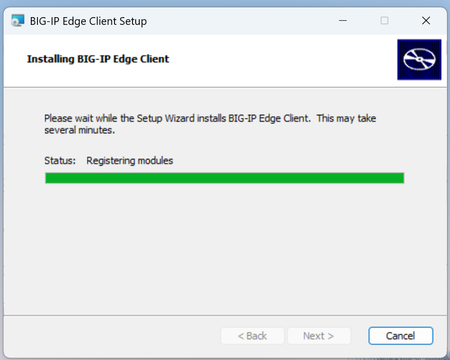
BIG-IP Edge Client installation stuck at "Status: Registering Modules"
I have just updated my Windows 11 with the version 24H2 update. Tried to launch and login through Edge-Client, which never failed before, but now it's stuck at the "initializing" stage. I tried uninstalling the Edge Client, and then get a new package from APM to perform a re-install. During the installation, it got stuck at the stage "Status: Registering Modules", and it won't finish the installation beyond that stage. I rebooted and tried several times, still the same. I have never encountered this issue before and can't find any technical document to solve it. Does anyone have this issue before and a solution?? Thank you.1.6KViews0likes5Comments
Blazor WebSocket WebApp behind APM not working...
Dear community, we a trying to host a new web-application using Websockets. I created a websocket profile - but we always get the following errors: [2024-12-13T18:28:56.102Z] Information: Normalizing '_blazor' to 'https://remote-t.dfg.de/f5-w-687474703a2f2f73727767743238312e696e742e742e6466672e6465$$/f5-h-$$/_blazor'. blazor.server.js?F5CH=J:1 [2024-12-13T18:28:56.219Z] Warning: Failed to connect via WebSockets, using the Long Polling fallback transport. This may be due to a VPN or proxy blocking the connection. To troubleshoot this, visit https://aka.ms/blazor-server-using-fallback-long-polling. log @ blazor.server.js?F5CH=J:1 blazor.server.js?F5CH=J:1 [2024-12-13T18:28:56.267Z] Error: The circuit failed to initialize. log @ blazor.server.js?F5CH=J:1 blazor.server.js?F5CH=J:1 [2024-12-13T18:28:56.375Z] Information: Connection disconnected. blazor.server.js?F5CH=J:1 Uncaught (in promise) Error: Invocation canceled due to the underlying connection being closed. at Xt._connectionClosed (blazor.server.js?F5CH=J:1:62068) at Xt.connection.onclose (blazor.server.js?F5CH=J:1:51976) at pn._stopConnection (blazor.server.js?F5CH=J:1:91786) at features.reconnect.transport.onclose (blazor.server.js?F5CH=J:1:89471) at hn._raiseOnClose (blazor.server.js?F5CH=J:1:76756) at hn.stop (blazor.server.js?F5CH=J:1:76567) at async pn._stopInternal (blazor.server.js?F5CH=J:1:84144) at async pn.stop (blazor.server.js?F5CH=J:1:83975) at async Xt.stop (blazor.server.js?F5CH=J:1:55012) at async Ir.disconnect (blazor.server.js?F5CH=J:1:137836) Without APM, the Website ist working fine. What am I doing wrong? I value and appreciate your time and energy and look forward to hearing from you. Thank you.999Views0likes1Comment
What is the use of epsec-package file in APM ?
Hello Team , What is the use of epsec-package file in APM ? How EPSEC works in APM ? apm epsec epsec-package epsec-1.0.0-1622.0.iso { create-time 2024-09-19:12:50:37 last-update-time 2024-03-21:11:07:38 mode 33188 oesis-version 4.3.3969.0 revision 1 size 301641728 system-package true updated-by root version 1.0.0-1622.0 }999Views0likes3Comments
big-ip edge client exe name
Hi, We need to open the big ip exe to a certain CRL server via local windows firewall. I have searched forever but I cannot get a definite name for the file that is the actual exe that we need to open on the local fw. I got only the name f5fpclientW.exe - but I thinks it's a different name. I don't have access to the client installation pcomputer, so maybe anybody else can tell me? This has been driving me crazy - F5 has a ton of info, but this is missing.... Vered700Views0likes2CommentsAPM/OAuth2 : auto apply changes made by discovery
Hi, I've setup OAuth2 to Azure EntraID following this documentation. It works well but I'm only facing a serious issue. In the OAuth provider configuration, I've enabled the discovery job to run once per day. This allows the BigIP to fetch any new certificate and/or JWT as provided by the app on EntraID. The problem is that when the certificate or the JWT change, you have to re-apply the per-session policy in order for the change to take effect. And on multiple occasion, the access to our critical applications failed because the changes were'nt applied in a timely manner. Is there a way to automatically apply the changes made by the OAuth discovery job ? Running version : BigIP 17.1.1.1Solved621Views0likes8CommentsHow can k8s CIS CRD VirtualServer reference existing APM Access profile?
Hey Everyone, How can k8s Container Ingress Services (CIS) CRD VirtualServer reference existing APM Acess profile? I know that this is in as3 ( https://clouddocs.f5.com/products/extensions/f5-appsvcs-extension/3.32/declarations/access-related.html ) but I don't see such options in the virtualserver ( https://clouddocs.f5.com/containers/latest/userguide/crd/virtualserver.html ) or policy ( https://clouddocs.f5.com/containers/latest/userguide/crd/virtualserver.html ) crd and I don't want to use old way with config maps. Edit: A not great workaround I found is attaching an access profile by using an irule (APM access-profile can be assigned from iRule only) as the F5 CRD supports attaching configured existing irules. apiVersion: "cis.f5.com/v1" kind: VirtualServer metadata: name: vs-test namespace: xxxx labels: f5cr: "true" spec: virtualServerAddress: "xxxx" virtualServerHTTPPort: xxx snat: auto iRules: - "/Common/test-irule" pools: - monitor: interval: 10 recv: "" send: "GET /" timeout: 31 type: http path: / service: XXX servicePort: 80Solved599Views0likes3Comments
Horizon View iApp - Big-IP 17.5
I have a client deploying an r4650 pair. The plan is for it to handle Exchange, LDAPS & Horizon View. I’m in the process of initial setup on the pair of boxes now. It’s been a long time since I've deployed Horizon View on F5. I see that the iApp is still maintained so yay! Question: is the current 1.5.9 version of the iApp supported in Big-IP 17.5? The KB article states 17.1 but the article hasn’t been updated in a while. F5 recommends the latest version of 17.5 but I don't want to hit any snags as we deploy. Thanks in advance, Matt599Views0likes2Comments
APM Policy with Restrict to single client IP
I am using an APM policy for RDP connection authentication. Currently, there is no pool associated with the VIP, and the client-server connection is defined within the access policy. For users connecting from an ISP, the IP address keeps changing, which causes their connections to be terminated, as shown by the error below. In the access policy, there is an option called "Restrict to single client IP". When we disable this option, the connection works, but this feature is crucial for protection against Session Hijacking. Have any of you encountered a similar scenario? Or do you have any suggestions on how persistence could be achieved without compromising security, perhaps using an iRule or other solutions?Solved508Views0likes5Comments
APM VPN LDAP POOL can't contact ldap server.
Hi, I have a question regarding APM VPN and LDAP authentication. When I configure the LDAP server using the direct LDAP Server IP, the authentication works fine. However, when I use a Pool with the same LDAP Server IP, it shows the error message: "Can't contact LDAP server." From the packet capture, it seems that no traffic is being sent out at all. Is there any specific configuration I need to adjust for LDAP Pool settings? Thank you.500Views0likes14CommentsAPM webtop – problem with websockets for Serverside Blazor app
Dear community, We have a web application built with Blazor server side rendering that utilizes SignalR (websockets) and runs on a Windows server with IIS (i.e. not web assembly). Virtual sever: the site runs as intended! Webtop + virtual sever: The site will render and SSO works, but any page using SignalR will loose interactivity as the websocket handshake times out. We have tried to disable websockets on the server which makes SignalR use long polling as a fallback. The web browser displays a different error message but behaves the same otherwise (have not dug deeper as we intend to use websockets in production). I would greatly appreciate any guidance on what to do! This is the log from the blazor web app (behind webtop + virtual server): 2025-09-18 16:50:26 Debug Microsoft.AspNetCore.SignalR.Internal.DefaultHubProtocolResolver Registered SignalR Protocol: json, implemented by Microsoft.AspNetCore.SignalR.Protocol.JsonHubProtocol. 2025-09-18 16:50:26 Debug Microsoft.AspNetCore.SignalR.Internal.DefaultHubProtocolResolver Registered SignalR Protocol: blazorpack, implemented by Microsoft.AspNetCore.Components.Server.BlazorPack.BlazorPackHubProtocol. 2025-09-18 16:50:27 Debug Microsoft.AspNetCore.Http.Connections.Internal.HttpConnectionManager New connection XQNqGM4oGkm0P1v4NECJ9g created. 2025-09-18 16:50:27 Debug Microsoft.AspNetCore.Http.Connections.Internal.HttpConnectionDispatcher Sending negotiation response. 2025-09-18 16:50:27 Debug Microsoft.AspNetCore.Http.Connections.Internal.HttpConnectionDispatcher Establishing new connection. 2025-09-18 16:50:27 Debug Microsoft.AspNetCore.SignalR.HubConnectionHandler OnConnectedAsync started. 2025-09-18 16:50:27 Debug Microsoft.AspNetCore.Http.Connections.Internal.Transports.WebSocketsTransport Socket opened using Sub-Protocol: '(null)'. 2025-09-18 16:50:42 Debug Microsoft.AspNetCore.SignalR.HubConnectionContext Handshake was canceled. 2025-09-18 16:50:42 Debug Microsoft.AspNetCore.Http.Connections.Internal.Transports.WebSocketsTransport Waiting for the client to close the socket. 2025-09-18 16:50:42 Debug Microsoft.AspNetCore.Http.Connections.Internal.Transports.WebSocketsTransport Socket closed. 2025-09-18 16:50:42 Debug Microsoft.AspNetCore.Http.Connections.Internal.HttpConnectionManager Removing connection xVt0cL2a0gpMOiJROyJxhw from the list of connections. This is the log from the same blazor web app when it works as intended 2025-09-18 17:29:31 Debug Microsoft.AspNetCore.SignalR.Internal.DefaultHubProtocolResolver Registered SignalR Protocol: json, implemented by Microsoft.AspNetCore.SignalR.Protocol.JsonHubProtocol. 2025-09-18 17:29:31 Debug Microsoft.AspNetCore.SignalR.Internal.DefaultHubProtocolResolver Registered SignalR Protocol: blazorpack, implemented by Microsoft.AspNetCore.Components.Server.BlazorPack.BlazorPackHubProtocol. 2025-09-18 17:29:37 Debug Microsoft.AspNetCore.Http.Connections.Internal.HttpConnectionManager New connection c0CR_c-7xa0QydeddE5HcA created. 2025-09-18 17:29:37 Debug Microsoft.AspNetCore.Http.Connections.Internal.HttpConnectionDispatcher Sending negotiation response. 2025-09-18 17:29:37 Debug Microsoft.AspNetCore.SignalR.HubConnectionHandler OnConnectedAsync started. 2025-09-18 17:29:37 Debug Microsoft.AspNetCore.Http.Connections.Internal.Transports.WebSocketsTransport Socket opened using Sub-Protocol: '(null)'. 2025-09-18 17:29:37 Debug Microsoft.AspNetCore.SignalR.Internal.DefaultHubProtocolResolver Found protocol implementation for requested protocol: blazorpack. 2025-09-18 17:29:37 Debug Microsoft.AspNetCore.SignalR.HubConnectionContext Completed connection handshake. Using HubProtocol 'blazorpack'. 2025-09-18 17:29:37 Debug Microsoft.AspNetCore.SignalR.Internal.DefaultHubDispatcher Received hub invocation: InvocationMessage { InvocationId: "0", Target: "StartCircuit", Arguments: [ https://testsite.com/, https://testsite.com/counter, [], CfD...m ], StreamIds: [ ] }. 2025-09-18 17:29:37 Debug Microsoft.AspNetCore.SignalR.Internal.DefaultHubDispatcher Received hub invocation: InvocationMessage { InvocationId: "", Target: "EndInvokeJSFromDotNet", Arguments: [ 2, True, [2,true,null] ], StreamIds: [ ] }. 2025-09-18 17:29:37 Debug Microsoft.AspNetCore.SignalR.Internal.DefaultHubDispatcher Received hub invocation: InvocationMessage { InvocationId: "", Target: "UpdateRootComponents", Arguments: [ {"batchId":1,"operations":[{"type":"add","ssrComponentId":1,"marker":{"type":"server","prerenderId":"80...9c8","key":{"locationHash":"....","formattedComponentKey":""},"sequence":0,"descriptor":".... ], StreamIds: [ ] }. 2025-09-18 17:29:37 Debug Microsoft.AspNetCore.SignalR.Internal.DefaultHubDispatcher Received hub invocation: InvocationMessage { InvocationId: "", Target: "OnRenderCompleted", Arguments: [ 2, ], StreamIds: [ ] }. This is the output in the web browser console when accessing the site via (webtop + virtual server): 2025-09-18T14:50:28.565Z Information: Normalizing '_blazor' to 'https://testsite.com/f5-w-68747470733a2f2f6d6139392e6d6963726f2d746573742e696e747261$$/f5-h-$$/_blazor'. blazor.web.js?F5CH=J:1 2025-09-18T14:50:28.609Z Information: WebSocket connected to wss://testsite.com/f5-w-68747470733a2f2f6d6139392e6d6963726f2d746573742e696e747261$$/f5-h-$$/_blazor?id=xVt0cL2a0gpMOiJROyJxhw. blazor.web.js?F5CH=J:1 2025-09-18T14:50:43.620Z Error: Connection disconnected with error 'Error: Server returned handshake error: Handshake was canceled.'. blazor.web.js?F5CH=J:1 2025-09-18T14:50:43.620Z Error: Error: Server returned handshake error: Handshake was canceled. blazor.web.js?F5CH=J:1 2025-09-18T14:50:43.620Z Error: Failed to start the circuit. blazor.web.js?F5CH=J:1499Views0likes3Comments