Forum Discussion

 Cirrus
Destination address at F5
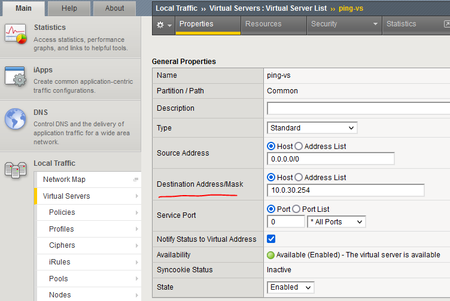
- Nov 06, 2022
Hi davidy2001 ,
> ICMP option is on virtual address list tab , see the below snap shot :Select your virtual server address and you will find the ICMP option and make it " disabled".
and try again.
> Or do it Cli ,
write this command on Tmsh prompt
( modify ltm virtual-address 10.0.30.254 icmp-echo disabled )
and try again
Look to this snap shot as well : - Nov 06, 2022
Hi davidy2001 ,
it is not weired , each virtual server is only responsible for its nodes and when you disable icmp echo on " 10.0.30.254" virtual server this option is related only to this virtual server , and other virtual servers do not impacted by your change , you will find the option of icmp-echo still as default always on all virtual servers except " 10.0.30.254 virtual server "
> For command , you wrote the command wrong , you need to write 10.0.30.254 instead of 10.0.30.1.
> this a special configuration for your environment , as the most deployed that F5 as a loadbalancer servers real servers not routers but of course everything is doable and available in F5 to handle your traffic on the way you want.
- my configuration was a workaround for your environment and " this virtual server 10.0.30.254" is the only object will be impacted to solve your issue with routes , and the rest of your applications and services run without impact.
Ty - Nov 06, 2022
davidy2001 ,
Also Note , When you change the virtual server IP only , the new virtual address added in statistics Page , Also you will find the in new virtual address the ( " icmp-echo" option returned to " always" ) again , so you will change it again.
> it is not good to change the virtual server ip address , you can create a new one instead of swapping ip , because existance of active session.
> Also , if you follow the scenario of swapping virtual server ip , run this command
" show sys connection cs-server-addr" , it will show to you that the traffic flow is correct and as expected.
Ty - Nov 06, 2022
davidy2001In all honesty if you are trying to figure out how the BIG-IP works I would configure VMs behind it rather than routers because it seems like you would want to use the BIG-IP in the closest way you intend to in the future. Most deployments of the BIG-IPs are for websites and applications rather than ICMP to routers. Don't get me wrong here because you can do all sorts of things on the BIG-IP but if your intent is to learn it I think the best way to start is the closest thing that everyone typically uses them for which is application load balancing or website load balancing. You can perform tcpdumps on the BIG-IPs to see traffic traversing it as well as a wireshark (windows) or tcpdump (linux) on the destination servers to see the traffic flow. This is a great exercise that you posted just to learn something one off but not where I would have started to learn about them.
- Nov 14, 2022
Hi davidy2001 ,
How are you ,
> you need to remove TCP profile and choose all protocols , because you are transferring icmp packets not a connection based on TCP :
check the below snap shot and tell me your feedback :Hope this help you and waiting your response.

 Cirrus
I tried many time to ping the new created virtual server 10.0.30.200. The Bits and Packets still increase in virtual server 10.0.30.254, not in 10.0.30.200. Of couse, i keep clicking on Refresh button, but it cannot change count numbers. Strange.


Hi davidy2001 ,
I think in this Case other virtual servers do not recieve packets , so you need to make sure that you configure it like this :
Also try on tmsh this command " show sys connection cs-server-addr 10.0.30.200 or 10.0.30.110 or 10.0.30.100.
> also send to me the new created virtual server configuration and virtual address configuration as well as a snap shot , maybe I find a missing part.
But I am sure new created virtual servers shoud work as expected if you configured them as the same way of " 10.0.30.254 " , because I simulated it in my lab and it works well.
> I am follow you , you can update me any time until your issue resolved.
Ty
- davidy2001Nov 06, 2022
Please see the below screenshot. This config is same as 10.0.30.254 virtual server except the ip address 10.0.30.200. and please let me if any info needed.
- Nov 06, 2022
well ,
I see you are using the standby unit to ping the Virtual servers.
you will not see any statistics on statndby , all connections should be in Active unite not standby.
I need you to try to ping from Router 10.0.30.1 to virtual server 10.0.30.200 , and see the statistics on Active Appliance.
> I see also you changed the Virtual server " Ping-vs " from 10.0.30.254 to 10.0.30.200 , I do not know why , but create both of them separately.
> do not see statistics or run this command " show sys connection cs-server-addr "
on standby system.
Try again and update me
Ty - davidy2001Nov 06, 2022
> I see also you changed the Virtual server " Ping-vs " from 10.0.30.254 to 10.0.30.200 , I do not know why , but create both of them separately. -- Yes, I only want to see the effect of ip change.
I rebooted it just now. then I can see Bits and Packet count increase in current virtual server 10.0.30.200. This is what we expect.
and then I change the ip from 10.0.30.200 to 10.0.30.123. The previous scene happen again, meaning ping 10.0.30.123 from router 10.0.30.1, the count number increase still at 10.0.30.200, not 10.0.30.123. so we might have to reboot it to resolve the issue? Looks like Refresh cannot work.
- Nov 06, 2022
well ,
maybe you need to kill the active sessions first before you swapping the virtual server ips , because Active sessions needs an idle timeout value.
For Example :
Traffic on 10.0.30.200 works well and count packets and bits , because this virtual server has the active connection now.
when you swap it to 10.0.30.123 you will need to kill the active sessions first by using this Command : " delete sys connection cs-server-addr 10.0.30.200 " this will kill the active connections that opened via " 10.0.30.200 vs ".
After that try to ping "10.0.30.123" and see the results.
you do not need to reboot , only use this command " delete sys connection cs-server-addr 10.0.30.200 " and I think it will work as expected.
> If you created new different virtual servers not swapping ips you will not see this behavior.
Try it and give me your feedback
Ty - Nov 06, 2022
davidy2001 ,
Also Note , When you change the virtual server IP only , the new virtual address added in statistics Page , Also you will find the in new virtual address the ( " icmp-echo" option returned to " always" ) again , so you will change it again.
> it is not good to change the virtual server ip address , you can create a new one instead of swapping ip , because existance of active session.
> Also , if you follow the scenario of swapping virtual server ip , run this command
" show sys connection cs-server-addr" , it will show to you that the traffic flow is correct and as expected.
Ty - davidy2001Nov 06, 2022
Yes, after creating new virtual server, the issue exist again. The issue resolved!
Thank you!
Help guide the future of your DevCentral Community!
What tools do you use to collaborate? (1min - anonymous)

Recent Discussions
Related Content
* Getting Started on DevCentral
* Community Guidelines
* Community Terms of Use / EULA
* Community Ranking Explained
* Community Resources
* Contact the DevCentral Team
* Update MFA on account.f5.com