pool member
20 Topics
qkview: revealing pool members & pools
A qkview file, when uploaded to F5's iHealth website, can easily show the entire lists of virtual servers, pools and nodes. Question: Is there any easy / quick way (whether in iHealth website, or in the F5 device's GUI or CLI) to somehow show: 1. the entire lists of node(s) (that are pool members) per pool in a qkview file 2. the entire lists of pool(s) that are associated with each virtual server in a qkview file189Views0likes3CommentsGTM Pool Members Gone After Maintenance? It's Probably This One Setting
You finish a maintenance window, everything looks good on LTM, and then someone notices Wide IPs are resolving to fewer destinations than before. You check the GTM pools and the members are just... gone. The virtual servers are fine on LTM. GTM just doesn't know about them anymore — and more importantly, it doesn't remember if they were ever pool members. This happens more often than it should, and it almost always comes back to the same thing: virtual-server-discovery enabled doing exactly what it was designed to do, at exactly the wrong moment. What's Actually Going On When virtual-server-discovery is set to enabled on a GTM server object, GTM keeps its view of LTM virtual servers in sync via iQuery. It automatically adds new virtual servers, updates existing ones, and — this is the part that causes problems — deletes virtual servers that LTM stops reporting on. That delete behavior is the issue. Any time iQuery reports zero virtual servers, even temporarily, GTM treats it as a mass deletion event. The virtual servers get pulled from the server object, and with them, their pool memberships. When LTM eventually reports on those virtual servers again, GTM re-discovers them as brand new objects with no memory of which pools they belonged to. Two scenarios trigger this consistently. Scenario 1: LTM Software Upgrade This is the one that catches most people. During an upgrade, LTM reboots and goes through a phase where iQuery can connect but the full configuration hasn't finished loading yet. From GTM's perspective, LTM is reachable but reporting no virtual servers. GTM interprets that as a deletion event, clears out the discovered virtual servers, and empties the pools. When LTM finishes loading and the virtual servers come back, GTM re-discovers them — but the pool memberships are gone. You're left manually rebuilding what was there before the maintenance window started. The telltale sign is pool members coming back in blue/CHECKING state. That only happens to newly discovered objects. GTM treated a returning virtual server as a brand new one — because as far as it's concerned, it is. The GTM log won't show a deletion event, only the re-add. That gap in the logs is a known blind spot with virtual-server-discovery enabled, and it's exactly why the problem is hard to diagnose after the fact. What you'll typically see in /var/log/gtm after the LTM comes back: alert gtmd[xxxxx]: 011a1005:1: SNMP_TRAP: Pool your_pool state change green --> red (No enabled pool members available) alert gtmd[xxxxx]: 011a3004:1: SNMP_TRAP: Wide IP your.wideip.example.com state change green --> red (No enabled pools available) And then shortly after, the virtual servers re-appear in CHECKING state as GTM re-discovers them — but with no pool bindings. Scenario 2: LTM HA Failover This one surprises people because the LTM pair is still running — it's just switching active units. After a failover, the new active device may not have its iQuery connections fully re-established yet. GTM sees the iQuery state as inconsistent, virtual server status updates stop coming through, and members disappear from the discovered list. What makes this harder to diagnose is that tmsh show gtm iquery may show "connected" — but connected doesn't mean the config sync is working correctly. In a GTM sync group, only the device assigned local ID 0 (the GTM with the lowest IP address) is responsible for writing auto-discovery results to the configuration. If that specific device loses its iQuery connection during the failover window, discovery events are missed entirely — even if every other GTM in the group can still reach the LTM. So you can have a situation where five out of six GTMs look perfectly healthy, iQuery shows connected everywhere, and yet pool members are still disappearing — because the one device that matters for discovery is the one with the broken connection. You can check which device in your sync group holds local ID 0 with: tmsh list sys db gtm.peerinfolocalid If that device's iQuery connection to the LTM is the one that dropped during the failover window, that's your answer — even if everything else looks fine. The Fix: enabled-no-delete Both scenarios share the same root cause: GTM's auto-delete behavior treating a temporary iQuery disruption as a permanent deletion event. The fix is the same for both: gtm server /Common/site1-ltm { addresses { 10.1.1.1 { device-name site1-ltm } } datacenter /Common/dc1 monitor /Common/bigip virtual-server-discovery enabled-no-delete } With enabled-no-delete, GTM still auto-discovers new virtual servers and keeps existing ones updated. The only thing that changes is that it will never delete a virtual server just because LTM temporarily stopped reporting it. Your pool memberships survive both scenarios above. Mode Adds new VS Updates VS Deletes VS Pool memberships survive iQuery disruption? disabled No No No Yes — nothing changes enabled Yes Yes Yes No — any disruption can empty pools enabled-no-delete Yes Yes No Yes — preserved The Trade-Off enabled-no-delete won't clean up after you when you intentionally decommission a virtual server on LTM. The stale GTM object stays in the discovered list until you remove it manually. In environments with a lot of VS churn, this can accumulate over time. The question is which failure mode you'd rather manage: pool members silently disappearing during a maintenance window, or occasionally needing to clean up stale objects after a planned decommission. For most production environments, the latter is far easier to deal with — and far less likely to wake someone up at 2am. How to Make the Change Via tmsh: tmsh modify gtm server /Common/site1-ltm \ virtual-server-discovery enabled-no-delete tmsh save sys config Via GUI: Go to DNS → GSLB → Servers Select the server object Set Virtual Server Discovery to Enabled (No Delete) Click Update This takes effect immediately and does not affect existing discovered virtual servers or current pool memberships. Cleaning Up Stale Objects When you intentionally decommission a virtual server on LTM, remove the leftover GTM object manually: # List virtual servers under a GTM server object tmsh list gtm server /Common/site1-ltm virtual-server # Remove a specific stale entry tmsh modify gtm server /Common/site1-ltm \ virtual-servers delete { /Common/old-vs-name } tmsh save sys config Make this part of your standard VS decommission runbook and stale objects will never pile up. Quick Diagnostic When Members Go Missing Before assuming it's a discovery issue, check iQuery health across all GTM devices first: tmsh show gtm iquery Look for: State: should be connected to all entries Reconnects: A high count suggests instability even if the connection looks up Configuration Time: None means the config has never successfully synced from that LTM Then confirm which GTM holds local ID 0 and verify its connectivity specifically: tmsh list sys db gtm.peerinfolocalid If the local ID 0 device is the one with the broken iQuery connection, that's your answer — regardless of what the other devices are showing. Wrapping Up Whether it's an LTM upgrade or an HA failover, the pattern is the same: iQuery goes quiet for a moment, GTM interprets silence as deletion, and your pool memberships are gone. It's working as designed — just not in a way that's useful to you. enabled-no-delete is a one-line change that stops this from happening. The cleanup overhead it introduces is predictable and manageable. The alternative — rebuilding pool memberships after an unplanned event — is not. Have you run into either of these scenarios in your environment? Drop a comment below, especially if you've seen the local ID 0 shift cause issues during a rolling GTM upgrade.344Views1like0Comments
Big IP FQDN Pool Member Resolution from /etc/hosts
Hi, I've added entries to the Big IP /etc/hosts file to map custom FQDNs to IP addresses (in an attempt to workaround the restriction of having LTM nodes with the same address). I then created an LTM Pool with a member using the custom FQDN hoping it would resolve to the IP address in the /etc/hosts file but unfortunately this is failing. The pool member is displaying the error "Unavailable (Enabled) - No records returned". Seems like the pool is only able to auto-populate via direct DNS queries. Is there any way to configure the Big IP to consult the /etc/hosts file first? Thanks909Views0likes5Comments
AS3 Monitoring multiple ports selectively
Hi, I have nodes listening on port 80, 81, 82, 83. the port 80 is mandatory and at least one out of the other 3 ports is mandatory. with manual configuration, I put the port 80 monitor at the node level and the other 3 ports at pool member level. with AS3, the node level monitoring does not exist. what are the other options given that all my deployments are based on AS3. thanks. OM103Views0likes0Comments
Pool round Robin not working with standard virtual server
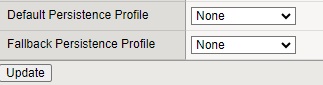
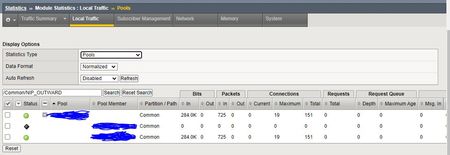
I have a standard HTTPS virtual server configured with two nodes in the pool. There is no persistence setting enabled and the load balancing method is round robin. For some reason, after I browse to the site and establish a connection with a backend server in the pool, all my future requests go to the same server and it behaves in a way that indicates some persistence is enabled. For example, when I refresh my browser, open the site in a new browser, and open the site in an incognito browser, all my requests keep going to the same node. You can see below that I tried this multiple times and kept getting connected to one server and the number of connections on that server was increasing. According to my research, because there is no persistence profile setting, the load balancing method is round robin, and both servers are available and able to accept traffic, every time I refresh or open the site in a new tab or browser, I should be randomly assigned to a server for that connection via round robin load balancing. But this is not what I observe. Is there a reason that my virtual servers are showing persistence by default? Any ideas? Here are some images of my config:Solved1.7KViews0likes6CommentsF5 Not sending traffic to Pool Members
Hello guys, I have an issue with our F5 devices, we have 2 devices in a cluster in an Active and standby state. we noticed the issue started about two weeks ago, the active F5 just stops sending traffic to the pool member behind the VS, we tried some couple of troubleshooting whenever this occurs we check the var/log/ltm and var/log/monitor logs for the pool affected but we cant see any stating a failure. we changed the health monitor and it is still the same. we can confirm that it is not the network because the other pools are working fine and checkup was done on the affected server to confirm all services and functions are working as should. Even after deleting and adding the pool member back to the pool, F5 doesn't send traffic to it. what i noticed is the statistics page show bits in without any bits outs also for packets Please what can cause this as it is an intermittent issue that occurs almost daily. we have to failover to the secondary device before F5 starts sending traffic out to pool member, this is a production issue as application server stops working(stops recieving traffic) until an administrator is able to do this.1.5KViews0likes3Comments
Redirect to pool member based on URI with persistence
We are implementing Kronos 8 with SSL offloading on our LTM. The SSL offload options in Kronos forces all traffic through the LTM so our Kronos admin can no longer hit the application directly on the individual servers. To accomplish this I need to direct traffic directly to the pool member based on URI. I also need to append /wfc/logon to all URIs. I have built an iRule based on examples I have found here, but it doesn't work correctly. It lands on the initial logon page correctly, but after the logon doesn't persist to the pool member. Process I am trying to accomplish: http://kronos.xxx.edu/ap1 -> https://kronos.xxx.edu/wfc/logon on pool member 1 http://kronos.xxx.edu/ap2 -> https://kronos.xxx.edu/wfc/logon on pool member 2 http://kronos.xxx.edu/ -> https://kronos.xxx.edu/wfc/logon default LB for clients Allow server selection via uri when HTTP_REQUEST { if {[HTTP::uri] contains "ap1" } { HTTP::uri "/wfc/logon" pool Kronos member 192.168.1.121 80 } elseif {[HTTP::uri] contains "ap2"} { HTTP::uri "/wfc/logon" pool Kronos member 192.168.1.122 80 } elseif {[HTTP::uri] eq "/"} { HTTP::uri "/wfc/logon" pool Kronos } } Any suggestions are greatly appreciated.877Views0likes2Commentstmsh script modify pool member status
Hi, I am trying to modify pool member admin status via tmsh script using such command: tmsh::modify /ltm pool lamp_opi_pl members modify {lamp12_nd:http {session user-disabled}} but every time script is executed I've got such errors: pool-status.tcl: script failed to complete: can't eval proc: "script::run" members: required brace is missing "{" while executing "tmsh::modify /ltm pool "lamp_opi_pl" members modify {"lamp12_nd:http" {session user-disabled}}" (procedure "script::run" line 35) invoked from within "script::run" line:1 script did not successfully complete, status:1 What is wrong with my command? Is that not possible to change admin status for pool member in script? Piotr677Views0likes3Comments
Question on Priority Group Activation
Hi, I want to make my virtual server with 9 pool member automatically disabled when four of its pool member are down. Can I achieve this with below settings : 1. Put all the pool members to the same priority group for example 5 2. Under Priority Group Activation, I would select 6 viz., traffic should be processed by the pool members of group 5 till the pool have 6 minimum active members failing which the group shall not process the traffic. Now, as all the pool members belong to same priority group 5 and when PGA conditions fails would the virtual server would be down as there are no more pool members to accept the traffic ?? Please provide your inputs. Thanks, MSK274Views0likes1CommentDisable Multiple Pools Members At Once
Making a single rest call, has anyone been able to disable multiple pool members? I'm running into a problem where I want to only disable 2 of the 4 members, but every time I use the PATCH or PUT method, it wipes out the members that are not referenced in the JSON data. I should mention that I'm also using the latest version of iControlRest. Example: URL: https://myf5.foobar.com/mgmt/tm/ltm/pool/testpool/ Method: PATCH Current Pool Members: member1,member2,member3,member4 Data: { "members":[ {"name":"member1:80","state": "user-up", "session": "user-disabled"}, {"name":"member2:80","state": "user-up", "session": "user-disabled"} ] } Expected Result: Half of the pool members will be disabled (1 and 2), while the other half are enabled (3 and 4) Actual Result: Pool members 3 and 4 are wiped out and only 1 and 2 are showing as part of the pool.690Views0likes6Comments