nginx
104 TopicsBolt-on Auth with NGINX Plus and F5 Distributed Cloud
Inarguably, we are well into the age wherein the user interface for a typical web application has shifted from server-generated markup to APIs as the preferred point of interaction. As developers, we are presented with a veritable cornucopia of tools, frameworks, and standards to aid us in the development of these APIs and the services behind them. What about securing these APIs? Now more than ever, attackers have focused their efforts on abusing APIs to exfiltrate data or compromise systems at an increasingly alarming rate. In fact, a large portion of the 2023 OWASP Top 10 API Security Risks list items are caused by a lack of (or insufficient) authentication and authorization. How can we provide protection for existing APIs to prevent unauthorized access? What if my APIs have already been developed without considering access control? What are my options now? Enter the use of a proxy to provide security services. Solutions such as F5 NGINX Plus can easily be configured to provide authorization and auditing for your APIs - irrespective of where they are deployed. For instance, you can enable OpenID Connect (OIDC) on NGINX Plus to provide authentication and authorization for your applications (including APIs) without having to change a single line of code. In this article, we will present an existing application with an API deployed in an F5 Distributed Cloud cluster. This application lacks authentication and authorization features. The app we will be using is the Sentence demo app, deployed into a Kubernetes cluster on Distributed Cloud. The Kubernetes cluster we will be using in this walkthrough is a Distributed Cloud Virtual Kubernetes (vk8s) instance deployed to host application services in more than one Regional Edge site. Why? An immediate benefit is that as a developer, I don’t have to be concerned with managing my own Kubernetes cluster. We will use automation to declaratively configure a virtual Kubernetes cluster and deploy our application to it in a matter of seconds! Once the Sentence demo app is up and running, we will deploy NGINX Plus into another vk8s cluster for the purpose of providing authorization services. What about authentication? We will walk through configuring Microsoft Entra ID (formerly Azure Active Directory) as the identity provider for our application, and then configure NGINX Plus to act as an OIDC Relying Party to provide security services for the deployed API. Finally, we will make use of Distributed Cloud HTTP load balancers. We will provision one publicly available load balancer that will securely route traffic to the NGINX Plus authorization server. We will then provision an additional Load Balancer to provide application routing services to the Sentence app. This second load balancer differs from the first in that it is only “advertised” (and therefore only reachable) from services inside the namespace. This results in a configuration that makes it impossible for users to bypass the NGINX authorization server in an attempt to directly consume the Sentence app. The following is a diagram representing what will be deployed: Let’s get to it! Deployment Steps The detailed steps to deploy this solution are located in a GitHub repository accompanying this article. Follow the steps here, and be sure to come back to this article for the wrap-up! Conclusion You did it! With the power and reach of Distributed Cloud combined with the security that NGINX Plus provides, we have been able to easily provide authorization for our example API-based application. Where could we go from here? Do you remember we deployed these applications to two specific geographical sites? You could very easily extend the reach of this solution to more regions (distributed globally) to provide reliability and low-latency experiences for the end users of this application. Additionally, you can easily attach Distributed Cloud’s award-winning DDoS mitigation, WAF, and Bot mitigation to further protect your applications from attacks and fraudulent activity. Thanks for taking this journey with me, and I welcome your comments below. Acknowledgments This article wouldn’t have been the same without the efforts of Fouad_Chmainy, Matt_Dierick, and Alexis Da Costa. They are the original authors of the distributed design, the Sentence app, and the NGINX Plus OIDC image optimized for Distributed Cloud. Additionally, special thanks to Cody_Green and Kevin_Reynolds for inspiration and assistance in the Terraform portion of the solution. Thanks, guys!2KViews8likes3Comments2022 DevCentral MVP Announcement
Congratulations to the 2022 DevCentral MVPs! Without users who take time from their busy days to share their experience and knowledge for others, DevCentral would be more of a corporate news site and not an actual user community. To that end, the DevCentral MVP Award is given annually to the outstanding group of individuals – the experts in the technical F5 user community who go out of their way to engage with the user community. The award is our way of recognizing their significant contributions, because while all of our users collectively make DevCentral one of the top community sites around and a valuable resource for everyone, MVPs regularly go above and beyond in assisting fellow F5 users. We understand that 2021 was difficult for everyone, and we are extra-grateful to this year's MVPs for going out of their ways to help others. MVPs get badges in their DevCentral profiles so everyone can see that they are recognized experts. This year’s MVPs will receive a glass award, certificate, exclusive thank-you gifts, and invitations to exclusive webinars and behind-the-scenes looks at things like roadmaps, new product sneak-previews, and innovative concepts in development. The 2022 DevCentral MVPs are: Aditya K Vlogs AlexBCT Amine_Kadimi Austin_Geraci Boneyard Daniel_Wolf Dario_Garrido David.burgoyne Donamato 01 Enes_Afsin_Al FrancisD iaine jaikumar_f5 Jim_Schwartzme1 JoshBecigneul JTLampe Kai Wilke Kees van den Bos Kevin_Davies Lionel Deval (Lidev) LouisK Mayur_Sutare Neeeewbie Niels_van_Sluis Nikoolayy1 P K Patrik_Jonsson Philip Jönsson Rob_Carr Rodolfo_Nützmann Rodrigo_Albuquerque Samstep SanjayP ScottE Sebastian Maniak Stefan_Klotz StephanManthey Tyler.Hatton1.5KViews8likes0CommentsMitigating OWASP 2019 API Security Top 10 risks using F5 NGINX App Protect
This 2019 API Security article provides a valuable summary of the OWASP API Security Top 10 risks identified for that year, outlining key vulnerabilities. We will deep-dive into some of those common risks and how we can protect our applications against these vulnerabilities using F5 NGINX App Protect. API2:2019 - Broken User Authentication Problem Statement: A critical API security risk, Broken Authentication occurs when weaknesses in the API's identity verification process permit attackers to circumvent authentication mechanisms. Successful exploitation leads attackers to impersonate legitimate users, gain unauthorized access to sensitive data, perform actions on behalf of victims, and potentially take over accounts or systems. This demonstration utilizes the Damn Vulnerable Web Application (DVWA) to illustrate the exploitability of Broken Authentication. We will execute a brute-force attack against the login interface, iterating through potential credential pairs to achieve unauthorized authentication. Below is the selenium automated script to execute brute-force attack, submitting multiple credential combinations to attempt authentication. The brute-force attack successfully compromised the authentication controls by iterating through multiple credential pairs, ultimately granting access. Solution: To mitigate the above vulnerability, NGINX App Protect is deployed and configured as reverse proxy in front of the application and requests are first validated by NAP for the vulnerabilities. The NGINX App Protect Brute Force WAF policy is utilized as shown below. Re-attempt to gain access to the application using the brute force approach is rejected and blocked. Support ID verification in the Security logs shows request is blocked because of Brute Force Policy. Request captured in NGINX App Protect security log API3:2019 - Excessive Data Exposure Problem Statement: As shown below in one of the demo application API’s, Personal Identifiable Information (PII) data, like Credit Card Numbers (CCN) and U.S. Social Security Numbers (SSN), are visible in responses that are highly sensitive. So, we must hide these details to prevent personal data exploits. Solution: To prevent this vulnerability, we will use the DataGuard feature in NGINX App Protect, which validates all response data for sensitive details and will either mask the data or block those requests, as per the configured settings. First, we will configure DataGuard to mask the PII data as shown below and will apply this configuration. Next, if we resend the same request, we can see that the CCN/SSN numbers are masked, thereby preventing data breaches. If needed, we can update configurations to block this vulnerability after which all incoming requests for this endpoint will be blocked. If you open the security log and filter with this support ID, we can see that the request is either blocked or PII data is masked, as per the DataGuard configuration applied in the above section. Request captured in NGINX App Protect security log API4:2019 - Lack of Resources & Rate Limiting Problem Statement: APIs do not have any restrictions on the size or number of resources that can be requested by the end user. Above mentioned scenarios sometimes lead to poor API server performance, Denial of Service (DoS), and brute force attacks. Solution: NGINX App Protect provides different ways to rate limit the requests as per user requirements. A simple rate limiting use case configuration is able to block requests after reaching the limit, which is demonstrated below. API6:2019 - Mass Assignment Problem Statement: API Mass Assignment vulnerability arises when clients can modify immutable internal object properties via crafted requests, bypassing API Endpoint restrictions. Attackers exploit this by sending malicious HTTP requests to escalate privileges, bypass security mechanisms, or manipulate the API Endpoint's functionality. Placing an order with quantity as 1: Bypassing API Endpoint restrictions and placing the order with quantity as -1 is also successful. Solution: To overcome this vulnerability, we will use the WAF API Security Policy in NGINX App Protect which validates all the API Security event triggered and based on the enforcement mode set in the validation rules, the request will either get reported or blocked, as shown below. Restricted/updated swagger file with .json extension is added as below: Policy used: App Protect API Security Re-attempting to place the order with quantity as -1 is getting blocked. Validating the support ID in Security log as below: Request captured in NGINX App Protect security log API7:2019 - Security Misconfiguration Problem Statement: Security misconfiguration occurs when security best practices are neglected, leading to vulnerabilities like exposed debug logs, outdated security patches, improper CORS settings, unnecessary allowed HTTP methods, etc. To prevent this, systems must stay up to date with security patches, employ continuous hardening, ensure API communications use secure channels (TLS), etc. Example: Unnecessary HTTP methods/verbs represent a significant security misconfiguration under the OWASP API Top 10. APIs often expose a range of HTTP methods (such as PUT, DELETE, PATCH) that are not required for the application's functionality. These unused methods, if not properly disabled, can provide attackers with additional attack surfaces, increasing the risk of unauthorized access or unintended actions on the server. Properly limiting and configuring allowed HTTP methods is essential for reducing the potential impact of such security vulnerabilities. Let’s dive into a demo application which has exposed “PUT” method., this method is not required as per the design and attackers can make use of this insecure unintended method to modify the original content. Solution: NGINX App Protect makes it easy to block unnecessary or risky HTTP methods by letting you customize which methods are allowed. By easily configuring a policy to block unauthorized methods, like disabling the PUT method by setting "$action": "delete", you can reduce potential security risks and strengthen your API protection with minimal effort. As shown below the attack request is captured in security log which conveys the request was successfully blocked, because of “Illegal method” violation. Request captured in NGINX App Protect security log API8:2019 - Injection Problem Statement: Customer login pages without secure coding practices may have flaws. Intruders could use those flaws to exploit credential validation using different types of injections, like SQLi, command injections, etc. In our demo application, we have found an exploit which allows us to bypass credential validation using SQL injection (by using username as “' OR true --” and any password), thereby getting administrative access, as below: Solution: NGINX App Protect has a database of signatures that match this type of SQLi attacks. By configuring the WAF policy in blocking mode, NGINX App Protect can identify and block this attack, as shown below. App Protect WAF Policy If you check in the security log with this support ID, we can see that request is blocked because of SQL injection risk, as below. Request captured in NGINX App Protect security log API9:2019 - Improper Assets Management Problem Statement: Improper Asset Management in API security signifies the crucial risk stemming from an incomplete awareness and tracking of an organization's full API landscape, including all environments like development and staging, different versions, both internal and external endpoints, and undocumented or "shadow" APIs. This lack of comprehensive inventory leads to an expanded and often unprotected attack surface, as security measures cannot be consistently applied to unknown or unmanaged assets. Consequently, attackers can exploit these overlooked endpoints, potentially find older, less secure versions or access sensitive data inadvertently exposed in non-production environments, thereby undermining overall security posture because you simply cannot protect assets you don't know exist. We’re using a flask database application with multiple API endpoints for demonstration. As part of managing API assets, the “/v1/admin/users” endpoint in the demo Flask application has been identified as obsolete. The continued exposure of the deprecated “/v1/admin/users” endpoint constitutes an Improper Asset Management vulnerability, creating an unnecessary security exposure that could be leveraged for exploitation. <public_ip>/v1/admin/users The current endpoint for user listing is “/v2/users”. <public_ip>/v2/users with user as admin1 Solution: To mitigate the above vulnerability, we are using NGINX as an API Gateway. The API Gateway acts as a filtering gateway for API incoming traffic, controlling, securing, and routing requests before they reach the backend services. The server’s name used for the above case is “f1-api” which is listening to the public IP where our application is running. To query the “/v1/admin/users” endpoint, use the curl command as shown below. Below is the configuration for NGINX as API Gateway, in “api_gateway.conf”, where “/v1/admin/users” endpoint is deprecated. The “api_json_errors.conf” is configured with error responses as shown below and included in the above “api_gateway.conf”. Executing the curl command against the endpoint yields an “HTTP 301 Moved Permanently” response. https://f1-api/v1/admin/users is deprecated API10:2019 - Insufficient Logging & Monitoring Problem Statement: Appropriate logging and monitoring solutions play a pivotal role in identifying attacks and also in finding the root cause for any security issues. Without these solutions, applications are fully exposed to attackers and SecOps is completely blind to identifying details of users and resources being accessed. Solution: NGINX provides different options to track logging details of applications for end-to-end visibility of every request both from a security and performance perspective. Users can change configurations as per their requirements and can also configure different logging mechanisms with different levels. Check the links below for more details on logging: https://www.nginx.com/blog/logging-upstream-nginx-traffic-cdn77/ https://www.nginx.com/blog/modsecurity-logging-and-debugging/ https://www.nginx.com/blog/using-nginx-logging-for-application-performance-monitoring/ https://docs.nginx.com/nginx/admin-guide/monitoring/logging/ https://docs.nginx.com/nginx-app-protect-waf/logging-overview/logs-overview/ Conclusion: In short, this article covered some common API vulnerabilities and shows how NGINX App Protect can be used as a mitigation solution to prevent these OWASP API security risks. Related resources for more information or to get started: F5 NGINX App Protect OWASP API Security Top 10 2019 OWASP API Security Top 10 20233.3KViews7likes0CommentsNGINX Management Suite API Connectivity Manager - Modern API driven Applications
Introduction API based applications benefits Before we dive into our API gateway use case, we will go one step back and check why the move to API driven applications, below are some of the benefits for this move: Loose coupling: API-based applications can be built and maintained independently, allowing for faster development and deployment cycles. Reusability: APIs can be reused across multiple applications, reducing the need to duplicate code and effort. Scalability: API-based architecture allows for easier scaling of individual services, rather than having to scale the entire application. Flexibility: APIs allow for different client applications to consume the same services, such as web, mobile, and IoT devices. Interoperability: APIs facilitate communication between different systems and platforms, enabling integration with third-party services and data sources. Microservices: API-based architecture allows developers to build small, modular services that can be developed, deployed, and scaled independently. NGINX Management Suite API Connectivity Manager capabilities NGINX Management Suite API Connectivity Manager adds to the capabilities of the API driven applications a secure approach to authenticate, access and developing those API based applications. API Connectivity Manager is used to connect, secure, and govern our APIs. In addition, API Connectivity Manager lets us separate infrastructure lifecycle management from the API lifecycle, giving the IT/Ops teams and application developers the ability to work independently. API Connectivity Manager provides the following features: Create and manage isolated Workspaces for business units, development teams, and so on, so each team can develop and deploy at its own pace without affecting other teams. Create and manage API infrastructure in isolated workspaces. Enforce uniform security policies across all workspaces by applying global policies. Create Developer Portals that align with your brand, with custom color themes, logos, and favicons. Onboard your APIs to an API Gateway cluster and publish your API documentation to the Dev Portal. Let teams apply policies to their API proxies to provide custom quality of service for individual applications. Onboard API documentation by uploading an OpenAPI spec. Publish your API docs to a Dev Portal while keeping your API’s backend service private. Let users issue API keys or basic authentication credentials for access to your API. Send API calls by using the Developer Portal’s API Reference documentation. API Connectivity Manager use case API Connectivity Manager use case overview In our case we will have three teams, Infrastructure team, this one will be responsible for setting up the infrastructure, domains and access policies. API team, this one will be responsible for setting up the API documentation, QoS and gateway for both production and developer portals. Application team, this one will be responsible for learning the APIs through the developer portal and use the APIs through the production portal. Authentication in our case is done via two methods, API Key authentication for API version 1. OAuth2 introspection for API version 2. Note, More Authentication methods can be used (JSON Web Token Assertion) included in the following tutorial. API authentication more detailed discussion can be found here Application Programming Interface (API) Authentication types simplified Additional features like API rate limiting can be applied as well, here's a toturial to enable that feature. API Connectivity Manager traffic flows In our use case will have three flows, Management flow, illustrated below. Metrics and events collection flow, illustrated below Data flow illustrated below NGINX tutorial on how to streamline API operations with API Connectivity Manager, API Connectivity Manager lab & implementation ِThe steps we are going to follow with some useful tutorial videos are highlighted below, Setup backend API application (This step has been already done for you in the lab). Setup API Connectivity Manager infrastructure and policies. Enable API Key Authentication via the following Youtube toturial Enable API Key Authentication with API Connectivity Manager. Publish APIs and Documentation through API Connectivity Manager. Test APIs through API Developer Portal The detailed lab guide and the implementation videos Cloud labs detailed guide https://clouddocs.f5.com/training/community/nginx/html/class10/class10.html UDF lab can be found here as well https://udf.f5.com/b/ed5ffb71-bcce-47ec-9d9f-307441e4c12c#documentation Below a recorded Lab walkthrough by our awesome guru Matt_Dierick References API Connectivity Manager NGINX Management Suite NGINX Docs API Connectivity Manager UDF Lab 2.2KViews7likes0Comments
F5 Container Ingress Services (CIS) and using k8s traffic policies to send traffic directly to pods
This article will take a look how you can use health monitors on the BIG-IP to solve the issue with constant AS3 REST-API pool member changes or when there is a sidecar service mesh like Istio (F5 has version called Aspen mesh of the istio mesh) or Linkerd mesh. I also have described some possible enchantments for CIS/AS3, Nginx Ingress Controller or Gateway Fabric that will be nice to have in the future. Intro Install Nginx Ingress Open source and CIS F5 CIS without Ingress/Gateway F5 CIS with Ingress F5 CIS with Gateway fabric Summary 1. Intro F5 CIS allows integration between F5 and k8s kubernetes or openshift clusters. F5 CIS has two modes and that are NodePort and ClusterIP and this is well documented at https://clouddocs.f5.com/containers/latest/userguide/config-options.html . There is also a mode called auto that I prefer as based on k8s service type NodePort or ClusterIP it knows how to configure the pool members. CIS in ClusterIP mode generally is much better as you bypass the kube-proxy as send traffic directly to pods but there could be issues if k8s pods are constantly being scaled up or down as CIS uses AS3 REST-API to talk and configure the F5 BIG-IP. I also have seen some issues where a bug or a config error that is not well validated can bring the entire CIS to BIG-IP control channel down as you then see 422 errors in the F5 logs and on CIS logs. By using NodePort and "externaltrafficpolicy: local" and if there is an ingress also "internaltrafficpolicy: local" you can also bypass the kubernetes proxy and send traffic directly to the pods and BIG-IP health monitoring will mark the nodes that don't have pods as down as the traffic policies prevent nodes that do not have the web application pods to send the traffic to other nodes. 2..Install Nginx Ingress Open source and CIS As I already have the k8s version of nginx and F5 CIS I need 3 different classes of ingress. k8s nginx is end of life https://kubernetes.io/blog/2025/11/11/ingress-nginx-retirement/ , so my example also shows how you can have in parallel the two nginx versions the k8s nginx and F5 nginx. There is a new option to use The Operator Lifecycle Manager (OLM) that when installed will install the components and this is even better way than helm (you can install OLM with helm and this is even newer way to manage nginx ingress!) but I found it still in early stage for k8s while for Openshift it is much more advanced. I have installed Nginx in a daemonset not deployment and I will mention why later on and I have added a listener config for the F5 TransportServer even if later it is seen why at the moment it is not usable. helm install -f values.yaml ginx-ingress oci://ghcr.io/nginx/charts/nginx-ingress \ --version 2.4.1 \ --namespace f5-nginx \ --set controller.kind=daemonset \ --set controller.image.tag=5.3.1 \ --set controller.ingressClass.name=nginx-nginxinc \ --set controller.ingressClass.create=true \ --set controller.ingressClass.setAsDefaultIngress=false cat values.yaml controller: enableCustomResources: true globalConfiguration: create: true spec: listeners: - name: nginx-tcp port: 88 protocol: TCP kubectl get ingressclasses NAME CONTROLLER PARAMETERS AGE f5 f5.com/cntr-ingress-svcs <none> 8d nginx k8s.io/ingress-nginx <none> 40d nginx-nginxinc nginx.org/ingress-controller <none> 32s niki@master-1:~$ kubectl get pods -o wide -n f5-nginx NAME READY STATUS RESTARTS AGE IP NODE NOMINATED NODE READINESS GATES nginx-ingress-controller-2zbdr 1/1 Running 0 62s 10.10.133.234 worker-2 <none> <none> nginx-ingress-controller-rrrc9 1/1 Running 0 62s 10.10.226.87 worker-1 <none> <none> niki@master-1:~$ The CIS config is shown below. I have used "pool_member_type" auto as this allows Cluster-IP or NodePort services to be used at the same time. helm install -f values.yaml f5-cis f5-stable/f5-bigip-ctlr cat values.yaml bigip_login_secret: f5-bigip-ctlr-login rbac: create: true serviceAccount: create: true name: namespace: f5-cis args: bigip_url: X.X.X.X bigip_partition: kubernetes log_level: DEBUG pool_member_type: auto insecure: true as3_validation: true custom_resource_mode: true log-as3-response: true load-balancer-class: f5 manage-load-balancer-class-only: true namespaces: [default, test, linkerd-viz, ingress-nginx, f5-nginx] # verify-interval: 35 image: user: f5networks repo: k8s-bigip-ctlr pullPolicy: Always nodeSelector: {} tolerations: [] livenessProbe: {} readinessProbe: {} resources: {} version: latest 3. F5 CIS without Ingress/Gateway Without Ingress actually the F5's configuration is much simpler as you just need to create nodeport service and the VirtualServer CR. As you see below the health monitor marks the control node and the worker node that do not have pod from "hello-world-app-new-node" as shown in the F5 picture below. Sending traffic without Ingresses or Gateways removes one extra hop and sub-optimal traffic patterns as when the Ingress or Gateway is in deployment mode for example there could be 20 nodes and only 2 ingress/gateway pods on 1 node each. Traffic will need to go to only those 2 nodes to enter the cluster. apiVersion: v1 kind: Service metadata: name: hello-world-app-new-node labels: app: hello-world-app-new-node spec: externalTrafficPolicy: Local ports: - name: http protocol: TCP port: 8080 targetPort: 8080 selector: app: hello-world-app-new type: NodePort --- apiVersion: "cis.f5.com/v1" kind: VirtualServer metadata: name: vs-hello-new namespace: default labels: f5cr: "true" spec: virtualServerAddress: "192.168.1.71" virtualServerHTTPPort: 80 host: www.example.com hostGroup: "new" snat: auto pools: - monitor: interval: 10 recv: "" send: "GET /" timeout: 31 type: http path: / service: hello-world-app-new-node servicePort: 8080 For Istio and Linkerd Integration an irule could be needed to send custom ALPN extensions to the backend pods that now have a sidecar. I suggest seeing my article at "the Medium" for more information see https://medium.com/@nikoolayy1/connecting-kubernetes-k8s-cluster-to-external-router-using-bgp-with-calico-cni-and-nginx-ingress-2c45ebe493a1 Keep in mind that for the new options with Ambient mesh (sidecarless) the CIS without Ingress will not work as F5 does not speak HBONE (or HTTP-Based Overlay Network Environment) protocol that is send in the HTTP Connect tunnel to inform the zTunnel (layer 3/4 proxy that starts or terminates the mtls) about the real source identity (SPIFFE and SPIRE) that may not be the same as the one in CN/SAN client SSL cert. Maybe in the future there could be an option based on a CRD to provide the IP address of an external device like F5 and the zTunnel proxy to terminate the TLS/SSL (the waypoint layer 7 proxy usually Envoy is not needed in this case as F5 will do the HTTP processing) and send traffic to the pod but for now I see no way to make F5 work directly with Ambient mesh. If the ztunnel takes the identity from the client cert CN/SAN F5 will not have to even speak HBONE. 4. F5 CIS with Ingress Why we may need an ingress just as a gateway into the k8s you may ask? Nowadays many times a service mesh like linkerd or istio or F5 aspen mesh is used and the pods talk to each other with mTLS handled by the sidecars and an Ingress as shown in https://linkerd.io/2-edge/tasks/using-ingress/ is an easy way for the client-side to be https while the server side to be the service mesh mtls, Even ambient mesh works with Ingresses as it captures traffic after them. It is possible from my tests F5 to talk to a linkerd injected pods for example but it is hard! I have described this in more detail at https://medium.com/@nikoolayy1/connecting-kubernetes-k8s-cluster-to-external-router-using-bgp-with-calico-cni-and-nginx-ingress-2c45ebe493a1 Unfortunately when there is an ingress things as much more complex! F5 has Integration called "IngressLink" but as I recently found out it is when BIG-IP is only for Layer 3/4 Load Balancing and the Nginx Ingress Controller will actually do the decryption and AppProtect WAF will be on the Nginx as well F5 CIS IngressLink attaching WAF policy on the big-ip through the CRD ? | DevCentral Wish F5 to make an integration like "IngressLink" but the reverse where each node will have nginx ingress as this can be done with demon set and not deployment on k8s and Nginx Ingress will be the layer 3/4, as the Nginx VirtualServer CRD support this and to just allow F5 in the k8s cluster. Below is how currently this can be done. I have created a Transportserver but is not used as it does not at the momemt support the option "use-cluster-ip" set to true so that Nginx does not bypass the service and to go directly to the endpoints as this will cause nodes that have nginx ingress pod but no application pod to send the traffic to other nodes and we do not want that as add one more layer of load balancing latency and performance impact. The gateway is shared as you can have a different gateway per namespace or shared like the Ingress. apiVersion: v1 kind: Service metadata: name: hello-world-app-new-cluster labels: app: hello-world-app-new-cluster spec: internalTrafficPolicy: Local ports: - name: http protocol: TCP port: 8080 targetPort: 8080 selector: app: hello-world-app-new type: ClusterIP --- apiVersion: k8s.nginx.org/v1 kind: TransportServer metadata: name: nginx-tcp annotations: nginx.org/use-cluster-ip: "true" spec: listener: name: nginx-tcp protocol: TCP upstreams: - name: nginx-tcp service: hello-world-app-new-cluster port: 8080 action: pass: nginx-tcp --- apiVersion: k8s.nginx.org/v1 kind: VirtualServer metadata: name: nginx-http spec: host: "app.example.com" upstreams: - name: webapp service: hello-world-app-new-cluster port: 8080 use-cluster-ip: true routes: - path: / action: pass: webapp The second part of the configuration is to expose the Ingress to BIG-IP using CIS. --- apiVersion: v1 kind: Service metadata: name: f5-nginx-ingress-controller namespace: f5-nginx labels: app.kubernetes.io/name: nginx-ingress spec: externalTrafficPolicy: Local type: NodePort selector: app.kubernetes.io/name: nginx-ingress ports: - name: http protocol: TCP port: 80 targetPort: http --- apiVersion: "cis.f5.com/v1" kind: VirtualServer metadata: name: vs-hello-ingress namespace: f5-nginx labels: f5cr: "true" spec: virtualServerAddress: "192.168.1.81" virtualServerHTTPPort: 80 snat: auto pools: - monitor: interval: 10 recv: "200" send: "GET / HTTP/1.1\r\nHost:app.example.com\r\nConnection: close\r\n\r\n" timeout: 31 type: http path: / service: f5-nginx-ingress-controller servicePort: 80 Only the nodes that have a pod will answer the health monitor. Hopefully F5 can make some Integration and CRD that makes this configuration simpler like the "IngressLink" and to add the option "use-cluster-ip" to the Transport server as Nginx does not need to see the HTTP traffic at all. This is on my wish list for this year 😁 Also if AS3 could reference existing group of nodes and just with different ports this could help CIS will need to push AS3 declaration of nodes just one time and then the different VirtualServers could reference it but with different ports and this will make the AS3 REST-API traffic much smaller. 5. F5 CIS with Gateway fabric This does not at the moment work as gateway-fabric unfortunately does not support "use-cluster-ip" option. The idea is to deploy the gateway fabric in daemonset and to inject it with a sidecar or even without one this will work with ambient meshes. As k8s world is moving away from an Ingress this will be a good option. Gateway fabric natively supports TCP , UDP traffic and even TLS traffic that is not HTTPS and by exposing the gateway fabric with a Cluster-IP or Node-Port service then with different hostnames the Gateway fabric will select to correct route to send the traffic to! helm install ngf oci://ghcr.io/nginx/charts/nginx-gateway-fabric --create-namespace -n nginx-gateway -f values-gateway.yaml cat values-gateway.yaml nginx: # Run the data plane per-node kind: daemonSet # How the data plane gets exposed when you create a Gateway service: type: NodePort # or NodePort # (optional) if you’re using Gateway API experimental channel features: nginxGateway: gwAPIExperimentalFeatures: enable: true apiVersion: gateway.networking.k8s.io/v1 kind: Gateway metadata: name: shared-gw namespace: nginx-gateway spec: gatewayClassName: nginx listeners: - name: https port: 443 protocol: HTTPS tls: mode: Terminate certificateRefs: - kind: Secret name: wildcard-tls allowedRoutes: namespaces: from: ALL --- apiVersion: gateway.networking.k8s.io/v1 kind: HTTPRoute metadata: name: app-route namespace: app spec: parentRefs: - name: shared-gw namespace: nginx-gateway hostnames: - app.example.com rules: - backendRefs: - name: app-svc port: 8080 F5 Nginx Fabric mesh is evolving really fast from what I see , so hopefully we see the features I mentioned soon and always you can open a github case. The documentation is at https://docs.nginx.com/nginx-gateway-fabric and as this use k8s CRD the full options can be seen at TLS - Kubernetes Gateway API 6. Summary With the release of TMOS 21 F5 now supports much more health monitors and pool members, so this way of deploying CIS with NodePort services may offer benefits with TMOS 21.1 that will be the stable version as shown in https://techdocs.f5.com/en-us/bigip-21-0-0/big-ip-release-notes/big-ip-new-features.html With auto mode some services can still be directly exposed to BIG-IP as the CIS config changes are usually faster to remove a pool member pod than BIG-IP health monitors to mark a node as down. The new version of CIS that will be CIS advanced may take of the concerns of hitting a bug or not well validated configuration that could bring the control channel down and TMOS 21.1 may also handle AS3 config changes better with less cpu/memory issue, so there could be no need in the future of using trafficpolicies and NodePort mode and k8s services of this type. For ambient mesh my example with Ingress and Gateway seems the only option for direct communication at the moment. We will see what the future holds!1.7KViews6likes2CommentsF5 NGINXaaS for Azure: Multi-Region Architecture
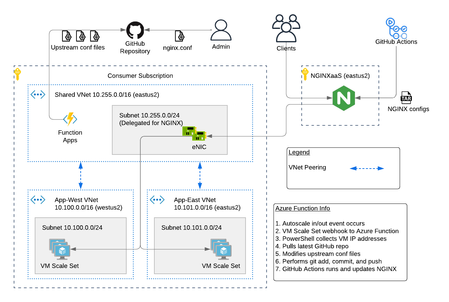
The F5 NGINXaaS for Azure offering recently announced general availability. Trust me...I've been using it and having fun! In this article, I will show you an example hub and spoke architecture using GitHub Actions and Azure Functions to automate NGINX configurations. As a bonus, I have code on GitHub that you can use to deploy this example. Topics Covered: NGINXaaS for Azure Architecture Explained The NGINXaaS for Azure architecture consists of an F5 subscription as well as customer subscription. F5 subscription - hidden from user, NGINX Plus instances, control plane, data plane Customer subscription - eNICs from VNet Injection, customer network stack, customer workloads F5 Subscription The NGINXaaS offering creates NGINX Plus instances and other related components like NGINX control plane and data plane resources in the F5 subscriptions. These items are not visible to the end user, and therefore result in the operational tasks of upgrades and scaling being managed by the NGINXaaS offering instead of the user. Each NGINX deployment, like other Azure services, is regional in nature. If you need to deploy NGINX closer to the client, then this will require multiple NGINX deployments (ex. westus2, eastus2). Each NGINX deployment will have a unique listener address. You can then use DNS to send clients to an NGINX deployment in the nearest region. Here is an example diagram. Customer Subscription The customer subscription has items like network stacks, Key Vaults, monitoring, application workloads, and more. The NGINX deployment automatically creates ethernet NICs (eNICs) in the customer subscription using VNet Injection and subnet delegation. The eNICs are deployed inside their own Azure Resource Group. They receive IP addressing from the customer VNet and are indeed visible by the user. However, there is no management needed with the eNICs because they are part of the NGINX deployment. Note: In my testing during public preview, I have noticed that Azure lets you manually remove subnet delegation for the NGINX service. Warning...do NOT do this. It will break traffic flow. Hub and Spoke Architecture You can easily make a hub and spoke design with NGINX in the mix using VNet peering. This is a great use case when required to use a shared NGINX deployment across different VNets, environments, or scaling workloads across multiple regions. Recall from earlier that an NGINX deployment will automatically create eNICs in the customer subscription. Therefore, you can control the entry point into the customer environment and the traffic flows. For example, configuring NGINX to use a customer shared VNet with peering gives you a hub and spoke design such as the picture below. This results in the NGINX eNICs being deployed into a customer Shared VNet (hub). Meanwhile the customer places workloads into their own VNets (spokes). Demo Code If this is the first time deploying NGINXaaS for Azure in your subscription, then you will need to subscribe to it in the marketplace. Search for “F5 NGINXaaS for Azure” in marketplace or follow this link Select F5 NGINXaaS for Azure and choose "Public Preview" and subscribe Time to play with code! Click the link below and review the README to deploy the demo example. There are prerequisites to follow. For example, you need to have a GitHub repository that stores the NGINX configuration files. You also need to have an Azure Key Vault and secret containing your GitHub access token. These are explained in the README. GitHub repo - F5 NGINXaaS for Azure Deployment with Demo Application in Multiple Regions After the deployment is done, you have a few options on how to handle NGINX configurations. I will share examples in future articles, but for now go ahead and explore on your own. Refer to the NGINXaaS for Azure documentation "NGINX Configuration" to get started. Summary This article gives an example architecture for deploying the NGINXaaS for Azure offering. I shared details on the different NGINX components, and I also shared demo code to help you explore the solution on your own! Contact us with any questions or requirements. We would love to hear from you! Resources DevCentral Series - F5 NGINXaaS for Azure F5 NGINXaaS for Azure Docs Blog Introducing F5 NGINXaaS for Azure3.8KViews6likes2CommentsVIPTest: Rapid Application Testing for F5 Environments
VIPTest is a Python-based tool for efficiently testing multiple URLs in F5 environments, allowing quick assessment of application behavior before and after configuration changes. It supports concurrent processing, handles various URL formats, and provides detailed reports on HTTP responses, TLS versions, and connectivity status, making it useful for migrations and routine maintenance.1.3KViews5likes2CommentsApplication Programming Interface (API) Authentication types simplified
API is a critical part of most of our modern applications. In this article we will walkthrough the different authentication types, to help us in the future articles covering NGINX API Connectivity Manager authentication and NGINX Single Sign-on.4.4KViews5likes0Comments
How to deploy NGINX App Protect WAF on the NGINX Ingress Controller using argoCD
Overview The NGINX App Protect WAF can be deployed as an add-on within the NGINX Ingress Controller, making the two function in tandem as a WAF armed with a Kubernetes Ingress Controller. This repo leverages argoCD as a GitOps continuous delivery tool to showcase an end-to-end example of how to use the combo to frontend a simple Kubernetes application. As this repo is public facing, I am also using a tool named 'Sealed-Secrets' to encrypt all the secret manifests. However, this is not a requirement for deploying either component. I will go through argoCD and Sealed-Secrets first as supporting pieces and then go into NGINX App Protect WAF itself. Please note that this tutorial is applies to the NGINX Plus-based version of NGINX Ingress Controller. If you aren’t sure which version you’re using, read the blog A Guide to Choosing an Ingress Controller, Part 4: NGINX Ingress Controller Options. argoCD If you do not know argoCD, I strongly recommend that you check it out. In essence, with argoCD, you create an argoCD application that references a location (e.g., Git repo or folder) containing all your manifests. argoCD applies all the manifests in that location and constantly monitors and syncs changes from that location. e.g., if you made a change to a manifest or added a new one, after you did a Git commit for that change, argoCD picks it up and immediate applies the change within your Kubernetes. The following screenshot taken from argoCD shows that I have an app named 'cafe'. The 'cafe' app points to a Git repo where all manifests are stored. The status is 'Healthy' and 'Synced'. It means that argoCD has successfully applied all the manifests that it knows about, and these manifests are in sync with the Git repo. The cafe argoCD application manifest is shown here. For this repo, all argoCD application manifests are stored in the bootstrap folder. To add the Cafe argoCD application, run the following, kubectl apply -f cafe.yaml Sealed Secrets When Kubernetes manifests that contain secrets such as passwords and private keys, they cannot simply be pushed to a public repo. With Sealed-Secrets, you can solve this problem by sealing those manifests files offline via the binary and then push them to the public repo. When you apply the sealed secret manifests from the public repo, the sealed-secrets component that sits inside Kubernetes will decrypt the sealed secrets and then apply them on the fly. To do this, you must upload the encryption key into Kubernetes first. Please note that I am only using sealed secrets so I can push my secret manifests to a public repo, for the purpose of this demo. It is not a requirement to install NGINX App Protect WAF. If you have a private repo, you can simply push all your secret manifests there and argoCD will then apply them as is. The following commands set up sealed secrets with my specified certificate/key in its own namespace. export PRIVATEKEY="dc7.h.l.key" export PUBLICKEY="dc7.h.l.cer" export NAMESPACE="sealed-secrets" export SECRETNAME="dc7.h.l" kubectl -n "$NAMESPACE" create secret tls "$SECRETNAME" --cert="$PUBLICKEY" --key="$PRIVATEKEY" kubectl -n "$NAMESPACE" label secret "$SECRETNAME" sealedsecrets.bitnami.com/sealed-secrets-key=active To create a sealed TLS secret, kubectl create secret tls wildcard.abbagmbh.de --cert=wildcard.abbagmbh.de.cer --key=wildcard.abbagmbh.de.key -n nginx-ingress --dry-run=client -o yaml | kubeseal \ --controller-namespace sealed-secrets \ --format yaml \ > sealed-wildcard.abbagmbh.de.yaml NGINX App Protect WAF The NGINX App Protect WAF for Kubernetes is a NGINX Ingress Controller software security module add-on with L7 WAF capabilities. It can be embedded within the NGINX Ingress Controller. The installation process for NGINX App Protect WAF is identical to NGINX Ingress Controller, with the following additional steps. Apply NGINX App Protect WAF specific CRD's to Kubernetes Apply NGINX App Protect WAF log configuration (NGINX App Protect WAF logging is different from NGINX Plus) Apply NGINX App Protect WAF protection policy The official installation docs using manifests have great info around the entire process. This repo simply collated all the necessary manifests required for NGINX App Protect WAF in a directory that is then fed to argoCD. Image Pull Secret With the NGINX App Protect WAF docker image, you can either pull it from the official NGINX private repo, or from your own repo. In the former case, you would need to create a secret that is generated from the JWT file (part of the NGINX license files). See below for detail. To create a sealed docker-registry secret, username=`cat nginx-repo.jwt` kubectl create secret docker-registry private-registry.nginx.com \ --docker-server=private-registry.nginx.com \ --docker-username=$username \ --docker-password=none \ --namespace nginx-ingress \ --dry-run=client -o yaml | kubeseal \ --controller-namespace sealed-secrets \ --format yaml \ > sealed-docker-registry-secret.yaml Notice the controller namespace above, it needs to match the namespace where you installed Sealed-Secrets. NGINX App Protect WAF CRD's A number of NGINX App Protect WAF specific CRD's (Custom Resource Definition) are required for installation. They are included in the crds directory and should be picked up and applied by argoCD automatically. NGINX App Protect WAF Configuration The NGINX App Protect WAF configuration includes the followings in this demo: User defined signature NGINX App Protect WAF policy NGINX App Protect WAF log configuration This user defined signature shows an example of a custom signature that looks for keyword apple in request traffic. The NGINX App Protect WAF policy defines violation rules. In this case it blocks traffic caught by the custom signature defined above. This sample policy also enables data guard and all other protection features defined in a base template. The NGINX App Protect WAF log configuration defines what gets logged and how they look like. e.g., log all traffic versus log illegal traffic. This repo also includes a manifest for syslog deployment as a log destination used by NGINX App Protect WAF. Ingress To use NGINX App Protect WAF, you must create an Ingress resource. Within the Ingress manifest, you use annotations to apply NGINX App Protect WAF specific settings that were discussed above. apiVersion: networking.k8s.io/v1 kind: Ingress metadata: name: cafe-ingress annotations: kubernetes.io/ingress.class: "nginx" appprotect.f5.com/app-protect-policy: "nginx-ingress/dataguard-alarm" appprotect.f5.com/app-protect-enable: "True" appprotect.f5.com/app-protect-security-log-enable: "True" appprotect.f5.com/app-protect-security-log: "nginx-ingress/logconf" appprotect.f5.com/app-protect-security-log-destination: "syslog:server=syslog-svc.nginx-ingress:514" The traffic routing logic is done via the followings, spec: ingressClassName: nginx # use only with k8s version >= 1.18.0 tls: - hosts: - cafe.abbagmbh.de secretName: wildcard.abbagmbh.de rules: - host: cafe.abbagmbh.de http: paths: - path: /tea pathType: Prefix backend: service: name: tea-svc port: number: 8080 - path: /coffee pathType: Prefix backend: service: name: coffee-svc port: number: 8080 Testing Once you added both applications (in bootstrap folder) into argoCD, you should see the followings in argoCD UI. We can do a test to confirm if NGINX App Protect WAF routes traffic based upon HTTP URI, as well as whether WAF protection is applied. First get the NGINX Ingress Controller IP. % kubectl get ingress NAME CLASS HOSTS ADDRESS PORTS AGE cafe-ingress nginx cafe.abbagmbh.de x.x.x.x 80, 443 1d Now send traffic to both '/tea' and '/coffee' URI paths. % curl --resolve cafe.abbagmbh.de:443:x.x.x.x https://cafe.abbagmbh.de/tea Server address: 10.244.0.22:8080 Server name: tea-6fb46d899f-spvld Date: 03/May/2022:06:02:24 +0000 URI: /tea Request ID: 093ed857d28e160b7417bb4746bec774 % curl --resolve cafe.abbagmbh.de:443:x.x.x.x https://cafe.abbagmbh.de/coffee Server address: 10.244.0.21:8080 Server name: coffee-6f4b79b975-7fwwk Date: 03/May/2022:06:03:51 +0000 URI: /coffee Request ID: 0744417d1e2d59329401ed2189067e40 As you can see from above, traffic destined to '/tea' is routed to the tea pod (tea-6fb46d899f-spvld) and traffic destined to '/coffee' is routed to the coffee pod (coffee-6f4b79b975-7fwwk). Let us trigger a violation based on the user defined signature, % curl --resolve cafe.abbagmbh.de:443:x.x.x.x https://cafe.abbagmbh.de/apple <html><head><title>Request Rejected</title></head><body>The requested URL was rejected. Please consult with your administrator.<br><br>Your support ID is: 10807744421744880061<br><br><a href='javascript:history.back();'>[Go Back]</a></body></html> Finally, traffic violating the XSS rule. curl --resolve cafe.abbagmbh.de:443:x.x.x.x 'https://cafe.abbagmbh.de/tea<script>' <html><head><title>Request Rejected</title></head><body>The requested URL was rejected. Please consult with your administrator.<br><br>Your support ID is: 10807744421744881081<br><br><a href='javascript:history.back();'>[Go Back]</a></body></html> Confirming that logs are received on the syslog pod. % tail -f /var/log/message May 3 06:30:32 nginx-ingress-6444787b8-l6fzr ASM:attack_type="Non-browser Client Abuse of Functionality Cross Site Scripting (XSS)" blocking_exception_reason="N/A" date_time="2022-05-03 06:30:32" dest_port="443" ip_client="x.x.x.x" is_truncated="false" method="GET" policy_name="dataguard-alarm" protocol="HTTPS" request_status="blocked" response_code="0" severity="Critical" sig_cves=" " sig_ids="200000099 200000093" sig_names="XSS script tag (URI) XSS script tag end (URI)" sig_set_names="{Cross Site Scripting Signatures;High Accuracy Signatures} {Cross Site Scripting Signatures;High Accuracy Signatures}" src_port="1478" sub_violations="N/A" support_id="10807744421744881591" threat_campaign_names="N/A" unit_hostname="nginx-ingress-6444787b8-l6fzr" uri="/tea<script>" violation_rating="5" vs_name="24-cafe.abbagmbh.de:8-/tea" x_forwarded_for_header_value="N/A" outcome="REJECTED" outcome_reason="SECURITY_WAF_VIOLATION" violations="Illegal meta character in URL Attack signature detected Violation Rating Threat detected Bot Client Detected" json_log="{violations:[{enforcementState:{isBlocked:false} violation:{name:VIOL_URL_METACHAR}} {enforcementState:{isBlocked:true} violation:{name:VIOL_RATING_THREAT}} {enforcementState:{isBlocked:true} violation:{name:VIOL_BOT_CLIENT}} {enforcementState:{isBlocked:true} signature:{name:XSS script tag (URI) signatureId:200000099} violation:{name:VIOL_ATTACK_SIGNATURE}} {enforcementState:{isBlocked:true} signature:{name:XSS script tag end (URI) signatureId:200000093} violation:{name:VIOL_ATTACK_SIGNATURE}}]}" Conclusion The NGINX App Protect WAF deploys as a software security module add-on to the NGINX Ingress Controller and provides comprehensive application security for your Kubernetes environment. I hope that you find the deployment simple and straightforward.4.8KViews5likes0CommentsKnowledge sharing: Containers, Kubernetes, Openshift, F5 Container Connector, NGINX Ingress
For anyone interested about the free traning for "F5 Container Connector for Kubernetes" or "F5 OpenShift Container Integration" at "LearnF5". For NGINX being installed in Kubernetes there is enough info but for F5 Contaner Connector/Container Ingress Services there is not so much: https://docs.nginx.com/nginx-ingress-controller/f5-ingresslink/ https://www.nginx.com/products/nginx-ingress-controller/ https://community.f5.com/t5/technical-articles/better-together-f5-container-ingress-services-and-nginx-plus/ta-p/280471 F5 Devcentral also has youtube channel with usefull info: https://www.youtube.com/c/devcentral If you don't have good knowledge about containers and kubernetes then first check the links below. For Docker containers in youtube you will find a lot of good training for example: you need to learn Kubernetes RIGHT NOW!! - YouTube Docker Tutorial for Beginners [FULL COURSE in 3 Hours] - YouTube Docker overview | Docker Documentation The same is true for Kubernetes and they have a free test lab on their site: Learn Kubernetes Basics | Kubernetes you need to learn Docker RIGHT NOW!! // Docker Containers 101 - YouTube Red Hat has some free training and IBM provides some free labs for Containers, Kubernetes, Openshift etc.: Training and Certification (redhat.com) IBM CloudLabs: Free, Interactive Kubernetes Tutorials | IBM Red Hat OpenShift Tutorials | IBM1.2KViews5likes2Comments