awaf
21 TopicsProtecting Your MCP Server From Secret Exposure With F5 BIG-IP Advanced WAF's Data Guard
The Threat of Token Mismanagement in MCP Servers Tokens and credentials serve as the backbone for authentication and authorization in MCP servers, yet their mishandling presents a significant security risk. Developers sometimes store these secrets insecurely, embedding them in configuration files or leaving them easily accessible. The inherent features of MCP—such as long-lived sessions, stateful agents, and persistent context—add complexity to this risk. Tokens can inadvertently be stored, retrieved, or indexed through user prompts, system recalls, or log inspections. This introduces a new vulnerability: contextual secret leakage, where the model or protocol layer unknowingly becomes a repository for sensitive information. Attackers can exploit this vulnerability to extract and misuse these exposed credentials, gaining unauthorized access production systems. Mitigating OWASP MCP01 with F5 BIG-IP Advanced WAF Data Guard Recognizing the gravity of this issue, OWASP has officially categorized Token Mismanagement and Secret Exposure in MCP servers under the MCP01 vulnerability class. This classification highlights the widespread nature of the threat and underscores the urgent need for tools like F5 BIG-IP Advanced WAF’s Data Guard. Although the long term solution is to correct token mismanagement at the backend servers, the F5 BIG-IP Advanced WAF’s Data Guard offers a quick and easy way to mitigate this vulnerability. By sanitizing server responses, Data Guard ensures that sensitive data—such as tokens—is never inadvertently exposed to unprivileged users. In the following video, we will see how token mismanagement can result in system error logs containing sensitive data. Subsequently, we demonstrate how we can utilize BIG-IP Advanced WAF Data Guard to sanitize these responses, thus mitigating OWASP MCP 01: Token Mismanagement & Secret Exposure. For more information on F5 Data Guard, click here. For a list of OWASP MCP Top 10 vulnerabilities, click here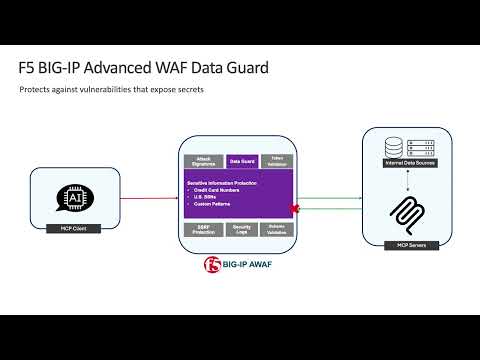 18Views0likes0Comments
AWAF Access Profile, missing a configurable JWKS URL - RFE
The AWAF Access Profile functionality (introduced in 17.5) is potentially a great feature, but IMHO it (still) lacks an essential function in the "Verify Digital Signature" part: an automatic refresh/rotation interval to periodically fetch and update the JWKS from a specified URL. Currently, it only supports the upload of a file containing the key. Not enough for a mature solution, which supports enterprise deployments (OIDC integrations with such as Entra ID, Okta, etc.) Note: I do know that some experts here builded some automation to work around this lacking feature. Great stuff. Anyway, as I though the effort for the F5 devs should not be huge (they have already some code doing that in their APM OIDC auto-discovery function), I've opened a support case/RFE and got one back => RFE ID2294753: AWAF Access profile Verify Digital Signature to support dynamic JWKS retrieval via a configurable URL endpoint Don't hesitate to open a support case to get it bound to that RFE, the more we are the higher priority will be assigned to implement it (hopefully). 😀 Alexandre117Views1like3CommentsProtecting your MCP Server from AI Vulnerabilities with F5 BIG-IP Advanced WAF JSON Schema Validation
This demo shows how a JSON schema can inform the BIG-IP how requests should be expected to come in. The F5 BIG-IP Advanced WAF can mitigate MCP server vulnerabilities by sanitizing parameters in requests allowing them to pass through to the MCP server. This demo covers two vulnerabilities from OWASP MCP Top 10. For more info on the OWASP MCP Top 10 vulnerabilities, click here. MCP02: Privilege Escalation via Scope Creep Scope creep can occur intentionally for convenience or accidentally through configuration drift allowing an agent to gain broad or administrative privileges to our MCP Server. As MCP servers connect to multiple systems, scope increases can result in a high-impact attack surface. Due to the nature of AI agents, an over-privileged agent can make unlabeled changes, trigger deployments, or access sensitive data without human review. For more information on OWASP MCP02: Privilege Escalation via Scope Creep, click here. MCP03: Tool Poisoning Schema poisoning occurs when an adversary tampers with the contract or schema definitions that govern agent-to-tool interactions in an MCP ecosystem. Schemas define the shape, types, and semantics of requests and responses — effectively the “language” agents use to call tools. If an attacker can modify a schema (or its metadata) so that a benign-sounding operation maps to a destructive action, agents that trust and follow the schema may inadvertently execute dangerous commands. Schema attacks are a supply-chain style compromise: the attacker doesn’t exploit a code bug directly, they change the contract so legitimate agents behave incorrectly while passing superficial validation. For more information on OWASP MCP03: Tool Poisoning, click here. Mitigating MCP02 and MCP03 Enforcing JSON Schema validation at the BIG-IP can mitigate requests that may allow excessive privilege to resources on our MCP server. This method gives security admins more control over how their MCP server can be used. In this video, we will demonstrate how an attacker can exploit MCP02 and MCP03 to gain access to resources unintended for them. Subsequently, we use JSON Schema validation to inform the F5 BIG-IP Advanced WAF's security policy on how a security admin would intend those resources to be accessed. Check out the video below for a demonstration of how the F5 BIG-IP's JSON Schema validation can mitigate MCP 02 and MCP 03. 159Views2likes0Comments
Error in AWAF v17.1 DoS Dashboard
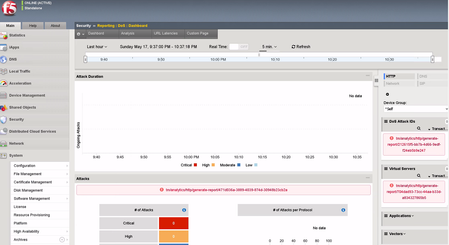
Hi all, I'm running v17.1.3.2 and provisioned for AWAF and LTM. After testing the DoS attack, the event had been detected. The issue is when I click on the Attack ID from the DoS Event Reporting, directing to DoS Dashboard, the Dashboard is showing the errors below and nothing is shown on the Attack Duration widget. Tested this with previous version v17.1.1.3, it shows exactly the same errors. Anyone had experienced this for AWAF with version 17.1? Are there any solutions for this. Thank you.276Views0likes1Comment
Recommendation for Adv. Lab
Hi Everyone, I'm relatively new to F5 BIG-IP and want to improve my hands-on skills. I have a chance to build a good lab, but I'm struggling to find real-world use cases and troubleshooting scenarios. Currently, I can only run basic tests with DVWA, but I want to simulate a complex environment. Could you recommend any resources (videos, docs, or lab guides or anything can help) specifically for LTM, AWAF, DNS and APM, use-case scenarios, troubleshooting exercises, architectures etc. Any guidance to help me bridge the gap between basic setup and professional practice would be greatly appreciated. Thanks in advance!545Views0likes8CommentsF5 AWAF/ASM learning only from Trusted traffic?
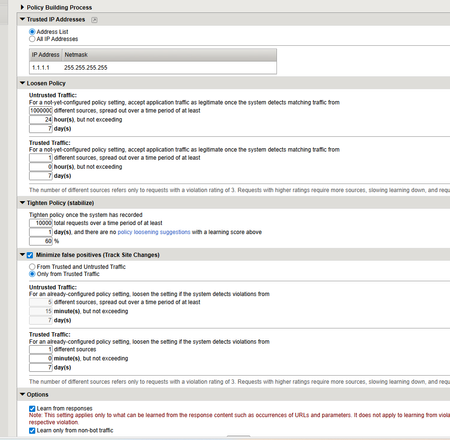
I found this nice option "Only from Trusted Traffic" for the Policy Builder but this is seems to relevant only after the learning period has passed. I did increase the thresholds to the max possible value 1000000000 under "Loosen Policy" for "Untrusted Traffic "as to never learn from not trusted IP addresses in the initial learning period that is 7 days. I think that is the correct way ? I would have been nice to have a global option or option under "Loosen Policy" to learn from "Only from Trusted Traffic" like in "Track Site ".220Views0likes2CommentsF5 AWAF/ASM Fails to update OpenAPI file through REST-API
Hello Everyone, I followed Update an existing API security policy with a newer swagger file but this only works when creating a new policy not upgrading an existing one when you change the openapi/swagger file. {"isBase64":false,"executionStartTime":"2025-12-03T09:41:52Z","status":"FAILURE","lastUpdateMicros":1.764754912e+15,"username":"niki","kind":"tm:asm:tasks:import-open-api:import-open-api-taskstate","selfLink":"https://localhost/mgmt/tm/asm/tasks/import-open-api/sC_gfgZ2fnY4mbMDkh0ApA?ver=17.1.1","policyName":"my-openapi-policy","filename":"openapi.json","endTime":"2025-12-03T09:41:52Z","apiType":"swagger","id":"sC_gfgZ2fnY4mbMDkh0ApA","startTime":"2025-12-03T09:41:52.009027Z","result":{"message":"Could not add the Policy '/Common/my-openapi-policy'. Failed validating value '/Common/my-openapi-policy' for fullPath: The valueniki@master-1:~Solved380Views0likes7CommentsF5 AWAF/ASM ASM_RESPONSE_VIOLATION event seem to not trigger on 17.1.x
Hey Everyone, The F5 AWAF/ASM ASM_RESPONSE_VIOLATION event seem to not trigger on 17.1.x. I have enabled irules support the waf policy and I tested in Normal and Compatibility mode but no luck. The other events trigger without an issue. I created 2 custom signatures for response and request match and request match one has no issues so it seems a bug to me. This can be easily tested with the below irule that logs to /var/log/asm when ASM_REQUEST_DONE { log local3. "test request" } when ASM_RESPONSE_VIOLATION { log local3. "test response" } The custom response signature is in the policy to just trigger alarm. I tried string or regex match " (?i)failed " PCRE-style as F5 15.x and up are using this regex style.309Views0likes2Comments
Is it possible to select ASM BoT profile from irule?
Hi. . Is it possible to select BoT profile from irule? . Concept is we have different set of IP which need to allow "some" BoT type. That why we can't use whitelist IP in BoT profile because it will allow all BoT type. So We want to use iRule to check if it IP A > use BoT profile which have some exception, but if all other IP > use normally BoT profile. . when HTTP_REQUEST { # Check IP and select BoT profile from that if { [IP::client_addr] eq "A" } { ASM::enable allow_some_bot_profile } else { ASM::enable normally_bot_profile } } ps. I didn't see any document about how to select BoT profile. So I'm not sure if ASM::enable can do that.278Views0likes3Comments