Forum Discussion

Alexander_01_13 Nimbostratus
Sep 07, 2013NimbostratusUsing the iapp for sharepoint: Documents can not be edited
Hi there,
We provide access to sharepoint 2010 via the bigip, version 11.3 (soon will be updated). For configuration we used the iapp.
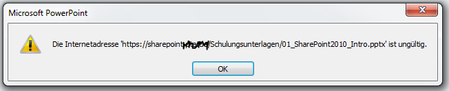
Everything seems to work fine, but editing office docu...

mikeshimkus_111
Sep 09, 2013Historic F5 Account
FYI, the v11.4 version of the template sets the persistent cookie option by default. In v11.3, you would need to disable strictness on the iApp and set it manually (if you are using the on-box template; the version of DevCentral for v11.3 and earlier will set it automatically as well).
 Carlos_13563Nov 06, 2013
Cirrus
We had the same problem with users trying to edit a document inside Sharepoint and when they click edit for a MS Word document, Word would open, but would not open the doc. After we enable Persistent Cookie we can open the document, but it's asking to authenticate again, that we do and we can open the document with no problems. Is there a way to not prompt authentication again?- mikeshimkus_111Nov 06, 2013Historic F5 AccountHave you added the SharePoint site to the trusted sites list in IE, and set the User Authentication>Logon setting for that zone to "Automatic logon with current user name and password"? If that doesn't help, there is a known bug with the Office clients not honoring persistent cookies. You would need to take a tcpdump or other traffic capture to confirm that the clients aren't sending the cookies. F5 is monitoring that bug and will update the documentation ASAP.


Recent Discussions
Related Content
DevCentral Quicklinks
* Getting Started on DevCentral
* Community Guidelines
* Community Terms of Use / EULA
* Community Ranking Explained
* Community Resources
* Contact the DevCentral Team
* Update MFA on account.f5.com
Discover DevCentral Connects