Forum Discussion

 Nimbostratus
Setting up F5 5000 in Lab
Hi Experts,
I have an f5 5000 and I want to use it in my lab. I can get into it via the AOM and have an IP. The password is the default one. So that is good. But the browser gets nothing when I go https://<IP>. SSH to the IP gets me an AOM menu. How do I get to the CLI shell or the web menu.?
I am more interested in getting to the management of the box then making it function as a load balancer. cli and snmp access is all I am interested in immediately.
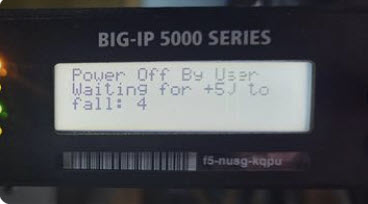
Below is the screen I get to from cli and from console. I never get anything but, number sequence in the bottom right hand corner. f5-23-26-30 are the numbers. Had to video it and slow it down to see the numbers.
Any help would be appreciated.
Thank you in advance.
5 Replies
You will need to connect to the MGMT IP to connect to the GUI on HTTPS (this is a separate IP to the AOM IP).
On the front LCD display of the hardware appliance, you should be able to navigate to the System menu and verify / configure the MGMT IP.
https://techdocs.f5.com/kb/en-us/products/big-ip_ltm/manuals/product/platform-b5000/2.html




Recent Discussions
Related Content
* Getting Started on DevCentral
* Community Guidelines
* Community Terms of Use / EULA
* Community Ranking Explained
* Community Resources
* Contact the DevCentral Team
* Update MFA on account.f5.com