Forum Discussion

 Cirrocumulus
ASM L7 DoS email alert
- Jun 28, 2023
Hi Nishal_Rai ,
For your inquiry about how bigip AWAD L7 DDoS use the rate-limit prevention.....
Well ,
First you have two concepts >>> Detection interval & historical interval
Detection interval >>> Avg of TPS in last 10 sec
Historical interval >>> Avg of TPS in last 1 hour ( Which should be the Legitimate TPS )
Both of intervals updated each 10 sec.
Bigip Rate-limit by using simple equation : ( Historical intrval TPS + Configured threshold ) /2
For Example :
If you configured absolute threshold >> 200 TPS ( Like diagram you have sent above ).
and Let we assume historical intraval ( AVG TPS within hour ) >>> 100 TPS
So Bigip will rate-limit to 150 TPS.
Bigip will rate-limit if the TPS exceeded the absolute threshold , or if the ( Relative threshold + at least TPS ) violated.
> btw , you can review it from logs when attack started you can observe the Limit which bigip used when this attack started.
>>>>>>>>>>>>>>>>>>>>>>>>>>>>>>>>>>>>>>>>>>>>>>>>>>>>>>>>>>>>>>>>>>>>>>>>>>>>>>>>>>>>>>
What is the Rate-limit mechanism , I have tested it before I will tell you my findings >>>
you have an option to record traffic in your AWAF DDOS profile , Bigip starts to record traffic ( Taking tcpdump ).
while looking at recorded Packet capture ( when Attack started ) you will find much traffic receiving RST Packets from Bigip and some samples receive normal responses ( 200 OK ) therefore when using ( Rate-limit ) as a prevension method >>> much traffic will be Reseted from Bigip ip while some of these requests will path through bigip normally.
The Key difference between ( Block ALL and Rate limit ) >>> Block all will show you at Recorded Packet capture file when attack start >> All Traffic from specific source are reseted ( RST Flag enabled ) no traffic Path through bigip , in the other hand ( Rate-limit ) Like I discribed above.
Let me know if you have further queries , I will be happy to think with you ^_^

Hi Nishal_Rai ,
>> For your first Question : about Logs regarding L7Dos >>>
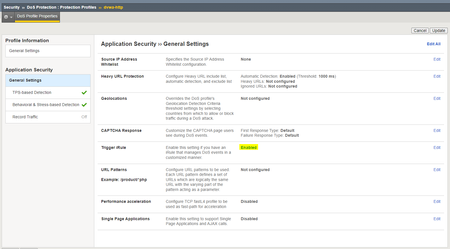
I see that you are using CS ( Client side integrity Defense ) as a prevention/mitigation method.
But using this Prevention method doesn't trigger your event "IN_DOSL7_ATTACK"
According this : https://clouddocs.f5.com/api/irules/IN_DOSL7_ATTACK.html
So First try to change it to rate limit for example , and monitor again.
>> For your second Question about Behavioral DoS :
Well ,
Behavioral method : is an intelligent way to identify and mitigate DOS Attacks by creating good baseline from normal traffic ( users normal traffic ) , you should give your bigip sufficient time to create it's baseline of learning the good traffic ( Not DoS attack ) one.
use this command to monitor your bigip and making sure that Bigip ip creates the baseline well from traffic :
Should be like this >>>
admd -s vs./Common/vs_hackazon_http+/Common/hackazon_bados.info.learning
Where ( vs_hackazon_http is the virtual server & hackazon_bados is the Dos profile that Behavioral Dos Enabled in)
For more details for baiseline , Please Follow this Article:
https://clouddocs.f5.com/training/community/ddos/html/class7/bados/module1.html
After that you will change the enforcement mode to Blocking in ( Behavioral & stress based ) , try your Dos Traffic against Bigip ( don't forget to attach your Behaioral Dos profile to the virtual server that you test the attack against )
Behaivoral Detection & mitigation statge :
- when bigip feel upnormal patterns of traffic violates it's learnt baseline , and observe the latency increases in Servers >>> it starts to create signatures for this attack patterns and start to slow down/ rate limiting the requests according to the used mitigation technique ( Standard protection , Aggressive protection ....)
Note ( Use the Help Tab in bigip GUI to know the differences between Protection methods in Behavioral DoS ) - Okay , What is the role of Signature and what are the parameters which these signatures depend on :
Bigip Behavioral Take some headers from the violating/attack requests "upnormal ones I mean " and store it in a signature , these headers are ANDed with each other within a single signature to identify the attacked request. >>> and these are the parameter that you asked about. - After that >> if you are using the "use approved signature only " enabled check box >>> That's mean you should open the signture and review it's headers and inforamtion to approve it ( if you feel that is an attack request )or disable it ( if you feel it's a normal request and valid)
- After approving signatures >>> Any request match any signature will be blocked immediately and quickly , so this keeps your servers safe and powerful also cleaned from attacking requests.
- If you disable / uncheck "use approved signature only" Bigip will use the created signatures immediately without your approval , and will start to block any request matchs any signature.
That's all , you can monitor the DoS >> by viewing Reporting / DOS Visibility or navigate ( Statistics >> Dashboad and choose Behavioral Dos if you expect a live attack )
I hope I explained Behavioral Dos well and use this Article as a starting point :
Thanks and Goodluck 🙂
- Nikoolayy1Jun 27, 2023
MVP
Mohamed could be right about the client side integrity. You can still use javascript to check the users if there is no API traffic the virtual server but with the Bot profile feature.
- Nishal_RaiJun 28, 2023
Hello Mohamed_Ahmed_Kansoh,
Thank for the answer and yes, you do have answered the addressed queries.
However, regarding the rate limit mitigation of the DoS profile - "How does this rate limiting mitigation apply once the DoS has been triggered?Is it layer 4 or layer 7 based rate-limiting? If its based on layer 4 (TCP) then what will be its approach like will it simply drop TCP packets (no ACK to the client) or drop the whole TCP connection?
Since not much is described in the documentation about the rate-limiting of the traffic once the DoS profile has been triggered and before such implementation can have negative impact on the false-positive cases (the legitimate users request on the window period of DoS profile triggered). So just want to be know the impact before the implementation of rate-limiting as the mitigation.
Nikoolayy1, on the bot defense profile if DoS mitigation mode is enabled then do I also need to enable client side integrity defense on the DoS protection profile?
or the clide side integrity defense provide different set of javascript challenges and approach to verify whether it's a maliciours or a legitimate users (browser or bot)?- Nikoolayy1Jun 28, 2023
The Bot Profile option I mentioned uses the same javascript check but it checks the users every time not only during DOS attack, so if you have API traffic this can be an issue (there is a way to stop the bot profile browser check for specific URLs as mentioned in https://community.f5.com/t5/technical-forum/why-does-the-local-traffic-policy-allow-bot-profile-to-be/td-p/302769 ) and "Verify After Access" is the safer one.
As I mentioned read https://my.f5.com/manage/s/article/K42323285
- Jun 28, 2023
Hi Nishal_Rai ,
For your inquiry about how bigip AWAD L7 DDoS use the rate-limit prevention.....
Well ,
First you have two concepts >>> Detection interval & historical interval
Detection interval >>> Avg of TPS in last 10 sec
Historical interval >>> Avg of TPS in last 1 hour ( Which should be the Legitimate TPS )
Both of intervals updated each 10 sec.
Bigip Rate-limit by using simple equation : ( Historical intrval TPS + Configured threshold ) /2
For Example :
If you configured absolute threshold >> 200 TPS ( Like diagram you have sent above ).
and Let we assume historical intraval ( AVG TPS within hour ) >>> 100 TPS
So Bigip will rate-limit to 150 TPS.
Bigip will rate-limit if the TPS exceeded the absolute threshold , or if the ( Relative threshold + at least TPS ) violated.
> btw , you can review it from logs when attack started you can observe the Limit which bigip used when this attack started.
>>>>>>>>>>>>>>>>>>>>>>>>>>>>>>>>>>>>>>>>>>>>>>>>>>>>>>>>>>>>>>>>>>>>>>>>>>>>>>>>>>>>>>
What is the Rate-limit mechanism , I have tested it before I will tell you my findings >>>
you have an option to record traffic in your AWAF DDOS profile , Bigip starts to record traffic ( Taking tcpdump ).
while looking at recorded Packet capture ( when Attack started ) you will find much traffic receiving RST Packets from Bigip and some samples receive normal responses ( 200 OK ) therefore when using ( Rate-limit ) as a prevension method >>> much traffic will be Reseted from Bigip ip while some of these requests will path through bigip normally.
The Key difference between ( Block ALL and Rate limit ) >>> Block all will show you at Recorded Packet capture file when attack start >> All Traffic from specific source are reseted ( RST Flag enabled ) no traffic Path through bigip , in the other hand ( Rate-limit ) Like I discribed above.
Let me know if you have further queries , I will be happy to think with you ^_^





Recent Discussions
Related Content
* Getting Started on DevCentral
* Community Guidelines
* Community Terms of Use / EULA
* Community Ranking Explained
* Community Resources
* Contact the DevCentral Team
* Update MFA on account.f5.com