sso
107 TopicsA Method for Auth and SSO
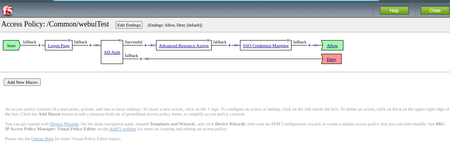
Recently, we discovered Cyberark has moved from the traditional HTML based auth page to the new JavaScript based. So, our client initiated sso method isn't working anymore. Webssso process could not identify the html form objects because there is no html form anymore. The new design relies on a bunch of JavaScripts which coordinates client browser to send requested data to be able to login. I never interested in JS and could not point out where the user credential comes into play either. I've found out another method to make SSO function work again. It is very basic and relies on the sideband method but i prefer to use http auth agent rather than sideband iRule. Since the "Http Auth" profile can store the http status code along with the cookies of the HTTP request we made, we can use it for basic jobs as "Sideband Http Requestor" Long story short, basically we sent crafted login request to auth page and it returns a couple of cookies[1] if credentials are valid. Then we sent those cookies to the client as a reponse. That is all. An iRule with two distict function is good enoug for this particular job. One function is to prepare json payload which we sent to the web service and the other one is parse the cookies from the response of the web service. You need a custom "HTTP Auth" profile. You can take a look at the below[2] as an example. HTTP Auth profile can be used only with http services not https. In order to use Http Auth profile for sending & receiving http messages to an https web service, you need to use a http2https virtual server which translates requests and responses. In my example[2] i sent http requests through a fake virtual server which is listening on "54.54.54.54:80" socket. The cyberark servers are attached in the pool behind this virtual server. I used this method for Grafana first around a year ago and it is still working. The grafana has similar login page which relies on JS. Here is my iRule: when CLIENT_ACCEPTED { ACCESS::restrict_irule_events disable } when ACCESS_POLICY_COMPLETED { if {[ACCESS::session data get {session.policy.result}] == "allow" } { log local0. "APM Session Started Successfuly in [ACCESS::session data get {session.user.sessionid}] for [ACCESS::session data get {session.logon.last.username}]" log local0. "APM DEBUG: Policy Complete Cookies: $respCookie_0 $respCookie_1 $respCookie_2" ACCESS::respond 302 Location "https://testpam.example.com/PasswordVault/v10/Accounts" "Connection" "close" "Set-Cookie" ${respCookie_0} "Set-Cookie" ${respCookie_1} "Set-Cookie" ${respCookie_2} } } when HTTP_REQUEST { if {[HTTP::has_responded]} { return } if {[string tolower [HTTP::path]] == "/logoff"} { set sid [ACCESS::session data get {session.user.sessionid}] log local0. "Logging out from [ACCESS::session data get {session.user.sessionid}] for [ACCESS::session data get {session.logon.last.username}]" HTTP::respond 302 noserver Location "https://testpam.example.com/PasswordVault/v10" "Connection" "close" "Set-Cookie" "CA11111=; expires=Thu, 01-Jan-1970 00:00:00 GMT; path=/PasswordVault/; secure; HttpOnly; SameSite=Strict" "Set-Cookie" "CA22222=; expires=expires=Thu, 01-Jan-1970 00:00:00 GMT; path=/PasswordVault/; secure; HttpOnly; SameSite=Strict" "Set-Cookie" "CA66666=; expires=Thu, 01-Jan-1970 00:00:00 GMT; path=/PasswordVault/; secure; HttpOnly; SameSite=Stric" ACCESS::session remove -sid $sid } } when ACCESS_POLICY_AGENT_EVENT { if {[ACCESS::policy agent_id] == "LoginSessionCreate" } { # Generate JSON payload to sent the Cyberark v10 set uname [ACCESS::session data get {session.logon.last.username}] set passwd [ACCESS::session data get -secure {session.sso.token.last.password}] log local0. "APM DEBUG: User: $uname : $passwd" set payload {{"username":"UUUU","password":"PPPP"}} set cred "UUUU $uname PPPP $passwd" set payload [string map "$cred" $payload] log local0. "APM DEBUG: Payload $payload" ACCESS::session data set session.custom.http.payload $payload } if {[ACCESS::policy agent_id] == "CookiePreperation" } { #### HTTP Auth #### if {([ACCESS::session data get {session.http.last.response_cookie}] != "") && ([ACCESS::session data get {session.http.last.response_status}] == 200) } { # HTTP Auth Succeed set cookies [ACCESS::session data get {session.http.last.response_cookie}] log local0. "APM DEBUG: Raw Cookies: $cookies" set cookies [string trimright [string map { \\r\\n @ } $cookies] "@"] set cookies [split $cookies '@'] log local0. "APM DEBUG: Cookies Now: $cookies" set listCount 0 foreach cookie $cookies { if {![string match CA* $cookie]} { continue } log local0. "APM DEBUG: listCount: $listCount Cookie: $cookie" set respCookie_${listCount} $cookie incr listCount } log local0. "APM DEBUG: Total listCount: $listCount RespCookie: $respCookie_0 $respCookie_1 $respCookie_2" } } } I also have attached a screenshot of the APM policy. In that APM policy the "GrafanaLogin" is the HTTP Auth agent. Logging lines in the iRule can be suppressed as per your needs. Hope this is helpful for someone. [1]: Cookie names are: "CA11111", "CA22222", "CA66666" [2]: apm aaa http /Common/CyberArk_Login { auth-type custom-post connection-timeout 3 content-type none custom-body "%{session.custom.http.payload}" form-action http://54.54.54.54/PasswordVault/api/login/ headers { header0 { name Content-Type value application/json } } request-timeout 5 success-match-type cookie success-match-value CA11111 } May the source be with you...107Views1like0Comments
SOLVED: sending IsCompliant, IsKnown and IsManaged via SAML (SSO)
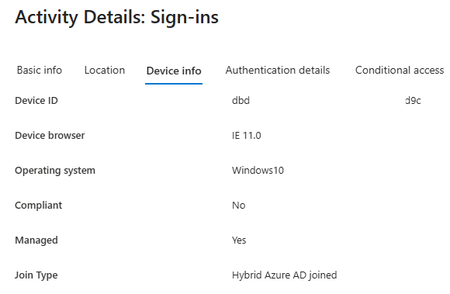
Background We have an EntraID (Azure/Microsoft365) SAML based VPN using the APM module and were keen to provide a different device pool to domain devices, rather than personal devices (BYOD). We noted that, in the EntraID logs, it included elements such as whether the device IsCompliant, IsKnown and/or IsManaged: Wrong step first We followed part of the exceptionally good video from Matthieu Dierick (https://www.youtube.com/watch?v=DBA84d4VJU8) in which he explains how to configure InTune to make the IsCompliant assertion and push a certificate onto the device to identify it.. and then the BIG-IP Edge client will send that certificate back to be used via an API call against InTune (even if EntraID isn't used for your APM authentication). To get the API bit to function we needed to follow the guidance in https://my.f5.com/manage/s/article/K00943512 But we aren't that far down the route with InTune and, without pushing that certificate, we got the error "Device ID was not found in session variables" (as explained in https://my.f5.com/manage/s/article/K93969130 ) To get working: Azure steps It seems exporting these variables isn't natively available through the GUI although there were some pointers available from Azure AD - SAML - Intune - ismanaged attribute - Microsoft Q&A In short, Navigate to: https://portal.azure.com/ Microsoft EntraID Under Manage > App registrations (this will default to "owned application") choose "all applications" tab Filter by the name of your SAML configuration Manage > Manifest Take a copy of the manifest incase you want to revert (note that it won't let you save it unless it can parse the input) Find the section "optional claims" and inject the following after any groups you pass back: "optionalClaims": { "accessToken": [], "idToken": [], "saml2Token": [ { "additionalProperties": [ "on_premise_security_identifier" ], "essential": false, "name": "groups", "source": null }, { "additionalProperties": [ ], "essential": true, "name": "is_device_managed", "source": null }, { "additionalProperties": [ ], "essential": true, "name": "is_device_compliant", "source": null }, { "additionalProperties": [ ], "essential": true, "name": "is_device_known", "source": null } ] }, To get working: APM steps In the visual policy editor you can now assign variables to those claims of the form: session.logon.last.isknown = mcget {session.saml.last.attr.name.http://schemas.microsoft.com/201 4/02/devicecontext/claims/isknown} session.logon.last.iscompliant = mcget {session.saml.last.attr.name.http://schemas.microsoft.com/201 4/09/devicecontext/claims/iscompliant} session.logon.last.ismanaged = mcget {session.saml.last.attr.name.http://schemas.microsoft.com/201 2/01/devicecontext/claims/ismanaged} So you can end up with a variable assignment box that looks like: (just be careful with copy/paste that it doesn't introduce spaces in the session variables) Then you can do a new general purpose > empty box with a branch rule evaluating: expr {[mcget {session.logon.last.ismanaged}] == "true"} Optionally you can record the output of these variables by adding a logging box with the entry: username=%{session.logon.last.username}, ismanaged=%{session.logon.last.ismanaged}, iscompliant=%{session.logon.last.iscompliant}, isknown=%{session.logon.last.isknown}451Views2likes6Comments
F5 APM 2FA through SMTP
Hello, We need to perform 2FA but by using F5 only, we don't have other MFA solutions like Duo, Google Authenticator,.... So can we use F5 to generate token and send it to the user using his email address, (So a token can be generated and by iRule sent to the user email address through SMTP?) Currently, we are using internal DB for users so inside it we can add user's email address Then, F5 APM verifies the token? Please provide your feedback and the configuration required to do that. We know that in VPE there is generate and validate token, so we need to use them, but only with SMTP, directly with F5 Also, it will be great if you can recommend a free or trial for 2FA solutions to be integrated with F5 APM340Views0likes8Commentsclient-initiated SSO issue
I’ve configured client-initiated SSO forms for different web applications, but I'm encountering two issues with two different virtual servers: 1) For the first virtual server, SSO authentication works fine, but the logout link doesn’t function. The APM profile doesn’t accept the URI /names.nsf/?Logout&Form=LogoutDone as a valid logout URI. Is there any workaround for this? 2) For the second virtual server, I don’t see APM submitting the POST request to the backend server. Is it mandatory to include an action field in the backend form? In passthrough mode, the log doesn’t show the "Submit Detection" either.Solved127Views0likes1Comment
APM with EntraID as idP / request signed
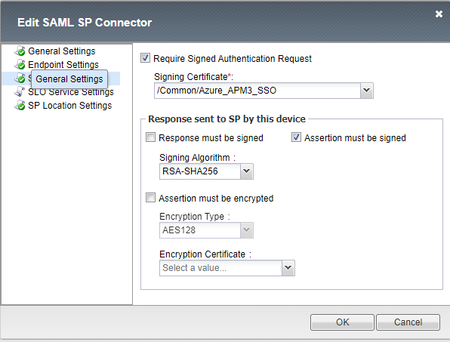
Hi experts. I need your help to solve an issue. I'm configuring a new enviroment with BIG-IP version 15.1.8.2 Build 0.0.17 Point Release 2. I have the APM works fine with SSO using EntraID (AzureAD) as idP. Now, I need to enable the request signed (Enforce signed SAML authentication requests - Microsoft Entra ID | Microsoft Learn). I generated the self signed certificate and import it on my app at Azure and my BIG-IP. I changed my config in Access > Federation > SAML Identity Provider and assigned my self signed certificate (pk included) to assign the request. But, I've received the below error by EntraID: Sign-in error code: 76021 Failure reason: The request sent by client is not signed while the application requires signed requests All attemps was made by browser (SSL VPN). Thank you.1.2KViews0likes4Comments
F5 BIG-IP password is hashed during Form based Client Initiated SSO
Hi, I'm having trouble setting up a seemingly simple SSO configuration for a portal. I have an initial logon page with AD authentication and an SSO credential mapping block to expose the user credentials in the session variables session.sso.token.last.username and session.sso.token.last.password. The problem is that when the password is injected into the app's login page, it is hashed (example: $CK$$XVGtyxu5Eni4DyNzJlVz1+UK/7NIy+00). I've also tried enabling the "secure" option in the form's configuration, but when it is enabled, the only password the app receives is "f5-sso-token". I will attach a screenshot below with the APM configuration. Thanks in advance.Solved235Views0likes1CommentOAuth SSO
Hi All, we'd like to secure the access to a backend portal with OAuth (F5 Authorization Server and F5 Client/Ressource Server). We aleady configured 2 Virtual Servers and 2 Access Profiles access profile 1 for the backend application (OAuth Client and Scope Agents) access profile 2 for the OAuth AS (Logon Page, LDAP Auth and OAuth AS Agent) The login and the OAuth (OIDC) works with the backend via id_token. Idea was to ask the user ONCE for his LDAP Credentials and then authorize the user in subsequent authorization requests from client applications WITHOUT asking for entering his credentials again. What we see in the session logs is, that the authorization server session always ends with "session deleted (oauth_finished)" once the authorization request has successfully ended, hence the users LDAP information is destroyed together with the "session deleted" Is it possible to get some kind of SSO so that the users credentials is stored in the client for subsequent authorization requests and that the logon page can make use those credentials without prompting the user to login manually again? Thanks Steffen706Views2likes3Comments
APM Portal Links SSO with Azure AD
Hi, We have an APM portal using AD authentication. We recently transitioned to using Azure AD MFA to log into it. This was done by following the solution to integrate APM with Azure AD using the bigIP as a SAML SP and works without issue. However, after logging into the portal and clicking on any of the links for the the various apps (which are also Azure AD integrated) the user must go through the login process with Azure AD all over again which is anyoing. Is there a way to somehow use the original SAML authentication from loging into the portal to seemlessly be logged into the various apps? Interestingly, once the user clicks on subsequent apps after the second login, they are logged in automatically so I believe it's able to use the session tokens stored in the browser for subsequent logins after the second login (but not after the initial log in to the portal).1.1KViews0likes3Comments
APM, Kerberos and SSO
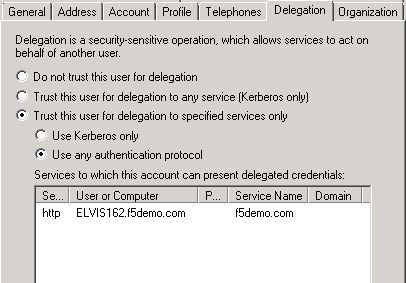
Hi, I was trying to setup SSO using APM Cookbook: Single Sign On (SSO) using Kerberos article. I am using VE with 12.0.0HF1. I have https vs with one member pool pointing to IIS server (IIS is runing on the same computer as AD). My VS has IP 10.128.10.6, it resolves to interent.f5demo.com (via DNS on AD), there is as well PTR record defined My AD (and KDC) has IP 10.128.10.2, it resolves to ad.f5demo.com, there is as well PTR record defined. On F5 both dig elvis162.f5demo.com and dig -x 10.128.10.2 is resolving correctly (DNS set on F5 is the one running on AD - 10.128.10.2) - here I am getting two names elvis162.f5demo.com and hostmaster.f5demo.com Target pool member in my IIS pool is 10.128.10.2 (IIS on AD computer) Delegation account on AD is set with user logon name host/apm-kcd.f5demo.com and pre-Windows 2000 apm-kcd Delegation is set as on screen below: Everything works OK except after auhenticating via APM Logon page I am getting Windows logon popup. Even if credentials entered there are the same that are working when directly connecting to IIS (on AD computer using elvis162.f5demo.com host) I can't authenticate. Of course main issue is that this second logon should not show up - at least that is my understanding. In APM log (logging set to debug) only error is: Feb 17 12:30:11 bigip11 err websso.1[2037]: 014d0019:3: /Common/intranet.f5demo.com_sso_ap:Common:9ba7de8f: Kerberos: Failed to resolve IP address: ::ffff:10.128.10.2 Feb 17 12:30:11 bigip11 err websso.1[2037]: 014d0048:3: /Common/intranet.f5demo.com_sso_ap:Common:9ba7de8f: failure occurred when processing the work item So what I am doing wrong here? Piotr544Views0likes7CommentsKerberos SSO without webtop
Dear Fellows, Is it possible to have a irule for kerberos SSO without webtop similar to SAML SSO without webtop. Do you have an example: SAML SSO without webtop: when ACCESS_POLICY_COMPLETED { switch -glob [ACCESS::session data get session.server.landinguri] { "/mycloudapp*" { ACCESS::respond 302 Location "https://idp.mycompany.com/saml/idp/res?id=/Common/MYCLOUDAPP" } "/proofpoint*" { ACCESS::respond 302 Location "https://idp.mycompany.com/saml/idp/res?id=/Common/PROOFPOINT" } "/businessolver*" { ACCESS::respond 302 Location "https://idp.mycompany.com/saml/idp/res?id=/Common/BUSINESSOLVER" } }356Views0likes1Comment