ltm
19131 TopicsFinding the Primary Replica of an Availability Group
Hi All, I've configured VIPs and a WIP for a SQL Always On service and would like to ensure traffic is directed to the current Primary Replica wherever possible. The configuration is as follows: DC1 hosts a SQL server and a corresponding VIP. DC2 hosts a SQL server and a corresponding VIP. The WIP currently directs traffic to the DC1 VIP using Global Availability, with a fallback to Round Robin if required. Does anyone know of a way for the F5 infrastructure to identify which SQL Always On replica is currently the Primary Replica and automatically direct clients to the associated VIP across the two data centres? Any advice or experience with this would be greatly appreciated. Thanks in advance.21Views0likes0Comments
An Irule for Client Ssl Profile that Allows Unassigned TLS Extension Values (17516)
Hello Community, I have a requirement to allow enriched https header enrichment. The SSL negotiation (I'm doing ssl termination on F5) fails because the enriched header from client contains reserved tls extension values. (https://www.iana.org/assignments/tls-extensiontype-values/tls-extensiontype-values.xhtmltls-extensiontype-values-1). The Client Hello request in the SSL Handshake was captured and contained an Extensions list, which included a reserved TLS Extension value (17156), which the F5 isn't presenting in Server Hello. I need an irule that can allow that Extension to be added on the client ssl profile so the ssl handshake doesn't fail.3.4KViews0likes28Comments
Weblogic JSessionID Persistence
Problem this snippet solves: Contributed by: unRuleY, Summarized by: deb Note: The previous version of this iRule contained escaped newlines following the session command, which in versions 10.0 - 10.2.0 causes TMM to core as documented in CR135937 / SOL11427. This was fixed in 10.2.1. See this related Codeshare example for details on how to take advantage of session replication on the WebLogic servers with targeted node failover in an iRule. Provides persistence on the jsessionid value found in either the URI or a cookie. When a request is received, the iRule first looks for a "jsessionid" cookie, and if not found, for a "jsessionid" parameter in the requested URI. If either is found, a persistence record is created if it doesn't already exist, or followed if it does. If neither is found, the request is load balanced according to the load balancing method applied to the virtual server and persisted based on the client's IP address. In order to ensure the second and subsequent requests follow the first, LTM must create a persistence record indicating the pool member to which the first request was load balanced. If the server is setting the jsessionid in a cookie, the persistence key value may be extracted from the server response to create the persistence record. If the server is setting the jsessionid in the URLs, source address persistence with a short timeout is recommended to track the original destination until the jsessionid is sent. How to use this snippet: To ensure a new persistence record is followed when a request is re-load balanced in a client-side Keep-Alive connection, apply a OneConnect profile to the virtual server. The iRule assumes the jsessionid is in upper case when used as a cookie name. If this isn't the case, please update the example. To persist on jsessionid, create the iRule below and create a custom Universal persistence profile, with Match Across Services enabled, that uses the iRule. Then use this custom Universal persistence profile as the Default Persistence profile on your Virtual Server. Applying a Fallback Persistence profile of type Source Address Affinity with a host mask and a short timeout (the default source_addr persistence profile will do the trick) to your Virtual Server is also recommended. Attention, if you are running firmware 11.0 - 11.2.1 and enabled "Match Across Services"! There is a bug inside. SOL14061 This iRule requires LTM v10. or higher. Code : when HTTP_REQUEST { # Log details for the request set log_prefix "[IP::client_addr]:[TCP::client_port]" log local0. "$log_prefix: Request to [HTTP::uri] with cookie: [HTTP::cookie value JSESSIONID]" # Check if there is a JSESSIONID cookie if { [HTTP::cookie "JSESSIONID"] ne "" }{ # Persist off of the cookie value with a timeout of 1 hour (3600 seconds) persist uie [string tolower [HTTP::cookie "JSESSIONID"]] 3600 # Log that we're using the cookie value for persistence and the persistence key if it exists. log local0. "$log_prefix: Used persistence record from cookie. Existing key? [persist lookup uie [string tolower [HTTP::cookie "JSESSIONID"]]]" } else { # Parse the jsessionid from the path. The jsessionid, when included in the URI, is in the path, # not the query string: /path/to/file.ext;jsessionid=1234?param=value set jsess [findstr [string tolower [HTTP::path]] "jsessionid=" 11] # Use the jsessionid from the path for persisting with a timeout of 1 hour (3600 seconds) if { $jsess != "" } { persist uie $jsess 3600 # Log that we're using the path jessionid for persistence and the persistence key if it exists. log local0. "$log_prefix: Used persistence record from path: [persist lookup uie $jsess]" } } } when HTTP_RESPONSE { # Check if there is a jsessionid cookie in the response if { [HTTP::cookie "JSESSIONID"] ne "" }{ # Persist off of the cookie value with a timeout of 1 hour (3600 seconds) persist add uie [string tolower [HTTP::cookie "JSESSIONID"]] 3600 log local0. "$log_prefix: Added persistence record from cookie: [persist lookup uie [string tolower [HTTP::cookie "JSESSIONID"]]]" } }6.2KViews2likes9Comments
Unable to use a single CRL on BIG-IP rSeries tenant (works on BIG-IP VE)
Hello everyone, I'm experiencing an issue with CRL validation on the BIG-IP tenant. I have a single CRL file (approximately 35 MB) downloaded directly from our CA. The CRL imports successfully into BIG-IP (either .pem or .crl format) without any errors. However, when I assign this CRL to a Client SSL profile configured for client certificate authentication, an error occurs. The following message is logged in /var/log/ltm: "Profile /Common/<clientssl_profile> - cannot load <CRL file> CRL file error: Unknown error." After that, as expected, access to the application published through this Client SSL profile no longer works correctly. The same CRL imports successfully on a BIG-IP VE running the same TMOS version. Has anyone experienced similar behavior or knows whether this could be a platform-specific limitation or a known issue? Any suggestions would be appreciated. Thank you.41Views0likes0Comments
An Irule that Stops TLS (tcp) Fragmentation on Client Side
There is a requirement to implement a service that extracts Inserted traffic in extension header from subscribers. the insertion is done by PGW on packet core, and works on server side, which can successfully extract the information from the extension header. When the PGW Succesfully inserts the added extension, the solution on serverside works well. The challenge is that the PGW frequently truncates the TLS Header (TCP), and the serverside (F5), is unable to see the added extension header, since it has been cut off. A technical explanation is goes thus. "The EPG is configured for Heuristic TLS Enrichment, its Deep Packet Inspection (DPI) engine scans incoming TCP payloads on port 443. The EPG searches for the TLS ClientHello record header. It calculates the extension array offsets, dynamically shifts the remaining TLS bytes downstream, and injects Extension 17516 contains 4 bytes of TLS headers and 16 bytes of data). EPG platforms enforce strict MTU boundaries. If a subscriber's initial ClientHello packet is already 1,445 bytes, adding the 20-byte extension pushes it to 1,465 bytes. The EPG's internal network stack will instantly transmit the first 1,460 bytes and create a second TCP fragment for the remaining 5 bytes." Is there an irule extension that can detect and stop this fragmentation of TCP/TLS Data on the Client side, to ensure the TLS CLIENTSSL_HELLO is never fragmented.125Views0likes3CommentsF5 BIG-IP Multi-Site Dashboard
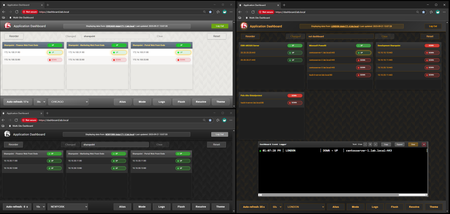
Code is community submitted, community supported, and recognized as ‘Use At Your Own Risk’. A comprehensive real-time monitoring dashboard for F5 BIG-IP Application Delivery Controllers featuring multi-site support, DNS hostname resolution, member state tracking, and advanced filtering capabilities. A 170KB modular JavaScript application runs entirely in your browser, served directly from the F5's high-speed operational dataplane. One or more sites operate as Dashboard Front-Ends serving the dashboard interface (HTML, JavaScript, CSS) via iFiles, while other sites operate as API Hosts providing pool data through optimized JSON-based dashboard API calls. This provides unified visibility across multiple sites from a single interface without requiring even a read-only account on any of the BIG-IPs, allowing you to switch between locations and see consistent pool, member, and health status data with almost no latency and very little overhead. Think of it as an extension of the F5 GUI: near real-time state tracking, DNS hostname resolution (if configured), advanced search/filtering, and the ability to see exactly what changed and when. It gives application teams and operations teams direct visibility into application pool state without needing to wait for answers from F5 engineers, eliminating the organizational bottleneck that slows down troubleshooting when every minute counts. https://github.com/hauptem/F5-Multisite-Dashboard563Views4likes2CommentsBIG-IP Report
Problem this snippet solves: Overview This is a script which will generate a report of the BIG-IP LTM configuration on all your load balancers making it easy to find information and get a comprehensive overview of virtual servers and pools connected to them. This information is used to relay information to NOC and developers to give them insight in where things are located and to be able to plan patching and deploys. I also use it myself as a quick way get information or gather data used as a foundation for RFC's, ie get a list of all external virtual servers without compression profiles. The script has been running on 13 pairs of load balancers, indexing over 1200 virtual servers for several years now and the report is widely used across the company and by many companies and governments across the world. It's easy to setup and use and only requires auditor (read-only) permissions on your devices. Demo/Preview Interactive demo http://loadbalancing.se/bigipreportdemo/ Screen shots The main report: The device overview: Certificate details: How to use this snippet: Installation instructions BigipReport REST This is the only branch we're updating since middle of 2020 and it supports 12.x and upwards. Downloads: https://github.com/net-utilities/BigIPReport/releases Documentation, installation instructions and troubleshooting: https://net-utilities.github.io/BigIPReport/ BIG-IP Report (Legacy) Older version of the report that only runs on Windows and is depending on a Powershell plugin originally written by Joe Pruitt (F5). The documentation for this will stay on loadbalancing.se. BIG-IP Report (only download this if you have v10 devices): https://github.com/net-utilities/BigIPReport/releases/download/v5.8.0/bigipreport-5.4.0-beta.zip iControl Snapin https://github.com/net-utilities/BigIPReport/releases/download/v5.8.0/f5-icontrol.zip Got issues/problems/feedback? Still have issues? Drop a comment below. We usually reply quite fast. Any bugs found, issues detected or ideas contributed makes the report better for everyone, so it's always appreciated. --- Join us on Discord: https://discord.gg/7JJvPMYahA Tested this on versions: 12, 13, 14, 15, 16, 17 (probably works on later versions too)20KViews21likes102Comments
Unlocking the power of AI with Model Context Protocol (MCP): Key features in F5 BIG-IP v21 & v21.1
Model Context Protocol (MCP), now supported in F5 BIG-IP v21, is a groundbreaking standard that revolutionizes AI systems by enabling seamless, dynamic discovery and integration of contextual data across tools, databases, and MCP servers. F5 enhances MCP workflows with optimized load balancing, dynamic traffic management, and secure integration capabilities, ensuring scalable and reliable AI-driven operations across hybrid and multicloud environments. With features like intelligent routing, adaptive context discovery, and agentic AI support, F5 BIG-IP v21 empowers organizations to confidently scale AI solutions while maintaining high performance and security. 234Views0likes0Comments
Question about source persistence across traffic group
Hello, Hope you are doing great! I would like to know if it is supported to mirror persistence between 2 DC's across 2 Traffic Groups, each one is Active on a DC. DC 1 Active on TG1 DC 2 Active on TG2 Client established connection on DC1, if it reconnected in DC2 traffic should be rerouted to DC1 backend. (There's no application level session synchronization) Any suggestions would be appreciated! Thank you. Regards!521Views0likes9CommentsSSL Orchestrator Advanced Use Cases: Client Certificate Constrained Delegation (C3D) Support
Introduction F5 BIG-IP is synonymous with "flexibility". You likely have few other devices in your architecture that provide the breadth of capabilities that come native with the BIG-IP platform. And for each and every BIG-IP product module, the opportunities to expand functionality are almost limitless. In this article series we examine the flexibility options of the F5 SSL Orchestrator in a set of "advanced" use cases. If you haven't noticed, the world has been steadily moving toward encrypted communications. Everything from web, email, voice, video, chat, and IoT is now wrapped in TLS, and that's a good thing. The problem is, malware - that thing that creates havoc in your organization, that exfiltrates personnel records to the Dark Web - isn't stopped by encryption. TLS 1.3 and multi-factor authentication don't eradicate malware. The only reasonable way to defend against it is to catch it in the act, and an entire industry of security products are designed for just this task. But ironically, encryption makes this hard. You can't protect against what you can't see. F5 SSL Orchestrator simplifies traffic decryption and malware inspection, and dynamically orchestrates traffic to your security stack. But it does much more than that. SSL Orchestrator is built on top of F5's BIG-IP platform, and as stated earlier, is abound with flexibility. SSL Orchestrator Use Case: Client Certificate Constrained Delegation (C3D) Using certificates to authenticate is one of the oldest and most reliable forms of authentication. While not every application supports modern federated access or multi-factor schemes, you'll be hard-pressed to find something that doesn't minimally support authentication over TLS with certificates. And coupled with hardware tokens like smart cards, certificates can enable one of the most secure multi-factor methods available. But certificate-based authentication has always presented a unique challenge to security architectures. Certificate "mutual TLS" authentication requires an end-to-end TLS handshake. When a server indicates a requirement for the client to submit its certificate, the client must send both its certificate, and a digitally-signed hash value. This hash value is signed (i.e. encrypted) with the client's private key. Should a device between the client and server attempt to decrypt and re-encrypt, it would be unable to satisfy the server's authentication request by virtue of not having access to the client's private key (to create the signed hash). This makes encrypted malware inspection complicated, often requiring a total bypass of inspection to sites that require mutual TLS authentication. Fortunately, F5 has an elegant solution to this challenge in the form of Client Certificate Constrained Delegation, affectionally referred to as "C3D". The concept is reasonably straightforward. In very much the same way that SSL forward proxy re-issues a remote server certificate to local clients, C3D can re-issue a remote client certificate to local servers. A local server can continue to enforce secure mutual TLS authentication, while allowing the BIG-IP to explicitly decrypt and re-encrypt in the middle. This presents an immediate advantage in basic load balancing, where access to the unencrypted data allows the BIG-IP greater control over persistence. In the absence of this, persistence would typically be limited to IP address affinity. But of course, access to the unencrypted data also allows the content to be scanned for malicious malware. C3D actually takes this concept of certificate re-signing to a higher level though. The "constrained delegation" portion of the name implies a characteristic much like Kerberos constrained delegation, where (arbitrary) attributes can be inserted into the re-signed token, like the PAC attributes in a Kerberos ticket, to inform the server about the client. Servers for their part can then simply filter on client certificates issued by the BIG-IP (to prevent direct access), and consume any additional attributes in the certificate to understand how better to handle the client. With C3D you can maintain strong mutual TLS authentication all the way through to your servers, while allowing the BIG-IP to more effectively manage availability. And combined with SSL Orchestrator, C3D can enable decryption and inspection of content for malware inspection. This article describes how to configure SSL Orchestrator to enable C3D for inbound decrypted inspection. Arguably, most of what follows is the C3D configuration itself, as the integration with SSL Orchestrator is pretty simple. Note that Client Certificate Constrained Delegation (C3D) is included with Local Traffic Manager (LTM) 13.0 and beyond, but for integration with SSL Orchestrator you should be running 14.1 or later.To learn more about C3D, please see the following resources: K14065425: Configuring Client Certificate Constrained Delegation (C3D): https://support.f5.com/csp/article/K14065425 Manual Chapter: SSL Traffic Management: https://techdocs.f5.com/en-us/bigip-15-1-0/big-ip-system-ssl-administration/ssl-traffic-management.html#GUID-B4D2529E-D1B0-4FE2-8C7F-C3774ADE1ED2 SSL::c3d iRule reference - not required to use C3D, but adds powerful functionality https://clouddocs.f5.com/api/irules/SSL__c3d.html The integration of C3D with SSL Orchestrator involves effectively replacing the client and server SSL profiles that the SSL Orchestrator topology creates, with C3D SSL profiles. This is done programmatically with an iRule, so no "non-strict" customization is required at the topology. Also note that an inbound (reverse proxy) SSL Orchestrator topology will take the form of a "gateway mode" deployment (a routed path to multiple applications), or "application mode" deployment (a single application instance hosted at the BIG-IP). See section 2.5 of the SSL Orchestrator deployment guide for a deeper examination of gateway and application modes: https://clouddocs.f5.com/sslo-deployment-guide/ The C3D integration is only applicable to application mode deployments. Configuration C3D itself involves the creation of client and server SSL profiles: Create a new Client SSL profile: Configuration Certificate Key Chain: public-facing server certificate and private key. This will be the certificate and key presented to the client on inbound request. It will likely be the same certificate and key defined in the SSL Orchestrator inbound topology. Client Authentication Client Certificate: require Trusted Certificate Authorities: bundle that can validate client certificate. This is a certificate bundle used to verify the client's certificate, and will contain all of the client certificate issuer CAs. Advertised Certificate Authorities: optional CA hints bundle. Not expressly required, but this certificate bundle is forwarded to the client during the TLS handshake to "hint" at the correct certificate, based on issuer. Client Certificate Constrained Delegation Client Certificate Constrained Delegation: Enabled Client Fallback Certificate (new in 15.1): option to select a default client certificate if client does not send one. This option was introduced in 15.1 and provides the means to select an alternate (local) certificate if the client does not present one. The primary use case here might be to select a "template" certificate, and use an iRule function to insert arbitrary attributes. OCSP: optional client certificate revocation control. This option defines an OCSP revocation provider for the client certificate. Unknown OCSP Response Control (new in 15.1): determines what happens when OCSP returns Unknown. If an OCSP revocation provider is selected, this option defines what to do if the response to the OCSP query is "unknown". Create a new Server SSL profile: Configuration Certificate: default.crt. The certificate and key here are used as "templates" for the re-signed client certificate. Key: default.key Client Certificate Configuration Delegation Client Certificate Constrained Delegation: Enabled CA Certificate: local forging CA cert. This is the CA certificate used to re-sign the client certificate. This CA must be trusted by the local servers. CA Key: local forging CA key CA Passphrase: optional CA passphrase Certificate Extensions: extensions from the real client cert to be included in the forged cert. This is the list of certificate extensions to be copied from the original certificate to the re-issued certificate. Custom Extension: additional extensions to copy to forged cert from real cert (OID). This option allows you to insert additional extensions to be copied, as OID values. Additional considerations: Under normal conditions, the F5 and backend server attempt to resume existing SSL sessions, whereby the server doesn’t send a Certificate Request message. The effect is that all connections to the backend server use the same forged client cert. There are two ways to get around this: Set a zero-length cache value in the server SSL profile, or Set server authentication frequency to ‘always’ in the server SSL profile CA certificate considerations: A valid signing CA certificate should possess the following attributes. While it can work in some limited scenarios, a self-signed server certificate is generally not an adequate option for the signing CA. keyUsage: certificate extension containing "keyCertSign" and "digitalSignature" attributes basicConstraints: certificate extension containing "CA = true" (for Yes), marked as "Critical" With the client and server SSL profiles built, the C3D configuration is basically done. To integrate with an inbound SSL Orchestrator topology, create a simple iRule and add it to the topology's Interception Rule configuration. Modify the SSL profile paths below to reflect the profiles you created earlier. ### Modify the SSL profile paths below to match real C3D SSL profiles when CLIENT_ACCEPTED priority 250 { ## set clientssl set cmd1 "SSL::profile /Common/c3d-clientssl" ; eval $cmd1 } when SERVER_CONNECTED priority 250 { ## set serverssl SSL::profile "/Common/c3d-serverssl" } In the SSL Orchestrator UI, either from topology workflow, or directly from the corresponding Interception Rule configuration, add the above iRule and deploy. The above iRule programmatically overrides the SSL profiles applied to the Interception Rule (virtual server), effectively enabling C3D support. At this point, the virtual server will request a client certificate, perform revocation checks if defined, and then mint a local copy of the client certificate to pass to the backend server. Optionally, you can insert additional certificate attributes via the server SSL profile configuration, or more dynamically through additional iRule logic: ### Added in 15.1 - allows you to send a forged cert to the server ### irrespective of the client side authentication (ex. APM SSO), ### and insert arbitrary values when SERVERSSL_SERVERCERT { ### The following options allow you to override/replace a submitted ### client cert. For example, a minted client certificate can be sent ### to the server irrespective of the client side authentication method. ### This certificate "template" could be defined locally in the iRule ### (Base64-encoded), pulled from an iFile, or some other certificate source. # set cert1 [b64decode "LS0tLS1a67f7e226f..."] # set cert1 [ifile get template-cert] ### In order to use a template cert, it must first be converted to DER format # SSL::c3d cert [X509::pem2der $cert1] ### Insert arbitrary attributes (OID:value) SSL::c3d extension 1.3.6.1.4.1.3375.3.1 "TEST" } If you've configured the above, a server behind SSL Orchestrator that requires mutual TLS authentication can receive minted client certificates from external users, and SSL Orchestrator can explicitly decrypt and pass traffic to the set of malware inspection tools. You can look at the certificate sent to the server by injecting a tcpdump packet between the BIG-IP and server, then open in Wireshark. tcpdump -lnni [VLAN] -Xs0 -w capture.pcap [additional filters] Finally, you might be asking what to do with certificate attributes injected by C3D, and really it depends on what the server can support. The below is a basic example in an Apache config file to block a client certificate that doesn't contain your defined attribute. <Directory /> SSLRequire "HTTP/%h" in PeerExtList("1.3.6.1.4.1.3375.3.1") RewriteEngine on RewriteCond %{SSL::SSL_CLIENT_VERIFY} !=SUCCESS RewriteRule .? - [F] ErrorDocument 403 "Delegation to SPN HTTP/%h failed. Please pass a valid client certificate" </Directory> And there you have it. In just a few steps you've configured your SSL Orchestrator to integrate with Client Certificate Constrained Delegation to support mutual TLS authentication, and along the way you have hopefully recognized the immense flexibility at your command. Updates As of F5 BIG-IP 16.1.3, there are some new C3D capabilities: C3D has been updated to encode and return the commonName (CN) found in the client certificate subject field in printableString format if possible, otherwise the value will be encoded as UTF8. C3D has been updated to support inserting a subject commonName (CN) via 'SSL::c3d subject commonName' command: when CLIENTSSL_HANDSHAKE { if {[SSL::cert count] > 0} { SSL::c3d subject commonName [X509::subject [SSL::cert 0] commonName] } } C3D has been updated to support inserting a Subject Alternative Name (SAN) and Authority Info Access (AIA) via 'SSL::c3d extension' commands: when CLIENTSSL_HANDSHAKE { ## Insert Subject Alternative Name (SAN) value SSL::c3d extension SAN "DNS:*.test-client.com, IP:1.1.1.1" ### Insert Authority Info Access (AIA) value SSL::c3d extension AIA "ocsp,https://ocsp.entrust.net.com; caIssuer, https://aia.entrust.net/l1m-chain256.cer" } C3D has been updated to add the Authority Key Identifier (AKI) extension to the client certificate if the CA certificate has a Subject Key Identifier (SKI) extension. Another interesting use case is copying the real client certificate Subject Key Identifier (SKI) to the minted client certificate. By default, the minted client certificate will not contain an SKI value, but it's easy to configure C3D to copy the origin cert's SKI by modifying the C3D server SSL profile. In the "Custom extension" field of the C3D section, add 2.5.29.14 as an available extension. __________________________________________ As of F5 BIG-IP 17.1.0 (SSL Orchestrator 11.0), C3D has been integrated natively. Now, for a deployed Inbound topology, the C3D SSL profiles are listed in the Protocol Settings section of the Interception Rules tab. You can replace the client and server SSL profiles created by SSL Orchestrator, with C3D SSL profiles in the Interception Rules tab to support C3D. The C3D support is now extended to both Gateway and Application modes. __________________________________________ As of F5 BIG-IP 21.1, there are some new C3D capabilities: C3D adds a new option in the server SSL profile to enable overriding the certificate start date. This overrides the notBefore (valid-from) attribute of forged certificates to dynamically set the certificate's start time to align with the exact time of certificate forging. C3D adds a new option in the server SSL profile to enable caching of forged certificates. This reduces the need to repeatedly generate them for similar transactions, thereby improving efficiency during high-traffic scenarios, and reducing computational overhead in TLS proxy flows. C3D adds a new iRule command to keep or override the notBefore date in the forged certificate. when CLIENTSSL_HANDSHAKE { ## Update forged certificate lifespan SSL::c3d cert_lifespan [1-8760] } C3D adds a new iRule command to override the forged certificate lifespan. when CLIENTSSL_HANDSHAKE { ## Override the forged certificate notBefore date SSL::c3d cert_start_date [ override | original ] } C3D adds a new iRule command to inject X.509 keyUsage attributes into the forged certificate. when CLIENTSSL_HANDSHAKE { ## Injects KeyUsage constraints into the forged certificate SSL::c3d extension KU "digitalSignature, keyEncipherment" } C3D adds a new iRule command to inject X.509 extendedKeyUsage attributes into the forged certificate. when CLIENTSSL_HANDSHAKE { ## Injects extendedKeyUsage constraints into the forged certificate SSL::c3d extension EKU "serverAuth, clientAuth" } C3D adds a new iRule command to inject X.509 subjectDirectoryAttributes into the forged certificate. when CLIENTSSL_HANDSHAKE { ## Injects subjectDirectoryAttributes constraints into the forged certificate SSL::c3d extension SDA "dateOfBirth:20000101000000Z, countryOfCitizenship:US" } Note that certificate extensions enabled in the C3D server SSL profile configuration are copy operations. When enabled they copy the selected attributes from the origin certificate. The iRule commands are write operations. They allow you to specify new attribute values.4.9KViews2likes3Comments