f5os
31 Topics
R5600 LAG question
Is is recommended to add ports into LAG from different pipelines? If we configure a LAG with port 3 from pipeline 1 and port 7 from pipeline 2. What will happen if port 3 from pipeline 1 goes down? Would it impact the traffic? I am trying to understand pros and cons of adding ports into LAG from same pipeline and different pipelines. I could not find a clear F5 reference document or SK article.112Views0likes2CommentsF5OS cloud-init on 21.1 does tenants come with DO and AS3 RPM installed?
Hello Everyone, This great new feature https://techdocs.f5.com/en-us/bigip-21-1-0/big-ip-f5os-cloud-init-support-velos-rseries/cloud-init-support-velos-rseries.html is not very well described. I think F5 making a demo session or a Guide with pictures will be helpful. For example do the F5os Tenants come with RPM AS3 and DO installed by default for this to work ? Other than that it is mentioned that the DO yaml file needs to be hosted on F5OS ? Where exactly ?310Views1like6CommentsPartially reachabilty issues with VS in F5OS tenant
As preparation of our service migration from iSeries to rSeries, we created a test-VS without a pool, but with an iRule responding with a simple static html-website. This works fine so far, but we must notice, that sometimes this VS is not reachable in the F5OS tenant. For now we could at least identify that the issue seems to be on the border between F5OS and tenant, because we see incoming packets with tcpdump on F5OS level, but they will not be forwarded into the tenant, because with the tcpdump there it's missing. Is this behavior related to the VS type of just using an iRule or is there something wrong/corrupt in our configuration? How can I further verify/troubleshot this, once the issue occurs again? Or which settings should I double check? We want to be sure to have the correct basic setup available, before migrating the first productive VS to the new platform. For your reference, we are using route domains in combination with partitions within the tenant. So we created the VLANs on F5OS level, then deleted them in the Common partition in the tenant and then re-created them again with the same name, but in the correct partition/route domain. And finally created the selfips within the partition/route domain within the tenant. F5OS: 1.8.3EHF1, TMOS: 17.5.1.3 Thank you! Regards, StefanSolved237Views0likes4Comments
F5 Software Downgrade from version 17.x.x to 15.x.x
After upgrading from version 15.x.x to 17.x.x, I attempted to downgrade from 17.x.x back to 15.x.x. However, the log continuously displayed “logger[xxxxx]:Re-stating devmgmtd”, and the prompt remained in the “INOPERATIVE” state. Could you please provide the correct procedure for performing a version downgrade?Solved556Views0likes3CommentsCPU utilization of F5OS on r2600
We have installed a new r2600 cluster and configured successful SNMP-monitoring. Here I must notice, that the CPU utilization of the F5OS with an average of more than 50% and peaks up to 90% is relatively high. The CPU utilization of the tenant looks fine with an average of around 15%. There is currently no active configuration on it nor any virtual server traffic passing the device. Is this a normal behavior, especially in comparison to the r5600 platform, where the F5OS CPU utilization average is at around 10%? Thank you! Regards, Stefan :)247Views0likes2CommentsF5OS VLAN naming length restrictions
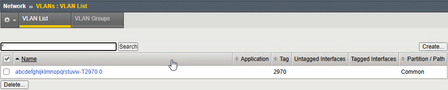
I must notice, that there seems to be a length restriction when creating VLANs on F5OS. I'm allowed to enter long names on F5OS-level without any warnings or errors, but when assigning them to a tenant, the name within the tenant will be truncated if its longer than 31 characters. It looks like this, means there is a suffix in the format of "-T<VLAN-ID>.0" On F5OS-level it looks like this: Is this a normal behavior? Can or will this be fixed? And are there any other such restrictions for other configuration items? For your reference, we are running F5OS 1.8.3 and BIG-IP 17.5.1.3. Thank you! Regards, Stefan :)335Views0likes4CommentsSNMP Monitoring/OIDs for rSeries
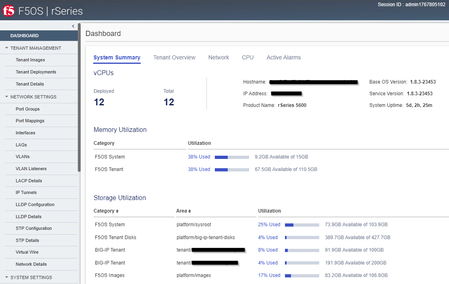
I'm currently configuring the required OIDs for monitoring our new rSeries, but I'm wondering if the provided MIBs contain all information? I'm searching especially the values from the GUIs dashboard for Memory Utilization and Storage Utilization like in the following screenshot: Also the mentioned "Base OS Version" and "Service Version" details seems to be not part of the MIB. I only found it under the OID .1.3.6.1.2.1.1.1.0 -> SNMPv2-MIB::sysDescr.0 = STRING: F5 rSeries-r5600 : Linux 3.10.0-1160.119.1.f5.1.el7_8.x86_64 : Appliance services version 1.8.3-23453. Where does the GUI render these information from? Is it possible to poll these details via SNMP as well? Any more details would be very helpful! Thank you! Regards, Stefan :)386Views0likes2CommentsF5OS login with admin/root failed via console
Right now we have a new rSeries installed, which is currently only accessible via console cable. First login with default password was fine and changing password was also successful. Then I prepared the device with our default configuration including TACACS authentication. Also appliance-mode is enabled. All configurations were commited successfully. Now when I try to login in again, it failed with "login incorrect" error, but the password is definitely correct. What's the reason for this and how can I get access again? Or do I need to wait until the management port is up and TACACS server is reachable? Or how can I fully reset the device again? Power cycle and then interrupting the boot process? Is there a documentation available, how to perform this? Thank you! Regards, Stefan462Views0likes1Comment
R2600 device and tenant/partition configuration
Hello, I'm working with configuration on r2600 where is one tenant with multiple vlans. On tenant perspective I want to add each vlan to specific partition. How to do this in correct way for rSeries? There is a bug http://cdn.f5.com/product/bugtracker/ID1231889.html which says that all vlans need to be in Common partition. On vCMP or bare metal there was an option to create vlan in partition, add it to route domain and then configure all other things (IP, routes, etc). So - what is proper way? Where can I find F5 document?1.1KViews0likes14CommentsCredentialed Scanning - F5OS - Rseries
After solving the remote authentication issue previously with F5OS. My next question is related to credentialed scanning on R series appliances running F5OS. The tenable agent logs in via SSH and tries to run commands in the shell to pull system information. This has never been on issues on the iseries appliances and BIG-IP guests as they allow uses directly to the shell upon login. All linux commands run as intended. F5OS is a new beast for me to understand as it dumps you into its own OS. The shell is protected and only root at the local level is allowed access to the linux shell. This is the issue I face with credentialed scanning. Authentication works perfectly fine but the ability to run the proper commands at the appropriate level seems to be locked and it doesn't appear I can grant shell access to remote accounts. Anyone have any experience running authenticated scans on their rseries appliances with f50S?522Views0likes1Comment