devops
797 Topics
Weblogic JSessionID Persistence
Problem this snippet solves: Contributed by: unRuleY, Summarized by: deb Note: The previous version of this iRule contained escaped newlines following the session command, which in versions 10.0 - 10.2.0 causes TMM to core as documented in CR135937 / SOL11427. This was fixed in 10.2.1. See this related Codeshare example for details on how to take advantage of session replication on the WebLogic servers with targeted node failover in an iRule. Provides persistence on the jsessionid value found in either the URI or a cookie. When a request is received, the iRule first looks for a "jsessionid" cookie, and if not found, for a "jsessionid" parameter in the requested URI. If either is found, a persistence record is created if it doesn't already exist, or followed if it does. If neither is found, the request is load balanced according to the load balancing method applied to the virtual server and persisted based on the client's IP address. In order to ensure the second and subsequent requests follow the first, LTM must create a persistence record indicating the pool member to which the first request was load balanced. If the server is setting the jsessionid in a cookie, the persistence key value may be extracted from the server response to create the persistence record. If the server is setting the jsessionid in the URLs, source address persistence with a short timeout is recommended to track the original destination until the jsessionid is sent. How to use this snippet: To ensure a new persistence record is followed when a request is re-load balanced in a client-side Keep-Alive connection, apply a OneConnect profile to the virtual server. The iRule assumes the jsessionid is in upper case when used as a cookie name. If this isn't the case, please update the example. To persist on jsessionid, create the iRule below and create a custom Universal persistence profile, with Match Across Services enabled, that uses the iRule. Then use this custom Universal persistence profile as the Default Persistence profile on your Virtual Server. Applying a Fallback Persistence profile of type Source Address Affinity with a host mask and a short timeout (the default source_addr persistence profile will do the trick) to your Virtual Server is also recommended. Attention, if you are running firmware 11.0 - 11.2.1 and enabled "Match Across Services"! There is a bug inside. SOL14061 This iRule requires LTM v10. or higher. Code : when HTTP_REQUEST { # Log details for the request set log_prefix "[IP::client_addr]:[TCP::client_port]" log local0. "$log_prefix: Request to [HTTP::uri] with cookie: [HTTP::cookie value JSESSIONID]" # Check if there is a JSESSIONID cookie if { [HTTP::cookie "JSESSIONID"] ne "" }{ # Persist off of the cookie value with a timeout of 1 hour (3600 seconds) persist uie [string tolower [HTTP::cookie "JSESSIONID"]] 3600 # Log that we're using the cookie value for persistence and the persistence key if it exists. log local0. "$log_prefix: Used persistence record from cookie. Existing key? [persist lookup uie [string tolower [HTTP::cookie "JSESSIONID"]]]" } else { # Parse the jsessionid from the path. The jsessionid, when included in the URI, is in the path, # not the query string: /path/to/file.ext;jsessionid=1234?param=value set jsess [findstr [string tolower [HTTP::path]] "jsessionid=" 11] # Use the jsessionid from the path for persisting with a timeout of 1 hour (3600 seconds) if { $jsess != "" } { persist uie $jsess 3600 # Log that we're using the path jessionid for persistence and the persistence key if it exists. log local0. "$log_prefix: Used persistence record from path: [persist lookup uie $jsess]" } } } when HTTP_RESPONSE { # Check if there is a jsessionid cookie in the response if { [HTTP::cookie "JSESSIONID"] ne "" }{ # Persist off of the cookie value with a timeout of 1 hour (3600 seconds) persist add uie [string tolower [HTTP::cookie "JSESSIONID"]] 3600 log local0. "$log_prefix: Added persistence record from cookie: [persist lookup uie [string tolower [HTTP::cookie "JSESSIONID"]]]" } }6.2KViews2likes9CommentsF5OS using Ansible Linux Shell with remote users as iCall replacement(works with banner as well).
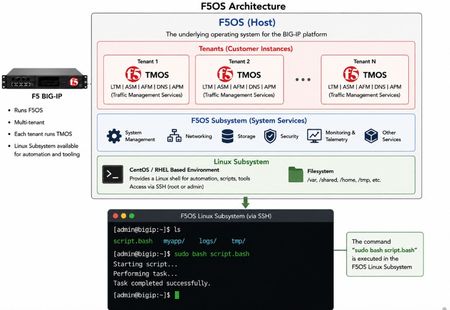
(AI Made picture so don't take it as 100% truth) In F5OS 1.8.0 and up remote users can automatically enter the Linux Shell if they have the correct remote group parameters and if this is system level enabled as shown in https://clouddocs.f5.com/training/community/rseries-training/html/rseries_security.html#superuser-role The superuser role if enabled can still trigger F5OS commands with "f5sh" that is similar to "tmsh" in TMOS and described in https://my.f5.com/manage/s/article/K000148922 . Code version: The code was tested on F5OS 1.8.4 rSeries 5900 Ansible Example without banner: --- - name: Restart docker container hosts: f5os gather_facts: no vars: container_name: tcpdumpd_manager tasks: - name: Restart the specified docker container ansible.builtin.shell: | docker restart {{ container_name }} become: false args: executable: /bin/bash Cronjobs also can be edited through shell Ansible playbook for scheduling transferred scripts. - name: Add cron job ansible.builtin.shell: | (crontab -l 2>/dev/null | grep -Fv '/opt/check_service.sh'; \ echo '*/5 * * * * /opt/check_service.sh') | crontab - become: false args: executable: /bin/bash Great Ansible F5OS automation article with cool examples that even has file transfer for transferring script file to the F5OS: Five Ways to Automate F5OS with Ansible: A Practical Guide | DevCentral Ansible Example with banner: The F5OS ssh banner is inserted between the username and password and that breaks the shell module as I did found out. I suspect that Ansible uses the PEXPECT Python package that spans SSH session and it is similar to TCL EXPECT and most people dealing with iRules will find this interesting. You need to add sudo in-front of each command. - name: Restart container hosts: localhost gather_facts: false tasks: - name: Run docker command ansible.builtin.expect: command: >- ssh -tt -o StrictHostKeyChecking=no -o ConnectTimeout=10 -o ServerAliveInterval=5 -o ServerAliveCountMax=2 {{ ansible_user }}@{{ ansible_host }} responses: '(?i)password:': {{ ansible_pass }} '(?m)\$\s*$': "sudo docker restart {{ container_name }}\nexit\n" timeout: 20 echo: true delegate_to: localhost register: out Also SCP file transfer can be done through the EXPEC module. From Linux bash you can use f5sh to trigger F5OS commands. Examples are f5sh "show interface" and to chain commands f5sh "config; vlan 500; commit; exit" . If you just write f5sh, you will enter the F5os from the Linux. This is like tmsh for TMOS. Summary! This is great feature. TMOS also has cronjobs but after upgrade the cronjob is lost but not on F5OS, this is why icall scripts still are better for TMOS Tenants. iCall has the option to be triggered by logs and that in F5OS will be harder as it will need a bash script that is sitting as a background process as to monitor the logs and a cronjob can check if the script is still running as a device reboot will cause the script to stop running. The script can be transferred and started the way I have shown with RESTCONF REST-API with Ansible/AWX as the best option.166Views2likes1CommentAdvanced WAF IP Exceptions Manager
This solution introduces a dedicated Python-based GUI tool for managing IP whitelist exceptions in F5 BIG-IP Advanced WAF policies. The tool was developed to simplify a common operational workflow: searching WAF policies, adding IP or CIDR-based exceptions, checking whether an IP already exists across policies, deleting outdated exceptions, applying policy changes, and tracking actions through an activity log. The solution is especially useful in large environments where manual exception handling can create operational overhead, inconsistent policy configuration, or audit challenges. It demonstrates how focused automation can deliver practical value without requiring a large orchestration platform or full CI/CD pipeline.154Views1like0CommentsBIG-IP Report
Problem this snippet solves: Overview This is a script which will generate a report of the BIG-IP LTM configuration on all your load balancers making it easy to find information and get a comprehensive overview of virtual servers and pools connected to them. This information is used to relay information to NOC and developers to give them insight in where things are located and to be able to plan patching and deploys. I also use it myself as a quick way get information or gather data used as a foundation for RFC's, ie get a list of all external virtual servers without compression profiles. The script has been running on 13 pairs of load balancers, indexing over 1200 virtual servers for several years now and the report is widely used across the company and by many companies and governments across the world. It's easy to setup and use and only requires auditor (read-only) permissions on your devices. Demo/Preview Interactive demo http://loadbalancing.se/bigipreportdemo/ Screen shots The main report: The device overview: Certificate details: How to use this snippet: Installation instructions BigipReport REST This is the only branch we're updating since middle of 2020 and it supports 12.x and upwards. Downloads: https://github.com/net-utilities/BigIPReport/releases Documentation, installation instructions and troubleshooting: https://net-utilities.github.io/BigIPReport/ BIG-IP Report (Legacy) Older version of the report that only runs on Windows and is depending on a Powershell plugin originally written by Joe Pruitt (F5). The documentation for this will stay on loadbalancing.se. BIG-IP Report (only download this if you have v10 devices): https://github.com/net-utilities/BigIPReport/releases/download/v5.8.0/bigipreport-5.4.0-beta.zip iControl Snapin https://github.com/net-utilities/BigIPReport/releases/download/v5.8.0/f5-icontrol.zip Got issues/problems/feedback? Still have issues? Drop a comment below. We usually reply quite fast. Any bugs found, issues detected or ideas contributed makes the report better for everyone, so it's always appreciated. --- Join us on Discord: https://discord.gg/7JJvPMYahA Tested this on versions: 12, 13, 14, 15, 16, 17 (probably works on later versions too)20KViews21likes102Comments
APM SAML IdP - SP Issuer Extraction
Problem this snippet solves: APM doesn't expose any detail about the SAML SP Issuer when authentication requests hitting APM as an IdP during an SP initiated SAMLRequest. This iRule when applied to a SAML IdP enabled virtual server will extract the assertion request, decode it and present the SAML SP Issuer ID as the session variable %{session.saml.request.issuer} within APM. How to use this snippet: This comes in real handy when performing authorisation of the resource and could help avoid having APM perform a TCP connection reset when a SAML resource isn't authorised. Code : when CLIENT_ACCEPTED { ACCESS::restrict_irule_events disable } when HTTP_REQUEST { if { [HTTP::path] equals "/saml/idp/profile/redirectorpost/sso" } { if { [HTTP::method] equals "POST" } { # Colelct POST data set content_length [HTTP::header value Content-Length] HTTP::collect $content_length } elseif { [HTTP::method] equals "GET" } { #TODO } } } when HTTP_REQUEST_DATA { set payload_data [URI::decode [HTTP::payload]] log local0. "payload=[URI::query "?$payload_data" "SAMLRequest"]" if { $payload_data contains "SAMLRequest" } { # Extract SAML request data set SAMLdata [b64decode [URI::query "?$payload_data" "SAMLRequest"]] set SAML_Issuer_loc [string first "saml:issuer" [string tolower $SAMLdata]] set SAML_Issuer_start [expr {[string first ">" $SAMLdata $SAML_Issuer_loc] + 1}] set SAML_Issuer_end [expr {[string first "<" $SAMLdata $SAML_Issuer_start] - 1}] set SAML_Issuer [string range $SAMLdata $SAML_Issuer_start $SAML_Issuer_end] if { !([ACCESS::session sid] equals "" ) } { ACCESS::session data set session.saml.request.issuer $SAML_Issuer } } } when ACCESS_SESSION_STARTED { if { [info exists SAML_Issuer] } { ACCESS::session data set session.saml.request.issuer $SAML_Issuer } } Tested this on version: 11.61.8KViews2likes8Comments
Creating a tmsh script with iControl REST and using it to restart HTTPD
Problem this snippet solves: TMSH has the ability to create tcl scripts that can be used to run multiple commands and transactions. It is rare that you will want to create on with TMSH but there are a few cases where this may be desirable. One of these is to restart HTTPD, which is difficult to do from iControl REST because the REST API is running over HTTPD and the restart will not be clean. See K13292945. This Python script creates a tmsh script, and then runs it to restart HTTPD. How to use this snippet: Syntax is <program_name.py> host user password Sample output: ./rest_script_example.py 10.155.117.12 admin admin Before httpd (pid 3186) is running... After httpd (pid 3289) is running... Code : #!/usr/bin/python #[email protected] #Makes tmsh script to restart HTTP #Syntax: host username password import json #allow python 2 and python 3 by loading the correct libraries. try: from http.client import BadStatusLine from urllib.parse import urlparse, urlencode from urllib.request import urlopen, Request from urllib.error import HTTPError except ImportError: from httplib import BadStatusLine from urlparse import urlparse from urllib import urlencode from urllib2 import urlopen, Request, HTTPError import ssl import sys import time #Internal calls will not verify certs so disable cert verification. ssl._create_default_https_context = ssl._create_unverified_context #Create request for token based authentication. This is in Bigip 12 and later: url = 'https://'+sys.argv[1]+'/mgmt/shared/authn/login' values = {'username' : sys.argv[2], 'password' : sys.argv[3], 'loginProviderName' : 'tmos'} values = json.dumps(values).encode('utf-8') Request(url,data=values) req = Request(url,data=values) req.add_header('Content-Type' , 'application/json') #Request authentication token. response = urlopen(req) #auth=result will be a json data structure. auth_result = response.read() #print (auth_result) #Json.loads makes an internal python data structure that is easier to extract auth token from json. #Now construct icontrol rest query for device-groups info. auth=json.loads(auth_result) token=(auth['token']['token']) #print(token) #Get current PID of HTTPD url = 'https://'+sys.argv[1]+'/mgmt/tm/sys/service/httpd/stats' req = Request(url) req.add_header('X-F5-Auth-Token',auth['token']['token']) response = urlopen(req,data=None) json_response=(response.read()) python_response=json.loads(json_response) print("Before") print(python_response["apiRawValues"]["apiAnonymous"]) #look for script with name to make sure that the script does not already exist url = 'https://'+sys.argv[1]+'/mgmt/tm/cli/script/example.tcl' #urllib2 raises an exception with an HTTP 404 req = Request(url) req.add_header('X-F5-Auth-Token',auth['token']['token']) try: response = urlopen(req,data=None) except HTTPError as err: if err.code==404: #print (err.code) #print("\nCreate cli script\n") #request create here url = 'https://'+sys.argv[1]+'/mgmt/tm/cli/script' req = Request(url) req.add_header('X-F5-Auth-Token',auth['token']['token']) req.add_header('Content-Type' , 'application/json') values = {"name":"example.tcl", "apiAnonymous": "proc script::init {} {\n}\n\nproc script::run {} {\n tmsh::run util bash -c 'killall -9 httpd' \n tmsh::start sys service httpd\n} \n\nproc script::help {} {\n}\n\nproc script::tabc {} {\n}\n"} values = json.dumps(values) response = urlopen(req,data=values) response_py=(json.load(response)) #print(json.dumps(response_py,sort_keys=True,indent=4)) #Now run script url = 'https://'+sys.argv[1]+'/mgmt/tm/cli/script/example.tcl' req = Request(url) req.add_header('X-F5-Auth-Token',auth['token']['token']) req.add_header('Content-Type' , 'application/json') values = {"kind":"tm:cli:script:runstate","command":"run"} values = json.dumps(values).encode('utf-8') # Killing HTTPD will abort the connection so catch the exception. try: urlopen(req,data=values) except BadStatusLine: pass #Wait for httpd to restart so you can query. time.sleep(5) #Get current PID of HTTPD after restart url = 'https://'+sys.argv[1]+'/mgmt/tm/sys/service/httpd/stats' req = Request(url) req.add_header('X-F5-Auth-Token',auth['token']['token']) response = urlopen(req,data=None) json_response=(response.read()) python_response=json.loads(json_response) print("After") print(python_response["apiRawValues"]["apiAnonymous"]) Tested this on version: 13.02KViews2likes3Comments
FTP Session Logging
Problem this snippet solves: This iRule logs FTP connections and username information. By default connection mapping from client through BIG-IP to server is logged as well as the username entered by the client. Optionally you can log the entire FTP session by uncommenting the log message in CLIENT_DATA. Code : # This iRule logs FTP connections and username information. # By default connection mapping from client through BIG-IP to server is logged # as well as the username entered by the client. Optionally you can log the # entire FTP session by uncommenting the log message in CLIENT_DATA. when CLIENT_ACCEPTED { set vip [IP::local_addr]:[TCP::local_port] set user "unknown" } when CLIENT_DATA { # uncomment for full session logging #log local0. "[IP::client_addr]:[TCP::client_port]: collected payload ([TCP::payload length]): [TCP::payload]" # check if payload contains the string we want to replace if { [TCP::payload] contains "USER" } { # use a regular expression to save the user name ## regex modified by arkashik regexp "USER \(\[a-zA-Z0-9_-]+)" [TCP::payload] all user # log connection mapping from client through BIG-IP to server log local0. "FTP connection from $client. Mapped to $inside -> $node, user $user" TCP::release TCP::collect } else { TCP::release TCP::collect } } when SERVER_CONNECTED { set client "[IP::client_addr]:[TCP::client_port]" set node "[IP::server_addr]:[TCP::server_port]" set inside "[serverside {IP::local_addr}]:[serverside {TCP::local_port}]" TCP::collect } when SERVER_DATA { TCP::release clientside { TCP::collect } }1.7KViews1like5CommentsF5 Per-App AS3 Part 2 How to see if there are manual changes!
Code version: The code was tested on 17.1.5.3 AS3: 3.55 For more about AS3 and per-app AS3 see my previous code share Part 1 article: https://community.f5.com/kb/codeshare/f5-per-app-as3-part-1-how-share-tenant-specific-object/345072 First we will send Per-App AS3 declaration as shown below. { "id": "per-app-declarationn", "schemaVersion": "3.55.0", "controls": { "class": "Controls", "logLevel": "debug", "trace": true, "traceResponse": true }, "A2": { "class": "Application", "service": { "class": "Service_HTTP", "virtualAddresses": [ "10.0.3.10" ], "pool": "web2_pool" }, "web2_pool": { "class": "Pool", "monitors": [ "http" ], "members": [{ "servicePort": 80, "serverAddresses": [ "192.7.21.10", "192.7.21.11" ] }] } } } Then we will change for example virtual server ip from 10.0.3.10 to 10.0.3.11 and we will send the same declaration but with "dryRun" set to true as this will cause AS3 to validate the config but not to execute it and with trace and traceResponse we will get the difference 😎 { "id": "per-app-declarationn", "schemaVersion": "3.55.0", "controls": { "class": "Controls", "logLevel": "debug", "trace": true, "dryRun": true, "traceResponse": true }, "A2": { "class": "Application", "service": { "class": "Service_HTTP", "virtualAddresses": [ "10.0.3.10" ], "pool": "web2_pool" }, "web2_pool": { "class": "Pool", "monitors": [ "http" ], "members": [{ "servicePort": 80, "serverAddresses": [ "192.7.21.10", "192.7.21.11" ] }] } } } Now we see that the IP has been changed from 10.0.3.10 to 10.0.3.11 and here we go now we have the difference ! This can be added in CI/CD to always first do "dry-run" using the original declaration to see if there are changes before executing the new AS3 declaration that could be for example changing the IP address to 10.0.3.12 but using the official way. Look at the Json reply "diff" section that is seen thanks to trace and traceResponse options and an automation can just check this section and stop the new deployment if the manual changes need to be reviewed first. For AS3 basic declaration not Per-App actually the "dry-run" is a different. F5 likes changing the naming like Local Traffic policies to Endpoint Policies or naming of TLS profiles between GU/TMSH and AS3 😅 { "$schema": "https://raw.githubusercontent.com/F5Networks/f5-appsvcs-extension/refs/heads/main/schema/3.55.0/as3-schema.json", "class": "AS3", "action": "dry-run", "logLevel": "debug", "trace": true, "traceResponse": true, "persist": true, "declaration": { "class": "ADC", "schemaVersion": "3.55.0", "id": "BIG-IP-Example-Tenant", "Example": { "class": "Tenant", "Shared": { "class": "Application", "template": "shared", "Example_Response": { "remark": "Used for F5 response", "class": "iRule", "iRule": { "base64": "d2hlbiBIVFRQX1JFUVVFU1Qgew0KICAgSFRUUDo6cmVzcG9uZCAyMDAgY29udGVudCB7DQogICAgICA8aHRtbD4NCiAgICAgICAgIDxoZWFkPg0KICAgICAgICAgICAgPHRpdGxlPkFwb2xvZ3kgUGFnZTwvdGl0bGU+DQogICAgICAgICA8L2hlYWQ+DQogICAgICAgICA8Ym9keT4NCiAgICAgICAgICAgIFdlIGFyZSBzb3JyeSwgYnV0IHRoZSBzaXRlIHlvdSBhcmUgbG9va2luZyBmb3IgaXMgdGVtcG9yYXJpbHkgb3V0IG9mIHNlcnZpY2U8YnI+DQogICAgICAgICAgICBJZiB5b3UgZmVlbCB5b3UgaGF2ZSByZWFjaGVkIHRoaXMgcGFnZSBpbiBlcnJvciwgcGxlYXNlIHRyeSBhZ2Fpbi4NCiAgICAgICAgIDwvYm9keT4NCiAgICAgIDwvaHRtbD4NCiAgIH0NCn0=" } } } } } } This will not show if someone has manually added a vlan for example as only changes on the apps that were deployed with AS3 will be seen. For those you will get error like the one below when you try to delete the partition. "" 0107082a:3: All objects must be removed from a partition "" https://my.f5.com/manage/s/article/K02718312 https://my.f5.com/manage/s/article/K000138638 Github link: https://github.com/Nikoolayy1/AS3-Per-App-Manual-Changes/tree/main239Views1like0CommentsF5 Per-App AS3 Part 1 How Share Tenant specific object
Code version: The code was tested on 17.1.5.3 AS3: 3.55 For testing F5 AS3 you can use combination of Postman as Visual Studio has option to post AS3 declarations but not Per-App specific as that will be needed for executing my code. Still I recommend using Visual Studio for general AS3 or Fast Templates and you can use the reference links for how to use Visual Studio F5 extensions and maybe F5 will update the extension in the future to work for Per-App AS3 with options for adding tenant and as variables 🤔 For FAST nice example is at https://github.com/Nikoolayy1/fast-template-examples The same way the /Shared objects can be configured under /Common can be done under a specific tenant and this is really useful if Per-App AS3 is enabled as each AS3 app will use separate declaration and all of them can use a customer iRule defined under /<Tenant>/Shared. References for AS3 Declarative API: https://www.youtube.com/watch?v=rrjrcnwAe1g&t=433s AS3 Foundations: Beyond Imperatives - What the Heck is AS3? | DevCentral https://www.youtube.com/watch?v=OHSBpOtQg_0&list=PLrn3yqXftAPUPdSP_kbCX6BDicVprsnfI Per-App AS3 is enabled by default for the AS3 3.50.x and above but if needed enable it. POST Endpoint: /mgmt/shared/appsvcs/settings { "perAppDeploymentAllowed": true } POST Endpoint for Creating the Tenant and the Shared irule that is base64 endpoint: /mgmt/shared/appsvcs/declare { "schemaVersion": "3.45.0", "Shared": { "class": "Application", "template": "shared", "test": { "class": "iRule", "remark": "yes", "iRule": { "base64": "d2hlbiBIVFRQX1JFUVVFU1Qgew0KICAgSFRUUDo6cmVzcG9uZCAyMDAgY29udGVudCB7DQogICAgICA8aHRtbD4NCiAgICAgICAgIDxoZWFkPg0KICAgICAgICAgICAgPHRpdGxlPkFwb2xvZ3kgUGFnZTwvdGl0bGU+DQogICAgICAgICA8L2hlYWQ+DQogICAgICAgICA8Ym9keT4NCiAgICAgICAgICAgIFdlIGFyZSBzb3JyeSwgYnV0IHRoZSBzaXRlIHlvdSBhcmUgbG9va2luZyBmb3IgaXMgdGVtcG9yYXJpbHkgb3V0IG9mIHNlcnZpY2U8YnI+DQogICAgICAgICAgICBJZiB5b3UgZmVlbCB5b3UgaGF2ZSByZWFjaGVkIHRoaXMgcGFnZSBpbiBlcnJvciwgcGxlYXNlIHRyeSBhZ2Fpbi4NCiAgICAgICAgIDwvYm9keT4NCiAgICAgIDwvaHRtbD4NCiAgIH0NCn0=" } } } } POST Endpoint for sending Per-App AP that references the Tenant shared iRule I: /mgmt/shared/appsvcs/declare/Example/applications { "schemaVersion": "3.45.0", "A1": { "class": "Application", "service": { "class": "Service_HTTP", "virtualAddresses": [ "10.0.1.10" ], "pool": "web_pool", "iRules": [ { "use": "/Test/Shared/test" }, "insert_xff" ] }, "web_pool": { "class": "Pool", "monitors": [ "http" ], "members": [ { "servicePort": 80, "serverAddresses": [ "192.0.1.10", "192.0.1.12" ] } ] }, "insert_xff": { "class": "iRule", "iRule": "when HTTP_REQUEST { HTTP::header insert X-Forwarded-For [IP::client_addr] }" } } } Github link: Editing AS3-Per-App-Shared-Tenant-Objects/README.md at main · Nikoolayy1/AS3-Per-App-Shared-Tenant-Objects Note! To see the Tenant config use GET Endpoint /mgmt/shared/appsvcs/declare/Example or for the app /mgmt/shared/appsvcs/declare/Example/A1 For only the Tenant shared config use GET /mgmt/shared/appsvcs/declare/Example/applications/Shared By placing the pools in the /Shared under the Tenant all Per-AS3 declarations for Tenant can use the pool like for the iRule example I showed and also the pools can share the node IP addresses like the "shareNodes" option but only for the tenant. https://my.f5.com/manage/s/article/K88250015253Views1like0CommentsEncrypted UCS Backup with REST-API
Because it seems this nowhere documented: Create a encrypted F5 backup with REST-API including private keys. This script should creates the task, starts it and get's it status. #!/usr/bin/env bash CURL_OPTS=("--fail-with-body" "--show-error" "-s" "-k" "-u" "user:pass" "-H" "Content-Type: application/json" "-H" "Accept: application/json, */*") # Create task and get id TASK_ID=$(jq -n --arg name /var/local/ucs/test.ucs \ --arg passphrase "testpw" \ '{ "command": "save", "name": $name, "options": [ { "passphrase": $passphrase } ] }' \ | curl "${CURL_OPTS[@]}" -X POST -d @- https://f5-lab/mgmt/tm/task/sys/ucs \ | jq -r "._taskId") # Start task jq -n '{ "_taskState": "VALIDATING" }' | curl "${CURL_OPTS[@]}" -X PUT -d @- "https://f5-lab/mgmt/tm/task/sys/ucs/$TASK_ID" # Get task status curl "${CURL_OPTS[@]}" --retry 5 --retry-all-errors --retry-delay 10 "https://f5-lab/mgmt/tm/task/sys/ucs/$TASK_ID" \ | jq -r "._taskState" Reference was https://my.f5.com/manage/s/article/K000138875 and the passphrase options was found by trial and error.202Views2likes0Comments