backups ucs
3 Topics
Auto UCS Backup using SolarWinds NCM
Hi, I am trying to setup auto UCS backup for F5 and using SolarWinds NCM. Now, I am able to create a script in NCM which successfully creates the UCS file locally in F5 device. Now need help on how to make that file transfer to remote server in that same script retaining the filename format. Can anyone help? script- tmsh save /sys ucs ${SysName}_${Date}.ucs ${Delay:120} Thanks179Views0likes1CommentBIG-IP Auto backup configure and send SCP/SFTP using crontab
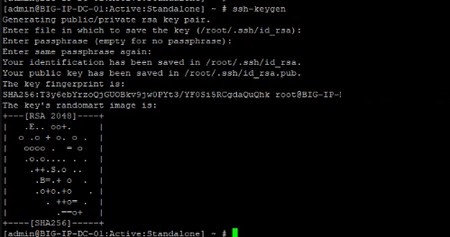
Prerequisite: Secure Copy Protocol server (SCP) server. BIG-IP CLI Access- recommened root user. Configuration Steps: Step#1: Login BIG-IP cli and generate ssh key pair. #ssh-keygen Step#2: Push the id_rsa.pub key to remote scp server. So that without password we can login. ssh-copy-id scp_user@<remote-scp-ip> #ssh-copy-id -i /root/.ssh/id_rsa.pub [email protected] Now you can check ssh public key authentication working by tring ssh login. ssh [email protected] Now test that public key authentication working. Simply do ssh on scp server: ssh scp_user@scp_ip If it's login remote scp server without password now good to go next step. Step#3: Make directory where the backup will stored. mkdir /var/ucs Step#4: Set schedule through crontab. crontab -e Step#5: After open cron file click i for insert and paste backup taking command. 0 1 * * * tmsh save /sys ucs /var/ucs/$(/bin/hostname).ucs && scp /var/ucs/$(/bin/hostname).ucs scp_user@<scp_server_ip>:/home/scpnet/F5/DC_F5_Node_02/$(/bin/hostname)-$(date +\%Y-\%m-\%d).ucs For save click ESC :wq Step#6: Now verfiy the crontab by crontab -l Note: This is the simplified 😊 version of below two article. I am tried to simplify and straightforward guide. https://my.f5.com/manage/s/article/K13418 https://my.f5.com/manage/s/article/K13454509Views0likes0Comments
SCP / WINSCP - problem copy - not allowed SCP error
Hello, It seems a recurring problem on the F5. But in 2 words, we cannot do a SCP without receive a message "relative addresses not allowed"... Of course we tried to make our SCP with a full path, but it doesn't work, anyway. So... From that, after research, I found multiple KB about it. For instance : K000134769. But I found them a little bit ambigous. All of them seems related on WinSCP, in particular. And yes, indeed, the destination correspond to a storage under Windows. So, here is my question : according your experiences, do you know if we could have the same problem if the distant storage is under Linux ? Or that problem appears only with a storage under Windows ? (We prefer to have a second opinion before to deploy an server Linux. To avoid to lost time). Thanks in advance! Best regards, Christian1.2KViews0likes6Comments