Forum Discussion

 Altostratus
Radius Authentication role not working

 Cumulonimbus
Cool,
So that "Administrator" setting is what's over riding everything and setting everything everyone to Admin.
Personally i set that to No Access, Then you MUST have a access right set to gain access.
The other thing to then doi is change the service type from "Authenticate Only" to something suitable for your use case. I must admit i found info on those settings a bit weak.
But i used default and everything burst into life on my side.
What that will do, is then tell the IF to look at the other parameters rather than just authentication and allowing the users in at the default level which is set by "External Users > Roles"
Hope that helps.
CumulonimbusAlso what groups have you setup? And have you got the same config on your radius server side?
 chocokoalaApr 25, 2022
i set it to no access, and icant login anymore on that read only account, i am trying to check with my colleague who handles the radius part
- PSFletchTheTekApr 25, 2022
Ok setting it to no access will stop everything,
If you set it to Guest you'll get the equivlant read only access.
But the other setting on "Service Type" being set to auth only you'll only get that account level set under "External User > Role" when you log in.
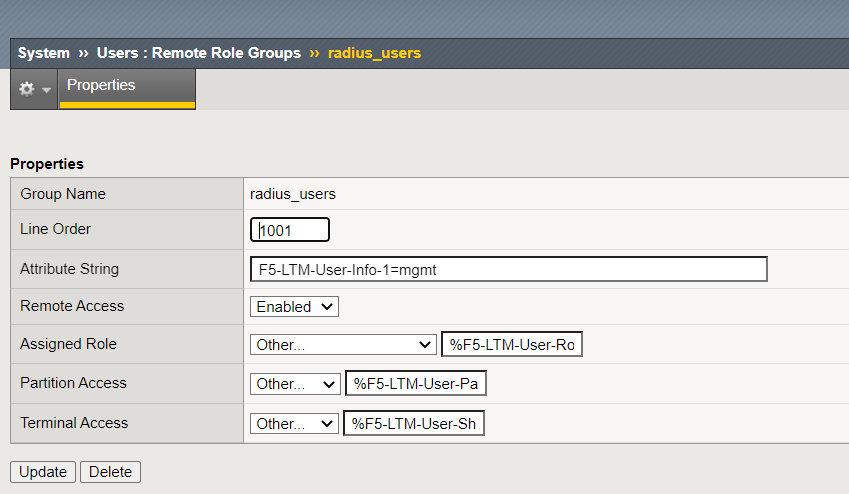
It won't even consider the roles you hopefully have configured under "Remote Rile Groups" could you send that as well?
The attriubutes that, that calls out are important and need to be linked to what the radius server sends.- chocokoalaApr 25, 2022
Hi yes, when i set it to guest, it does really makes the account as guest.
we follow this article:
https://support.f5.com/csp/article/K14324#3
You can see the remote group we created (attached)
Help guide the future of your DevCentral Community!
What tools do you use to collaborate? (1min - anonymous)

Recent Discussions
Related Content
* Getting Started on DevCentral
* Community Guidelines
* Community Terms of Use / EULA
* Community Ranking Explained
* Community Resources
* Contact the DevCentral Team
* Update MFA on account.f5.com