Forum Discussion

jaikumar_f5_226 Nimbostratus
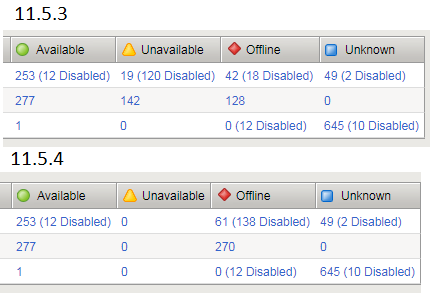
Jan 26, 2018NimbostratusUpgrade from 11.5.3 to 11.5.4 making unavailable object to offline
Hi all,
Can you share your thoughts on this. We upgraded an F5 from 11.5.3 to 11.5.4, the pre & post snapshots shows some differences. The difference is on the stats of network map. There were a...

boneyard MVP
MVP
Jan 27, 2018MVPfrom my experience and the documentation the unavailable usually means connection limit reached.
https://support.f5.com/csp/article/K14976
https://support.f5.com/csp/article/K12213214
yellow triangle status icon - The object is not currently available, but might become available later with no user intervention. For example, an object that has reached its configured connection limit might show a yellow status and then switch to a green status when the number of connections falls below the configured limit.why that would change to full down after an upgrade? kinda odd, perhaps a change in behaviour where in the past down virtual with too many requests could actually show yellow.
release notes don't show anything.
did you reboot before the upgrade and check status then?



Recent Discussions
Related Content
DevCentral Quicklinks
* Getting Started on DevCentral
* Community Guidelines
* Community Terms of Use / EULA
* Community Ranking Explained
* Community Resources
* Contact the DevCentral Team
* Update MFA on account.f5.com
Discover DevCentral Connects