Forum Discussion

 Nimbostratus
Issue with certificates using public F5 presence to internal resource

 Employee
That's exactly right. A client SSL profile is used when the server the BIG-IP is the server side of the SSL session. A server SSL profile is used when the BIG-IP is the client side of the SSL session. That's not confusing at all! [sarcasm] 😉
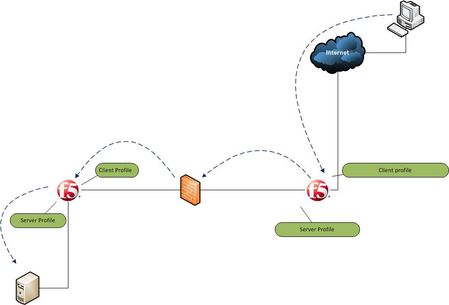
So in your case, you have a client SSL profile applied to the external F5 to establish an SSL session with the client. You have a server SSL session applied to the internal F5 to establish an SSL session with the server. And you have a server SSL profile applied to the external F5 that acts as the client side when talking to the client SSL profile on the internal F5. The beauty of the proxy design is that these three SSL sessions are completely independent of one another. You could encrypt to the client and/or to the server and not do encryption in the middle for example.
client --(ssl)--> F5 -------(clear)-------> F5 --(ssl)--> server
Or simply not encrypt past the external F5. The reason I'm bringing this up is that you might find some value in simply turning off SSL between the F5s to allow for more isolated troubleshooting of client and server side SSL.
In any case, the only SSL profiles that really require any specific attention are the profiles that touch the client and server. Client browsers are generally very flexible with regard to cryptography, so a simple client SSL profile based on the default profile is probably a good start. The server SSL profile, the one connecting to the server, may need tweaking if an older server can't handle secure renegotiation or more modern ciphers. As for the SSL session between the F5s, I'd just use the default client and server SSL profiles here.



Recent Discussions
Related Content
* Getting Started on DevCentral
* Community Guidelines
* Community Terms of Use / EULA
* Community Ranking Explained
* Community Resources
* Contact the DevCentral Team
* Update MFA on account.f5.com