Forum Discussion

sterreta_87927 Nimbostratus
May 19, 2014NimbostratusCustom HTTP Monitor
Hello, I need to create a custom HTTP monitor and I have no scripting experience. The F5 LTM I am using is version is 10.2.4. This is what I started with:
I created the following send string to ...
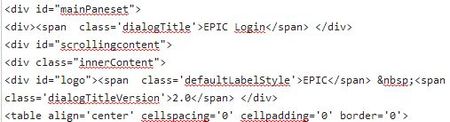

mimlo_61970 Cumulonimbus
May 19, 2014CumulonimbusYou can use a regular expression, but it might not work exactly as you plan.
EPIC Login.*EPIC.*2\.0
This will match 'EPIC Login' followed by any amount of text, followed by 'EPIC' followed by any amount of text, finishing up with matching '2.0'
The problem might be these matches occur anywhere in the document, and not necessarily in the fields you want them to. I think it would be pretty difficult to match the text as it appears on screen, without using the entire code block as the receive string.

sterreta_87927Nimbostratus
May 28, 2014NimbostratusI tried all of the following variations, but none of them worked:
Epic Login.*EPIC.*2\.0
Epic Login.*EPIC
Epic Login
EPIC Login
I am now trying to match the response Header "HTTP/1.1 200 OK". So far I have tried the following without success:
HTTP/1.1.*200.*OK
HTTP.*200.*OK
200.*OK
200 OK
200
The only string that has succeded in NOT marking the servers DOWN is "HTTP" (without the quotes), but that is too generic, as each Response Header starts with HTTP. Any help at all with coding the receive string for this monitor is greatly appreciated.



Recent Discussions
Related Content
DevCentral Quicklinks
* Getting Started on DevCentral
* Community Guidelines
* Community Terms of Use / EULA
* Community Ranking Explained
* Community Resources
* Contact the DevCentral Team
* Update MFA on account.f5.com
Discover DevCentral Connects