xc
31 Topics
CORS with API calls
Hello, Sorry if this is an obvious question -- we're very new to XC. We're using XC with one load balancer with CORS activated. It works fine for web applications but all API calls (to our internal APIs) are blocked because of missing origin header. What is the correct way to handle it? Ask the connecting party to insert origin headers? Dedicate another load balancer (to be used for APIs only) with CORS disabled? Thank you.36Views0likes1CommentSimplifying and Securing Network Segmentation with F5 Distributed Cloud and Nutanix Flow
Introduction Enterprises often separate environments—such as development and production—to improve efficiency, reduce risk, and maintain compliance. A critical enabler of this separation is network segmentation, which isolates networks into smaller, secured segments—strengthening security, optimizing performance, and supporting regulatory standards. In this article, we explore the integration between Nutanix Flow and F5 Distributed Cloud, showcasing how F5 and Nutanix collaborate to simplify and secure network segmentation across diverse environments—on-premises, remote, and hybrid multicloud. Integration Overview At the heart of this integration is the capability to deploy a F5 Distributed Cloud Customer Edge (CE) inside a Nutanix Flow VPC, establish BGP peering with the Nutanix Flow BGP Gateway, and inject CE-advertised BGP routes into the VPC routing table. This architecture provides full control over application delivery and security within the VPC. It enables selective advertisement of HTTP load balancers (LBs) or VIPs to designated VPCs, ensuring secure and efficient connectivity. By leveraging F5 Distributed Cloud to segment and extend networks to remote location—whether on-premises or in the public cloud—combined with Nutanix Flow for microsegmentation within VPCs, enterprises achieve comprehensive end-to-end security. This approach enforces a consistent security posture while reducing complexity across diverse infrastructures. In our previous article (click here) , we explored application delivery and security. Here, we focus on network segmentation and how this integration simplifies connectivity across environments. Demo Walkthrough The demo consists of two parts: Extending a local network segment from a Nutanix Flow VPC to a remote site using F5 Distributed Cloud. Applying microsegmentation within the network segment using Nutanix Flow Security Next-Gen. San Jose (SJ) serves as our local site, and the demo environment dev3 is a Nutanix Flow VPC with an F5 Distributed Cloud Customer Edge (CE) deployed inside: *Note: The SJ CE is named jy-nutanix-overlay-dev3 in the F5 Distributed Cloud Console and xc-ce-dev3 in the Nutanix Prism Central. On the F5 Distributed Cloud Console, we created a network segment named jy-nutanix-sjc-nyc-segment and we assigned it specifically to the subnet 192.170.84.0/24: eBGP peering is ESTABLISHED between the CE and the Nutanix Flow BGP Gateway in this segment: At the remote site in NYC, a CE named jy-nutanix-nyc is deployed with a local subnet of 192.168.60.0/24: To extend jy-nutanix-sjc-nyc-segment from SJ to NYC, simply assign the segment jy-nutanix-sjc-nyc-segment to the NYC CE local subnet 192.168.60.0/24 in the F5 Distributed Cloud Console: Effortlessly and in no time, the segment jy-nutanix-sjc-nyc-segment is now extended across environments from SJ to NYC: Checking the CE routing table, we can see that the local routes originated from the CEs are being exchanged among them: At the local site SJ, the SJ CE jy-nutanix-overlay-dev3 advertises the remote route originating from the NYC CE jy-nutanix-nyc to the Nutanix Flow BGP Gateway via BGP, and installs the route in the dev3 routing table: SJ VMs can now reach NYC VMs and vice versa, while continuing to use their Nutanix Flow VPC logical router as the default gateway: To enforce granular security within the segment, Nutanix Flow Security Next-Gen provides microsegmentation. Together, F5 Distributed Cloud and Nutanix Flow Security Next-Gen deliver a cohesive solution: F5 Distributed cloud seamlessly extends network segments across environments, while Nutanix Flow Security Next-Gen ensures fine-grained security controls within those segments: Our demo extends a network segment between two data centers, but the same approach can also be applied between on-premises and public cloud environments—delivering flexibility across hybrid multicloud environments. Conclusion F5 Distributed Cloud simplifies network segmentation across hybrid and multi-cloud environments, making it both secure and effortless. By seamlessly extending network segments across any environment, F5 removes the complexity traditionally associated with connecting diverse infrastructures. Combined with Nutanix Flow Security Next-Gen for microsegmentation within each segment, this integration delivers end-to-end protection and consistent policy enforcement. Together, F5 and Nutanix help enterprises reduce operational overhead, maintain compliance, and strengthen security—while enabling agility and scalability across all environments. This integration is coming soon in CY2026. If you’re interested in early access, please contact your F5 representative. Related URLs Delivering Secure Application Services Anywhere with Nutanix Flow and F5 Distributed Cloud | DevCentral F5 Distributed Cloud - https://www.f5.com/products/distributed-cloud-services Nutanix Flow Network Security - https://www.nutanix.com/products/flow 176Views2likes0Comments
Does XC DNS support health monitoring for CNAME records?
Hi everyone, I have a question regarding health monitor with CNAME records in the XC DNS Load Balancer. If I configure a Type A DNS Load Balancer in XC, I can attach a DNS pool with health monitor. However, if I configure a Type CNAME DNS Load Balancer with a CNAME-type pool, I can't select any health monitor for the CNAME pool. Our goal is to monitor a server service hosted in a third-party cloud and avoid the cloud edge service going down. Once the XC DNS detect a service failure, then it will reply with the fallback dns record (from another cloud service) to the user. Is there have any other way to monitor the health of CNAME pool ? Regards, Ding41Views0likes0Comments
HTTP portal with the NTLM auth flow is broken on XC.
We are trying to protect an OWA365 portal with XC, but some requests with NTLM authentication show an Error 503 - Service Unavailable message in XC. I think that is the NTLM auth process because when try the same HTTP GET with "Authorization: Basic" it works fine. curl -v https://autodiscover.example.com/autodiscover/autodiscover.xml -H "Authorization: Basic ZG9tYWluXHVzZXI6UHJ1ZWJhc2RlcGFzc3dvcmQ=" < HTTP/2 200 < cache-control: private < content-type: text/xml; charset=utf-8 < request-id: 00000000-0000-0000-0000-000000000000 < server: volt-adc < <?xml version="1.0" encoding="utf-8"?> <Autodiscover xmlns="http://schemas.microsoft.com/exchange/autodiscover/responseschema/2006"> <Response> <Error Time="20:00:00.0000000" Id="000000000"> But the browser always fails. First, it responds with a 401 HTTP code. After sending the credentials, XC shows a 503-03 error: 'Service unavailable'. method: GET host: autodiscover.example.com req_path: /autodiscover/autodiscover.xml req_body: — api_endpoint: UNKNOWN scheme: https rsp_code: 503 rsp_code_details: upstream_reset_before_response_started{remote_reset} Do F5-XC have an OWA template or something about the NTLM user portal?Solved71Views0likes3CommentsShow or List F5 XC Routes in the Web
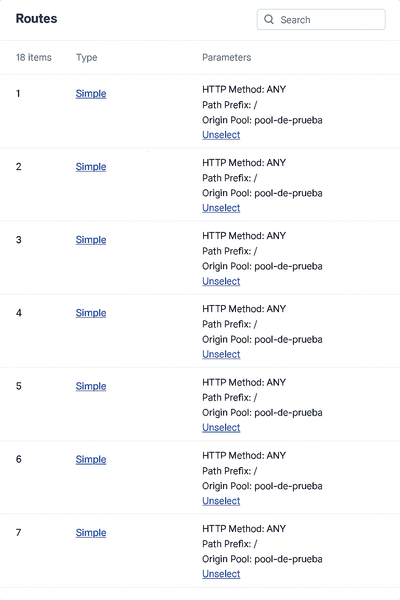
Hi F5ers, After more than two years working with F5 XC, I have decided to explore a functionality to show the host associated with each route "I have requested this functionality to F5, but it´s in design." For anyone who has deployed XC and has created routes into the load balancers, they may have encountered the fact that the routes don't have any description or relevant information, and in the case that they have to find a specific route, it could be almost impossible in an incident, or it will take a lot of time to navigate the menu. So, what I propose as an alternative solution, meanwhile, is F5 solving the request? I have designed a JavaScript that can be integrated into a bookmark "easy way", and if you copy the entire JSON configuration of the load balancer, it will show you in a console over the main XC web page the specific routes and their position in the Routes Menu. The steps to deploy it are: Create a new bookmark and copy the next encoded JavaScript in the URL New Bookmark javascript:(async()=>{const H=h=>{if(!h)return'';const i=h.invert_match?%27NOT %27:%27%27;const n=(h.name||%27%27)+%27%27;if(n.toLowerCase()===%27host%27){if(h.regex)return`${i}Host Regex: ${h.regex}`;if(h.exact)return`${i}Host: ${h.exact}`;if(h.match_value)return`${i}Host: ${h.match_value}`;if(h.value)return`${i}Host: ${h.value}`;if(Array.isArray(h.values)&&h.values.length)return`${i}Host in [${h.values.join(%27 | %27)}]`;return`${i}Host Header Present`}if(h.regex)return`${i}Header Regex: ${n} ~ ${h.regex}`;if(h.exact)return`${i}Header: ${n} = ${h.exact}`;if(h.match_value)return`${i}Header: ${n} = ${h.match_value}`;if(h.value)return`${i}Header: ${n} = ${h.value}`;if(Array.isArray(h.values)&&h.values.length)return`${i}Header: ${n} in [${h.values.join(%27 | %27)}]`;return`${i}Header: ${n} (present)`},S=t=>{try{let s=t.replace(/^\uFEFF/,%27%27).replace(/\u200B/g,%27%27);s=s.replace(/\/\*[^]*?\*\//g,%27%27);s=s.replace(/(^|[^:])\/\/.*$/gm,%27$1%27);s=s.replace(/,\s*([}\]])/g,%27$1%27);return s}catch{return t}},J=t=>{if(!t)return null;try{return JSON.parse(t)}catch{try{return JSON.parse(S(t))}catch{return null}}},G=()=>{try{return(getSelection()?.toString()||%27%27).trim()}catch{return%27%27}},D=()=>{const o=[];document.querySelectorAll(%27pre,code,textarea,div%27).forEach(el=>{const t=(el.innerText||el.textContent||%27%27).trim();if(t&&t.includes(%27"spec"%27)&&t.includes(%27"routes"%27)&&t.includes(%27"metadata"%27))o.push(t)});return o},P=a=>{for(const r of a){let t=r,i=t.indexOf(%27{%27),j=t.lastIndexOf(%27}%27);if(i>=0&&j>i)t=t.slice(i,j+1);const x=J(t);if(x?.spec?.routes)return x}return null},M=()=>{try{if(window.monaco?.editor?.getModels){for(const m of window.monaco.editor.getModels()){const txt=m.getValue?.();const j=J(txt);if(j?.spec?.routes)return j}}}catch{}return null},Q=onOk=>{const host=document.createElement(%27div%27),shadow=host.attachShadow({mode:%27open%27}),ov=document.createElement(%27div%27);ov.style.cssText=%27position:fixed;inset:0;z-index:1000000;background:rgba(0,0,0,.55);display:flex;align-items:center;justify-content:center;outline:none;%27;ov.tabIndex=0;const box=document.createElement(%27div%27);box.style.cssText=%27width:min(960px,92vw);height:min(76vh,720px);background:#111;color:#eee;border:1px solid #444;border-radius:10px;box-shadow:0 8px 24px rgba(0,0,0,.35);display:flex;flex-direction:column';const head=document.createElement('div');head.style.cssText='padding:10px 12px;border-bottom:1px solid #333;font:600 14px system-ui';head.textContent='Pega o carga el JSON del HTTP LB (vista JSON)';const bar=document.createElement('div');bar.style.cssText='display:flex;gap:8px;align-items:center;padding:8px 12px;border-bottom:1px solid #333';const btnRead=document.createElement('button');btnRead.textContent='📋 Leer portapapeles';btnRead.title='Requiere permiso del navegador';btnRead.style.cssText='background:#2b2b2b;color:#ddd;border:1px solid #444;border-radius:6px;padding:6px 10px;cursor:pointer';btnRead.onclick=async()=>{try{const txt=await navigator.clipboard.readText();ta.value=txt;ta.focus()}catch{alert('No se pudo leer del portapapeles. Permite el permiso o usa Archivo.')}};const file=document.createElement('input');file.type='file';file.accept='.json,.txt,application/json,text/plain';file.style.cssText='color:#bbb';file.onchange=async e=>{const f=e.target.files?.[0];if(!f)return;const txt=await f.text();ta.value=txt;ta.focus()};const tip=document.createElement('div');tip.style.cssText='margin-left:auto;color:#aaa;font-size:12px';tip.textContent='Consejo: arrastra y suelta un archivo aquí';bar.append(btnRead,file,tip);const ta=document.createElement('textarea');ta.style.cssText='flex:1;padding:10px 12px;background:#0f0f0f;color:#eee;border:0;outline:none;resize:none;font:12px/1.4 ui-monospace,Menlo,Consolas,monospace';ta.placeholder='Pega aquí el JSON (Ctrl+V). Si la página intercepta, usa "Leer portapapeles" o Archivo.';const pasteToTa=async e=>{try{let d=e.clipboardData?.getData('text/plain');if(!d&&navigator.clipboard?.readText)d=await navigator.clipboard.readText();if(typeof d==='string'){const st=ta.selectionStart??ta.value.length,en=ta.selectionEnd??ta.value.length;ta.value=ta.value.slice(0,st)+d+ta.value.slice(en);const pos=st+d.length;ta.setSelectionRange(pos,pos);ta.focus()}}catch{}};const globalPaste=e=>{e.stopImmediatePropagation?.();e.stopPropagation();e.preventDefault();pasteToTa(e)};window.addEventListener('paste',globalPaste,true);ta.addEventListener('dragover',e=>{e.preventDefault();ta.style.outline='1px dashed #555'});ta.addEventListener('dragleave',()=>ta.style.outline='');ta.addEventListener('drop',async e=>{e.preventDefault();ta.style.outline='';const f=e.dataTransfer.files?.[0];if(f)ta.value=await f.text()});const foot=document.createElement('div');foot.style.cssText='display:flex;gap:10px;justify-content:flex-end;padding:10px 12px;border-top:1px solid #333';const ok=document.createElement('button');ok.textContent='Validar y mostrar';ok.style.cssText='background:#2b2b2b;color:#ddd;border:1px solid #444;border-radius:6px;padding:6px 12px;cursor:pointer';ok.onclick=()=>{const j=J(ta.value);if(!(j?.spec?.routes)){alert('No parece un JSON válido con spec.routes.\nAsegúrate de copiar la vista JSON completa.');return}cleanup();onOk(j)};const cancel=document.createElement('button');cancel.textContent='Cancelar';cancel.style.cssText='background:#222;color:#bbb;border:1px solid #444;border-radius:6px;padding:6px 12px;cursor:pointer';const cleanup=()=>{try{window.removeEventListener('paste',globalPaste,true)}catch{}host.remove()};cancel.onclick=cleanup;foot.append(ok,cancel);box.append(head,bar,ta,foot);ov.append(box);shadow.append(ov);document.body.append(host);setTimeout(()=>ta.focus(),0);ov.addEventListener('mousedown',()=>ta.focus())},A=()=>{const s=G();let j=J(s);if(j?.spec?.routes)return Promise.resolve(j);j=M();if(j?.spec?.routes)return Promise.resolve(j);const hits=D();j=P(hits);if(j?.spec?.routes)return Promise.resolve(j);return new Promise(res=>Q(res))},R=jobj=>{const routes=jobj?.spec?.routes||[],id='xcHostMatchesPanel';document.getElementById(id)?.remove();const panel=document.createElement('div');panel.id=id;panel.style.cssText=['position:fixed','z-index:999999','top:12px','left:12px','max-width:560px','max-height:75vh','overflow:auto','background:#111','color:#eee','border:1px solid #444','border-radius:8px','font:13px/1.35 system-ui,Segoe UI,Roboto,Arial','padding:0','box-shadow:0 8px 24px rgba(0,0,0,.35)','cursor:grab'].join(';');const header=document.createElement('div');header.style.cssText='user-select:none;background:#1b1b1b;border-bottom:1px solid #333;border-top-left-radius:8px;border-top-right-radius:8px;padding:8px 12px;position:relative';header.innerHTML='<div style="font-weight:600">F5 XC — Host match (sin API)</div><div style="opacity:.8;font-size:12px">Fuente: selección/DOM/portapapeles/archivo</div>';const close=document.createElement('button');close.textContent='×';close.title='Cerrar';close.style.cssText='position:absolute;top:6px;right:8px;background:#333;color:#ddd;border:0;border-radius:4px;padding:2px 6px;cursor:pointer';close.addEventListener('pointerdown',e=>{e.stopPropagation();e.preventDefault()});close.addEventListener('click',e=>{e.stopPropagation();e.preventDefault();cleanup()});header.appendChild(close);panel.appendChild(header);const body=document.createElement('div');body.style.cssText='padding:10px 12px 8px';const hr=()=>{const x=document.createElement('div');x.style.cssText='height:1px;background:#333;margin:8px 0';body.appendChild(x)};if(!routes.length){body.append('Sin routes en el JSON.')}else{routes.forEach((r,i)=>{const idx=i+1,s=r.simple_route||{},rd=r.redirect_route||{};let host='';const others=[];(s.headers||[]).forEach(h=>{const t=H(h);((h.name||'').toLowerCase()==='host')?(host=host||t):others.push(t)});(rd.headers||[]).forEach(h=>{const t=H(h);((h.name||'').toLowerCase()==='host')?(host=host||t):others.push(t)});const path=s.path?(s.path.prefix?%60Path Match: ${s.path.prefix}%60:(s.path.regex?%60Path Regex: ${s.path.regex}%60:'')):(rd.path&&rd.path.prefix?%60Path Match: ${rd.path.prefix}%60:'');const type=s?'Simple Route':(rd?'Redirect Route':'(otro)');const block=document.createElement('div');block.style.marginBottom='8px';block.innerHTML=%60<div style="color:#8bd;">#${idx} — ${type}</div>%60+(host?%60<div>• ${host}</div>%60:'<div>• (sin Host)</div>')+(path?%60<div>• ${path}</div>%60:'')+(others.length?%60<div>• ${others.join('<br>• ')}</div>%60:'');body.appendChild(block);hr()})}const foot=document.createElement('div');foot.style.cssText='display:flex;gap:8px;align-items:center;justify-content:space-between';const left=document.createElement('div');left.style.cssText='display:flex;gap:8px;align-items:center';const reset=document.createElement('button');reset.textContent='Reset posición';reset.style.cssText='background:#2b2b2b;color:#ddd;border:1px solid #444;border-radius:4px;padding:4px 8px;cursor:pointer';reset.onclick=()=>{panel.style.left='12px';panel.style.top='12px';panel.style.right='auto';localStorage.removeItem('XC_PANEL_POS')};left.appendChild(reset);foot.appendChild(left);body.appendChild(foot);panel.appendChild(body);document.body.appendChild(panel);const clamp=(v,min,max)=>Math.max(min,Math.min(max,v)),restore=()=>{try{const pos=JSON.parse(localStorage.getItem('XC_PANEL_POS')||'null');if(pos&&typeof pos.left==='number'&&typeof pos.top==='number'){panel.style.left=pos.left+'px';panel.style.top=pos.top+'px';panel.style.right='auto'}}catch{}},save=()=>{try{const r=panel.getBoundingClientRect();localStorage.setItem('XC_PANEL_POS',JSON.stringify({left:Math.round(r.left),top:Math.round(r.top)}))}catch{}};restore();let drag=false,sx=0,sy=0,sl=0,st=0;function onKey(e){if(e.key==='Escape')cleanup()}function cleanup(){try{window.removeEventListener('keydown',onKey)}catch{}panel.remove()}panel.addEventListener('pointerdown',e=>{if(e.button!==0)return;if(e.target.closest("button, a, input, textarea, select, [draggable='true']"))return;drag=true;panel.setPointerCapture(e.pointerId);sx=e.clientX;sy=e.clientY;const r=panel.getBoundingClientRect();sl=r.left;st=r.top;panel.style.willChange='left, top';panel.style.transition='none';panel.style.cursor='grabbing'});panel.addEventListener('pointermove',e=>{if(!drag)return;const dx=e.clientX-sx,dy=e.clientY-sy,w=panel.offsetWidth,h=panel.offsetHeight,maxL=innerWidth-w-6,maxT=innerHeight-h-6,newL=clamp(sl+dx,6,Math.max(6,maxL)),newT=clamp(st+dy,6,Math.max(6,maxT));panel.style.left=newL+'px';panel.style.top=newT+'px';panel.style.right='auto'});panel.addEventListener('pointerup',e=>{if(!drag)return;drag=false;panel.releasePointerCapture(e.pointerId);panel.style.willChange='';panel.style.cursor='grab';save()});window.addEventListener('resize',()=>{save();restore()});window.addEventListener('keydown',onKey)};try{const json=await A();R(json)}catch(e){console.error(e);alert('No fue posible obtener el JSON. Abre la vista JSON del LB o usa el cuadro para pegar/cargar.')}})(); If you want to explore the JavaScript code, I will leave it at the end of the publication. How does it work? Copy or upload the JSON code of the load balancer In the XC web menu, execute the bookmark and copy the JSON code, and then click on validate and show. It shows you the specific routes and number position for each route, giving the possibility to find the required route easily and quickly. Hope it works for anyone who has the same problem as me. The JavaScript code is: (async () => { /** * F5 XC Host Match Viewer (sin API) — blindado contra listeners externos * - Fuentes: Selección | Monaco | DOM | Cuadro (Pegar / Portapapeles / Archivo) * - Intercepción GLOBAL de 'paste' (captura) mientras el cuadro está abierto: * redirige el contenido al <textarea> propio y corta la propagación/defecto. * - Panel arrastrable, ESC/× para cerrar, posición persistente. */ // ---------- Utils ---------- const formatHeader = (h) => { if (!h) return ''; const inv = h.invert_match ? 'NOT ' : ''; const name = (h.name || '').toString(); if (name.toLowerCase() === 'host') { if (h.regex) return `${inv}Host Regex: ${h.regex}`; if (h.exact) return `${inv}Host: ${h.exact}`; if (h.match_value) return `${inv}Host: ${h.match_value}`; if (h.value) return `${inv}Host: ${h.value}`; if (Array.isArray(h.values) && h.values.length) { return `${inv}Host in [${h.values.join(' | ')}]`; } return `${inv}Host Header Present`; } if (h.regex) return `${inv}Header Regex: ${name} ~ ${h.regex}`; if (h.exact) return `${inv}Header: ${name} = ${h.exact}`; if (h.match_value) return `${inv}Header: ${name} = ${h.match_value}`; if (h.value) return `${inv}Header: ${name} = ${h.value}`; if (Array.isArray(h.values) && h.values.length) { return `${inv}Header: ${name} in [${h.values.join(' | ')}]`; } return `${inv}Header: ${name} (present)`; }; const sanitizeJson = (text) => { try { let s = text.replace(/^\uFEFF/, '').replace(/\u200B/g, ''); s = s.replace(/\/\*[^]*?\*\//g, ''); // /* ... */ s = s.replace(/(^|[^:])\/\/.*$/gm, '$1'); // // ... (evita http://) s = s.replace(/,\s*([}\]])/g, '$1'); // comas colgantes return s; } catch { return text; } }; const tryParseJson = (text) => { if (!text) return null; try { return JSON.parse(text); } catch { try { return JSON.parse(sanitizeJson(text)); } catch { return null; } } }; const getSelectionText = () => { try { return (window.getSelection()?.toString() || '').trim(); } catch { return ''; } }; const findDomCandidates = () => { const out = []; document.querySelectorAll('pre,code,textarea,div').forEach(el => { const t = (el.innerText || el.textContent || '').trim(); if (t && t.includes('"spec"') && t.includes('"routes"') && t.includes('"metadata"')) out.push(t); }); return out; }; const parseFirstJson = (texts) => { for (const raw of texts) { let t = raw; const i = t.indexOf('{'), j = t.lastIndexOf('}'); if (i >= 0 && j > i) t = t.slice(i, j + 1); const jn = tryParseJson(t); if (jn?.spec?.routes) return jn; } return null; }; const tryMonacoModels = () => { try { if (window.monaco?.editor?.getModels) { for (const m of window.monaco.editor.getModels()) { const txt = m.getValue?.(); const j = tryParseJson(txt); if (j?.spec?.routes) return j; } } } catch {} return null; }; // ---------- Cuadro Pegar/Archivo con Shadow DOM + PASTE GLOBAL ---------- let modalState = { open: false, ta: null, host: null, removeGlobal: null }; const showPasteOrFileModal = (onOk) => { // Shadow host para aislar el cuadro const host = document.createElement('div'); const shadow = host.attachShadow({ mode: 'open' }); // Overlay clicable (lleva el foco al textarea) const ov = document.createElement('div'); ov.style.cssText = 'position:fixed;inset:0;z-index:1000000;background:rgba(0,0,0,.55);display:flex;align-items:center;justify-content:center;outline:none;'; ov.tabIndex = 0; // para recibir foco ov.addEventListener('mousedown', () => ta?.focus()); const box = document.createElement('div'); box.style.cssText = 'width:min(960px,92vw);height:min(76vh,720px);background:#111;color:#eee;border:1px solid #444;border-radius:10px;' + 'box-shadow:0 8px 24px rgba(0,0,0,.35);display:flex;flex-direction:column'; const head = document.createElement('div'); head.style.cssText = 'padding:10px 12px;border-bottom:1px solid #333;font:600 14px system-ui'; head.textContent = 'Pega o carga el JSON del HTTP LB (vista JSON)'; const bar = document.createElement('div'); bar.style.cssText = 'display:flex;gap:8px;align-items:center;padding:8px 12px;border-bottom:1px solid #333'; const btnRead = document.createElement('button'); btnRead.textContent = '📋 Leer portapapeles'; btnRead.title = 'Requiere permiso del navegador'; btnRead.style.cssText = 'background:#2b2b2b;color:#ddd;border:1px solid #444;border-radius:6px;padding:6px 10px;cursor:pointer'; btnRead.onclick = async () => { try { const txt = await navigator.clipboard.readText(); ta.value = txt; ta.focus(); } catch { alert('No se pudo leer del portapapeles. Permite el permiso o usa Archivo.'); } }; const file = document.createElement('input'); file.type = 'file'; file.accept = '.json,.txt,application/json,text/plain'; file.style.cssText = 'color:#bbb'; file.onchange = async (e) => { const f = e.target.files?.[0]; if (!f) return; const txt = await f.text(); ta.value = txt; ta.focus(); }; const tip = document.createElement('div'); tip.style.cssText = 'margin-left:auto;color:#aaa;font-size:12px'; tip.textContent = 'Consejo: arrastra y suelta un archivo aquí'; bar.append(btnRead, file, tip); const ta = document.createElement('textarea'); ta.style.cssText = 'flex:1;padding:10px 12px;background:#0f0f0f;color:#eee;border:0;outline:none;resize:none;font:12px/1.4 ui-monospace,Menlo,Consolas,monospace'; ta.placeholder = 'Pega aquí el JSON (Ctrl+V). Si la página intercepta, usa "Leer portapapeles" o Archivo.'; // Pegar “blindado” en el <textarea> const pasteToTa = async (e) => { try { let data = e.clipboardData?.getData('text/plain'); if (!data && navigator.clipboard?.readText) { // Fallback si el navegador no expone clipboardData al evento data = await navigator.clipboard.readText(); } if (typeof data === 'string') { const start = ta.selectionStart ?? ta.value.length; const end = ta.selectionEnd ?? ta.value.length; ta.value = ta.value.slice(0, start) + data + ta.value.slice(end); const pos = start + data.length; ta.setSelectionRange(pos, pos); ta.focus(); } } catch {} }; // Interceptor GLOBAL (captura) — redirige SIEMPRE el paste al <textarea> const globalPasteCapture = (e) => { if (!modalState.open) return; e.stopImmediatePropagation?.(); e.stopPropagation(); e.preventDefault(); pasteToTa(e); }; window.addEventListener('paste', globalPasteCapture, true); // Drag&drop de archivo al <textarea> ta.addEventListener('dragover', e => { e.preventDefault(); ta.style.outline = '1px dashed #555'; }); ta.addEventListener('dragleave', () => { ta.style.outline = ''; }); ta.addEventListener('drop', async e => { e.preventDefault(); ta.style.outline = ''; const f = e.dataTransfer.files?.[0]; if (f) ta.value = await f.text(); }); const foot = document.createElement('div'); foot.style.cssText = 'display:flex;gap:10px;justify-content:flex-end;padding:10px 12px;border-top:1px solid #333'; const ok = document.createElement('button'); ok.textContent = 'Validar y mostrar'; ok.style.cssText = 'background:#2b2b2b;color:#ddd;border:1px solid #444;border-radius:6px;padding:6px 12px;cursor:pointer'; ok.onclick = () => { const j = tryParseJson(ta.value); if (!(j?.spec?.routes)) { alert('No parece un JSON válido con spec.routes.\nAsegúrate de copiar la vista JSON completa.'); return; } cleanup(); onOk(j); }; const cancel = document.createElement('button'); cancel.textContent = 'Cancelar'; cancel.style.cssText = 'background:#222;color:#bbb;border:1px solid #444;border-radius:6px;padding:6px 12px;cursor:pointer'; const cleanup = () => { try { window.removeEventListener('paste', globalPasteCapture, true); } catch {} modalState = { open: false, ta: null, host: null, removeGlobal: null }; host.remove(); }; cancel.onclick = cleanup; foot.append(ok, cancel); box.append(head, bar, ta, foot); ov.append(box); shadow.append(ov); document.body.append(host); // Estado global del modal modalState = { open: true, ta, host, removeGlobal: () => window.removeEventListener('paste', globalPasteCapture, true) }; // Foco inicial y al pulsar en overlay setTimeout(() => { ta.focus(); }, 0); ov.addEventListener('click', (ev) => { // Si clic fuera de controles, mueve foco al textarea if (ev.target === ov) ta.focus(); }); }; // ---------- Flujo de adquisición ---------- const acquireJson = () => { const sel = getSelectionText(); let j = tryParseJson(sel); if (j?.spec?.routes) return Promise.resolve(j); j = tryMonacoModels(); if (j?.spec?.routes) return Promise.resolve(j); const hits = findDomCandidates(); j = parseFirstJson(hits); if (j?.spec?.routes) return Promise.resolve(j); return new Promise(res => showPasteOrFileModal(res)); }; // ---------- Panel ---------- const drawPanel = (jobj) => { const routes = jobj?.spec?.routes || []; const id = 'xcHostMatchesPanel'; document.getElementById(id)?.remove(); const panel = document.createElement('div'); panel.id = id; panel.style.cssText = [ 'position:fixed','z-index:999999','top:12px','left:12px', 'max-width:560px','max-height:75vh','overflow:auto', 'background:#111','color:#eee','border:1px solid #444','border-radius:8px', 'font:13px/1.35 system-ui,Segoe UI,Roboto,Arial','padding:0', 'box-shadow:0 8px 24px rgba(0,0,0,.35)','cursor:grab' ].join(';'); const header = document.createElement('div'); header.style.cssText = 'user-select:none;background:#1b1b1b;border-bottom:1px solid #333;border-top-left-radius:8px;border-top-right-radius:8px;padding:8px 12px;position:relative'; header.innerHTML = ` <div style="font-weight:600">F5 XC — Host match (sin API)</div> <div style="opacity:.8;font-size:12px">Fuente: selección/DOM/portapapeles/archivo</div> `; const close = document.createElement('button'); close.textContent = '×'; close.title = 'Cerrar'; close.style.cssText = 'position:absolute;top:6px;right:8px;background:#333;color:#ddd;border:0;border-radius:4px;padding:2px 6px;cursor:pointer'; close.addEventListener('pointerdown', (e) => { e.stopPropagation(); e.preventDefault(); }); close.addEventListener('click', (e) => { e.stopPropagation(); e.preventDefault(); cleanup(); }); header.appendChild(close); panel.appendChild(header); const body = document.createElement('div'); body.style.cssText = 'padding:10px 12px 8px'; const hr = () => { const x = document.createElement('div'); x.style.cssText = 'height:1px;background:#333;margin:8px 0'; body.appendChild(x); }; if (!routes.length) { body.append('Sin routes en el JSON.'); } else { routes.forEach((r, i) => { const idx = i + 1; const s = r.simple_route || {}; const rd = r.redirect_route || {}; let hostLine = ''; const others = []; (s.headers || []).forEach(h => { const t = formatHeader(h); ((h.name || '').toLowerCase() === 'host') ? (hostLine = hostLine || t) : others.push(t); }); (rd.headers || []).forEach(h => { const t = formatHeader(h); ((h.name || '').toLowerCase() === 'host') ? (hostLine = hostLine || t) : others.push(t); }); const path = s.path ? (s.path.prefix ? `Path Match: ${s.path.prefix}` : (s.path.regex ? `Path Regex: ${s.path.regex}` : '')) : (rd.path && rd.path.prefix ? `Path Match: ${rd.path.prefix}` : ''); const type = s ? 'Simple Route' : (rd ? 'Redirect Route' : '(otro)'); const block = document.createElement('div'); block.style.marginBottom = '8px'; block.innerHTML = `<div style="color:#8bd;">#${idx} — ${type}</div>` + (hostLine ? `<div>• ${hostLine}</div>` : '<div>• (sin Host)</div>') + (path ? `<div>• ${path}</div>` : '') + (others.length ? `<div>• ${others.join('<br>• ')}</div>` : ''); body.appendChild(block); hr(); }); } const foot = document.createElement('div'); foot.style.cssText = 'display:flex;gap:8px;align-items:center;justify-content:space-between'; const left = document.createElement('div'); left.style.cssText = 'display:flex;gap:8px;align-items:center'; const reset = document.createElement('button'); reset.textContent = 'Reset posición'; reset.style.cssText = 'background:#2b2b2b;color:#ddd;border:1px solid #444;border-radius:4px;padding:4px 8px;cursor:pointer'; reset.onclick = () => { panel.style.left = '12px'; panel.style.top = '12px'; panel.style.right = 'auto'; localStorage.removeItem('XC_PANEL_POS'); }; left.appendChild(reset); foot.appendChild(left); body.appendChild(foot); panel.appendChild(body); document.body.appendChild(panel); // ---- Drag & persistencia ---- const clamp = (v, min, max) => Math.max(min, Math.min(max, v)); const restore = () => { try { const pos = JSON.parse(localStorage.getItem('XC_PANEL_POS') || 'null'); if (pos && typeof pos.left === 'number' && typeof pos.top === 'number') { panel.style.left = pos.left + 'px'; panel.style.top = pos.top + 'px'; panel.style.right = 'auto'; } } catch {} }; const save = () => { try { const r = panel.getBoundingClientRect(); localStorage.setItem('XC_PANEL_POS', JSON.stringify({ left: Math.round(r.left), top : Math.round(r.top), })); } catch {} }; restore(); let dragging = false, sx = 0, sy = 0, sl = 0, st = 0; function onKey(ev) { if (ev.key === 'Escape') cleanup(); } window.addEventListener('keydown', onKey); function cleanup() { try { window.removeEventListener('keydown', onKey); } catch {} panel.remove(); } panel.addEventListener('pointerdown', (e) => { if (e.button !== 0) return; if (e.target.closest("button, a, input, textarea, select, [draggable='true']")) return; dragging = true; panel.setPointerCapture(e.pointerId); sx = e.clientX; sy = e.clientY; const r = panel.getBoundingClientRect(); sl = r.left; st = r.top; panel.style.willChange = 'left, top'; panel.style.transition = 'none'; panel.style.cursor = 'grabbing'; }); panel.addEventListener('pointermove', (e) => { if (!dragging) return; const dx = e.clientX - sx; const dy = e.clientY - sy; const w = panel.offsetWidth; const h = panel.offsetHeight; const maxLeft = innerWidth - w - 6; const maxTop = innerHeight - h - 6; const newLeft = clamp(sl + dx, 6, Math.max(6, maxLeft)); const newTop = clamp(st + dy, 6, Math.max(6, maxTop)); panel.style.left = newLeft + 'px'; panel.style.top = newTop + 'px'; panel.style.right = 'auto'; }); panel.addEventListener('pointerup', (e) => { if (!dragging) return; dragging = false; panel.releasePointerCapture(e.pointerId); panel.style.willChange = ''; panel.style.cursor = 'grab'; save(); }); window.addEventListener('resize', () => { save(); restore(); }); }; // ---------- Ejecuta ---------- try { const json = await (async () => { const sel = getSelectionText(); let j = tryParseJson(sel); if (j?.spec?.routes) return j; j = tryMonacoModels(); if (j?.spec?.routes) return j; const hits = findDomCandidates(); j = parseFirstJson(hits); if (j?.spec?.routes) return j; return await new Promise(res => showPasteOrFileModal(res)); })(); drawPanel(json); } catch (e) { console.error(e); alert('No fue posible obtener el JSON. Abre la vista JSON del LB o usa el cuadro para pegar/cargar.'); } })();27Views1like1CommentF5 Distributed Cloud (XC) Custom Routes: Capabilities, Limitations, and Key Design Considerations
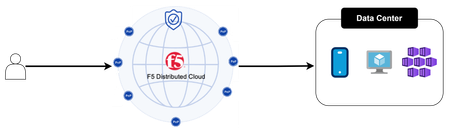
This article explores how Custom Routes work in F5 Distributed Cloud (XC), why they differ architecturally from standard Load Balancer routes, and what to watch out for in real-world deployments, covering backend abstraction, Endpoint/Cluster dependencies, and critical TLS trust and Root CA requirements.292Views2likes1CommentThinking Outside the Box: Rewriting Web Pages with F5 Distributed Cloud (XC)
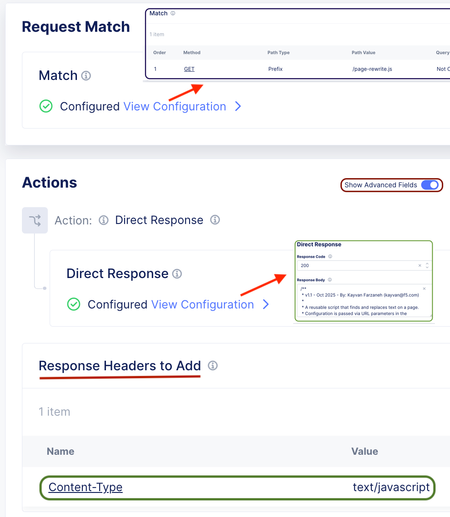
This article demonstrates how to dynamically rewrite web page content, such as updating links or replacing text, by using native features in F5 Distributed Cloud (XC). It provides a creative workaround that leverages JavaScript injection to modify pages on the fly, avoiding the need for a separate proxy like NGINX or BIG-IP.569Views4likes3Comments
F5 XC HTTP 404 rout_not_found / rsp_code 404
I would like to add more point about the HTTP 404 error: route_not_found / rsp_code 404 in an XC (RE + CE) deployment. 1. Even if XC has the correct host match value in the route, you might still observe a 404 response. In such cases, check the DNS configuration on the CEs. A possible reason could be that the CEs are unable to resolve DNS for host which is configured in route. 2. Even if XC has the correct host match value, the path might not match. For example, if you have a single route as shown below and the request comes as https://example.com/, you may see rsp_code 404 , as it is not matching any routes. Example : HTTP Method:ANY Path Match : Prefix Prefix:/hello Headers Host example.com Orginpool: example_orgin pool https://my.f5.com/manage/s/article/K00014749096Views1like2CommentsF5 DNS/GTM External Monitor(EAV) with SNI support and response code check
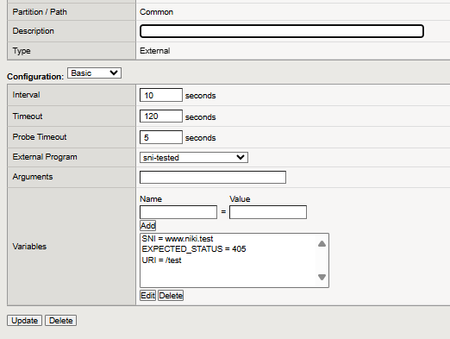
Code is community submitted, community supported, and recognized as ‘Use At Your Own Risk’. The example DNS/GTM health monitor is for versions before 16.1 as BIG-IP supports SNI for default DNS/GTM HTTPS monitor in the latest version but if you have still not upgraded then this is for you! I have used this monitor for XC Distributed Cloud as the HTTP LB share by default the same tenant IP address and SNI support is needed. You can order dedicated public IP addresses for each HTTP LB and enable "Default Load Balancer" ( https://my.f5.com/manage/s/article/K000152902 ) option but it will cost you extra 😉 The script is a modified version of External https health monitor for SNI-enabled pool as to handle response codes and to set the SNI globally for the entire pool and it's members. If you are uploading from Windows machine see External monitor fails to run as you could hit the bug. This could be needed for F5 DNS/GTM below 16.1 that do not support SNI in HTTPS monitors. The only mandatory variable is "SNI" that should be set in the external monitor config that references this uploaded bash script. The "URI" variable by default is set to "/" and "$2" variable by default is empty or 443, the default expected response code 200. #!/bin/sh # External monitoring script for checking HTTP status code # $1 = IP (::ffff:nnn.nnn.nnn.nnn notation or hostname) # $2 = port (optional; defaults to 443 if not provided) # Default SNI to IP if not explicitly provided node_ip=$(echo "$1" | sed 's/::ffff://') # Remove IPv6 compatibility prefix SNI=${SNI:-"$node_ip"} # Assign sanitized IP to SNI # Default variables MON_NAME=${MON_NAME:-"MyExtMon$$"} pidfile="/var/run/$MON_NAME.$1..$2.pid" # PID file path DEBUG=${DEBUG:-0} # Enable debugging if set to 1 EXPECTED_STATUS=${EXPECTED_STATUS:-200} # Default HTTP status code to 200 URI=${URI:-"/"} # Default URI DEFAULT_PORT=443 # Default port (used if $2 is unset) # Set port to default if $2 is not provided if [ -z "${2}" ]; then PORT=${DEFAULT_PORT} else PORT=${2} fi # Kill old process if pidfile exists if [ -f "$pidfile" ]; then kill -9 -$(cat "$pidfile") > /dev/null 2>&1 fi echo "$$" > "$pidfile" # Perform the HTTP(S) request via single curl (fetch status code only) status_code=$(curl -s -o /dev/null -w '%{http_code}' --connect-timeout 5 --resolve "${SNI}:${PORT}:${node_ip}" "https://${SNI}:${PORT}${URI}") # Cleanup rm -f "$pidfile" > /dev/null 2>&1 # Output server status based on HTTP status code match if [ "$status_code" -eq "$EXPECTED_STATUS" ]; then echo "up" else echo "down" fi # Debugging if [ "$DEBUG" -eq 1 ]; then echo "Debugging on..." echo "SNI=${SNI}" echo "URI=${URI}" echo "IP=${node_ip}" echo "PORT=${PORT}" echo "MON_NAME=${MON_NAME}" echo "STATUS_CODE=${status_code}" echo "EXPECTED_STATUS=${EXPECTED_STATUS}" echo "curl -s -o /dev/null -w '%{http_code}' --connect-timeout 5 --resolve ${SNI}:${PORT}:${node_ip} https://${SNI}:${PORT}${URI}" fi223Views0likes1CommentXC Distributed Cloud and how to keep the Source IP from changing with customer edges(CE)!
Code is community submitted, community supported, and recognized as ‘Use At Your Own Risk’. Old applications sometimes do not accept a different IP address to be used by the clients during the session/connection. How can make certain the IP stays the same for a client? The best will always be the application to stop tracking users based on something primitive as an ip address and sometimes the issue is in the Load Balancer or ADC after the XC RE and then if the persistence is based on source IP address on the ADC to be changed in case it is BIG-IP to Cookie or Universal or SSL session based if the Load Balancer is doing no decryption and it is just TCP/UDP layer . As an XC Regional Edge (RE) has many ip addresses it can connect to the origin servers adding a CE for the legacy apps is a good option to keep the source IP from changing for the same client HTTP requests during the session/transaction. Before going through this article I recommend reading the links below: F5 Distributed Cloud – CE High Availability Options: A Comparative Exploration | DevCentral F5 Distributed Cloud - Customer Edge | F5 Distributed Cloud Technical Knowledge Create Two Node HA Infrastructure for Load Balancing Using Virtual Sites with Customer Edges | F5 Distributed Cloud Technical Knowledge RE to CE cluster of 3 nodes The new SNAT prefix option under the origin pool allows no mater what CE connects to the origin pool the same IP address to be seen by the origin. Be careful as if you have more than a single IP with /32 then again the client may get each time different IP address. This may cause "inet port exhaustion " ( that is what it is called in F5BIG-IP) if there are too many connections to the origin server, so be careful as the SNAT option was added primary for that use case. There was an older option called "LB source IP persistence" but better not use it as it was not so optimized and clean as this one. RE to 2 CE nodes in a virtual site The same option with SNAT pool is not allowed for a virtual site made of 2 standalone CE. For this we can use the ring hash algorithm. Why this works? Well as Kayvan explained to me the hashing of the origin is taking into account the CE name, so the same origin under 2 different CE will get the same ring hash and the same source IP address will be send to the same CE to access the Origin Server. This will not work for a single 3-node CE cluster as it all 3 nodes have the same name. I have seen 503 errors when ring hash is enabled under the HTTP LB so enable it only under the XC route object and the attached origin pool to it! CE hosted HTTP LB with Advertise policy In XC with CE you can do do HA with 3-cluster CE that can be layer2 HA based on VRRP and arp or Layer 3 persistence based bgp that can work 3 node CE cluster or 2 CE in a virtual site and it's control options like weight, as prepend or local preference options at the router level. For the Layer 2 I will just mention that you need to allow 224.0.0.8 for the VRRP if you are migrating from BIG-IP HA and that XC selects 1 CE to hold active IP that is seen in the XC logs and at the moment the selection for some reason can't be controlled. if a CE can't reach the origin servers in the origin pool it should stop advertising the HTTP LB IP address through BGP. For those options Deploying F5 Distributed Cloud (XC) Services in Cisco ACI - Layer Three Attached Deployment is a great example as it shows ECMP BGP but with the BGP attributes you can easily select one CE to be active and processing connections, so that just one ip address is seen by the origin server. When a CE gets traffic by default it does prefer to send it to the origin as by default "Local Preferred" is enabled under the origin pool. In the clouds like AWS/Azure just a cloud native LB is added In front of the 3 CE cluster and the solution there is simple as to just modify the LB to have a persistence. Public Clouds do not support ARP, so forget about Layer 2 and play with the native LB that load balances between the CE 😉 CE on Public Cloud (AWS/Azure/GCP) When deploying on a public cloud the CE can be deployed in two ways one is through the XC GUI and adding the AWS credentials but this way you have not a big freedom to be honest as you can't deploy 2 CE and make a virtual site out of them and add cloud LB in-front of them as it always will be 3-CE cluster with preconfigured cloud LB that will use all 3 LB! Using the newer "clickops" method is much better https://docs.cloud.f5.com/docs-v2/multi-cloud-network-connect/how-to/site-management/deploy-site-aws-clickops or using terraform but with manual mode and aws as a provider (not XC/volterra as it is the same as the XC GUI deployment) https://docs.cloud.f5.com/docs-v2/multi-cloud-network-connect/how-to/site-management/deploy-aws-site-terraform This way you can make the Cloud LB to use just one CE or have some client Persistence or if traffic comes from RE to CE to implement the virtual site 2 CE node! There is no Layer 2 ARP support as I mentioned in public cloud with 3-node cluster but there is NAT policy https://docs.cloud.f5.com/docs-v2/multi-cloud-network-connect/how-tos/networking/nat-policies but I haven't tried it myself to comment on it. Hope you enjoyed this article!225Views2likes0Comments