waf policy analysis
4 Topics
Evaluate WAF Policy with BIG-IQ Policy Analyzer
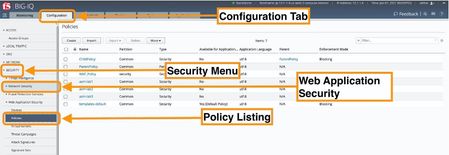
Introduction With BIG-IQ 8.0, F5 introduced a policy analyzer feature for web application security. It allows you to have an evaluation of your policy with respect to F5 recommended practices. It results in giving your team suggestions on enhancing your application’s security posture from a Web Application Firewall perspective. This article will take you through the process of using the Policy Analyzer feature. The resulting report can be exported to PDF for wider consumption. Using the Policy Analyzer The “Policy Analyzer” feature is available from the Configuration menu on BIG-IQ. Ensure that you login to the BIG-IQ web interface with sufficient privileges to access and view the Application Security Policies and their contents. The figure below shows how to access the policy by selecting the Configuration tab, highlighting the Security menu, expanding the item labelled Web Application Security Selecting the Policies The analyzer feature is available from the “More” menu as shown below: The Policy Analyzer screen provides the 4 main sections outlined below: The Security Score shown above provides a synthetic assessment of the policy based on the severity and number of recommendations. To look into more detail, refer to the recommendations table shown in the figure below. From the screen above, you can select and choose to ignore the recommendations. You can also click on the recommendation to access the feature configuration screen directly. This will allow you modify the policy directly from the Analyzer screen. For example, clicking on the “More than 10% or attack signatures are in staging (…)” entry, points to the policy configuration screen shown below: This allows you to review and hone your policy accordingly and adhere to recommended practices. Once the changes are made, makes sure to Save & Close . Keep in mind that you will need to go through the policy deployment process for the policy to become effective on the BIG-IP. (Deployment >> Web Application Security). Conclusion BIG-IQ’s Policy Analyzer can be used to gain better visibility into your security posture from one central location for your entire application security infrastructure. The insights provided by the Policy Analyzer Tool provide a starting point to gaining visibility in the efficacy of the protection in place.1.4KViews2likes1Comment
How to check the disabled rules in ASM Policy
Hi Experts , We would like to know the allowed/disbale url or Parameters configured for the Specific ASM policy . Example: www.example.com is the url for which I would like to know the rules applied . How can I check this? Any way I can pull the detailed configuration of ASM Policy from cli ?124Views0likes1Comment
Exced Timeout in Event Logs WAF
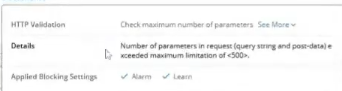
I have a issue with a customer WAF, in the Event Logs, it shows me an error in the "triggered violation (I attached a screenshot).", & the request show the status: ilegal. we modify the maximun limitation of 500 to 1000, with recommend F5 docs, and a traffic test was carried out again and the request status is: legal, but the registration of this traffic in Event Logs took a time of 3 minutos, wich is too much. Some recommendation with how resolve? Greetings Friends :),114Views0likes3Comments
F5 ASM/AWAF – violations logged but no learning suggestions generated
Hey everyone, running into a strange behavior with F5 ASM and hoping someone has seen this before. Setup: - Explicit/closed parameter list (only allowed parameters defined, everything else triggers a violation) - "Illegal Parameter" violation has Learn + Alarm + Block all enabled - Parameter learning mode is set to Always - Violations are appearing correctly in the event logs - no blocked IP addresses exceptions The Problem: Despite all of the above, no learning suggestions are being generated for the illegal parameter violations except one on the Traffic Learning page. What I noticed: After digging through the logs, I found a pattern: - the one request that triggered only the illegal parameter violation (with a valid URL) → learning suggestion WAS generated - Requests that triggered illegal parameter + illegal URL or illegal file type simultaneously → no learning suggestion generated The vast majority of my traffic falls into the second category, which is why the suggestions page looks empty. My question: Is there any documented behavior in ASM/AWAF where requests triggering multiple severe violations (illegal URL + illegal file type + illegal parameter together) are suppressed from generating learning suggestions? Or is something else going on here? Has anyone run into this and found a workaround other than manually adding parameters from the event log? Thanks in advance.96Views0likes3Comments