security
25 TopicsA Method for the Madness: Meet HTTP QUERY
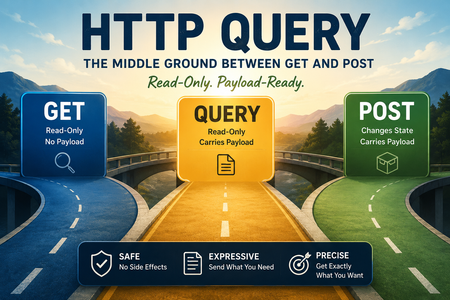
Note to the reader: I saw a headline on the new QUERY method and in a quick read didn't really understand the need, so I did a deep dive with Claude to understand the method itself, then followed with the larger infrastructure, security, and operational impacts for the implementation transitional period. This article is a summary of that session and co-authored by Claude. Every REST API grows a POST /search endpoint sooner or later — not because POST is the right tool for reading data, but because GET can't carry a body and your filter JSON stopped fitting in the URL years ago. The IETF closed that gap. On 15 June 2026 the RFC Editor published RFC 10008, "The HTTP QUERY Method" — a 24-page Proposed Standard on the IETF Standards Track. It's the first genuinely new HTTP method since PATCH landed as RFC 5789 in 2010, a 16-year gap. QUERY gives you the one thing GET and POST each refuse to provide: a safe, idempotent, cacheable request that carries a body. The TL;DR What it is: QUERY is a new, IANA-registered HTTP method that is safe and idempotent like GET, but carries a request body like POST. The body defines the query. Why it exists: GET is semantically correct for reads but forces the query into the URL (length limits, encoding pain, logging/bookmarking leakage). POST /search carries a body but lies to the infrastructure — nothing in the protocol signals the request is read-only, so caches, retry logic, and proxies can't treat it as one. QUERY is the missing middle. What's new on the wire: Nothing special. Any existing HTTP/1.1 or HTTP/2 connection carries it today. The friction is at every layer that has opinions about methods. The security headline: "Safe" is a promise about intent, not a guarantee about payloads. QUERY bodies need POST-level inspection, cache keys must include the full body (or you get cache poisoning), CSRF checks still apply to any endpoint with side effects, and method allowlists written before June 2026 don't know QUERY exists. Where support stands (mid-2026): Node.js has parsed QUERY since early 2024; OpenAPI 3.2 documents it; browsers can send it via fetch()/XHR but don't yet cache it; declarative HTML forms fall back to GET and drop the body; Spring hasn't shipped support. Treat it as production-ready for server-to-server, early-stage for browser-facing traffic. What to do: Don't rip out POST /search. QUERY sits alongside GET and POST — migrate gradually, and confirm every infrastructure layer handles it deliberately before real traffic arrives. The two-tool problem For as long as most of us have built APIs, reading data from a server meant choosing between two imperfect tools. GET has exactly the semantics you want for reads: safe (no state change expected), idempotent, and cacheable. The catch is that GET has no generally defined semantics for a request body — core HTTP semantics (RFC 9110 §9.3.1) even warn that a body on a GET can lead implementations to reject the request or treat it as a request-smuggling attempt. So the query has to go in the URL, and that runs into hard walls: URL length limits vary per proxy, load balancer, and server, and you discover the smallest one in the chain at runtime. RFC 9110 only recommends supporting URIs of at least ~8,000 octets, and that's a floor, not a promise. Some data is awkward to encode in a URI at all. Request URIs get logged, bookmarked, and dropped into Referer headers and analytics. And a nested filter object with arrays and boolean logic becomes an unreadable, fragile query string. POST fixes the body problem and creates a semantic one. A POST can create a record, update state, trigger a job, submit a form, or just run a search — and the HTTP layer can't tell which. Your application knows POST /search is read-only, but that's a private agreement between the server and the humans who wrote it. The caches, proxies, retry logic, CORS, gateways, and WAFs in the middle only see "POST," so they treat it as unsafe: not cacheable, not auto-retryable. Even a 200 OK doesn't tell them whether state changed. What QUERY actually does QUERY is the obvious hybrid: body support from POST, safe-and-idempotent semantics from GET. QUERY /users HTTP/1.1 Host: example.org Content-Type: application/json { "role": "admin", "status": "active", "sort": "name", "page": 1 } Because the method is declared safe and idempotent — and IANA-registered as such — the infrastructure can finally reason about it. A dropped QUERY can be automatically retried or restarted without worrying about partial state changes. Responses are cacheable. And the request finally tells the truth about what it's doing. A few spec details worth knowing: No new status codes, no new content types. QUERY reuses the existing vocabulary. A missing media type earns a 400; an unsupported one earns a 415; a syntactically valid query that can't be processed (say, correct SQL against a nonexistent table) earns a 422. Accept-Query for discovery. A response header a resource uses to advertise QUERY support and the media types it accepts, so clients can discover support instead of trial-and-erroring into a 405 Method Not Allowed. Cache key includes the body. This is the whole trick that makes a body-carrying request cacheable — and, as we'll see, the whole security footgun. A URI escape hatch. The server can respond to a QUERY with a Location / Content-Location header, assigning a stable URI to the query and its result, so clients can GET that URI afterward. This restores bookmarking and sharing, which you lose when the condition moves from the URL into the body. The name, for the curious: early drafts used SEARCH, borrowed from the WebDAV family (alongside PROPFIND and REPORT). The working group settled on QUERY because it maps cleanly to the URI's query component and describes a generic safe-read operation rather than implying one specific use case. The security implications most coverage skips Here's the part that matters more than the protocol itself. QUERY is well specified; the surrounding security assumptions are what need a second look. For nearly three decades, developers and security teams have built applications, APIs, WAFs, proxies, and tooling around a fixed set of verbs — GET, POST, PUT, DELETE, PATCH, HEAD, OPTIONS. A new one that behaves like a GET/POST hybrid breaks assumptions baked into all of those layers. 1. "Safe" describes intent, not payload This is the single most important thing to internalize. The safe designation means the client is not requesting a state change. It says nothing about whether the body is malicious. A QUERY body can carry SQL injection, XSS, command injection, or an oversized payload just as easily as a POST body can. Any WAF/IDS rule set that inspects POST bodies for these patterns must apply the same coverage to QUERY — SQLi, XSS, and command-injection inspection, plus request size limits. Give QUERY POST-level scrutiny at the body, even while trusting its read-only semantics for caching and retries. Treating "safe" as "harmless" is the mistake that turns a clean protocol upgrade into an open door. 2. Cache poisoning and cache deception QUERY is explicitly cacheable, and RFC 10008's cache model requires the cache key to incorporate the request body. That's non-negotiable, because otherwise two different queries to the same URL would collide. The risk: a cache that hashes or normalizes the body incorrectly — or normalizes it differently than the origin processes it — can return the wrong response on a false-positive key match. That's cache poisoning (an attacker plants a response that later gets served to victims) and cache deception (a victim's sensitive response gets cached under a key an attacker can retrieve) in one bug class. It's the same underlying failure as the GitHub Actions cache-poisoning attacks — the cache key doesn't capture the full request — just at a different layer of the stack. Any cache you enable for QUERY needs an explicit audit of how it derives keys from the body. Worth noting: as of mid-2026, current Chrome and Firefox send QUERY but don't cache repeated identical QUERYs yet. So browser-side caching is unimplemented rather than solved — the poisoning surface today lives in your CDN, reverse proxy, and API gateway. 3. The CSRF trap Because QUERY is labeled "safe," it's tempting to exclude it from CSRF protection the way you might exclude GET. Don't. The safe designation is a semantic promise, not an enforcement mechanism. If any endpoint accepts QUERY and has any side effect — logging that mutates state, a search that also writes an audit record, a "read" that lazily provisions something — it must remain covered by CSRF checks regardless of the method's designation. Middleware that method-matches on POST|PUT|DELETE|PATCH will silently skip QUERY. Extend it explicitly. 4. Method allowlists and request-smuggling flags Most WAFs, API gateways, and load balancers enforce method allowlists written as literal sets — and those written before June 2026 don't mention QUERY. Two failure modes result, and they pull in opposite directions: Reject: strict setups drop QUERY as an unknown verb, and your rollout silently fails at the edge. Pass through uninspected: looser setups forward QUERY but skip the body inspection they apply to POST — the worst outcome, an inspection blind spot. There's also a genuine request-smuggling dimension. Many enterprise WAFs flag non-standard verbs as protocol anomalies or smuggling vectors, precisely because inconsistent method handling across a proxy chain is how desync attacks start. If your CDN, WAF, and origin disagree about whether QUERY is valid — or one preserves the body while another strips it — you've created exactly the kind of parsing inconsistency smuggling exploits. On AWS, for example, CloudFront must be explicitly configured to forward QUERY with its body, and AWS WAF Core Rule Sets need QUERY deliberately whitelisted rather than caught by anomaly rules. The fix everywhere is the same: make QUERY a deliberate decision at every hop, not an accident. For penetration testers, the flip side is a fresh request type worth throwing at filters tuned for the usual suspects. Rules that catch a POST-body payload may not fire on the identical payload sent via QUERY. 5. Content-Type must be enforced, not sniffed RFC 10008 requires rejecting requests whose Content-Type is missing or inconsistent with the body, and explicitly forbids content sniffing — a server may not guess the media type and override a missing or wrong one. If you accept application/json, parse it as JSON; if you use a custom query DSL, define its media type and advertise it via Accept-Query. Leave this vague and you've simply carried the implicit, undocumented conventions of the POST /search era onto a shiny new method — with the added risk that a lenient parser and a strict one in your chain disagree about what the body means. 6. The logging trade-off is real but not free Moving search conditions out of the URL and into the body is a genuine privacy win: URIs persist in access logs, analytics, browser history, Referer headers, and bookmarks, and sensitive selectors don't belong there. But if your API gateway or application logs request bodies — many do, for debugging — those conditions end up recorded anyway, now in a place your log-redaction rules may not cover. You haven't eliminated the leak; you've relocated it. Audit body logging and redaction on QUERY endpoints as deliberately as you'd audit URL logging. 7. CORS preflight is mandatory QUERY is not on the CORS-safelisted method list, so browser JavaScript must send an OPTIONS preflight before any cross-origin QUERY. Test how your actual edge and application stack handles that preflight flow — a misconfigured CORS policy that reflexively allows a new method, or one that blocks the preflight, will either over-permit or silently break browser clients. 8. Observability blind spots Dashboards, log parsers, rate-limit buckets, and SIEM detection rules keyed on method names will bucket QUERY as "unknown" or drop it entirely. During the transition, flag QUERY traffic for visibility — a Sigma-style rule that surfaces QUERY requests so you can confirm they're expected — and tune it to your known-good clients as adoption grows. The goal is deliberate awareness during the transition, not a permanent alert. Where support actually stands A method this fundamental gets adopted layer by layer, and that's normal. The honest picture as of early July 2026: Node.js — parses QUERY at the HTTP layer, and has since early 2024, ahead of standardization. OpenAPI 3.2 — has a place to document QUERY operations. Browsers — fetch(url, { method: 'QUERY', body }) and XHR work (QUERY is neither forbidden nor normalized away), but neither Chrome nor Firefox caches QUERY responses yet, and declarative <form method="query"> falls back to GET and drops the body. Mozilla and WebKit standards positions are in progress. Spring — close, but hasn't shipped support. CDNs — Cloudflare and Akamai co-authored the RFC, so edge support may well arrive before framework integrations. Combined with the cache-key caveat, that means your edge may understand QUERY before your app does — plan accordingly. The practical read: solid for server-to-server APIs and backend services today; early-stage for public browser-facing traffic. A general adoption checklist QUERY is a semantically clean upgrade path, not a replacement. Existing POST /search endpoints keep working; migrate gradually. Before QUERY traffic shows up against your applications, confirm each layer treats it deliberately: Edge / CDN — Confirm your CDN is configured to recognize QUERY and forward it to the origin with its body intact, not discard the payload. WAF / API gateway — Add QUERY to method allowlists explicitly. Apply POST-level body inspection (SQLi, XSS, command injection) and size limits. Make sure anomaly/smuggling rules don't flag it by accident, and that no hop strips the body. Cache layer — Verify cache keys are built from the full request body, not just the URL and headers. Audit body normalization for false-positive collisions before enabling QUERY caching. CSRF middleware — Extend coverage to QUERY on any endpoint with side effects. Don't let a "safe" designation exclude it from protection. Content-Type handling — Enforce a required, consistent Content-Type; reject missing or mismatched types; never content-sniff. Advertise supported types via Accept-Query. Logging & redaction — Confirm request-body logging on QUERY endpoints is covered by the same redaction rules you'd apply to sensitive URL parameters. CORS — If browser clients are in scope, test the OPTIONS preflight flow end to end. Confirm your policy neither over-permits nor blocks the new method. Client tooling — Confirm the SDKs and HTTP libraries your consumers use support QUERY, and plan a POST-fallback path (or the Accept-Query discovery flow) for those that don't. Observability — Update method-keyed dashboards, rate limiters, and SIEM rules to recognize QUERY. Add a detection rule to surface QUERY traffic during rollout, tuned to known-good clients. Get those nine right and QUERY is exactly what the web has been missing for 16 years: a request that finally tells the truth about what it's doing. Skip them, and you've handed every layer of your stack a verb it doesn't understand.409Views1like0CommentsHTTP/2 bomb attack - is BIG-IP vulnerable against CVE-2026-49975?
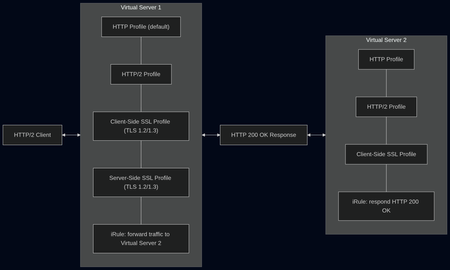
tl;dr The answer is: No Intro Two days earlier (June 2) Calif, a security firm from California, published a blog post about a new HTTP/2 DoS attack, that chains two attack techniques: a compression bomb and a Slowloris-style hold. I recommend to read this article, it contains a lot of deep dive information about the exploit. The attack basically goes after HPACK, the header compression in HTTP/2. A single byte sent over the network can turn into a full header allocation on the server—and that happens thousands of times in one request. Then the “hold” part comes in: a zero‑byte flow-control window that stops the server from ever releasing that memory. It amplifies tiny compressed header inputs into massive per‑request memory allocations via HPACK’s dynamic table, then exhausts server memory by using stalled flow control to prevent those allocations from ever being released. The attack works against many major web servers including: nginx Apache httpd Microsoft IIS Envoy Cloudflare Pingora This attack was assigned CVE-2026-49975. There are close to 1 million web servers running this vulnerable setup, according to Calif. The risk explained in plain english This attack is serious because it is a low-effort and therefore low-cost attack that works against most default http/2 configurations. Attackers can crash widely used web servers with minimum effort. Available mitigations Web servers that have the number of headers and the maximum decoded header size limited should be protected from this attack. NGINX 1.29.8+ adds max_headers directive with a default of 1000. Apache included a fix in mod_http2 in release v2.0.41. Microsoft IIS, Envoy, Cloudflare Pingora didn't release a patch at the time of writing. Testing - is BIG-IP vulnerable? All tests were conducted against BIG-IP v21.1 Best Bundle 3 GBps in AWS with a m5.xlarge EC2 instance with 4 cores and 16 GB memory. Good news first: The BIG-IP is not vulnerable to this attack Test setup For testing we used a BIG-IP v21.1 in AWS. We used a virtual server with an HTTP2 and an HTTP Profile with the default settings, Cliens-side and Server-Side SSL Profile, adjusted for TLS 1.3 and 1.2 with the required settings for HTTP2. This server had one iRule attached to forward traffic to a second virtual server. The second virtual server had again an HTTP2 and an HTTP Profile and a Client-Side SSL Profile, as well as an iRule that would respond HTTP 200 OK to any request. Additionally I started an instance of the F5 Application Study Tool. Important: We started our tests with the default values for Maximum Header Count of 64 in the HTTP profile and the default value for Concurrent Streams Per Connection of 10 in the HTTP/2 profile. The RFC 7540 for HTTP/2 recommends no less than 100 for the number of Concurrent Streams Per Connection to not unnecessarily limit parallelism. In a blog post the German IT news portal heise.de analyzed intermittent connection errors (ERR_HTTP2_PROTOCOL_ERROR) with their portal website were traced to Chrome sending a very large number of cookies as separate HTTP2 headers, exceeding the default Maximum Header Count in BIG-IP and causing dropped connections. heise.de resolved the issue by raising the header limit. First tests In our first test zero.bs attacked my BIG-IP with a HTTP2 GET Flood, running 100 bots with just 1 stream. This time the memory consumption went close to 40%, CPU usage even higher as in all other attacks before. We quickly went on the the second attack, a HTTP2 GET Flood, running 100 bots with just 10 streams. Both attacks did not seem to bother the BIG-IP a lot. CPU usage went up above 80%, but memory usage stayed below 20%. I could see around 3000 RPS on the second attack. On the third attack I increased the number of allowed headers to 1000 in the HTTP profile. zero.bs started another attack with 30 parallel HTTP2 streams and 1000 headers. On the third attack I increased the number of allowed headers to 1000 in the HTTP profile. zero.bs started another attack with 30 parallel HTTP2 streams and 1000 headers. The result was similar - high CPU consumption, slighlty more memory used. But still no risk of running out of memory. Taking our tests to the limits We did a couple of more tests, but let's fast forward to our final test. We used the maximum allowed values for Maximum Header Count of 4096 in the HTTP profile and for Concurrent Streams Per Connection of 256 in the HTTP/2 profile. This time the memory consumption went close to 40%, CPU usage even higher as in all other attacks before. Note: We observed that some of our control requests sent from a browser failed. The cause of that was that the CPUs had reached their limits while under attack by 100 bots with HTTP and HTTP2 profile values way above what is considered best practice. Final verdict and recommendations Conclusion: The conclusion of our tests led us to determine that the BIG-IP is not vulnerable to CVE-2026-49975. Security depends on configuration, traffic patterns, and software versions. We tested this attack on one virtual server. A carpet bombing attack on 10 or 20 virtual servers might have a totally different impact on the BIG-IP. We tested with low defaults and went to the maximum allowed values - keep your default settings sane and follow recommendations and best practices. Always use the latest LTS software to ensure you get the latest security patches. My key takeway: Test your environment regularly for vulnerabilites in your software and weaknesses in your DDoS defense strategy. Further reading I highly recommend reading this blog post by zero.bs that tracks their insights and test results related to this attack: One HTTP/2 Bomb to break them all786Views4likes0CommentsEnhancing the F5 DoD Banner with EU CAPTCHA (Myra) & Sideband Validation
Features & Security Hardening (v1.3) Besides the frontend EU CAPTCHA integration, this iRule introduces several security hardening measures (P3–P9): Strict POST Enforcement: Banner acceptance is strictly limited to POST requests. Content-Security-Policy (CSP): Implements restrictive HTTP headers tailored to safely allow the CAPTCHA's verify.js script to execute. Overview and Benefits of Myra EU CAPTCHA Myra EU CAPTCHA is a bot protection solution developed in Germany. It is positioned as a sovereign, European, and 100% GDPR-compliant alternative to traditional American providers (such as Google reCAPTCHA or Cloudflare Turnstile, which are subject to the CLOUD Act). Key Features: Seamless User Experience (Zero-Click): Verification is performed automatically in the background using cryptographic calculations. The user does not need to take any action (no visual puzzles to solve, no traffic lights to identify). The system is therefore completely accessible and barrier-free. Privacy by Design: The solution operates entirely without cookies and does not use any persistent storage in the browser (meaning you do not need to add a cookie consent banner). Furthermore, no personal data is stored, and any potentially identifying metadata is anonymized using a hashing system. Security and Sovereignty: Built on Myra Security technology, the solution relies on the analysis of over 100 billion daily CDN signals. Customers benefit from a certified sovereign technology (ISO 27001, BSI C5, PCI DSS) and can mandate that data processing takes place exclusively in data centers located in Germany or within the European Union. https://www.eu-captcha.eu/ https://docs.eu-captcha.eu/integration/frontend/html-integration/ Implementation Steps 1. Configure the Internal Sideband Virtual Server The iRule requires an internal Virtual Server to route API traffic to Myra. Create a file named eucaptcha-sideband-vs.conf in /var/tmp/ on your BIG-IP with the following content: ltm node /Common/node-api.eu-captcha.eu { fqdn { autopopulate enabled interval ttl name api.eu-captcha.eu } } ltm monitor https /Common/hm_myra_eucaptcha_https { adaptive disabled defaults-from /Common/https destination *:* interval 20 ip-dscp 0 recv HTTP/1 recv-disable none send "GET / HTTP/1.1\r\nHost: api.eu-captcha.eu\r\nConnection: close\r\n\r\n" time-until-up 0 timeout 21 } ltm pool /Common/pool_eucaptcha_api { members { /Common/node-api.eu-captcha.eu:https { } } monitor /Common/hm_myra_eucaptcha_https } ltm profile server-ssl /Common/server-api.eu-captcha.eu { app-service none defaults-from /Common/serverssl server-name api.eu-captcha.eu sni-default true } ltm virtual /Common/vs_dod_eucaptcha_sb { destination 10.10.10.8:webcache ip-protocol tcp mask 255.255.255.255 pool /Common/pool_eucaptcha_api profiles { /Common/http { } /Common/server-api.eu-captcha.eu { context serverside } /Common/tcp { } } serverssl-use-sni enabled source 0.0.0.0/0 source-address-translation { type automap } translate-address enabled translate-port enabled } Note: This configuration creates the necessary node, pool, Server SSL profile (with SNI enabled), and the internal Virtual Server vs_dod_eucaptcha_sb Merge this configuration into your BIG-IP via tmsh: tmsh load sys config merge file /var/tmp/eucaptcha-sideband-vs.conf 2. Generate Your Local HMAC Key To ensure the integrity of the banner acceptance cookie, generate a robust random string on your BIG-IP bash shell: openssl rand -hex 32 3. Deploy the iRule Create a new iRule on your BIG-IP and paste the source code. You must update the RULE_INIT block with your specific values: when RULE_INIT { set static::dod_banner_ttl 600 set static::dod_banner_hmac_key "PASTE_YOUR_OPENSSL_HEX_KEY_HERE" set static::eucaptcha_sitekey "YOUR_EUCAPTCHA_SITEKEY" set static::eucaptcha_secret "YOUR_EUCAPTCHA_SECRET" set static::eucaptcha_sideband_vs "vs_dod_eucaptcha_sb" # Trusted proxy CIDRs (empty = IP::client_addr only). Ex. : list "10.0.0.0/8" set static::dod_banner_trusted_proxy_cidrs [list] # Max acceptations / IP / window (seconds) set static::dod_banner_accept_rate_limit 10 set static::dod_banner_accept_rate_window 60 } Note: The HTML payload is embedded in the iRule and handles the frontend display and token submission. 4. Attach to your Virtual Server Attach the iRule to the public-facing Virtual Server protecting your application. Validation & Testing Open an Incognito/Private browsing window and navigate to your application. You should be intercepted by the DoD warning banner containing the EU CAPTCHA widget. Solve the challenge. The "I Accept" (J'ai pris connaissance et j'accepte) button will enable. Submit the form. The BIG-IP will validate the token via sideband, generate an HMAC-signed _si_gate cookie, and redirect you to the application. Refresh the page; the banner should be bypassed as long as the cookie remains valid (default 600 seconds). Credits Special thanks to Eric Haupt for the original repository that made this possible: https://github.com/hauptem/F5-LTM-iRule-based-DoD-Banners230Views0likes0Comments
Automating TLS Certificates in Kubernetes with cert-manager and F5 Distributed Cloud DNS
Introduction If you run workloads in Kubernetes or Open Shift, you've almost certainly dealt with TLS certificates. You need them everywhere — Ingress controllers, internal services, mutual TLS between microservices, and API gateways. Managing them by hand is error-prone and doesn't scale: certificates expire silently, rotation is forgotten, and the person who originally created the wildcard cert is now working somewhere else. cert-manager solves this elegantly. It's a Kubernetes-native certificate controller that automates the issuance, renewal, and management of TLS certificates. It speaks ACME — the same protocol Let's Encrypt uses — but ACME is a standard, not a Let's Encrypt exclusive. You can point cert-manager at: Let's Encrypt (free, public, widely trusted) ZeroSSL, Buypass, Google Trust Services — other public CAs supporting ACME Step CA / HashiCorp Vault / Smallstep — for private PKI running inside your infrastructure Any commercial CA that has implemented an ACME endpoint This means the same workflow, the same Kubernetes manifests, and the same tooling can back both your public-facing services and your internal, corporate-signed certificates. One operator to rule them all. Why DNS-01 Challenge? ACME offers multiple ways to prove you own a domain. The most common is the HTTP-01 challenge, where the ACME server checks a well-known URL on your domain. It works well, but has limitations: The endpoint must be publicly reachable on port 80 It cannot issue wildcard certificates (*.example.com) The DNS-01 challenge takes a different approach: cert-manager (via a solver webhook) creates a _acme-challenge.example.com TXT record in your DNS zone. The ACME server checks for this record. Once verified, the TXT record is cleaned up automatically. Benefits: Works behind firewalls — no inbound HTTP needed Supports wildcard certificates — a single *.example.com certificate covers all subdomains Fully automated — the webhook handles record creation and deletion If your DNS is managed by F5 Distributed Cloud (F5 XC), you can now wire this entire flow together with the open-source cert-manager-webhook-f5xc solver. Architecture Overview Here's what happens when cert-manager issues a certificate using the F5 XC webhook: Developer applies Certificate manifest ▼ cert-manager creates Order + Challenge ▼ cert-manager calls webhook (DNS-01 solver) ▼ Webhook calls F5 XC DNS API → Creates TXT record: _acme-challenge.example.com ▼ ACME server (Let's Encrypt / other) validates the TXT record ▼ Webhook cleans up the TXT record ▼ cert-manager stores the issued certificate in a Kubernetes Secret The webhook runs as a standard Kubernetes Deployment inside your cluster, registered with cert-manager via a ValidatingWebhookConfiguration. It receives solver calls from cert-manager and translates them into F5 XC DNS API calls using an API token you provide as a Kubernetes Secret. Prerequisites Before we start, make sure you have the following in place: A Kubernetes cluster (1.21+) cert-manager installed (v1.14+) kubectl apply -f https://github.com/cert-manager/cert-manager/releases/latest/download/cert-manager.yaml Helm 3.8+ An F5 Distributed Cloud tenant with DNS management enabled Your domain's DNS zone managed in F5 XC F5 XC credentials for DNS API access — either an API Token or a Client Certificate (P12); see Step 1 below for details Least privilege note: The service account or user whose credentials you use must have permission to manage DNS records. As of the time of writing, the built-in role f5xc-dns-management-admin is sufficient. Avoid using tenant-admin or other overly broad roles — the webhook only needs to create and delete TXT records in your DNS zone. Step 1: Prepare F5 XC Credentials The webhook supports two authentication methods against the F5 XC DNS API: an API Token or a Client Certificate (P12). Both are stored as a Kubernetes Secret in the cert-manager namespace. Obtaining credentials in F5 XC Console Regardless of which method you choose, the service account must have sufficient permissions to manage DNS records. Follow the least-privilege principle: In the F5 XC Console, navigate to Account Settings → Administration. Create a dedicated service credential under IAM and assign it the f5xc-dns-management-admin role in the system namespace — this is the minimum required role as of the time of writing and grants access to DNS Zone Management without unnecessary privileges elsewhere in the tenant. Or use an existing account privileges under Personal Management credentials. Generate the credentials of your preferred type (API Token or API Certificate) Option A: API Token (simpler, recommended for most setups) Take the API Token obtained from the F5XC console and use it with the following command kubectl create secret generic f5xc-api-token \ --namespace cert-manager \ --from-literal=token=<YOUR_F5XC_API_TOKEN> Option B: Client Certificate (P12) F5 XC also supports certificate-based authentication using a P12 (PKCS#12) client certificate, which may be preferred in environments. Use the certificate and password generated in the previous step and store it as a Secret: kubectl create secret generic f5xc-client-cert \ --namespace cert-manager \ --from-file=certificate.p12=<PATH_TO_YOUR.p12> \ --from-literal=password=<P12_PASSWORD> Refer to the webhook documentation for the exact certificateSecretRef fields to use in the solver config when choosing this method. Verify the secret was created: kubectl get secret f5xc-api-token -n cert-manager Step 2: Install the Webhook via Helm The chart is published as an OCI artifact on GitHub Container Registry. Install it into the cert-manager namespace: helm install cert-manager-webhook-f5xc \ oci://ghcr.io/wenkow/charts/cert-manager-webhook-f5xc \ --namespace cert-managerbaba Check the rollout: kubectl rollout status \ deployment cert-manager-webhook-f5xc \ -n cert-manager kubectl get pods -n cert-manager Step 3: Configure a ClusterIssuer A ClusterIssuer tells cert-manager which ACME server to use and how to solve challenges. Here we're pointing it at Let's Encrypt production and configuring the F5 XC DNS-01 solver. Note on groupName: The field appears twice in the YAML below and serves different purposes. At the webhook level, it's a fixed identifier (acme.f5xc.io) that tells cert-manager which registered webhook to call. Inside config, it's the RRSet group name within your F5 XC DNS zone — a logical container for DNS records created by the webhook. You can choose any name; F5 XC will create the group if it doesn't exist. clusterissuer.yaml: apiVersion: cert-manager.io/v1 kind: ClusterIssuer metadata: name: letsencrypt-f5xc-prod spec: acme: email: [email protected] server: https://acme-v02.api.letsencrypt.org/directory privateKeySecretRef: name: letsencrypt-f5xc-prod-account-key solvers: - dns01: webhook: # Fixed identifier — tells cert-manager which webhook to call groupName: acme.f5xc.io solverName: f5xc config: # Your F5 XC tenant name (subdomain part of your console URL) tenantName: my-tenant # RRSet group name in F5 XC DNS zone groupName: "cert-manager" # ttl: 120 # optional, default is 120 seconds apiTokenSecretRef: name: f5xc-api-token key: token # If using certificate-based auth instead of a token, replace # apiTokenSecretRef with certificateSecretRef — see webhook docs. Apply it: kubectl apply -f clusterissuer.yaml Verify it's ready: kubectl get clusterissuer letsencrypt-f5xc-prod Step 4: Request a Certificate Now the fun part. Create a Certificate resource. Note that we're requesting both the apex domain and a wildcard — something that's only possible with DNS-01. certificate.yaml: apiVersion: cert-manager.io/v1 kind: Certificate metadata: name: example-tls namespace: default spec: secretName: example-tls issuerRef: name: letsencrypt-f5xc-prod kind: ClusterIssuer dnsNames: - example.com - "*.example.com" Apply it: kubectl apply -f certificate.yaml Step 5: Watch the Certificate Lifecycle This is where it gets satisfying to watch. cert-manager creates an Order, which spawns one or more Challenge objects. Each Challenge triggers the F5 XC webhook to create a DNS TXT record. Watch Certificate status kubectl get certificate example-tls -n default -w Inspect the Order kubectl get orders -n default kubectl describe order example-tls-1-3552197254 -n default Status: Authorizations: Challenges: Token: <token> Type: dns-01 URL: https://acme-v02.api.letsencrypt.org/acme/chall/... Identifier: example.com Initial State: valid URL: https://acme-v02.api.letsencrypt.org/acme/authz/... Wildcard: true Challenges: Token: <token> Type: dns-01 URL: https://acme-v02.api.letsencrypt.org/acme/chall/... Identifier: example.com Initial State: valid URL: https://acme-v02.api.letsencrypt.org/acme/authz/... Wildcard: false Certificate: REDACTED Finalize URL: https://acme-v02.api.letsencrypt.org/acme/finalize/... State: valid URL: https://acme-v02.api.letsencrypt.org/acme/order/... Events: Type Reason Age From Message ---- ------ ---- ---- ------- Normal Complete 8m37s cert-manager-orders Order completed successfully Inspect the Challenges before it's done kubectl get challenges -n default kubectl describe challenge example-tls-<1234567890> -n default Verify the Issued Certificate kubectl get secret example-tls -n default -o jsonpath='{.data.tls\.crt}' \ | base64 -d | openssl x509 -noout -text | grep -E "Subject:|DNS:|Not After" Not After : Aug 19 19:22:31 2026 GMT Subject: CN = example.com DNS:*.example.com, DNS:example.com Both the apex domain and the wildcard are covered by a single certificate. Using a Custom or Internal ACME Server One of the most powerful aspects of this setup is that the ACME server is completely configurable. If you run an internal CA — for example HashiCorp Vault with the ACME secrets engine, or Step CA — just change the server field in your ClusterIssuer: spec: acme: email: [email protected] server: https://vault.internal.example.com/v1/pki/acme/directory # or # server: https://step-ca.internal.example.com/acme/acme/directory The webhook doesn't care which ACME server you use — it only handles the DNS side of the challenge. This makes the setup equally useful for: Internet-facing services using Let's Encrypt Internal services using a corporate CA Mixed environments where different ClusterIssuer objects point to different CAs, all sharing the same F5 XC DNS solver Troubleshooting Tips Challenge stays in pending for a long time Check the webhook logs for API errors: kubectl logs -n cert-manager -l app=cert-manager-webhook-f5xc --tail=50 READY: False on ClusterIssuer Usually means cert-manager couldn't register an ACME account. Check that the email field is valid and the ACME server URL is reachable. TXT record not appearing in F5 XC - Verify that the credentials you stored in the Secret have the right DNS permissions. In F5 XC Console, check that the service account has the f5xc-dns-management-admin role (or equivalent). API token permission issues will typically surface as 403 Forbidden errors in the webhook logs. Summary The cert-manager-webhook-f5xc project closes the loop between F5 Distributed Cloud DNS and the Kubernetes-native certificate management ecosystem. With a few manifests and a Helm install, you get: Fully automated certificate issuance and renewal — no manual interventions, no expiry surprises Wildcard certificate support out of the box via DNS-01 ACME provider flexibility — works with Let's Encrypt, commercial CAs, or your internal PKI Clean Kubernetes-native UX — certificates are just resources; the entire lifecycle is observable with standard kubectl commands The webhook is open source, available on GitHub and packaged on Artifact Hub. Contributions and feedback are welcome. Related Resources cert-manager documentation cert-manager DNS01 webhook reference F5 Distributed Cloud DNS Management docs GitHub: Wenkow/cert-manager-webhook-f5xc Artifact Hub: cert-manager-webhook-f5xc287Views2likes1CommentThe Blind Spot in Cloud WAF Architectures: Shared IPs and the Origin Bypass Problem
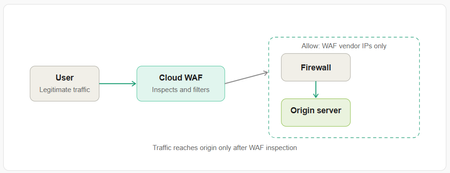
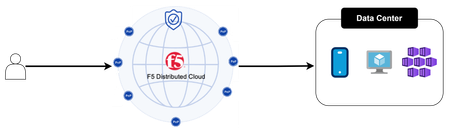
Cloud WAFs are a widely adopted security control, but they carry a structural trust assumption that most operators never examine: whitelisting a vendor's IP ranges grants access not just to your WAF instance, but to every tenant on that platform. This article examines how that assumption can be exploited, why IP-based ownership validation cannot solve it, and what mitigations, including Zero Trust-aligned architectures like F5 Distributed Cloud Customer Edge, actually close the gap. When you deploy a Cloud WAF, whether it's F5, Imperva, Cloudflare or any similar service, you're trusting it to stand between the internet and your origin server. You configure your DNS to point to the WAF, tighten your firewall to only accept traffic from the WAF's published IP ranges, and consider yourself protected. The traffic gets inspected, filtered, and forwarded. Job done. Except there's a subtle but serious flaw baked into this architecture that is widely overlooked, and it stems from a property that is fundamental to how Cloud WAFs work: shared egress IPs. How Cloud WAF Proxying Actually Works When a Cloud WAF forwards traffic to your origin, it does so from a pool of IP addresses that the vendor owns and publishes. These ranges are shared across all customers of that vendor. In fact, every major Cloud WAF provider explicitly instructs you to whitelist their entire published IP range as part of the standard onboarding process. This is not a misconfiguration on your part, it is the vendor-recommended setup. Your firewall rule, "allow traffic from this vendor's IP ranges", doesn't mean "allow traffic from my WAF instance." It means "allow traffic from anyone who also happens to be a customer of that vendor." That distinction matters enormously. An attacker who is also a customer of the same WAF vendor can point their own WAF configuration at your origin IP. When they do, their traffic, potentially malicious and definitely uninspected by your WAF policy, arrives at your server from the very IP ranges you've whitelisted. Your firewall lets it through. Your WAF policy, which applies only to traffic routed through your tenant configuration, never sees it. Your server is now reachable by anyone, even with a $20/month account for some vendors, on the same WAF platform. Why This Matters More Than It Seems This isn't a theoretical edge case. The attack surface is: Broad: Every Cloud WAF customer on a given platform could potentially reach any other customer's origin. Silent: The origin server receives the traffic without any obvious indication it bypassed the WAF policy. Persistent: It doesn't require exploiting a vulnerability, it exploits an intentional architectural property. The classic goal of origin hardening, hiding your real IP and only allowing WAF traffic, is partially undermined the moment you realize that "WAF traffic" and "your WAF traffic" are not the same thing. The Missing Validation: Outbound Origin Ownership What makes this problem interesting is the asymmetry in how Cloud WAFs handle trust. On the inbound side, WAF vendors have robust validation. Before a vendor will proxy traffic for your domain, you must prove you own it, typically via a DNS TXT record or HTTP challenge, the same mechanisms used in TLS certificate issuance. No proof, no proxying. On the outbound side, the connection from the WAF to your origin, there is essentially no equivalent validation. Any tenant can point their configuration at any IP address. The WAF will dutifully forward traffic to it. The origin has no way, at the network layer, to distinguish "traffic from my WAF tenant" from "traffic from another tenant who decided to target my server." An obvious question is: why not apply the same ownership verification to origin IPs that vendors already apply to domains? The answer is that not all IP addresses can map cleanly to ownership the way domain names do. In practice, IPs are frequently shared, multiple services behind a load balancer or shared hosting infrastructure, and in cloud environments they rotate constantly as instances scale up and down or elastic IPs are reassigned. Unlike a domain name, an IP address is not a stable, exclusive identifier of a single operator. That said, the picture is not entirely bleak for enterprises. Organizations that own their own IPs do have a stable and exclusive relationship with their IPs. In these cases, ownership validation is technically feasible: a vendor could verify control via a well-known URL served at that IP, or via a PTR record in the reverse DNS zone, both of which require actual control of the address space. This would mirror the HTTP-01 and DNS-01 challenge models already used in certificate issuance. For the broader market, however, where IPs are leased from cloud providers and rotate frequently, this approach does not hold. The asymmetry therefore reflects a genuine structural limitation of IP-based identity for the general case, even if partial solutions exist for enterprises with dedicated address space. Mitigations Available Today Since origin IP ownership validation isn't yet a standard feature across Cloud WAF platforms, the burden falls on origin operators. There are several practical mitigations, ranging from straightforward to architecturally robust. Shared Secret Header Authentication The most common approach is having the WAF inject a secret header on all forwarded requests (for example, X-Origin-Token), which your origin validates on every request. Traffic missing the header, or presenting the wrong value, is rejected. Most Cloud WAF vendors support this through custom header injection rules. The weakness is operational: the secret must be kept out of logs, rotated periodically, and is only as strong as your header validation implementation. Mutual TLS Between WAF and Origin Several vendors support presenting a client certificate when connecting to your origin, allowing your server to cryptographically verify that the connection came from your WAF vendor's infrastructure, not just the right IP range. This is stronger than a shared secret because it's not a value that can be accidentally leaked in a log file. Private Tunneling (Eliminating the Public IP Entirely) The most architecturally sound solution is to remove your origin from the public internet entirely. An outbound-only encrypted tunnel from your origin to the WAF's edge means your server never needs a publicly routable IP. There is no firewall rule to configure, no IP range to whitelist, and the shared-IP problem becomes entirely irrelevant because there is no exposed surface to exploit. This approach is increasingly the recommended baseline for new deployments, not just a hardening option. Host Header Validation at the Origin Your origin should always reject requests where the Host header doesn't match your expected domain. However, this provides no real protection against the shared-IP bypass, as an attacker can trivially rewrite the Host header in their own WAF configuration to match your domain before forwarding traffic to your origin. It remains good hygiene, but should not be counted as a mitigation for this specific threat. A Note on F5 Distributed Cloud Customer Edge F5 Distributed Cloud takes a different architectural approach that sidesteps this problem structurally. Rather than relying on shared cloud-based egress IPs, F5 XC allows you to deploy a Customer Edge (CE) node(s), a dedicated piece of infrastructure that runs within your environment or network perimeter. Traffic flows from the F5 global network through an encrypted tunnel directly to your CE node, rather than from a shared IP pool to a publicly exposed origin. Because the CE node is yours, deployed in your environment and associated exclusively with your tenant, the concept of another tenant "reaching your origin from a shared IP" simply doesn't apply. The origin isn't exposed to a shared egress pool in the first place. This design is also a natural fit for Zero Trust architectures: the origin never implicitly trusts any network-level connection, and access is gated by tenant identity rather than IP address. It's an architectural answer to an architectural problem, rather than a mitigation layered on top of a fundamentally shared infrastructure model. Conclusion The Cloud WAF shared-IP bypass is a genuine blind spot that deserves more attention than it typically receives. The root cause is an asymmetry in how trust is established: vendors carefully validate that you own your domain before proxying it, but apply no equivalent validation to origin IP ownership. Any tenant on the same platform can route traffic to your origin. The good news is that practical mitigations exist, mTLS, secret headers, and private tunneling cover most production scenarios. The better news is that some architectures, like F5 XC with Customer Edge, eliminate the exposure at the design level rather than patching around it. If your current posture is "I've whitelisted the WAF vendor's IP ranges," it's worth asking: which WAF customers, exactly, have you let in? This article was written by the author and formatted with the assistance of AI.340Views1like1CommentDNS: El protocolo que nadie ve...hasta que se convierte en el problema más grande de la arquitectura
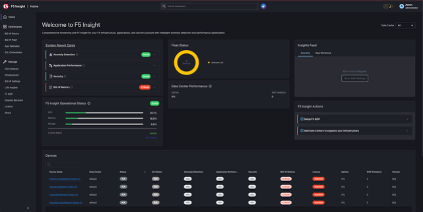
En el día a día de operación, el DNS rara vez está en el centro de la conversación. No suele ser el protagonista de los roadmaps, ni el primer punto que se revisa en un diseño nuevo. Muchas veces se asume que "ya está ahí", funcionando, resolviendo nombres sin mayor fricción. Y eso es precisamente lo peligroso. Después de años trabajando con arquitecturas empresariales y de Service Providers, hay una constante difícil de ignorar: el DNS es uno de los componentes más críticos de la infraestructura moderna y, al mismo tiempo, uno de los más subestimados. Cuando todo funciona, nadie pregunta por él. Cuando algo falla, todo lo demás deja de importar. He visto aplicaciones "arriba", enlaces estables, firewalls en verde... pero usuarios incapaces de acceder a un servicio. El problema no estaba en la aplicación ni en la red, sino en ese primer paso que todos damos por sentado: resolver un nombre. DNS en la vida real: cuando la teoría se encuentra con la operación En el papel, el DNS parece simple, pero en producción, no lo es. En arquitecturas reales, el DNS participa activamente en decisiones críticas como: A qué sitio o región se dirige un usuario Qué backend recibe una solicitud Cómo se distribuye la carga entre múltiples data centers Qué tan rápido se recupera un servicio ante una degradación o caída En Service Providers y grandes organizaciones, esto se vuelve evidente durante eventos inesperados. Un sismo, una noticia de alto impacto, un evento deportivo global, una actualización urgente de una aplicación, una app que se vuelve tendencia, un anuncio gubernamental o una contingencia sanitaria pueden disparar el tráfico digital en cuestión de minutos. En estos escenarios, el primer crecimiento significativo no ocurre en HTTP ni en TLS, sino en las consultas DNS. Millones de usuarios abren aplicaciones, refrescan portales y generan resoluciones simultáneas hacia los mismos dominios. Si el DNS no está preparado para absorber ese pico: La aplicación nunca recibe tráfico Los balanceadores no alcanzan a participar La experiencia del usuario se degrada de inmediato Aquí es donde soluciones como F5 BIG-IP DNS dejan de ser un "servicio de nombres" y se convierten en un componente activo de control de tráfico, capaz de tomar decisiones basadas en: Estado real de los servicios Salud de los backends Políticas de disponibilidad y continuidad El boom de la inteligencia artificial y su impacto directo en DNS La llegada masiva de la Inteligencia Artificial no solo ha cambiado cómo se consumen aplicaciones; ha cambiado radicalmente el patrón del tráfico. Las arquitecturas modernas de IA introducen: Más microservicios desacoplados Más APIs internas y externas Endpoints efímeros que aparecen y desaparecen Resoluciones dinámicas y frecuentes Cada llamada a un modelo, cada inferencia distribuida y cada backend que escala automáticamente comienza con una consulta DNS. Pero el impacto va mucho más allá de la teoría. Los datos de 2025 lo confirman de forma contundente: Según Humansecurity, el tráfico generado por sistemas de inteligencia artificial casi se triplicó en un solo año, con un crecimiento mensual del 187% entre enero y diciembre. Y dentro de ese universo, el segmento que más creció fue el de agentes autónomos de IA — bots que ya no solo leen la web, sino que interactúan con ella: navegan, consultan APIs, completan transacciones. Ese tipo de tráfico creció más de un 7,800% interanual. ¿Qué significa esto para el DNS? Cada vez que un agente de IA resuelve una consulta, busca un endpoint o escala un servicio, hay una resolución DNS detrás. Y no estamos hablando de patrones predecibles. El tráfico de IA se comporta de forma diferente al tráfico humano: es más agresivo en ráfagas, menos predecible en horarios, y crece a un ritmo ocho veces mayor que el tráfico generado por personas. A esto se suma que los crawlers de IA — los sistemas que rastrean contenido para entrenamiento, búsqueda y acciones en tiempo real — se han convertido en una de las fuentes más grandes de tráfico automatizado en internet. Durante 2025, solo el crawler de Google generó aproximadamente el 4.5% de todas las solicitudes HTML hacia sitios protegidos por las principales plataformas de seguridad. Y el crawling por "acción de usuario" (cuando un usuario le pide algo a un chatbot y este sale a buscar información en la web) creció más de 15 veces en el mismo periodo. Desde una perspectiva técnica, esto tiene implicaciones claras: Crecimiento sostenido y acelerado del volumen de consultas DNS Mayor sensibilidad a latencia y jitter en la resolución Mayor impacto de fallas parciales o intermitentes Patrones de tráfico menos predecibles y más difíciles de planificar El DNS deja de ser infraestructura "estática" y se convierte en un componente dinámico del plano de datos, íntimamente ligado al desempeño de los modelos y servicios de IA. Y quien no esté dimensionando su infraestructura DNS con esta variable en mente, va a sentir el impacto más temprano que tarde. El DNS como punto crítico en eventos globales A lo largo de los años, múltiples eventos han demostrado el impacto del DNS a escala global. Desde interrupciones masivas de servicios digitales hasta ataques de amplificación, el patrón es consistente: cuando el DNS se ve afectado, el impacto se multiplica. Y no hay que ir lejos para encontrar ejemplos. Solo en octubre de 2025, dos incidentes dejaron muy claro lo que pasa cuando el DNS falla en entornos de producción reales. En el primero, un error en el sistema automatizado de gestión DNS de una de las principales plataformas de nube pública dejó inaccesibles servicios críticos en la región más grande de su infraestructura. Los servidores estaban operativos, las bases de datos intactas... pero el DNS los hacía invisibles. La falla se propagó en cascada a más de cien servicios, afectó a miles de empresas en más de 60 países y generó millones de reportes de caída en cuestión de horas. Plataformas de mensajería, gaming, streaming, servicios financieros y hasta aplicaciones gubernamentales quedaron fuera de línea. No fue un ataque. Fue un error de automatización en DNS. Días después, un proveedor de telecomunicaciones europeo con millones de clientes de red fija experimentó una falla de resolución DNS que dejó sin acceso a internet a gran parte de su base de usuarios durante varias horas. El tráfico observado cayó más del 75%. Y la causa raíz fue, nuevamente, un problema de resolución DNS — no un corte de fibra, no un ataque DDoS, no una caída de energía. F5 Labs ha documentado ampliamente cómo: Ataques volumétricos utilizan DNS como vector principal La amplificación DNS sigue siendo una técnica efectiva Eventos globales generan patrones de tráfico anómalos que exponen debilidades de diseño Estos escenarios no distinguen industria ni tamaño. Afectan por igual a proveedores de servicios, plataformas digitales, infraestructura crítica y aplicaciones empresariales. La diferencia no está en si ocurren, sino en qué tan preparada está la arquitectura para absorberlos sin colapsar. Primero la observabilidad: entender antes de reaccionar Durante mucho tiempo, el DNS fue una caja negra. Funcionaba... o no. Hoy, la conversación cambia por completo cuando incorporamos observabilidad real a la ecuación. F5 Insight, componente clave dentro de la plataforma F5 ADSP, permite: Analizar patrones reales de consultas Identificar picos atípicos y comportamientos anómalos Correlacionar eventos externos con tráfico DNS Entender el porqué detrás del comportamiento del sistema Pero F5 Insight va más allá de dashboards y métricas. Incorpora inteligencia artificial para ofrecer guía proactiva, detección de anomalías y algo que cambia la forma de operar: la capacidad de interactuar con tus datos operacionales en lenguaje natural, usando integración con LLMs y el Model Context Protocol (MCP). En la práctica, esto significa pasar de revisar dashboards buscando qué pasó, a recibir narrativas operacionales que te dicen qué está pasando, por qué, y qué deberías priorizar. Para entornos con alta densidad de consultas DNS, donde los patrones cambian en minutos y los picos pueden ser impredecibles,especialmente con el crecimiento del tráfico de IA, ese salto de reactivo a proactivo no es un lujo, es una necesidad operativa. En escenarios de alto QPS, el problema no siempre es la capacidad, sino cómo se comporta el tráfico. Ver el DNS como datos, no solo como servicio, marca una diferencia enorme en operación y planeación.Plataforma y arquitectura: cuando el DNS ya no es "básico" Plataforma y arquitectura: cuando el DNS ya no es "básico" Cuando el DNS se vuelve crítico, la plataforma importa. Arquitecturas basadas en VELOS permiten separar capacidad, resiliencia y crecimiento del ciclo de vida de la aplicación, soportando cargas DNS masivas con aislamiento, alta disponibilidad y escalamiento ordenado. Por su parte, rSeries ofrece un modelo más compacto y eficiente, ideal para despliegues donde el rendimiento por unidad, la latencia y la eficiencia operativa son clave. Y cuando la aplicación ya no vive en un solo data center, F5 Distributed Cloud Services extiende las capacidades del DNS a arquitecturas híbridas y multicloud, manteniendo: Políticas consistentes Visibilidad unificada Control desde el edge hasta el backend El punto no es dónde corre el DNS, sino que acompañe a la aplicación sin perder control, resiliencia ni observabilidad. Seguridad integrada desde el primer paquete El DNS también es una superficie de ataque. Lo hemos comprobado una y otra vez durante eventos de seguridad globales. Y el panorama no se está simplificando: durante 2025, se identificaron más de 100 millones de dominios nuevos, de los cuales una cuarta parte fue clasificada como maliciosos o sospechosos. Los atacantes están registrando volúmenes sin precedentes de dominios, usando automatización para montar campañas masivas que evaden defensas tradicionales. Ignorar al DNS desde el punto de vista de seguridad es dejar una puerta abierta. Integrar protección dentro de la misma plataforma de entrega permite: Mitigar ataques sin introducir latencia adicional Aplicar políticas de forma consistente Mantener visibilidad unificada del tráfico Seguridad, rendimiento y disponibilidad no son capas separadas; son partes del mismo flujo. En ocasiones olvidamos Que el DNS no suele fallar de forma dramática. Falla de forma silenciosa... y por eso es tan peligroso. Invertir en su diseño, observabilidad y seguridad no es sobreingeniería. Es entender que todo empieza ahí. En un mundo donde la IA está triplicando el volumen de tráfico automatizado año con año, donde los agentes autónomos generan resoluciones DNS a un ritmo que no existía hace 18 meses, y donde un solo error de automatización en DNS puede dejar fuera a miles de empresas en más de 60 países... el DNS vuelve a ocupar el lugar que siempre tuvo en la arquitectura, aunque muchos lo hayan olvidado. La pregunta no es si el DNS es crítico. La pregunta es si tu arquitectura está lista para tratarlo como tal.211Views1like0CommentsUpdate an ASM Policy Template via REST-API - the reverse engineering way
I always want to automate as many tasks as possible. I have already a pipeline to import ASM policy templates. Today I had the demand to update this base policies. Simply overwriting the template with the import tasks does not work. I got the error message "The policy template ax-f5-waf-jump-start-template already exists.". Ok, I need an overwrite tasks. Searching around does not provide me a solution, not even a solution that does not work. Simply nothing, my google-foo have deserted me. Quick chat with an AI, gives me a solution that was hallucinated. The AI answer would be funny if it weren't so sad. I had no hope that AI could solve this problem for me and it was confirmed, again. I was configuring Linux systems before the internet was widely available. Let's dig us in the internals of the F5 REST API implementation and solve the problem on my own. I took a valid payload and removed a required parameter, "name" in this case. The error response changes, this is always a good signal in this stage of experimenting. The error response was "Failed Required Fields: Must have at least 1 of (title, name, policyTemplate)". There is also a valid field named "policyTemplate". My first thought: This could be a reference for an existing template to update. I added the "policyTemplate" parameter and assigned it an existing template id. The error message has changed again. It now throws "Can't use string (\"ox91NUGR6mFXBDG4FnQSpQ\") as a HASH ref while \"strict refs\" in use at /usr/local/share/perl5/F5/ASMConfig/Entity/Base.pm line 888.". An perl error that is readable and the perl file is in plain text available. Looking at the file at line 888: The Perl code looks for an "id" field as property of the "policyTemplate" parameter. Changing the payload again and added the id property. And wow that was easy, it works and the template was updated. Final the payload for people who do not want to do reverse engineering. Update POST following payload to /mgmt/tm/asm/tasks/import-policy-template to update an ASM policy template: { "filename": "<username>~<filename>", "policyTemplate": { "id": "ox91NUGR6mFXBDG4FnQSpQ" } } Create POST following payload /mgmt/tm/asm/tasks/import-policy-template to create an ASM policy template: { "name": "<name>", "filename": "<username>~<filename>" } Hint: You must upload the template before to /var/config/rest/downloads/<username>~<filename>". Conclusion Documentation is sometimes overrated if you can read Perl. Missed I the API documentation for this endpoint and it was just a exercise for me?595Views2likes8Comments
Context Cloak: Hiding PII from LLMs with F5 BIG-IP
The Story As I dove deeper into the world of AI -- MCP servers, LLM orchestration, tool-calling models, agentic workflows -- one question kept nagging me: how do you use the power of LLMs to process sensitive data without actually exposing that data to the model? Banks, healthcare providers, government agencies -- they all want to leverage AI for report generation, customer analysis, and workflow automation. But the data they need to process is full of PII: Social Security Numbers, account numbers, names, phone numbers. Sending that to an LLM (whether cloud-hosted or self-hosted) creates a security and compliance risk that most organizations can't accept. I've spent years working with F5 technology, and when I learned that BIG-IP TMOS v21 added native support for the MCP protocol, the lightbulb went on. BIG-IP already sits in the data path between clients and servers. It already inspects, transforms, and enforces policy on HTTP traffic. What if it could transparently cloak PII before it reaches the LLM, and de-cloak it on the way back? That's Context Cloak. The Problem An analyst asks an LLM: "Generate a financial report for John Doe, SSN 078-05-1120, account 4532-1189-0042." The LLM now has real PII. Whether it's logged, cached, fine-tuned on, or exfiltrated -- that data is exposed. Traditional approaches fall short: Approach What Happens The Issue Masking (****) LLM can't see the data Can't reason about what it can't see Tokenization (<<SSN:001>>) LLM sees placeholders Works with larger models (14B+); smaller models may hallucinate Do nothing LLM sees real PII Security and compliance violation The Solution: Value Substitution Context Cloak takes a different approach -- substitute real PII with realistic fake values: John Doe --> Maria Garcia 078-05-1120 --> 523-50-6675 4532-1189-0042 --> 7865-4412-3375 The LLM sees what looks like real data and reasons about it naturally. It generates a perfect financial report for "Maria Garcia." On the way back, BIG-IP swaps the fakes back to the real values. The user sees a report about John Doe. The LLM never knew John Doe existed. This is conceptually a substitution cipher -- every real value maps to a consistent fake within the session, and the mapping is reversed transparently. When I was thinking about this concept, my mind kept coming back to James Veitch's TED talk about messing with email scammers. Veitch tells the scammer they need to use a code for security: Lawyer --> Gummy Bear Bank --> Cream Egg Documents --> Jelly Beans Western Union --> A Giant Gummy Lizard The scammer actually uses the code. He writes back: "I am trying to raise the balance for the Gummy Bear so he can submit all the needed Fizzy Cola Bottle Jelly Beans to the Creme Egg... Send 1,500 pounds via a Giant Gummy Lizard." The real transaction details -- the amounts, the urgency, the process -- all stayed intact. Only the sensitive terms were swapped. The scammer didn't even question it. That idea stuck with me -- what if we could do the same thing to protect PII from LLMs? But rotate the candy -- so it's not a static code book, but a fresh set of substitutions every session. Watch the talk: https://www.ted.com/talks/james_veitch_this_is_what_happens_when_you_reply_to_spam_email?t=280 Why BIG-IP? F5 BIG-IP was the natural candidate: Already in the data path -- BIG-IP is a reverse proxy that organizations already deploy MCP protocol support -- TMOS v21 added native MCP awareness via iRules iRules -- Tcl-based traffic manipulation for real-time HTTP payload inspection and rewriting Subtables -- in-memory key-value storage perfect for session-scoped cloaking maps iAppLX -- deployable application packages with REST APIs and web UIs Trust boundary -- BIG-IP is already the enforcement point for SSL, WAF, and access control How Context Cloak Works An analyst asks a question in Open WebUI Open WebUI calls MCP tools through the BIG-IP MCP Virtual Server The MCP server queries Postgres and returns real customer data (name, SSN, accounts, transactions) BIG-IP's MCP iRule scans the structured JSON response, extracts PII from known field names, generates deterministic fakes, and stores bidirectional mappings in a session-keyed subtable. The response passes through unmodified so tool chaining works. Open WebUI receives real data and composes a prompt When the prompt goes to the LLM through the BIG-IP Inference VS, the iRule uses [string map] to swap every real PII value with its fake counterpart The LLM generates its response using fake data BIG-IP intercepts the response and swaps fakes back to reals. The analyst sees a report about John Doe with his real SSN and account numbers. Two Cloaking Modes Context Cloak supports two modes, configurable per PII field: Substitute Mode Replaces PII with realistic fake values. Names come from a deterministic pool, numbers are digit-shifted, emails are derived. The LLM reasons about the data naturally because it looks real. John Doe --> Maria Garcia (name pool) 078-05-1120 --> 523-50-6675 (digit shift +5) 4532-1189-0042 --> 7865-4412-3375 (digit shift +3) [email protected] --> [email protected] (derived) Best for: fields the LLM needs to reason about naturally -- names in reports, account numbers in summaries. Tokenize Mode Replaces PII with structured placeholders: 078-05-1120 --> <<SSN:32.192.169.232:001>> John Doe --> <<name:32.192.169.232:001>> 4532-1189-0042 --> <<digit_shift:32.192.169.232:001>> A guidance prompt is automatically injected into the LLM request, instructing it to reproduce the tokens exactly as-is. Larger models (14B+ parameters) handle this reliably; smaller models (7B) may struggle. Best for: defense-in-depth with F5 AI Guardrails. The tokens are intentionally distinctive -- if one leaks through de-cloaking, a guardrails policy can catch it. Both modes can be mixed per-field in the same request. The iAppLX Package Context Cloak is packaged as an iAppLX extension -- a deployable application on BIG-IP with a REST API and web-based configuration UI. When deployed, it creates all required BIG-IP objects: data groups, iRules, HTTP profiles, SSL profiles, pools, monitors, and virtual servers. The PII Field Configuration is the core of Context Cloak. The admin selects which JSON fields in MCP responses contain PII and chooses the cloaking mode per field: Field Aliases Mode Type / Label full_name customer_name Substitute Name Pool ssn Tokenize SSN account_number Substitute Digit Shift phone Substitute Phone email Substitute Email The iRules are data-group-driven -- no PII field names are hardcoded. Change the data group via the GUI, and the cloaking behavior changes instantly. This means Context Cloak works with any MCP server, not just the financial demo. Live Demo Enough theory -- here's what it looks like in practice. Step 1: Install the RPM Installing Context Cloak via BIG-IP Package Management LX Step 2: Configure and Deploy Context Cloak GUI -- MCP server, LLM endpoint, PII fields, one-click deploy Deployment output showing session config and saved configuration Step 3: Verify Virtual Servers BIG-IP Local Traffic showing MCP VS and Inference VS created by Context Cloak Step 4: Baseline -- No Cloaking Without Context Cloak: real PII flows directly to the LLM in cleartext This is the "before" picture. The LLM sees everything: real names, real SSNs, real account numbers. Demo 1: Substitute Mode -- SSN Lookup Prompt: "Show me the SSN number for John Doe. Just display the number." Substitute mode -- Open WebUI + Context Cloak GUI showing all fields as Substitute Result: User sees real SSN 078-05-1120. LLM saw a digit-shifted fake. Demo 2: Substitute Mode -- Account Lookup Prompt: "What accounts are associated to John Doe?" Left: Open WebUI with real data. Right: vLLM logs showing "Maria Garcia" with fake account numbers What the LLM saw: "customer_name": "Maria Garcia" "account_number": "7865-4412-3375" (checking) "account_number": "7865-4412-3322" (investment) "account_number": "7865-4412-3376" (savings) What the user saw: Customer: John Doe Checking: 4532-1189-0042 -- $45,230.18 Investment: 4532-1189-0099 -- $312,500.00 Savings: 4532-1189-0043 -- $128,750.00 Switching to Tokenize Mode Changing PII fields from Substitute to Tokenize in the GUI Demo 3: Mixed Mode -- Tokenized SSN SSN set to Tokenize, name set to Substitute. Prompt: "Show me the SSN number for Jane Smith. Just display the number." Mixed mode -- real SSN de-cloaked on left, <<SSN:...>> token visible in vLLM logs on right What the LLM saw: "customer_name": "Maria Thompson" "ssn": "<<SSN:32.192.169.232:001>>" What the user saw: Jane Smith, SSN 219-09-9999 Both modes operating on the same customer record, in the same request. Demo 4: Full Tokenize -- The Punchline ALL fields set to Tokenize mode. Prompt: "Show me the SSN and account information for Carlos Rivera. Display all the numbers." Full tokenize -- every PII field as a token, all de-cloaked on return What the LLM saw -- every PII field was a token: "full_name": "<<name:32.192.169.232:001>>" "ssn": "<<SSN:32.192.169.232:002>>" "phone": "<<phone:32.192.169.232:002>>" "email": "<<email:32.192.169.232:001>>" "account_number": "<<digit_shift:32.192.169.232:002>>" (checking) "account_number": "<<digit_shift:32.192.169.232:003>>" (investment) "account_number": "<<digit_shift:32.192.169.232:004>>" (savings) What the user saw -- all real data restored: Name: Carlos Rivera SSN: 323-45-6789 Checking: 6789-3345-0022 -- $89,120.45 Investment: 6789-3345-0024 -- $890,000.00 Savings: 6789-3345-0023 -- $245,000.00 And here's the best part. Qwen's last line in the response: "Please note that the actual numerical values for the SSN and account numbers are masked due to privacy concerns." The LLM genuinely believed it showed the user masked data. It apologized for the "privacy masking" -- not knowing that BIG-IP had already de-cloaked every token back to the real values. The user saw the full, real, unmasked report. What's Next: F5 AI Guardrails Integration Context Cloak's tokenize mode is designed to complement F5 AI Guardrails. The <<TYPE:ID:SEQ>> format is intentionally distinctive -- if any token leaks through de-cloaking, a guardrails policy can catch it as a pattern match violation. The vision: Context Cloak as the first layer of defense (PII never reaches the LLM), AI Guardrails as the safety net (catches anything that slips through). Defense in depth for AI data protection. Other areas I'm exploring: Hostname-based LLM routing -- BIG-IP as a model gateway with per-route cloaking policies JSON profile integration -- native BIG-IP JSON DOM parsing instead of regex Auto-discovery of MCP tool schemas for PII field detection Centralized cloaking policy management across multiple BIG-IP instances Try It Yourself The complete project is open source: https://github.com/j2rsolutions/f5_mcp_context_cloak The repository includes Terraform for AWS infrastructure, Kubernetes manifests, the iAppLX package (RPM available in Releases), iRules, sample financial data, a test script, comprehensive documentation, and a full demo walkthrough with GIFs (see docs/demo-evidence.md). A Note on Production Readiness I want to be clear: this is a lab proof-of-concept. I have not tested this in a production environment. The cloaking subtable stores PII in BIG-IP memory, the fake name pool is small (100 combinations), the SSL certificates are self-signed, and there's no authentication on the MCP server. There are edge cases around streaming responses, subtable TTL expiry, and LLM-derived values that need more work. But the core concept is proven: BIG-IP can transparently cloak PII in LLM workflows using value substitution and tokenization, and the iAppLX packaging makes it deployable and configurable without touching iRule code. I'd love to hear what the community thinks. Is this approach viable for your use cases? What PII types would you need to support? How would you handle the edge cases? What would it take to make this production-ready for your environment? Let me know in the comments -- and if you want to contribute, PRs are welcome! Demo Environment F5 BIG-IP VE v21.0.0.1 on AWS (m5.xlarge) Qwen 2.5 14B Instruct AWQ on vLLM 0.8.5 (NVIDIA L4, 24GB VRAM) MCP Server: FastMCP 1.26 + PostgreSQL 16 on Kubernetes (RKE2) Open WebUI v0.8.10 Context Cloak iAppLX v0.2.0 References Managing MCP in iRules -- Part 1 Managing MCP in iRules -- Part 2 Managing MCP in iRules -- Part 3 Model Context Protocol Specification James Veitch: This is what happens when you reply to spam email (TED, skip to 4:40)348Views2likes0CommentsEmbedding APM Protected Resources into Third-Party Sites
This is the story of a fight with CORS (Cross-Origin Resource Sharing) and the process of understanding how it actually works. APM is a powerful tool that provides solutions for both simple and complex use cases. However, I have historically struggled with one specific scenario: embedding an APM-protected application into a third-party site. Unfortunately APM doesn't provide any mechanism to make this easy. Everything works when accessing the APM application directly. But when the same application was embedded in another site, it failed silently—nothing rendered, and the browser console filled with errors. Since I never had the opportunity to fully investigate the issue, alternative solutions were usually chosen. Recently, I worked with a customer who needed protection for a web application, and APM seemed like the right fit. The application was divided into public and private components, where only the private resources required authentication. This appeared straightforward, and I initially assumed that some iRule logic would be sufficient. But unbeknownst to me the site was not always the entry point to the application which meant that I now had the same old problem with serving content to a 3. party site. Now I was forced to look into CORS for real and how to handle this beast. I used a fair amount of time to get a better understanding and to my surprise it wasn't really all that difficult to fix, it looked like I just needed to inject a couple of headers in the response and then it would all be dandy. This is where the complexity began - specifically around iRules on a virtual server with APM enabled; I just couldn't get it to insert the headers the way I wanted. While there are multiple ways to solve this, I chose a layered virtual server design to keep the logic clean and predictable. This weird construct has been my goto solution for some time now and proven quite reliable. With a layered VS you have two virtual servers which are glued together via an iRule command "virtual". This gives you the option to run modules, iRules, policies etc. independently of each other. One of the VS' is the entry point and based on the logic you then forward traffic to the second one. In this setup the frontend virtual server - the one exposed to the users - has a single iRule responsible for: Handling CORS preflight requests by returning the appropriate headers Injecting CORS headers into responses when the origin is allowed Forwarding all non-preflight requests to the APM virtual server This separation ensures full control over HTTP processing without being constrained by APM behavior. On the inner APM virtual server, an access profile is attached which handles authentication. I usually set a non-reachable IP address on the inner VS to ensure that it can only be reached via the frontend VS. Initially, I planned to use a per-request policy on the inner APM VS with a URL branch agent to determine whether a request should be authenticated or not. While this looked correct on paper, it failed in practice. The third-party site was requesting embedded resources (such as images), and its logic could not handle APM redirects (e.g., '/my.policy'). One possible workaround was to use "clientless mode" by inserting the special header: HTTP::header insert "clientless-mode" 1 However, this introduces additional logic without providing real benefits and I wasn't sure if the application would handle the session cookie correctly or just create a million new APM sessions. Instead, I implemented an iRule that performs a datagroup lookup. If a match is found, APM is bypassed entirely for that request. This approach is simpler to maintain and reduces load by not utilizing the APM module. Below is a diagram illustrating the request flow and decision logic: A user browses the 3. party site which has links to our site. The Origin site. The browser retrieves the resources on our site. Should the browser decided to make a preflight request, the iRule will verify the Origin header from a datagroup and if allowed return the CORS headers. Forward the traffic to the inner APM VS. The iRule on the inner APM VS looks up in a datagroup and find no match and the authentication process is executed. The iRule on the inner APM VS looks up in a datagroup and find a match and disables APM. On the response from the backend we check if the origin was on the approved list. and if so we inject the CORS headers which will allow for the browser to show the content. A user browses the site directly which will bypass any CORS logic. Here is the iRule for the frontend VS: # ============================================================================= # iRule: Outer virtual for redirect + CORS before APM # ----------------------------------------------------------------------------- # Purpose: # - Redirect "/" on portal.example.com to /portal/home/ # - Handle CORS preflight locally before APM # - Forward all other traffic to the inner APM virtual # - Inject CORS headers into normal responses # # Dependencies: # - Attached to outer/public virtual server # - Inner virtual server exists and is called via "virtual" # - Internal string datagroup for allowed CORS origin hostnames # # Datagroups: # - portal_example_com_allowed_cors_origins_dg # # Notes: # - Datagroup must contain lowercase hostnames only # - Empty datagroup = allow all origins # # ============================================================================= when RULE_INIT { set static::portal_example_com_outer_cors_debug_enabled 1 } when HTTP_REQUEST { # Initialize request-scoped state explicitly. set cors_origin "" set cors_origin_host "" set cors_is_allowed 0 if { $static::portal_example_com_outer_cors_debug_enabled } { log local0. "debug: HTTP_REQUEST start - host=[HTTP::host] uri=[HTTP::uri] method=[HTTP::method]" } # ------------------------------------------------------------------------- # Root redirect # ------------------------------------------------------------------------- if { ([string tolower [getfield [HTTP::host] ":" 1]] eq "portal.example.com") && ([HTTP::uri] eq "/") } { if { $static::portal_example_com_outer_cors_debug_enabled } { log local0. "debug: root redirect matched" } HTTP::redirect "https://portal.example.com/portal/home/" return } # ------------------------------------------------------------------------- # Origin evaluation (empty DG = allow all) # ------------------------------------------------------------------------- if { [HTTP::header exists "Origin"] } { set cors_origin [HTTP::header "Origin"] set cors_origin_host [string tolower [URI::host $cors_origin]] if { $static::portal_example_com_outer_cors_debug_enabled } { log local0. "debug: origin='$cors_origin' parsed_host='$cors_origin_host'" } if { ([class size portal_example_com_allowed_cors_origins_dg] == 0) || ($cors_origin_host ne "" && [class match -- $cors_origin_host equals portal_example_com_allowed_cors_origins_dg]) } { set cors_is_allowed 1 if { $static::portal_example_com_outer_cors_debug_enabled } { log local0. "debug: origin allowed" } } else { if { $static::portal_example_com_outer_cors_debug_enabled } { log local0. "debug: origin NOT allowed" } } } else { if { $static::portal_example_com_outer_cors_debug_enabled } { log local0. "debug: no Origin header" } } # ------------------------------------------------------------------------- # Preflight handling # ------------------------------------------------------------------------- if { $cors_is_allowed } { if { ([HTTP::method] eq "OPTIONS") && ([HTTP::header exists "Access-Control-Request-Method"]) } { if { $static::portal_example_com_outer_cors_debug_enabled } { log local0. "debug: handling preflight locally" } HTTP::respond 200 noserver \ "Access-Control-Allow-Origin" $cors_origin \ "Access-Control-Allow-Methods" "GET, POST, OPTIONS" \ "Access-Control-Allow-Headers" [HTTP::header "Access-Control-Request-Headers"] \ "Access-Control-Max-Age" "86400" \ "Vary" "Origin" return } } if { $static::portal_example_com_outer_cors_debug_enabled } { log local0. "debug: forwarding to inner virtual" } # ------------------------------------------------------------------------- # Forward to inner APM virtual # ------------------------------------------------------------------------- virtual portal.example.com_https_vs } when HTTP_RESPONSE { if { $cors_is_allowed && $cors_origin ne "" } { if { $static::portal_example_com_outer_cors_debug_enabled } { log local0. "debug: injecting CORS headers" } HTTP::header replace "Access-Control-Allow-Origin" $cors_origin HTTP::header replace "Vary" "Origin" } } Here is the iRule for the inner APM VS: # ============================================================================= # iRule: Selective APM bypass for portal.example.com using datagroups # ----------------------------------------------------------------------------- # Purpose: # Disable APM only for explicitly public endpoint prefixes while preserving # APM protection for everything else. # # Dependencies: # - BIG-IP LTM # - BIG-IP APM # - Internal string datagroup for public path prefixes # # Datagroups: # - gisportal_public_path_prefixes_dg # # Notes: # - Matching is done against the raw request path derived from HTTP::uri. # - Only the query string is stripped. # - Datagroup entries are matched using starts_with behavior. # - APM is disabled only when a request matches an explicit public prefix. # - All other requests remain protected by APM. # - Debug logging can be enabled in RULE_INIT by setting: # static::portal_example_com_apm_bypass_debug 1 # # ============================================================================= when RULE_INIT { set static::portal_example_com_apm_bypass_debug 1 } when HTTP_REQUEST { set normalized_host [string tolower [getfield [HTTP::host] ":" 1]] set normalized_uri [string tolower [HTTP::uri]] # ------------------------------------------------------------------------- # Extract request path from raw URI # ------------------------------------------------------------------------- set query_delimiter_index [string first "?" $normalized_uri] if { $query_delimiter_index >= 0 } { set normalized_path [string range $normalized_uri 0 [expr {$query_delimiter_index - 1}]] } else { set normalized_path $normalized_uri } if { $static::portal_example_com_apm_bypass_debug } { log local0. "debug: host='$normalized_host' uri='$normalized_uri' path='$normalized_path'" } if { $normalized_host ne "portal.example.com" } { if { $static::portal_example_com_apm_bypass_debug } { log local0. "debug: host did not match target host, skipping rule" } return } # ------------------------------------------------------------------------- # PUBLIC # ------------------------------------------------------------------------- set matched_public_prefix [class match -name -- $normalized_path starts_with gisportal_public_path_prefixes_dg] if { $static::portal_example_com_apm_bypass_debug } { if { $matched_public_prefix ne "" } { log local0. "debug: matched PUBLIC prefix '$matched_public_prefix' -> disabling APM" } else { log local0. "debug: no public prefix matched -> APM remains enabled" } } if { $matched_public_prefix ne "" } { ACCESS::disable return } } I can recommend spending time on YouTube to get a better feeling about what CORS is about and why it is being used. You might run into another problem with APM if you try to embed the entire application, with APM authentication logic, into a frame in a 3. party app. I have not addressed it in this example, but you could extend the iRule logic to inject CSP headers to make this possible. I might address this in another article. I hope this example can help you fast-track pass all the headaches I struggled with. If you have any feedback just let me know. I don't know everything about CORS and I'm sure there are areas which requires special attention that I haven't addressed. Tell me so we can enrich the solution by sharing knowledge.445Views2likes1CommentF5 Distributed Cloud (XC) Custom Routes: Capabilities, Limitations, and Key Design Considerations
This article explores how Custom Routes work in F5 Distributed Cloud (XC), why they differ architecturally from standard Load Balancer routes, and what to watch out for in real-world deployments, covering backend abstraction, Endpoint/Cluster dependencies, and critical TLS trust and Root CA requirements.881Views2likes1Comment