security
244 TopicsAdvanced WAF IP Exceptions Manager
This solution introduces a dedicated Python-based GUI tool for managing IP whitelist exceptions in F5 BIG-IP Advanced WAF policies. The tool was developed to simplify a common operational workflow: searching WAF policies, adding IP or CIDR-based exceptions, checking whether an IP already exists across policies, deleting outdated exceptions, applying policy changes, and tracking actions through an activity log. The solution is especially useful in large environments where manual exception handling can create operational overhead, inconsistent policy configuration, or audit challenges. It demonstrates how focused automation can deliver practical value without requiring a large orchestration platform or full CI/CD pipeline.154Views1like0CommentsComplete MFA solution with GA stored in Active Directory
Problem this snippet solves: All modern business applications require Multi-Factor Authentication (MFA) to be used for remote access by employees. There are many vendors on market selling enterprise MFA solutions that may be utilised with F5 BIG-IP Access Policy Manager (APM). Those solutions are complex and allow customers to create flexible policies which allow them to decide when and whom will be authorised to access protected applications. But what about those customers which have no needs for using complex enterprise solutions or does not have adequate budget for such spendings? How to use this snippet: For those customers I would like to present my One-Time Password (OTP) application which requires BIG-IP LTM/APM/iRulesLX. Shared secret value is stored in Active Directory and QR code is generated in user's browser. All you need after implementing this application on your BIG-IP is. to ask your users to get any OTP-compatible mobile application, like Google Authenticator or Microsoft Authenticator Please see https://github.com/akhmarov/f5_otp/ for instructions UPDATE 1: New version now support APM 15.1+ Modern Customization UPDATE 2: Added trusted device support UPDATE 3: Added multi-tenancy support Tested this on version: 15.11.9KViews1like9CommentsCIS F5 Benchmark Reporter
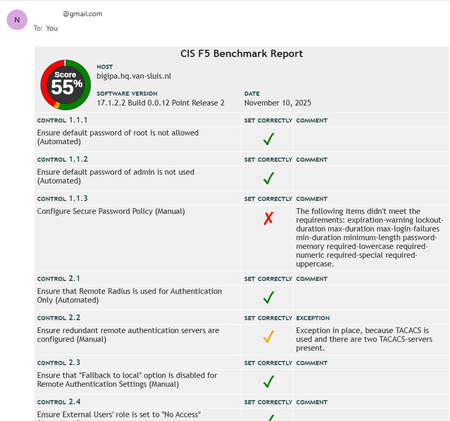
Code is community submitted, community supported, and recognized as ‘Use At Your Own Risk’. The CIS_F5_Benchmark_Reporter.py is a Python script that can be run on a F5 BIG-IP. This script will check if the configuration of the F5 BIG-IP is compliant with the CIS Benchmark for F5. The script will generate a report that can be saved to a file, send by e-mail or send its output to the screen. Just use the appropriate arguments when running the script. [root@bigipa:Active:Standalone] # ./CIS_F5_Benchmark_Reporter.py Usage: CIS_F5_Benchmark_Reporter.py [OPTION]... Mandatory arguments to long options are mandatory for short options too. -f, --file=FILE output report to file. -m, --mail output report to mail. -s, --screen output report to screen. Report bugs to [email protected] [root@bigipa:Active:Standalone] # To receive a daily or weekly report from your F5 BIG-IP, you can create a cron job. Below is a screenshot that shows what the report will look like. Settings In the script, there is a section named 'User Options'. These options should be modified to reflect your setup. #----------------------------------------------------------------------- # User Options - Configure as desired #----------------------------------------------------------------------- E-mail settings Here the e-mail setting can be configured, so the script will be able to send a report by e-mail. # e-mail settings port = 587 smtp_server = "smtp.example.com" sender_email = "[email protected]" receiver_email = "[email protected]" login = "johndoe" password = "mySecret" SNMP settings Here you can add additional SNMP clients. These are necessary to be compliant with control 6.1. # list containing trusted IP addresses and networks that have access to SNMP (control 6.1) snmp_client_allow_list = [ "127.0.0.0/8", ] Exceptions Sometimes there are valid circumstances, why a specific requirement of a security control can't be met. In this case you can add an exception. See the example below. # set exceptions (add your own exceptions) exceptions = { '2.1' : "Exception in place, because TACACS is used instead of RADIUS.", '2.2' : "Exception in place, because TACACS is used and there are two TACACS-servers present." } Recommendations Store the script somewhere in the /shared partition. The data stored on this partition will still be available after an upgrade. Feedback This script has been tested on F5 BIG-IP version 17.x. If you have any questions, remarks or feedback, just let me know. Download The script can be downloaded from github.com. https://github.com/nvansluis/CIS_F5_Benchmark_Reporter906Views8likes8Comments- 1.1KViews3likes7Comments
iRule based RADIUS Server Stack
Code is community submitted, community supported, and recognized as ‘Use At Your Own Risk’. Short Description The iRule based RADIUS Server Stack can be used to turn a UDP-based Virtual Server into a flexible and fully featured RADIUS Server, including regular REQUEST/RESPONSE as well as CHALLENGE/RESPONSE based RADIUS authentication. Problem solved by this Code Snippet The RADIUS Server Stack covers the RADIUS protocol core-mechanics outlined in RFC 2865 and RFC 5080 and can easily be extended to support every other RADIUS related RFC built on top of these specifications. The RADIUS Server Stack can be used as an extension for LTMs missing RADIUS Server functionalities, as well as iRule command functionalities to support Self-Hosted RADIUS Server scenarios. How to use this Code Snippet Visit my GitHub Repository for further explanations how the RADIUS Server Stack can be used to perform RADIUS Server operations within an iRule. Code Snippet Meta Information Version: 1.1 Coding Language: TCL Full Code Snippet Visit: https://github.com/KaiWilke/F5-iRule-RADIUS-Server-Stack925Views1like1CommentiRule based RADIUS Client Stack
Code is community submitted, community supported, and recognized as ‘Use At Your Own Risk’. Short Description The iRule based RADIUS Client Stack can be used to perform RADIUS based user authentication via SIDEBAND UDP connections. Problem solved by this Code Snippet The RADIUS Client Stack covers the RADIUS protocol core-mechanics outlined in RFC 2865 and RFC 5080 and can be utilized for a Password Authentication Protocol (PAP) authentication within an iRule. How to use this Code Snippet Visit my GitHub Repository for further explanations how the RADIUS Client Stack can be used to perform RADIUS Client operations within an iRule. Code Snippet Meta Information Version: 1.1 Coding Language: TCL Full Code Snippet Visit: https://github.com/KaiWilke/F5-iRule-RADIUS-Client-Stack1.4KViews2likes1CommentThe WAF Dilemma
Code is community submitted, community supported, and recognized as ‘Use At Your Own Risk’. How I lowered false positives with NGINX App Protect without compromising security. We are always facing the dilemma "Security vs Usability" in the world of security. This becomes painfully obvious once you start implementing a WAF. I have now implemented a wide range of WAF security policies, both BigIP AWAF and NAP, and two application functions/features always stand out: file upload and wiki editors. The core problem with the two scenarios is that they are about handling unstructured data. No matter how hard you try to tune the policy you will have an endless amount of false positives interrupting the end users. If we don't handle this problem correctly we will be forced (aka being demanded by the business) to disable the WAF policy. And that is a loose-loose situation. What I have constructed is a way to minimize this problem by differentiate between authenticated and unauthenticated end users. In most situations we can have a higher level of trust in traffic that is authenticated and thus tune down on the security. My design is very binary, if you are authenticated the WAF is turned off, if not it is on. This might not be good enough for you but this is only an example on how to go about the core problem. You can fine-tune the solution to be more granular based on the information available like switching the security policy or other mitigating actions. Just remember that having a simple WAF is always better than not having any at all. You can find the details, configuration and code here: NGINX App Protect with Authentication | Wiki As always feedback is much appreciated!427Views2likes6Comments
TLS Server Name Indication
Problem this snippet solves: Extensions to TLS encryption protocols after TLS v1.0 have added support for passing the desired servername as part of the initial encryption negotiation. This functionality makes it possible to use different SSL certificates with a single IP address by changing the server's response based on this field. This process is called Server Name Indication (http://en.wikipedia.org/wiki/Server_Name_Indication). It is not supported on all browsers, but has a high level of support among widely-used browsers. Only use this functionality if you know the bulk of the browsers accessing your site support SNI - the fact that IE on Windows XP does not precludes the wide use of this functionality for most sites, but only for now. As older browsers begin to die off, SNI will be a good weapon in your arsenal of virtual hosting tools. You can test if your browser supports SNI by clicking here: https://alice.sni.velox.ch/ Supported Browsers: * Internet Explorer 7 or later, on Windows Vista or higher * Mozilla Firefox 2.0 or later * Opera 8.0 or later (the TLS 1.1 protocol must be enabled) * Opera Mobile at least version 10.1 beta on Android * Google Chrome (Vista or higher. XP on Chrome 6 or newer) * Safari 2.1 or later (Mac OS X 10.5.6 or higher and Windows Vista or higher) * MobileSafari in Apple iOS 4.0 or later (8) * Windows Phone 7 * MicroB on Maemo Unsupported Browsers: * Konqueror/KDE in any version * Internet Explorer (any version) on Windows XP * Safari on Windows XP * wget * BlackBerry Browser * Windows Mobile up to 6.5 * Android default browser (Targeted for Honeycomb but won't be fixed until next version for phone users as Honeycomb will be reserved to tablets only) * Oracle Java JSSE Note: The iRule listed here is only supported on v10 and above. Note: Support for SNI was added in 11.1.0. See SOL13452 for more information. How to use this snippet: Create a string-type datagroup to be called "tls_servername". Each hostname that needs to be supported on the VIP must be input along with its matching clientssl profile. For example, for the site "testsite.site.com" with a ClientSSL profile named "clientssl_testsite", you should add the following values to the datagroup. String: testsite.site.com Value: clientssl_testsite If you wish to switch pool context at the time the servername is detected in TLS, then you need to create a string-type datagroup called "tls_servername_pool". You will input each hostname to be supported by the VIP and the pool to direct the traffic towards. For the site "testsite.site.com" to be directed to the pool "testsite_pool_80", add the following to the datagroup: String: testsite.site.com Value: testsite_pool_80 Apply the iRule below to a chosen VIP. When applied, this iRule will detect if an SNI field is present and dynamically switch the SSL profile and pool to use the configured certificate. Important: The VIP must have a clientSSL profile AND a default pool set. If you don't set this, the iRule will likely break. There is also no real errorhandling for incorrect/inaccurate entries in the datagroup lists -- if you enter a bad value, it'll fail. This allows you to support multiple certificates and multiple pools per VS IP address. when CLIENT_ACCEPTED { if { [PROFILE::exists clientssl] } { # We have a clientssl profile attached to this VIP but we need # to find an SNI record in the client handshake. To do so, we'll # disable SSL processing and collect the initial TCP payload. set default_tls_pool [LB::server pool] set detect_handshake 1 SSL::disable TCP::collect } else { # No clientssl profile means we're not going to work. log local0. "This iRule is applied to a VS that has no clientssl profile." set detect_handshake 0 } } when CLIENT_DATA { if { ($detect_handshake) } { # If we're in a handshake detection, look for an SSL/TLS header. binary scan [TCP::payload] cSS tls_xacttype tls_version tls_recordlen # TLS is the only thing we want to process because it's the only # version that allows the servername extension to be present. When we # find a supported TLS version, we'll check to make sure we're getting # only a Client Hello transaction -- those are the only ones we can pull # the servername from prior to connection establishment. switch $tls_version { "769" - "770" - "771" { if { ($tls_xacttype == 22) } { binary scan [TCP::payload] @5c tls_action if { not (($tls_action == 1) && ([TCP::payload length] > $tls_recordlen)) } { set detect_handshake 0 } } } default { set detect_handshake 0 } } if { ($detect_handshake) } { # If we made it this far, we're still processing a TLS client hello. # # Skip the TLS header (43 bytes in) and process the record body. For TLS/1.0 we # expect this to contain only the session ID, cipher list, and compression # list. All but the cipher list will be null since we're handling a new transaction # (client hello) here. We have to determine how far out to parse the initial record # so we can find the TLS extensions if they exist. set record_offset 43 binary scan [TCP::payload] @${record_offset}c tls_sessidlen set record_offset [expr {$record_offset + 1 + $tls_sessidlen}] binary scan [TCP::payload] @${record_offset}S tls_ciphlen set record_offset [expr {$record_offset + 2 + $tls_ciphlen}] binary scan [TCP::payload] @${record_offset}c tls_complen set record_offset [expr {$record_offset + 1 + $tls_complen}] # If we're in TLS and we've not parsed all the payload in the record # at this point, then we have TLS extensions to process. We will detect # the TLS extension package and parse each record individually. if { ([TCP::payload length] >= $record_offset) } { binary scan [TCP::payload] @${record_offset}S tls_extenlen set record_offset [expr {$record_offset + 2}] binary scan [TCP::payload] @${record_offset}a* tls_extensions # Loop through the TLS extension data looking for a type 00 extension # record. This is the IANA code for server_name in the TLS transaction. for { set x 0 } { $x < $tls_extenlen } { incr x 4 } { set start [expr {$x}] binary scan $tls_extensions @${start}SS etype elen if { ($etype == "00") } { # A servername record is present. Pull this value out of the packet data # and save it for later use. We start 9 bytes into the record to bypass # type, length, and SNI encoding header (which is itself 5 bytes long), and # capture the servername text (minus the header). set grabstart [expr {$start + 9}] set grabend [expr {$elen - 5}] binary scan $tls_extensions @${grabstart}A${grabend} tls_servername set start [expr {$start + $elen}] } else { # Bypass all other TLS extensions. set start [expr {$start + $elen}] } set x $start } # Check to see whether we got a servername indication from TLS. If so, # make the appropriate changes. if { ([info exists tls_servername] ) } { # Look for a matching servername in the Data Group and pool. set ssl_profile [class match -value [string tolower $tls_servername] equals tls_servername] set tls_pool [class match -value [string tolower $tls_servername] equals tls_servername_pool] if { $ssl_profile == "" } { # No match, so we allow this to fall through to the "default" # clientssl profile. SSL::enable } else { # A match was found in the Data Group, so we will change the SSL # profile to the one we found. Hide this activity from the iRules # parser. set ssl_profile_enable "SSL::profile $ssl_profile" catch { eval $ssl_profile_enable } if { not ($tls_pool == "") } { pool $tls_pool } else { pool $default_tls_pool } SSL::enable } } else { # No match because no SNI field was present. Fall through to the # "default" SSL profile. SSL::enable } } else { # We're not in a handshake. Keep on using the currently set SSL profile # for this transaction. SSL::enable } # Hold down any further processing and release the TCP session further # down the event loop. set detect_handshake 0 TCP::release } else { # We've not been able to match an SNI field to an SSL profile. We will # fall back to the "default" SSL profile selected (this might lead to # certificate validation errors on non SNI-capable browsers. set detect_handshake 0 SSL::enable TCP::release } } }1.8KViews0likes7CommentsTrigger js challenge/Captcha for ip reputation/ip intelligence categories
Problem solved by this Code Snippet Because some ISP or cloud providers do not monitor their users a lot of times client ip addresses are marked as "spam sources" or "windows exploits" and as the ip addresses are dynamic and after time a legitimate user can use this ip addresses the categories are often stopped in the IP intelligence profile or under the ASM/AWAF policy. This usually happens in Public Clouds that do not monitor what their users do and the IP gets marked as bad then another good user after a day or two has this ip address and this causes the issue. For many of my clients I had to stop the ip reputation/ip intelligence category "spam sources" and in some cases "windows exploits" so having a javascript/captcha checks seems a nice compromise 😎 To still make use of this categories the users coming from those ip addresses can be forced to solve captcha checks or at least to be checked for javascript support! How to use this Code Snippet Have AWAF/ASM and ip intelligence licensed Add AWAF/ASM policy with irule support option (by default not enabled under the policy) or/and Bot profile under the Virtual server Optionally add IP intelligence profile or enable the Ip intelligence under the WAF policy without the categories that cause a lot of false positives, Add the irule and if needed modify the categories for which it triggers Do not forget to first create the data group, used in the code or delete that part of the code and to uncomment the Bot part of the code, if you plan to do js check and not captcha and maybe comment the captcha part ! Code Snippet Meta Information Version: 17.1.3 Coding Language: TCL Code You can find the code and further documentation in my GitHub repository: reputation-javascript-captcha-challlenge/ at main · Nikoolayy1/reputation-javascript-captcha-challlenge when HTTP_REQUEST { # Take the ip address for ip reputation/intelligence check from the XFF header if it comes from the whitelisted source ip addresses in data group "client_ip_class" if { [HTTP::header exists "X-Forwarded-For"] && [class match [IP::client_addr] equals "/Common/client_ip_class"] } { set trueIP [HTTP::header "X-Forwarded-For"] } else { set trueIP [IP::client_addr] } # Check if IP reputation is triggered and it is containing "Spam Sources" if { ([llength [IP::reputation $trueIP]] != 0) && ([IP::reputation $trueIP] contains "Spam Sources") }{ log local0. "The category is [IP::reputation $trueIP] from [IP::client_addr]" # Set the variable 1 or bulean true as to trigger ASM captcha or bot defense javascript set js_ch 1 } else { set js_ch 0 } # Custom response page just for testing if there is no real backend origin server for testing if {!$js_ch} { HTTP::respond 200 content { <html> <head> <title>Apology Page</title> </head> <body> We are sorry, but the site you are looking for is temporarily out of service<br> If you feel you have reached this page in error, please try again. </body> </html> } } } # when BOTDEFENSE_ACTION { # Trigger bot defense action javascript check for Spam Sources # if {$js_ch && (not ([BOTDEFENSE::reason] starts_with "passed browser challenge")) && ([BOTDEFENSE::action] eq "allow") }{ # BOTDEFENSE::action browser_challenge # } # } when ASM_REQUEST_DONE { # Trigger ASM captcha check only for users comming from Spam sources that have not already passed the captcha check (don't have the captcha cookie) if {$js_ch && [ASM::captcha_status] ne "correct"} { set res [ASM::captcha] if {$res ne "ok"} { log local0. "Cannot send captcha_challenge: \"$res\"" } } } Extra References: BOTDEFENSE::action ASM::captcha ASM::captcha_status574Views1like1CommentF5 ASM/AWAF Preventing unauthorized users accessing admin path using iRule script
The below code uses the new BIG-IP variables " [ASM::is_authenticated] " and " [ASM::username] " and the code is simple enough as if you are authenticated but not admin then you will not get access to the url path " /about.php " and this is logged in the /var/log/asm logs because " log local3. ". At the end of the article I have shown how with APM you can accomplish AD group limit for specific urls but then the Authentication is moved on the APM while the AWAF iRule example the authentication is on the origin web server and the AWAF just handles the URL Authorization. when ASM_REQUEST_DONE { if { [ASM::is_authenticated] && [HTTP::path] equals "/about.php" } { log local3. "This request was sent by user [ASM::username]." if {[ASM::username] equals "admin"} { log local3. "The admin has logged!" return } else { drop } } } Github link: Nikoolayy1/F5_AWAF-ASM-ADMIN-Access: F5 BIG-IP iRule code for limiting users by to access urls! The harder part is that you need to do several prerequisites that I will explain here: Enable iRule support in the ASM policy. Configure a login page and optionally login enforcement (if " /about.php " is not blocked by the origin server to not be accessible before login this is a needed step!) Enable session tracking by login page Attach the irule Test and see Example logs: cat /var/log/asm ......... Jun 25 03:59:33 bigip1.com info tmm2[11400]: Rule /Common/f5-asm-allow-admin <ASM_REQUEST_DONE>: This request was sent by user admin. Jun 25 03:59:33 bigip1.com info tmm2[11400]: Rule /Common/f5-asm-allow-admin <ASM_REQUEST_DONE>: The admin has logged! [root@bigip1:Active:Standalone] config # The DVWA app was used for this demo that is old but gold and there are many F5 demos how to configure login enforcement for it! Here is a youtube video for assistance: BIG-IP AWAF Demo 32 - Use Login Page Enforcement with F5 BIG-IP Adv WAF (formerly ASM) Extra links (there is also a new event "ASM_RESPONSE_LOGIN"): ASM::username ASM::is_authenticated https://clouddocs.f5.com/api/irules/ASM.html AD group url enforcement: If you want to control access to URLs based on AD groups I suggest seeing the F5 APM/Acess module that will take of the authentication and with Layer 7 ACL each AD group could be limited what it has access to. APM and AWAF can work together as with layered virtual server AWAF can be before the APM as by default is after it and then to get the username you need to use the login page feature and not "Use APM username and Session ID" feature in the AWAF policy. Configuring Access Control Lists https://my.f5.com/manage/s/article/K00363504 https://my.f5.com/manage/s/article/K03113285 https://my.f5.com/manage/s/article/K54217479 Example APM profile of type LTM+APM and the APM policy for anyone interested where the APM uses AD to authenticate the users and query for group data and the members for of the guest group have an ACL assigned that limits their access 😜 Summary: This probably will be seen as well in F5 NEXT with many more cool features !596Views0likes0Comments