scalability
91 Topics
Client-side vs Server-side Load Balancing
Lei Zhu @ Digital Web Magazine has an interesting article on Client Side Load Balancing for Web 2.0 Applications. It is interesting in that it presents an alternative mechanism for implementing high-availability without the use of an intermediate load balancing solution. His solution relies solely on the client and takes advantage of the dynamic nature of Web 2.0. The problem with Lei's article is that there are a few assumptions made that are simply inaccurate. Lei contends that the negatives to using an intermediate load balancing solution are: There is a limit to the number of requests the load balancer itself can handle. However, this problem can be resolved with the combination of round-robin DNS and dedicated load balancers. The upper bounds of a hardware load balancing solution are typically higher than any given server can handle. We are talking about hundreds of thousands of requests per second. Round-robin DNS, while an industry standard, is one of the most rudimentary implementations of "load balancing" that exists. Load balancers, a.k.a. application delivery controllers, today are capable of making routing decisions based on much more intelligent factors than a simple list of servers. There is no server that can handle more requests than a load balancing solution today. Even SMB load balancers can process requests faster than any server and maintain a session table much larger than existing web and application servers. There is an extra cost related to operating a dedicated load balancer, which can run into tens of thousands of dollars. The backup load balancer generally does nothing other than wait for the primary to fail. It is absolutely true that an intermediate load balancer is going to require an investment. That the backup "does nothing" is entirely dependent upon the implementation. Load balancers today are capable of both active-standby (this is Lei's assumption here) as well as active-active configurations. In an active-active configuration both load balancers are working all the time. It is completely up to the implementor to determine which configuration should be used. Lei also claims: It is easier to make the client code and resources highly available and scalable than to do so for the servers—serving non-dynamic content requires fewer server resources. There are two statements here, one regarding the ease with which you can deploy a highly available site and that serving non-dynamic content requires fewer server resources. The latter is absolutely correct, it does indeed take less resources on the server to serve non-dynamic content. The former assertion, however, is not entirely true. Lei's article describes a methodology that requires modifications to not only the application (the client code) but also to the infrastructure (additional servers and entries in DNS to accomodate the new servers). A good application delivery controller will not require changes to the application and will be less disruptive to the infrastructure because it effectively intercepts requests for the domain and handles them without changes to the server-side of the equation. For example, if your domain is www.example.com and you implement a load balancing solution, the load balancer becomes www.example.com. Servers can be added to the pool (a.k.a. cluster, farm) of servers and it will then distribute requests amongst those servers without any further changes to the client or the servers. A good application delivery controller can distribute requests based on more than DNS round-robin algorithms, and can base its decisions in real time on the health and status of any given server. This is one the problems with Lei's arguments - he bases his decision upon a single, outdated mechanism for load balancing and uses that as the basis for recommending a client-side solution. And as far as scalability - let's look at that for a moment. In the intermediate load balancer scenario if we need more resources we (1) add another server, and (2) add it to the pool on the load balancer. In Lei's scenario we (1) add another server, (2) reconfigure the client-application, and (3) add another entry to DNS. Lei's solution is much more invasive and disruptive to every piece of the equation than the intermediate load balancing solution scenario, and Lei's solution is not guaranteed to work as he cannot ensure that the client browser's caching scheme will definitively update and include the new server. And lest we forget, Lei does not discuss the problem of persistence inherent in his client-side solution. A purely round-robin based solution that ignores client-session is limited in use and value. The solution must take into consideration the possibility that a client needs to be tied to a particular server for the duration of a session. This is particularly true of e-commerce sites. A client-side solution that does not take this into consideration (and Lei's solution does not) will not be useful in many situations. A good application delivery controller by default is capable of handling persistence and "stickiness" to a server - and again does so without requiring modification to the client or server side code. Lei's client-side load balancing solution is novel, and while it certainly might be interesting for individual developers whose livelihoods do not rely on the availability of their site this solution is not something that should be recommended lightly and without a great deal of forethought. The assumptions upon which his article is based are, with the exception the additional cost of a load balancing solution, outdated and inaccurate. Client-side load balancing requires more maintenance, more initial work to deploy, and introduces security risks by "opening the organization's kimono" and showing clients what lies beneath, namely the infrastructure architecture. Imbibing: Coffee Technorati tags: MacVittie, F5, load balancing, application delivery, scalability, high availability, Web 2.02.6KViews0likes1CommentHTML5 Web Sockets Changes the Scalability Game
#HTML5 Web Sockets are poised to completely change scalability models … again. Using Web Sockets instead of XMLHTTPRequest and AJAX polling methods will dramatically reduce the number of connections required by servers and thus has a positive impact on performance. But that reliance on a single connection also changes the scalability game, at least in terms of architecture. Here comes the (computer) science… If you aren’t familiar with what is sure to be a disruptive web technology you should be. Web Sockets, while not broadly in use (it is only a specification, and a non-stable one at that) today is getting a lot of attention based on its core precepts and model. Web Sockets Defined in the Communications section of the HTML5 specification, HTML5 Web Sockets represents the next evolution of web communications—a full-duplex, bidirectional communications channel that operates through a single socket over the Web. HTML5 Web Sockets provides a true standard that you can use to build scalable, real-time web applications. In addition, since it provides a socket that is native to the browser, it eliminates many of the problems Comet solutions are prone to. Web Sockets removes the overhead and dramatically reduces complexity. - HTML5 Web Sockets: A Quantum Leap in Scalability for the Web So far, so good. The premise upon which the improvements in scalability coming from Web Sockets are based is the elimination of HTTP headers (reduces bandwidth dramatically) and session management overhead that can be incurred by the closing and opening of TCP connections. There’s only one connection required between the client and server over which much smaller data segments can be sent without necessarily requiring a request and a response pair. That communication pattern is definitely more scalable from a performance perspective, and also has a positive impact of reducing the number of connections per client required on the server. Similar techniques have long been used in application delivery (TCP multiplexing) to achieve the same results – a more scalable application. So far, so good. Where the scalability model ends up having a significant impact on infrastructure and architectures is the longevity of that single connection: Unlike regular HTTP traffic, which uses a request/response protocol, WebSocket connections can remain open for a long time. - How HTML5 Web Sockets Interact With Proxy Servers This single, persistent connection combined with a lot of, shall we say, interesting commentary on the interaction with intermediate proxies such as load balancers. But ignoring that for the nonce, let’s focus on the “remain open for a long time.” A given application instance has a limit on the number of concurrent connections it can theoretically and operationally manage before it reaches the threshold at which performance begins to dramatically degrade. That’s the price paid for TCP session management in general by every device and server that manages TCP-based connections. But Lori, you’re thinking, HTTP 1.1 connections are persistent, too. In fact, you don’t even have to tell an HTTP 1.1 server to keep-alive the connection! This really isn’t a big change. Whoa there hoss, yes it is. While you’d be right in that HTTP connections are also persistent, they generally have very short connection timeout settings. For example, the default connection timeout for Apache 2.0 is 15 seconds and for Apache 2.2 a mere 5 seconds. A well-tuned web server, in fact, will have thresholds that closely match the interaction patterns of the application it is hosting. This is because it’s a recognized truism that long and often idle connections tie up server processes or threads that negatively impact overall capacity and performance. Thus the introduction of connections that remain open for a long time changes the capacity of the server and introduces potential performance issues when that same server is also tasked with managing other short-lived, connection-oriented requests. Why this Changes the Game… One of the most common inhibitors of scale and high-performance for web applications today is the deployment of both near-real-time communication functions (AJAX) and traditional web content functions on the same server. That’s because web servers do not support a per-application HTTP profile. That is to say, the configuration for a web server is global; every communication exchange uses the same configuration values such as connection timeouts. That means configuring the web server for exchanges that would benefit from a longer time out end up with a lot of hanging connections doing absolutely nothing because they were used to grab standard dynamic or static content and then ignored. Conversely, configuring for quick bursts of requests necessarily sets timeout values too low for near or real-time exchanges and can cause performance issues as a client continually opens and re-opens connections. Remember, an idle connection is a drain on resources that directly impacts the performance and capacity of applications. So it’s a Very Bad Thing™. One of the solutions to this somewhat frustrating conundrum, made more feasible by the advent of cloud computing and virtualization, is to deploy specialized servers in a scalability domain-based architecture using infrastructure scalability patterns. Another approach to ensuring scalability is to offload responsibility for performance and connection management to an appropriately capable intermediary. Now, one would hope that a web server implementing support for both HTTP and Web Sockets would support separately configurable values for communication settings on at least the protocol level. Today there are very few web servers that support both HTTP and Web Sockets. It’s a nascent and still evolving standard so many of the servers are “pure” Web Sockets servers, many implemented in familiar scripting languages like PHP and Python. Which means two separate sets of servers that must be managed and scaled. Which should sound a lot like … specialized servers in a scalability domain-based architecture. The more things change, the more they stay the same. The second impact on scalability architectures centers on the premise that Web Sockets keep one connection open over which message bits can be exchanged. This ties up resources, but it also requires that clients maintain a connection to a specific server instance. This means infrastructure (like load balancers and web/application servers) will need to support persistence (not the same as persistent, you can read about the difference here if you’re so inclined). That’s because once connected to a Web Socket service the performance benefits are only realized if you stay connected to that same service. If you don’t and end up opening a second (or Heaven-forbid a third or more) connection, the first connection may remain open until it times out. Given that the premise of the Web Socket is to stay open – even through potentially longer idle intervals – it may remain open, with no client, until the configured time out. That means completely useless resources tied up by … nothing. Persistence-based load balancing is a common feature of next-generation load balancers (application delivery controllers) and even most cloud-based load balancing services. It is also commonly implemented in application server clustering offerings, where you’ll find it called server-affinity. It is worth noting that persistence-based load balancing is not without its own set of gotchas when it comes to performance and capacity. THE ANSWER: ARCHITECTURE The reason that these two ramifications of Web Sockets impacts the scalability game is it requires an broader architectural approach to scalability. It can’t necessarily be achieved simply by duplicating services and distributing the load across them. Persistence requires collaboration with the load distribution mechanism and there are protocol-based security constraints with respect to incorporating even intra-domain content in a single page/application. While these security constraints are addressable through configuration, the same caveats with regards to the lack of granularity in configuration at the infrastructure (web/application server) layer must be made. Careful consideration of what may be accidentally allowed and/or disallowed is necessary to prevent unintended consequences. And that’s not even starting to consider the potential use of Web Sockets as an attack vector, particularly in the realm of DDoS. The long-lived nature of a Web Socket connection is bound to be exploited at some point in the future, which will engender another round of evaluating how to best address application-layer DDoS attacks. A service-focused, distributed (and collaborative) approach to scalability is likely to garner the highest levels of success when employing Web Socket-based functionality within a broader web application, as opposed to the popular cookie-cutter cloning approach made exceedingly easy by virtualization. Infrastructure Scalability Pattern: Partition by Function or Type Infrastructure Scalability Pattern: Sharding Sessions Amazon Makes the Cloud Sticky Load Balancing Fu: Beware the Algorithm and Sticky Sessions Et Tu, Browser? Forget Hyper-Scale. Think Hyper-Local Scale. Infrastructure Scalability Pattern: Sharding Streams Infrastructure Architecture: Whitelisting with JSON and API Keys Does This Application Make My Browser Look Fat? HTTP Now Serving … Everything1.3KViews0likes5CommentsWILS: Load Balancing and Ephemeral Port Exhaustion
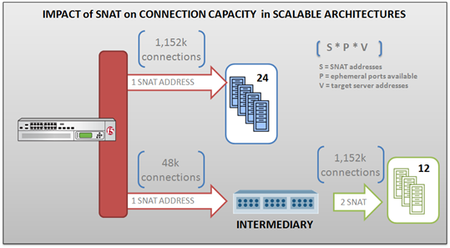
Understanding the relationship between SNAT and connection limitations in full proxy intermediaries. If you’ve previously delved into the world of SNAT (which is becoming increasingly important in large-scale implementations, such as those in the service provider world) you remember that SNAT essentially provides an IP address from which a full-proxy intermediary can communicate with server-side resources and maintain control over the return routing path. There is an interesting relationship between intermediaries that leverage two separate TCP stacks (such as full-proxies) and SNAT in terms of concurrent (open) connections that can be supported by any given “virtual” server (or virtual IP address, as they are often referred to in the industry). The number of ephemeral ports that can be used by any client IP address is 65535. Programmer types will recognize that as a natural limitation imposed by the use of an unsigned short integer (16 bits) in many programming languages. Now, what that means is that for each SNAT address assigned to a virtual IP address, a theoretical total of 65535 connections can be open at any other single address at any given time. This is because in a full-proxy architecture the intermediary is acting as a client and while servers use well-known ports for communication, clients do not. They use ephemeral (temporary) ports, the value of which is communicated to the server in the source port field in the request. Each additional SNAT address available increases the total number of connections by some portion of that space. As you should never use ephemeral ports in the privileged range (port numbers under 1024 are traditionally reserved for firewall and other sanity checkers - see /etc/services on any Unix box) that number can be as many as 64512 available ports between the SNAT address and any other IP address. For example, if a server pool (virtual or iron) has 24 members and assuming the SNAT address is configured to use ephemeral ports in the range of 1024-65535, then a single SNAT address results in a total of 24 x 48k = 1,152k concurrent connections to the pool. If the SNAT is assigned to a virtual server that is targeting a single address (like another virtual server or another intermediate device) then the total connections is 1 x 48k = 48k connections. Obviously this has a rather profound impact on scalability and capacity planning. If you only have one SNAT address available and you need the capabilities of a full-proxy (such as payload inspection inbound and out) you can only support a limited number of connections (and by extension, users). Some solutions provide the means by which these limitations can be mitigated, such as the ability to configure a SNAT pool (a set of dedicated IP addresses) from which SNAT addresses can be automatically pulled and used to automatically increase the number of available ephemeral ports. Running out of ephemeral ports is known as “ephemeral port exhaustion” as you have exhausted the ports available from which a connection to the server resource can be made. In practice the number of ephemeral ports available for any given IP address can be limited by operating system implementations and is always much lower than the 65535 available per IP address. For example, the IANA official suggestion is that ephemeral ports use 49152 through 65535, which means a limitation of 16383 open connections per address. Any full-proxy intermediary that has adopted this suggestion would necessarily require more SNAT addresses to scale an application to more concurrent connections. One of the advantages of a solution implementing a custom TCP/IP stack, then, is that they can ignore the suggestion on ephemeral port assignment typically imposed at the operating system or underlying software layer and increase the range to the full 65535 if desired. Another major advantage is making aggressive use of TIME-WAIT recycling. Normal TCP stacks hold on to the ephemeral port for seconds to minutes after a connection closes. This leads to odd bursting behavior. With proper use of TCP timestamps you can recycle that ephemeral port almost immediately. Regardless, it is an important relationship to remember, especially if it appears that the Load balancer (intermediary) is suddenly the bottleneck when demand increases. It may be that you don’t have enough IP addresses and thus ports available to handle the load. WILS: Write It Like Seth. Seth Godin always gets his point across with brevity and wit. WILS is an ATTEMPT TO BE concise about application delivery TOPICS AND just get straight to the point. NO DILLY DALLYING AROUND. Related Posts All WILS Topics on DevCentral Server Virtualization versus Server Virtualization1.1KViews0likes0Comments6 Reasons You Need an Application Delivery Controller Now
Application delivery controllers, and load balancing in general, are often seen as solutions waiting for a problem to solve. We know what those problems are, but until we experience them we often don't feel a sense of urgency in acquiring and deploying an application delivery controller. While it's certainly true that an application delivery controller can solve many problems that arise, it's also true that there are benefits to acquiring and deploying an application delivery controller before it becomes absolutely necessary in order to save your application, your site, or your job. So here are six good reasons to consider deploying an application delivery controller now rather than waiting until the next emergency. 6. Efficiency An application delivery controller (ADC) can improve the efficiency of the servers for which it manages application requests. By offloading compute intensive processing like SSL or TCP/IP connection management an ADC reduces the overhead associated with assembling and serving responses to application requests and makes better use of the resources (RAM, CPU, I/O) on each server. Making your infrastructure more efficient is also a great way to "go green". 5. Performance The performance of your applications can be improved dramatically through the deployment of an ADC. Whether it's because of compression, caching, protocol optimizations, connection management or intelligent load balancing algorithms, an ADC improves the overall performance of your applications. 4. Reliability If you rely on applications for business processes or as a revenue stream, the last thing you want is for those application to be unavailable. An ADC provides reliability by ensuring that requests are sent only to available servers, redirecting requests when a server is down for maintenance or finally hit the wall and died. If you're large enough to have two data centers, an ADC with global load balancing capabilities furthers assurance of reliability by redirecting requests from the primary data center to a secondary in the event of a disaster - whether that's a natural disaster (earthquake, fire, flood) or man-made (oops - was that our DS3 I just ripped out?). 3. Security We're not talking about advanced security options like web application firewalls or secure remote access products such as an SSL VPN, we're just talking basic security here. DDoS protection, rate limiting, blacklisting, whitelisting, authentication, resource obfuscation, SSL, content encryption - the bare minimum security you need to protect your applications and the servers on which they're deployed. An ADC provides the core security functions you need to ensure your site is safe. 2. Capacity Capacity is about how much throughput, how many requests, how many users you can support. It's nearly impossible to support thousands of concurrent users with a single server, unless it's one really really really big server. You need more than one server, and in order to architect a solution that uses a pool of servers you need something to mediate and direct those requests - to balance the load across those servers. That means you need an ADC, because the core purpose of an ADC is to perform load balancing and ensure that you can serve everyone who wants to be served. 1. Scalability Scaling up to meet demand is difficult, doing so without re-architecting your infrastructure or scheduling down-time is even more difficult. By including an ADC in your architecture from the very beginning, the process becomes a simple one. Add a new server, add it to the ADC and voila! You've just scaled up and can instantly support more users and more requests without requiring downtime or moving around network cables. Imbibing: Mountain Dew1.1KViews0likes0CommentsF5 Friday: Gracefully Scaling Down
What goes up, must come down. The question is how much it hurts (the user). An oft ignored side of elasticity is scaling down. Everyone associates scaling out/up with elasticity of cloud computing but the other side of the coin is just as important, maybe more so. After all, what goes up must come down. The trick is to scale down gracefully, i.e. to do it in such a way as to prevent the disruption of service to existing users while simultaneously trying to scale back down after a spike in demand. The ramifications of not scaling down are real in terms of utilization and therefore cost. Scaling up with the means to scale back down means higher costs, and simply shutting down an instance that is currently in use can result in angry users as service is disrupted. What’s necessary is to be able to gracefully scale down; to indicate somehow to the load balancing solution that a particular instance is no longer necessary and begin preparation for eventually shutting it down. Doing so gracefully requires that you are somehow able to quiesce or bleed off the connections. You want to continue to service those users who are currently connected to the instance while not accepting any new connections. This is one of the benefits of leveraging an application-aware application delivery controller versus a simple Load balancer: the ability to receive instruction in-process to begin preparation for shut down without interrupting existing connections. SERVING UP ACTIONABLE DATA BIG-IP users have always had the ability to specify whether disabling a particular “node” or “member” results in the rejection of all connections (including existing ones) or if it results in refusing new connections while allowing old ones to continue to completion. The latter technique is often used in preparation for maintenance on a particular server for applications (and businesses) that are sensitive to downtime. This method maintains availability while accommodating necessary maintenance. In version 10.2 of the core BIG-IP platform a new option was introduced that more easily enables the process of draining a server/application’s connections in preparation for being taken offline. Whether the purpose is maintenance or simply the scaling down side of elastic scalability is really irrelevant; the process is much the same. Being able to direct a load balancing service in the way in which connections are handled from the application is an increasingly important capability, especially in a public cloud computing environment because you are unlikely to have the direct access to the load balancing system necessary to manually engage this process. By providing the means by which an application can not only report but direct the load balancing service, some measure of customer control over the deployment environment is re-established without introducing the complexity of requiring the provider to manage the thousands (or more) credentials that would otherwise be required to allow this level of control over the load balancer’s behavior. HOW IT WORKS For specific types of monitors in LTM (Local Traffic Manager) – HTTP, HTTPS, TCP, and UDP – there is a new option called “Receive Disable String.” This “string” is just that, a string that is found within the content returned from the application as a result of the health check. In phase one we have three instances of an application (physical or virtual, doesn’t matter) that are all active. They all have active connections and are all receiving new connections. In phase two a health check on one server returns a response that includes the string “DISABLE ME.” BIG-IP sees this and, because of its configuration, knows that this means the instance of the application needs to gracefully go offline. LTM therefore continues to direct existing connections (sessions) with that instance to the right application (phase 3), but subsequently directs all new connection requests to the other instances in the pool (farm, cluster). When there are no more existing connections the instance can be taken offline or shut down with zero impact to users. The combination of “receive string” and “receive disable string” impacts the way in which BIG-IP interprets the instruction. A “receive string” typically describes the content received that indicates an available and properly executing application. This can be as simple as “HTTP 200 OK” or as complex as looking for a specific string in the response. Similarly the “receive disable” string indicates a particular string of text that indicates a desire to disable the node and begin the process of bleeding off connections. This could be as simple as “DISABLE” as indicated in the above diagram or it could just as easily be based solely on HTTP status codes. If an application instance starts returning 50x errors because it’s at capacity, the load balancing policy might include a live disable of the instance to allow it time to cool down – maintaining existing connections while not allowing new ones. Because action is based on matching a specific string, the possibilities are pretty much wide open. The following table describes the possible interactions between the two receive string types: LEVERAGING as a PROVIDER One of the ways in which a provider could leverage this functionality to provide differentiated value-added cloud services (as Randy Bias calls them) would be to define an application health monitoring API of sorts that allows customers to add to their application a specific set of URIs that are used solely for monitoring and can thus control the behavior of the load balancer without requiring per-customer access to the infrastructure itself. That’s a win-win, by the way. The customer gets control but so does the provider. Consider an health monitoring API that is a single URI: http://$APPLICATION_INSTANCE_HOSTNAME/health/check. Now provide a set of three options for customers to return (these are likely oversimplified for illustration purposes, but not by much): ENABLE QUIESCE DISABLE For all application instances the BIG-IP will automatically use an HTTP-derived monitor that calls $APP_INSTANCE/health/check and examines the result. The monitor would use “ENABLE” as the “receive string” and “QUIESCE” as the “receive disable” string. Based on the string returned by the application, the BIG-IP takes the appropriate action (as defined by the table above). Of course this can also easily be accomplished by providing a button on the cloud management interface to do the same via iControl, but this option is more able to be programmatically defined by customers and thus is more dynamic and allows for automation. And of course such an implementation isn’t relegated only to service providers; IT organizations in any environment can take advantage of such an implementation, especially if they’re working toward an automated data center and/or self-service provisioning/management of IT services. That is infrastructure as a service. Yes, this means modification to the application being deployed. No, I don’t think that’s a problem – cloud and Infrastructure as a Service (IaaS), at least real IaaS is going to necessarily require modifications to existing applications and new applications will need to include this type of integration in the future if we are to take advantage of the benefits afforded by a more application aware infrastructure and, conversely, a more infrastructure-aware application architecture. Related Posts1.1KViews0likes1CommentWAN Optimization is not Application Acceleration
Increasingly WAN optimization solutions are adopting the application acceleration moniker, implying a focus that just does not exist. WAN optimization solutions are designed to improve the performance of the network, not applications, and while the former does beget improvements of the latter, true application acceleration solutions offer greater opportunity for improving efficiency and end-user experience as well as aiding in consolidation efforts that result in a reduction in operating and capital expenditure costs. WAN Optimization solutions are, as their title implies, focused on the WAN; on the network. It is their task to improve the utilization of bandwidth, arrest the effects of network congestion, and apply quality of service policies to speed delivery of critical application data by respecting application prioritization. WAN Optimization solutions achieve these goals primarily through the use of data de-duplication techniques. These techniques require a pair of devices as the technology is most often based on a replacement algorithm that seeks out common blocks of data and replaces them with a smaller representative tag or indicator that is interpreted by the paired device such that it can reinsert the common block of data before passing it on to the receiver. The base techniques used by WAN optimization are thus highly effective in scenarios in which large files are transferred back and forth over a connection by one or many people, as large chunks of data are often repeated and the de-duplication process significantly reduces the amount of data traversing the WAN and thus improves performance. Most WAN optimization solutions specifically implement “application” level acceleration for protocols aimed at the transfer of files such as CIFS and SAMBA. But WAN optimization solutions do very little to aid in the improvement of application performance when the data being exchanged is highly volatile and already transferred in small chunks. Web applications today are highly dynamic and personalized, making it less likely that a WAN optimization solution will find chunks of duplicated data large enough to make the overhead of the replacement process beneficial to application performance. In fact, the process of examining small chunks of data for potential duplicated chunks can introduce additional latency that actual degrades performance, much in the same way compression of small chunks of data can be detrimental to application performance. Too, WAN optimization solutions require deployment in pairs which results in what little benefits these solutions offer for web applications being enjoyed only by end-users in a location served by a “remote” device. Customers, partners, and roaming employees will not see improvements in performance because they are not served by a “remote” device. Application acceleration solutions, however, are not constrained by such limitations. Application acceleration solutions act at the higher layers of the stack, from TCP to HTTP, and attempt to improve performance through the optimization of protocols and the applications themselves. The optimizations of TCP, for example, reduce the overhead associated with TCP session management on servers and improve the capacity and performance of the actual application which in turn results in improved response times. The understanding of HTTP and both the browser and server allows application acceleration solutions to employ techniques that leverage cached data and industry standard compression to reduce the amount of data transferred without requiring a “remote” device. Application acceleration solutions are generally asymmetric, with some few also offering a symmetric mode. The former ensures that regardless of the location of the user, partner, or employee that some form of acceleration will provide a better end-user experience while the latter employs more traditional WAN optimization-like functionality to increase the improvements for clients served by a “remote” device. Regardless of the mode, application acceleration solutions improve the efficiency of servers and applications which results in higher capacities and can aid in consolidation efforts (fewer servers are required to serve the same user base with better performance) or simply lengthens the time available before additional investment in servers – and the associated licensing and management costs – must be made. Both WAN optimization and application acceleration aim to improve application performance, but they are not the same solutions nor do they even focus on the same types of applications. It is important to understand the type of application you want to accelerate before choosing a solution. If you are primarily concerned with office productivity applications and the exchange of large files (including backups, virtual images, etc…) between offices, then certainly WAN optimization solutions will provide greater benefits than application acceleration. If you’re concerned primarily about web application performance then application acceleration solutions will offer the greatest boost in performance and efficiency gains. But do not confuse WAN optimization with application acceleration. There is a reason WAN optimization-focused providers have recently begun to partner with application acceleration and application delivery providers – because there is a marked difference between the two types of solutions and a single offering that combines them both is not (yet) available.999Views0likes2CommentsArchitecting Scalable Infrastructures: CPS versus DPS
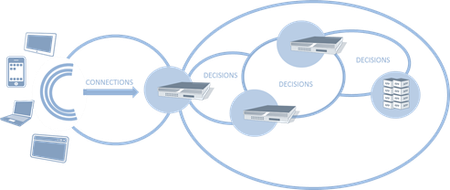
#webperf As we continue to find new ways to make connections more efficient, capacity planning must look to other metrics to ensure scalability without compromising performance. Infrastructure metrics have always been focused on speeds and feeds. Throughput, packets per second, connections per second, etc… These metrics have been used to evaluate and compare network infrastructure for years, ultimately being used as a critical component in data center design. This makes sense. After all, it's not rocket science to figure out that a firewall capable of handling 10,000 connections per second (CPS) will overwhelm a next hop (load balancer, A/V scanner, etc… ) device only capable of 5,000 CPS. Or will it? The problem with old skool performance metrics is they focus on ingress, not egress capacity. With SDN pushing a new focus on both northbound and southbound capabilities, it makes sense to revisit the metrics upon which we evaluate infrastructure and design data centers. CONNECTIONS versus DECISIONS As we've progressed from focusing on packets to sessions, from IP addresses to users, from servers to applications, we've necessarily seen an evolution in the intelligence of network components. It's not just application delivery that's gotten smarter, it's everything. Security, access control, bandwidth management, even routing (think NAC), has become much more intelligent. But that intelligence comes at a price: processing. That processing turns into latency as each device takes a certain amount of time to inspect, evaluate and ultimate decide what to do with the data. And therein lies the key to our conundrum: it makes a decision. That decision might be routing based or security based or even logging based. What the decision is is not as important as the fact that it must be made. SDN necessarily brings this key differentiator between legacy and next-generation infrastructure to the fore, as it's just software-defined but software-deciding networking. When a switch doesn't know what to do with a packet in SDN it asks the controller, which evaluates and makes a decision. The capacity of SDN – and of any modern infrastructure – is at least partially determined by how fast it can make decisions. Examples of decisions: URI-based routing (load balancers, application delivery controllers) Virus-scanning SPAM scanning Traffic anomaly scanning (IPS/IDS) SQLi / XSS inspection (web application firewalls) SYN flood protection (firewalls) BYOD policy enforcement (access control systems) Content scrubbing (web application firewalls) The DPS capacity of a system is not the same as its connection capacity, which is merely the measure of how many new connections a second can be established (and in many cases how many connections can be simultaneously sustained). Such a measure is merely determining how optimized the networking stack of any given solution might be, as connections – whether TCP or UDP or SMTP – are protocol oriented and it is the networking stack that determines how well connections are managed. The CPS rate of any given device tells us nothing about how well it will actually perform its appointed tasks. That's what the Decisions Per Second (DPS) metric tells us. CONSIDERING BOTH CPS and DPS Reality is that most systems will have a higher CPS compared to its DPS. That's not necessarily bad, as evaluating data as it flows through a device requires processing, and processing necessarily takes time. Using both CPS and DPS merely recognizes this truth and forces it to the fore, where it can be used to better design the network. A combined metric helps design the network by offering insight into the real capacity of a given device, rather than a marketing capacity. When we look only at CPS, for example, we might feel perfectly comfortable with a topological design with a flow of similar CPS capacities. But what we really want is to make sure that DPS –> CPS (and vice-versa) capabilities were matched up correctly, lest we introduce more latency than is necessary into a given flow. What we don't want is to end up with is a device with a high DPS rate feeding into a device with a lower CPS rate. We also don't want to design a flow in which DPS rates successively decline. Doing so means we're adding more and more latency into the equation. The DPS rate is a much better indicator of capacity than CPS for designing high-performance networks because it is a realistic measure of performance, and yet a high DPS coupled with a low CPS would be disastrous. Luckily, it is almost always the case that a mismatch in CPS and DPS will favor CPS, with DPS being the lower of the two metrics in almost all cases. What we want to see is as close a CPS:DPS ratio as possible. The ideal is 1:1, of course, but given the nature of inspecting data it is unrealistic to expect such a tight ratio. Still, if the ratio becomes too high, it indicates a potential bottleneck in the network that must be addressed. For example, assume an extreme case of a CPS:DPS of 2:1. The device can establish 10,000 CPS, but only process at a rate of 5,000 DPS, leading to increasing latency or other undesirable performance issues as connections queue up waiting to be processed. Obviously there's more at play than just new CPS and DPS (concurrent connection capability is also a factor) but the new CPS and DPS relationship is a good general indicator of potential issues. Knowing the DPS of a device enables architects to properly scale out the infrastructure to remediate potential bottlenecks. This is particularly true when TCP multiplexing is in play, because it necessarily reduces CPS to the target systems but in no way impacts the DPS. On the ingress, too, are emerging protocols like SPDY that make more efficient use of TCP connections, making CPS an unreliable measure of capacity, especially if DPS is significantly lower than the CPS rating of the system. Relying upon CPS alone – particularly when using TCP connection management technologies - as a means to achieve scalability can negatively impact performance. Testing systems to understand their DPS rate is paramount to designing a scalable infrastructure with consistent performance. The Need for (HTML5) Speed SPDY versus HTML5 WebSockets Y U No Support SPDY Yet? Curing the Cloud Performance Arrhythmia F5 Friday: Performance, Throughput and DPS Data Center Feng Shui: Architecting for Predictable Performance On Cloud, Integration and Performance999Views0likes0CommentsBack to Basics: Load balancing Virtualized Applications
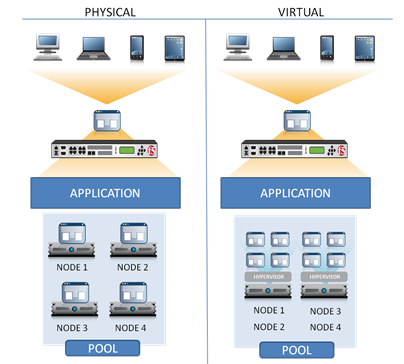
#virtualization load balancing in a virtualized world is the same as it ever was, but different. The introduction of virtualization and cloud computing to data centers has been heralded as “transformational” and “disruptive” and “game changing.” From an operational IT perspective, that’s absolutely true. But like transformational innovation in other industries, such disruption is often not in how the core solution is leveraged or used, but how it impacts operations and the broader ecosystem, rather than the individual tasked with using the solution. The transformation of the auto-industry, for example, toward alternative fuel-sourced vehicles is disruptive and changes much about the industry. But it doesn’t change the way you drive a car; it still works on the same principles and the skills you’ve learned driving gas powered cars are still applicable to alternative fuel-source cars. What changes for the operator – just as within IT - is there may be new concerns with which you must contend. Load balancing virtualized applications is in this category. While the core principles you’ve always applied to load balancing applications still applies, there are a few additional concerns that arise from the use of virtualization that you’re going to have to take into consideration. LOAD BALANCING 101 REFRESH Let’s remember quickly how load balancing traditional applications works, shall we? The load balancing service presents to the end-user a single endpoint, i.e. “the application”. Users communicate exclusively with that endpoint. The load balancing service communicates with a pool of resources comprised of one or more application instances. It is by adding instances to the pool that an application is able to scale horizontally to meet demand. In the most common traditional load balancing environment, each application instance is hosted on a single, physical server. The availability of the “application” is maintained by insuring there are always enough instances (nodes) available to compensate for any failures that might occur at the physical server, operating system, platform, or application layers. Load balancing services also allow for the designation of “back up” nodes. Each node in a pool may have a back up node that is only activated in the event of a failure. This is used primarily for high-availability purposes to ensure continuous application availability rather than for scaling purposes. Now, when we replace the physical servers with virtual servers, we have pretty much the same system. There still exists a pool of resources that comprise “the application”, the load balancing service still mediates for the end-user, and there are still enough application instances in the pool to compensate for failure, thus ensuring availability of “the application.” However, there are some new potential sources of failure that must be addressed that impact the topology – the physical placement – of the application instances in the pool. TWO RULES for LOAD BALANCING VIRTUALIZED APPLICATIONS One of the most important changes coming from virtualization that must be addressed is fault isolation. Assume for a moment that we took all four physical nodes and consolidated them on a single, physical virtualized platform. In theory, nothing changes. The load balancing service views a “node” as a unique combination of IP address and TCP port, and whether that’s hosted on a virtual platform or a physical server is irrelevant to the load balancing service. The load balancing algorithms still work the same way, nodes are selected as directed by configured policies, backup nodes are still used to ensure continuous availability, and nothing about the way in which load balancing works changes. But it’s very relevant to operations because this type of server-consolidated deployment model introduces higher unrecoverable failure scenarios and it will directly impact the performance (in a bad way) of “the application.” There are a couple operational axioms at work here: 1. Shared infrastructure (network, compute, storage) means shared risk. 2. As load increases, performance decreases. Let’s say “Node 1” fails. In both the physical and virtual deployments, the load is simply shifted to the remaining active nodes. No problem. But what if the network connectivity between the load balancing service and “Node 1” fails? In a physical deployment, no problem – each node has its own physical connection and is unlikely to impact the other nodes. But what about the virtual deployment? Each node has its own virtual network connection, certainly, but does it have its own physical network connection or is it shared? If it’s a shared physical connection and it fails, then all nodes will fail – leaving “the application” unavailable. Load Balancing Virtualized Applications Rule #1: Team and Trunk. Physical network redundancy is a must. Modern server platforms are generally enabled with at least 2 if not 4 GBE connections, use them. So now you’ve got your network topology designed to ensure that a physical failure will not take out every application instance on the server. Next you need to consider how the application instances are isolated and deployed to ensure that a failure at the hypervisor layer does not disrupt all application instances. Consider that there are two possible reasons you are implementing load balancing: scalability and availability. In the former, you’re trying to ensure supply meets demand. In the latter, you’re trying to mitigate potential failure in a way to ensure “the application” is always available, regardless of failure. If there is a failure at the hypervisor layer, all instances relying on that hypervisor will be impacted (and not in a good way). Regardless of why you’re implementing load balancing, the result of such a failure is the same, instances are unavailable. Similarly, if the physical device on which virtualized applications are deployed fails, every instance on that device will be down. In both cases, if all your virtual eggs are in one basket and there’s a failure at the hypervisor layer, you’re in trouble. Load Balancing Virtualized Applications Rule #2: Divide and Conquer. Application instance redundancy is a must. Never put all your application instances on a single virtualized or physical platform. Spread them across at least two, to isolate potential failures in the virtualization layer or at the physical server layer. Node backups should always be located on physically separate devices. Load balancing services are adept at discerning failure but they are not necessarily able to determine the source. A failure to communicate with an application instance could be caused by a bad cable, a failed port, an unresponsive network stack, or an application error. The load balancing service knows the application instance is down, but not necessarily why it’s down. If it’s a crashed instance, then failing over to a back up instance on the same server is probably going to work out fine. But if the root cause is a failed port or bad cable, failing over to a backup instance on the same server isn’t going to help – because it is down too. It is imperative to ensure availability that there are always at least two of everything – and that means physical devices, as well. Never put all your eggs in one basket – at any layer. THE PERFORMANCE IMPACT Aside from general availability issues, there is also the very real possibility that where you deploy virtualized application instances will impact performance of “the application.” Remember that even though you can designate CPU and memory on a per application instance, they still ultimately shared I/O – both storage and network. That means even if you use rate limiting technologies to try to manage bandwidth consumption as a means to reduce congestion or latency, ultimately you’re impacting performance. If you don’t use rate limiting or other bandwidth-focused solutions to manage the shared network resource, you run the risk of congestion and increasing latency on the wire. Similarly, shared storage is even more problematic because when you trace I/O down through the system, you end up at a single, shared I/O controller that is going to have some serious limitations on it. I/O intense application instances deployed on the same physical device are going to cause contention in the underlying system, which is going to negatively impact performance. Again, divide and conquer. Disperse such instances across two (or more) physical servers. The number of servers will depend on the overall scale of the application and the resource consumption rate. Load balancing will be able to assist in maintaining performance across instances if you take advantage of a response-time aware algorithm such as fastest response time (the assumption is that response time correlates directly to load and in most cases, this is true). This keeps any given instance from becoming overwhelmed. Ultimately, what this means is that you have to be a little more aware of physical deployment location for application instances than you did with pure physical deployments. Consolidation is a great way to reduce operational and capital expenditures, but it also means consolidating risk. LOCATION MATTERS This is a particularly tough nut to crack especially when combined with the desire to implement auto-scaling operations in a more cloud-like environment. The idea that you can leverage “whatever idle resources” you can find to scale out applications on-demand is powerful, but it’s also potentially fraught with risk if you’re unable to control placement at all. While the possibility that every instance would end up deployed on a single server or even a select handful of servers is minimal, there is the possibility that multiple instances could be deployed in a way that means a single server failure could eliminate a sizeable number of application instances, resulting in an unacceptable degradation of performance or even downtime for some percentage of users. In the end, location really does matter when it comes to load balancing virtualized applications. Where they are deployed and in what groupings becomes a critical factor for maintaining performance and availability. The tendency to increase VM density is high, but that tendency can lead to highly disruptive situations in the event of a failed component. Be aware that cost savings from mass-consolidation and “high efficiency” through increasing VM density metrics may look good now, but may not look so good through the lens of hindsight. Digital is Different The Cost of Ignoring ‘Non-Human’ Visitors Cloud Bursting: Gateway Drug for Hybrid Cloud The HTTP 2.0 War has Just Begun Why Layer 7 Load Balancing Doesn’t Suck Network versus Application Layer Prioritization Complexity Drives Consolidation Performance in the Cloud: Business Jitter is Bad943Views0likes1CommentWhy Layer 7 Load Balancing Doesn’t Suck
Alternative title: Didn’t We Resolve This One 10 Years Ago? There’s always been a bit of a disconnect between traditional network-focused ops and more modern, application-focused ops when it comes to infrastructure architecture. The arguments for an against layer 7 (application) load balancing first appeared nearly a decade ago when the concept was introduced. These arguments were being tossed around at the same time we were all arguing for or against various QoS (Quality of Service) technologies, namely the now infamous “rate shaping” versus “queuing” debate. If you missed that one, well, imagine an argument similar to that today of “public” versus “private” clouds. Same goals, different focus on how to get there. Seeing this one crop up again is not really any more surprising than seeing some of the other old debates bubbling to the surface. cloud computing and virtualization have brought network infrastructure and its capabilities, advantages and disadvantages – as well as its role in architecting a dynamic data center – to the fore again. But seriously? You’d think the arguments would have evolved in the past ten years. While load balancing hardware marketing execs get very excited about the fact that their product can magically scale your application by using amazing Layer 7 technology in the Load balancer such as cookie inserts and tracking/re-writing. What they fail to mention is that any application that requires the load balancer to keep track of session related information within the communications stream can never ever be scalable or reliable. -- Why Layer 7 load balancing sucks… I myself have never shied away from mentioning the session management capabilities of a full-proxy application delivery controller (ADC) and, in fact, I have spent much time advocating on behalf of its benefits to architectural flexibility, scalability, and security. Second, argument by selective observation is a poor basis upon which to make any argument, particularly this one. While persistence-based load balancing is indeed one of the scenarios in which an advanced application delivery controller is often used (and in some environments, such as scaling out VDI deployments, is a requirement) this is a fairly rudimentary task assigned to such devices. The use of layer 7 routing, aka page routing in some circles (such as Facebook), is a highly desirable capability to have at your disposable. It enables more flexible, scalable architectures by creating scalability domains based on application-specific functions. There are a plethora of architectural patterns that leverage the use of an intelligent, application-aware intermediary (i.e. layer 7 load balancing capable ADC). Here’s a few I’ve written myself, but rest assured there are many more examples of infrastructure scalability patterns out there on the Internets: Infrastructure Architecture: Avoiding a Technical Ambush Infrastructure Scalability Pattern: Partition by Function or Type Applying Scalability Patterns to Infrastructure Architecture Infrastructure Scalability Pattern: Sharding Streams Interestingly, ten years ago this argument may have held some water. This was before full-proxy application delivery controllers were natively able to extract the necessary HTTP headers (where cookies are exchanged). That means in the past, such devices had to laboriously find and extract the cookie and its value from the textual representation of the headers, which obviously took time and processing cycles (i.e. added latency). But that’s not been the case since oh, 2004-2005 when such capabilities were recognized as being a requirement for most organizations and were moved into native processing, which reduced the impact of such extraction and evaluation to a negligible, i.e. trivial, amount of delay and effectively removed as an objection this argument. THE SECURITY FACTOR Both this technique and trivial tasks like tracking and re-writing do, as pointed out, require session tracking – TCP session tracking, to be exact. Interestingly, it turns out that this is a Very Good Idea TM from a security perspective as it provides a layer of protection against DDoS attacks at lower levels of the stack and enables an application-aware ADC to more effectively thwart application-layer DDoS attacks, such as SlowLoris and HTTP GET floods. A simple, layer 4 load balancing solution (one that ignores session tracking, as is implied by the author) can neither recognize nor defend against such attacks because they maintain no sense of state. Ultimately this means the application and/or web server is at high risk of being overwhelmed by even modest attacks, because these servers are incapable of scaling sessions at the magnitude required to sustain availability under such conditions. This is true in general of high volumes of traffic or under overwhelming loads due to processor-intense workloads. A full-proxy device mitigates many of the issues associated with concurrency and throughput simply by virtue of its dual-stacked nature. SCALABILITY As far as scalability goes, really? This is such an old and inaccurate argument (and put forth with no data, to boot) that I’m not sure it’s worth presenting a counter argument. Many thousands of customers use application delivery controllers to perform layer 7 load balancing specifically for availability assurance. Terminating sessions does require session management (see above), but to claim that this fact is a detriment to availability and business continuity shows a decided lack of understanding of failover mechanisms that provide near stateful-failover (true stateful-failover is impossible at any layer). The claim that such mechanisms require network bandwidth indicates either a purposeful ignorance with respect to modern failover mechanisms or simply failure to investigate. We’ve come a long way, baby, since then. In fact, it is nigh unto impossible for a simple layer 4 load balancing mechanism to provide the level of availability and consistency claimed, because such an architecture is incapable of monitoring the entire application (which consists of all instances of the application residing on app/web servers, regardless of form-factor). See axiom #3 (Context-Aware) in “The Three Axioms of Application Delivery”. The Case (For & Against) Network-Driven Scalability in Cloud Computing Environments The Case (For & Against) Management-Driven Scalability in Cloud Computing Environments The Case (For & Against) Application-Driven Scalability in Cloud Computing Environments Resolution to the Case (For & Against) X-Driven Scalability in Cloud Computing Environments The author’s claim seems to rest almost entirely on the argument “Google does layer 4 not layer 7” to which I say, “So?” If you’re going to tell part of the story, tell the entire story. Google also does not use a traditional three-tiered approach to application architecture, nor do its most demanding services (search) require state, nor does it lack the capacity necessary to thwart attacks (which cannot be said for most organizations on the planet). There is a big difference between modern, stateless applications (and many benefits) and traditional three-tiered application architectures. Now it may in fact be the case that regardless of architecture an application and its supporting infrastructure do not require layer 7 load balancing services. In that case, absolutely – go with layer 4. But to claim layer 7 load balancing is not scalable, or resilient, or high-performance enough when there is plenty of industry-wide evidence to prove otherwise is simply a case of not wanting to recognize it.824Views0likes0CommentsSessions, Sessions Everywhere
If you’re replicating session state across application servers you probably need to rethink your strategy. There’s other options – more efficient options – than wasting RAM and, ultimately, money. Although the discussion of Oracle’s “cloud in a box” announcement at OpenWorld dominated much of the tweet-stream this week there were other discussions going on that proved to not only interesting but a good reminder of how cloud computing has brought to the fore the importance of architecture. Foremost in my mind was what started as a lamentation on the fact that Amazon EC2 does not support multicasting that evolved into a discussion on why that would cause grief for those deploying applications in the environment. Remember that multicast is essentially spraying the same data to a group of endpoints and is usually leveraged for streaming media topologies: In computer networking, multicast is the delivery of a message or information to a group of destination computers simultaneously in a single transmission from the source creating copies automatically in other network elements, such as routers, only when the topology of the network requires it. -- Wikipedia, multicast As it turns out, a primary reason behind the need for multicasting in the application architecture revolves around the mirroring of session state across a pool of application servers. Yeah, you heard that right – mirroring session state across a pool of application servers. The first question has to be: why? What is it about an application that requires this level of duplication? MULTICASTING for SESSIONS There are three reasons why someone would want to use multicasting to mirror session state across a pool of application servers. There may be additional reasons that aren’t as common and if so, feel free to share. The application relies on session state and, when deployed in a load balanced environment, broke because the tight-coupling between user and session state was not respected by the Load balancer. This is a common problem when moving from dev/qa to production and is generally caused by using a load balancing algorithm without enabling persistence, a.k.a. sticky sessions. The application requires high-availability that necessitates architecting a stateful-failover architecture. By mirroring sessions to all application servers if one fails (or is decommissioned in an elastic environment) another can easily re-establish the coupling between the user and their session. This is not peculiar to application architecture – load balancers and application delivery controllers mirror their own “session” state across redundant pairs to achieve a stateful failover architecture as well. Some applications, particularly those that are collaborative in nature (think white-boarding and online conferences) “spray” data across a number of sessions in order to enable the sharing in real time aspect of the application. There are other architectural choices that can achieve this functionality, but there are tradeoffs to all of them and in this case it is simply one of several options. THE COST of REPLICATING SESSIONS With the exception of addressing the needs of collaborative applications (and even then there are better options from an architectural point of view) there are much more efficient ways to handle the tight-coupling of user and session state in an elastic or scaled-out environment. The arguments against multicasting session state are primarily around resource consumption, which is particularly important in a cloud computing environment. Consider that the typical session state is 3-200 KB in size (Session State: Beyond Soft State ). Remember that if you’re mirroring every session across an entire cluster (pool) of application servers, that each server must use memory to store that session. Each mirrored session, then, is going to consume resources on every application server. Every application server has, of course, a limited amount of memory it can utilize. It needs that memory for more than just storing session state – it must also store connection tables, its own configuration data, and of course it needs memory in which to execute application logic. If you consume a lot of the available memory storing the session state from every other application server, you are necessarily reducing the amount of memory available to perform other important tasks. This reduces the capacity of the server in terms of users and connections, it reduces the speed with which it can execute application logic (which translates into reduced response times for users), and it operates on a diminishing returns principle. The more application servers you need to scale – and you’ll need more, more frequently, using this technique – the less efficient each added application server becomes because a good portion of its memory is required simply to maintain session state of all the other servers in the pool. It is exceedingly inefficient and, when leveraging a public cloud computing environment, more expensive. It’s a very good example of the diseconomy of scale associated with traditional architectures – it results in a “throw more ‘hardware’ at the problem, faster” approach to scalability. BETTER ARCHITECTURAL SOLUTIONS There are better architectural solutions to maintaining session state for every user. SHARED DATABASE Storing session state in a shared database is a much more efficient means of mirroring session state and allows for the same guarantees of consistency when experiencing a failure. If session state is stored in a database then regardless of which application server instance a user is directed to that application server has access to its session state. The interaction between the user and application becomes: User sends request Clustering/load balancing solution routes to application server Application server receives request, looks up session in database Application server processes request, creates response Application server stores updated session in database Application server returns response If a single database is problematic (because it is a single point of failure) then multicasting or other replication techniques can be used to implement a dual-database architecture. This is somewhat inefficient, but far less so than doing the same at the application server layer. PERSISTENCE-BASED LOAD BALANCING It is often the case that the replication of session state is implemented in response to wonky application behavior occurring only when the application is deployed in a scalable environment, a.k.a a load balancing solution is introduced into the architecture. This is almost always because the application requires tight-coupling between user and session and the load balancing is incorrectly configured to support this requirement. Almost every load balancing solution – hardware, software, virtual network appliance, infrastructure service – is capable of supporting persistence, a.k.a. sticky sessions. This solution requires, however, that the load balancing solution of choice be configured to support the persistence. Persistence (also sometimes referred to as “server affinity” when implemented by a clustering solution) can be configured in a number of ways. The most common configuration is to leverage the automated session IDs generated by application servers, e.g. PHPSESSIONID, ASPSESSIONID. These ids are contained in the HTTP headers and are, as a matter of fact, how the application server “finds” the appropriate session for any given user’s request. The load balancer intercepts every request (it does anyway) and performs the same type of lookup on its own session table (which is much, much higher capacity than an application server and leverages the same high-performance lookups used to store connection and network session tables) and routes the user to the appropriate application server based on the session ID. The interaction between the user and application becomes: User sends request Clustering/load balancing solution finds, if existing, the session-app server mapping. If it does not, it chooses the application server based on the load balancing algorithm and configured parameters Application server receives request, Application server processes request, creates response Application server returns response Clustering/load balancing solution creates the session-app server mapping if it did not already exist Persistence can generally be based on any data in the HTTP header or payload, but using the automatically generated session ids tends to be the most common implementation. YOUR INFRASTRUCTURE, GIVE IT TO ME Now, it may be the case when the multicasting architecture is the right one. It is impossible to say it’s never the right solution because there are always applications and specific scenarios in which an architecture that may not be a good idea in general is, in fact, the right solution. It is likely the case, however, in most situations that it is not the right solution and has more than likely been implemented as a workaround in response to problems with application behavior when moving through a staged development environment. This is one of the best reasons why the use of a virtual edition of your production load balancing solution should be encouraged in development environments. The earlier a holistic strategy to application design and architecture can be employed the fewer complications will be experienced when the application moves into the production environment. Leveraging a virtual version of your load balancing solution during the early stages of the development lifecycle can also enable developers to become familiar with production-level infrastructure services such that they can employ a holistic, architectural approach to solving application issues. See, it’s not always because developers don’t have the know how, it’s because they don’t have access to the tools during development and therefore can’t architect a complete solution. I recall a developer’s plaintive query after a keynote at [the now defunct] SD West conference a few years ago that clearly indicated a reluctance to even ask the network team for access to their load balancing solution to learn how to leverage its services in application development because he knew he would likely be denied. Network and application delivery network pros should encourage the use of and tinkering with virtual versions of application delivery controllers/load balancers in the application development environment as much as possible if they want to reduce infrastructure and application architectural-related issues from cropping up during production deployment. A greater understanding of application-infrastructure interaction will enable more efficient, higher performing applications in general and reduce the operational expenses associated with deploying applications that use inefficient methods such as replication of session state to address application architectural constraints. Related blogs & articles: Applying Scalability Patterns to Infrastructure Architecture Scalability Only One Half the Reliability Equation Service Virtualization Helps Localize Impact of Elastic Scalability Web 2.0: Integration, APIs, and Scalability Automating scalability and high availability services To Take Advantage of Cloud Computing You Must Unlearn, Luke. Scalability with multiple networks for Virtual Servers ... Cloud Lets You Throw More Hardware at the Problem Faster And That, Young Cloudwalker, Is Why You Fail709Views0likes0Comments