routes
4 TopicsShow or List F5 XC Routes in the Web
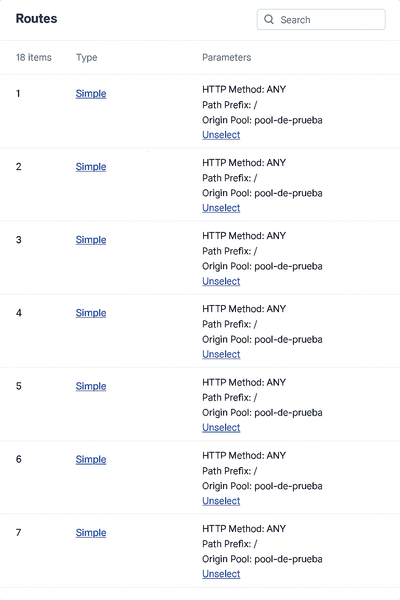
Hi F5ers, After more than two years working with F5 XC, I have decided to explore a functionality to show the host associated with each route "I have requested this functionality to F5, but it´s in design." For anyone who has deployed XC and has created routes into the load balancers, they may have encountered the fact that the routes don't have any description or relevant information, and in the case that they have to find a specific route, it could be almost impossible in an incident, or it will take a lot of time to navigate the menu. So, what I propose as an alternative solution, meanwhile, is F5 solving the request? I have designed a JavaScript that can be integrated into a bookmark "easy way", and if you copy the entire JSON configuration of the load balancer, it will show you in a console over the main XC web page the specific routes and their position in the Routes Menu. The steps to deploy it are: Create a new bookmark and copy the next encoded JavaScript in the URL New Bookmark javascript:(async()=>{const H=h=>{if(!h)return'';const i=h.invert_match?%27NOT %27:%27%27;const n=(h.name||%27%27)+%27%27;if(n.toLowerCase()===%27host%27){if(h.regex)return`${i}Host Regex: ${h.regex}`;if(h.exact)return`${i}Host: ${h.exact}`;if(h.match_value)return`${i}Host: ${h.match_value}`;if(h.value)return`${i}Host: ${h.value}`;if(Array.isArray(h.values)&&h.values.length)return`${i}Host in [${h.values.join(%27 | %27)}]`;return`${i}Host Header Present`}if(h.regex)return`${i}Header Regex: ${n} ~ ${h.regex}`;if(h.exact)return`${i}Header: ${n} = ${h.exact}`;if(h.match_value)return`${i}Header: ${n} = ${h.match_value}`;if(h.value)return`${i}Header: ${n} = ${h.value}`;if(Array.isArray(h.values)&&h.values.length)return`${i}Header: ${n} in [${h.values.join(%27 | %27)}]`;return`${i}Header: ${n} (present)`},S=t=>{try{let s=t.replace(/^\uFEFF/,%27%27).replace(/\u200B/g,%27%27);s=s.replace(/\/\*[^]*?\*\//g,%27%27);s=s.replace(/(^|[^:])\/\/.*$/gm,%27$1%27);s=s.replace(/,\s*([}\]])/g,%27$1%27);return s}catch{return t}},J=t=>{if(!t)return null;try{return JSON.parse(t)}catch{try{return JSON.parse(S(t))}catch{return null}}},G=()=>{try{return(getSelection()?.toString()||%27%27).trim()}catch{return%27%27}},D=()=>{const o=[];document.querySelectorAll(%27pre,code,textarea,div%27).forEach(el=>{const t=(el.innerText||el.textContent||%27%27).trim();if(t&&t.includes(%27"spec"%27)&&t.includes(%27"routes"%27)&&t.includes(%27"metadata"%27))o.push(t)});return o},P=a=>{for(const r of a){let t=r,i=t.indexOf(%27{%27),j=t.lastIndexOf(%27}%27);if(i>=0&&j>i)t=t.slice(i,j+1);const x=J(t);if(x?.spec?.routes)return x}return null},M=()=>{try{if(window.monaco?.editor?.getModels){for(const m of window.monaco.editor.getModels()){const txt=m.getValue?.();const j=J(txt);if(j?.spec?.routes)return j}}}catch{}return null},Q=onOk=>{const host=document.createElement(%27div%27),shadow=host.attachShadow({mode:%27open%27}),ov=document.createElement(%27div%27);ov.style.cssText=%27position:fixed;inset:0;z-index:1000000;background:rgba(0,0,0,.55);display:flex;align-items:center;justify-content:center;outline:none;%27;ov.tabIndex=0;const box=document.createElement(%27div%27);box.style.cssText=%27width:min(960px,92vw);height:min(76vh,720px);background:#111;color:#eee;border:1px solid #444;border-radius:10px;box-shadow:0 8px 24px rgba(0,0,0,.35);display:flex;flex-direction:column';const head=document.createElement('div');head.style.cssText='padding:10px 12px;border-bottom:1px solid #333;font:600 14px system-ui';head.textContent='Pega o carga el JSON del HTTP LB (vista JSON)';const bar=document.createElement('div');bar.style.cssText='display:flex;gap:8px;align-items:center;padding:8px 12px;border-bottom:1px solid #333';const btnRead=document.createElement('button');btnRead.textContent='📋 Leer portapapeles';btnRead.title='Requiere permiso del navegador';btnRead.style.cssText='background:#2b2b2b;color:#ddd;border:1px solid #444;border-radius:6px;padding:6px 10px;cursor:pointer';btnRead.onclick=async()=>{try{const txt=await navigator.clipboard.readText();ta.value=txt;ta.focus()}catch{alert('No se pudo leer del portapapeles. Permite el permiso o usa Archivo.')}};const file=document.createElement('input');file.type='file';file.accept='.json,.txt,application/json,text/plain';file.style.cssText='color:#bbb';file.onchange=async e=>{const f=e.target.files?.[0];if(!f)return;const txt=await f.text();ta.value=txt;ta.focus()};const tip=document.createElement('div');tip.style.cssText='margin-left:auto;color:#aaa;font-size:12px';tip.textContent='Consejo: arrastra y suelta un archivo aquí';bar.append(btnRead,file,tip);const ta=document.createElement('textarea');ta.style.cssText='flex:1;padding:10px 12px;background:#0f0f0f;color:#eee;border:0;outline:none;resize:none;font:12px/1.4 ui-monospace,Menlo,Consolas,monospace';ta.placeholder='Pega aquí el JSON (Ctrl+V). Si la página intercepta, usa "Leer portapapeles" o Archivo.';const pasteToTa=async e=>{try{let d=e.clipboardData?.getData('text/plain');if(!d&&navigator.clipboard?.readText)d=await navigator.clipboard.readText();if(typeof d==='string'){const st=ta.selectionStart??ta.value.length,en=ta.selectionEnd??ta.value.length;ta.value=ta.value.slice(0,st)+d+ta.value.slice(en);const pos=st+d.length;ta.setSelectionRange(pos,pos);ta.focus()}}catch{}};const globalPaste=e=>{e.stopImmediatePropagation?.();e.stopPropagation();e.preventDefault();pasteToTa(e)};window.addEventListener('paste',globalPaste,true);ta.addEventListener('dragover',e=>{e.preventDefault();ta.style.outline='1px dashed #555'});ta.addEventListener('dragleave',()=>ta.style.outline='');ta.addEventListener('drop',async e=>{e.preventDefault();ta.style.outline='';const f=e.dataTransfer.files?.[0];if(f)ta.value=await f.text()});const foot=document.createElement('div');foot.style.cssText='display:flex;gap:10px;justify-content:flex-end;padding:10px 12px;border-top:1px solid #333';const ok=document.createElement('button');ok.textContent='Validar y mostrar';ok.style.cssText='background:#2b2b2b;color:#ddd;border:1px solid #444;border-radius:6px;padding:6px 12px;cursor:pointer';ok.onclick=()=>{const j=J(ta.value);if(!(j?.spec?.routes)){alert('No parece un JSON válido con spec.routes.\nAsegúrate de copiar la vista JSON completa.');return}cleanup();onOk(j)};const cancel=document.createElement('button');cancel.textContent='Cancelar';cancel.style.cssText='background:#222;color:#bbb;border:1px solid #444;border-radius:6px;padding:6px 12px;cursor:pointer';const cleanup=()=>{try{window.removeEventListener('paste',globalPaste,true)}catch{}host.remove()};cancel.onclick=cleanup;foot.append(ok,cancel);box.append(head,bar,ta,foot);ov.append(box);shadow.append(ov);document.body.append(host);setTimeout(()=>ta.focus(),0);ov.addEventListener('mousedown',()=>ta.focus())},A=()=>{const s=G();let j=J(s);if(j?.spec?.routes)return Promise.resolve(j);j=M();if(j?.spec?.routes)return Promise.resolve(j);const hits=D();j=P(hits);if(j?.spec?.routes)return Promise.resolve(j);return new Promise(res=>Q(res))},R=jobj=>{const routes=jobj?.spec?.routes||[],id='xcHostMatchesPanel';document.getElementById(id)?.remove();const panel=document.createElement('div');panel.id=id;panel.style.cssText=['position:fixed','z-index:999999','top:12px','left:12px','max-width:560px','max-height:75vh','overflow:auto','background:#111','color:#eee','border:1px solid #444','border-radius:8px','font:13px/1.35 system-ui,Segoe UI,Roboto,Arial','padding:0','box-shadow:0 8px 24px rgba(0,0,0,.35)','cursor:grab'].join(';');const header=document.createElement('div');header.style.cssText='user-select:none;background:#1b1b1b;border-bottom:1px solid #333;border-top-left-radius:8px;border-top-right-radius:8px;padding:8px 12px;position:relative';header.innerHTML='<div style="font-weight:600">F5 XC — Host match (sin API)</div><div style="opacity:.8;font-size:12px">Fuente: selección/DOM/portapapeles/archivo</div>';const close=document.createElement('button');close.textContent='×';close.title='Cerrar';close.style.cssText='position:absolute;top:6px;right:8px;background:#333;color:#ddd;border:0;border-radius:4px;padding:2px 6px;cursor:pointer';close.addEventListener('pointerdown',e=>{e.stopPropagation();e.preventDefault()});close.addEventListener('click',e=>{e.stopPropagation();e.preventDefault();cleanup()});header.appendChild(close);panel.appendChild(header);const body=document.createElement('div');body.style.cssText='padding:10px 12px 8px';const hr=()=>{const x=document.createElement('div');x.style.cssText='height:1px;background:#333;margin:8px 0';body.appendChild(x)};if(!routes.length){body.append('Sin routes en el JSON.')}else{routes.forEach((r,i)=>{const idx=i+1,s=r.simple_route||{},rd=r.redirect_route||{};let host='';const others=[];(s.headers||[]).forEach(h=>{const t=H(h);((h.name||'').toLowerCase()==='host')?(host=host||t):others.push(t)});(rd.headers||[]).forEach(h=>{const t=H(h);((h.name||'').toLowerCase()==='host')?(host=host||t):others.push(t)});const path=s.path?(s.path.prefix?%60Path Match: ${s.path.prefix}%60:(s.path.regex?%60Path Regex: ${s.path.regex}%60:'')):(rd.path&&rd.path.prefix?%60Path Match: ${rd.path.prefix}%60:'');const type=s?'Simple Route':(rd?'Redirect Route':'(otro)');const block=document.createElement('div');block.style.marginBottom='8px';block.innerHTML=%60<div style="color:#8bd;">#${idx} — ${type}</div>%60+(host?%60<div>• ${host}</div>%60:'<div>• (sin Host)</div>')+(path?%60<div>• ${path}</div>%60:'')+(others.length?%60<div>• ${others.join('<br>• ')}</div>%60:'');body.appendChild(block);hr()})}const foot=document.createElement('div');foot.style.cssText='display:flex;gap:8px;align-items:center;justify-content:space-between';const left=document.createElement('div');left.style.cssText='display:flex;gap:8px;align-items:center';const reset=document.createElement('button');reset.textContent='Reset posición';reset.style.cssText='background:#2b2b2b;color:#ddd;border:1px solid #444;border-radius:4px;padding:4px 8px;cursor:pointer';reset.onclick=()=>{panel.style.left='12px';panel.style.top='12px';panel.style.right='auto';localStorage.removeItem('XC_PANEL_POS')};left.appendChild(reset);foot.appendChild(left);body.appendChild(foot);panel.appendChild(body);document.body.appendChild(panel);const clamp=(v,min,max)=>Math.max(min,Math.min(max,v)),restore=()=>{try{const pos=JSON.parse(localStorage.getItem('XC_PANEL_POS')||'null');if(pos&&typeof pos.left==='number'&&typeof pos.top==='number'){panel.style.left=pos.left+'px';panel.style.top=pos.top+'px';panel.style.right='auto'}}catch{}},save=()=>{try{const r=panel.getBoundingClientRect();localStorage.setItem('XC_PANEL_POS',JSON.stringify({left:Math.round(r.left),top:Math.round(r.top)}))}catch{}};restore();let drag=false,sx=0,sy=0,sl=0,st=0;function onKey(e){if(e.key==='Escape')cleanup()}function cleanup(){try{window.removeEventListener('keydown',onKey)}catch{}panel.remove()}panel.addEventListener('pointerdown',e=>{if(e.button!==0)return;if(e.target.closest("button, a, input, textarea, select, [draggable='true']"))return;drag=true;panel.setPointerCapture(e.pointerId);sx=e.clientX;sy=e.clientY;const r=panel.getBoundingClientRect();sl=r.left;st=r.top;panel.style.willChange='left, top';panel.style.transition='none';panel.style.cursor='grabbing'});panel.addEventListener('pointermove',e=>{if(!drag)return;const dx=e.clientX-sx,dy=e.clientY-sy,w=panel.offsetWidth,h=panel.offsetHeight,maxL=innerWidth-w-6,maxT=innerHeight-h-6,newL=clamp(sl+dx,6,Math.max(6,maxL)),newT=clamp(st+dy,6,Math.max(6,maxT));panel.style.left=newL+'px';panel.style.top=newT+'px';panel.style.right='auto'});panel.addEventListener('pointerup',e=>{if(!drag)return;drag=false;panel.releasePointerCapture(e.pointerId);panel.style.willChange='';panel.style.cursor='grab';save()});window.addEventListener('resize',()=>{save();restore()});window.addEventListener('keydown',onKey)};try{const json=await A();R(json)}catch(e){console.error(e);alert('No fue posible obtener el JSON. Abre la vista JSON del LB o usa el cuadro para pegar/cargar.')}})(); If you want to explore the JavaScript code, I will leave it at the end of the publication. How does it work? Copy or upload the JSON code of the load balancer In the XC web menu, execute the bookmark and copy the JSON code, and then click on validate and show. It shows you the specific routes and number position for each route, giving the possibility to find the required route easily and quickly. Hope it works for anyone who has the same problem as me. The JavaScript code is: (async () => { /** * F5 XC Host Match Viewer (sin API) — blindado contra listeners externos * - Fuentes: Selección | Monaco | DOM | Cuadro (Pegar / Portapapeles / Archivo) * - Intercepción GLOBAL de 'paste' (captura) mientras el cuadro está abierto: * redirige el contenido al <textarea> propio y corta la propagación/defecto. * - Panel arrastrable, ESC/× para cerrar, posición persistente. */ // ---------- Utils ---------- const formatHeader = (h) => { if (!h) return ''; const inv = h.invert_match ? 'NOT ' : ''; const name = (h.name || '').toString(); if (name.toLowerCase() === 'host') { if (h.regex) return `${inv}Host Regex: ${h.regex}`; if (h.exact) return `${inv}Host: ${h.exact}`; if (h.match_value) return `${inv}Host: ${h.match_value}`; if (h.value) return `${inv}Host: ${h.value}`; if (Array.isArray(h.values) && h.values.length) { return `${inv}Host in [${h.values.join(' | ')}]`; } return `${inv}Host Header Present`; } if (h.regex) return `${inv}Header Regex: ${name} ~ ${h.regex}`; if (h.exact) return `${inv}Header: ${name} = ${h.exact}`; if (h.match_value) return `${inv}Header: ${name} = ${h.match_value}`; if (h.value) return `${inv}Header: ${name} = ${h.value}`; if (Array.isArray(h.values) && h.values.length) { return `${inv}Header: ${name} in [${h.values.join(' | ')}]`; } return `${inv}Header: ${name} (present)`; }; const sanitizeJson = (text) => { try { let s = text.replace(/^\uFEFF/, '').replace(/\u200B/g, ''); s = s.replace(/\/\*[^]*?\*\//g, ''); // /* ... */ s = s.replace(/(^|[^:])\/\/.*$/gm, '$1'); // // ... (evita http://) s = s.replace(/,\s*([}\]])/g, '$1'); // comas colgantes return s; } catch { return text; } }; const tryParseJson = (text) => { if (!text) return null; try { return JSON.parse(text); } catch { try { return JSON.parse(sanitizeJson(text)); } catch { return null; } } }; const getSelectionText = () => { try { return (window.getSelection()?.toString() || '').trim(); } catch { return ''; } }; const findDomCandidates = () => { const out = []; document.querySelectorAll('pre,code,textarea,div').forEach(el => { const t = (el.innerText || el.textContent || '').trim(); if (t && t.includes('"spec"') && t.includes('"routes"') && t.includes('"metadata"')) out.push(t); }); return out; }; const parseFirstJson = (texts) => { for (const raw of texts) { let t = raw; const i = t.indexOf('{'), j = t.lastIndexOf('}'); if (i >= 0 && j > i) t = t.slice(i, j + 1); const jn = tryParseJson(t); if (jn?.spec?.routes) return jn; } return null; }; const tryMonacoModels = () => { try { if (window.monaco?.editor?.getModels) { for (const m of window.monaco.editor.getModels()) { const txt = m.getValue?.(); const j = tryParseJson(txt); if (j?.spec?.routes) return j; } } } catch {} return null; }; // ---------- Cuadro Pegar/Archivo con Shadow DOM + PASTE GLOBAL ---------- let modalState = { open: false, ta: null, host: null, removeGlobal: null }; const showPasteOrFileModal = (onOk) => { // Shadow host para aislar el cuadro const host = document.createElement('div'); const shadow = host.attachShadow({ mode: 'open' }); // Overlay clicable (lleva el foco al textarea) const ov = document.createElement('div'); ov.style.cssText = 'position:fixed;inset:0;z-index:1000000;background:rgba(0,0,0,.55);display:flex;align-items:center;justify-content:center;outline:none;'; ov.tabIndex = 0; // para recibir foco ov.addEventListener('mousedown', () => ta?.focus()); const box = document.createElement('div'); box.style.cssText = 'width:min(960px,92vw);height:min(76vh,720px);background:#111;color:#eee;border:1px solid #444;border-radius:10px;' + 'box-shadow:0 8px 24px rgba(0,0,0,.35);display:flex;flex-direction:column'; const head = document.createElement('div'); head.style.cssText = 'padding:10px 12px;border-bottom:1px solid #333;font:600 14px system-ui'; head.textContent = 'Pega o carga el JSON del HTTP LB (vista JSON)'; const bar = document.createElement('div'); bar.style.cssText = 'display:flex;gap:8px;align-items:center;padding:8px 12px;border-bottom:1px solid #333'; const btnRead = document.createElement('button'); btnRead.textContent = '📋 Leer portapapeles'; btnRead.title = 'Requiere permiso del navegador'; btnRead.style.cssText = 'background:#2b2b2b;color:#ddd;border:1px solid #444;border-radius:6px;padding:6px 10px;cursor:pointer'; btnRead.onclick = async () => { try { const txt = await navigator.clipboard.readText(); ta.value = txt; ta.focus(); } catch { alert('No se pudo leer del portapapeles. Permite el permiso o usa Archivo.'); } }; const file = document.createElement('input'); file.type = 'file'; file.accept = '.json,.txt,application/json,text/plain'; file.style.cssText = 'color:#bbb'; file.onchange = async (e) => { const f = e.target.files?.[0]; if (!f) return; const txt = await f.text(); ta.value = txt; ta.focus(); }; const tip = document.createElement('div'); tip.style.cssText = 'margin-left:auto;color:#aaa;font-size:12px'; tip.textContent = 'Consejo: arrastra y suelta un archivo aquí'; bar.append(btnRead, file, tip); const ta = document.createElement('textarea'); ta.style.cssText = 'flex:1;padding:10px 12px;background:#0f0f0f;color:#eee;border:0;outline:none;resize:none;font:12px/1.4 ui-monospace,Menlo,Consolas,monospace'; ta.placeholder = 'Pega aquí el JSON (Ctrl+V). Si la página intercepta, usa "Leer portapapeles" o Archivo.'; // Pegar “blindado” en el <textarea> const pasteToTa = async (e) => { try { let data = e.clipboardData?.getData('text/plain'); if (!data && navigator.clipboard?.readText) { // Fallback si el navegador no expone clipboardData al evento data = await navigator.clipboard.readText(); } if (typeof data === 'string') { const start = ta.selectionStart ?? ta.value.length; const end = ta.selectionEnd ?? ta.value.length; ta.value = ta.value.slice(0, start) + data + ta.value.slice(end); const pos = start + data.length; ta.setSelectionRange(pos, pos); ta.focus(); } } catch {} }; // Interceptor GLOBAL (captura) — redirige SIEMPRE el paste al <textarea> const globalPasteCapture = (e) => { if (!modalState.open) return; e.stopImmediatePropagation?.(); e.stopPropagation(); e.preventDefault(); pasteToTa(e); }; window.addEventListener('paste', globalPasteCapture, true); // Drag&drop de archivo al <textarea> ta.addEventListener('dragover', e => { e.preventDefault(); ta.style.outline = '1px dashed #555'; }); ta.addEventListener('dragleave', () => { ta.style.outline = ''; }); ta.addEventListener('drop', async e => { e.preventDefault(); ta.style.outline = ''; const f = e.dataTransfer.files?.[0]; if (f) ta.value = await f.text(); }); const foot = document.createElement('div'); foot.style.cssText = 'display:flex;gap:10px;justify-content:flex-end;padding:10px 12px;border-top:1px solid #333'; const ok = document.createElement('button'); ok.textContent = 'Validar y mostrar'; ok.style.cssText = 'background:#2b2b2b;color:#ddd;border:1px solid #444;border-radius:6px;padding:6px 12px;cursor:pointer'; ok.onclick = () => { const j = tryParseJson(ta.value); if (!(j?.spec?.routes)) { alert('No parece un JSON válido con spec.routes.\nAsegúrate de copiar la vista JSON completa.'); return; } cleanup(); onOk(j); }; const cancel = document.createElement('button'); cancel.textContent = 'Cancelar'; cancel.style.cssText = 'background:#222;color:#bbb;border:1px solid #444;border-radius:6px;padding:6px 12px;cursor:pointer'; const cleanup = () => { try { window.removeEventListener('paste', globalPasteCapture, true); } catch {} modalState = { open: false, ta: null, host: null, removeGlobal: null }; host.remove(); }; cancel.onclick = cleanup; foot.append(ok, cancel); box.append(head, bar, ta, foot); ov.append(box); shadow.append(ov); document.body.append(host); // Estado global del modal modalState = { open: true, ta, host, removeGlobal: () => window.removeEventListener('paste', globalPasteCapture, true) }; // Foco inicial y al pulsar en overlay setTimeout(() => { ta.focus(); }, 0); ov.addEventListener('click', (ev) => { // Si clic fuera de controles, mueve foco al textarea if (ev.target === ov) ta.focus(); }); }; // ---------- Flujo de adquisición ---------- const acquireJson = () => { const sel = getSelectionText(); let j = tryParseJson(sel); if (j?.spec?.routes) return Promise.resolve(j); j = tryMonacoModels(); if (j?.spec?.routes) return Promise.resolve(j); const hits = findDomCandidates(); j = parseFirstJson(hits); if (j?.spec?.routes) return Promise.resolve(j); return new Promise(res => showPasteOrFileModal(res)); }; // ---------- Panel ---------- const drawPanel = (jobj) => { const routes = jobj?.spec?.routes || []; const id = 'xcHostMatchesPanel'; document.getElementById(id)?.remove(); const panel = document.createElement('div'); panel.id = id; panel.style.cssText = [ 'position:fixed','z-index:999999','top:12px','left:12px', 'max-width:560px','max-height:75vh','overflow:auto', 'background:#111','color:#eee','border:1px solid #444','border-radius:8px', 'font:13px/1.35 system-ui,Segoe UI,Roboto,Arial','padding:0', 'box-shadow:0 8px 24px rgba(0,0,0,.35)','cursor:grab' ].join(';'); const header = document.createElement('div'); header.style.cssText = 'user-select:none;background:#1b1b1b;border-bottom:1px solid #333;border-top-left-radius:8px;border-top-right-radius:8px;padding:8px 12px;position:relative'; header.innerHTML = ` <div style="font-weight:600">F5 XC — Host match (sin API)</div> <div style="opacity:.8;font-size:12px">Fuente: selección/DOM/portapapeles/archivo</div> `; const close = document.createElement('button'); close.textContent = '×'; close.title = 'Cerrar'; close.style.cssText = 'position:absolute;top:6px;right:8px;background:#333;color:#ddd;border:0;border-radius:4px;padding:2px 6px;cursor:pointer'; close.addEventListener('pointerdown', (e) => { e.stopPropagation(); e.preventDefault(); }); close.addEventListener('click', (e) => { e.stopPropagation(); e.preventDefault(); cleanup(); }); header.appendChild(close); panel.appendChild(header); const body = document.createElement('div'); body.style.cssText = 'padding:10px 12px 8px'; const hr = () => { const x = document.createElement('div'); x.style.cssText = 'height:1px;background:#333;margin:8px 0'; body.appendChild(x); }; if (!routes.length) { body.append('Sin routes en el JSON.'); } else { routes.forEach((r, i) => { const idx = i + 1; const s = r.simple_route || {}; const rd = r.redirect_route || {}; let hostLine = ''; const others = []; (s.headers || []).forEach(h => { const t = formatHeader(h); ((h.name || '').toLowerCase() === 'host') ? (hostLine = hostLine || t) : others.push(t); }); (rd.headers || []).forEach(h => { const t = formatHeader(h); ((h.name || '').toLowerCase() === 'host') ? (hostLine = hostLine || t) : others.push(t); }); const path = s.path ? (s.path.prefix ? `Path Match: ${s.path.prefix}` : (s.path.regex ? `Path Regex: ${s.path.regex}` : '')) : (rd.path && rd.path.prefix ? `Path Match: ${rd.path.prefix}` : ''); const type = s ? 'Simple Route' : (rd ? 'Redirect Route' : '(otro)'); const block = document.createElement('div'); block.style.marginBottom = '8px'; block.innerHTML = `<div style="color:#8bd;">#${idx} — ${type}</div>` + (hostLine ? `<div>• ${hostLine}</div>` : '<div>• (sin Host)</div>') + (path ? `<div>• ${path}</div>` : '') + (others.length ? `<div>• ${others.join('<br>• ')}</div>` : ''); body.appendChild(block); hr(); }); } const foot = document.createElement('div'); foot.style.cssText = 'display:flex;gap:8px;align-items:center;justify-content:space-between'; const left = document.createElement('div'); left.style.cssText = 'display:flex;gap:8px;align-items:center'; const reset = document.createElement('button'); reset.textContent = 'Reset posición'; reset.style.cssText = 'background:#2b2b2b;color:#ddd;border:1px solid #444;border-radius:4px;padding:4px 8px;cursor:pointer'; reset.onclick = () => { panel.style.left = '12px'; panel.style.top = '12px'; panel.style.right = 'auto'; localStorage.removeItem('XC_PANEL_POS'); }; left.appendChild(reset); foot.appendChild(left); body.appendChild(foot); panel.appendChild(body); document.body.appendChild(panel); // ---- Drag & persistencia ---- const clamp = (v, min, max) => Math.max(min, Math.min(max, v)); const restore = () => { try { const pos = JSON.parse(localStorage.getItem('XC_PANEL_POS') || 'null'); if (pos && typeof pos.left === 'number' && typeof pos.top === 'number') { panel.style.left = pos.left + 'px'; panel.style.top = pos.top + 'px'; panel.style.right = 'auto'; } } catch {} }; const save = () => { try { const r = panel.getBoundingClientRect(); localStorage.setItem('XC_PANEL_POS', JSON.stringify({ left: Math.round(r.left), top : Math.round(r.top), })); } catch {} }; restore(); let dragging = false, sx = 0, sy = 0, sl = 0, st = 0; function onKey(ev) { if (ev.key === 'Escape') cleanup(); } window.addEventListener('keydown', onKey); function cleanup() { try { window.removeEventListener('keydown', onKey); } catch {} panel.remove(); } panel.addEventListener('pointerdown', (e) => { if (e.button !== 0) return; if (e.target.closest("button, a, input, textarea, select, [draggable='true']")) return; dragging = true; panel.setPointerCapture(e.pointerId); sx = e.clientX; sy = e.clientY; const r = panel.getBoundingClientRect(); sl = r.left; st = r.top; panel.style.willChange = 'left, top'; panel.style.transition = 'none'; panel.style.cursor = 'grabbing'; }); panel.addEventListener('pointermove', (e) => { if (!dragging) return; const dx = e.clientX - sx; const dy = e.clientY - sy; const w = panel.offsetWidth; const h = panel.offsetHeight; const maxLeft = innerWidth - w - 6; const maxTop = innerHeight - h - 6; const newLeft = clamp(sl + dx, 6, Math.max(6, maxLeft)); const newTop = clamp(st + dy, 6, Math.max(6, maxTop)); panel.style.left = newLeft + 'px'; panel.style.top = newTop + 'px'; panel.style.right = 'auto'; }); panel.addEventListener('pointerup', (e) => { if (!dragging) return; dragging = false; panel.releasePointerCapture(e.pointerId); panel.style.willChange = ''; panel.style.cursor = 'grab'; save(); }); window.addEventListener('resize', () => { save(); restore(); }); }; // ---------- Ejecuta ---------- try { const json = await (async () => { const sel = getSelectionText(); let j = tryParseJson(sel); if (j?.spec?.routes) return j; j = tryMonacoModels(); if (j?.spec?.routes) return j; const hits = findDomCandidates(); j = parseFirstJson(hits); if (j?.spec?.routes) return j; return await new Promise(res => showPasteOrFileModal(res)); })(); drawPanel(json); } catch (e) { console.error(e); alert('No fue posible obtener el JSON. Abre la vista JSON del LB o usa el cuadro para pegar/cargar.'); } })();127Views1like1Comment
ha cis multi cluster Openshift route creation
I like to verify that when creating a route on an Openshift multicluster HA cis environment, the endpoints of a service on the secondary cluster are added to the poolmembers automatically. First I had the annotation below add: virtual-server.f5.com/multiClusterServices: | [ { "clusterName": "openshift-engineering-02", "service": "tea-svc", "namespace": "cafe", "servicePort": 8080, "weight": 100 } ] Creating routes without this annotation still adds the pods of the service with the same name and in the same namespace on the secondary cluster I saw. Is this annotation not required for a HA cis multi cluster application? Does HA CIS always add the pods of the secondary cluster as poolmembers if they belong to the same service and namespace as on the primary cluster? And the same if the secondary CIS becomes the active CIS? What about services on other external clusters? Is the annotation for virtual-server.f5.com/multiClusterServices only required if the service or namespace do not match with the names in the route manifest?Solved361Views0likes2Comments
F5 APM Network Access route domain -- specific gateway for vpn clients
I have setup a virtual server listening on the wan for vpn requests on port 443. I have a specific vlan configured for vpn clients 10.12.200.0/23. I have created a new route domain, and i have added the vlan into the route domain. In the VPE i added route domain and selected the correct one after authentication and before advanced resource assign. I created self ips of 10.12.200.3%200 and 10.12.200.4%200 (floating). I am able to ping the gateway on the upstream switch 10.12.200.1. If i add a default route 0.0.0.0%200 0.0.0.0 10.12.200.1%200 i cant get to anything on the vpn. it hits the self ip 10.12.200.3 and stops. If i turn on proxyarp, i get full connectivity, but the vpn client disconnects almost immediately (usually between 1-10 seconds after connecting) with no log messages other than client request to disconnect vpn session in the windows logs and in the APM it just says session deleted due to user logout request. I deleted the default route and created an l4 forwarding server source 10.12.200.0%200/23 and destination 0.0.0.0%200/0 with source address translation turned off as well as address and port translation turned off and set the pool to the gateway 10.12.200.1%200. I bound this to the vlan as well as to the connection profile vlan. This also cannot get past 10.12.200.3. If i turn on proxy arp, same thing, it works perfectly for a few seconds and then abruptly disconnects. if i turn off proxy arp but set snat to automap, i can ping everything, but nothing works in browser, rdp, ssh, etc, they all just come back saying connection refused. I cannot figure out why this is failing to work. I have seen several articles about this, and I have set this up as others have suggested and have not been able to successfully route via a default route from that vlan once connected to vpn.254Views0likes0Comments
BIG-IP does not route traffic from "internal vlan" to "external vlan"
Hello, My name is Joaquin, I am working in a lab for a implementation of BIG-IP 2000S LTM, I pass to explain my topology and what is happening. I will load balance the outgoing traffic to 2 links of internet for example: Link 1: 1.1.1.5 and Link 2: 2.2.2.5, I added 3 Self-IPs one 1.1.1.1 that points to the Link 1, and the other 2.2.2.1 that points to the Link 2. Then I added 2 nodes one is the 1.1.1.5 and other 2.2.2.5 on a pool (pool_dfg) for the load balance. And also I created an Internal vlan (untaged) that points to a host 192.168.1.1 with his respective self-ip (ex: 192.168.1.100) on interface 1.1 and external vlan (untaged) that points to Link 1 ( int 1.3), and Link 2 ( int 1.4), and a default route 0.0.0.0/0 that points to the pool pool_dfg of the links! From the F5, I can ping the interfaces of the routers and it loadbalances the "pings" between one link and the other as I want, and if I connect one host behind the routers I can ping it too, but here is the problem from the host on the Internal VLAN (192.168.1.1), I can ping the interfaces of the F5 (self ips, example: 1.1.1.1), but the pings doesn't pass from the F5, for example If I want to ping the "node Link 1 -1.1.1.5- router interface" I can't and the same with "node Link 2", the packets never arrive. I think I am missing some essential thing. If you could help me I will be so greatfull, If you need some information more, don't doubt in ask. **_First of anything thanks you so much for reading my ask!_**1KViews0likes4Comments