rdp
29 TopicsHitting the Easy Button: Securing the Remote Desktop on F5 BIG-IP APM
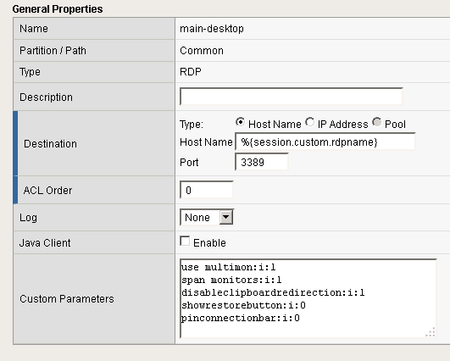
Being able to provide the most effective remote access solution is critical, especially in these turbulent times. In this article printed with permission from authors Lucas Thompson & Michael Waechter, we're going to talk about Remote Desktop Web Access. Solution Brief In short, it enables end-users to access their Remote Desktop applications through the F5 APM Webtop. The benefits of utilizing Remote Desktop Web Access over a desktop can be many. With the only requirement being a compatible web browser, Microsoft RDP application (comes installed with all modern versions of Windows), and a backend server hosting the applications… the solution speaks for itself. When the Full Webtop is displayed, APM will fetch a list of RemoteApps available on the target Terminal Server via HTTPS (using the Server SSL profile on the APM virtual server) and the associated icons. They will then be presented to the end user. The connection is done over HTTPS to the APM, and APM uses RDP (port 3389) to the Terminal Server. In the classic Terminal Server Desktop use case, the user is assigned a ‘native’ type RDP resource. This icon is presented to the user on a Full Webtop. Access is made by selecting the icon. A .RDP file is downloaded to the end user client PC, and the browser will activate the OS’s native RDP client to proceed with the connection. The connection is done over HTTPS to the APM, and APM uses RDP (port 3389) to the Terminal Server. Not only is the client setup simple, but the administration part of the equation is equally as easy to enable. I’m running version 14.1 (LTS) and here are a few screenshots of the setup. To enable the solution, let’s click on Access -> Connectivity/VPN Go ahead and choose VDI/RDP -> Remote Desktops Add the relative information. (Note: It’s always best to have the host name be a FQDN, and add this as a LTM node for health monitoring.) Technical Workflow The user clicks a resource icon on the Full Webtop, an RDP file is downloaded and then executed by the TS client on the user’s PC. The RemoteApp use case has a few differences versus targeting a desktop, or terminal server directly. In this case APM Will: Obtain a list of the RD feeds. The list of RDP App Resources will be derived from the RemoteApp feed. The list of icons will be delivered to the end user’s browser. The end user’s browser will request the icon pictures via a proxy mechanism in the VDI module. Because the RemoteApp feed comes through HTTPS and IIS on the Terminal Server, we have to make sure that: BIG-IP data plane can route to the Terminal Server. BIG-IP can create a HTTPS connection to Terminal Server. Terminal Server is rendering the page correctly. When you browse to it (https://terminalserver/rdweb/) you should see something like this: 2008: 2012: Authenticate with the same credentials that the test user uses in APM, and you should see an App Feed or desktop feed: Solution FAQ What kind of licenses are used for RDP access? APM has two license types: CCU and Access Session. Access Sessions are used for each established session ID. CCU are used for Network VPNs and other things that require more advanced features. Native Mode RDP does NOT use a CCU (connectivity) license. Only a single Access Session license will be consumed by a connecting user. What RDP options are supported? All of them. They’re basically echoed back to the client in the .RDP file. Put your desired parameter into the Custom Parameters area. It’s OK to use session variables in %{session.variable} format as well. RDP Custom Parameters configuration Lists of the RDP options have been compiled by 3rd parties, including the one at https://www.donkz.nl/overview-rdp-file-settings/ which is quite comprehensive. Please note that the following options are reserved for APM RDG use. If you attempt to apply these custom parameters, they will be ignored and/or overwritten by APM: Gatewayusagemethod Gatewayprofileusagemethod Gatewayhostname Gatewaycredentialssource Gatewayaccesstoken authentication level full address server port enablecredsspsupport signscope signature prompt for credentials on client domain username alternate full address gatewaybrokeringtype RDP Window Title The maximized window title for MSTSC inherits the target device name (not the RD gateway host). The medium-sized window title for MSTSC inherits the RDP filename (which is always “launch” -- see RFE 610244). One interesting thing that is possible is to internally-redirect the RDP session so that the client THINKS its connecting to one site, but then re-assign the remote host variable to a different site during the RAP access policy execution. RemoteApps It’s possible to create a lot of apps by using a PowerShell script on a RemoteApp-enabled terminal server. Client Requirements Microsoft Remote Desktop Client is supported for both Windows and Mac. Because the protocol used utilizes the Remote Desktop Gateway functionality, only newer RDP clients work. Legacy clients will likely not be able to create connections. iOS/Android The latest iOS / Android App Store RDP clients from Microsoft are supported. There might be some version conflicts, but for the most part the latest and greatest will work Reconnections / Disruptions Reconnections work the same as normal RDP If the user disconnects and reconnects, the session will be resumed. The client instructs the RD Gateway (APM) to again establish the session. The Remote Desktop session will be resumed also, the same way as with normal RDP. If the session is deleted or timed out or otherwise destroyed, the connection will stop, RDP will try to reconnect, but it will fail, and you will see this message from the MSTSC client.5.1KViews3likes1Comment
Delay Remote Desktop Response to Client
Hello, We're currently using F5 APM to provide VDI/RDP secure access via a Remote Desktop resource assigned to the Webtop. When a user clicks the icon, an .rdp file is downloaded, which they then open in Microsoft Remote Desktop, Remmina, or a similar client. I was recently asked if it would be possible to keep the target VMs powered off by default , and have BIG-IP power them on before they are accessed. This is accomplished via REST API calls to the VDI solution. I've successfully implemented this logic using iRules LX. However, the issue is that the .rdp file is delivered to the user before the iRule has completed execution. As a result, the user could attempt to connect while the VM is still in the propcess of powering on. Is there a way to delay sending the .rdp file to the client until after the iRule has finished running? Has anyone implemented a similar approach before? Thanks in advance.116Views0likes1Comment
F5 APM Webtop - RDP Session Logging
Hello F5 Experts, I am relatively new to the F5 advanced ecosystem, am trying to generate useful logs from our APM Webtop environment and am hoping that someone can point me in the correct direction. I am trying to log the following things from our environment: Initial login's to the Webtop including ClientIP, Webtop portal address, Browser UserAgent, Client Username. (Optional) Client group membership/published resources when they log into Webtop. When a client opens a Web Portal Access from within Webtop including, ClientIP, Webtop portal address, Browser UserAgent, Client Username, Web Portal Access Address. (It would be good to get their session duration for this but that might not be fesable). When a client opens a RDP link from within the Webtop including, ClientIP, Webtop portal address, Browser UserAgent, Client Username, RDP Address, SessionCookie(?). When a client connects to a RDP session though the Webtop using one of the downloaded links, ClientIP, Webtop portal address, Client Username, RDP Address, SessionCookie(?), Session start and end time (Maybe two different log events?). From what I can tell this is likely to be an iRule. I think I have an idea how to do the Webtop portal logging, but what is really eluding me is how to log the RDP session connection and duration. Any help or a direction where to look would be greatly appreciated. Thank you,869Views0likes1Comment
APM - User Defined RDP in version 13 - digital signature issue
I'm testing out v13 and User Defined RDP via webtop in my lab and am getting the following message when launching the .RDP file: "The digital signature of this RDP File cannot be verified. The remote connection cannot be started." Has anyone run into this at all? I'm wondering if it could be related to the use of default "clientssl" and "serverssl" profiles for the Virtual Server associated with the Access Policy.2KViews0likes7Comments
RDP connection via application access fails when client certificate is set to require
I've set up a VIP with a client SSL profile that requires a certificate. The access policy on this VIP has some resource assignments: network access, rdp application access and rdp via app tunnel access. All of these resources work just fine, except the rdp application access. The connection is not established and the handshake gives this failure: TLSv1.2 Record Layer: Handshake Protocol: Multiple Handshake Messages Content Type: Handshake (22) Version: TLS 1.2 (0x0303) Length: 269 Handshake Protocol: Certificate Handshake Type: Certificate (11) Length: 3 Certificates Length: 0 Handshake Protocol: Client Key Exchange However, another resource works just fine: TLSv1.2 Record Layer: Handshake Protocol: Multiple Handshake Messages Content Type: Handshake (22) Version: TLS 1.2 (0x0303) Length: 269 Handshake Protocol: Certificate Handshake Type: Certificate (11) Length: 3 Certificates Length: 2647 Handshake Protocol: Client Key Exchange In the first capture, the certificate length is 0. In the second one it is 2647. Now, I've set the client SSL profile to 'request' and all resources work just fine. Can someone shed some light on this issue? Why does it fail when set to 'require'?847Views0likes5CommentsAPM :: Remote Desktop List :: Monitor Span/Multimon
Has anybody been able to get monitor spanning to work with an RDP access resource? Neither of these parameters appear to work: I opened a support case with F5 - but the engineer was not entirely helpful. When asking about Java RDP spanning: The short answer is no, Span support isn't available for the Java RDP client. It is possible to configure the MSTSC.exe client to support span however if you absolutely need it. This has been brought up as an RFE on multiple occasions and is a limitation of the underlying Java RDP implementation that PD has said they won't change. When asking about RDP spanning with the native (Windows) client: I am certain I have seen the mstsc monitor span successful with the *span monitors:i:1*. I don't recall off hand if it was using an access portal or the client itself. When pressing about the response: I only saw it work in a lab environment when I was testing against a previous bug with the active x control RDP module. I hadn't configured it, one of my colleagues did and I may have been mistaking what I saw (he may have been connecting directly to a windows box, not through the F5). Does he just not feel like helping people today? If that was my answer to one of my customers I'd be getting some heat from my boss. Our SE says that Mac will have an official RDP launch client (non-Java) and the mstsc launcher has some updates in version 13 that's coming out soon. Not sure if that's the root of my problems or not - and I'm not really interested in upgrading to .0 code right now... so I'd really like to get this to work at least on Windows... Mac is what it is at the moment unless I buy the HOB client (which I likely won't get approval for from management - not to mention it will look really bad when I ask for more money to do something we already have working in the environment with the solution we're replacing ). Thanks-515Views0likes1CommentMicrosoft Server 2016 Remote Desktop Session Host
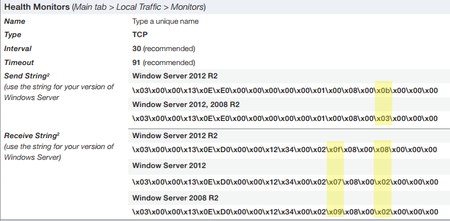
I have a customer who would like his MS Remote Desktop to be delivered through our LTMs. The issue that I'm running into is the servers he's using. The deployment guides include Server 2008/2012, but he's using 2016. Is there somewhere posted what the Send/Receive strings will be on the health monitors if the pool members are 2016 servers? https://www.f5.com/pdf/deployment-guides/microsoft-rds-session-host-dg.pdf865Views0likes2CommentsAPM Logging RDP Target hostname
Hi All, Have APM configured as an RDP gateway, clients use the native RDP client with a prompt for the target RDP hostname. How can log the the target RDP hostname in the APM log? The RDP target hostname is logged if I enable the debug logging profile for the RDG-RAP profile but I would prefer not to do this as I only want the RDP hostname logged. Thank you616Views0likes1Comment
Multiple remote desktop (VMware View and RDP) on APM webtop
Hello, We use the F5 APM to present an portalaccess that present an RDP remote desktop to connect users to their RDP session for entreprise user's that need to do home office. We have now an new VDI VMware environement that going to replace the RDP environnement. So my question is : Can we present on the webtop portal both RDP remote desktop and VMware View remote desktop ? I trying to do that but if I present the RDP remote dektop the second VMware view desktop doesn't appear on my webtop ?? but if I present only the VMware view remote desktop it's appear on my webtop ?? Let my know if my question is not clear...my English is very bad. Thank you guys Regards,573Views0likes1Comment
F5 APM and Remote Desktop Gateway
I'm having a weird issue with RDG and APM currently single sign on works internally and externally however when we try to launch any app externally it is saying unable to connect to the remote desktop gateway internally this works perfectly. Even weirder when I just load balance the RDG servers without APM everything works fine externally/internally which makes me think there is no firewall issue. Right now we have a VIP with APM and SSO is configured as below: NameRDS Partition / PathCommon SSO MethodForms Credentials Source Username Source session.sso.token.last.username Password Source session.sso.token.last.password SSO Method Configuration Start URI /RDWeb/Pages/en-US/login.aspx Pass Through Enable Form Method POST Form Action Form Parameter For User Name DomainUserName Form Parameter For Password UserPass Hidden Form Parameters/ValuesSuccessful Logon Detection Match Type None By Resulting Redirect URL By Presence Of Specific String In Cookie Successful Logon Detection Match Value /RDWeb/Pages/en-US/default.aspx757Views0likes2Comments