owasp
54 TopicsProtecting Your MCP Server From Secret Exposure With F5 BIG-IP Advanced WAF's Data Guard
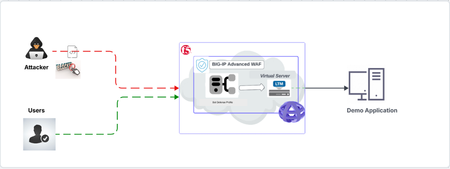
The Threat of Token Mismanagement in MCP Servers Tokens and credentials serve as the backbone for authentication and authorization in MCP servers, yet their mishandling presents a significant security risk. Developers sometimes store these secrets insecurely, embedding them in configuration files or leaving them easily accessible. The inherent features of MCP—such as long-lived sessions, stateful agents, and persistent context—add complexity to this risk. Tokens can inadvertently be stored, retrieved, or indexed through user prompts, system recalls, or log inspections. This introduces a new vulnerability: contextual secret leakage, where the model or protocol layer unknowingly becomes a repository for sensitive information. Attackers can exploit this vulnerability to extract and misuse these exposed credentials, gaining unauthorized access production systems. Mitigating OWASP MCP01 with F5 BIG-IP Advanced WAF Data Guard Recognizing the gravity of this issue, OWASP has officially categorized Token Mismanagement and Secret Exposure in MCP servers under the MCP01 vulnerability class. This classification highlights the widespread nature of the threat and underscores the urgent need for tools like F5 BIG-IP Advanced WAF’s Data Guard. Although the long term solution is to correct token mismanagement at the backend servers, the F5 BIG-IP Advanced WAF’s Data Guard offers a quick and easy way to mitigate this vulnerability. By sanitizing server responses, Data Guard ensures that sensitive data—such as tokens—is never inadvertently exposed to unprivileged users. In the following video, we will see how token mismanagement can result in system error logs containing sensitive data. Subsequently, we demonstrate how we can utilize BIG-IP Advanced WAF Data Guard to sanitize these responses, thus mitigating OWASP MCP 01: Token Mismanagement & Secret Exposure. For more information on F5 Data Guard, click here. For a list of OWASP MCP Top 10 vulnerabilities, click here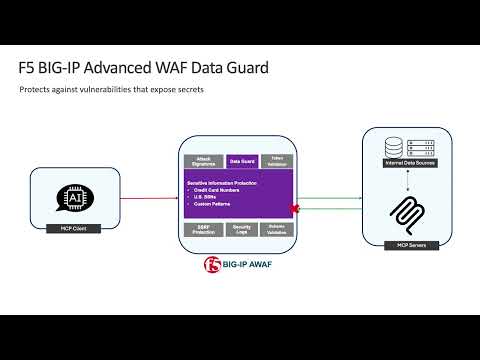 53Views1like0Comments
Mitigating OWASP Web Application Risk: Insecure Design using F5 XC platform
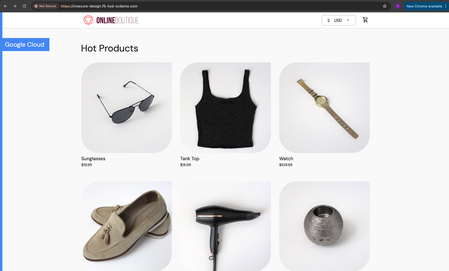
Overview: This article is the last part in a series of articles on mitigation of OWASP Web Application vulnerabilities using F5 Distributed Cloud platform (F5 XC). Introduction to Insecure Design: In an effort to speed up the development cycle, some phases might be reduced in scope which leads to give chance for many vulnerabilities. To focus the risks which are been ignored from design to deployment phases, a new category of “Insecure Design” is added under OWASP Web Application Top 10 2021 list. Insecure Design represents the weaknesses i.e. lack of security controls which are been integrated to the website/application throughout the development cycle. If we do not have any security controls to defend the specific attacks, Insecure Design cannot be fixed by any perfect implementation while at the same time a secure design can still have an implementation flaw which leads to vulnerabilities that may be exploited. Hence the attackers will get vast scope to leverage the vulnerabilities created by the insecure design principles. Here are the multiple scenarios which comes under insecure design vulnerabilities. Credential Leak Authentication Bypass Injection vulnerabilities Scalper bots etc. In this article we will see how F5 XC platform helps to mitigate the scalper bot scenario. What is Scalper Bot: In the e-commerce industry, Scalping is a process which always leads to denial of inventory. Especially, online scalping uses bots nothing but the automated scripts which will check the product availability periodically (in seconds), add the items to the cart and checkout the products in bulk. Hence the genuine users will not get a fair chance to grab the deals or discounts given by the website or company. Alternatively, attackers use these scalper bots to abandon the items added to the cart later, causing losses to the business as well. Demonstration: In this demonstration, we are using an open-source application “Online Boutique” (refer boutique-repo) which will provide end to end online shopping cart facility. Legitimate customer can add any product of their choice to the cart and checkout the order. Customer Page: Scalper bot with automation script: The below automation script will add products in bulk into the cart of the e-commerce application and place the order successfully. import requests import random # List of User-Agents USER_AGENTS = [ "sqlmap/1.5.2", # Automated SQL injection tool "Nikto/2.1.6", # Nikto vulnerability scanner "nmap", # Network mapper used in reconnaissance "Mozilla/5.0 (compatible; Googlebot/2.1; +http://www.google.com/bot.html)", # Spoofed Search Engine Bot "php", # PHP Command Line Tool "Mozilla/4.0 (compatible; MSIE 6.0; Windows NT 5.1)", # Old Internet Explorer (suspicious outdated) "libwww-perl/6.36", # Perl-based automation, often found in attacks or scrapers "wget/1.20.3", # Automation tool for downloading files or making requests "Python-requests/2.26.0", # Python automation library ] # Function to select a random User-Agent def get_random_user_agent(): return random.choice(USER_AGENTS) # Base URL of the API BASE_URL = "https://insecure-design.f5-hyd-xcdemo.com" # Perform the API request to add products to the cart def add_to_cart(product_id, quantity): url = f"{BASE_URL}/cart" headers = { "User-Agent": get_random_user_agent(), # Random User-Agent "Content-Type": "application/x-www-form-urlencoded" } payload = { "product_id": product_id, "quantity": quantity } # Send POST request with cookies included response = requests.post(url, headers=headers, data=payload) if response.status_code == 200: print(f"Successfully added {quantity} to cart!") else: print(f"Failed to add to cart. Status Code: {response.status_code}, Response: {response.text}") return response # Perform the API request to place an order def place_order(): url = f"{BASE_URL}/cart/checkout" headers = { "User-Agent": get_random_user_agent(), # Random User-Agent "Content-Type": "application/x-www-form-urlencoded" } payload = { "email": "[email protected]", "street_address": "1600 Amphitheatre Parkway", "zip_code": "94043", "city": "Mountain View", "state": "CA", "country": "United States", "credit_card_number": "4432801561520454", "credit_card_expiration_month": "1", "credit_card_expiration_year": "2026", "credit_card_cvv": "672" } # Send POST request with cookies included response = requests.post(url, headers=headers, data=payload) if response.status_code == 200: print("Order placed successfully!") else: print(f"Failed to place order. Status Code: {response.status_code}, Response: {response.text}") return response # Main function to execute the API requests def main(): # Add product to cart product_id = "OLJCESPC7Z" quantity = 10 print("Adding product to cart...") add_to_cart_response = add_to_cart(product_id, quantity) # If the add_to_cart request is successful, proceed to checkout if add_to_cart_response.status_code == 200: print("Placing order...") place_order() # Run the main function if __name__ == "__main__": main() To mitigate this problem, F5 XC is providing the feasibility of identifying and blocking these bots based on the configuration provided under HTTP load balancer. Here is the procedure to configure the bot defense with mitigation action ‘block’ in the load balancer and associate the backend application nothing but ‘evershop’ as the origin pool. Create origin pool Refer pool-creation for more info Create http load balancer (LB) and associate the above origin pool to it. Refer LB-creation for more info Configure bot defense on the load balancer and add the policy with mitigation action as ‘block’. Click on “Save and Exit” to save the Load Balancer configuration. Run the automation script by providing the LB domain details to exploit the items in the application. Validating the product availability for the genuine user manually. Monitor the logs through F5 XC, Navigate to WAAP --> Apps & APIs --> Security Dashboard, select your LB and click on ‘Security Event’ tab. The above screenshot gives the detailed info on the blocked attack along with the mitigation action. Conclusion: As you have seen from the demonstration, F5 Distributed Cloud WAAP (Web Application and API Protection) has detected the scalpers with the bot defense configuration applied on the Load balancer and mitigated the exploits of scalper bots. It also provides the mitigation action of “_allow_”, “_redirect_” along with “_block_”. Please refer link for more info. Reference links: OWASP Top 10 - 2021 Overview of OWASP Web Application Top 10 2021 F5 Distributed Cloud Services F5 Distributed Cloud Platform Authentication Bypass Injection vulnerabilities2.7KViews2likes0CommentsMitigating OWASP API Security Risk: BOPLA using F5 BIG-IP
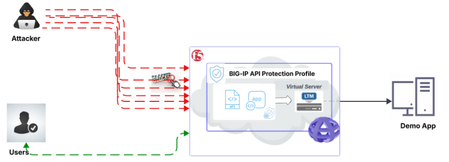
BOPLA i.e Broken Object Property Level Authorization is combination of Mass Assignment vulnerability and Excessive Data Exposure attack, one is caused due to automatic binding of client-provided data to code internal object without proper validation while other is due to expose of sensitive data such as Personally Identifiable Information (PII), Social Security Number (SSN), Credit Card Number (CCN) and Phone Number etc. These vulnerabilities in the application is mitigated by the F5 BIG-IP Advanced WAF.341Views0likes0CommentsMitigating OWASP API Security Risk: Mass Assignment using F5 BIG-IP
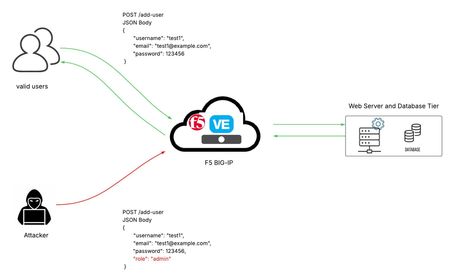
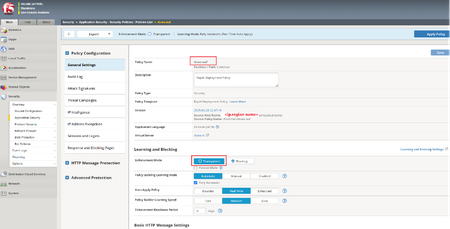
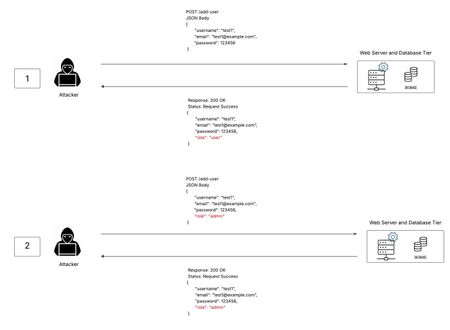
This article is a continuation of the OWASP Top 10 API Security series. It aims to explain Mass Assignment and how to stop it using F5 BIG-IP Advanced WAF. Introduction to Mass Assignment: In today’s world of data communication, applications often interact with one another to enable data sharing and improve services to meet user needs. At the core of these interactions are APIs, which are extensively utilized in modern application development. To streamline their implementation, developers commonly rely on various software frameworks. However, these frameworks often introduce a security risk by automatically binding client-provided data to code variables and internal objects without proper validation. This lack of validation creates an opportunity for an attacker to exploit a vulnerability known as Mass Assignment. In the screenshot mentioned above, describes the exploitation of Mass Assignment vulnerability. Attacker has successfully escalated his role from normal user to admin by modifying the JSON content of the API request. At first, the attacker sends a valid API request to the vulnerable application to add the user and gets a response back with a parameter that defines the role. In the second step, the attacker tampers the role parameters and sends the API request, due to lack of validations at the web server. This results in successful exploitation of the system. Preventive Steps: Automatic binding of client-input data into application’s internal code variables must be avoided. Clearly defining input parameters that should be allowed/blocked from the client-input data. Schema should be explicitly defined and enforced for the input parameters. Demo Attack and Mitigation steps using BIG-IP Advanced WAF: Using BIG-IP Advanced WAF, we define schemas with fixed parameters and only those are allowed from the client-input data and block the rest, thereby causing restrictions to the parameters that make the system vulnerable. The steps mentioned below give some brief details about creating a security policy using WAF policy API Security templates, which are designed to protect web applications that expose APIs from vulnerabilities. It focuses on safeguarding API endpoints, managing authentication, controlling access, and mitigating threats that target API logic and data handling. We generate a mass assignment attack followed by enforcing blocking mode to block the attack using BIG-IP. Let us now see a quick demo of mass assignment and mitigate it using BIG-IP Advanced WAF policy API Security template. Note: Following configs and validations are done on F5 BIG-IP VE with version: BIG-IP 16.1.6 Build 0.0.3 As a vulnerable application to exploit mass assignment, I chose crAPI demo application. Demo app crAPI Github repo Note: Before proceeding further into the demo, let us restrict the “quantity” value to 1 by adding a “minimum” keywork with value as 1 in the crAPI’s OpenAPI specification file or swagger file to positive values before uploading it to BIG-IP while creating a policy. Let’s try to violate the quantity value with input parameters and observe the behavior during Transparent and blocking mode. Step 1: Creating a security policy On the Main tab, click Security > Application Security > Security Policies. Click on Create to create the policy. Provide a name in the Name field. Make sure the Policy Type is Security. From the Policy Template, select API Security. The OpenAPI (Swagger) File field is now visible. Click Upload File to navigate to your OpenAPI specification file and upload it. From the Virtual Server dropdown, select the virtual server to which this policy should be assigned. Under Learning and Blocking section, make sure Enforcement Mode is initially set to Transparent to observe the attack requests. Click on Save to save the security policy configured. This confirms security policy is saved successfully. Step 2: Attack Generation and Mitigation In the demonstration below, we have an API endpoint which is used to order products. This endpoint has a vulnerable object named “quantity”. By providing negative value to this variable not only results in successful ordering of a product but also causes increment in available balance. This results in successful exploitation of mass assignment. As shown above, the available balance for a user is $200. From the above screenshot, you can be able to see on placing the order worth $10 successfully shows available balance as $190, which is expected behavior. Now, let us try to place an order for the same product with negative quantity for the same endpoint and check whether mass assignment vulnerability is present or not. As you can be able to see from above screenshot, order is successfully placed by providing client-input variable “quantity” with negative value and increment in available balance by $10 which is not expected. This confirms that mass assignment vulnerability exists in this demo application. BIG-IP logs show alarm for the above request in transparent mode. Now, let’s modify the policy to Blocking mode and observe the behavior. From the Policy configuration, Select Enforcement mode as Blocking, click on Save and then click on Apply Policy button. Once the policy is updated, and re-trying the same attack, the attack request is blocked. Conclusion: Mass assignment vulnerability provides an opportunity for attackers to exploit the vulnerability using client-input variables. BIG-IP Advanced WAF’s OpenAPI schema validation feature helps to detect and mitigate these vulnerabilities, thereby safeguarding the application and enhancing overall security of the system. References: For more detailed guidance on OWASP and steps to configuring Advanced WAF security policy on F5 BIG IP, refer to the official documentation below: https://owasp.org/API-Security/editions/2019/en/0xa6-mass-assignment/ https://techdocs.f5.com/en-us/bigip-17-0-0/big-ip-asm-implementations/working-with-openapi.html569Views1like1Comment