k8s
15 TopicsUnderstanding Modern Application Architecture - Part 1
This is part 1 of a series. Here are the other parts: Understanding Modern Application Architecture - Part 2 Understanding Modern Application Architecture - Part 3 Over the past decade, there has been a change taking place in how applications are built. As applications become more expansive in capabilities and more critical to how a business operates, (or in many cases, the application is the business itself) a new style of architecture has allowed for increased scalability, portability, resiliency, and agility. To support the goals of a modern application, the surrounding infrastructure has had to evolve as well. Platforms like Kubernetes have played a big role in unlocking the potential of modern applications and is a new paradigm in itself for how infrastructure is managed and served. To help our community transition the skillset they've built to deal with monolithic applications, we've put together a series of videos to drive home concepts around modern applications. This article highlights some of the details found within the video series. In these first three videos, we breakdown the definition of a Modern Application. One might think that by name only, a modern application is simply an application that is current. But we're actually speaking in comparison to a monolithic application. Monolithic applications are made up of a single, or a just few pieces. They are rigid in how they are deployed and fragile in their dependencies. Modern applications will instead incorporate microservices. Where a monolithic application might have all functions built into one broad encompassing service, microservices will break down the service into smaller functions that can be worked on separately. A modern application will also incorporate 4 main pillars. Scalability ensures that the application can handle the needs of a growing user base, both for surges as well as long term growth. Portability ensures that the application can be transportable from its underlying environment while still maintaining all of its functionality and management plane capabilities. Resiliency ensures that failures within the system go unnoticed or pose minimal disruption to users of the application. Agility ensures that the application can accommodate for rapid changes whether that be to code or to infrastructure. There are also 6 design principles of a modern application. Being agnostic will allow the application to have freedom to run on any platform. Leveraging open source software where it makes sense can often allow you to move quickly with an application but later be able to adopt commercial versions of that software when full support is needed. Defining by code allows for more uniformity of configuration and move away rigid interfaces that require specialized knowledge. Automated CI/CD processes ensures the quick integration and deployment of code so that improvements are constantly happening while any failures are minimized and contained. Secure development ensures that application security is integrated into the development process and code is tested thoroughly before being deployed into production. Distributed Storage and Infrastructure ensures that applications are not bound by any physical limitations and components can be located where they make the most sense. These videos should help set the foundation for what a modern application is. The next videos in the series will start to define the fundamental technical components for the platforms that bring together a modern application. Continued in Part 24.4KViews8likes0CommentsF5 Container Ingress Services (CIS) and using k8s traffic policies to send traffic directly to pods
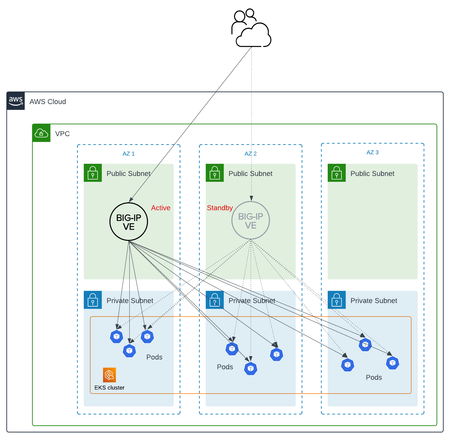
This article will take a look how you can use health monitors on the BIG-IP to solve the issue with constant AS3 REST-API pool member changes or when there is a sidecar service mesh like Istio (F5 has version called Aspen mesh of the istio mesh) or Linkerd mesh. I also have described some possible enchantments for CIS/AS3, Nginx Ingress Controller or Gateway Fabric that will be nice to have in the future. Intro Install Nginx Ingress Open source and CIS F5 CIS without Ingress/Gateway F5 CIS with Ingress F5 CIS with Gateway fabric Summary 1. Intro F5 CIS allows integration between F5 and k8s kubernetes or openshift clusters. F5 CIS has two modes and that are NodePort and ClusterIP and this is well documented at https://clouddocs.f5.com/containers/latest/userguide/config-options.html . There is also a mode called auto that I prefer as based on k8s service type NodePort or ClusterIP it knows how to configure the pool members. CIS in ClusterIP mode generally is much better as you bypass the kube-proxy as send traffic directly to pods but there could be issues if k8s pods are constantly being scaled up or down as CIS uses AS3 REST-API to talk and configure the F5 BIG-IP. I also have seen some issues where a bug or a config error that is not well validated can bring the entire CIS to BIG-IP control channel down as you then see 422 errors in the F5 logs and on CIS logs. By using NodePort and "externaltrafficpolicy: local" and if there is an ingress also "internaltrafficpolicy: local" you can also bypass the kubernetes proxy and send traffic directly to the pods and BIG-IP health monitoring will mark the nodes that don't have pods as down as the traffic policies prevent nodes that do not have the web application pods to send the traffic to other nodes. 2..Install Nginx Ingress Open source and CIS As I already have the k8s version of nginx and F5 CIS I need 3 different classes of ingress. k8s nginx is end of life https://kubernetes.io/blog/2025/11/11/ingress-nginx-retirement/ , so my example also shows how you can have in parallel the two nginx versions the k8s nginx and F5 nginx. There is a new option to use The Operator Lifecycle Manager (OLM) that when installed will install the components and this is even better way than helm (you can install OLM with helm and this is even newer way to manage nginx ingress!) but I found it still in early stage for k8s while for Openshift it is much more advanced. I have installed Nginx in a daemonset not deployment and I will mention why later on and I have added a listener config for the F5 TransportServer even if later it is seen why at the moment it is not usable. helm install -f values.yaml ginx-ingress oci://ghcr.io/nginx/charts/nginx-ingress \ --version 2.4.1 \ --namespace f5-nginx \ --set controller.kind=daemonset \ --set controller.image.tag=5.3.1 \ --set controller.ingressClass.name=nginx-nginxinc \ --set controller.ingressClass.create=true \ --set controller.ingressClass.setAsDefaultIngress=false cat values.yaml controller: enableCustomResources: true globalConfiguration: create: true spec: listeners: - name: nginx-tcp port: 88 protocol: TCP kubectl get ingressclasses NAME CONTROLLER PARAMETERS AGE f5 f5.com/cntr-ingress-svcs <none> 8d nginx k8s.io/ingress-nginx <none> 40d nginx-nginxinc nginx.org/ingress-controller <none> 32s niki@master-1:~$ kubectl get pods -o wide -n f5-nginx NAME READY STATUS RESTARTS AGE IP NODE NOMINATED NODE READINESS GATES nginx-ingress-controller-2zbdr 1/1 Running 0 62s 10.10.133.234 worker-2 <none> <none> nginx-ingress-controller-rrrc9 1/1 Running 0 62s 10.10.226.87 worker-1 <none> <none> niki@master-1:~$ The CIS config is shown below. I have used "pool_member_type" auto as this allows Cluster-IP or NodePort services to be used at the same time. helm install -f values.yaml f5-cis f5-stable/f5-bigip-ctlr cat values.yaml bigip_login_secret: f5-bigip-ctlr-login rbac: create: true serviceAccount: create: true name: namespace: f5-cis args: bigip_url: X.X.X.X bigip_partition: kubernetes log_level: DEBUG pool_member_type: auto insecure: true as3_validation: true custom_resource_mode: true log-as3-response: true load-balancer-class: f5 manage-load-balancer-class-only: true namespaces: [default, test, linkerd-viz, ingress-nginx, f5-nginx] # verify-interval: 35 image: user: f5networks repo: k8s-bigip-ctlr pullPolicy: Always nodeSelector: {} tolerations: [] livenessProbe: {} readinessProbe: {} resources: {} version: latest 3. F5 CIS without Ingress/Gateway Without Ingress actually the F5's configuration is much simpler as you just need to create nodeport service and the VirtualServer CR. As you see below the health monitor marks the control node and the worker node that do not have pod from "hello-world-app-new-node" as shown in the F5 picture below. Sending traffic without Ingresses or Gateways removes one extra hop and sub-optimal traffic patterns as when the Ingress or Gateway is in deployment mode for example there could be 20 nodes and only 2 ingress/gateway pods on 1 node each. Traffic will need to go to only those 2 nodes to enter the cluster. apiVersion: v1 kind: Service metadata: name: hello-world-app-new-node labels: app: hello-world-app-new-node spec: externalTrafficPolicy: Local ports: - name: http protocol: TCP port: 8080 targetPort: 8080 selector: app: hello-world-app-new type: NodePort --- apiVersion: "cis.f5.com/v1" kind: VirtualServer metadata: name: vs-hello-new namespace: default labels: f5cr: "true" spec: virtualServerAddress: "192.168.1.71" virtualServerHTTPPort: 80 host: www.example.com hostGroup: "new" snat: auto pools: - monitor: interval: 10 recv: "" send: "GET /" timeout: 31 type: http path: / service: hello-world-app-new-node servicePort: 8080 For Istio and Linkerd Integration an irule could be needed to send custom ALPN extensions to the backend pods that now have a sidecar. I suggest seeing my article at "the Medium" for more information see https://medium.com/@nikoolayy1/connecting-kubernetes-k8s-cluster-to-external-router-using-bgp-with-calico-cni-and-nginx-ingress-2c45ebe493a1 Keep in mind that for the new options with Ambient mesh (sidecarless) the CIS without Ingress will not work as F5 does not speak HBONE (or HTTP-Based Overlay Network Environment) protocol that is send in the HTTP Connect tunnel to inform the zTunnel (layer 3/4 proxy that starts or terminates the mtls) about the real source identity (SPIFFE and SPIRE) that may not be the same as the one in CN/SAN client SSL cert. Maybe in the future there could be an option based on a CRD to provide the IP address of an external device like F5 and the zTunnel proxy to terminate the TLS/SSL (the waypoint layer 7 proxy usually Envoy is not needed in this case as F5 will do the HTTP processing) and send traffic to the pod but for now I see no way to make F5 work directly with Ambient mesh. If the ztunnel takes the identity from the client cert CN/SAN F5 will not have to even speak HBONE. 4. F5 CIS with Ingress Why we may need an ingress just as a gateway into the k8s you may ask? Nowadays many times a service mesh like linkerd or istio or F5 aspen mesh is used and the pods talk to each other with mTLS handled by the sidecars and an Ingress as shown in https://linkerd.io/2-edge/tasks/using-ingress/ is an easy way for the client-side to be https while the server side to be the service mesh mtls, Even ambient mesh works with Ingresses as it captures traffic after them. It is possible from my tests F5 to talk to a linkerd injected pods for example but it is hard! I have described this in more detail at https://medium.com/@nikoolayy1/connecting-kubernetes-k8s-cluster-to-external-router-using-bgp-with-calico-cni-and-nginx-ingress-2c45ebe493a1 Unfortunately when there is an ingress things as much more complex! F5 has Integration called "IngressLink" but as I recently found out it is when BIG-IP is only for Layer 3/4 Load Balancing and the Nginx Ingress Controller will actually do the decryption and AppProtect WAF will be on the Nginx as well F5 CIS IngressLink attaching WAF policy on the big-ip through the CRD ? | DevCentral Wish F5 to make an integration like "IngressLink" but the reverse where each node will have nginx ingress as this can be done with demon set and not deployment on k8s and Nginx Ingress will be the layer 3/4, as the Nginx VirtualServer CRD support this and to just allow F5 in the k8s cluster. Below is how currently this can be done. I have created a Transportserver but is not used as it does not at the momemt support the option "use-cluster-ip" set to true so that Nginx does not bypass the service and to go directly to the endpoints as this will cause nodes that have nginx ingress pod but no application pod to send the traffic to other nodes and we do not want that as add one more layer of load balancing latency and performance impact. The gateway is shared as you can have a different gateway per namespace or shared like the Ingress. apiVersion: v1 kind: Service metadata: name: hello-world-app-new-cluster labels: app: hello-world-app-new-cluster spec: internalTrafficPolicy: Local ports: - name: http protocol: TCP port: 8080 targetPort: 8080 selector: app: hello-world-app-new type: ClusterIP --- apiVersion: k8s.nginx.org/v1 kind: TransportServer metadata: name: nginx-tcp annotations: nginx.org/use-cluster-ip: "true" spec: listener: name: nginx-tcp protocol: TCP upstreams: - name: nginx-tcp service: hello-world-app-new-cluster port: 8080 action: pass: nginx-tcp --- apiVersion: k8s.nginx.org/v1 kind: VirtualServer metadata: name: nginx-http spec: host: "app.example.com" upstreams: - name: webapp service: hello-world-app-new-cluster port: 8080 use-cluster-ip: true routes: - path: / action: pass: webapp The second part of the configuration is to expose the Ingress to BIG-IP using CIS. --- apiVersion: v1 kind: Service metadata: name: f5-nginx-ingress-controller namespace: f5-nginx labels: app.kubernetes.io/name: nginx-ingress spec: externalTrafficPolicy: Local type: NodePort selector: app.kubernetes.io/name: nginx-ingress ports: - name: http protocol: TCP port: 80 targetPort: http --- apiVersion: "cis.f5.com/v1" kind: VirtualServer metadata: name: vs-hello-ingress namespace: f5-nginx labels: f5cr: "true" spec: virtualServerAddress: "192.168.1.81" virtualServerHTTPPort: 80 snat: auto pools: - monitor: interval: 10 recv: "200" send: "GET / HTTP/1.1\r\nHost:app.example.com\r\nConnection: close\r\n\r\n" timeout: 31 type: http path: / service: f5-nginx-ingress-controller servicePort: 80 Only the nodes that have a pod will answer the health monitor. Hopefully F5 can make some Integration and CRD that makes this configuration simpler like the "IngressLink" and to add the option "use-cluster-ip" to the Transport server as Nginx does not need to see the HTTP traffic at all. This is on my wish list for this year 😁 Also if AS3 could reference existing group of nodes and just with different ports this could help CIS will need to push AS3 declaration of nodes just one time and then the different VirtualServers could reference it but with different ports and this will make the AS3 REST-API traffic much smaller. 5. F5 CIS with Gateway fabric This does not at the moment work as gateway-fabric unfortunately does not support "use-cluster-ip" option. The idea is to deploy the gateway fabric in daemonset and to inject it with a sidecar or even without one this will work with ambient meshes. As k8s world is moving away from an Ingress this will be a good option. Gateway fabric natively supports TCP , UDP traffic and even TLS traffic that is not HTTPS and by exposing the gateway fabric with a Cluster-IP or Node-Port service then with different hostnames the Gateway fabric will select to correct route to send the traffic to! helm install ngf oci://ghcr.io/nginx/charts/nginx-gateway-fabric --create-namespace -n nginx-gateway -f values-gateway.yaml cat values-gateway.yaml nginx: # Run the data plane per-node kind: daemonSet # How the data plane gets exposed when you create a Gateway service: type: NodePort # or NodePort # (optional) if you’re using Gateway API experimental channel features: nginxGateway: gwAPIExperimentalFeatures: enable: true apiVersion: gateway.networking.k8s.io/v1 kind: Gateway metadata: name: shared-gw namespace: nginx-gateway spec: gatewayClassName: nginx listeners: - name: https port: 443 protocol: HTTPS tls: mode: Terminate certificateRefs: - kind: Secret name: wildcard-tls allowedRoutes: namespaces: from: ALL --- apiVersion: gateway.networking.k8s.io/v1 kind: HTTPRoute metadata: name: app-route namespace: app spec: parentRefs: - name: shared-gw namespace: nginx-gateway hostnames: - app.example.com rules: - backendRefs: - name: app-svc port: 8080 F5 Nginx Fabric mesh is evolving really fast from what I see , so hopefully we see the features I mentioned soon and always you can open a github case. The documentation is at https://docs.nginx.com/nginx-gateway-fabric and as this use k8s CRD the full options can be seen at TLS - Kubernetes Gateway API 6. Summary With the release of TMOS 21 F5 now supports much more health monitors and pool members, so this way of deploying CIS with NodePort services may offer benefits with TMOS 21.1 that will be the stable version as shown in https://techdocs.f5.com/en-us/bigip-21-0-0/big-ip-release-notes/big-ip-new-features.html With auto mode some services can still be directly exposed to BIG-IP as the CIS config changes are usually faster to remove a pool member pod than BIG-IP health monitors to mark a node as down. The new version of CIS that will be CIS advanced may take of the concerns of hitting a bug or not well validated configuration that could bring the control channel down and TMOS 21.1 may also handle AS3 config changes better with less cpu/memory issue, so there could be no need in the future of using trafficpolicies and NodePort mode and k8s services of this type. For ambient mesh my example with Ingress and Gateway seems the only option for direct communication at the moment. We will see what the future holds!1.5KViews6likes2CommentsEgress control for Kubernetes using F5 Distributed Cloud Services
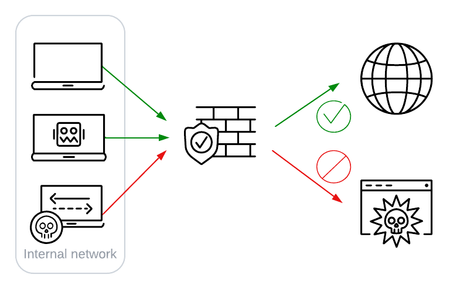
Summary When using F5 Distributed Cloud Services (F5 XC) to manage your Kubernetes (K8s) workloads, egress firewalling based on K8s namespaces or labels is easy. While network firewalls have no visibility into which K8s workload initiated outbound traffic - and therefore cannot apply security policies based on workload - we can use a platform like F5 XC Managed Kubernetes (mK8s) to achieve this. Introduction Applying security policies to outbound traffic is common practice. Security teams inspect Internet-bound traffic in order to detect/prevent Command & Control traffic, allow select users to browse select portions of the Internet, or for visibility into outbound traffic. Often the allow/deny decision is based on a combination of user, source IP, and destination website. Here's an awesome walk through of outbound inspection. Typical outbound inspection performed by a network-based device. Network-based firewalls cannot do the same for K8s workloads because pods are ephemeral. They can be short-lived, their IP addresses are temporary and reused, and all pods on the same node making outbound connections will have the same source IP on the external network. In short, a network device cannot distinguish traffic from one pod versus another. Which microservice is making this outbound request? Should it be allowed? Problem statement In my cluster I have two apps, app1 and app2, in namespaces app1-ns and app2-ns. For HTTP traffic, I want app1 to reach out to *.github.com but nothing else app2 to reach out to the REST API at api.weather.gov but nothing else, even other subdomains of weather.gov For non-HTTP traffic, I want app1 to be able to reach a partner's public IP address on port 22 app2 to reach Google's DNS server at 8.8.8.8 on port 25 I want no other traffic (TCP, UDP) to egress from my pods (ie., HTTP or non-HTTP). What about a Service Mesh? A service mesh will control traffic within your K8s cluster, both East-West (between services) and North-South (traffic to/from the cluster). Indeed, egress control is a feature of some service meshes, and a service mesh is a good solution to this problem. Istio's egress control is a great starting point to read more about a service mesh with egress control. By using an egress gateway, Istio's sidecars will force traffic destined for a particular destination through a proxy, and this proxy can enforce Istio policies. This solves our problem, although I've heard customers voice reasonable concerns: what about non-HTTP traffic? what if the egress gateway is bypassed? can our security team configure the mesh or configuration as code? a mesh may require an additional learning / admin overhead a mesh is often managed by a different team than traditional security What about a NetworkPolicy? A NetworkPolicy is a K8s resource that can define networking rules, including allow/deny rules by namespace, labels, src/dest pods, destination domains, etc. However NetworkPolicies must be enforced by the network plugin in your distribution (eg Calico), so they're not an option for everyone. They're also probably not a scalable solution when you consider the same concerns of service meshes above, but they are possible. Read more about NetworkPolicies for egress control with Istio, and check out this article from Monzo to see a potential solution involving NetworkPolicies. Other ideas Read the article from Monzo linked above to see what others have done. You could watch (or serve) DNS requests from Pods and then very quickly update outbound firewall rules to allow/disallow traffic to the IP address in the DNS response. NeuVector had a great article on this. You could also use a dedicated outbound proxy per domain name, as Monzo did, although this wouldn't scale to a large number, so some kind of exceptions would need to be made. I read an interesting article on Falco also, which is a tool that can monitor outbound connections from pods using eBPF. Generally speaking, these other ideas will bring the same concerns to teams without mesh skills: K8s and mesh networking can be unfamiliar and difficult to operate. Me and Kubernetes Solving egress control with F5 XC Managed Kubernetes Another way we can control outbound traffic specific to K8s namespace or labels is by using a K8s distribution that includes these features. In a technical sense, this works just like a mesh. By injecting a sidecar container for security controls into pods, the platform can control networking. However the mesh is not managed separately in this case. The security policies of the platform provide a GUI, easy reuse of policies, and generally an experience identical to that used for traditional egress control with the platform. Solving for our problem statement If I am using Virtual K8s (vK8s) or Managed K8s (mK8s), my pods are running on the F5 XC platform. These containers may be on-prem or in F5's PoPs, but the XC platform is natively aware of each pod. Here's how to solve our problem with XC when you have a managed K8s cluster. 1. Firstly we will create a known key so we can have a label in XC to match a label we will apply to our K8s pods. I have created a known key egress-ruleset by following this how-to guide. 2. For HTTP and HTTPS traffic, create a forward proxy policy. Since we want rules to apply to pods based on their labels, choose "Custom Rule List" when creating rules. Rule 1: set the source to be anything with a known label of egress-ruleset=app1 and allow access to TLS domain with suffix of github.com. Rule 2: Same as 1, but allow access to HTTP path of suffix github.com. Rules 3 and 4 are the same, but where the source endpoint matches egress-ruleset=app2. Rule 5, the last, can be a Deny All rule. 3. For non HTTP(S) traffic, create multiple firewall policies for traffic ingressing, egressing, or originating from an F5 Gateway. I've recommended multiple policies because a policy applies to a group of endpoints defined by IP or label. I've used three policies in my examples (one for label egress-ruleset=app1 and another for app2, and one for all endpoints). Use the policies to allow TCP traffic as desired. 4. Create and deploy a Managed K8s cluster and an App Stack site that is attached to this cluster. When creating the App Stack site, you can attached the policies you created from steps 1 and 2. You can have multiple policies layered in order, for policies of both types (forward proxy and firewall). 5. Deploy your K8s workload and label your pods with egress-ruleset and a value of app1 or app2. Finally validate your policies are in effect by using kubectl exec against a pod running in your cluster. We have now demonstrated that outbound traffic from our pods is allowed only to destinations we have configured. We can now control outbound traffic specific to the microservice that is the source of the traffic. Application namespaces Another way to solve this problem uses Namespaces only and not labels. If you create your Application Namespace in the XC console (not K8s Namespace) and deploy your workloads in the corresponding K8s namespace, you can use the built-in label of name.ves.io/namespace. This means you won't need to create your own label (Step 1) but you will need to have a 1:1 relationship between K8s namespaces and Application Namespaces in XC. Plus, your granularity for endpoints is not fine-grained at the level of pod labels, but instead is at the namespace level. Further Reading Enterprise-level outbound firewalling from products like F5's SSLO will do more than simple egress control, such as selectively pass traffic to 3rd party inspection devices. Egress control in XC is not integrating with other devices, but the security controls fit the nature of typical microservices. Still, we could layer simple outbound rules performed in K8s with enterprise-wide inspection rules performed by SSLO for further control of outbound traffic, including integration with 3rd party devices. While this example used mK8s, I'll make note of another helpful article that explains how labels can be used for controlling network traffic when using Virtual K8s (vK8s). Conclusion Egress control for Kubernetes workloads, where security policy can be based on namespace labels, can be enforced with a service mesh that supports egress control, or a managed K8s solution like F5 XC that integrates network security policies natively into the K8s networking layer. Consider practical concerns, like management overhead and existing skill sets, and reach out if I or another F5'er can help explain more about egress control using F5 XC! Finally thank you to my colleague Steve Iannetta @netta2 who helped me prepare this. Please do reach out if you want to do this yourself or have more in-depth K8s traffic management questions.3.4KViews6likes3CommentsExtending F5 ADSP: Multi-Tailnet Egress
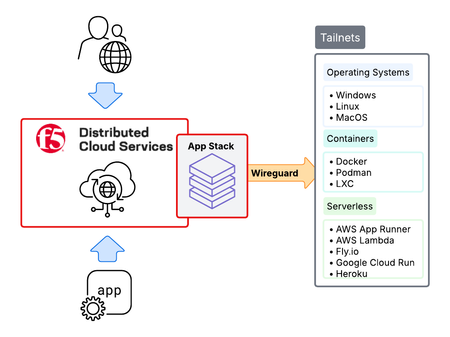
Tailscale tailnets make private networking simple, secure, and efficient. They’re quick to establish, easy to operate, and provide strong identity and network-level protection through zero-trust WireGuard mesh networking. However, while tailnets are secure, applications inside these environments still need enterprise-grade application security, especially when exposed beyond the mesh. This is where F5 Distributed Cloud (XC) App Stack comes in. As F5 XC’s Kubernetes-native platform, App Stack integrates directly with Tailscale to extend F5 ADSP into tailnets. The result is that applications inside tailnets gain the same enterprise-grade security, performance, and operational consistency as in traditional environments, while also taking full advantage of Tailscale networking.791Views4likes2Comments
Automating TLS Certificates in Kubernetes with cert-manager and F5 Distributed Cloud DNS
Introduction If you run workloads in Kubernetes or Open Shift, you've almost certainly dealt with TLS certificates. You need them everywhere — Ingress controllers, internal services, mutual TLS between microservices, and API gateways. Managing them by hand is error-prone and doesn't scale: certificates expire silently, rotation is forgotten, and the person who originally created the wildcard cert is now working somewhere else. cert-manager solves this elegantly. It's a Kubernetes-native certificate controller that automates the issuance, renewal, and management of TLS certificates. It speaks ACME — the same protocol Let's Encrypt uses — but ACME is a standard, not a Let's Encrypt exclusive. You can point cert-manager at: Let's Encrypt (free, public, widely trusted) ZeroSSL, Buypass, Google Trust Services — other public CAs supporting ACME Step CA / HashiCorp Vault / Smallstep — for private PKI running inside your infrastructure Any commercial CA that has implemented an ACME endpoint This means the same workflow, the same Kubernetes manifests, and the same tooling can back both your public-facing services and your internal, corporate-signed certificates. One operator to rule them all. Why DNS-01 Challenge? ACME offers multiple ways to prove you own a domain. The most common is the HTTP-01 challenge, where the ACME server checks a well-known URL on your domain. It works well, but has limitations: The endpoint must be publicly reachable on port 80 It cannot issue wildcard certificates (*.example.com) The DNS-01 challenge takes a different approach: cert-manager (via a solver webhook) creates a _acme-challenge.example.com TXT record in your DNS zone. The ACME server checks for this record. Once verified, the TXT record is cleaned up automatically. Benefits: Works behind firewalls — no inbound HTTP needed Supports wildcard certificates — a single *.example.com certificate covers all subdomains Fully automated — the webhook handles record creation and deletion If your DNS is managed by F5 Distributed Cloud (F5 XC), you can now wire this entire flow together with the open-source cert-manager-webhook-f5xc solver. Architecture Overview Here's what happens when cert-manager issues a certificate using the F5 XC webhook: Developer applies Certificate manifest ▼ cert-manager creates Order + Challenge ▼ cert-manager calls webhook (DNS-01 solver) ▼ Webhook calls F5 XC DNS API → Creates TXT record: _acme-challenge.example.com ▼ ACME server (Let's Encrypt / other) validates the TXT record ▼ Webhook cleans up the TXT record ▼ cert-manager stores the issued certificate in a Kubernetes Secret The webhook runs as a standard Kubernetes Deployment inside your cluster, registered with cert-manager via a ValidatingWebhookConfiguration. It receives solver calls from cert-manager and translates them into F5 XC DNS API calls using an API token you provide as a Kubernetes Secret. Prerequisites Before we start, make sure you have the following in place: A Kubernetes cluster (1.21+) cert-manager installed (v1.14+) kubectl apply -f https://github.com/cert-manager/cert-manager/releases/latest/download/cert-manager.yaml Helm 3.8+ An F5 Distributed Cloud tenant with DNS management enabled Your domain's DNS zone managed in F5 XC F5 XC credentials for DNS API access — either an API Token or a Client Certificate (P12); see Step 1 below for details Least privilege note: The service account or user whose credentials you use must have permission to manage DNS records. As of the time of writing, the built-in role f5xc-dns-management-admin is sufficient. Avoid using tenant-admin or other overly broad roles — the webhook only needs to create and delete TXT records in your DNS zone. Step 1: Prepare F5 XC Credentials The webhook supports two authentication methods against the F5 XC DNS API: an API Token or a Client Certificate (P12). Both are stored as a Kubernetes Secret in the cert-manager namespace. Obtaining credentials in F5 XC Console Regardless of which method you choose, the service account must have sufficient permissions to manage DNS records. Follow the least-privilege principle: In the F5 XC Console, navigate to Account Settings → Administration. Create a dedicated service credential under IAM and assign it the f5xc-dns-management-admin role in the system namespace — this is the minimum required role as of the time of writing and grants access to DNS Zone Management without unnecessary privileges elsewhere in the tenant. Or use an existing account privileges under Personal Management credentials. Generate the credentials of your preferred type (API Token or API Certificate) Option A: API Token (simpler, recommended for most setups) Take the API Token obtained from the F5XC console and use it with the following command kubectl create secret generic f5xc-api-token \ --namespace cert-manager \ --from-literal=token=<YOUR_F5XC_API_TOKEN> Option B: Client Certificate (P12) F5 XC also supports certificate-based authentication using a P12 (PKCS#12) client certificate, which may be preferred in environments. Use the certificate and password generated in the previous step and store it as a Secret: kubectl create secret generic f5xc-client-cert \ --namespace cert-manager \ --from-file=certificate.p12=<PATH_TO_YOUR.p12> \ --from-literal=password=<P12_PASSWORD> Refer to the webhook documentation for the exact certificateSecretRef fields to use in the solver config when choosing this method. Verify the secret was created: kubectl get secret f5xc-api-token -n cert-manager Step 2: Install the Webhook via Helm The chart is published as an OCI artifact on GitHub Container Registry. Install it into the cert-manager namespace: helm install cert-manager-webhook-f5xc \ oci://ghcr.io/wenkow/charts/cert-manager-webhook-f5xc \ --namespace cert-managerbaba Check the rollout: kubectl rollout status \ deployment cert-manager-webhook-f5xc \ -n cert-manager kubectl get pods -n cert-manager Step 3: Configure a ClusterIssuer A ClusterIssuer tells cert-manager which ACME server to use and how to solve challenges. Here we're pointing it at Let's Encrypt production and configuring the F5 XC DNS-01 solver. Note on groupName: The field appears twice in the YAML below and serves different purposes. At the webhook level, it's a fixed identifier (acme.f5xc.io) that tells cert-manager which registered webhook to call. Inside config, it's the RRSet group name within your F5 XC DNS zone — a logical container for DNS records created by the webhook. You can choose any name; F5 XC will create the group if it doesn't exist. clusterissuer.yaml: apiVersion: cert-manager.io/v1 kind: ClusterIssuer metadata: name: letsencrypt-f5xc-prod spec: acme: email: [email protected] server: https://acme-v02.api.letsencrypt.org/directory privateKeySecretRef: name: letsencrypt-f5xc-prod-account-key solvers: - dns01: webhook: # Fixed identifier — tells cert-manager which webhook to call groupName: acme.f5xc.io solverName: f5xc config: # Your F5 XC tenant name (subdomain part of your console URL) tenantName: my-tenant # RRSet group name in F5 XC DNS zone groupName: "cert-manager" # ttl: 120 # optional, default is 120 seconds apiTokenSecretRef: name: f5xc-api-token key: token # If using certificate-based auth instead of a token, replace # apiTokenSecretRef with certificateSecretRef — see webhook docs. Apply it: kubectl apply -f clusterissuer.yaml Verify it's ready: kubectl get clusterissuer letsencrypt-f5xc-prod Step 4: Request a Certificate Now the fun part. Create a Certificate resource. Note that we're requesting both the apex domain and a wildcard — something that's only possible with DNS-01. certificate.yaml: apiVersion: cert-manager.io/v1 kind: Certificate metadata: name: example-tls namespace: default spec: secretName: example-tls issuerRef: name: letsencrypt-f5xc-prod kind: ClusterIssuer dnsNames: - example.com - "*.example.com" Apply it: kubectl apply -f certificate.yaml Step 5: Watch the Certificate Lifecycle This is where it gets satisfying to watch. cert-manager creates an Order, which spawns one or more Challenge objects. Each Challenge triggers the F5 XC webhook to create a DNS TXT record. Watch Certificate status kubectl get certificate example-tls -n default -w Inspect the Order kubectl get orders -n default kubectl describe order example-tls-1-3552197254 -n default Status: Authorizations: Challenges: Token: <token> Type: dns-01 URL: https://acme-v02.api.letsencrypt.org/acme/chall/... Identifier: example.com Initial State: valid URL: https://acme-v02.api.letsencrypt.org/acme/authz/... Wildcard: true Challenges: Token: <token> Type: dns-01 URL: https://acme-v02.api.letsencrypt.org/acme/chall/... Identifier: example.com Initial State: valid URL: https://acme-v02.api.letsencrypt.org/acme/authz/... Wildcard: false Certificate: REDACTED Finalize URL: https://acme-v02.api.letsencrypt.org/acme/finalize/... State: valid URL: https://acme-v02.api.letsencrypt.org/acme/order/... Events: Type Reason Age From Message ---- ------ ---- ---- ------- Normal Complete 8m37s cert-manager-orders Order completed successfully Inspect the Challenges before it's done kubectl get challenges -n default kubectl describe challenge example-tls-<1234567890> -n default Verify the Issued Certificate kubectl get secret example-tls -n default -o jsonpath='{.data.tls\.crt}' \ | base64 -d | openssl x509 -noout -text | grep -E "Subject:|DNS:|Not After" Not After : Aug 19 19:22:31 2026 GMT Subject: CN = example.com DNS:*.example.com, DNS:example.com Both the apex domain and the wildcard are covered by a single certificate. Using a Custom or Internal ACME Server One of the most powerful aspects of this setup is that the ACME server is completely configurable. If you run an internal CA — for example HashiCorp Vault with the ACME secrets engine, or Step CA — just change the server field in your ClusterIssuer: spec: acme: email: [email protected] server: https://vault.internal.example.com/v1/pki/acme/directory # or # server: https://step-ca.internal.example.com/acme/acme/directory The webhook doesn't care which ACME server you use — it only handles the DNS side of the challenge. This makes the setup equally useful for: Internet-facing services using Let's Encrypt Internal services using a corporate CA Mixed environments where different ClusterIssuer objects point to different CAs, all sharing the same F5 XC DNS solver Troubleshooting Tips Challenge stays in pending for a long time Check the webhook logs for API errors: kubectl logs -n cert-manager -l app=cert-manager-webhook-f5xc --tail=50 READY: False on ClusterIssuer Usually means cert-manager couldn't register an ACME account. Check that the email field is valid and the ACME server URL is reachable. TXT record not appearing in F5 XC - Verify that the credentials you stored in the Secret have the right DNS permissions. In F5 XC Console, check that the service account has the f5xc-dns-management-admin role (or equivalent). API token permission issues will typically surface as 403 Forbidden errors in the webhook logs. Summary The cert-manager-webhook-f5xc project closes the loop between F5 Distributed Cloud DNS and the Kubernetes-native certificate management ecosystem. With a few manifests and a Helm install, you get: Fully automated certificate issuance and renewal — no manual interventions, no expiry surprises Wildcard certificate support out of the box via DNS-01 ACME provider flexibility — works with Let's Encrypt, commercial CAs, or your internal PKI Clean Kubernetes-native UX — certificates are just resources; the entire lifecycle is observable with standard kubectl commands The webhook is open source, available on GitHub and packaged on Artifact Hub. Contributions and feedback are welcome. Related Resources cert-manager documentation cert-manager DNS01 webhook reference F5 Distributed Cloud DNS Management docs GitHub: Wenkow/cert-manager-webhook-f5xc Artifact Hub: cert-manager-webhook-f5xc203Views2likes1CommentUnderstanding Modern Application Architecture - Part 3
In this last article of the series discussing Modern Application Architecture, we will be discussion manageability with respect to the traffic. As the traffic patterns grow and look quite different from monolithic applications, different approaches need to take place in order to maintain the stability of the application. Understanding Modern Application Architecture - Part 1 Understanding Modern Application Architecture - Part 2 In this next video, we discuss Service Mesh. As modern applications expand and their communications change to microservice to microservice, a service mesh can be introduced to provide control, security and visibility to that traffic. Since individual microservices can be written by different individuals or groups, the service mesh can be the intermediary that allows them to understand what is happening when one piece of code needs to speak to another piece of code. At the same time, trust and verification can happen between the microservices to ensure they are talking to what they should be talking to. In this next video we discuss Sidecar Proxies. As mentioned in the Service Mesh video, the sidecar proxy is a key piece of the mesh implementation. It is responsible for functions such as TLS termination, mutual TLS and authentication. It can also be used for tracing and other observability. This means these functions don't have to be performed by the microservice itself. In this final video, we review NGINX as a Production Grade Kubernetes Solution. While Modern Applications will adopt Open Source Solutions where possible, these applications can be mission critical ones that require the highest level of service. As mentioned in the previous videos in this series, there are a number of important pieces of a Kubernetes cluster that can be augmented, or replaced by enhanced services. NGINX can actually perform as an enhanced Ingress Controller, giving a high level of control as well as performance for inbound traffic to the cluster. NGINX with App Protect can also provide finer grain controlled web application security for the inbound web based components of the application. And finally, NGINX Service Mesh can help with the microservice to microservice control, security and visibility, offloading that function from the microservice itself. We hope that this video series has helped shed some light for those who are curious about modern application architecture. As you have questions, don't hesistate to ask in our Technical Forums! 1KViews2likes0Comments
Understanding Modern Application Architecture - Part 2
To help our Community transfer their skills to handle Modern Applications, we've released a video series to explain the major points. This article is part 2 and here are the other parts: Understanding Modern Application Architecture - Part 1 Understanding Modern Application Architecture - Part 3 This next set of videos discuss the platforms and components that make up modern applications. In this video, we review containers. These have become a key building block of microservices. They help achieve the application portability by neatly packaging up everything needing to bring up an application within a container runtime such as Docker. One great example of a container is the f5-demo-httpd container. This small lightweight container can be downloaded quickly to run a web server. It's incorporated into a lot of F5 demo environments because it is lightweight and can be customized by simply forking the repository and making your own changes. In this next video, we talk about Kubernetes (or k8s for short). While there are container runtimes like Docker that can work individually on a server, the Kubernetes project has brought the concept into a form that can be scaled out. Worker nodes, where containers are run on, can be brought together into clusters. Commands can be issued to a Master Node via YAML files and have affect across the cluster. Containers can be scheduled efficiently across a cluster which is managed as one. In this next video, we break down the Kubernetes API. The Kubernetes API is the main interface to a k8s cluster. While there are GUI solutions that can be added to a k8s cluster, they are still interfacing with the API so it is important to understand what the API is capable of and what it is doing with the cluster. The main way to issue commands to the API is through YAML files and the kubectl command. From there, the API server will interact with the other parts of the cluster to perform operations. In this next video, we discuss Securing a Kubernetes cluster. There are a number of attack vectors that need to be understood and so we review them along with some of the actions that can be taken in order to increase the security for them. In this next video, we go over Ingress Controller. An Ingres Controller is one of the main ways that traffic is brought from outside of the cluster, into a pod. This role is of particular interest to F5 customers as they can use NGINX, NGINX+ or BIG-IP to play this strategic role within a Kubernetes cluster. In this next video, we talk about Microservices. As applications are decomposed from monolithic applications to modern applications, they are broken up into microservices that carry out individual functions of an application. The microservices then communicate with each other in order to deliver the overall application. It's important to then understand this service to service communication so that you can design application services around them such as load balancing, routing, visibility and security. We hope that you've enjoyed this video series so far. In the next article, we'll be reviewing the components that aid in the management of a Kubernetes platform. Understanding Modern Application Architecture - Part 3 1.3KViews2likes0Comments
Protect Your Kubernetes Cluster Against The Apache Log4j2 Vulnerability Using BIG-IP
Whenever a high profile vulnerability like Apache Log4j2 is announced, it is often a race to patch and remediate. Luckily, for those of us with BIG-IP's with AWAF (Advanced Web Application Firewall) in our environment, we can take care of some mitigation through updating and applying signatures. When there is a consolidation of duties, or both SecOps and NetOps work together on the same cluster of BIG-IP's then an AWAF policy can simply be applied to a virtual server. However, as we move into a world of modern application architectures, the Kubernetes administrators are very often a different set of individuals falling within DevOps. The DevOps team will work with NetOps to incorporate BIG-IP as the Ingress to the Kubernetes environment through the use of Container Ingress Services. This allows for a declarative configuration and objects can be called upon to incorporate into the Ingress configuration. In Container Ingress Services version 2.7, using the Policy CRD (Custom Resource Definitions) feature, an AWAF policy can be one of these objects incorporated. Here is some example code for defining the Policy CRD and specifying the WAF policy: apiVersion: cis.f5.com/v1 kind: Policy metadata: labels: f5cr: "true" name: policy-mysite namespace: default spec: l7Policies: waf: /Common/WAF_Policy profiles: http: /Common/Custom_HTTP logProfiles: - /Common/Log all requests And here is an example of associating this Policy CRD with the VirtualServer CRD: apiVersion: "cis.f5.com/v1" kind: VirtualServer metadata: name: vs-myapp labels: f5cr: "true" spec: # This is an insecure virtual, Please use TLSProfile to secure the virtual # check out tls examples to understand more. virtualServerAddress: "10.192.75.117" virtualServerHTTPSPort: 443 httpTraffic: redirect tlsProfileName: reencrypt-tls policyName: policy-mysite host: myapp.f5demo.com pools: - path: / service: f5-demo servicePort: 443 Mark Dittmer, Sr. Product Management Engineer here at F5, recently teamed up with Brandon Frelich, Security Solutions Architect, to create a how-to video on this. Mark's associated Github repo: https://github.com/mdditt2000/kubernetes-1-19/blob/master/cis%202.7/log4j/README.md This is going to now allow for the SecOps teams to focus on creating and providing AWAF policies while the DevOps can focus on their domain and incorporate the AWAF policy quickly. As we see microservices sprawl, we need every speed advantage we can get!1KViews1like0Comments