irules
722 TopicsFingerprinting TLS Clients with JA4 on F5 BIG-IP
JA4+ is a set of simple network fingerprints that are both human and machine readable to facilitate more effective threat-hunting and analysis. In this article you will learn how you can use F5 iRules to gerenate JA4 TLS fingerprints.7KViews11likes1Commentlog local0. is not a debugging strategy!
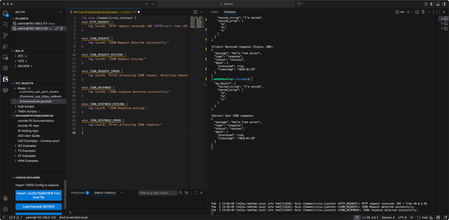
But let's be honest...with iRules, it's pretty much all we've had. If you have ever debugged an iRule, you know the ritual. Former F5er Jibin_Han in an article once called the log command is "the crudest of debug facilities." He was not wrong. It is the printf of application delivery, and at high traffic the logging pipeline will happily truncate your output just to keep things spicy. So back in TMOS 13.1, he shipped something much better: ltm rule-profiler. It is a passive tracer baked right into TMM. (Did you know this? Most don't, including most F5ers I talk to!) You do not touch your script. You tell it which virtual server, events, and occurrences to watch, you flip it on, and it emits a timestamped execution trace of everything your iRule did. Events firing, rules matching, the Tcl VM grinding through bytecode, native commands getting dispatched, variables changing. The whole shebang. There is just one catch. Ok actually two. It is tmsh-only. No GUI, no REST endpoint, no nothing. You configure it by hand and you start and stop it by hand. The not so fun part, the output looks like this: 1780079189187194,RP_EVENT_ENTRY,/Common/testvip-http,CLIENT_ACCEPTED,22623,0x70373707000576,10.1.10.6,36086,0,10.1.10.50,80,0 1780079189187210,RP_RULE_ENTRY,/Common/testvip-http,/Common/myrule,22623,0x70373707000576,... 1780079189187225,RP_RULE_VM_ENTRY,... 1780079189187240,RP_CMD_BYTECODE,/Common/testvip-http,push1,... Now multiply that by a few hundred lines, sprinkle in microsecond timestamps you are expected to subtract in your head, and remember that every single custom iRules command is actually a round trip out of the Tcl VM and back into TMM. A command, inside a VM, inside the microkernel. We need to go deeper. Reading it raw is less "performance analysis" and more "staring at the green rain in The Matrix and pretending you can see the woman in the red dress." The data is genuinely great. It's just wearing a CSV trench coat and refusing to make eye contact. But that ends now. Let's talk about Rültracer. What Rültracer is Rültracer is an iApps LX extension that gives ltm rule-profiler the face it always deserved. When Jibin_Han released his 3-part article series (linked at the bottom of this article) introducing the rule-profiler, we had a couple interns who built an analysis engine called Campfire that used a perl-based flamegraph package to display the trace in context of the "lift" of each occurence within a trace. The challenge was you had to manually configure everything on BIG-IP, send the logs somewhere, collect those logs, then import them into where you built campfire to run. A lot of manual work to get to the good. But Rültracer? It runs on the BIG-IP. An on-box Node worker handles the unglamorous parts: it configures the profiler, sets up (and tears down) the log publisher, captures the trace stream into a per-session file, and serves that file to a browser app. The browser does all the parsing and visualization client side, so the box just ships raw CSV and gets out of the way. What you get: A sequence diagram and step-through debugger. The trace becomes a UML-style sequence diagram across six lifelines (Users, Event, Rule, Rule VM, Command VM, Command), with the TMM and Tcl VM sides color coded so you can actually see every handoff between the microkernel and the interpreter. Which matters, because that back-and-forth is exactly where iRule inefficiency likes to hide. Next to it sits a linked step-through with a timeline scrubber, variable state, and command replay. Click the diagram, the table follows. Click the table, the diagram follows. There's a Tclsh disassembler you can enable as well, and as long as you're willing to modify the parts of the iRules code under test. I wrote an article years ago on this disassembly functionality, it's worth the read to see what this functionality affords you. iRule source mapping. It pulls your actual iRule source and lights it up: which commands fired (with microseconds and counts), which branches never ran, and which lines were ambiguous multi-matches. Your code, annotated by what the trace really did. (this part is early stages, it needs work.) Flamegraphs, with diff. An interactive flamegraph where width equals inclusive time, so the widest frame is your prime suspect. Find the slow command without playing Where's Waldo. Captured a "before" and an "after"? The diff view paints frames red and blue by how their self-time shifted, so you can prove your optimization actually optimized. Cycles versus CPU. Rültracer takes the box's own ltm rule stats hardware cycle counters and turns them into honest performance tables: cycles to microseconds, percent of a CPU per request, and max requests per second before your iRule becomes the bottleneck. It even reconciles the authoritative cycle counts against the trace-derived numbers, and the gap between them is the profiler's own overhead. These are numbers you can bring to a capacity-planning meeting without getting laughed out of the room. This is based on Deb Allen's yesteryear work in excel for computing capacity with iRules and my update in doing this with python much later. Reports and exports. Export a capture as self-contained HTML, JSON, a Mermaid sequence diagram, or Brendan Gregg folded stacks. Share it, attach it to a ticket, or feed it to your own tooling. Multi-TMM aware. Captures that span multiple TMMs get partitioned by context id with a scope selector, because of course your traffic did not politely land on a single TMM. No (post RPM install) build steps, no cloud, no telemetry, no agent. Vanilla JS in the browser, a small ES5 worker on the box, fully self-contained. And it is a lab tool on purpose: tracing adds significant TMM overhead, so this is not something you run in production. Rültracer tears the profiler and publisher down for you on teardown, so you never accidentally leave the tap open. Installing it Rültracer installs over SSH. You build the RPM on your workstation, copy it to the BIG-IP, and run the installer on the box as root. The installer provisions the persistent data directory, installs the package through the iApps LX framework, runs the post-install step, and confirms the workers came up. Replace and with your BIG-IP's SSH host and port. If it answers on plain old port 22, drop the -P / -p flags. First time on a fresh box The installer script lives outside the RPM, so it rides along once: Copy the installer on the box (one time only) scp -O -P <port> build/install-onbox.sh root@<host>:/shared/images/ Build, ship, and install ./build/build-rpm.sh 0.7.1 0001 scp -O -P <port> build/dist/rultracer-0.7.1-0001.noarch.rpm root@<host>:/shared/images/ ssh -p <port> root@<host> /shared/images/install-onbox.sh 0.7.1-0001 Because the installer runs as root, it creates the session data directory owned by the restnoded worker user before the workers start (the worker is uid 198 and cannot create directories under /shared/ on its own). When it finishes, it prints your UI URL: https://BIG-IP-host/mgmt/shared/rultracer/ui/ Open that, and you are in. Follow-on updates The installer is already on the box, so the next rounds are just bump, build, ship, install like above. That is an in-place upgrade and it keeps your saved sessions. If you ever want a clean slate, pass --reinstall, but note it wipes session data, so hit the Sessions tab's "Download backup" button first if you care about what is in there. See it in action (The walkthrough covers a live capture end to end: pointing the profiler at a virtual server, driving a little traffic, then digging through the sequence diagram, flamegraph, and cycle stats on a real trace.) Conclusion This was a fun project to bring together something I've played with a lot since the v13.1 release but could never quite figure out a packaging solution to make it functional enough to rely on. You can find the code in the Rültracer repo on Github. Let me know in the comments if you take a look at this and submit any bugs ore feature requests as an issue out on Github. 240Views2likes0Comments
Explicit write control for iRules subtables
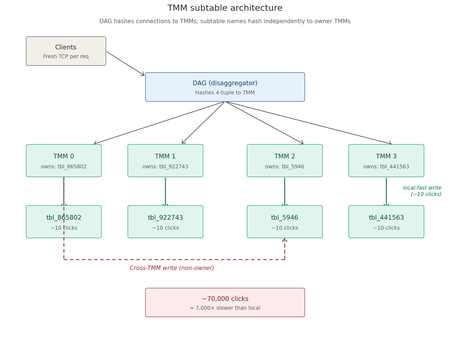
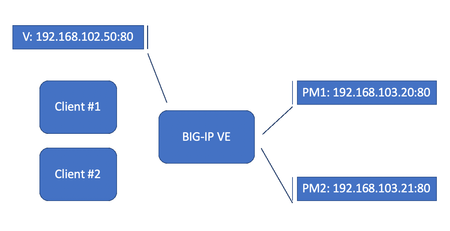
Note to the reader...apparently what is old is new again. There are some threads here on DevCentral that have already solved for this, albeit in different ways. The few brought to my attention by MVP Kai_Wilke are included in the list below for your benefit to read through. That said, the journey of discovery here in this article is worth your time to understand the nuances of how data is passed in a multi-TMM system. Dealing with iRule $variables for HTTP2 workload while HTTP MRF Router is enabled | DevCentral https://github.com/KaiWilke/F5-iRule-RADIUS-Server-Stack SPDY/HTTP2 Profile Impact on Variable Use | DevCentral The TL;DR TMM subtables on BIG-IP are partitioned across TMMs by hashing the subtable name. Writing to a subtable from a non-owner TMM is roughly 1000x slower than writing from the owner...single-digit clock clicks vs. tens of thousands. If you want fast per-TMM local storage, you cannot pick the subtable name yourself; you have to *discover* a locally-owned name by timing trial writes. Deterministic naming schemes do not work, even when they look obviously correct. The Problem A colleague had an iRule that maintained per-connection state across many CLIENT_DATA events. The natural data structure was a TMM session subtable. His quick experimenting showed the writes were slow enough to push the system CPU under modest load and needed to understand why before scaling further. There's an example proc library from Nat_Thirasuttakorn "LOCALDB" that uses a clever timing trick: it generates a random subtable name, times a probe write, and only keeps the name if the write completes under some threshold (50 clock clicks in the original). The implication was that most random names produce slow writes and only a few are fast. I read the code, figured I understood it, and rewrote it "cleanly" using deterministic per-TMM names: `localdb_tmm_0`, `localdb_tmm_1`, `localdb_tmm_2`, ... one per TMM, no probing required. Each TMM would write only to its own name. Done, right? Wrong. The diagram above is the mental model the rest of this post leans on. Two independent hashes are happening: the DAG hashes the inbound 4-tuple to choose which TMM accepts the connection, and TMOS separately hashes the subtable name to choose which TMM *owns* the storage for that name. A write succeeds only when both hashes agree; when the TMM that received the connection is also the owner of the subtable being written to. When they disagree, the write costs roughly 7000x more. The Investigation The deterministic version "worked" — writes succeeded, distribution looked plausible, throughput was decent. Then I added timing instrumentation per TMM and looked at the percentiles: TMM samples min avg max 0 74 121 64855.6 229089 1 34 136 71536.3 236204 2 38 121 88516.9 293259 3 62 3 13.3 25 TMM 3 was writing in 3-25 clicks. Every other TMM was averaging tens of thousands, which is a 5,000-7,000x gap! Something was very wrong. The diagnosis came from a `/probe` endpoint I'd added for unrelated reasons: hit the same subtable name from many connections, time each write, count which TMM responds fast. Probing each of the four "deterministic" names produced: localdb_tmm_0 → owner is TMM 2 localdb_tmm_1 → owner is TMM 2 localdb_tmm_2 → owner is TMM 3 localdb_tmm_3 → owner is TMM 3 Visualizing the result for one of those probes makes the signal unambiguous: Two of the four names hashed to TMM 2, the other two hashed to TMM 3. TMMs 0 and 1 didn't own any of the subtables I'd "assigned" to them. This is the key insight: **the subtable name `localdb_tmm_3` doesn't get owned by TMM 3 just because its name ends in 3.** TMOS hashes the whole name string and assigns ownership based on that hash. The hash is opaque, and it's stable, but it has no relationship to the content of the name. My deterministic scheme was generating four unique names, which guaranteed no key collisions across TMMs — but it didn't guarantee, and couldn't guarantee, that name N landed on TMM N. Why The Original Trick Was Right Going back to the LOCALDB proc library pattern from DevCentral: while { $try < $maxtry } { set name [expr rand()] set before [clock clicks] table set -subtable $name test_$name $name 5 set after [clock clicks] set diff [expr {$after - $before}] if { $diff < $maxdiff } { break } incr try } Generate a random name. Probe it. If it's fast, keep it; if not, throw it away and try another. Each TMM independently does this, and on average needs ~N tries on an N-TMM system to find a name it owns. The probe is the *only* reliable way to know. The randomness is load-bearing. The timing measurement is load-bearing. Neither is decorative. My "elegant" rewrite removed both and produced a system that looked fine but was burning 99% of its potential throughput shipping writes between TMMs. How to Verify A timing histogram per TMM is the diagnostic. The test workflow: Add a `/probe?name=X` endpoint that times a single `table set` against an arbitrary subtable name and reports clicks + the responding TMM Hit it many times from a multi-threaded client Aggregate per-TMM: hits, OWNER count (writes under threshold), NON_OWNER count, min/avg/max clicks The owner of name X will show up as ~all-OWNER with consistently low clicks; everyone else shows ~all-NON_OWNER with high clicks A handful of stray "OWNER" tags on non-owners is just noisy variance in `clock clicks` measurement. The real signal is overwhelming: 50+ OWNER tags vs 0-3 OWNER tags, and average clicks differing by 1000-10000x. Lessons About TMM Subtables A few things worth internalizing if you work with these: Names are global; storage is partitioned Two TMMs writing the same name reach the same logical subtable, but only the owner stores it locally. Non-owners pay an inter-TMM coordination tax on every operation. This is fundamentally a sharding scheme where the shard key is the subtable name and the shard map is hidden from you. Construction can't replace discovery Anywhere a system uses an opaque hash to assign ownership of named resources, you cannot construct a locally-owned name, you can only find one by trying. This pattern shows up well beyond TMOS: Cassandra token ranges, Redis Cluster slots, Kafka partition assignments, consistent-hashing rings in general. Discovery beats construction whenever the mapping function is hidden. O(n) reads in hot paths kill throughput I had a `count` proc that called `table keys -subtable X` and ran `llength` on the result. With per-TMM subtables of ~25k entries, that's 25k strings to enumerate per request. Throughput decayed from 3300/s to 600/s over a 40k-record run, a perfect 1/n curve. Maintaining the count incrementally in a `static::` variable made it O(1) and throughput stayed flat. The fix is obvious in hindsight; the bug is invisible without per-second throughput measurement. Static variables are per-TMM This is great when you want it (per-TMM owned-subtable name, per-TMM counters) and confusing when you don't (you can't share state across TMMs through statics alone). The variables are also persistent across rule reloads in some versions, which means a rule update that adds a new static can leave you with TMMs running the new code but missing the new state. Defensive existence checks at the top of every proc are worthwhile. Sampling debug logs is mandatory at scale Logging every write to `/var/log/ltm` for a million-record load is 1M log lines, hundreds of MB, and enough log I/O to tank throughput on its own. Sample 1-in-N (where N grows with load size), and gate calling-rule logs on the same sample point so the log narrative stays coherent. A `should_log` helper proc shared between the library and its callers keeps this clean. Test harnesses should reset, not reload I initially "reset" between runs by reloading the iRule. `RULE_INIT` re-ran and statics reset, but the *subtable contents* persisted in TMM session memory because they're indexed by name, not by rule. Each rule reload picked a new random name and orphaned the old subtable's entries. Over many runs, memory accumulated. A `/reset` endpoint that walks `table keys` and deletes them is the right abstraction. What "Done" Looked Like After the fix, a 100k-record run on a 4-TMM system: TMM samples min avg max 0 98 3 17.4 71 1 101 4 18.9 88 2 99 3 16.8 77 3 102 4 19.1 91 Throughput stayed flat at ~3000/s for the entire run. Every TMM in the same low-clicks range. No `SLOW` tags in the sampled logs. The before-and-after chart (log scale) makes the impact unmistakable: TMM 3 is interesting on its own. Under the broken design it was already fast (averaging 13.3 clicks) because the deterministic names happened to hash to it, meaning every other TMM was ferrying its writes over to TMM 3. Under the fix, TMM 3 stops being a single hot point and instead does roughly the same work as everyone else, on its own subtable. The fact that TMM 3's "broken" bar isn't dramatically taller is what makes this kind of bug survive a smoke test: writes were succeeding, throughput looked plausible, *one* TMM was even fast. The percentile breakdown is what gave it away. The Validated Test Session Here is the actual end-to-end verification run, command by command, on a 4-TMM lab BIG-IP. This is the workflow that I ended up codifying in the project's `USAGE.md` — it both validates that the fix works and demonstrates each tool's role. Step 1: Verify Every TMM Picked a Unique Subtable After deploying the LOCALDB rule and the calling rule, hit `/whoami` enough times that fresh TCP connections fan out across all TMMs: $ for i in $(seq 1 30); do curl -s http://10.0.2.49/whoami; done | sort -u tmm 0 subtable localdb_tmm_0_865802 total_tmms 4 writes 0 entries 0 tmm 1 subtable localdb_tmm_1_922743 total_tmms 4 writes 0 entries 0 tmm 2 subtable localdb_tmm_2_5946 total_tmms 4 writes 0 entries 0 tmm 3 subtable localdb_tmm_3_441563 total_tmms 4 writes 0 entries 0 Four things to read out of this: Four unique TMMs (0, 1, 2, 3) responded meaning full coverage. With `Connection: close` from curl, each request gets a fresh ephemeral source port and the BIG-IP's DAG re-hashes; 30 requests against 4 TMMs is essentially guaranteed to hit all of them. Four unique subtable names, each with the responding TMM number as a prefix and a random suffix. The TMM-number prefix is just a label for human readability. The random suffix is what `init_table` actually iterates on during timing-probe discovery, throwing away names that hash to other TMMs and keeping the first one whose write completes under the threshold. `total_tmms=4` is consistent on every row. `TMM::cmp_count` is reporting the cluster size correctly. writes=0 entries=0` everywhere. Clean baseline before any load. Step 2: Reset to a Clean Baseline $ python tbl-loader.py reset --host 10.0.2.49 --port 80 Discovering TMM count from 10.0.2.49:80/info ... BIG-IP reports 4 TMMs. Sending 200 /reset requests with 32 workers... Reset summary: TMM hits first_deleted total_deleted ------------------------------------------ 0 50 0 0 1 47 0 0 2 55 0 0 3 48 0 0 All 4 TMMs cleared. Total entries removed (first-hit): 0 200 reset requests, 50 / 47 / 55 / 48 distribution across the four TMMs. That's essentially perfect uniform. Expected mean is 50, observed range is 47-55, which is well within the natural variance of a fair hash. Worth confirming because the same DAG is what'll spread the load run; uneven reset distribution would predict uneven load distribution, which complicates the analysis. `first_deleted=0` everywhere because the previous step's `whoami` had already shown empty subtables. After a load run, this column tells you exactly how many entries each TMM was holding. Step 3: Run the Load $ python tbl-loader.py load --host 10.0.2.49 --port 80 --count 100000 --workers 64 ... completed=100,000/100,000 (100.0%) rate=4376/s coverage=4/4 missing=[] errors=0 Done. completed=100,000 errors=0 elapsed=22.9s rate=4375/s Final distribution: tmm 0: 25,198 writes (25.20%) tmm 1: 24,782 writes (24.78%) tmm 2: 24,914 writes (24.91%) tmm 3: 25,106 writes (25.11%) Three numbers worth lingering on: Sustained 4,375/s throughput, completely flat Earlier in the project, before the O(1) `count` fix, the equivalent run started at 3,300/s and decayed to 600/s by the 40k-record mark, a perfect 1/n curve from the hidden `table keys` + `llength` cost in the calling rule. With `static::LOCALDB_entries` maintained incrementally, the per-write work is genuinely constant and throughput stays where it starts. Distribution within ±0.25% of perfect uniform 25.20% / 24.78% / 24.91% / 25.11% is what fair hashing produces over 100k samples. The DAG is doing its job; nothing is being funneled through one TMM the way the broken-locality version was. Zero errors over 100k fresh TCP connections No TIME_WAIT exhaustion on the client (the ephemeral port range is wide enough), no rate limiting on the BIG-IP, no socket timeouts. Suggests the workload is well within both ends' capacity. The 22.9 second elapsed time works out to ~5 microseconds per write end-to-end, including the full TCP setup/teardown for each request. The actual `table set` is in the tens of clock clicks (single-digit microseconds), so HTTP and TCP overhead dominate, which is the right answer when the iRule work itself is fast and local. Step 4: Verify Per-TMM Locality from the Logs The throughput and distribution numbers tell us writes are happening evenly, but they don't directly prove each write is *local*. For that, pull the sampled timing lines from the BIG-IP's log and run them through the analyzer. Filter to the test window so earlier (broken) runs don't pollute the stats: $ ssh [email protected] "grep '^May 6 16' /var/log/ltm | grep 'sampled'" \ | python3 timing_stats.py Sample rate: 1/1000 Locality threshold: 100 clicks TMM n FAST SLOW min p50 avg p95 p99 max ------------------------------------------------------------------------------ 0 25 25 0 3 5 5.5 10 11 11 1 24 24 0 3 5 6.1 11 18 18 2 24 24 0 2 6 6.1 10 11 11 3 25 25 0 2 6 6.5 12 13 13 ------------------------------------------------------------------------------ Total: 98 samples across 4 TMMs FAST_LOCAL=98 SLOW=0 OK: all TMMs have average write timing below 100 clicks. Per-TMM locality is working. This is the centerpiece of the validation. Reading it line by line: Sample counts 25 / 24 / 24 / 25 samples per TMM matches the 25.20% / 24.78% / 24.91% / 25.11% write distribution from the load output, which is what you'd expect if the BIG-IP is logging 1-in-1000 of all writes uniformly. Timing Single-digit minimums (2-3 clicks). Averages of 5.5-6.5 clicks. p99s of 11-18. Max of 18 across all 98 samples. Compare to the broken run earlier in the project (shown at the top of the article in the investigation section), on the same hardware with the same workload but the wrong `init_table`. That's a **10,000x improvement on three of the four TMMs** between the two runs. The only thing that changed was `init_table` switching from deterministic naming to timing-probe discovery. Tag tally 98 FAST_LOCAL, 0 SLOW. Not a single sampled write missed the locality threshold. The 100-click threshold has plenty of headroom, the actual max was 18, an order of magnitude below. Verdict The script's automated check confirms locality is working. This is the line you'd grep for in CI if you wanted regression coverage. Step 5: Spot-Check Ownership of a Discovered Name The timing report proves writes were fast, but it doesn't prove that the *names* each TMM picked are actually owned by those TMMs (only that their writes were fast for whatever reason). To close that gap, take one of the names from `whoami` and probe it directly: $ python tbl-loader.py probe --host 10.0.2.49 --port 80 --name localdb_tmm_2_5946 --requests 200 ... Results for subtable 'localdb_tmm_2_5946': TMM hits OWNER NON_OWNER min_clicks avg_clicks max_clicks ---------------------------------------------------------------- 0 55 0 55 286 5139.9 19814 1 70 0 70 127 12475.3 52544 2 8 8 0 3 8.6 20 3 67 0 67 238 7126.6 51939 Likely owner of subtable 'localdb_tmm_2_5946': TMM 2 (avg 8.6 clicks, tagged OWNER 8 times) This is unambiguous: TMM 2 wrote in 3-20 clicks, average 8.6 Consistent with the 6.1 average from `timing_stats.py` during the load. Small differences, both well under threshold, both unambiguously local. TMMs 0, 1, 3 took 127-52,544 clicks, averages 5,139 / 12,475 / 7,126 Roughly 600x to 1,500x slower than TMM 2 on the same operation. They're paying the inter-TMM coordination tax because the subtable is owned by TMM 2. Zero stray OWNER tags on non-owning TMMs Earlier probe runs against fresh subtables sometimes had 1-3 stray OWNER tags from non-owners due to `clock clicks` jitter on small subtables. With this subtable now containing ~25k entries, the non-owner penalty is large enough (mins of 127-286 clicks) that no stray write made it under the 100-click threshold. The bigger the subtable, the cleaner the signal. TMM 2 only got 8 hits That's just sampling variance. The DAG hashed inbound connections 55 / 70 / 8 / 67, which over 200 requests is a normal-looking spread. With 1000 requests you'd see ~250 hits per TMM. The 8 hits TMM 2 did get were unanimous on OWNER, which is what matters. A run against any of the other discovered names (`localdb_tmm_0_865802`, `localdb_tmm_1_922743`, `localdb_tmm_3_441563`) produces the same shape of result with the corresponding TMM as owner. What This Validates Step 1 proves every TMM ran `init_table` and picked a unique name. Step 2 proves clean baseline and even DAG distribution. Step 3 proves throughput is sustained and writes spread evenly across TMMs at scale. Step 4 proves every write was fast at the time it happened. Step 5 proves the names each TMM picked are genuinely owned by those TMMs. Together they're a complete proof of the design: the timing-probe discovery in `init_table` correctly identifies a locally-owned subtable name on each TMM, and operations against those names cost ~10 clock clicks instead of ~70,000. The cost gap is the entire reason the per-TMM-subtable pattern exists, and it's now empirically demonstrated end-to-end. This validation run took maybe three minutes of wall time. It's the kind of verification I should have been running before believing the original "deterministic naming" rewrite worked, not after watching it fail under load. Pushing Throughput: Per-Write to Bulk-POST The validated workflow above writes one key per HTTP request. That's the right shape for testing locality (each write is a clean, isolated trial), but it makes TCP connection setup the dominant cost. At ~4,375 writes per second on a 4-TMM box, the iRule is spending most of its time accepting connections, parsing headers, and tearing down sockets, not writing to subtables. The natural next step is to batch many writes into a single HTTP request. A separate `/bulk_load` endpoint accepts a POST body of newline-separated keys (UUIDs in our test case), collects the body via `HTTP::collect`, and walks the lines in a tight loop calling `LOCALDB::set_unique` on each. One TCP connection now writes 15,625 keys instead of one. Per-batch timing comes back in the response so the loader can aggregate it client-side. The throughput result is striking: Same hardware, same iRule logic, same per-TMM locality — the 30× gap is purely TCP setup cost saved. The per-write timing inside the iRule barely changed (3-6 clicks per `LOCALDB::set_unique` either way), but the request-level overhead collapsed because we stopped paying it 1M times. A few things worth noting about this bulk path that aren't obvious: Locality holds inside the loop A `/bulk_load` request that lands on TMM 2 will do all 15,625 of its writes against TMM 2's local subtable. There's no opportunity for a single batch to "leak" writes to other TMMs, because the connection is pinned to one TMM by DAG and the subtable name is fixed by `static::LOCALDB_name`. So the locality verdict from the per-write test carries over without needing re-verification and the loader's per-batch `clicks_per_write` measurement confirms it stays in the 3-6 click range. DAG fan-out still distributes work With 64 fresh POSTs, each gets its own ephemeral source port, so the DAG hashes them across TMMs the same way it did with single-write requests. After enough batches, the per-TMM POST counts converge. In one of the runs, 4 TMMs each took exactly 16 of 64 POSTs. Body size matters for HTTP::collect The `/bulk_load` handler reads `Content-Length` and calls `HTTP::collect $cl` to buffer the entire body before processing. We cap at 16 MiB to protect TMM memory; that's plenty of headroom (~400k UUIDs per batch) but it's a real ceiling worth knowing about. The default of 15,625 UUIDs is ~580 KiB, which is well within bounds. An aside: log volume kills throughput at this rate Our first three bulk-post runs showed throughput drifting downward across consecutive runs...163k/s, then 129k/s, then 122k/s on the same hardware with no other state changes between them. The cause turned out to be the calling rule's logging itself. The `/bulk_load` and `/reset` handlers each had unconditional `log local0.` statements, producing 64 + 200 = 264 syslog writes per test cycle on top of the LOCALDB sample logs. After silencing those handlers (the response bodies already carried the per-batch timing data, so we lost no visibility), runs stabilized at ~133k writes/s ± 4% and survived 60-second sleeps with no warmup penalty. The lesson generalizes: at high write rates, the rule path needs to be quiet, not just "not chatty." Even gated log statements run their gate evaluation on every request, and unconditional ones write to syslog regardless of intent. When the per-write iRule cost is in the single-digit microseconds, *any* per-request work shows up. The rule of thumb that emerged: log statements that fire once per HTTP request are fine for diagnostics (`/probe`, `/whoami`) but should be sampled or removed entirely from the hot path (`/load`, `/bulk_load`, `/reset`). The loader can carry timing data back in response bodies and aggregate it client-side, which is both faster and more useful for analysis. Worth flagging that the absolute throughput numbers here (130-160k writes/s) reflect the test environment: a BIG-IP VE running on an Intel NUC under VMware, sharing the host with the load generator and other VMs. Those are not headroom numbers; they're contention-dominated. A 16-vCPU appliance without that contention should comfortably scale 5-10× from these figures, putting bulk-load throughput into the millions of writes per second on real hardware. The Code The updated `LOCALDB.tcl`, the test harness `subtable_test_updates.tcl`, the Python loader/prober/timing-analyzer, and the USAGE.md are all in the irules-subtable-discovery repo out on Github. Two key bits to study: The `init_table` proc that does the timing-probe discovery, including the fallback path that logs a WARNING and uses a slow name rather than failing silently when discovery exhausts its tries. The 200-try ceiling is sized for 16+ TMMs; on a 4-TMM box you'll typically find a local name in 1-3 tries. The `/probe` endpoint and the loader's `probe` mode. Together they let you take any subtable name and identify which TMM owns it in seconds. Worth keeping in your toolkit; it's the cleanest way I've found to interrogate TMOS's hash assignments. Closing Thoughts The whole episode reinforced something I keep relearning: when a working pattern looks weirdly complicated, the complications are usually load-bearing. The original LOCALDB rule looked over-engineered with its random names and timing probes and retry loops. It was actually exactly as engineered as it needed to be. My "cleaner" rewrite was simpler because I'd quietly assumed something untrue about how TMOS assigns ownership. The truth was readable from a 6-line timing report; I just hadn't generated one yet. If you're going to deviate from a working pattern, the deviation should be the thing you instrument first. Note: the original LocalDB proc library I built this from has been updated by the author in a couple different ways since I shared my work with him. I didn't fold that work in here, but I'll post those updates along with the original when I get permission to do so.167Views1like0CommentsIntroducing Rülbased - version your iRules on BIG-IP!
For all the BIG-IP maintainers out there who just don't have a centralized version control system for your iRules...this one's for you! The TL;DR Rülbased is an iApps LX extension that adds version control, change tracking, editing, and rollback capabilities to iRules on a BIG-IP. It lives on the device, watches for changes (whether made through the BIG-IP GUI, tmsh, iControl REST, ConfigSync, or Rülbased itself), captures every edit as a versioned snapshot with author and reason metadata, and lets you diff, restore, or audit any iRule's history without leaving the BIG-IP. Think of it as git log and git diff for iRules, with no external dependencies. Executive Summary Rülbased solves a problem most BIG-IP shops have lived with for years: iRules change, sometimes in ways no one remembers, and there's no built-in mechanism to see who changed what, when, or why. The BIG-IP audit log tells you something happened; it doesn't show you the code before and after, and it can't roll you back. Rülbased is a self-contained iApps LX RPM that installs via an iControl REST call and adds: Automatic baseline snapshot of every iRule on the device at install time, so history starts populated rather than empty Continuous change detection via a background poll worker. Edits made outside Rülbased (the BIG-IP GUI, tmsh, ConfigSync replication from a peer) are captured, hashed, and stored within minutes Per-edit metadata when changes go through Rülbased's own GUI: an author name and a free-text reason field, so every audit-log entry answers "why" Content-addressed version store with SHA-1 deduplication, so reverting to last week's working version doesn't take any more space than a regular snapshot Side-by-side and unified diff views between any two versions of any iRule, rendered in-browser with no external tooling One-click rollback to any prior version, with the restoration itself recorded as a new audit entry Syslog and webhook notifications on every change (including HMAC-signed webhook payloads) so changes flow into whatever SIEM, chat tool, or pipeline you already run Append-only audit log in JSON Lines format, queryable by rule, author, time window, or action type Full-text search across versions to find when a specific line was added or removed Import/export of the entire version store as a tarball, for offline backup or migration between devices A built-in CodeMirror editor with iRules syntax highlighting, click-to-docs on F5 commands, dark mode, basic linting with opinionated style preferences, and a "test this iRule before saving" pre-flight validation that catches syntax errors before they hit production Everything runs on the BIG-IP itself. No external database, no Git server requirement, no cloud dependency, no agent. The GUI is hosted by the iApps LX worker; the data lives in the extension directory; deploys go through tmsh load sys config merge so any iRule the GUI accepts deploys cleanly. HA awareness is coming next The current release treats each device in an HA pair as an independent island, with its own version history and audit log. The next major release transitions to storing data and metadata in iFiles and/or data-groups, so a unified history follows the rule regardless of which device an edit landed on. A note on iApps LX longevity iApps LX as a framework will be deprecated over time. The replacement is a WASM-based extensibility runtime that we're building toward, and the value of a tool like Rülbased grows in that direction, not shrinks. The job is the same; the substrate becomes faster, sandboxed, and more portable. When the WASM runtime lands, expect Rülbased (or a successor that does the same work) to follow. The Details Everything you need to know is covered in the repo on GitHub. Pop this on a lab box near you, mess around with it, and shoot me feedback either in an issue out there on GitHub or in the comments below. Video Walkthrough202Views0likes0CommentsAPM-DHCP Access Policy Example and Detailed Instructions
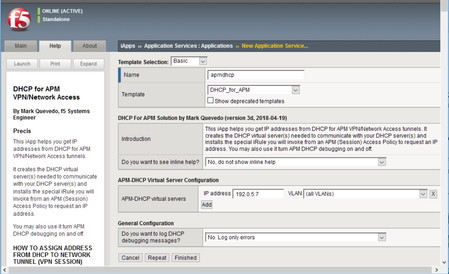
Prepared with Mark Quevedo, F5 Principal Software Engineer May, 2020 Sectional Navigation links Important Version Notes || Installation Guide || What Is Going On Here? || Parameters You Set In Your APM Access Policy || Results of DHCP Request You Use in Access Policy || Compatibility Tips and Troubleshooting Introduction Ordinarily you assign an IP address to the “inside end” of an APM Network Tunnel (full VPN connection) from an address Lease Pool, from a static list, or from an LDAP or RADIUS attribute. However, you may wish to assign an IP address you get from a DHCP server. Perhaps the DHCP server manages all available client addresses. Perhaps it handles dynamic DNS for named client workstations. Or perhaps the DHCP server assigns certain users specific IP addresses (for security filtering). Your DHCP server may even assign client DNS settings as well as IP addresses. APM lacks DHCP address assignment support (though f5's old Firepass VPN had it ). We will use f5 iRules to enable DHCP with APM. We will send data from APM session variables to the DHCP server so it can issue the “right” IP address to each VPN tunnel based on user identity, client info, etc. Important Version Notes Version v4c includes important improvements and bug fixes. If you are using an older version, you should upgrade. Just import the template with “Overwrite existing templates” checked, then “reconfigure” your APM-DHCP Application Service—you can simply click “Finished” without changing any options to update the iRules in place. Installation Guide First install the APM-DHCP iApp template (file DHCP_for_APM.tmpl). Create a new Application Service as shown (choose any name you wish). Use the iApp to manage the APM-DHCP virtual servers you need. (The iApp will also install necessary iRules.) You must define at least one APM-DHCP virtual server to receive and send DHCP packets. Usually an APM-DHCP virtual server needs an IP address on the subnet on which you expect your DHCP server(s) to assign client addresses. You may define additional APM-DHCP virtual servers to request IP addresses on additional subnets from DHCP. However, if your DHCP server(s) support subnet-selection (see session.dhcp.subnet below) then you may only need a single APM-DHCP virtual server and it may use any IP that can talk to your DHCP server(s). It is best to give each APM-DHCP virtual server a unique IP address but you may use an BIG-IP Self IP as per SOL13896 . Ensure your APM and APM-DHCP virtual servers are in the same TMOS Traffic Group (if that is impossible set TMOS db key tmm.sessiondb.match_ha_unit to false). Ensure that your APM-DHCP virtual server(s) and DHCP server(s) or relay(s) are reachable via the same BIG-IP route domain. Specify in your IP addresses any non-zero route-domains you are using (e.g., “192.168.0.20%3”)—this is essential. (It is not mandatory to put your DHCP-related Access Policy Items into a Macro—but doing so makes the below screenshot less wide!) Into your APM Access Policy, following your Logon Page and AD Auth (or XYZ Auth) Items (etc.) but before any (Full/Advanced/simple) Resource Assign Item which assigns the Network Access Resource (VPN), insert both Machine Info and Windows Info Items. (The Windows Info Item will not bother non-Windows clients.) Next insert a Variable Assign Item and name it “DHCP Setup”. In your “DHCP Setup” Item, set any DHCP parameters (explained below) that you need as custom session variables. You must set session.dhcp.servers. You must also set session.dhcp.virtIP to the IP address of an APM-DHCP virtual server (either here or at some point before the “DHCP_Req” iRule Event Item). Finally, insert an iRule Event Item (name it “DHCP Req”) and set its Agent ID to DHCP_req. Give it a Branch Rule “Got IP” using the expression “expr {[mcget {session.dhcp.address}] ne ""}” as illustrated. You must attach iRule ir-apm-policy-dhcp to your APM virtual server (the virtual server to which your clients connect). Neither the Machine Info Item nor the Windows Info Item is mandatory. However, each gathers data which common DHCP servers want to see. By default DHCP_req will send that data, when available, to your DHCP servers. See below for advanced options: DHCP protocol settings, data sent to DHCP server(s), etc. Typically your requests will include a user identifier from session.dhcp.subscriber_ID and client (machine or connection) identifiers from other parameters. The client IP address assigned by DHCP will appear in session.dhcp.address. By default, the DHCP_req iRule Event handler will also copy that IP address into session.requested.clientip where the Network Access Resource will find it. You may override that behavior by setting session.dhcp.copy2var (see below). Any “vendor-specific information” supplied by the DHCP server 1 (keyed by the value of session.dhcp.vendor_class) will appear in variables session.dhcp.vinfo.N where N is a tag number (1-254). You may assign meanings to tag numbers. Any DNS parameters the DHCP server supplies 2 are in session.dhcp.dns_servers and session.dhcp.dns_suffix. If you want clients to use those DNS server(s) and/or DNS default search domain, put the name of every Network Access Resource your Access Policy may assign to the client into the session.dhcp.dns_na_list option. NB: this solution does not renew DHCP address leases automatically, but it does release IP addresses obtained from DHCP after APM access sessions terminate. 3 Please configure your DHCP server(s) for an address lease time longer than your APM Maximum Session Timeout. Do not configure APM-DHCP virtual servers in different BIG-IP route domains so they share any part of a DHCP client IP range (address lease pool). For example, do not use two different APM-DHCP virtual servers 10.1.5.2%6 and 10.1.5.2%8 with one DHCP client IP range 10.1.5.10—10.1.5.250. APM-DHCP won’t recognize when two VPN sessions in different route domains get the same client IP from a non-route-domain-aware DHCP server, so it may not release their IP’s in proper sequence. This solution releases DHCP address leases for terminated APM sessions every once in a while, when a new connection comes in to the APM virtual server (because the BIG IP only executes the relevant iRules on the “event” of each new connection). When traffic is sparse (say, in the middle of the night) there may be some delay in releasing addresses for dead sessions. If ever you think this solution isn’t working properly, be sure to check the BIG IP’s LTM log for warning and error messages. DHCP Setup (a Variable Assign Item) will look like: Put the IP of (one of) your APM-DHCP virtual server(s) in session.dhcp.virtIP. Your DHCP server list may contain addresses of DHCP servers or relays. You may list a directed broadcast address (e.g., “172.16.11.255”) instead of server addresses but that will generate extra network chatter. To log information about DHCP processing for the current APM session you may set variable session.dhcp.debug to true (don’t leave it enabled when not debugging). DHCP Req (an iRule Event Item) will look like: Note DHCP Req branch rules: If DHCP fails, you may wish to warn the user: (It is not mandatory to Deny access after DHCP failure—you may substitute another address into session.requested.clientip or let the Network Access Resource use a Lease Pool.) What is going on here? We may send out DHCP request packets easily enough using iRules’ SIDEBAND functions, but it is difficult to collect DHCP replies using SIDEBAND. 4 Instead, we must set up a distinct LTM virtual server to receive DHCP replies on UDP port 67 at a fixed address. We tell the DHCP server(s) we are a DHCP relay device so replies will come back to us directly (no broadcasting). 5 For a nice explanation of the DHCP request process see http://technet.microsoft.com/en-us/library/cc940466.aspx. At this time, we support only IPv4, though adding IPv6 would require only toil, not genius. By default, a DHCP server will assign a client IP on the subnet where the DHCP relay device (that is, your APM-DHCP virtual server) is homed. For example, if your APM-DHCP virtual server’s address were 172.30.4.2/22 the DHCP server would typically lease out a client IP on subnet 172.30.4.0. Moreover, the DHCP server will communicate directly with the relay-device IP so appropriate routes must exist and firewall rules must permit. If you expect to assign client IP’s to APM tunnel endpoints on multiple subnets you may need multiple APM-DHCP virtual servers (one per subnet). Alternatively, some but not all DHCP servers 6 support the rfc3011 “subnet selection” or rfc3527 “subnet/link-selection sub-option” so you can request a client IP on a specified subnet using a single APM-DHCP virtual server (relay device) IP which is not homed on the target subnet but which can communicate easily with the DHCP server(s): see parameter session.dhcp.subnet below. NOTE: The subnet(s) on which APM Network Access (VPN) tunnels are homed need not exist on any actual VLAN so long as routes to any such subnet(s) lead to your APM (BIG-IP) device. Suppose you wish to support 1000 simultaneous VPN connections and most of your corporate subnets are /24’s—but you don’t want to set up four subnets for VPN users. You could define a virtual subnet—say, 172.30.4.0/22—tell your DHCP server(s) to assign addresses from 172.30.4.3 thru 172.30.7.254 to clients, put an APM-DHCP virtual server on 172.30.4.2, and so long as your Layer-3 network knows that your APM BIG-IP is the gateway to 172.30.4.0/22, you’re golden. When an APM Access Policy wants an IP address from DHCP, it will first set some parameters into APM session variables (especially the IP address(es) of one or more DHCP server(s)) using a Variable Assign Item, then use an iRule Event Item to invoke iRule Agent DHCP_req in ir apm policy dhcp. DHCP_req will send DHCPDISCOVERY packets to the specified DHCP server(s). The DHCP server(s) will reply to those packets via the APM-DHCP virtual-server, to which iRule ir apm dhcp must be attached. That iRule will finish the 4-packet DHCP handshake to lease an IP address. DHCP_req handles timeouts/retransmissions and copies the client IP address assigned by the DHCP server into APM session variables for the Access Policy to use. We use the APM Session-ID as the DHCP transaction-ID XID and also (by default) in the value of chaddr to avert collisions and facilitate log tracing. Parameters You Set In Your APM Access Policy Required Parameters session.dhcp.virtIP IP address of an APM-DHCP virtual-server (on UDP port 67) with iRule ir-apm-dhcp. This IP must be reachable from your DHCP server(s). A DHCP server will usually assign a client IP on the same subnet as this IP, though you may be able to override that by setting session.dhcp.subnet. You may create APM-DHCP virtual servers on different subnets, then set session.dhcp.virtIP in your Access Policy (or branch) to any one of them as a way to request a client IP on a particular subnet. No default. Examples (“Custom Expression” format): expr {"172.16.10.245"} or expr {"192.0.2.7%15"} session.dhcp.servers A TCL list of one or more IP addresses for DHCP servers (or DHCP relays, such as a nearby IP router). When requesting a client IP address, DHCP packets will be sent to every server on this list. NB: IP broadcast addresses like 10.0.7.255 may be specified but it is better to list specific servers (or relays). Default: none. Examples (“Custom Expression” format): expr {[list "10.0.5.20" "10.0.7.20"]} or expr {[list "172.30.1.20%5"]} Optional Parameters (including some DHCP Options) NOTE: when you leave a parameter undefined or empty, a suitable value from the APM session environment may be substituted (see details below). The defaults produce good results in most cases. Unless otherwise noted, set parameters as Text values. To exclude a parameter entirely set its Text value to '' [two ASCII single-quotes] (equivalent to Custom Expression return {''} ). White-space and single-quotes are trimmed from the ends of parameter values, so '' indicates a nil value. It is best to put “Machine Info” and “Windows Info” Items into your Access Policy ahead of your iRule Event “DHCP_req” Item (Windows Info is not available for Mac clients beginning at version 15.1.5 as they are no longer considered safe). session.dhcp.debug Set to 1 or “true” to log DHCP-processing details for the current APM session. Default: false. session.dhcp.firepass Leave this undefined or empty (or set to “false”) to use APM defaults (better in nearly all cases). Set to “true” to activate “Firepass mode” which alters the default values of several other options to make DHCP messages from this Access Policy resemble messages from the old F5 Firepass product. session.dhcp.copy2var Leave this undefined or empty (the default) and the client IP address from DHCP will be copied into the Access Policy session variable session.requested.clientip, thereby setting the Network Access (VPN) tunnel’s inside IP address. To override the default, name another session variable here or set this to (Text) '' to avert copying the IP address to any variable. session.dhcp.dns_na_list To set the client's DNS server(s) and/or DNS default search domain from DHCP, put here a Custom Expression TCL list of the name(s) of the Network Access Resource(s) you may assign to the client session. Default: none. Example: expr {[list "/Common/NA" "/Common/alt-NA"]} session.dhcp.broadcast Set to “true” to set the DHCP broadcast flag (you almost certainly should not use this). session.dhcp.vendor_class Option 60 A short string (32 characters max) identifying your VPN server. Default: “f5 APM”. Based on this value the DHCP server may send data to session.dhcp.vinfo.N (see below). session.dhcp.user_class Option 77 A Custom Expression TCL list of strings by which the DHCP server may recognize the class of the client device (e.g., “kiosk”). Default: none (do not put '' here). Example: expr {[list "mobile" "tablet"]} session.dhcp.client_ID Option 61 A unique identifier for the remote client device. Microsoft Windows DHCP servers expect a representation of the MAC address of the client's primary NIC. If left undefined or empty the primary MAC address discovered by the Access Policy Machine Info Item (if any) will be used. If no value is set and no Machine Info is available then no client_ID will be sent and the DHCP server will distinguish clients by APM-assigned ephemeral addresses (in session.dhcp.hwcode). If you supply a client_ID value you may specify a special code, a MAC address, a binary string, or a text string. Set the special code “NONE” (or '') to avoid sending any client_ID, whether Machine Info is available or not. Set the special code “XIDMAC” to send a unique MAC address for each APM VPN session—that will satisfy DHCP servers desiring client_ID‘s while averting IP collisions due to conflicting Machine Info MAC’s like Apple Mac Pro’s sometimes provide. A value containing twelve hexadecimal digits, possibly separated by hyphens or colons into six groups of two or by periods into three groups of four, will be encoded as a MAC address. Values consisting only of hexadecimal digits, of any length other than twelve hexits, will be encoded as a binary string. A value which contains chars other than [0-9A-Fa-f] and doesn't seem to be a MAC address will be encoded as a text string. You may enclose a text string in ASCII single-quotes (') to avert interpretation as hex/binary (the quotes are not part of the text value). On the wire, MAC-addresses and text-strings will be prefixed by type codes 0x01 and 0x00 respectively; if you specify a binary string (in hex format) you must include any needed codes. Default: client MAC from Machine Info, otherwise none. Example (Text value): “08-00-2b-2e-d8-5e”. session.dhcp.hostname Option 12 A hostname for the client. If left undefined or empty, the short computer name discovered by the APM Access Policy Windows Info Item (if any) will be used. session.dhcp.subscriber_ID Sub-option 6 of Option 82 An identifier for the VPN user. If undefined or empty, the value of APM session variable session.logon.last.username will be used (generally the user's UID or SAMAccountName). session.dhcp.circuit_ID Sub-option 1 of Option 82 An identifier for the “circuit” or network endpoint to which client connected. If left undefined or empty, the IP address of the (current) APM virtual server will be used. session.dhcp.remote_ID Sub-option 2 of Option 82 An identifier for the client's end of the connection. If left undefined or empty, the client’s IP address + port will be used. session.dhcp.subnet Option 118 Sub-option 5 of Option 82 The address (e.g., 172.16.99.0) of the IP subnet on which you desire a client address. With this option you may home session.dhcp.virtIP on another (more convenient) subnet. MS Windows Server 2016 added support for this but some other DHCP servers still lack support. Default: none. session.dhcp.hwcode Controls content of BOOTP htype, hlen, and chaddr fields. If left undefined or empty, a per-session value optimal in most situations will be used (asserting that chaddr, a copy of XID, identifies a “serial line”). If your DHCP server will not accept the default, you may set this to “MAC” and chaddr will be a locally-administered Ethernet MAC (embedding XID). When neither of those work you may force any value you wish by concatenating hexadecimal digits setting the value of htype (2 hexits) and chaddr (a string of 0–32 hexits). E.g., a 6-octet Ethernet address resembles “01400c2925ea88”. Most useful in the last case is the MAC address of session.dhcp.virtIP (i.e., a specific BIG-IP MAC) since broken DHCP servers may send Layer 2 packets directly to that address. Results of DHCP Request For Use In Access Policy session.dhcp.address <-- client IP address assigned by DHCP! session.dhcp.message session.dhcp.server, session.dhcp.relay session.dhcp.expires, session.dhcp.issued session.dhcp.lease, session.dhcp.rebind, session.dhcp.renew session.dhcp.vinfo.N session.dhcp.dns_servers, session.dhcp.dns_suffix session.dhcp.xid, session.dhcp.hex_client_id, session.dhcp.hwx If a DHCP request succeeds the client IP address appears in session.dhcp.address. If that is empty look in session.dhcp.message for an error message. The IP address of the DHCP server which issued (or refused) the client IP is in session.dhcp.server (if session.dhcp.relay differs then DHCP messages were relayed). Lease expiration time is in session.dhcp.expires. Variables session.dhcp.{lease, rebind, renew} indicate the duration of the address lease, plus the rebind and renew times, in seconds relative to the clock value in session.dhcp.issued (issued time). See session.dhcp.vinfo.N where N is tag number for Option 43 vendor-specific information. If the DHCP server sends client DNS server(s) and/or default search domain, those appear in session.dhcp.dns_servers and/or session.dhcp.dns_suffix. To assist in log analysis and debugging, session.dhcp.xid contains the XID code used in the DHCP request. The client_ID value (if any) sent to the DHCP server(s) is in session.dhcp.hex_client_id. The DHCP request’s htype and chaddr values (in hex) are concatenated in session.dhcp.hwx. Compatibility Tips and Troubleshooting Concern Response My custom parameter seems to be ignored. You should set most custom parameters as Text values (they may morph to Custom Expressions). My users with Apple Mac Pro’s sometimes get no DHCP IP or a conflicting one. A few Apple laptops sometimes give the Machine Info Item bogus MAC addresses. Set session.dhcp.client_ID to “XIDMAC“ to use unique per-session identifiers for clients. After a VPN session ends, I expect the very next session to reuse the same DHCP IP but that doesn’t happen. Many DHCP servers cycle through all the client IP’s available for one subnet before reusing any. Also, after a session ends APM-DHCP takes a few minutes to release its DHCP IP. When I test APM-DHCP with APM VE running on VMware Workstation, none of my sessions gets an IP from DHCP. VMware Workstation’s built-in DHCP server sends bogus DHCP packets. Use another DHCP server for testing (Linux dhcpd(8) is cheap and reliable). I use BIG-IP route domains and I notice that some of my VPN clients are getting duplicate DHCP IP addresses. Decorate the IP addresses of your APM-DHCP virtual servers, both in the iApp and in session.dhcp.virtIP, with their route-domain ID’s in “percent notation” like “192.0.2.5%3”. APM-DHCP is not working. Double-check your configuration. Look for errors in the LTM log. Set session.dhcp.debug to “true” before trying to start a VPN session, then examine DHCP debugging messages in the LTM log to see if you can figure out the problem. Even after looking at debugging messages in the log I still don’t know why APM-DHCP is not working. Run “tcpdump –ne -i 0.0 -s0 port 67” to see where the DHCP handshake fails. Are DISCOVER packets sent? Do any DHCP servers reply with OFFER packets? Is a REQUEST sent to accept an OFFER? Does the DHCP server ACK that REQUEST? If you see an OFFER but no REQUEST, check for bogus multicast MAC addresses in the OFFER packet. If no OFFER follows DISCOVER, what does the DHCP server’s log show? Is there a valid zone/lease-pool for you? Check the network path for routing errors, hostile firewall rules, or DHCP relay issues. Endnotes In DHCP Option 43 (rfc2132). In DHCP Options 6 and 15 (rfc2132). Prior to version v3h, under certain circumstances with some DHCP servers, address-release delays could cause two active sessions to get the same IP address. And even more difficult using [listen], for those of you in the back of the room. A bug in some versions of VMware Workstation’s DHCP server makes this solution appear to fail. The broken DHCP server sends messages to DHCP relays in unicast IP packets encapsulated in broadcast MAC frames. A normal BIG-IP virtual server will not receive such packets. As of Winter 2017 the ISC, Cisco, and MS Windows Server 2016 DHCP servers support the subnet/link selection options but older Windows Server and Infoblox DHCP servers do not. Supporting Files - Download attached ZIP File Here.19KViews7likes67CommentsRethinking Payload Parsing: Native JSON Handling in iRules
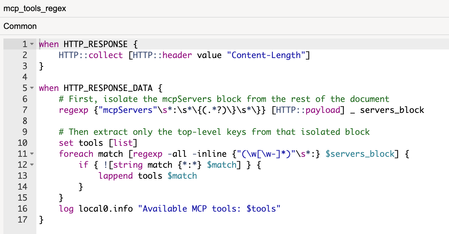
iRules have long been a cornerstone for customization in F5 workflows, a flexible tool that lets users solve traffic management and security challenges in rapid, clever, creative ways. Whether optimizing app performance, fine-tuning protocol behavior, or even defending against unusual attack vectors, iRules empower users to think beyond what’s “standard” and craft solutions tailored to their needs. Over the years, as JSON became a dominant format for transmitting data between systems, the iRules community adapted to handle it: crafting intricate regular expression patterns to parse payloads and extract key information. It worked, but it wasn’t ideal. Regex parsing is notoriously labor-intensive, requiring precision, patience, and constant debugging to ensure accuracy and maintain reliability in production. When taken in the context of iRules, the addition of more labor and increased attention to fine details made the process of creating such an iRule a much more demanding, high-stakes task. Now, there’s a better path forward: native JSON parsing capabilities built directly into iRules. Introduced in TMOS 21.0, this feature removes much of the heavy lifting for JSON processing, replacing manual parsing work with automatic handling via JSON profiles. This means faster customization, reduced complexity, and an easier way to tackle modern traffic challenges. Why Native JSON Parsing Matters To better understand the significance of this development, let’s revisit what JSON parsing traditionally required within an iRule. Imagine needing to capture data points like a session token, a user ID, or an API call parameter embedded in a JSON payload. The typical approach involved carefully writing regular expressions to match specific patterns in the data. While regex is powerful, it demands exact syntax. Even the slightest mistake could break functionality, leading to hours of troubleshooting. With native JSON parsing, much of that toil disappears. Instead of manually defining how to parse a payload, iRules users gain access to JSON profiles that do the reading and processing automatically. Payload data is extracted seamlessly so users can focus on higher-level logic and customizations that drive value in their unique environment. Here’s what this can look like in practice: Simplified Customization for AI Protocols: Whether you’re handling machine-to-machine traffic (e.g., MCP or A2A protocols) or managing real-time API workflows, JSON parsing allows iRules to adapt more easily to protocol-specific traffic customization. Reduced Regex Dependency: Regex patterns are no longer the default method for handling JSON. Native parsing reduces code complexity while also mitigating the risk of hidden errors in regex logic. Time Savings: Less time spent debugging payload-handling code means more time spent solving problems and optimizing workflows. Let’s look at an example: Imagine you have a large JSON body that contains the list of tools available from an MCP server. You want to produce a list of the tools and potentially modify that list before passing them back to a client. Before BIG-IP LTM v.21.0, you would need to collect a payload and use multiple regex passes to extract the tool’s information. Even then, the regex approach is fragile because the logic would need to be re-examined any time the JSON structure changed. The regex also has no concept of nesting depth, so keys from nested objects could potentially leak into the tool list. Truly solving this with regex alone would require a custom brace-depth tracking loop in TCL, essentially writing a partial JSON parser by hand. With the new JSON events and commands available in iRules; when a JSON profile is attached to the virtual server, the iRule becomes much more reliable & performant due to its’ structural awareness of JSON, elimination of payload buffering, and removal of regex processing. In both cases, a typical iRule would have additional events, more error handling, and perform more actions on the result than just logging, but this comparison shows how much more intuitive the code becomes for this task when using the new JSON events and commands. The difference becomes even more stark when we examine how we would remove one of the tools from the list before sending the response back to the client. Without the JSON parser, we are required to hand-write a brace-depth tracking loop just to find the boundaries of the entry to remove, while also ensuring we don’t invalidate the JSON format, all within a performance-sensitive event. In contrast, the approach with the JSON parser hasn’t changed much from the previous example. We can simply remove the object we don’t want and respond with the modified content. Integrating JSON profiles transforms the way teams interact with iRules, and thus the way iRules interact with modern traffic, enabling faster, smarter decisions at scale. Learning from the iRules Community Showcasing this new enhancement merits further exploration into how exactly iRules can become tools for innovation. The depth of creativity around iRules in F5’s community is unmatched, as users consistently craft solutions that push the boundaries of what is possible in-app delivery. This ingenuity is evident in iRules contests that spotlight the best work from the community. Each year, participants create bespoke iRules to address a problem offered up by F5’s DevCentral evangelists. Without fail, the submissions shed light on how some ingenious scripting can solve real-world challenges. From impressive performance optimizations to cutting-edge security use cases, the results consistently reflect the practical ingenuity behind the community’s success. Here are three examples of how users approached their problems creatively from this year’s AppWorld iRules contest: LLM Prompt Injection Detection & Enforcement Problem: As enterprises integrate AI APIs, public LLM, and self-hosted LLM’s into production applications, a critical and largely unaddressed attack surface has emerged: prompt injection. Unlike traditional web attacks that target code parsers, prompt injection targets the AI model itself. Attackers embed malicious instructions inside legitimate-looking API requests. Currently, there is no existing iRule or BIG-IP capability that addresses this. Solution: Implement a multi-layer, real-time Prompt Injection Detection (PID) engine in line with LLM API traffic on BIG-IP, requiring zero backend changes Rate limiting WebSocket messages for Agents Problem: Protecting WebSocket-based AI services from Overload caused by high message rates; temporary spikes via burst control; resource waste from duplicate or repeated messages; aggressive/malicious agents with temporary penalties, and lack of visibility via structured JSON logging. Solution: Protect WebSocket endpoints from aggressive or misbehaving AI agents by enforcing message rate limits, burst controls, and duplicate suppression. Each client IP is allowed up to 40 messages per 10 seconds with a maximum of 20 messages per second. AI Token Limit Enforcement Problem: Without proper limits, users or applications can generate excessive inference requests and consume GPU or CPU capacity uncontrollably. Inference stacks may lack built-in mechanisms for enforcing per-user or per-role token budgets, so organizations need a way to control usage before requests reach the model. Solution: Enables token budget enforcement directly on BIG-IP LTM without requiring additional modules or external gateways. By validating JWTs and extracting user and role information, the iRule applies role-based token limits before requests reach the inference service. This provides a simple, native way to introduce quota control and protect on-premise AI infrastructure from uncontrolled usage. These are just three examples from AppWorld 2026. The depth of knowledge and innovation that the iRules community has cultivated over the last decade is a testament to the way teams can use a tool like iRules to craft novel, bespoke solutions for their environments. What Comes After the Shift to Simplification In the story of iRules’ evolution, the addition of native JSON parsing is a small step, but it reflects a broader trend in the evolution of our digital tools: making powerful capabilities more accessible to more users. While iRules remain as flexible and intricate as ever, developments like JSON parsing streamlines foundational tasks, allowing users to spend less time on granular parsing and more time solving bigger challenges. For those engaged in heavy traffic customization, the impact of this shift is substantial: AI-driven workflows like MCP become easier to configure; payload handling becomes less reliant on regex, minimizing complexity; and customization scales alongside traffic demands, no matter how intricate protocols become. As iRules continues to evolve, the F5 community remains at the heart of innovation, exploring new ways to address critical application delivery challenges and raising the bar for what’s possible. The tools enable the vision; your ingenuity delivers results. Take your next step by exploring native JSON parsing in TMOS 21.0, and if you haven’t already, dive into the winning solutions from this year’s iRules contests for even more inspiration.486Views1like0CommentsEnforcing a Single Connection Max to Pool Members
I like finding jewels and nuggets of clarity in problems presented to the community at large, whether it’s here on DevCentral or in third party communities like Reddit, where member macallen posed the following problem in r/sysadmin a couple months back (paraphrased here, check the link for full context). Problem Statement I have a pool of five servers, and I need a maximum of one connection per server strictly enforced. When I set the connection limit to 1 at the node level, I’m still seeing a second connection offered when the 6th active request comes in. Any ideas on how I can accomplish this? Diagnosing the Problem First, I’ll mock this up in my lab, only on a smaller scale of two servers rather than five, and setting the connection limit on each server to one. Using curl from two virtual machines, I run curl 192.168.102.50/ several times and notice that I am seeing a max of two per server being enforced, not one as anticipated. The problem here is not that TMM is failing to honor the connection limits. The problem, at least on my test system, is that there are two TMMs present. Each TMM is limiting the servers to a maximum of one connection, so in this case, two connections are allowed instead of the required one. And just like the statistical representation of a family consisting of 2.3 kids, well, there’s no such thing as .3 of a kid, and there’s no such thing as .5 of a connection, so setting that doesn’t make much sense and isn’t allowed anyway. The good news is that for almost all use cases at scale the BIG-IP does the math, taking maximum configured connections and dividing by the number of TMMs. Note that this can lead to unexpected issues if for some reason the disaggregator (DAG) has an uneven connection distribution, and it is generally recommended NOT to have a connection maximum less than the active number of TMM instances. See K8457 for additional details. But now that the problem is known, what do I do about it? Solutions Option #1 - Duct Tape & Chewing Gum! In the Reddit thread, the original poster solved his own problem by, in his words, "I created a duct tape solution. I wrote a service that opens a port. When the user connects, it closes the port, when they disconnect it opens it back up. Then I created a contract in F5 for that port so it disables the node when the port is down. Cheap and dirty, but works." Glad to hear that works, but not a process I’d recommend. If someone else takes over ownership of that application and has no idea why that service exists and thus removes it…outage city! Option #2 - Configure BIG-IP VE for a Single Core I call this the machete mode, where I just whack some compute cycles away to solve the problem. That’s an easy one! Shut down the image, strip it down to a single core, fire it back up, and presto! And if this was the only application in service, that would be fantastic. But that’s not likely, and so punishing the rest of the application delivery needs to meet this need is not a great solution. Option #3 - Pin the Virtual Server to a Single Core with an iRule This option requires no system changes at all, just a simple iRule using a global variable, as they are not CMP compatible and thus will demote any virtual server to a single TMM, effectively pinning it and solving the problem. The iRule could look something like this: when RULE_INIT { set ::global_pin_tmm } This iRule is clean and compact, with no impact to traffic since its only engagement is at initialization. It also has a useful name, indicating it’s a global variable and its purpose is to pin the virtual server to a single TMM. Effective, but it feels a little icky to use an iRule with global variables in any version after 11.4 and one of my biggest messages when I speak at user groups is that “iRules are great! But don’t use them!” I always suggest the use of a configuration option when available, and only when iRules are necessary should they be utilized. Option #4 - Pin the Virtual Server to a Single Core with a TMSH Command That brings me to the final option I’ll explore, and that is to use a TMSH command to pin the virtual server. It’s an option on the virtual server (not available in the GUI) to disable CMP: tmsh modify ltm virtual <virtual name> cmp-enabled no Super simple, crystal clear in the configuration, no Tcl-machine necessary. That sounds like a winner to me and is evident now in a new screen capture. Conclusion With BIG-IP, there are often many ways to approach a problem. Sometimes there are no clear advantages amongst solutions, but this problem has a clear winner and that is the final option presented here: using the tmsh command to disable CMP.1.1KViews0likes0Comments
Infrastructure as Code: Using Git to deploy F5 iRules Automagically
Many approaches within DevOps take the view that infrastructure must be treated like code to realize true continuous deployment. The TL;DR on the concept is simply this: infrastructure configuration and related code (like that created to use data path programmability) should be treated like, well, code. That is, it should be stored in a repository, versioned, and automatically pulled as part of the continuous deployment process. This is one of the foundational concepts that enables immutable infrastructure, particularly for infrastructure tasked with providing application services like load balancing, web application security, and optimization. Getting there requires that you not only have per-application partitioning of configuration and related artifacts (templates, code, etc…) but a means to push those artifacts to the infrastructure for deployment. In other words, an API. A BIG-IP, whether appliance, virtual, cloud, or some combination thereof, provides the necessary per-application partitioning required to support treating its app services (load balancing, web app security, caching, etc..) as “code”. A whole lot of apps being delivered today take advantage of the programmability available (iRules) to customize and control everything from scalability to monitoring to supporting new protocols. It’s code, so you know that means it’s pretty flexible. So it’s not only code, but it’s application-specific code, and that means in the big scheme of continuous deployment, it should be treated like code. It should be versioned, managed, and integrated into the (automated) deployment process. And if you’re standardized on Git, you’d probably like the definition of your scalability service (the load balancing) and any associated code artifacts required (like some API version management, perhaps) to be stored in Git and integrated into the CD pipeline. Cause, automation is good. Well have I got news for you! I wish I’d coded this up (but I don’t do as much of that as I used to) but that credit goes to DevCentral community member Saverio. He wasn’t the only one working on this type of solution, but he was the one who coded it up and shared it on Git (and here on DevCentral) for all to see and use. The basic premise is that the system uses Git as a repository for iRules (BIG-IP code artifacts) and then sets up a trigger such that whenever that iRule is committed, it’s automagically pushed back into production. Now being aware that DevOps isn’t just about automagically pushing code around (especially in production) there’s certain to be more actual steps here in terms of process. You know, like code reviews because we are talking about code here and commits as part of a larger process, not just because you can. That caveat aside, the bigger takeaway is that the future of infrastructure relies as much on programmability – APIs, templates, and code – as it does on the actual services it provides. Infrastructure as Code, whether we call it that or not, is going to continue to shift left into production. The operational process management we generally like to call “orchestration” and “data center automation" , like its forerunner, business process management, will start requiring a high degree of programmability and integratability (is too a word, I just made it up) to ensure the infrastructure isn’t impeding the efficiency of the deployment process. Code on, my friends. Code on.1.6KViews0likes1CommentWorking with JSON data in iRules - Part 1
When TMOS version 21 dropped a few months ago, I released a three part article series focused on managing MCP in iRules. MCP is JSON-RPC2.0 based, so this was a great use case for the new JSON commands. But it's not the only use case. JSON has been the default data format for the web transport for well over a decade. And until v21, doing anything with JSON in iRules was not for the faint of heart as the Tcl version iRules uses has no native parsing capability. In this article, i'll do a JSON overview, introduce the test scripts to pass simple JSON payloads back and forth, and get the BIG-IP configured to manage this traffic. In part two, we'll dig into the iRules. JSON Structure & Terminology Let's start with some example JSON, then we'll break it down. { "my_string": "Hello World", "my_number": 42, "my_boolean": true, "my_null": null, "my_array": [1, 2, 3], "my_object": { "nested_string": "I'm nested", "nested_array": ["a", "b", "c"] } } JSON is pretty simple. The example shown there is a JSON object. Object delimeters are the curly brackets you see on lines 1 and 11, but also in the nested object in lines 7 and 10. Every key in JSON must be a string enclosed in double quotes. The keys are the left side of the colon on lines 2-9. The colon is the separator between the key and its value The comma is the separator between key/value pairs There are 6 data types in JSON String - should be enclosed with double quotes like keys Number - can be integer, floating point, or exponential format Boolean - can only be true or false, without quotes, no capitals Null - this is an intentional omission of a value Array - this is called a list in python and Tcl Object - this is called a dictionary in python and Tcl Objects can be nested. (If you've ever pulled stats from iControl REST, you know this to be true!) Creating a JSON test harness Since iControl REST is JSON based, I could easily pass payloads from my desktop through a virtual server and onward to an internal host for the iControl REST endpoints, but I wanted something I could simplify with a pre-defined client and server payload. So I vibe coded a python script to do just that if you want to use it. I have a ubuntu desktop connected to both the client and server networks of the v21 BIG-IP in my lab. First I tested on localhost, then got my BIG-IP set up to handle the traffic as well. Local test Clientside jrahm@udesktop:~/scripts$ ./cspayload.py client --host 10.0.3.95 --port 8088 [Client] Connecting to http://10.0.3.95:8088/ [Client] Sending JSON payload (POST): { "my_string": "Hello World", "my_number": 42, "my_boolean": true, "my_null": null, "my_array": [ 1, 2, 3 ], "my_object": { "nested_string": "I'm nested", "nested_array": [ "a", "b", "c" ] } } [Client] Received response (Status: 200): { "message": "Hello from server", "type": "response", "status": "success", "data": { "processed": true, "timestamp": "2026-01-29" } } Serverside jrahm@udesktop:~/scripts$ ./cspayload.py server --host 0.0.0.0 --port 8088 [Server] Starting HTTP server on 0.0.0.0:8088 [Server] Press Ctrl+C to stop [Server] Received JSON payload: { "my_string": "Hello World", "my_number": 42, "my_boolean": true, "my_null": null, "my_array": [ 1, 2, 3 ], "my_object": { "nested_string": "I'm nested", "nested_array": [ "a", "b", "c" ] } } [Server] Sent JSON response: { "message": "Hello from server", "type": "response", "status": "success", "data": { "processed": true, "timestamp": "2026-01-29" } } Great, my JSON payload is properly flowing from client to server on localhost. Now let's get the BIG-IP setup to manage this traffic. BIG-IP config This is a pretty basic setup, just need a JSON profile on top of the standard HTTP virtual server setup. My server is listening on 10.0.3.95:8088, so i'll add that as a pool member and then create the virtual in my clientside network at 10.0.2.50:80. Config is below. ltm virtual virtual.jsontest { creation-time 2026-01-29:15:10:10 destination 10.0.2.50:http ip-protocol tcp last-modified-time 2026-01-29:16:21:58 mask 255.255.255.255 pool pool.jsontest profiles { http { } profile.jsontest { } tcp { } } serverssl-use-sni disabled source 0.0.0.0/0 source-address-translation { type automap } translate-address enabled translate-port enabled vlans { ext } vlans-enabled vs-index 2 } ltm pool pool.jsontest { members { 10.0.3.95:radan-http { address 10.0.3.95 session monitor-enabled state up } } monitor http } ltm profile json profile.jsontest { app-service none maximum-bytes 3000 maximum-entries 1000 maximum-non-json-bytes 2000 } BIG-IP test, just traffic, no iRules yet Ok, let's repeat the same client/server test to make sure we're flowing properly through the BIG-IP. I'll just show the clientside this time as the serverside would be the same as before. Note the updated IP and port in the client request should match the virtual server you create. jrahm@udesktop:~/scripts$ ./cspayload.py client --host 10.0.2.50 --port 80 [Client] Connecting to http://10.0.2.50:80/ [Client] Sending JSON payload (POST): { "my_string": "Hello World", "my_number": 42, "my_boolean": true, "my_null": null, "my_array": [ 1, 2, 3 ], "my_object": { "nested_string": "I'm nested", "nested_array": [ "a", "b", "c" ] } } [Client] Received response (Status: 200): { "message": "Hello from server", "type": "response", "status": "success", "data": { "processed": true, "timestamp": "2026-01-29" } } Ok. Now we're cooking and BIG-IP is managing the traffic. Part two will drop as soon as I can share some crazy good news about a little thing happening at AppWorld you don't want to miss!567Views4likes2CommentsWorking with JSON data in iRules - Part 2
In part one, we covered JSON at a high level, got scripts working to pass JSON payload back and forth between client and server, and got the BIG-IP configured to manage this traffic. In this article, we'll start with an overview of the new JSON events, walk through an existing Tcl procedure that will print out the payload in log statements and explain the JSON:: iRules commands in play, and then we'll create a proc or two of our own to find keys in a JSON payload and log their values. But before that, we're going to have a little iRules contest at this year's AppWorld 2026 in Vegas. Are you coming? REGISTER in the AppWorld mobile app for the contest (to be released soon)...seats are limited! when CONTEST_SUBMISSION { set name [string toupper [string replace Jason 1 1 ""]] log local0. "Hey there...$name here." log local0. "You might want to speak my language: structured, nested, and curly-braced." } Some details are being withheld until we gather at AppWorld for the contest, but there just might be a hint in that psuedo-iRule code above. Crawl, Walk, Run! Crawling Let's start by crawling. With the new JSON profile, there are several new events: JSON_REQUEST JSON_REQUEST_MISSING JSON_REQUEST_ERROR JSON_RESPONSE JSON_RESPONSE_MISSING JSON_RESPONSE_ERROR From there let's craft a basic iRule to see what triggers the events. Simple log statements in each. when HTTP_REQUEST { log local0. "HTTP request received: URI [HTTP::uri] from [IP::client_addr]" } when JSON_REQUEST { log local0. "JSON Request detected successfully." } when JSON_REQUEST_MISSING { log local0. "JSON Request missing." } when JSON_REQUEST_ERROR { log local0. "Error processing JSON request. Rejecting request." } when JSON_RESPONSE { log local0. "JSON response detected successfully." } when JSON_RESPONSE_MISSING { log local0. "JSON Response missing." } when JSON_RESPONSE_ERROR { log local0. "Error processing JSON response." } Now we need some client and server payload. Thankfully we have that covered with the script I shared in part one. We just need to unleash it! I have my Visual Studio Code IDE fired up with the F5 Extension and iRules editor marketplace extensions connected to my v21 BIG-IP, I have the iRule above loaded up in the center pane, and then I have the terminal on the right pane split three ways so I can a) generate traffic in the top terminal, b) view the server request/response in the middle terminal, and c) watch the logs from BIG-IP in the bottom terminal. Handy to have all that in one view in the IDE while working. For the first pass, I'll send a request expected to work through the BIG-IP and get a response back from my test server. That command is: ./cspayload.py client --host 10.0.2.50 --port 80 And the result can be seen in the picture below (shown here to show the VS Code setup, I'll just show text going forward.) You can see that the request triggered HTTP_REQUEST, JSON_REQUEST, and JSON_RESPONSE as expected. Now, I'll send an empty payload to verify that JSON_REQUEST_MISSING will fire. The command for that is: ./cspayload1.py client --host 10.0.2.50 --port 80 --no-json We get the event triggered as expected, but interestingly, the request is still processed and sent to the backend and the response is sent back just fine. (timestamps removed) Rule /Common/irule.jsontest <HTTP_REQUEST>: HTTP request received: URI / from 10.0.2.95 Rule /Common/irule.jsontest <JSON_REQUEST_MISSING>: JSON Request missing. Rule /Common/irule.jsontest <JSON_RESPONSE>: JSON response detected successfully. My test script serverside code doesn't balk at an empty payload, but most services likely will, so you'll likely want to manage a reject or response as appropriate in this event. Now let's trigger an error by sending some invalid JSON. The command I sent is: ./cspayload1.py client --host 10.0.2.50 --port 80 --malformed-custom '{invalid: "no quotes on key"}' And that resulted in a successfully triggered JSON_REQUEST_ERROR and no payload was sent back to the backend server. Rule /Common/irule.jsontest <HTTP_REQUEST>: HTTP request received: URI / from 10.0.2.95 Rule /Common/irule.jsontest <JSON_REQUEST_ERROR>: Error processing JSON request. Rejecting request. Walking After validating our events are triggering, let's take a look at the example iRule below that will use a procedure to print out the JSON payload. when JSON_REQUEST { set json_data [JSON::root] call print $json_data } proc print { e } { set t [JSON::type $e] set v [JSON::get $e] set p0 [string repeat " " [expr {2 * ([info level] - 1)}]] set p [string repeat " " [expr {2 * [info level]}]] switch $t { array { log local0. "$p0\[" set size [JSON::array size $v] for {set i 0} {$i < $size} {incr i} { set e2 [JSON::array get $v $i] call print $e2 } log local0. "$p0\]" } object { log local0. "$p0{" set keys [JSON::object keys $v] foreach k $keys { set e2 [JSON::object get $v $k] log local0. "$p${k}:" call print $e2 } log local0. "$p0}" } string - literal { set v2 [JSON::get $e $t] log local0. "$p\"$v2\"" } default { set v2 [JSON::get $e $t] if { $v2 eq "" && $t eq "null" } { log local0. "${p}null" } elseif { $v2 == 1 && $t eq "boolean" } { log local0. "${p}true" } elseif { $v2 == 0 && $t eq "boolean" } { log local0. "${p}false" } else { log local0. "$p$v2" } } } } If you build a lot of JSON utilities, I'd recommend creating an iRule that is just a library of procedures you can call from the iRule where your application-specific logic is. In this case, it's instructional so I'll keep the proc local to the iRule. Let's take this line by line. Lines 1-4 are the logic of the iRule. Upon the JSON_REQUEST event trigger, use the JSON::root command to load the JSON payload into the json_data variable, then pass that data to the print proc to, well, print it (via log statements.) Lines 5-47 detail the print procedure. It takes the variable e (for element) and acts on that throughout the proc. Lines 6-7 set the type and value of the element to the t and v variables respectively Lines 8-9 are calculating whitespace requirements for each element's value that will be printed Lines 10-38 are conditional logic controlled by the switch statement based on the element's type set by the JSON::type command, with lines 11-19 handling an array, lines 20-29 handling an object, lines 30-33 a string or literal, and lines 34-27 the default catchall. Lines 11 - 19 cover the JSON array, which in Tcl is a list. The JSON::array size command gets the list size and iterates through each list item in the for loop. The JSON::array get command then sets the value at that index in the loop to a second element variable (e2) and recursively calls the proc to start afresh on the e2 element. Lines 20-29 cover the JSON object, which in Tcl is a key/value dictionary. The JSON::object keys command gets the keys of the element and iterates through each key. The rest of this action is identical to the JSON array with the exception here of using the JSON::object get command. Lines 30-33 cover the string and literal types. Simple action here, uses the JSON::get command with the element and type and then logs it. For lines 34-43, this is the catch all for other types. Tcl represents a null type as an empty string, and the boolean values of true and false as 1 and 0 respectively. But since we're printing out the JSON values sent, it's nice to make sure they match, so I modified the function to print a literal null as a string for that type, and a literal true/false string for their 1/0 Tcl counterparts. Otherwise, it will print as is. Ok, let's run the test and see what we see. Clientside view: ./cspayload2.py client --host 10.0.2.50 --port 80 [Client] Connecting to http://10.0.2.50:80/ [Client] Sending JSON payload (POST): { "my_string": "Hello World", "my_number": 42, "my_boolean": true, "my_null": null, "my_array": [ 1, 2, 3 ], "my_object": { "nested_string": "I'm nested", "nested_array": [ "a", "b", "c" ] } } [Client] Received response (Status: 200): { "message": "Hello from server", "type": "response", "status": "success", "data": { "processed": true, "timestamp": "2026-01-29" } } Serverside view: jrahm@udesktop:~/scripts$ ./cspayload2.py server --host 0.0.0.0 --port 8088 [Server] Starting HTTP server on 0.0.0.0:8088 [Server] Mode: Normal JSON responses [Server] Press Ctrl+C to stop [Server] Received JSON payload: { "my_string": "Hello World", "my_number": 42, "my_boolean": true, "my_null": null, "my_array": [ 1, 2, 3 ], "my_object": { "nested_string": "I'm nested", "nested_array": [ "a", "b", "c" ] } } [Server] Sent JSON response: { "message": "Hello from server", "type": "response", "status": "success", "data": { "processed": true, "timestamp": "2026-01-29" } } Resulting log statements on BIG-IP (with timestamp through rule name removed for visibility): <JSON_REQUEST>: { <JSON_REQUEST>: my_string: <JSON_REQUEST>: "Hello World" <JSON_REQUEST>: my_number: <JSON_REQUEST>: 42 <JSON_REQUEST>: my_boolean: <JSON_REQUEST>: true <JSON_REQUEST>: my_null: <JSON_REQUEST>: null <JSON_REQUEST>: my_array: <JSON_REQUEST>: [ <JSON_REQUEST>: 1 <JSON_REQUEST>: 2 <JSON_REQUEST>: 3 <JSON_REQUEST>: ] <JSON_REQUEST>: my_object: <JSON_REQUEST>: { <JSON_REQUEST>: nested_string: <JSON_REQUEST>: "I'm nested" <JSON_REQUEST>: nested_array: <JSON_REQUEST>: [ <JSON_REQUEST>: "a" <JSON_REQUEST>: "b" <JSON_REQUEST>: "c" <JSON_REQUEST>: ] <JSON_REQUEST>: } <JSON_REQUEST>: } The print procedure is shown here to include the whitespace necessary to prettify the output. Neat! Running Now that we've worked our way through the print function, let's do something useful! You might have a need to evaluate the value of a key somewhere in the JSON object and act on that. For this example, we're going to look for the nested_array key, retrieve it's value, and if an item value of b is found, reject the request by building a new JSON object to return status to the client. First, we need to build a proc we'll name find_key that is similar to the print one above to recursively search the JSON payload. While learning my way through this, I also discovered I needed to create an additional proc we'll name stringify to, well, "stringify" the values of objects because they are still encoded. stringify proc proc stringify { json_element } { set element_type [JSON::type $json_element] set element_value [JSON::get $json_element] set output "" switch -- $element_type { array { append output "\[" set array_size [JSON::array size $element_value] for {set index 0} {$index < $array_size} {incr index} { set array_item [JSON::array get $element_value $index] append output [call stringify $array_item] if {$index < $array_size - 1} { append output "," } } append output "\]" } object { append output "{" set object_keys [JSON::object keys $element_value] set key_count [llength $object_keys] set current_index 0 foreach current_key $object_keys { set nested_element [JSON::object get $element_value $current_key] append output "\"${current_key}\":" append output [call stringify $nested_element] if {$current_index < $key_count - 1} { append output "," } incr current_index } append output "}" } string - literal { set actual_value [JSON::get $json_element $element_type] append output "\"$actual_value\"" } default { set actual_value [JSON::get $json_element $element_type] append output "$actual_value" } } return $output } There really isn't any new magic in this proc, though I did expand variable names to make it a little more clear than our original example. It's basically a redo of the print function, but instead of printing it's just creating the string version of objects so I can execute a conditional against that string. Nothing new to learn, but necessary in making the find_key proc work. find_key proc proc find_key { json_element search_key } { set element_type [JSON::type $json_element] set element_value [JSON::get $json_element] switch -- $element_type { array { set array_size [JSON::array size $element_value] for {set index 0} {$index < $array_size} {incr index} { set array_item [JSON::array get $element_value $index] set result [call find_key $array_item $search_key] if {$result ne ""} { return $result } } } object { set object_keys [JSON::object keys $element_value] foreach current_key $object_keys { if {$current_key eq $search_key} { set found_element [JSON::object get $element_value $current_key] set found_type [JSON::type $found_element] if {$found_type eq "object" || $found_type eq "array"} { set found_value [call stringify $found_element] } else { set found_value [JSON::get $found_element $found_type] } return $found_value } set nested_element [JSON::object get $element_value $current_key] set result [call find_key $nested_element $search_key] if {$result ne ""} { return $result } } } } return "" } In the find_key proc, the magic happens in line 10 for a JSON array (Tcl list) and in lines 18-32 for a JSON object (Tcl dictionary.) Nothing new in the use of the JSON commands, but rather than printing all the keys and values found, we're looking for a specific key so we can return its value. For the array we are iterating through list items that will have a single value, but that value might be an object that needs to be stringified. For the object, we need to iterate through all the keys and their values, also which might be objects or nested objects to be stringified. Recursion for the win! Hopefull you're starting to get the hang of using all the interrogating JSON commands we've covered, because now wer'e going to create something with some new commands! iRule logic Once we have the procs defined to handle their specific jobs, the iRule to find the key and then return the rejected status message becomes much cleaner: when JSON_REQUEST priority 500 { set json_data [JSON::root] if {[call find_key $json_data "nested_array"] contains "b" } { set cache [JSON::create] set rootval [JSON::root $cache] JSON::set $rootval object set obj [JSON::get $rootval object] JSON::object add $obj "[IP::client_addr] status" string "rejected" set rendered [JSON::render $cache] log local0. "$rendered" HTTP::respond 200 content $rendered "Content-Type" "application/json" } } Let's walk through this one line by line. Lines 1 and 13 wrap the JSON_REQUEST payload. Line 2 retrieves the current JSON::root, which is our payload, and stores it in the json_data variable. Lines 3 and 12 wrap the if conditional, which is using our find_key proc to look for the nested_array key, and if that stringified value includes b, reject the response. (in real life looking for "b" would be a terrible contains pattern to look for, but go with me here.) Line 4 creates a JSON context for the system. Think of this as a container we're going to do JSON stuff in. Line 5 gets the root element of our JSON container. At this point it's empty, we're just getting a handle to whatever will be at the top level. Line 6 now actually adds an object to the JSON container. At this point, it's just "{ }". Line 7 gets the handle of that object we just created so we can do something with it. Line 8 adds the key value pair of "status" and our reject message. Line 9 now takes the entire JSON context we just created and renders it to a JSON string we can log and respond with. Line 10 logs to /var/log/ltm Line 11 responds with the reject message in JSON format. Note I'm using a 200 error code instead of a 403. That's just because the cilent test script won't show the status message with a 403 and I wanted to see it. Normally you'd use the appropriate error code. Now, I offer you a couple challenges. lines 4-9 in the JSON_REQUEST example above should really be split off to become another proc, so that the logic of the JSON_REQUEST is laser-focused. How would YOU write that proc, and how would you call it from the JSON_REQUEST event? The find_key proc works, but there's a Tcl-native way to get at that information with just the JSON::object subcommands that is far less complex and more performant. Come at me! Conclusion When I started this JSON article series, I knew A LOT less about the underlying basics of JSON than I thought I knew. It's funny how working with things on the wire requires a little more insight into protocols and data formats than you think you need. Happy iRuling out there, and I hope to see you at AppWorld next month!448Views4likes0Comments