icontrol
3694 TopicsAdvanced WAF IP Exceptions Manager
This solution introduces a dedicated Python-based GUI tool for managing IP whitelist exceptions in F5 BIG-IP Advanced WAF policies. The tool was developed to simplify a common operational workflow: searching WAF policies, adding IP or CIDR-based exceptions, checking whether an IP already exists across policies, deleting outdated exceptions, applying policy changes, and tracking actions through an activity log. The solution is especially useful in large environments where manual exception handling can create operational overhead, inconsistent policy configuration, or audit challenges. It demonstrates how focused automation can deliver practical value without requiring a large orchestration platform or full CI/CD pipeline.154Views1like0CommentsBIG-IP Report
Problem this snippet solves: Overview This is a script which will generate a report of the BIG-IP LTM configuration on all your load balancers making it easy to find information and get a comprehensive overview of virtual servers and pools connected to them. This information is used to relay information to NOC and developers to give them insight in where things are located and to be able to plan patching and deploys. I also use it myself as a quick way get information or gather data used as a foundation for RFC's, ie get a list of all external virtual servers without compression profiles. The script has been running on 13 pairs of load balancers, indexing over 1200 virtual servers for several years now and the report is widely used across the company and by many companies and governments across the world. It's easy to setup and use and only requires auditor (read-only) permissions on your devices. Demo/Preview Interactive demo http://loadbalancing.se/bigipreportdemo/ Screen shots The main report: The device overview: Certificate details: How to use this snippet: Installation instructions BigipReport REST This is the only branch we're updating since middle of 2020 and it supports 12.x and upwards. Downloads: https://github.com/net-utilities/BigIPReport/releases Documentation, installation instructions and troubleshooting: https://net-utilities.github.io/BigIPReport/ BIG-IP Report (Legacy) Older version of the report that only runs on Windows and is depending on a Powershell plugin originally written by Joe Pruitt (F5). The documentation for this will stay on loadbalancing.se. BIG-IP Report (only download this if you have v10 devices): https://github.com/net-utilities/BigIPReport/releases/download/v5.8.0/bigipreport-5.4.0-beta.zip iControl Snapin https://github.com/net-utilities/BigIPReport/releases/download/v5.8.0/f5-icontrol.zip Got issues/problems/feedback? Still have issues? Drop a comment below. We usually reply quite fast. Any bugs found, issues detected or ideas contributed makes the report better for everyone, so it's always appreciated. --- Join us on Discord: https://discord.gg/7JJvPMYahA Tested this on versions: 12, 13, 14, 15, 16, 17 (probably works on later versions too)20KViews21likes102Comments
Infrastructure as Code: Using Git to deploy F5 iRules Automagically
Many approaches within DevOps take the view that infrastructure must be treated like code to realize true continuous deployment. The TL;DR on the concept is simply this: infrastructure configuration and related code (like that created to use data path programmability) should be treated like, well, code. That is, it should be stored in a repository, versioned, and automatically pulled as part of the continuous deployment process. This is one of the foundational concepts that enables immutable infrastructure, particularly for infrastructure tasked with providing application services like load balancing, web application security, and optimization. Getting there requires that you not only have per-application partitioning of configuration and related artifacts (templates, code, etc…) but a means to push those artifacts to the infrastructure for deployment. In other words, an API. A BIG-IP, whether appliance, virtual, cloud, or some combination thereof, provides the necessary per-application partitioning required to support treating its app services (load balancing, web app security, caching, etc..) as “code”. A whole lot of apps being delivered today take advantage of the programmability available (iRules) to customize and control everything from scalability to monitoring to supporting new protocols. It’s code, so you know that means it’s pretty flexible. So it’s not only code, but it’s application-specific code, and that means in the big scheme of continuous deployment, it should be treated like code. It should be versioned, managed, and integrated into the (automated) deployment process. And if you’re standardized on Git, you’d probably like the definition of your scalability service (the load balancing) and any associated code artifacts required (like some API version management, perhaps) to be stored in Git and integrated into the CD pipeline. Cause, automation is good. Well have I got news for you! I wish I’d coded this up (but I don’t do as much of that as I used to) but that credit goes to DevCentral community member Saverio. He wasn’t the only one working on this type of solution, but he was the one who coded it up and shared it on Git (and here on DevCentral) for all to see and use. The basic premise is that the system uses Git as a repository for iRules (BIG-IP code artifacts) and then sets up a trigger such that whenever that iRule is committed, it’s automagically pushed back into production. Now being aware that DevOps isn’t just about automagically pushing code around (especially in production) there’s certain to be more actual steps here in terms of process. You know, like code reviews because we are talking about code here and commits as part of a larger process, not just because you can. That caveat aside, the bigger takeaway is that the future of infrastructure relies as much on programmability – APIs, templates, and code – as it does on the actual services it provides. Infrastructure as Code, whether we call it that or not, is going to continue to shift left into production. The operational process management we generally like to call “orchestration” and “data center automation" , like its forerunner, business process management, will start requiring a high degree of programmability and integratability (is too a word, I just made it up) to ensure the infrastructure isn’t impeding the efficiency of the deployment process. Code on, my friends. Code on.1.6KViews0likes1Comment
AS3 Limitations
Below are some limitations of AS3 as means of Automation. config deployment is locked down by Automation, no manual intervention possible for below use cases - incidents - new requirements/features need to wait for automation to be updated - Automation failures cause deployment to be stalled until automation is fixed - Operational issues, maybe require out-of-band changes outside of AS3 - Source of truth must be reconciled periodically with F5 device to check for config drift - 2 layers of failures during config deployment one is Automation and second is source of truth, therefore involves more troubleshooting effort - Reliance on an External Source of Truth management, non-native to F5 and not supported by F5 - AS3 is Less mature compared to iControl Rest, iControl Rest was introduced in TMOS 11.x405Views2likes3Comments
F5 iControl REST API - Token Lifecycle Management
Hello, I have a question about the API Token Lifecycle Management. In my case, I got the difference between expired tokens lifecycle management in two different versions BIG-IP 15 and 17. ------------------ BIG-IP Version ------------------ Sys::Version Main Package Product BIG-IP Version 15.1.10.6 Build 0.0.6 Edition Point Release 6 Date Thu Nov 21 05:48:27 PST 2024 ------------------ BIG-IP Version ------------------ Sys::Version Main Package Product BIG-IP Version 17.1.2.1 Build 0.0.2 Edition Point Release 1 Date Tue Dec 17 03:58:42 PST 2024 Version 15 I've got a new API Token with timeout value is 1200s past 1200s, I've checked the API Token is unavailable then past 600s, this expired API Token has been removed in /mgmt/shared/authz/tokens Version 17 I've got a new API Token with timeout value is 1200s past 1200s, I've checked the API Token is unavailable This expired API Token does not remove in /mgmt/shared/authz/tokens. Certainly it can be removed by DELETE method request. Why relatively recent version 17 does not work expired token automatically delete? Thank you, greetings!Solved571Views0likes1CommentManaging ZoneRunner Resource Records with Bigsuds
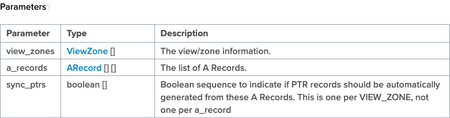
Over the last several years, there have been questions internal and external on how to manage ZoneRunner (the GUI tool in F5 DNS that allows you to manage DNS zones and records) resources via the REST interface. But that's a no can do with the iControl REST--it doesn't have that functionality. It was brought to my attention by one of our solutions engineers that a customer is using some methods in the SOAP interface that allows you to do just that...which was news to me! The things you learn... In this article, I'll highlight a few of the methods available to you and work on a sample domain in the python module bigsuds that utilizes the suds SOAP library for communication duties with the BIG-IP iControl SOAP interface. Test Domain & Procedure For demonstration purposes, I'll create a domain in the external view, dctest1.local, with the following attributes that mirrors nearly identically one I created in the GUI: Type: master Zone Name: dctest1.local. Zone File Name: db.external.dctest1.local. Options: allow-update from localhost TTL: 500 SOA: ns1.dctest1.local. Email: hostmaster.ns1.dctest1.local. Serial: 2021092201 Refresh: 10800 Retry: 3600 Expire: 604800 Negative TTL: 60 I'll also add a couple type A records to that domain: name: mail.dctest1.local., address: 10.0.2.25, TTL: 86400 name: www.dctest1.local., address: 10.0.2.80, TTL: 3600 After adding the records, I'll update one of them, changing the IP and the TTL: name: mail.dctest1.local., address: 10.0.2.110, ttl: 900 Then I'll delete the other one: name: www.dctest1.local., address: 10.0.2.80, TTL: 3600 And finally, I'll delete the zone: name: dctest1.local. ZoneRunner Methods All the methods can be found on Clouddocs in the ZoneRunner, Zone, and ResourceRecord method pages. The specific methods we'll use in our highlight real are: Management.ResourceRecord.add_a Management.ResourceRecord.delete_a Management.ResourceRecord.get_rrs Management.ResourceRecord.update_a Management.Zone.add_zone_text Management.Zone.get_zone_v2 Management.Zone.zone_exist With each method, there is a data structure that the interface expects. Each link above provides the details, but let's look at an example with the add_a method. The method requires three parameters, view_zones, a_records, and sync_ptrs, which the image of the table shows below. The boolean is just a True/False value in a list. The reason the list ( [] ) is there for all the attributes is because you can send a single request to update more than one zone, and add more than one record within each zone if desired. The data structure for view_zones and a_records is in the following two images. Now that we have an idea of what the methods require, let's take a look at some code! Methods In Action First, I import bigsuds and initialize the BIG-IP. The arguments are ordered in bigsuds for host, username, and password. If the default “admin/admin” is used, they are assumed, as is shown here. import bigsuds b = bigsuds.BIGIP(hostname='ltm3.test.local') Next, I need to format the ViewZone data in a native python dictionary, and then I check for the existence of that zone. zone_view = {'view_name': 'external', 'zone_name': 'dctest1.local.' } b.Management.Zone.zone_exist([zone_view]) # [0] Note that the return value, which should be a list of booleans, is a list with a 0. I’m guessing that’s either suds or the bigsuds implementation doing that, but it’s important to note if you’re checking for a boolean False. It’s also necessary to set the booleans as 0 or 1 as well when sending requests to BIG-IP with bigsuds. Now I will create the zone since it does not yet exist. From the add_zone_text method description on Clouddocs, note that I need to supply, in separate parameters, the zone info, the appropriate zone records, and the boolean to sync reverse records or not. zone_add_info = {'view_name': 'external', 'zone_name': 'dctest1.local.', 'zone_type': 'MASTER', 'zone_file': 'db.external.dctest1.local.', 'option_seq': ['allow-update { localhost;};']} zone_add_records = 'dctest1.local. 500 IN SOA ns1.dctest1.local. hostmaster.ns1.dctest1.local. 2021092201 10800 3600 604800 60;\n' \ 'dctest1.local. 3600 IN NS ns1.dctest1.local.;\n' \ 'ns1.dctest1.local. 3600 IN A 10.0.2.1;' b.Management.Zone.add_zone_text([zone_add_info], [[zone_add_records]], [0]) b.Management.Zone.zone_exist([zone_view]) # [1] Note that the strings here require a detailed understanding of DNS record formatting, the individual fields are not parameters that can be set like in the ZoneRunner GUI. But, I am confident there is an abundance of modules that manage DNS formatting in the python ecosystem that could simplify the data structuring. After creating the zone, another check to see if the zone exists results in a true condition. Huzzah! Now I’ll check the zone info and the existing records for that zone. zone = b.Management.Zone.get_zone_v2([zone_view]) for k, v in zone[0].items(): print(f'{k}: {v}') # view_name: external # zone_name: dctest1.local. # zone_type: MASTER # zone_file: "db.external.dctest1.local." # option_seq: ['allow-update { localhost;};'] rrs = b.Management.ResourceRecord.get_rrs([zone_view]) for rr in rrs[0]: print(rr) # dctest1.local. 500 IN SOA ns1.dctest1.local. hostmaster.ns1.dctest1.local. 2021092201 10800 3600 604800 60 # dctest1.local. 3600 IN NS ns1.dctest1.local. # ns1.dctest1.local. 3600 IN A 10.0.2.1 Everything checks outs! Next I’ll create the A records for the mail and www services. I’m going to add a filter to only check for the mail/www services for printing to cut down on the lines, but know that they’re still there going forward. a1 = {'domain_name': 'mail.dctest1.local.', 'ip_address': '10.0.2.25', 'ttl': 86400} a2 = {'domain_name': 'www.dctest1.local.', 'ip_address': '10.0.2.80', 'ttl': 3600} b.Management.ResourceRecord.add_a(view_zones=[zone_view], a_records=[[a1, a2]], sync_ptrs=[0]) rrs = b.Management.ResourceRecord.get_rrs([zone_view]) for rr in rrs[0]: if any(item in rr for item in ['mail', 'www']): print(rr) # mail.dctest1.local. 86400 IN A 10.0.2.25 # www.dctest1.local. 3600 IN A 10.0.2.80 Here you can see that I’m adding two records to the zone specified and not creating the reverse records (not included for brevity, but in prod would be likely). Now I’ll update the mail address and TTL. b.Management.ResourceRecord.update_a([zone_view], [[a1]], [[a1_update]], [0]) rrs = b.Management.ResourceRecord.get_rrs([zone_view]) for rr in rrs[0]: if any(item in rr for item in ['mail', 'www']): print(rr) # mail.dctest1.local. 900 IN A 10.0.2.110 # www.dctest1.local. 3600 IN A 10.0.2.80 You can see that the address and TTL updated as expected. Note that with the update_/N/ methods, you need to provide the old and new, not just the new. Let’s get destruction and delete the www record! b.Management.ResourceRecord.delete_a([zone_view], [[a2]], [0]) rrs = b.Management.ResourceRecord.get_rrs([zone_view]) for rr in rrs[0]: if any(item in rr for item in ['mail', 'www']): print(rr) # mail.dctest1.local. 900 IN A 10.0.2.110 And your web service is now unreachable via DNS. Congratulations! But there’s more damage we can do: it’s time to delete the whole zone. b.Management.Zone.delete_zone([zone_view]) b.Management.Zone.zone_exist([zone_view]) # [0] And that’s a wrap! As I said, it’s been years since I have spent time with the iControl SOAP interface. It’s nice to know that even though most of what we do is done through REST, imperatively or declaratively, that some missing functionality in that interface is still alive and kicking via SOAP. H/T to Scott Huddy for the nudge to investigate this. Questions? Drop me a comment below. Happy coding! A gist of these samples is available on GitHub.1.5KViews2likes2Comments
Python module to post and retrieve IControl Rest JSON objects for AVR statistics
Problem this snippet solves: This module simplifies making Python dictionary objects that are converted to IControl rest AVR JSON objects. It also handles making AVR requests and retrieving results as well allowing multiple AVR requests to be queued, posted and retrieved. It also has some basis type checking for the elements of a AVR request. This module requires Bigip 12.1 on the target that statistics are retrieved. How to use this snippet: The main class is rest_avr.avr_req. It is a dictionary class that maps directly to an IControl Rest AVR JSON request as translated by json.dumps. Each dictionary element is an object derived from a customer class for each part of the request. The element classes have add() and clear() functions. if the element class only allows one entry the add() function will replace the existing entry, otherwise it will append the entry to the request element. The rest_avr.avr_req class also has functions to populate the HTTP host and authentication values for the target system. rest_avr.avr_req.post_and_response returns the Python representation of the JSON result of the query. rest_avr.avr_req.add_to_queue() adds the currently constructed request to a queue of requests to post. rest_avr.avr_req.post_and_response_queue() returns a python list of results of queued queries. The following code sample constructs, posts and returns results for an AVR statistics request for specific DNS records and a specificrecord type, then queues multiple quests and posts and returns results. #!/usr/bin/python import json import sys import time import rest_avr #print rest_avr.ShowAVRJsonApi #Populate the url avr_dns_req=rest_avr.avr_req() avr_dns_req.auth('admin','admin') avr_dns_req.url_base('10.10.2.113','dns') #Populate the json object avr_dns_req['analyticsModule'].add('dns') avr_dns_req['reportFeatures'].add('time-aggregated') avr_dns_req['entityFilters'].add('domain-name', 'OPERATOR_TYPE_EQUAL', ['test2.test1.com','test1.test1.com']) avr_dns_req['entityFilters'].add('query-type', 'OPERATOR_TYPE_EQUAL', ['a']) avr_dns_req['viewMetrics'].add('packets') avr_dns_req['viewDimensions'].add('domain-name') avr_dns_req['metricFilters'].add('packets', 'OPERATOR_TYPE_GREATER_THAN', 0) avr_dns_req['sortByMetrics'].add('packets', 'ascending') avr_dns_req['pagination'].add(20, 0) avr_dns_req['timeRange'].add(1461778251000000, None) #Post and retrieve results. result_py=avr_dns_req.post_and_response() if result_py != None: print ('\n' + result_py['results']['timeAggregated'][0]['dimensions'][0]['value'] + " " + result_py['results']['timeAggregated'][0]['metricValues'][0]['value'] + '\n') else: print result_py.error_layer print result_py.error_code print result_py.error_text # Now add multiple requests to a queue avr_dns_req.add_to_queue() avr_dns_req['entityFilters'].clear() avr_dns_req['entityFilters'].add('query-type', 'OPERATOR_TYPE_EQUAL', ['aaaa']) avr_dns_req.add_to_queue() #post and retrieve queued results result_py_q=avr_dns_req.post_and_response_queue() for result_py in result_py_q: if result_py != None: print ('\n' + result_py['results']['timeAggregated'][0]['dimensions'][0]['value'] + " " + result_py['results']['timeAggregated'][0]['metricValues'][0]['value'] + '\n') else: print result_py.error_layer print result_py.error_code print result_py.error_text Code : """ rest_avr provides a python interface to Bigip AVR statistics using the REST API. The main Python rest_avr.avr_req object is a Python dictionary that maps to a JSON object that can be processed with the json.dumps() function An IControl Rest AVR JSON request and response can be initiated with avr_req.post_and_response The simple description of the API can is available at avr_req.ShowJsonApi() Each of these modules has a method to add single or multiple elements as appropriate to the specific module. Once these elements are are populated a RestAPI request can be made with results returned as a python representation. avr_req.auth(user, passw) avr_req.url_base(host, module) avr_req['analyticsModule'].add(module) avr_req['analyticsModule'].clear() avr_req['reportFeatures'].add(metric_name, predicate, value) avr_req['reportFeatures'].clear() avr_req['entityFilters'].add(dimension_name, predicate, values) avr_req['entityFilters'].clear() avr_req['viewMetrics'].add(metric_name) avr_req['viewMetrics'].clear() avr_req['viewDimensions'].add(metric_name, order) avr_req['viewDimensions'].clear() avr_req['metricFilters'].add(metric_name, predicate, valu) avr_req['metricFilters'].clear() avr_req['sortByMetrics'].add(metric_name, orde) avr_req['sortByMetrics'].clear() avr_req['pagination'].add(num_results, skip_result) avr_req['pagination'].clear() avr_req['timeRange'].add(t_from, t_to) avr_req['timeRange'].clear() After a request in constructed a REST API call is initiated with initiated with: avr_req.post_and_response() The response is a python dictionary data structure of the results as processed by json.loads """ from copy import deepcopy import requests import json import sys import time import warnings __author__ = 'Mark Lloyd' __version__ = '1.0' # 05/24/2016 import json import requests import time class BadDictElement(Exception): def __init__(self, key, value, expl): Exception.__init__(self, '{0} {1} {2} '.format(key, value, expl)) class BadTime(Exception): def __init__(self, variable, value): Exception.__init__(self, '{0} {1} should be 16 char decimal in microseconds '.format('a', 'b')) class RequestFailure(Exception): def __init__(self, key, value): Exception.__init__(self, '{0} {1} '.format(key, value)) class analyticsModule(str): """ This class is tied to the structure of the parent class. parent() get's the parent object so we can make the string pseudo-mutable. accessed from within an avr request ['analyticsModule'].add(module) Adds a single string to analyticsModule element . If one exists it is replaced. ['analyticsModule'].clear() Send a null value to the analyticsModule element. See rest_avr.ShowAVRJsonApi for more details """ def parent(self, parent): self.parent = parent def add(self, module): """ avr_req.['analyticsModule'].add(module) Adds a single string to analyticsModule element . If one already exists it is replaced. This should be the same as the module string in avr_req.url_base. """ self.parent['analyticsModule'] = analyticsModule(module) self.parent['analyticsModule'].parent = self.parent def clear(self): """ avr_req.['analyticsModule'].add(module) replaces the analyticsModule mddule with a null string """ self.parent['analyticsModule'] = analyticsModule('') self.parent['analyticsModule'].parent = self.parent class metricFilters(list): """ avr_req.['metricFilters'].add(metric_name, predicate, value) metric name is a string, value is an integer Valid predicates strings are ['OPERATOR_TYPE_EQUAL', 'OPERATOR_TYPE_NOT_EQUAL', 'OPERATOR_TYPE_GREATER_THAN', OPERATOR_TYPE_LOWER_THAN','OPERATOR_TYPE_GREATER_THAN_OR_EQUAL', 'OPERATOR_TYPE_LOWER_THAN_OR_EQUAL']) avr_req['metricFilters'].clear() Clears metricFilters elements See rest_avr.ShowAVRJsonApi for more details. """ def __init__(self): self.append([]) self.valid_metric_predicate = ( ['OPERATOR_TYPE_EQUAL', 'OPERATOR_TYPE_NOT_EQUAL', 'OPERATOR_TYPE_GREATER_THAN', 'OPERATOR_TYPE_LOWER_THAN', 'OPERATOR_TYPE_GREATER_THAN_OR_EQUAL', 'OPERATOR_TYPE_LOWER_THAN_OR_EQUAL']) def add(self, metric_name, predicate, value): """ avr_req.['metricFilters'].add(metric_name, predicate, value) metric name is a string, value is an integer Valid predicates strings are ['OPERATOR_TYPE_EQUAL', 'OPERATOR_TYPE_NOT_EQUAL', 'OPERATOR_TYPE_GREATER_THAN', OPERATOR_TYPE_LOWER_THAN','OPERATOR_TYPE_GREATER_THAN_OR_EQUAL', 'OPERATOR_TYPE_LOWER_THAN_OR_EQUAL'] """ if type(value) is not int: raise BadDictElement(metric_name, value, 'value should be integer') if predicate in self.valid_metric_predicate: # first check if it is already there for metric in self[0]: if metric['metricName'] == metric_name: metric['predicate'] = predicate metric['value'] = value return 0 # if it is not there then just add it. self[0].append({'metricName': metric_name, 'predicate': predicate, 'value': value}) else: raise BadDictElement(metric_name, predicate, 'invalid predicate') def clear(self): """ avr_req['metricFilters'].clear() Clears metricFilters elements """ del self[0][:] class entityFilters(list): """ avr_req.['entityFilters'].add(dimension_name, predicate, values): All values are strings valid predicate is 'OPERATOR_TYPE_EQUAL' ['entityFilters'].clear() Clears the entityFilters element See rest_avr.ShowJsonApi for more details """ def __init__(self): self.append([]) def add(self, dimension_name, predicate, values): """ avr_req.['entityFilters'].add(dimension_name, predicate, values): All values are strings valid predicate is 'OPERATOR_TYPE_EQUAL' """ if predicate is 'OPERATOR_TYPE_EQUAL': # then loop throuth to see if the dimenson name already exists, if so replace for entity in self[0]: if entity['dimensionName'] == dimension_name: entity['predicate'] = predicate entity['values'] = values return 0 # if it is not there then just add it. self[0].append({'dimensionName': dimension_name, 'predicate': predicate, 'values': values}) else: raise BadDictElement(dimension_name, predicate, 'predicate must be OPERATOR_TYPE_EQUAL') def clear(self): """ ['entityFilters'].clear() Clears the entityFilters element """ del self[0][:] class reportFeatures(list): """ avr_req.['reportFeatures'].add( feature) adds report feature string. Multiple features are permitted. ['reportFeatures'].clear() Clears the analyticsModule element. See rest_avr.ShowAVRJsonApi for more details. """ def add(self, feature): """ avr_req.['reportFeatures'].add( feature) adds report feature string. Multiple features are permitted .""" if feature not in self: self.append(feature) def clear(self): """ ['reportFeatures'].clear() Clears the entityFilters element """ del self[:] class sortByMetrics(list): """ avr_req.['sortByMetrics'].add(metric_name, order) valid order names are 'ascending' and 'descending' sortByMetrics is optional in an AVR request. avr_req['sortByMetrics'].clear() Clears the sortByMetrics element. See rest_avr.ShowAVRJsonApi for more details. """ def __init__(self): self.metric_list = [] def add(self, metric_name, order): if metric_name not in self.metric_list: self.append({'metricName': metric_name, 'order': order}) self.metric_list.append(metric_name) def clear(self): """ ['sortByMetrics'].clear() Clears the sortByMetrics element """ del self[:] del self.metric_list[:] class viewDimensions(list): """ avr_req.['viewDimensions'].add(dimension_name): adds view dimension, only one dimension is allowed add will replace element if it already exists avr_req['viewDimensions'].clear() Clears the viewDimensions element. See rest_avr.ShowAVRJsonApi for more details. """ def __init__(self): self.append([]) self[0] = {} def add(self, dimension_name): """ avr_req.['viewDimensions'].add(dimension_name): adds view dimension string, only one dimension is allowed add will replace element if it already exists """ self[0]['dimensionName'] = dimension_name def clear(self, dimension_name): """ ['viewDimensions'].clear() Clears the viewDimensions element """ del self[0][:] class viewMetrics(list): """ avr_req.['viewMetrics'].add(metric_name): appends metric_name string to list. The specification allows multiple view metric elements avr_req['viewMetrics'].clear() Clears the viewMetrics elements See rest_avr.ShowAVRJsonApi for more details. """ def __init__(self): self.metric_list = [] def add(self, metric_name): """ avr_req.['viewMetrics'].add(metric_name): appends metric_name string to list. The specification allows multiple viewMetric elements """ if metric_name not in self.metric_list: self.append({'metricName': metric_name}) self.metric_list.append(metric_name) def clear(self): """ ['viewMetrics'].clear() Clears the viewMetrics elements """ del self[:] del self.metric_list[:] class timeRange(dict): """ avr_req.['timeRange'].add( t_from, t_to) both values are 16 digit numeric value in microseconds of unix/linux time. t_to is optional and can be replace by None timeRange is an optional. avr_req['timeRange'].clear() Clears the timeRange elements See rest_avr.ShowAVRJsonApi for more details. """ def add(self, t_from, t_to): """ avr_req.['timeRange'].add( t_from, t_to) both values are 16 digit numeric value in microseconds of unix/linux time. t_to is optional and can be replace by None timeRange is optional. """ if type(t_from) is long and len(str(t_from)) == 16: self['from'] = t_from else: raise BadTime(t_from + " is 16 digit numeric value in microseconds") if t_to != '' and t_to != 0 and t_to != None: if type(t_to) is long and len(str(t_from)) == 16: self['to'] = t_to else: raise BadTime(t_to + " is 16 digit numeric value in microseconds") else: if 'to' in self.keys(): del self['to'] def clear(self): """ ['timeRange'].clear() Clears the timeRange element """ del self[:] class pagination(dict): """ avr_req.['pagination'].add(num_results, skip_results) both are integer values. avr_req['pagination'].clear() Clears the pagination elements See rest_avr.ShowAVRJsonApi for more details. """ def add(self, num_results, skip_results): """ avr_req.['pagination'].add(num_results, skip_results) both arguments are integers. """ if type(num_results) is int: self['numberOfResults'] = num_results else: raise BadDictElement('number of Results ', num_results, 'must be integer') if type(skip_results) is int: self['skipResults'] = skip_results else: raise BadDictElement('skipResults ', skip_results, 'must be integer') def clear(self): """ ['pagination'].clear() Clears the pagination element """ del self[:] class avr_resp(dict): """ python response error is applicable. """ def __init__(self): self.error_layer = None self.error_code = None self.error_text = None class avr_req(dict): """ The main class for rest_avr. avr_req contains a dictionary that maps to the elements of a Icontrol REST AVR request along with capability of posting that request and receiving a response. The dictionary values are object instances of python classes that correspond to the the JSON values of the object's name/value pair. Each value has two public methods: avr_req.['objectName']add(): adds an element to the appropriate object with type checking. If an element allows more then one instance the add function will append the element If an element allows only one instance the add function will replace the element avr_req.['objectName'].clear()r: clears all elements in the object. printing rest_avr.ShowAVRJsonApi provides documentation for the AVR JASON elements. Further documentation is available on devcentral.f5.com To post an AVR Rest request there are two functions to populate the HTTP/HTTPS request. avr_req.auth(user, passw): provides the username and password avr_req.url_base(host, module) provides the host and the bigip module AVR queries to construct the URL to make the request. Then to post the request and return results in a python representation of the JSON response. avr_req.post_and_response() """ def __init__(self): self['analyticsModule'] = analyticsModule() self['analyticsModule'].parent = self self['pagination'] = pagination() self['metricFilters'] = metricFilters() self['entityFilters'] = entityFilters() self['reportFeatures'] = reportFeatures() self['sortByMetrics'] = sortByMetrics() self['viewDimensions'] = viewDimensions() self['viewMetrics'] = viewMetrics() self['timeRange'] = timeRange() self.avr_session = requests.session() self.avr_session.verify = False self.avr_session.headers.update({'Content-Type': 'application/json'}) # for multiple queued request handling. self.req_queue = [] self.generate_id = None self.done = None self.result = None self.num_requests = 0 self.res_queue = [] def post_and_response(self): """ returns a python representation of the json response to the request. failure returns array ['ERROR','component',error] """ warnings.filterwarnings("ignore") self.generate_request = self.avr_session.post(self.req_url_base + "/generate-report/", data=json.dumps(self)) self.generate_request_py = json.loads(self.generate_request.text) self.result_guid = self.generate_request_py['id'] self.results_status_url = self.req_url_base + "/generate-report/" + self.result_guid + "/?$select=status,reportResultsLink" self.results_url = self.req_url_base + "/report-results/" + self.result_guid self.sleeptime = .5 for i in range(5): time.sleep(self.sleeptime) self.sleeptime *= 2 # double backoff period each time. self.status_results_json = self.avr_session.get(self.results_status_url) self.status_results = json.loads(self.status_results_json.text) if self.status_results['status'] == 'FAILED': self.result = avr_resp() self.result_error_layer = 'REST' self.result_error_code = self.status_results['status'] self.result.error_text = self.status_results if self.status_results['status'] == 'FINISHED': self.raw_results_url = self.status_results['reportResultsLink'] self.results_url = self.raw_results_url.replace('localhost', self.host_name) self.results = self.avr_session.get(self.results_url) if self.results.status_code == 200: self.result = avr_resp() self.result.update(json.loads(self.results.text)) return self.result else: self.result = avr_resp() self.result.error_layer = 'HTTP' self.result.error_code = self.results.status_code self.result.error_text = self.results return self.result else: continue self.result = avr_resp() self.result.error_layer = 'REST_AVR' self.result.error_code = '408' self.result.error_text = 'TIMEOUT' def auth(self, user, passw): """ avr_req.auth(user, passw): username and password """ self.avr_session.auth = (user, passw) def url_base(self, host, module): """ avr_req.url_base(host, module) host and bigip module AVR queries to construct the URL to make the request. """ self.host_name = host self.req_url_base = 'https://%s/mgmt/tm/analytics/%s' % (host, module) self.module_py = {'analyticsModule': module} def add_to_queue(self): "adds request as currently constructed to queue" self.req_queue.append(deepcopy(self)) def clear_queue(self): """" clears request queue """ del self.req_queue[:] def post_and_response_queue(self): """ posts and sends response to from queue of requests. """ warnings.filterwarnings("ignore") for req in self.req_queue: req.generate_request = req.avr_session.post(req.req_url_base + "/generate-report/", data=json.dumps(req)) req.generate_request_py = json.loads(req.generate_request.text) req.generate_id = (req.generate_request_py['id']) req.results_status_url = self.req_url_base + "/generate-report/" + req.generate_id + "/?$select=status,reportResultsLink" self.sleeptime = .5 self.num_requests = len(self.req_queue) for i in range(5): for req in self.req_queue: if req.done is None: time.sleep(self.sleeptime) self.sleeptime *= 2 # double backoff period each time. req.status_results_json = req.avr_session.get(req.results_status_url) req.status_results = json.loads(req.status_results_json.text) if req.status_results['status'] == 'FAILED': req.result = avr_resp() req.result_error['layer'] = 'REST' req.result_error['error'] = req.status_results['status'] req.result_error['text'] = req.status_results if req.status_results['status'] == 'FINISHED': req.raw_results_url = req.status_results['reportResultsLink'] req.results_url = req.raw_results_url.replace('localhost', self.host_name) req.results = self.avr_session.get(req.results_url) if req.results.status_code == 200: req.result = avr_resp() req.result.update(json.loads(req.results.text)) req.done = True self.res_queue.append(req.result) self.num_requests -= 1 else: req.result = avr_resp() req.result_error.layer = 'HTTP' req.result_error.code = req.results.status_code req.result_error.text = req.results self.res_queue.append(req.result) if i == 5: if req.result == False: req.result = avr_resp() req.result.error_layer = 'REST_AVR' req.result.error_error = '408' req.result.error_text = 'TIMEOUT' if self.num_requests == 0: break return self.res_queue ShowAVRJsonApi = """ reportFeatures -------------- Specifies the kind of information that appears in a response from AVR. You may specify one or more of the following values: existing-entities time-aggregated time-series entities-count viewDimensions -------------- Specifies the dimensions for which to calculate a report, such as: {"dimensionName": "domain-name"} You may only specify a single dimension. You may omit this field in a report generation request. viewMetrics ----------- Specifies the list of metrics by which to sort results, such as: { "metricName": "average-tps" }, { "metricName": "transactions" } If you specify either time-aggregated or time-series features, you must specify one metric in a report generation request. sortByMetrics -------------- Specifies the list of metrics to sort by, such as: [{ metricName: "average-tps", order:"descending" } ] Valid values are ascending and descending. Sorting only applies to the time-aggregated feature. You do not need to specify this field in a report generation request. timeRange --------- Specifies the time range, in microseconds, for which to calculate a report, such as: {"from": 1410420888000000, "to": 1410424488000000 } You do not need to specify this field in a report generation request. entityFilters ============= Specifies the entities and values for which to calculate a report. You can specify a single entity with a second level of dimension filters that describe an aspect of the entity. If you specify multiple entity types, the results include only the entities that match all of the criteria. You do not need to specify this field in a report generation request. The following snippet contains two entities with corresponding values: [[{ "dimensionName" : "virtual", "predicate": "OPERATOR_TYPE_EQUAL", "values : ["phpAuction_VS_1"] }, { "dimensionName : "response-code", "predicate": "OPERATOR_TYPE_EQUAL", "values" : ["200"] } ]] metricFilters ------------- Specifies the metric filters for which to calculate a report, such as: [{ "metricName": "transactions", "predicate" : metricFilters "OPERATOR_TYPE_GREATER_THAN" "value": 100 }] You do not need to specify this field in a report generation request. For the existing-entities feature, AVR supports the OPERATOR_TYPE_LIKE predicate. AVR also supports the following predicates: OPERATOR_TYPE_EQUAL OPERATOR_TYPE_NOT_EQUAL OPERATOR_TYPE_GREATER_THAN OPERATOR_TYPE_LOWER_THAN OPERATOR_TYPE_GREATER_THAN_OR_EQUAL OPERATOR_TYPE_LOWER_THAN_OR_EQUAL pagination ---------- Specifies the number of results to return, and the number of results to skip, such as: { numberOfResults : 10, skipResults : 10} To see the second set of ten results, use the example shown here. AVR does not implement the OData query parameters top or skip. In order to see a specific set of results, you must set the number of results to return and then determine how many results to skip. You do not need to specify this field in a report generation request. """ Tested this on version: 12.0663Views0likes1Comment
CPU data, control and analytics plane utilization
Hi everyone, Wondering if there is any "quick" way of extracting the CPU statistics for Data, Control and Analytics plane utilization via iControl ? As far as I read, Even-numbered logical cores (hyperthreads) are allocated to TMM, while odd numbered cores are available for other processes, while last core is used for analytics. Do I need to do the math myself ?1.2KViews1like7Comments
F5 ASM
Hey I'm trying to get to know the ASM feature in Big-IP. I want to be able to block request based on specific ips or headers (+values) and more. I also want to configure it using an API, I saw there is something called iControl. Is there any docs that contain all the paths in iControl so I could search everything I need? It would also help me get more familiar with the feature291Views0likes2Comments