irules
718 TopicsWorking with JSON data in iRules - Part 1
When TMOS version 21 dropped a few months ago, I released a three part article series focused on managing MCP in iRules. MCP is JSON-RPC2.0 based, so this was a great use case for the new JSON commands. But it's not the only use case. JSON has been the default data format for the web transport for well over a decade. And until v21, doing anything with JSON in iRules was not for the faint of heart as the Tcl version iRules uses has no native parsing capability. In this article, i'll do a JSON overview, introduce the test scripts to pass simple JSON payloads back and forth, and get the BIG-IP configured to manage this traffic. In part two, we'll dig into the iRules. JSON Structure & Terminology Let's start with some example JSON, then we'll break it down. { "my_string": "Hello World", "my_number": 42, "my_boolean": true, "my_null": null, "my_array": [1, 2, 3], "my_object": { "nested_string": "I'm nested", "nested_array": ["a", "b", "c"] } } JSON is pretty simple. The example shown there is a JSON object. Object delimeters are the curly brackets you see on lines 1 and 11, but also in the nested object in lines 7 and 10. Every key in JSON must be a string enclosed in double quotes. The keys are the left side of the colon on lines 2-9. The colon is the separator between the key and its value The comma is the separator between key/value pairs There are 6 data types in JSON String - should be enclosed with double quotes like keys Number - can be integer, floating point, or exponential format Boolean - can only be true or false, without quotes, no capitals Null - this is an intentional omission of a value Array - this is called a list in python and Tcl Object - this is called a dictionary in python and Tcl Objects can be nested. (If you've ever pulled stats from iControl REST, you know this to be true!) Creating a JSON test harness Since iControl REST is JSON based, I could easily pass payloads from my desktop through a virtual server and onward to an internal host for the iControl REST endpoints, but I wanted something I could simplify with a pre-defined client and server payload. So I vibe coded a python script to do just that if you want to use it. I have a ubuntu desktop connected to both the client and server networks of the v21 BIG-IP in my lab. First I tested on localhost, then got my BIG-IP set up to handle the traffic as well. Local test Clientside jrahm@udesktop:~/scripts$ ./cspayload.py client --host 10.0.3.95 --port 8088 [Client] Connecting to http://10.0.3.95:8088/ [Client] Sending JSON payload (POST): { "my_string": "Hello World", "my_number": 42, "my_boolean": true, "my_null": null, "my_array": [ 1, 2, 3 ], "my_object": { "nested_string": "I'm nested", "nested_array": [ "a", "b", "c" ] } } [Client] Received response (Status: 200): { "message": "Hello from server", "type": "response", "status": "success", "data": { "processed": true, "timestamp": "2026-01-29" } } Serverside jrahm@udesktop:~/scripts$ ./cspayload.py server --host 0.0.0.0 --port 8088 [Server] Starting HTTP server on 0.0.0.0:8088 [Server] Press Ctrl+C to stop [Server] Received JSON payload: { "my_string": "Hello World", "my_number": 42, "my_boolean": true, "my_null": null, "my_array": [ 1, 2, 3 ], "my_object": { "nested_string": "I'm nested", "nested_array": [ "a", "b", "c" ] } } [Server] Sent JSON response: { "message": "Hello from server", "type": "response", "status": "success", "data": { "processed": true, "timestamp": "2026-01-29" } } Great, my JSON payload is properly flowing from client to server on localhost. Now let's get the BIG-IP setup to manage this traffic. BIG-IP config This is a pretty basic setup, just need a JSON profile on top of the standard HTTP virtual server setup. My server is listening on 10.0.3.95:8088, so i'll add that as a pool member and then create the virtual in my clientside network at 10.0.2.50:80. Config is below. ltm virtual virtual.jsontest { creation-time 2026-01-29:15:10:10 destination 10.0.2.50:http ip-protocol tcp last-modified-time 2026-01-29:16:21:58 mask 255.255.255.255 pool pool.jsontest profiles { http { } profile.jsontest { } tcp { } } serverssl-use-sni disabled source 0.0.0.0/0 source-address-translation { type automap } translate-address enabled translate-port enabled vlans { ext } vlans-enabled vs-index 2 } ltm pool pool.jsontest { members { 10.0.3.95:radan-http { address 10.0.3.95 session monitor-enabled state up } } monitor http } ltm profile json profile.jsontest { app-service none maximum-bytes 3000 maximum-entries 1000 maximum-non-json-bytes 2000 } BIG-IP test, just traffic, no iRules yet Ok, let's repeat the same client/server test to make sure we're flowing properly through the BIG-IP. I'll just show the clientside this time as the serverside would be the same as before. Note the updated IP and port in the client request should match the virtual server you create. jrahm@udesktop:~/scripts$ ./cspayload.py client --host 10.0.2.50 --port 80 [Client] Connecting to http://10.0.2.50:80/ [Client] Sending JSON payload (POST): { "my_string": "Hello World", "my_number": 42, "my_boolean": true, "my_null": null, "my_array": [ 1, 2, 3 ], "my_object": { "nested_string": "I'm nested", "nested_array": [ "a", "b", "c" ] } } [Client] Received response (Status: 200): { "message": "Hello from server", "type": "response", "status": "success", "data": { "processed": true, "timestamp": "2026-01-29" } } Ok. Now we're cooking and BIG-IP is managing the traffic. Part two will drop as soon as I can share some crazy good news about a little thing happening at AppWorld you don't want to miss!333Views4likes2CommentsWorking with JSON data in iRules - Part 2
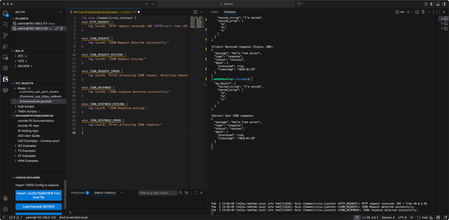
In part one, we covered JSON at a high level, got scripts working to pass JSON payload back and forth between client and server, and got the BIG-IP configured to manage this traffic. In this article, we'll start with an overview of the new JSON events, walk through an existing Tcl procedure that will print out the payload in log statements and explain the JSON:: iRules commands in play, and then we'll create a proc or two of our own to find keys in a JSON payload and log their values. But before that, we're going to have a little iRules contest at this year's AppWorld 2026 in Vegas. Are you coming? REGISTER in the AppWorld mobile app for the contest (to be released soon)...seats are limited! when CONTEST_SUBMISSION { set name [string toupper [string replace Jason 1 1 ""]] log local0. "Hey there...$name here." log local0. "You might want to speak my language: structured, nested, and curly-braced." } Some details are being withheld until we gather at AppWorld for the contest, but there just might be a hint in that psuedo-iRule code above. Crawl, Walk, Run! Crawling Let's start by crawling. With the new JSON profile, there are several new events: JSON_REQUEST JSON_REQUEST_MISSING JSON_REQUEST_ERROR JSON_RESPONSE JSON_RESPONSE_MISSING JSON_RESPONSE_ERROR From there let's craft a basic iRule to see what triggers the events. Simple log statements in each. when HTTP_REQUEST { log local0. "HTTP request received: URI [HTTP::uri] from [IP::client_addr]" } when JSON_REQUEST { log local0. "JSON Request detected successfully." } when JSON_REQUEST_MISSING { log local0. "JSON Request missing." } when JSON_REQUEST_ERROR { log local0. "Error processing JSON request. Rejecting request." } when JSON_RESPONSE { log local0. "JSON response detected successfully." } when JSON_RESPONSE_MISSING { log local0. "JSON Response missing." } when JSON_RESPONSE_ERROR { log local0. "Error processing JSON response." } Now we need some client and server payload. Thankfully we have that covered with the script I shared in part one. We just need to unleash it! I have my Visual Studio Code IDE fired up with the F5 Extension and iRules editor marketplace extensions connected to my v21 BIG-IP, I have the iRule above loaded up in the center pane, and then I have the terminal on the right pane split three ways so I can a) generate traffic in the top terminal, b) view the server request/response in the middle terminal, and c) watch the logs from BIG-IP in the bottom terminal. Handy to have all that in one view in the IDE while working. For the first pass, I'll send a request expected to work through the BIG-IP and get a response back from my test server. That command is: ./cspayload.py client --host 10.0.2.50 --port 80 And the result can be seen in the picture below (shown here to show the VS Code setup, I'll just show text going forward.) You can see that the request triggered HTTP_REQUEST, JSON_REQUEST, and JSON_RESPONSE as expected. Now, I'll send an empty payload to verify that JSON_REQUEST_MISSING will fire. The command for that is: ./cspayload1.py client --host 10.0.2.50 --port 80 --no-json We get the event triggered as expected, but interestingly, the request is still processed and sent to the backend and the response is sent back just fine. (timestamps removed) Rule /Common/irule.jsontest <HTTP_REQUEST>: HTTP request received: URI / from 10.0.2.95 Rule /Common/irule.jsontest <JSON_REQUEST_MISSING>: JSON Request missing. Rule /Common/irule.jsontest <JSON_RESPONSE>: JSON response detected successfully. My test script serverside code doesn't balk at an empty payload, but most services likely will, so you'll likely want to manage a reject or response as appropriate in this event. Now let's trigger an error by sending some invalid JSON. The command I sent is: ./cspayload1.py client --host 10.0.2.50 --port 80 --malformed-custom '{invalid: "no quotes on key"}' And that resulted in a successfully triggered JSON_REQUEST_ERROR and no payload was sent back to the backend server. Rule /Common/irule.jsontest <HTTP_REQUEST>: HTTP request received: URI / from 10.0.2.95 Rule /Common/irule.jsontest <JSON_REQUEST_ERROR>: Error processing JSON request. Rejecting request. Walking After validating our events are triggering, let's take a look at the example iRule below that will use a procedure to print out the JSON payload. when JSON_REQUEST { set json_data [JSON::root] call print $json_data } proc print { e } { set t [JSON::type $e] set v [JSON::get $e] set p0 [string repeat " " [expr {2 * ([info level] - 1)}]] set p [string repeat " " [expr {2 * [info level]}]] switch $t { array { log local0. "$p0\[" set size [JSON::array size $v] for {set i 0} {$i < $size} {incr i} { set e2 [JSON::array get $v $i] call print $e2 } log local0. "$p0\]" } object { log local0. "$p0{" set keys [JSON::object keys $v] foreach k $keys { set e2 [JSON::object get $v $k] log local0. "$p${k}:" call print $e2 } log local0. "$p0}" } string - literal { set v2 [JSON::get $e $t] log local0. "$p\"$v2\"" } default { set v2 [JSON::get $e $t] if { $v2 eq "" && $t eq "null" } { log local0. "${p}null" } elseif { $v2 == 1 && $t eq "boolean" } { log local0. "${p}true" } elseif { $v2 == 0 && $t eq "boolean" } { log local0. "${p}false" } else { log local0. "$p$v2" } } } } If you build a lot of JSON utilities, I'd recommend creating an iRule that is just a library of procedures you can call from the iRule where your application-specific logic is. In this case, it's instructional so I'll keep the proc local to the iRule. Let's take this line by line. Lines 1-4 are the logic of the iRule. Upon the JSON_REQUEST event trigger, use the JSON::root command to load the JSON payload into the json_data variable, then pass that data to the print proc to, well, print it (via log statements.) Lines 5-47 detail the print procedure. It takes the variable e (for element) and acts on that throughout the proc. Lines 6-7 set the type and value of the element to the t and v variables respectively Lines 8-9 are calculating whitespace requirements for each element's value that will be printed Lines 10-38 are conditional logic controlled by the switch statement based on the element's type set by the JSON::type command, with lines 11-19 handling an array, lines 20-29 handling an object, lines 30-33 a string or literal, and lines 34-27 the default catchall. Lines 11 - 19 cover the JSON array, which in Tcl is a list. The JSON::array size command gets the list size and iterates through each list item in the for loop. The JSON::array get command then sets the value at that index in the loop to a second element variable (e2) and recursively calls the proc to start afresh on the e2 element. Lines 20-29 cover the JSON object, which in Tcl is a key/value dictionary. The JSON::object keys command gets the keys of the element and iterates through each key. The rest of this action is identical to the JSON array with the exception here of using the JSON::object get command. Lines 30-33 cover the string and literal types. Simple action here, uses the JSON::get command with the element and type and then logs it. For lines 34-43, this is the catch all for other types. Tcl represents a null type as an empty string, and the boolean values of true and false as 1 and 0 respectively. But since we're printing out the JSON values sent, it's nice to make sure they match, so I modified the function to print a literal null as a string for that type, and a literal true/false string for their 1/0 Tcl counterparts. Otherwise, it will print as is. Ok, let's run the test and see what we see. Clientside view: ./cspayload2.py client --host 10.0.2.50 --port 80 [Client] Connecting to http://10.0.2.50:80/ [Client] Sending JSON payload (POST): { "my_string": "Hello World", "my_number": 42, "my_boolean": true, "my_null": null, "my_array": [ 1, 2, 3 ], "my_object": { "nested_string": "I'm nested", "nested_array": [ "a", "b", "c" ] } } [Client] Received response (Status: 200): { "message": "Hello from server", "type": "response", "status": "success", "data": { "processed": true, "timestamp": "2026-01-29" } } Serverside view: jrahm@udesktop:~/scripts$ ./cspayload2.py server --host 0.0.0.0 --port 8088 [Server] Starting HTTP server on 0.0.0.0:8088 [Server] Mode: Normal JSON responses [Server] Press Ctrl+C to stop [Server] Received JSON payload: { "my_string": "Hello World", "my_number": 42, "my_boolean": true, "my_null": null, "my_array": [ 1, 2, 3 ], "my_object": { "nested_string": "I'm nested", "nested_array": [ "a", "b", "c" ] } } [Server] Sent JSON response: { "message": "Hello from server", "type": "response", "status": "success", "data": { "processed": true, "timestamp": "2026-01-29" } } Resulting log statements on BIG-IP (with timestamp through rule name removed for visibility): <JSON_REQUEST>: { <JSON_REQUEST>: my_string: <JSON_REQUEST>: "Hello World" <JSON_REQUEST>: my_number: <JSON_REQUEST>: 42 <JSON_REQUEST>: my_boolean: <JSON_REQUEST>: true <JSON_REQUEST>: my_null: <JSON_REQUEST>: null <JSON_REQUEST>: my_array: <JSON_REQUEST>: [ <JSON_REQUEST>: 1 <JSON_REQUEST>: 2 <JSON_REQUEST>: 3 <JSON_REQUEST>: ] <JSON_REQUEST>: my_object: <JSON_REQUEST>: { <JSON_REQUEST>: nested_string: <JSON_REQUEST>: "I'm nested" <JSON_REQUEST>: nested_array: <JSON_REQUEST>: [ <JSON_REQUEST>: "a" <JSON_REQUEST>: "b" <JSON_REQUEST>: "c" <JSON_REQUEST>: ] <JSON_REQUEST>: } <JSON_REQUEST>: } The print procedure is shown here to include the whitespace necessary to prettify the output. Neat! Running Now that we've worked our way through the print function, let's do something useful! You might have a need to evaluate the value of a key somewhere in the JSON object and act on that. For this example, we're going to look for the nested_array key, retrieve it's value, and if an item value of b is found, reject the request by building a new JSON object to return status to the client. First, we need to build a proc we'll name find_key that is similar to the print one above to recursively search the JSON payload. While learning my way through this, I also discovered I needed to create an additional proc we'll name stringify to, well, "stringify" the values of objects because they are still encoded. stringify proc proc stringify { json_element } { set element_type [JSON::type $json_element] set element_value [JSON::get $json_element] set output "" switch -- $element_type { array { append output "\[" set array_size [JSON::array size $element_value] for {set index 0} {$index < $array_size} {incr index} { set array_item [JSON::array get $element_value $index] append output [call stringify $array_item] if {$index < $array_size - 1} { append output "," } } append output "\]" } object { append output "{" set object_keys [JSON::object keys $element_value] set key_count [llength $object_keys] set current_index 0 foreach current_key $object_keys { set nested_element [JSON::object get $element_value $current_key] append output "\"${current_key}\":" append output [call stringify $nested_element] if {$current_index < $key_count - 1} { append output "," } incr current_index } append output "}" } string - literal { set actual_value [JSON::get $json_element $element_type] append output "\"$actual_value\"" } default { set actual_value [JSON::get $json_element $element_type] append output "$actual_value" } } return $output } There really isn't any new magic in this proc, though I did expand variable names to make it a little more clear than our original example. It's basically a redo of the print function, but instead of printing it's just creating the string version of objects so I can execute a conditional against that string. Nothing new to learn, but necessary in making the find_key proc work. find_key proc proc find_key { json_element search_key } { set element_type [JSON::type $json_element] set element_value [JSON::get $json_element] switch -- $element_type { array { set array_size [JSON::array size $element_value] for {set index 0} {$index < $array_size} {incr index} { set array_item [JSON::array get $element_value $index] set result [call find_key $array_item $search_key] if {$result ne ""} { return $result } } } object { set object_keys [JSON::object keys $element_value] foreach current_key $object_keys { if {$current_key eq $search_key} { set found_element [JSON::object get $element_value $current_key] set found_type [JSON::type $found_element] if {$found_type eq "object" || $found_type eq "array"} { set found_value [call stringify $found_element] } else { set found_value [JSON::get $found_element $found_type] } return $found_value } set nested_element [JSON::object get $element_value $current_key] set result [call find_key $nested_element $search_key] if {$result ne ""} { return $result } } } } return "" } In the find_key proc, the magic happens in line 10 for a JSON array (Tcl list) and in lines 18-32 for a JSON object (Tcl dictionary.) Nothing new in the use of the JSON commands, but rather than printing all the keys and values found, we're looking for a specific key so we can return its value. For the array we are iterating through list items that will have a single value, but that value might be an object that needs to be stringified. For the object, we need to iterate through all the keys and their values, also which might be objects or nested objects to be stringified. Recursion for the win! Hopefull you're starting to get the hang of using all the interrogating JSON commands we've covered, because now wer'e going to create something with some new commands! iRule logic Once we have the procs defined to handle their specific jobs, the iRule to find the key and then return the rejected status message becomes much cleaner: when JSON_REQUEST priority 500 { set json_data [JSON::root] if {[call find_key $json_data "nested_array"] contains "b" } { set cache [JSON::create] set rootval [JSON::root $cache] JSON::set $rootval object set obj [JSON::get $rootval object] JSON::object add $obj "[IP::client_addr] status" string "rejected" set rendered [JSON::render $cache] log local0. "$rendered" HTTP::respond 200 content $rendered "Content-Type" "application/json" } } Let's walk through this one line by line. Lines 1 and 13 wrap the JSON_REQUEST payload. Line 2 retrieves the current JSON::root, which is our payload, and stores it in the json_data variable. Lines 3 and 12 wrap the if conditional, which is using our find_key proc to look for the nested_array key, and if that stringified value includes b, reject the response. (in real life looking for "b" would be a terrible contains pattern to look for, but go with me here.) Line 4 creates a JSON context for the system. Think of this as a container we're going to do JSON stuff in. Line 5 gets the root element of our JSON container. At this point it's empty, we're just getting a handle to whatever will be at the top level. Line 6 now actually adds an object to the JSON container. At this point, it's just "{ }". Line 7 gets the handle of that object we just created so we can do something with it. Line 8 adds the key value pair of "status" and our reject message. Line 9 now takes the entire JSON context we just created and renders it to a JSON string we can log and respond with. Line 10 logs to /var/log/ltm Line 11 responds with the reject message in JSON format. Note I'm using a 200 error code instead of a 403. That's just because the cilent test script won't show the status message with a 403 and I wanted to see it. Normally you'd use the appropriate error code. Now, I offer you a couple challenges. lines 4-9 in the JSON_REQUEST example above should really be split off to become another proc, so that the logic of the JSON_REQUEST is laser-focused. How would YOU write that proc, and how would you call it from the JSON_REQUEST event? The find_key proc works, but there's a Tcl-native way to get at that information with just the JSON::object subcommands that is far less complex and more performant. Come at me! Conclusion When I started this JSON article series, I knew A LOT less about the underlying basics of JSON than I thought I knew. It's funny how working with things on the wire requires a little more insight into protocols and data formats than you think you need. Happy iRuling out there, and I hope to see you at AppWorld next month!279Views4likes0CommentsManaging Model Context Protocol in iRules - Part 3
In part 2 of this series, we took a look at a couple iRules use cases that do not require the json or sse profiles and don't capitalize on the new JSON commands and events introduced in the v21 release. That changes now! In this article, we'll take a look at two use cases for logging MCP activity and removing MCP tools from a servers tool list. Event logging This iRule logs various HTTP, SSE, and JSON-related events for debugging and monitoring purposes. It provides clear visibility into request/response flow and detects anomalies or errors. How it works HTTP_REQUEST Logs each HTTP request with its URI and client IP. Example: "HTTP request received: URI /example from 192.168.1.1" SSE_RESPONSE Logs when a Server-Sent Event (SSE) response is identified. Example: "SSE response detected successfully." JSON_REQUEST and JSON_RESPONSE Logs when valid JSON requests or responses are detected Examples: "JSON Request detected successfully" JSON Response detected successfully" JSON_REQUEST_MISSING and JSON_RESPONSE_MISSING Logs if JSON payloads are missing from requests or responses. Examples: "JSON Request missing." "JSON Response missing." JSON_REQUEST_ERROR and JSON_RESPONSE_ERROR Logs when there are errors in parsing JSON during requests or responses. Examples: "Error processing JSON request. Rejecting request." "Error processing JSON response." iRule: Event Logging when HTTP_REQUEST { # Log the event (for debugging) log local0. "HTTP request received: URI [HTTP::uri] from [IP::client_addr]" when SSE_RESPONSE { # Triggered when a Server-Sent Event response is detected log local0. "SSE response detected successfully." } when JSON_REQUEST { # Triggered when the JSON request is detected log local0. "JSON Request detected successfully." } when JSON_RESPONSE { # Triggered when a Server-Sent Event response is detected log local0. "JSON response detected successfully." } when JSON_RESPONSE_MISSING { # Triggered when the JSON payload is missing from the server response log local0. "JSON Response missing." } when JSON_REQUEST_MISSING { # Triggered when the JSON is missing or can't be parsed in the request log local0. "JSON Request missing." } when JSON_RESPONSE_ERROR { # Triggered when there's an error in the JSON response processing log local0. "Error processing JSON response." #HTTP::respond 500 content "Invalid JSON response from server." } when JSON_REQUEST_ERROR { # Triggered when an error occurs (e.g., malformed JSON) during JSON processing log local0. "Error processing JSON request. Rejecting request." #HTTP::respond 400 content "Malformed JSON payload. Please check your input." } MCP tool removal This iRule modifies server JSON responses by removing disallowed tools from the result.tools array while logging detailed debugging information. How it works JSON parsing and logging print procedure - recursively traverses and logs the JSON structure, including arrays, objects, strings, and other types. jpath procedure - extracts values or JSON elements based on a provided path, allowing targeted retrieval of nested properties. JSON response handling When JSON_RESPONSE is triggered: Logs the root JSON object and parses it using JSON::root. Extracts the tools array from result.tools. Tool removal logic Iterates over the tools array and retrieves the name of each tool. If the tool name matches start-notification-stream: Removes it from the array using JSON::array remove. Logs that the tool is not allowed. If the tool does not match: Logs that the tool is allowed and moves to the next one. Logging information Logs all JSON structures and actions: Full JSON structure. Extracted tools array. Tools allowed or removed. Input JSON Response { "result": { "tools": [ {"name": "start-notification-stream"}, {"name": "allowed-tool"} ] } } Modified Response { "result": { "tools": [ {"name": "allowed-tool"} ] } } iRule: Remove tool list # Code to check JSON and print in logs proc print { e } { set t [JSON::type $e] set v [JSON::get $e] set p0 [string repeat " " [expr {2 * ([info level] - 1)}]] set p [string repeat " " [expr {2 * [info level]}]] switch $t { array { log local0. "$p0\[" set size [JSON::array size $v] for {set i 0} {$i < $size} {incr i} { set e2 [JSON::array get $v $i] call print $e2 } log local0. "$p0\]" } object { log local0. "$p0{" set keys [JSON::object keys $v] foreach k $keys { set e2 [JSON::object get $v $k] log local0. "$p${k}:" call print $e2 } log local0. "$p0}" } string - literal { set v2 [JSON::get $e $t] log local0. "$p\"$v2\"" } default { set v2 [JSON::get $e $t] log local0. "$p$v2" } } } proc jpath { e path {d .} } { if { [catch {set v [call jpath2 $e $path $d]} err] } { return "" } return $v } proc jpath2 { e path {d .} } { set parray [split $path $d] set plen [llength $parray] set i 0 for {} {$i < [expr {$plen }]} {incr i} { set p [lindex $parray $i] set t [JSON::type $e] set v [JSON::get $e] if { $t eq "array" } { # array set e [JSON::array get $v $p] } else { # object set e [JSON::object get $v $p] } } set t [JSON::type $e] set v [JSON::get $e $t] return $v } # Modify in response when JSON_RESPONSE { log local0. "JSON::root" set root [JSON::root] call print $root set tools [call jpath $root result.tools] log local0. "root = $root tools= $tools" if { $tools ne "" } { log local0. "TOOLS not empty" set i 0 set block_tool "start-notification-stream" while { $i < 100 } { set name [call jpath $root result.tools.${i}.name] if { $name eq "" } { break } if { $name eq $block_tool } { log local0. "tool $name is not alowed" JSON::array remove $tools $i } else { log local0. "tool $name is alowed" incr i } } } else { log local0. "no tools" } } Conclusion This not only concludes the article, but also this introductory series on managing MCP in iRules. Note that all these commands handle all things JSON, so you are not limited to MCP contexts. We look forward to what the community will build (and hopefully share back) with this new functionality! NOTE: This series is ghostwritten. Awaiting permission from original author to credit.335Views2likes0CommentsManaging Model Context Protocol in iRules - Part 2
In the first article in this series, we took a look at what Model Context Protocol (MCP) is, and how to get the F5 BIG-IP set up to manage it with iRules. In this article, we'll take a look at the first couple of use cases with session persistence and routing. Note that the use cases in this article do not require the json or sse profiles to work. That will change in part 3. Session persistence and routing This iRule ensures session persistence and traffic routing for three endpoints: /sse, /messages, and /mcp. It injects routing information (f5Session) via query parameters or headers, processes them for routing to specific pool members, and transparently forwards requests to the server. How it works Client sends HTTP GET request to SSE endpoint of server (typically /sse): GET /sse HTTP/1.1 Server responds 200 OK with an SSE event stream. It includes an SSE message with an "event" field of "endpoint", which provides the client with a URI where all its future HTTP requests must be sent. This is where servers might include a session ID: event: endpoint data: /messages?sessionId=abcd1234efgh5678 NOTE: the MCP spec does not specify how a session ID can be encoded in the endpoint here. While we have only seen use of a sessionId query parameter, theoretically a server could implement its session Ids with any arbitrary query parameter name, or even as part of the path like this: event: endpoint data: /messages/abcd1234efgh5678 Our iRule can take advantage of this mechanism by injecting a query parameter into this path that tells us which server we should persist future requests to. So when we forward the SSE message to the client, it looks something like this: event: endpoint data: /messages?f5Session=some_pool_name,10.10.10.5:8080&sessionId=abcd1234efgh5678 or event: endpoint data: /messages/abcd1234efgh5678?f5Session=some_pool_name,10.10.10.5:8080 When the client sends a subsequent HTTP request, it will use this endpoint. Thus, when processing HTTP requests, we can read the f5Session secret we inserted earlier, route to that pool member, and then remove our secret before forwarding the request to the server using the original endpoint/sessionId it provided. Load Balancing when HTTP_REQUEST { set is_req_to_sse_endpoint false # Handle requests to `/sse` (Server-Sent Event endpoint) if { [HTTP::path] eq "/sse" } { set is_req_to_sse_endpoint true return } # Handle `/messages` endpoint persistence query processing if { [HTTP::path] eq "/messages" } { set query_string [HTTP::query] set f5_sess_found false set new_query_string "" set query_separator "" set queries [split $query_string "&"] ;# Split query string into individual key-value pairs foreach query $queries { if { $f5_sess_found } { append new_query_string "${query_separator}${query}" set query_separator "&" } elseif { [string match "f5Session=*" $query] } { # Parse `f5Session` for persistence routing set pmbr_info [string range $query 10 end] set pmbr_parts [split $pmbr_info ","] if { [llength $pmbr_parts] == 2 } { set pmbr_tuple [split [lindex $pmbr_parts 1] ":"] if { [llength $pmbr_tuple] == 2 } { pool [lindex $pmbr_parts 0] member [lindex $pmbr_parts 1] set f5_sess_found true } else { HTTP::respond 404 noserver return } } else { HTTP::respond 404 noserver return } } else { append new_query_string "${query_separator}${query}" set query_separator "&" } } if { $f5_sess_found } { HTTP::query $new_query_string } else { HTTP::respond 404 noserver } return } # Handle `/mcp` endpoint persistence via session header if { [HTTP::path] eq "/mcp" } { if { [HTTP::header exists "Mcp-Session-Id"] } { set header_value [HTTP::header "Mcp-Session-Id"] set header_parts [split $header_value ","] if { [llength $header_parts] == 3 } { set pmbr_tuple [split [lindex $header_parts 1] ":"] if { [llength $pmbr_tuple] == 2 } { pool [lindex $header_parts 0] member [lindex $header_parts 1] HTTP::header replace "Mcp-Session-Id" [lindex $header_parts 2] } else { HTTP::respond 404 noserver } } else { HTTP::respond 404 noserver } } } } when HTTP_RESPONSE { # Persist session for MCP responses if { [HTTP::header exists "Mcp-Session-Id"] } { set pool_member [LB::server pool],[IP::remote_addr]:[TCP::remote_port] set header_value [HTTP::header "Mcp-Session-Id"] set new_header_value "$pool_member,$header_value" HTTP::header replace "Mcp-Session-Id" $new_header_value } # Inject persistence information into response payloads for Server-Sent Events if { $is_req_to_sse_endpoint } { set sse_data [HTTP::payload] ;# Get the SSE payload # Extract existing query params from the SSE response set old_queries [URI::query $sse_data] if { [string length $old_queries] == 0 } { set query_separator "" } else { set query_separator "&" } # Insert `f5Session` persistence information into query set new_query "f5Session=[URI::encode [LB::server pool],[IP::remote_addr]:[TCP::remote_port]]" set new_payload "?${new_query}${query_separator}${old_queries}" # Replace the payload in the SSE response HTTP::payload replace 0 [string length $sse_data] $new_payload } } Persistence when CLIENT_ACCEPTED { # Log when a new TCP connection arrives (useful for debugging) log local0. "New TCP connection accepted from [IP::client_addr]:[TCP::client_port]" } when HTTP_REQUEST { # Check if this might be an SSE request by examining the Accept header if {[HTTP::header exists "Accept"] && [HTTP::header "Accept"] contains "text/event-stream"} { log local0. "SSE Request detected from [IP::client_addr] to [HTTP::uri]" # Insert a custom persistence key (optional) set sse_persistence_key "[IP::client_addr]:[HTTP::uri]" persist uie $sse_persistence_key } } when HTTP_RESPONSE { # Ensure this is an SSE connection by checking the Content-Type if {[HTTP::header exists "Content-Type"] && [HTTP::header "Content-Type"] equals "text/event-stream"} { log local0. "SSE Response detected for [IP::client_addr]. Enabling persistence." # Use the same persistence key for the response persist add uie $sse_persistence_key } } Conclusion Thank you for your patience! Now is the time to continue on to part 3 where we'll finally get into the new JSON commands and events added in version 21! NOTE: This series is ghostwritten. Awaiting permission from original author to credit.253Views3likes0CommentsManaging Model Context Protocol in iRules - Part 1
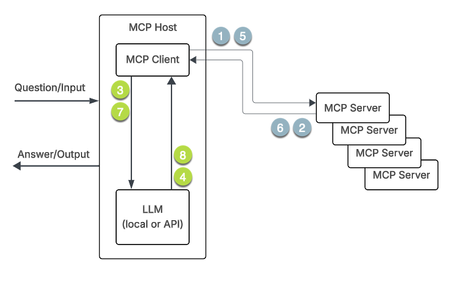
The Model Context Protocol (MCP) was introduced by Anthropic in November of 2024, and has taken the industry by storm since. MCP provides a standardized way for AI applications to connect with external data sources and tools through a single protocol, eliminating the need for custom integrations for each service and enabling AI systems to dynamically discover and use available capabilities. It's gained rapid industry adoption because major model providers and numerous IDE and tool makers have embraced it as an open standard, with tens of thousands of MCP servers built and widespread recognition that it mostly solves the fragmented integration challenge that previously plagued AI development. In this article, we'll take a look at the MCP components, how MCP works, and how you can use the JSON iRules events and commands introduced in version 21 to control the messsaging between MCP clients and servers. MCP components Host The host is the AI application where the LLM logic resides, such as Claude Desktop, AI-powered IDEs like Cursor, Open WebUI with the mcpo proxy like in our AI Step-by-Step labs, or via custom agentic systems that receive user requests and orchestrate the overall interaction. Client The client exists within the host application and maintains a one-to-one connection with each MCP server, converting user requests into the structured format that the protocol can process and managing session details like timeouts and reconnects. Server Servers are lightweight programs that expose data and functionality from external systems, whether internal databases or external APIs, allowing connections to both local and remote resources. Multiple clients can exist within a host, but each client has a dedicated (or perceived in the case of using a proxy) 1:1 relationship with an MCP server. MCP servers expose three main types of capabilities: Resources - information retrieval without executing actions Tools - performing side effects like calculations or API requests Prompts - reusable templates and workflows for LLM-server communication Message format (JSON-RPC) The transport layer between clients and servers uses JSON-RPC format for two-way message conversion, allowing the transport of various data structures and their processing rules. This enforces a consistent request/response format across all tools, so applications don't have to handle different response types for different services. Transport options MCP supports three standard transport mechanisms: stdio (standard input/output for local connections), Server-Sent Events (SSE for remote connections with separate endpoints for requests and responses), and Streamable HTTP (a newer method introduced in March 2025 that uses a single HTTP endpoint for bidirectional messaging). NOTE: SSE transport has been deprecated as of protocol version 2024-11-05 and replaced by Streamable HTTP, which addresses limitations like lack of resumable streams and the need to maintain long-lived connections, though SSE is still supported for backward compatibility. MCP workflow Pictures tell a compelling story. First, the diagram. The steps in the diagram above are as follows: The MCP client requests capabilities from the MCP server The MCP server provides a list of available tools and services the MCP client sends the question and the retrieved MCP server tools and services to the LLM The LLM specifies which tools and services to use. The MCP client calls the specific tool or service The MCP server returns the result/context to the MCP client The MCP client passes the result/context to the LLM The LLM uses the result/context to prepare the answer iRules MCP-based use cases There are a bunch of use cases for MCP handling, such as: Load-balancing of MCP traffic across MCP Servers High availability of the MCP Servers MCP message validation on behalf of MCP servers MCP protocol inspection and payload modification Monitoring the MCP Servers' health and their transport protocol status. In case of any error in MCP request and response, BIG-IP should be able to detect and report to the user Optimization Profiles Support Use OneConnect Profile Use Compression Profile Security support for MCP servers. There are no native features for this yet, but you can build your own secure business logic into the iRules logic for now. LTM profiles Configuring MCP involves creating two profiles - an SSE profile and a JSON profile - and then attaching them to a virtual server. The SSE profile is for backwards compatibility should you need it in your MCP client/server environment. The defaults for these profiles are shown below. [root@ltm21a:Active:Standalone] config # tmsh list ltm profile sse all-properties ltm profile sse sse { app-service none defaults-from none description none max-buffered-msg-bytes 65536 max-field-name-size 1024 partition Common } [root@ltm21a:Active:Standalone] config # tmsh list ltm profile json all-properties ltm profile json json { app-service none defaults-from none description none maximum-bytes 65536 maximum-entries 2048 maximum-non-json-bytes 32768 partition Common } These can be tuned down from these maximums by creating custom profiles that will meet the needs of your environment, for example (without all properties like above): [root@ltm21a:Active:Standalone] config # tmsh create ltm profile sse sse_test_env max-buffered-msg-bytes 1000 max-field-name-size 500 [root@ltm21a:Active:Standalone] config # tmsh create ltm profile json json_test_env maximum-bytes 3000 maximum-entries 1000 maximum-non-json-bytes 2000 [root@ltm21a:Active:Standalone] config # tmsh list ltm profile sse sse_test_env ltm profile sse sse_test_env { app-service none max-buffered-msg-bytes 1000 max-field-name-size 500 } [root@ltm21a:Active:Standalone] config # tmsh list ltm profile json json_test_env ltm profile json json_test_env { app-service none maximum-bytes 3000 maximum-entries 1000 maximum-non-json-bytes 2000 } NOTE: Both profiles have database keys that can be temporarily enabled for troubleshooting purposes. The keys are log.sse.level and log.json.level. You can set the value for one or both to debug. Do not leave them in debug mode! Conclusion Now that we have the laid the foundation, continue on to part 2 where we'll look at the first two use cases. NOTE: This series is ghostwritten. Awaiting permission from original author to credit.462Views3likes1CommentiCall Triggers - Invalidating Cache from iRules
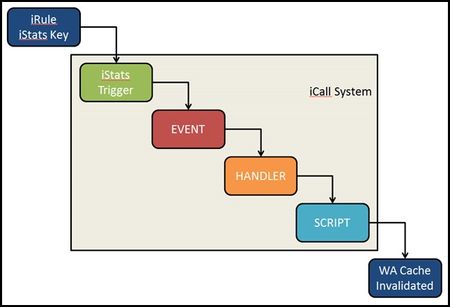
iCall is BIG-IP's all new (as of BIG-IP version 11.4) event-based automation system for the control plane. Previously, I wrote up the iCall system overview, as well as an article on the use of a periodic handler for automating backups. This article will feature the use of the triggered iCall handler to allow a user to submit a http request to invalidate the cache served up for an application managed by the Application Acceleration Manager. Starting at the End Before we get to the solution, I'd like to address the use case for invalidating cache. In many cases, the team responsible for an application's health is not the network services team which is the typical point of access to the BIG-IP. For large organizations with process overhead in generating tickets, invalidating cache can take time. A lot of time. So the request has come in quite frequently..."How can I invalidate cache remotely?" Or even more often, "Can I invalidate cache from an iRule?" Others have approached this via script, and it has been absolutely possible previously with iRules, albeit through very ugly and very-not-recommended ways. In the end, you just need to issue one TMSH command to invalidate the cache for a particular application: tmsh::modify wam application content-expiration-time now So how do we get signal from iRules to instruct BIG-IP to run a TMSH command? This is where iCall trigger handlers come in. Before we hope back to the beginning and discuss the iRule, the process looks like this: Back to the Beginning The iStats interface was introduced in BIG-IP version 11 as a way to make data accessible to both the control and data planes. I'll use this to pass the data to the control plane. In this case, the only data I need to pass is to set a key. To set an iStats key, you need to specify : Class Object Measure type (counter, gauge, or string) Measure name I'm not measuring anything, so I'll use a string starting with "WA policy string" and followed by the name of the policy. You can be explicit or allow the users to pass it in a query parameter as I'm doing in this iRule below: when HTTP_REQUEST { if { [HTTP::path] eq "/invalidate" } { set wa_policy [URI::query [HTTP::uri] policy] if { $wa_policy ne "" } { ISTATS::set "WA policy string $wa_policy" 1 HTTP::respond 200 content "App $wa_policy cache invalidated." } else { HTTP::respond 200 content "Please specify a policy /invalidate?policy=policy_name" } } } Setting the key this way will allow you to create as many triggers as you have policies. I'll leave it as an exercise for the reader to make that step more dynamic. Setting the Trigger With iStats-based triggers, you need linkage to bind the iStats key to an event-name, wacache in my case. You can also set thresholds and durations, but again since I am not measuring anything, that isn't necessary. sys icall istats-trigger wacache_trigger_istats { event-name wacache istats-key "WA policy string wa_policy_name" } Creating the Script The script is very simple. Clear the cache with the TMSH command, then remove the iStats key. sys icall script wacache_script { app-service none definition { tmsh::modify wam application dc.wa_hero content-expiration-time now exec istats remove "WA policy string wa_policy_name" } description none events none } Creating the Handler The handler is the glue that binds the event I created in the iStats trigger. When the handler sees an event named wacache, it'll execute the wacache_script iCall script. sys icall handler triggered wacache_trigger_handler { script wacache_script subscriptions { messages { event-name wacache } } } Notes on Testing Add this command to your arsenal - tmsh generate sys icall event <event-name> context none</event-name> where event-name in my case is wacache. This allows you to troubleshoot the handler and script without worrying about the trigger. And this one - tmsh modify sys db log.evrouted.level value Debug. Just note that the default is Notice when you're all done troubleshooting.2KViews0likes6Comments
A Simple One-way Generic MRF Implementation to load balance syslog message
The BIG-IP Generic Message Protocol implements a protocol filter compatible with MRF (Message Routing Framework). MRF is designed to implement the most complex use cases, but it can be daunting if you need to create a simple configuration. This article provides a simple baseline to understand the relationships of the MRF components and how they can be combined for a simple one way implementation . A production implementation will in most case be more complex. The following virtual, profiles and iRules load balances a one way stream of new line delimited messages (in this case syslog) to a pool of message consumers. The messages will be parsed and distributed with a simple MLB protocol. Return traffic will not be returned to the client with this configuration. To implement this we will need these configuration objects: Virtual Server - Accepts incoming traffic and configure the Generic Protocol Generic Protocol - Defines message parsing. Generic Router - Configures message routing and point to the Generic Route Generic Route - Points to a Generic Peer Generic Peer - Defines an LTM pool members and points to the Generic Transport Config Generic Transport Config - Defines the server side protocol and server side irule iRule - Defines the message peers (Connections in the message streams) In this case we have a single client that is sending messages to a virtual server that will then be distributed to 3 pool members. Each message will be sent to one pool member only. This can only be configured from the CLI and the official F5 recommendation is to not make any changes in the web GUI to the virtual server. This was tested with BIG-IP 12.1.3.5 and 14.1.2.6. Here is the virtual with a tcp profile and required protocol and routing profiles along with an iRule to setup the connection peer on the client side. ltm virtual /Common/mrftest_simple { destination /Common/10.10.20.201:515 ip-protocol tcp mask 255.255.255.255 profiles { /Common/simple_syslog_protocol { } /Common/simple_syslog_router { } /Common/tcp { } } rules { /Common/mrf_simple } source 0.0.0.0/0 source-address-translation { type automap } translate-address enabled translate-port enabled } The first profile is the protocol. The only difference between the default protocol (genericmsg) is the field no-response must be configured to yes if this is a one way stream. Otherwise the server side will allocate buffers for return traffic that will cause severe free memory depletion. ltm message-routing generic protocol simple_syslog_protocol { app-service none defaults-from genericmsg description none disable-parser no max-egress-buffer 32768 max-message-size 32768 message-terminator %0a no-response yes } The Generic Router profile points to a generic route ltm message-routing generic router simple_syslog_router { app-service none defaults-from messagerouter description none ignore-client-port no max-pending-bytes 23768 max-pending-messages 64 mirror disabled mirrored-message-sweeper-interval 1000 routes { simple_syslog_route } traffic-group traffic-group-1 use-local-connection yes } The Generic Route points to the Generic Peer: ltm message-routing generic route simple_syslog_route { peers { simple_syslog_peer } } The Generic Peer configures the server pool and points to the Generic Transport Config. Note the pool is configured here instead of the more common configuration in the virtual server. ltm message-routing generic peer simple_syslog_peer { pool mrfpool transport-config simple_syslog_tcp_tc } The Generic Transport Config also has the Generic Protocol configured along with the iRule to setup the server side peers. ltm message-routing generic transport-config simple_syslog_tcp_tc { ip-protocol tcp profiles { simple_syslog_protocol { } tcp { } } rules { mrf_simple } } An iRule must be configured on both the Virtual Server and Generic Transport Config. This iRule must be linked as a profile in both the virtual server and generic transport configuration. ltm rule /Common/mrf_simple { when CLIENT_ACCEPTED { GENERICMESSAGE::peer name "[IP::local_addr]:[TCP::local_port]_[IP::remote_addr]:[TCP::remote_port]" } when SERVER_CONNECTED { GENERICMESSAGE::peer name "[IP::local_addr]:[TCP::local_port]_[IP::remote_addr]:[TCP::remote_port]" } } This example is from a user case where a single syslog client was load balanced to multiple syslog server pool members. Messages are parsed with the newline (0x0a) character as configured in the generic protocol, but this can easily be adapted to other message types.2.6KViews2likes4CommentsSSL Orchestrator Service Extensions: DoH Guardian
SSL Orchestrator Service Extensions provide a powerful new way to add a programmable inspection service object directly inside the service chain enabling enormous possibilities for additional security value without additional, external tooling. DoH Guardian is one implementation of Service Extensions that logs and manages decrypted outbound DNS-over-HTTPS traffic, and detects potentially malicious DoH anomalies include data exfiltration attacks.517Views2likes0Comments
Multiple Certs, One VIP: TLS Server Name Indication via iRules
An age old question that we’ve seen time and time again in the iRules forums here on DevCentral is “How can I use iRules to manage multiple SSL certs on one VIP"?”. The answer has always historically been “I’m sorry, you can’t.”. The reasoning is sound. One VIP, one cert, that’s how it’s always been. You can’t do anything with the connection until the handshake is established and decryption is done on the LTM. We’d like to help, but we just really can’t. That is…until now. The TLS protocol has somewhat recently provided the ability to pass a “desired servername” as a value in the originating SSL handshake. Finally we have what we’ve been looking for, a way to add contextual server info during the handshake, thereby allowing us to say “cert x is for domain x” and “cert y is for domain y”. Known to us mortals as "Server Name Indication" or SNI (hence the title), this functionality is paramount for a device like the LTM that can regularly benefit from hosting multiple certs on a single IP. We should be able to pull out this information and choose an appropriate SSL profile now, with a cert that corresponds to the servername value that was sent. Now all we need is some logic to make this happen. Lucky for us, one of the many bright minds in the DevCentral community has whipped up an iRule to show how you can finally tackle this challenge head on. Because Joel Moses, the shrewd mind and DevCentral MVP behind this example has already done a solid write up I’ll quote liberally from his fine work and add some additional context where fitting. Now on to the geekery: First things first, you’ll need to create a mapping of which servernames correlate to which certs (client SSL profiles in LTM’s case). This could be done in any manner, really, but the most efficient both from a resource and management perspective is to use a class. Classes, also known as DataGroups, are name->value pairs that will allow you to easily retrieve the data later in the iRule. Quoting Joel: Create a string-type datagroup to be called "tls_servername". Each hostname that needs to be supported on the VIP must be input along with its matching clientssl profile. For example, for the site "testsite.site.com" with a ClientSSL profile named "clientssl_testsite", you should add the following values to the datagroup. String: testsite.site.com Value: clientssl_testsite Once you’ve finished inputting the different server->profile pairs, you’re ready to move on to pools. It’s very likely that since you’re now managing multiple domains on this VIP you'll also want to be able to handle multiple pools to match those domains. To do that you'll need a second mapping that ties each servername to the desired pool. This could again be done in any format you like, but since it's the most efficient option and we're already using it, classes make the most sense here. Quoting from Joel: If you wish to switch pool context at the time the servername is detected in TLS, then you need to create a string-type datagroup called "tls_servername_pool". You will input each hostname to be supported by the VIP and the pool to direct the traffic towards. For the site "testsite.site.com" to be directed to the pool "testsite_pool_80", add the following to the datagroup: String: testsite.site.com Value: testsite_pool_80 If you don't, that's fine, but realize all traffic from each of these hosts will be routed to the default pool, which is very likely not what you want. Now then, we have two classes set up to manage the mappings of servername->SSLprofile and servername->pool, all we need is some app logic in line to do the management and provide each inbound request with the appropriate profile & cert. This is done, of course, via iRules. Joel has written up one heck of an iRule which is available in the codeshare (here) in it's entirety along with his solid write-up, but I'll also include it here in-line, as is my habit. Effectively what's happening is the iRule is parsing through the data sent throughout the SSL handshake process and searching for the specific TLS servername extension, which are the bits that will allow us to do the profile switching magic. He's written it up to fall back to the default client SSL profile and pool, so it's very important that both of these things exist on your VIP, or you may likely find yourself with unhappy users. One last caveat before the code: Not all browsers support Server Name Indication, so be careful not to implement this unless you are very confident that most, if not all, users connecting to this VIP will support SNI. For more info on testing for SNI compatibility and a list of browsers that do and don't support it, click through to Joel's awesome CodeShare entry, I've already plagiarized enough. So finally, the code. Again, my hat is off to Joel Moses for this outstanding example of the power of iRules. Keep at it Joel, and thanks for sharing! when CLIENT_ACCEPTED { if { [PROFILE::exists clientssl] } { # We have a clientssl profile attached to this VIP but we need # to find an SNI record in the client handshake. To do so, we'll # disable SSL processing and collect the initial TCP payload. set default_tls_pool [LB::server pool] set detect_handshake 1 SSL::disable TCP::collect } else { # No clientssl profile means we're not going to work. log local0. "This iRule is applied to a VS that has no clientssl profile." set detect_handshake 0 } } when CLIENT_DATA { if { ($detect_handshake) } { # If we're in a handshake detection, look for an SSL/TLS header. binary scan [TCP::payload] cSS tls_xacttype tls_version tls_recordlen # TLS is the only thing we want to process because it's the only # version that allows the servername extension to be present. When we # find a supported TLS version, we'll check to make sure we're getting # only a Client Hello transaction -- those are the only ones we can pull # the servername from prior to connection establishment. switch $tls_version { "769" - "770" - "771" { if { ($tls_xacttype == 22) } { binary scan [TCP::payload] @5c tls_action if { not (($tls_action == 1) && ([TCP::payload length] > $tls_recordlen)) } { set detect_handshake 0 } } } default { set detect_handshake 0 } } if { ($detect_handshake) } { # If we made it this far, we're still processing a TLS client hello. # # Skip the TLS header (43 bytes in) and process the record body. For TLS/1.0 we # expect this to contain only the session ID, cipher list, and compression # list. All but the cipher list will be null since we're handling a new transaction # (client hello) here. We have to determine how far out to parse the initial record # so we can find the TLS extensions if they exist. set record_offset 43 binary scan [TCP::payload] @${record_offset}c tls_sessidlen set record_offset [expr {$record_offset + 1 + $tls_sessidlen}] binary scan [TCP::payload] @${record_offset}S tls_ciphlen set record_offset [expr {$record_offset + 2 + $tls_ciphlen}] binary scan [TCP::payload] @${record_offset}c tls_complen set record_offset [expr {$record_offset + 1 + $tls_complen}] # If we're in TLS and we've not parsed all the payload in the record # at this point, then we have TLS extensions to process. We will detect # the TLS extension package and parse each record individually. if { ([TCP::payload length] >= $record_offset) } { binary scan [TCP::payload] @${record_offset}S tls_extenlen set record_offset [expr {$record_offset + 2}] binary scan [TCP::payload] @${record_offset}a* tls_extensions # Loop through the TLS extension data looking for a type 00 extension # record. This is the IANA code for server_name in the TLS transaction. for { set x 0 } { $x < $tls_extenlen } { incr x 4 } { set start [expr {$x}] binary scan $tls_extensions @${start}SS etype elen if { ($etype == "00") } { # A servername record is present. Pull this value out of the packet data # and save it for later use. We start 9 bytes into the record to bypass # type, length, and SNI encoding header (which is itself 5 bytes long), and # capture the servername text (minus the header). set grabstart [expr {$start + 9}] set grabend [expr {$elen - 5}] binary scan $tls_extensions @${grabstart}A${grabend} tls_servername set start [expr {$start + $elen}] } else { # Bypass all other TLS extensions. set start [expr {$start + $elen}] } set x $start } # Check to see whether we got a servername indication from TLS. If so, # make the appropriate changes. if { ([info exists tls_servername] ) } { # Look for a matching servername in the Data Group and pool. set ssl_profile [class match -value [string tolower $tls_servername] equals tls_servername] set tls_pool [class match -value [string tolower $tls_servername] equals tls_servername_pool] if { $ssl_profile == "" } { # No match, so we allow this to fall through to the "default" # clientssl profile. SSL::enable } else { # A match was found in the Data Group, so we will change the SSL # profile to the one we found. Hide this activity from the iRules # parser. set ssl_profile_enable "SSL::profile $ssl_profile" catch { eval $ssl_profile_enable } if { not ($tls_pool == "") } { pool $tls_pool } else { pool $default_tls_pool } SSL::enable } } else { # No match because no SNI field was present. Fall through to the # "default" SSL profile. SSL::enable } } else { # We're not in a handshake. Keep on using the currently set SSL profile # for this transaction. SSL::enable } # Hold down any further processing and release the TCP session further # down the event loop. set detect_handshake 0 TCP::release } else { # We've not been able to match an SNI field to an SSL profile. We will # fall back to the "default" SSL profile selected (this might lead to # certificate validation errors on non SNI-capable browsers. set detect_handshake 0 SSL::enable TCP::release } } }4.6KViews0likes18CommentsiRule Editor - Auto Connection
In the latest release of the iRule Editor v 0.10.1, I added several new features. This tutorial will walk through the Auto Connection features I've added that allow you to supply command line arguments to have the iRule editor automatically connect to your specified BIG-IP. Usage: iRuler.exe [args] args ----------- /h hostname - the hostname (or ip) of your BIG-IP /u username - the admin username /p password - the admin password The following video will walk you through the steps to auto connect from the command line as well as how to create a desktop shortcut to each of your BIG-IP systems.477Views0likes2Comments