government
59 TopicsDeploying F5 BIG-IP HA into AWS GovCloud
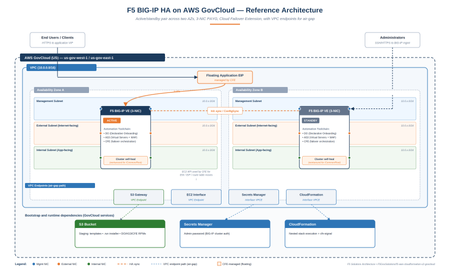
This guide provides a walk-through for deploying an active/standby F5 BIG-IP High Availability (HA) cluster within AWS GovCloud (US) using the AWS Console. Code Repository: F5GovSolutions/f5-aws-cloudformation-v2-govcloud While the repository's examples/failover/GOVCLOUD-GUIDE.md handles the exact AWS CLI workflows, this document serves as the web console companion. The Partition Problem The upstream commercial F5 templates (F5Networks/f5-aws-cloudformation-v2) assume a standard AWS commercial partition. Pointing those unmodified templates at GovCloud breaks deployment for three distinct reasons: Partition Isolation (aws-us-gov): GovCloud uses unique ARNs, regional endpoints, and an entirely separate AMI catalog. Furthermore, CloudFormation mandates that a parent stack's nested templates reside in an S3 bucket within the exact same region and partition. CloudFormation cannot fetch objects across partitions, meaning all templates must be pre-staged in a local GovCloud bucket. Air-Gapped Realities: In isolated enclaves with no internet egress, a booting BIG-IP cannot pull the runtime-init installer or Automation Toolchain RPMs from public GitHub repositories or F5 CDNs. Everything must be hosted locally inside an S3 bucket, accessible via VPC Gateway and Interface endpoints. The 17.x Clustering Bug: On the BIG-IP 17.x code train, a startup-timing condition occasionally prevents the local device-trust domain (/Common/Root) from initializing properly on first boot. When this occurs, Declarative Onboarding (DO) cannot establish the trust domain or failover group, leaving both nodes deadlocked. This modified template embeds an automated, non-blocking self-heal script to orchestrate the recovery process without manual intervention. What it deploys The root template (failover.yaml) orchestrates a series of nested module stacks (network, access, ingress, application, and individual BIG-IP nodes) to build: An active/standby pair of BIG-IP Virtual Editions (VE) deployed across two Availability Zones using a 3-NIC topology (Management, External, Internal). Cloud Failover Extension (CFE) integration to re-map floating application IPs and AWS routes during a failover event. Automated onboarding via F5 BIG-IP Runtime Init, executing Declarative Onboarding (DO) for core network clustering, Application Services 3 (AS3) for virtual servers/WAF policies, and CFE for AWS API integration. The architecture uses Pay-As-You-Go (PAYG) marketplace licensing and is fully validated on the 3nic-payg...-with-app runtime-init configuration. Core Architecture Differences vs. Commercial Staged-Bucket Deployment Mode Because of partition constraints, your local GovCloud S3 bucket serves as the single source of truth. It must hold two types of data: the nested CloudFormation templates cloned from the repository, and the target installation binaries (the runtime-init .run installer and the accompanying DO/AS3/CFE RPM packages). The Unauthenticated 403 Pitfall CloudFormation reads your deployment templates using your active IAM user/role credentials. However, during the bootstrap phase, the individual BIG-IP instances download their configuration files and RPM packages over an unauthenticated HTTPS request. They do not sign these requests with AWS credentials. If your S3 bucket permissions block public read access completely, the instances receive an HTTP 403 Forbidden response, initialization fails, and CloudFormation rolls back the stack. Because GovCloud blocks public access by default, you must apply a scoped bucket policy allowing s3:GetObject to Principal: "*" paired with a DenyInsecureTransport block. Single-Toggle VPC Endpoints Isolated enclaves require four distinct VPC endpoints to function: S3 (Gateway) for fetching installation packages and AS3 WAF policies, and Interface endpoints for EC2, Secrets Manager, and CloudFormation APIs. Missing even one endpoint causes silent automation failures. To simplify this, the template consolidates these requirements into a single parameter: setting provisionS3Endpoint=true automatically provisions all four regional endpoints with private DNS enabled. Note that your bucket, stack, and endpoints must reside within the same AWS region. Automated Clustering Self-Heal To bypass the 17.x initialization bug without manual operator access, the template installs a localized orchestration loop during the pre_onboard hook. The mechanism drops three files onto the file system: cluster-heal.sh: The main orchestrator script. cluster-heal-trust.py: A native Python script that securely pulls the admin password from Secrets Manager via a SigV4 request using the instance's IAM role, then invokes the local device trust commands. /etc/cron.d/cluster-heal: A cron job that triggers the orchestrator every 3 minutes. This loop checks the cluster status. If it detects a missing root domain, it triggers a single controlled reboot, reads the peer node's address from the runtime logs, pulls the password, and establishes device trust. Once synchronized, it issues the CloudFormation success signal and disables its own cron job. This preserves DO as the declarative source of truth without creating configuration drift. During this process, the CloudFormation stack will remain in CREATE_IN_PROGRESS for roughly 25 to 30 minutes, which is normal behavior. Elastic IP Allocation Constraints The default AWS regional quota is 5 Elastic IPs (EIPs). Depending on your topology, this architecture can request up to 7. To prevent deployment failures due to exhausted quotas, use the template toggles to limit public allocations: Default Configuration (Public Mgmt, Public VIP, Public Self IPs): 7 EIPs Standard Air-Gap Profile (Public Mgmt, Private VIP, Private Self IPs): 4 EIPs Strict Isolated Profile (Private Mgmt via Bastion, Private VIP, Private Self IPs): 3 EIPs Verify your regional limit under Service Quotas → EC2-VPC Elastic IPs (L-0263D0A3) before executing the template. Deployment Steps (AWS Console) Before You Begin Select a single target GovCloud region (us-gov-east-1 or us-gov-west-1). Your staging bucket, CloudFormation stack, EC2 Key Pair, and Secrets Manager secret must share this region to prevent cross-region routing failures in isolated enclaves. 1. Provision the staging S3 bucket S3 → Create bucket, in your Region. Give it a globally unique name. [S3 Create bucket, Region selector highlighted.] 2. Stage the templates and artifacts While file uploads can be handled via the S3 web GUI, staging is more reliably managed via the AWS CLI from a local workstation. Installing the AWS CLI is outside the scope of this article but it's easy and instructions can be Googled. Execute the following commands from the root of your cloned repository to sync the template architecture and upload your pre-downloaded F5 binaries: Download commands: # F5 BIG-IP Runtime Init installer (note: this repo's tag has NO "v" prefix) curl -fL -o f5-bigip-runtime-init-2.0.3-1.gz.run \ https://github.com/F5Networks/f5-bigip-runtime-init/releases/download/2.0.3/f5-bigip-runtime-init-2.0.3-1.gz.run # Declarative Onboarding (DO) curl -fL -o f5-declarative-onboarding-1.47.0-14.noarch.rpm \ https://github.com/F5Networks/f5-declarative-onboarding/releases/download/v1.47.0/f5-declarative-onboarding-1.47.0-14.noarch.rpm # Application Services (AS3) curl -fL -o f5-appsvcs-3.56.0-10.noarch.rpm \ https://github.com/F5Networks/f5-appsvcs-extension/releases/download/v3.56.0/f5-appsvcs-3.56.0-10.noarch.rpm # Cloud Failover Extension (CFE) curl -fL -o f5-cloud-failover-2.4.0-0.noarch.rpm \ https://github.com/F5Networks/f5-cloud-failover-extension/releases/download/v2.4.0/f5-cloud-failover-2.4.0-0.noarch.rpm Sync and upload commands (be sure to be at root of the cloned repo), set the variables accordingly: # Synchronize the nested CloudFormation infrastructure templates aws s3 sync ./examples/ "s3://$BUCKET/$PREFIX/" --region "$REGION" # Upload the core runtime engine and toolchain extensions aws s3 cp f5-bigip-runtime-init-2.0.3-1.gz.run "s3://$BUCKET/$PREFIX/" --region "$REGION" aws s3 cp f5-declarative-onboarding-1.47.0-14.noarch.rpm "s3://$BUCKET/$PREFIX/bigip-extensions/" --region "$REGION" aws s3 cp f5-appsvcs-3.56.0-10.noarch.rpm "s3://$BUCKET/$PREFIX/bigip-extensions/" --region "$REGION" aws s3 cp f5-cloud-failover-2.4.0-0.noarch.rpm "s3://$BUCKET/$PREFIX/bigip-extensions/" --region "$REGION" 3. Grant anonymous read on the artifacts In the S3 Console, select your staging bucket and navigate to Permissions. Under Block public access (bucket settings), disable the option to Block public access to buckets and objects granted through new public bucket policies (leave ACL blocks enabled). Next, apply the following bucket policy to allow the instances to pull down the bootstrap packages securely over HTTPS: { "Version": "2012-10-17", "Statement": [ { "Sid": "PublicReadGetObject", "Effect": "Allow", "Principal": "*", "Action": "s3:GetObject", "Resource": "arn:aws-us-gov:s3:::YOUR-BUCKET-NAME-HERE/*" }, { "Sid": "DenyInsecureTransport", "Effect": "Deny", "Principal": "*", "Action": "s3:*", "Resource": [ "arn:aws-us-gov:s3:::YOUR-BUCKET-NAME-HERE", "arn:aws-us-gov:s3:::YOUR-BUCKET-NAME-HERE/*" ], "Condition": { "Bool": { "aws:SecureTransport": "false" } } } ] } Note: Ensure you replace YOUR-BUCKET-NAME-HERE with your actual bucket name. Do not include any trailing lines or comments in the JSON editor. [S3 Permissions — Block public access settings.] 4. Store the Admin Password Secret Navigate to AWS Secrets Manager → Store a new secret. Choose Other type of secret, select the Plaintext tab, clear the default JSON template, and type your raw password string. Name the secret (e.g., f5-bigip-admin) and save it using the default settings. Copy the resulting Secret ARN (arn:aws-us-gov:secretsmanager:...); both nodes query this specific object at startup. [Secrets Manager Store secret, plaintext tab.] [Secrets Manager: Name your secret.] 5. Create the SSH key pair EC2 → Key Pairs → Create key pair, download the .pem. The key pair is regional. This is optional but recommended you create one before template launch. [Screenshot: EC2 Create key pair.] (You can leave the parameter blank in the template and let the stack auto-create one, but then the private key only lives in SSM Parameter Store — pre-creating is simpler if you need to access the boxes vis SSH) 6. Confirm the BIG-IP AMI exists in your Region The deployment template discovers the target AMI using automated string matching. Ensure that your region has access to the target image by running the following lookup via your terminal, this can also be done via the GUI: aws ec2 describe-images --region "$REGION" --owners aws-marketplace \ --filters "Name=name,Values=*17.5*PAYG-Best Plus 25Mbps*" \ --query 'reverse(sort_by(Images,&CreationDate))[].[Name,ImageId,CreationDate]' --output table 7. Launch the stack (CloudFormation) Open CloudFormation, select your target region, and click Create stack (with new resources). Select Template is ready, choose Amazon S3 URL, and paste the direct object URL to your staged failover.yaml file. Configure the mandatory parameters: Stack Name: Define an environment-specific identifier. S3 Configurations: Populate s3BucketName and s3BucketRegion. Secrets Management: Paste your copied Secrets Manager ARN into bigIpSecretArn. Security Access: Set restrictedSrcAddressMgmt and restrictedSrcAddressApp to your administrative CIDR blocks to avoid exposing management interfaces. Air-Gap Toggles (For isolated VPCs): Change provisionS3Endpoint to true, and flip both provisionPublicIpExternalSelf and provisionPublicIpVip to false. In the options screen, consider setting Stack failure options to Preserve successfully provisioned resources during your initial test runs. This keeps instances alive for log inspection if a deployment fails. Acknowledge the CAPABILITY_NAMED_IAM prompt and click Submit. [CloudFormation Specify template — Amazon S3 URL field.] [Parameters page, air-gap toggles section.] [Review — Acknowledgement and Stack failure options.] 8. Wait it out Expect ~25–30 minutes in CREATE_IN_PROGRESS while the self-heal forms the cluster, then CREATE_COMPLETE. This is normal — it is not stuck. After 10 minutes, go ahead and admin SSH into the boxes, they should accept your admin secret by now, if not use your SSH key you created and referenced in the template. See the commands below or in the git repo guide. Validating the deployment From the stack Outputs, grab a management IP, then: Onboarding: grep -i 'All operations completed successfully' /var/log/cloud/bigIpRuntimeInit.log; the prompt should show failover01.local / failover02.local, not ip-x-x-x-x. Clustering: tmsh show cm sync-status → In Sync (green), Mode: high-availability, one node Active and one Standby. CFE: GET https://localhost/mgmt/shared/cloud-failover/inspect returns a populated object (instance, addresses, trafficGroup). The self-heal's own narration lives in /config/cluster-heal/log — the primary place to look if the stack runs long; you'll see the reboot → add-to-trust → creating failoverGroup → cluster In Sync → cfn-signal sent OK → disabling self-heal sequence. If clustering genuinely never forms (the rare case where the self-heal exhausts its attempts), the repo guide has a validated manual fallback that follows the same reboot → rebuild trust → reapply sequence. What's GovCloud-ready today — and what isn't Let's be clear about scope. The GovCloud template— staged-bucket defaults, the four VPC endpoints, the clustering self-heal, the bumped extensions — currently applies to one solution: the failover active/standby pair on the 3-NIC PAYG -with-app runtime-init config. The repo's autoscale, the quickstart standalone, and the other failover variants (2-NIC, BYOL, and the non--with-app configs) still carry upstream configuration and are not yet GovCloud-validated. Adapting them is planned work and would follow exactly the pattern documented here. And the self-heal is a workaround for an F5 platform bug, not a permanent fix. The right long-term resolution is the platform defect behind the KB; when a fixed build is in play, the self-heal simply stays inert. Where to go next The repo: F5GovSolutions/f5-aws-cloudformation-v2-govcloud Full CLI walkthrough (first-time operator): examples/failover/GOVCLOUD-GUIDE.md Parameter and architecture reference: examples/failover/README.md The self-heal sources: examples/failover/bigip-configurations/cluster-heal.sh and cluster-heal-trust.py If you're standing up BIG-IP HA in an enclave, start from the 4-EIP air-gap profile with provisionS3Endpoint=true, stage everything in one in-Region bucket, and let the self-heal do the clustering. File issues on the repo if you hit something the guide doesn't cover.129Views1like0CommentsEnsuring Secure Data Interoperability in Government Agencies: Challenges and Solutions
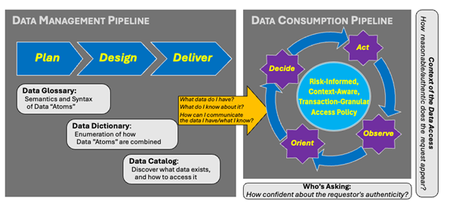
Secure data interoperability is not just a technical requirement but a strategic necessity for government agencies. As security professionals, your role in defending against increasingly sophisticated attackers and ensuring seamless and secure data exchange cannot be overstated. Organizations can enhance their capabilities by adhering to a structured framework, implementing robust data management pipelines, and leveraging advanced technologies.385Views0likes1Comment
How is SDN disrupting the way businesses develop technology?
You must have read so much about software-defined networking (SDN) by now that you probably think you know it inside and out. However, such a nascent industry is constantly evolving and there are always new aspects to discover and learn about. While much of the focus on SDN has focused on the technological benefits it brings, potential challenges are beginning to trouble some SDN watchers. While many businesses acknowledge that the benefits of SDN are too big to ignore, there are challenges to overcome, particularly with the cultural changes that it brings. In fact, according to attendees at the Open Networking Summit (ONS) recently the cultural changes required to embrace SDN outweigh the technological challenges. One example, outlined in this TechTarget piece, is that the (metaphorical) wall separating network operators and software developers needs to be torn down; network operators need coding skills and software developers will need to be able to program networking services into their applications. That’s because SDN represents a huge disruption to how organisations develop technology. With SDN, the speed of service provisioning is dramatically increased; provisioning networks becomes like setting up a VM... a few clicks of the button and you’re done. This centralised network provision means the networking element of development is no longer a bottleneck; it’s ready and available right when it’s needed. There’s another element to consider when it comes to SDN, tech development and its culture. Much of what drives software-defined networking is open source, and dealing with that is something many businesses may not have a lot of experience with. Using open source SDN technologies means a company will have to contribute something back to the community - that’s how open source works. But for some that may prove to be a bit of an issue: some SDN users such as banks or telecoms companies may feel protective of their technology and not want is source code to be released to the world. But that is the reality of the open source SDN market, so it is something companies will have to think carefully about. Are the benefits of SDN for tech development worth going down the open source route? That’s a question only the companies themselves can answer. Software-defined networking represents a huge disruption to the way businesses develop technology. It makes things faster, easier and more convenient during the process and from a management and scalability point of view going forward. There will be challenges - there always are when disruption is on the agenda - but if they can be overcome SDN could well usher in a new era of technological development.1.4KViews0likes6Comments
Getting Around the Logon/Legal Banner Issues when using APM PCoIP Proxy and Horizon
If you're using APM's PCoIP Proxy and require a logon banner, you've probably figured out that the PCoIP Proxy integration stops working when you turn on the integrated logon banner from within the Horizon Administrator. Adding to the pain, internal users can't get any logon banner since you had to turn it off in order for your external access to work! Well, the wait is over! With the use of a nifty iRule that you can attach to your internal Horizon Connection Servers virtual server, you can now present a banner BOTH internal users as well as external users who access Horizon resources using APM PCoIP Proxy. Here's how it works: Disable the logon banner through Horizon Administrator - the BIG-IP will handle presenting the banners for internal users (through the iRule) and external users (through the View iApp) instead of Horizon. Modify the text in the iRule with the text you want to show in the logon banner. Apply the iRule to your LTM Virtual Server that services internal Horizon users (either manually to the LTM virtual server or through the View iApp). You're done! A couple of things to think about when you implement this: If you need to present a legal disclaimer your external users using the PCoIP Proxy, you can still do that through the Horizon View iApp. Do not apply this to any virtual server running the APM PCoIP Proxy - it's only for providing the logon banner to internal Horizon users. The banner for PCoIP Proxy can be easily enabled through the iApp It's important to ensure the PCoIP Proxy's Connection Server settings are pointing to the individual connection server(s) and NOT the LTM virtual server that has the Logon Banner iRule applied. The iRule source is below. # Attach iRule to iApp created virtual server named "<iapp_name>_internal_https" # Replace the section “This is a XXX computer system that is FOR OFFICIAL USE ONLY. This # system is subject to monitoring. Therefore, no expectation of privacy is to be assumed. # Individuals found performing unauthorized activities are subject to disciplinary action # including criminal prosecution.” with your desired text. when RULE_INIT { # Debug Level 0=off, 1=on, 2=verbose set static::internal_disclaimer_debug 0 } when CLIENT_ACCEPTED { set log_prefix_cs "[IP::remote_addr]:[TCP::remote_port clientside] <-> [IP::local_addr]:[TCP::local_port clientside]" if { $static::internal_disclaimer_debug > 1 } { log local0. "<$log_prefix_cs>: CLIENT_ACCEPTED" } } when HTTP_REQUEST { set bypass 0 if {[HTTP::uri] starts_with "/portal/info.jsp"} { if { $static::internal_disclaimer_debug > 0 } { log local0. "<$log_prefix_cs>: Portal Info request, bypassing further processing"} set bypass 1 } else { if {[HTTP::header exists "Content-Length"]} { set content_length [HTTP::header "Content-Length"] } else { # If the header is missing, use a sufficiently large number set content_length 5000 } if { $static::internal_disclaimer_debug > 1 } { log local0. "<$log_prefix_cs>: Set content-length to $content_length"} HTTP::collect $content_length if { [HTTP::path] == "/broker/xml" && [HTTP::header Expect] == "100-continue" } { SSL::respond "HTTP/1.0 100 Continue\r\n\r\n" if { $static::internal_disclaimer_debug > 1 } { log local0. "<$log_prefix_cs>: Application requested: client requires 100 continue response, sending 100-continue"} } } } when HTTP_REQUEST_DATA { if { [HTTP::payload] contains "set-locale" and ( not ($bypass)) } { HTTP::respond 200 content {<?xml version="1.0"?><broker version="9.0"><configuration><result>ok</result><broker-guid>aaaaaaaa-bbbb-cccc-ddddddddddddddddd</broker-guid><authentication><screen><name>disclaimer</name><params><param><name>text</name><values><value>This is a XXX computer system that is FOR OFFICIAL USE ONLY. This system is subject to monitoring. Therefore, no expectation of privacy is to be assumed. Individuals found performing unauthorized activities are subject to disciplinary action including criminal prosecution.</value></values></param></params></screen></authentication></configuration><set-locale><result>ok</result></set-locale></broker>} noserver "Connection" "close" "Content-Type" "text/xml;charset=UTF-8" if { $static::internal_disclaimer_debug > 1 } { log local0. "<$log_prefix_cs>: Sending Disclaimer Message"} } if { [HTTP::payload] contains "disclaimer" } { if { $static::internal_disclaimer_debug > 1 } { log local0. "<$log_prefix_cs>: Disclaimer Message Accepted - waiting for credentials."} } } This solution has been tested using Horizon 6.0 (and later) as well as the Horizon 3.0 (and later) Client. Earlier versions of the client and/or Horizon Connection Server could produce unexpected results. Big shout-out to Greg Crosby for his work on the iRule!890Views0likes1CommentLoad Balancing VMware's Workspace Portal/Identity Manager with F5 BIG-IP Local Traffic Manager (LTM)
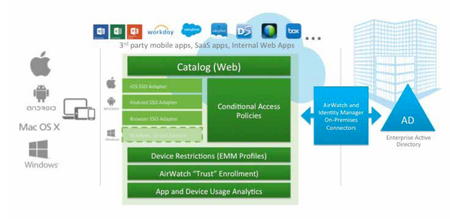
What is VMware Identity Manager (formerly known as VMware Workspace Portal)? VMware Identity Manager is a service that extends your on-premises directory infrastructure to provide a seamless Single Sign-On (SSO) experience to Web, Mobile, SaaS, and legacy applications. Simply put, it's a service aggregator and identity provider for your IT resources. One single login to Identity Manager gains you access to Citrix XenApp, Horizon, Web, SaaS, and ThinApp resources. You can find more about Identity Manager at https://www.vmware.com/products/identity-manager/. BIG-IP can provide intelligent traffic management, high availability and monitoring through the use of BIG-IP Local Traffic Manager (LTM) and BIG-IP DNS (Global Traffic Management). BIG-IP's Access Policy Manager (APM) can also provide secure access to the apps and resources accessible through the Identity Manager portal as well as the actual Identity Manager portal itself. In this article, we'll focus on building a highly available Identity Manager implementation using BIG-IP LTM. You can download the updated step-by-step load-balancing guide for VMware Workspace Portal/Identity Manager here. What's also cool is you can do a walk through of this very setup in the VMware Hands-On-Lab at VMworld 2015 (Look for HOL-MBL-1659) or by clicking the following link - http://labs.hol.vmware.com/HOL/catalogs/lab/2078. Special thanks to Bryan Salek, Matt Mabis, and Mosa Emamjomeh for helping put this together! Stay tuned for a future post on how to securely access Workspace Portal/Identity Manager using BIG-IP Access Policy Manager (APM), which includes proxying Citrix XenApp, Horizon, and Web Application resources. WorkspaceOne/Identity Manager 2.6 Update: When changing the FQDN of VMware Identity Manager there is an additional (and new) step that needs to be done. After changing the FQDN, log back into the Workspace One Admin UI using a local account and click Catalog --> Settings. Next, select New End User Portal UI and click Enable New Portal UI. Once completed, log out and you should now be able to login using a domain account.1.1KViews0likes5CommentsUS FEDERAL: DISA UCCO APL Certification
Great news! We have finally been posted to the Defense Information Systems Agency (DISA) Unified Capability (UC) Approved Product List (APL), as an IA Tool. The certification covers all F5 BIG-IP platforms (VE through Viprion) running a minimum of TMOS 11.6. The certification Memo can be found at the following link: DISA UC APL F5 Approval Memo Anyone that has been through the now defunct DoD Information Assurance Certification and Accreditation Process (DIACAP) or DoD Information Technology Security Certification and Accreditation Process (DITSCAP) in the past (1) knows it’s a party, and (2) may know that F5 BIG-IP used to be classified as a “Content Switch / Load Balancer with an OS of Other Network OS.” With the new APL certification, F5 is now classified as an IA tool. While the Certification and Accreditation process will look pretty much the same, things concerning the F5 are starting to change quite a bit. Change 1. F5 Military Unique Deployment Guide. This document helps identify and configure the BIG-IP base configuration required to pass IA scans. Change 2. There is much better clarification on which STIGS apply to F5 BIG-IP, and stronger guidance on how to configure your platform in adherence to STIG and Security Requirements Guidelines (SRG). Change 3. There is also the new National Institute of Standards and Technology (NIST) Risk Management Framework (RMF) process (DoD Instruction 8501.01). We didn’t have anything to do with this, but its new, and its important to know that we are in line with this process. Getting Started To start preparing the F5 BIG-IPs on your network, you should reach out to your account team to acquire a copy of the Military Unique Deployment Guide (MUDG), which details the proper base configuration. The MUDG can be acquired from any member of the F5 Federal team. However, due to sensitive information, a copy of the Information Assurance Assessment Package (IAAP) must be acquired directly from the Unified Capability Certification Office (UCCO), details on this information is located within the DISA UC APL Certification Memo. Next, Apply STIG/SRG. These are currently in process, but the MUDG is sufficient to lock the appliance down to pass initial IA scans. Draft STIG Release Guidance -Update: Final F5 STIG / SRG released, see below. There have been a lot of questions lately on the release of the Draft STIGS for BIG-IP. The important things to note are as follows: First and foremost, do not apply draft STIGS. These are drafts and not yet final. Do not start applying draft STIGS in production environments. Draft STIGS are subject to change. Finally, do not apply draft STIGS. To access and review the Draft STIGS, you can find them at the following location: http://iase.disa.mil/stigs/net_perimeter/network-infrastructure/Pages/network-overview.aspx Final STIG/SRG Release Guidance There have been a lot of questions lately on the release of the Final STIGS / SRGS for BIG-IP. The important things to note are as follows: It is important to first follow and apply the guidance provided in the Military Unique Deployment Guide v1.2 (MUDGv1.2). If you have any questions or concerns regarding the guidance or text in the F5 Final STIGS, do not hesitate to reach out to your account team. To access the Final F5 STIGS, you can find them at the following location: http://iase.disa.mil/stigs/net_perimeter/network-infrastructure/Pages/other.aspx Need Help? Contact Federal [at] F5.com.1.1KViews0likes2Comments
The Mounting Case for Cloud Access Brokers
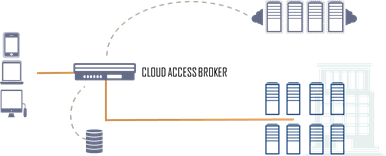
#infosec #cloud #iam Addressing the need for flexible control of access to off-premise applications Unifying identity and access management has been a stretch goal for IT for nearly a decade. At first it was merely the need to have a single, authoritative source of corporate identity such that risks like orphaned or unauthorized accounts could be addressed within the enterprise. But with a growing number of applications - business applications - being deployed "in the cloud", it's practically a foregone conclusion that organizations are going to need similar capabilities for those applications, as well. It's not easy, there are myriad reasons why unifying identity and access control is a stretch goal and not something easily addressed by simply deploying a solution. Federation of identity and access control requires integration. It may require modification of applications. It may require architectural changes. All of these are disruptive and, ultimately, costly. But the costs of not addressing the issue are likely higher. Security a Rising Concern for Cloud-Based Application Usage With access to these applications taking place from a variety of locations including smartphones (80 percent),tablets (71 percent) and non-company computers (80 percent) and with a large percentage of organizations (73 percent) needing to grant temporary access to cloud apps, respondents cited concerns around identity management, governance and complexity. ... Nearly three-quarters (72 percent) of the respondents said they have the need to provide external users, such as consultants, with temporary access to the company’s cloud applications, while just under half (48 percent) of respondents said they are still not able to sign in to cloud applications with a single set of credentials. [emphasis mine] There is a significant loss of control - in terms of governance - that's occurring, where the organization no longer has the means by which they can control who has access to applications, from what device or location, and when. That's the downside of cloud, of distributed systems that are not architected with security in mind. Make no mistake, it's not just IT making a power grab for power's sake. This is a real, significant issue for the business side of the house, because it is their applications - and ultimately data - that is at risk by failing to properly address issues of access. THE CASE FOR CLOUD ACCESS BROKERS The least disruptive - and most efficient - means of addressing this disconnect is to insert into the data center architecture an access broker tier, a layer of dynamic access and identity management services designed to provide federation and unification of credentials across cloud and data center resources based on the organization's authoritative source of identity. The advantages of such a tier are that they are less disruptive, it respects the authoritative source of identity and it is highly flexible. The same cloud access broker that provides authentication and authorization to internal resources can do so for cloud-based resources. The downside is integration with a growing variety of SaaS and custom cloud-deployed applications used by the enterprise. A standards-based way of integrating off-premise applications with a cloud access broker is needed, and we find such a standard in SAML 2.0, an increasingly popular means of integrating identity and access management services across the cloudosphere. In addition to providing access control through such integration, a cloud access broker also provides the means for IT to address the issue of password security noted in "Security a Rising Concern for Cloud-Based Application Usage": The survey indicated unsafe password management continues to be a challenge, with 43 percent of respondents admitting that employees manage passwords in spreadsheets or on sticky notes and 34 percent share passwords with their co-workers for applications like FedEx, Twitter, Staples and LinkedIn. Twenty percent of respondents said they experienced an employee still being able to log in after leaving the company. By enabling federation and single-sign on capabilities, organizations can mitigate this problem by ensuring users have fewer passwords to recall and that they do not share them with off-premise applications like FedEx. Because IT controls the authoritative source of identity, it also governs policies for those credentials, such as password length, history, interval of change, and composition. FEDERATION MEANS HEIGHTENED (AND ENFORCEABLE) SECURITY Federation of identity and access management through a cloud access broker can alleviate the loss of control - and thus expanding security threats. By maintaining the authoritative source of identity on-premise, organizations can enforce security policies regarding password strength and length while improving the overall experience for end-users by reducing the number of credentials they must manage to conduct daily business operations. Issues such as orphaned or rogue accounts having access to critical business applications and data can be more easily - and quickly - addressed, and by using a flexible cloud access broker capable of transitioning security protocols, device incompatibility becomes a non-issue. As more and more organizations recognize the ramifications of unfettered use of cloud services it is inevitable that cloud access brokers will become a critical component in the data center.469Views0likes1Comment
A New Twist on DNS NXDOMAIN DDoS
DDoS attacks are increasing in scale and complexity, threatening to overwhelm the internal resources of businesses around the world. The F5 Silverline Security Operations Center (SOC) recently saw a new distributed denial-of-service (DDoS) attack vector targeting a customer’s DNS servers with malicious traffic averaging between 8 and 12 Mbps and bursts of malicious traffic peaking at over 100 Mbps. This attack began in mid-August and continued through November 2015. It was not a typical reflection attack where DNS servers are used to attack a web site, but an attack against the actual DNS servers. Through additional investigation, the SOC analysts identified the vector and crafted a targeted mitigation for this new “_dmarc” attack. In their investigation, Edgar Ojeda and his colleagues found that F5 Silverline customer's DNS servers were receiving hundreds of thousands of randomized queries for “_dmarc” DNS records even if from a volumetric standpoint this amount of traffic seems to be trivial. Then, they noticed that _dmarc DNS queries were for non-existent subdomains and that customer’s DNS infrastructure was becoming unstable. As the attack continued and after further investigation, F5 SOC created a finely tuned signature that successfully scrubbed all malicious traffic and the customer’s service became operational again. To read the full report describing the attack, click here. If you are under attack, just click this link and we can get you back online! Click here to learn more about how F5 Silverline mitigate DDoS attack.522Views0likes0Comments
La transition vers HTTP/2, l'envisager, s'y préparer, la réaliser
HTTP/2 est désormais un standard avec son support intégré dans les browsers modernes. Les serveurs Web, proposent aussi dans leurs dernières versions, la compatiliblité avec cette évolution. Ce qu'il faut retenir est qu'HTTP/2 vient accéler le transport du contenu Web en maintenant la confidentialité à travers SSL. Un des bénéfices pour les developpeurs et fournisseurs de contenu est la capacité à se rendre compte des apports de ce protocole sans remettre en cause toute son infrastructure. Les démonstrations montrent bien les gains à travers un browser sur un ordinateur portable, choses encore plus appréciables sur les plateformes mobiles. La version 12.0 de TMOS permet de se comporter comme un serveur HTTP/2 vis à vis des clients tout en continuant à solliciter le contenu en HTTP/1.0 et HTTP/1.1 auprès des serveurs. Pour trouver des raisons de s'interesser à ce protocole, plusieurs sources d'information peuvent y aider : Making the journey to HTTP/2 HTTP/2 home346Views0likes0CommentsBillionaires, Icons and Movie Stars – Why Geek Is Now Chic
Over the past few years we’ve seen the unstoppable rise of the geek. From popular culture to big business, the geeks have inherited the earth. They’re the billionaires, the modern day rock stars, and their many achievements have resulted in a significant change to their status in popular society. They are now often championed, given the limelight or even imitated - geek is now chic! So let’s take some time out to look how the geek – and our perception of the geek – has evolved… The Geek Revolution Before the dawn of the information age, being an IT expert was associated with social ineptitude, a stereotype amplified by films such as 'Revenge of the Nerds.’ Although this negative stigma has not quite been completely reversed, the rise of the geek has been prolific, driven by the mainstream rise of tech and the acute relevance of previously niche skills. Whether consumers or enterprises, society relies heavily on certain technologies, making IT experts and their knowledge indispensable. Employment of ‘Genius’ assistants in Apple stores show the change in status and dependence of society on the geek, as customers compete for the attention of who can fix their gadgets. The behaviour of geek idols such as Mark Zuckerberg and Bill Gates also helped make geeks cool, by having the audacity to drop out of (a Harvard) education to follow their dreams. The relevance of geek knowledge to businesses has been demonstrated by the scramble to fill the tech skills gap, but it spreads beyond classic computing know-how. Political forecaster Nate Silver received attention after mathematically predicting an Obama victory in 2012, resulting in a call to ‘hire geeks not pundits’ if you want to win a presidential election. The government introduction of compulsory IT-based aspects to school curriculums also shows the value attributed to IT know-how. The Omni-Present Geek Popular culture too is now exploring the techie as an unorthodox hero. This is perhaps most evident on the screen, demonstrated recently through television shows such as 'The Big Bang Theory' and 'The IT Crowd,' which explicitly focus their stories around stereotypical geeks. 'The Social Network' saw an entire film made about the rise of the IT genius. Characters are by no means portrayed with model good looks and bulging muscles, but the idea that the geek can 'win' is becoming more prevalent. In fashion, thick-rimmed, non-prescriptive glasses have become popular as an optional accessory rather than an optical necessity and been embraced by stars and school children alike. T-shirts sold by 'Topshop' emblazoned with the word 'NERD' or 'GEEK' were hugely successful when launched in 2013; it seems the implication of intellect, whether genuine or ironic, is now considered fashionable. Geek Power If society has progressed through the Iron Age and the Industrial Age, we are undoubtedly in the Tech Age. IT geeks have done amazing things with their inventions and innovations: Sir Tim Berners-Lee revolutionised global society by giving life to the World Wide Web; the inventions of Steve Jobs and Apple are omnipresent and envelop popular society and business; Mark Zuckerberg has helped shape a generation through social media – just try to escape social networks today! Despite geeks hitting the headlines for all the right reasons, there remains a significant gap between the level of demand for staff with specialist knowledge and the number of prospective employees who possess it. A number of recent high-profile hacking scandals show that IT experts have the potential to mould the business landscape in a variety of ways and have catapulted the cyber-security skills shortage to up the national agenda. These achievements have not gone unnoticed by businesses or the government, who have increased IT spending budgets and launched recruitment drives. The success of tech companies and individuals has seen expert knowledge come to be associated with entrepreneurial flair, with the stories of innovators like Zuckerberg carrying the geek into the unchartered realms of, dare we say it, coolness. Now that geek is chic, how about meeting some of the F5 geeks keeping businesses current in the age of tech? Why not join us at F5 Agility in Scotland in May? There will be F5 experts on hand to discuss your ideas and answer questions, as well as a host of sessions from a range of executives, from our CTO to our field engineers.439Views0likes1Comment