government
59 TopicsDeploying F5 BIG-IP HA into AWS GovCloud
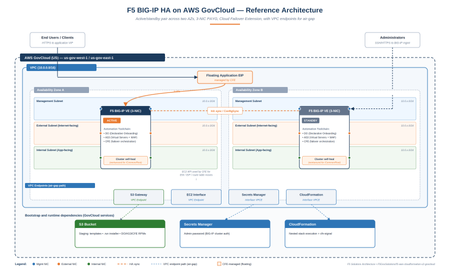
This guide provides a walk-through for deploying an active/standby F5 BIG-IP High Availability (HA) cluster within AWS GovCloud (US) using the AWS Console. Code Repository: F5GovSolutions/f5-aws-cloudformation-v2-govcloud While the repository's examples/failover/GOVCLOUD-GUIDE.md handles the exact AWS CLI workflows, this document serves as the web console companion. The Partition Problem The upstream commercial F5 templates (F5Networks/f5-aws-cloudformation-v2) assume a standard AWS commercial partition. Pointing those unmodified templates at GovCloud breaks deployment for three distinct reasons: Partition Isolation (aws-us-gov): GovCloud uses unique ARNs, regional endpoints, and an entirely separate AMI catalog. Furthermore, CloudFormation mandates that a parent stack's nested templates reside in an S3 bucket within the exact same region and partition. CloudFormation cannot fetch objects across partitions, meaning all templates must be pre-staged in a local GovCloud bucket. Air-Gapped Realities: In isolated enclaves with no internet egress, a booting BIG-IP cannot pull the runtime-init installer or Automation Toolchain RPMs from public GitHub repositories or F5 CDNs. Everything must be hosted locally inside an S3 bucket, accessible via VPC Gateway and Interface endpoints. The 17.x Clustering Bug: On the BIG-IP 17.x code train, a startup-timing condition occasionally prevents the local device-trust domain (/Common/Root) from initializing properly on first boot. When this occurs, Declarative Onboarding (DO) cannot establish the trust domain or failover group, leaving both nodes deadlocked. This modified template embeds an automated, non-blocking self-heal script to orchestrate the recovery process without manual intervention. What it deploys The root template (failover.yaml) orchestrates a series of nested module stacks (network, access, ingress, application, and individual BIG-IP nodes) to build: An active/standby pair of BIG-IP Virtual Editions (VE) deployed across two Availability Zones using a 3-NIC topology (Management, External, Internal). Cloud Failover Extension (CFE) integration to re-map floating application IPs and AWS routes during a failover event. Automated onboarding via F5 BIG-IP Runtime Init, executing Declarative Onboarding (DO) for core network clustering, Application Services 3 (AS3) for virtual servers/WAF policies, and CFE for AWS API integration. The architecture uses Pay-As-You-Go (PAYG) marketplace licensing and is fully validated on the 3nic-payg...-with-app runtime-init configuration. Core Architecture Differences vs. Commercial Staged-Bucket Deployment Mode Because of partition constraints, your local GovCloud S3 bucket serves as the single source of truth. It must hold two types of data: the nested CloudFormation templates cloned from the repository, and the target installation binaries (the runtime-init .run installer and the accompanying DO/AS3/CFE RPM packages). The Unauthenticated 403 Pitfall CloudFormation reads your deployment templates using your active IAM user/role credentials. However, during the bootstrap phase, the individual BIG-IP instances download their configuration files and RPM packages over an unauthenticated HTTPS request. They do not sign these requests with AWS credentials. If your S3 bucket permissions block public read access completely, the instances receive an HTTP 403 Forbidden response, initialization fails, and CloudFormation rolls back the stack. Because GovCloud blocks public access by default, you must apply a scoped bucket policy allowing s3:GetObject to Principal: "*" paired with a DenyInsecureTransport block. Single-Toggle VPC Endpoints Isolated enclaves require four distinct VPC endpoints to function: S3 (Gateway) for fetching installation packages and AS3 WAF policies, and Interface endpoints for EC2, Secrets Manager, and CloudFormation APIs. Missing even one endpoint causes silent automation failures. To simplify this, the template consolidates these requirements into a single parameter: setting provisionS3Endpoint=true automatically provisions all four regional endpoints with private DNS enabled. Note that your bucket, stack, and endpoints must reside within the same AWS region. Automated Clustering Self-Heal To bypass the 17.x initialization bug without manual operator access, the template installs a localized orchestration loop during the pre_onboard hook. The mechanism drops three files onto the file system: cluster-heal.sh: The main orchestrator script. cluster-heal-trust.py: A native Python script that securely pulls the admin password from Secrets Manager via a SigV4 request using the instance's IAM role, then invokes the local device trust commands. /etc/cron.d/cluster-heal: A cron job that triggers the orchestrator every 3 minutes. This loop checks the cluster status. If it detects a missing root domain, it triggers a single controlled reboot, reads the peer node's address from the runtime logs, pulls the password, and establishes device trust. Once synchronized, it issues the CloudFormation success signal and disables its own cron job. This preserves DO as the declarative source of truth without creating configuration drift. During this process, the CloudFormation stack will remain in CREATE_IN_PROGRESS for roughly 25 to 30 minutes, which is normal behavior. Elastic IP Allocation Constraints The default AWS regional quota is 5 Elastic IPs (EIPs). Depending on your topology, this architecture can request up to 7. To prevent deployment failures due to exhausted quotas, use the template toggles to limit public allocations: Default Configuration (Public Mgmt, Public VIP, Public Self IPs): 7 EIPs Standard Air-Gap Profile (Public Mgmt, Private VIP, Private Self IPs): 4 EIPs Strict Isolated Profile (Private Mgmt via Bastion, Private VIP, Private Self IPs): 3 EIPs Verify your regional limit under Service Quotas → EC2-VPC Elastic IPs (L-0263D0A3) before executing the template. Deployment Steps (AWS Console) Before You Begin Select a single target GovCloud region (us-gov-east-1 or us-gov-west-1). Your staging bucket, CloudFormation stack, EC2 Key Pair, and Secrets Manager secret must share this region to prevent cross-region routing failures in isolated enclaves. 1. Provision the staging S3 bucket S3 → Create bucket, in your Region. Give it a globally unique name. [S3 Create bucket, Region selector highlighted.] 2. Stage the templates and artifacts While file uploads can be handled via the S3 web GUI, staging is more reliably managed via the AWS CLI from a local workstation. Installing the AWS CLI is outside the scope of this article but it's easy and instructions can be Googled. Execute the following commands from the root of your cloned repository to sync the template architecture and upload your pre-downloaded F5 binaries: Download commands: # F5 BIG-IP Runtime Init installer (note: this repo's tag has NO "v" prefix) curl -fL -o f5-bigip-runtime-init-2.0.3-1.gz.run \ https://github.com/F5Networks/f5-bigip-runtime-init/releases/download/2.0.3/f5-bigip-runtime-init-2.0.3-1.gz.run # Declarative Onboarding (DO) curl -fL -o f5-declarative-onboarding-1.47.0-14.noarch.rpm \ https://github.com/F5Networks/f5-declarative-onboarding/releases/download/v1.47.0/f5-declarative-onboarding-1.47.0-14.noarch.rpm # Application Services (AS3) curl -fL -o f5-appsvcs-3.56.0-10.noarch.rpm \ https://github.com/F5Networks/f5-appsvcs-extension/releases/download/v3.56.0/f5-appsvcs-3.56.0-10.noarch.rpm # Cloud Failover Extension (CFE) curl -fL -o f5-cloud-failover-2.4.0-0.noarch.rpm \ https://github.com/F5Networks/f5-cloud-failover-extension/releases/download/v2.4.0/f5-cloud-failover-2.4.0-0.noarch.rpm Sync and upload commands (be sure to be at root of the cloned repo), set the variables accordingly: # Synchronize the nested CloudFormation infrastructure templates aws s3 sync ./examples/ "s3://$BUCKET/$PREFIX/" --region "$REGION" # Upload the core runtime engine and toolchain extensions aws s3 cp f5-bigip-runtime-init-2.0.3-1.gz.run "s3://$BUCKET/$PREFIX/" --region "$REGION" aws s3 cp f5-declarative-onboarding-1.47.0-14.noarch.rpm "s3://$BUCKET/$PREFIX/bigip-extensions/" --region "$REGION" aws s3 cp f5-appsvcs-3.56.0-10.noarch.rpm "s3://$BUCKET/$PREFIX/bigip-extensions/" --region "$REGION" aws s3 cp f5-cloud-failover-2.4.0-0.noarch.rpm "s3://$BUCKET/$PREFIX/bigip-extensions/" --region "$REGION" 3. Grant anonymous read on the artifacts In the S3 Console, select your staging bucket and navigate to Permissions. Under Block public access (bucket settings), disable the option to Block public access to buckets and objects granted through new public bucket policies (leave ACL blocks enabled). Next, apply the following bucket policy to allow the instances to pull down the bootstrap packages securely over HTTPS: { "Version": "2012-10-17", "Statement": [ { "Sid": "PublicReadGetObject", "Effect": "Allow", "Principal": "*", "Action": "s3:GetObject", "Resource": "arn:aws-us-gov:s3:::YOUR-BUCKET-NAME-HERE/*" }, { "Sid": "DenyInsecureTransport", "Effect": "Deny", "Principal": "*", "Action": "s3:*", "Resource": [ "arn:aws-us-gov:s3:::YOUR-BUCKET-NAME-HERE", "arn:aws-us-gov:s3:::YOUR-BUCKET-NAME-HERE/*" ], "Condition": { "Bool": { "aws:SecureTransport": "false" } } } ] } Note: Ensure you replace YOUR-BUCKET-NAME-HERE with your actual bucket name. Do not include any trailing lines or comments in the JSON editor. [S3 Permissions — Block public access settings.] 4. Store the Admin Password Secret Navigate to AWS Secrets Manager → Store a new secret. Choose Other type of secret, select the Plaintext tab, clear the default JSON template, and type your raw password string. Name the secret (e.g., f5-bigip-admin) and save it using the default settings. Copy the resulting Secret ARN (arn:aws-us-gov:secretsmanager:...); both nodes query this specific object at startup. [Secrets Manager Store secret, plaintext tab.] [Secrets Manager: Name your secret.] 5. Create the SSH key pair EC2 → Key Pairs → Create key pair, download the .pem. The key pair is regional. This is optional but recommended you create one before template launch. [Screenshot: EC2 Create key pair.] (You can leave the parameter blank in the template and let the stack auto-create one, but then the private key only lives in SSM Parameter Store — pre-creating is simpler if you need to access the boxes vis SSH) 6. Confirm the BIG-IP AMI exists in your Region The deployment template discovers the target AMI using automated string matching. Ensure that your region has access to the target image by running the following lookup via your terminal, this can also be done via the GUI: aws ec2 describe-images --region "$REGION" --owners aws-marketplace \ --filters "Name=name,Values=*17.5*PAYG-Best Plus 25Mbps*" \ --query 'reverse(sort_by(Images,&CreationDate))[].[Name,ImageId,CreationDate]' --output table 7. Launch the stack (CloudFormation) Open CloudFormation, select your target region, and click Create stack (with new resources). Select Template is ready, choose Amazon S3 URL, and paste the direct object URL to your staged failover.yaml file. Configure the mandatory parameters: Stack Name: Define an environment-specific identifier. S3 Configurations: Populate s3BucketName and s3BucketRegion. Secrets Management: Paste your copied Secrets Manager ARN into bigIpSecretArn. Security Access: Set restrictedSrcAddressMgmt and restrictedSrcAddressApp to your administrative CIDR blocks to avoid exposing management interfaces. Air-Gap Toggles (For isolated VPCs): Change provisionS3Endpoint to true, and flip both provisionPublicIpExternalSelf and provisionPublicIpVip to false. In the options screen, consider setting Stack failure options to Preserve successfully provisioned resources during your initial test runs. This keeps instances alive for log inspection if a deployment fails. Acknowledge the CAPABILITY_NAMED_IAM prompt and click Submit. [CloudFormation Specify template — Amazon S3 URL field.] [Parameters page, air-gap toggles section.] [Review — Acknowledgement and Stack failure options.] 8. Wait it out Expect ~25–30 minutes in CREATE_IN_PROGRESS while the self-heal forms the cluster, then CREATE_COMPLETE. This is normal — it is not stuck. After 10 minutes, go ahead and admin SSH into the boxes, they should accept your admin secret by now, if not use your SSH key you created and referenced in the template. See the commands below or in the git repo guide. Validating the deployment From the stack Outputs, grab a management IP, then: Onboarding: grep -i 'All operations completed successfully' /var/log/cloud/bigIpRuntimeInit.log; the prompt should show failover01.local / failover02.local, not ip-x-x-x-x. Clustering: tmsh show cm sync-status → In Sync (green), Mode: high-availability, one node Active and one Standby. CFE: GET https://localhost/mgmt/shared/cloud-failover/inspect returns a populated object (instance, addresses, trafficGroup). The self-heal's own narration lives in /config/cluster-heal/log — the primary place to look if the stack runs long; you'll see the reboot → add-to-trust → creating failoverGroup → cluster In Sync → cfn-signal sent OK → disabling self-heal sequence. If clustering genuinely never forms (the rare case where the self-heal exhausts its attempts), the repo guide has a validated manual fallback that follows the same reboot → rebuild trust → reapply sequence. What's GovCloud-ready today — and what isn't Let's be clear about scope. The GovCloud template— staged-bucket defaults, the four VPC endpoints, the clustering self-heal, the bumped extensions — currently applies to one solution: the failover active/standby pair on the 3-NIC PAYG -with-app runtime-init config. The repo's autoscale, the quickstart standalone, and the other failover variants (2-NIC, BYOL, and the non--with-app configs) still carry upstream configuration and are not yet GovCloud-validated. Adapting them is planned work and would follow exactly the pattern documented here. And the self-heal is a workaround for an F5 platform bug, not a permanent fix. The right long-term resolution is the platform defect behind the KB; when a fixed build is in play, the self-heal simply stays inert. Where to go next The repo: F5GovSolutions/f5-aws-cloudformation-v2-govcloud Full CLI walkthrough (first-time operator): examples/failover/GOVCLOUD-GUIDE.md Parameter and architecture reference: examples/failover/README.md The self-heal sources: examples/failover/bigip-configurations/cluster-heal.sh and cluster-heal-trust.py If you're standing up BIG-IP HA in an enclave, start from the 4-EIP air-gap profile with provisionS3Endpoint=true, stage everything in one in-Region bucket, and let the self-heal do the clustering. File issues on the repo if you hit something the guide doesn't cover.129Views1like0Comments