deployment
4247 Topics
F5 Migration between DCs
I have couple of F5's in a data center and want to migrate to single F5 in different DC. All the F5 configurations including the VIP's, Profile, certificate needs to be consolidated into single F5. What approach need to be taken to migrate the config's. Would GUI or CLI migration approach or advise the best way forward. Any help Appreciated.161Views0likes5Comments
feedService: Automate Threat Feed and Blocklist Ingestion on BIG-IP (iApp + Python)
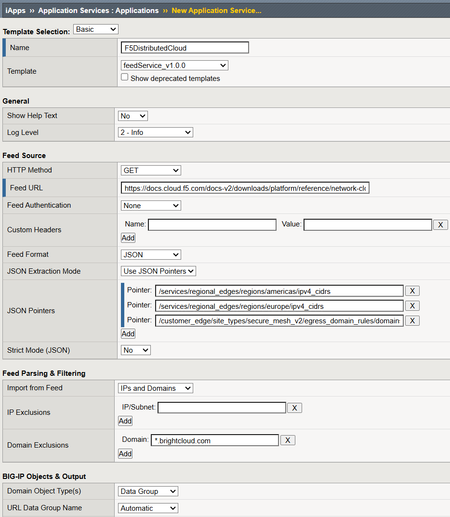
feedService is an iApp- and Python-based automation solution for F5 BIG-IP that automatically downloads, validates, normalizes, and imports feed data into native BIG-IP constructs — with intelligent data classification, change detection, and scheduled updates via iCall.70Views3likes0CommentsOracle WebLogic Server
F5 and Oracle have long collaborated on delivering market-leading application delivery solutions for WebLogic Server. F5 has designed an integrated, agile, and adaptable network platform for delivering WebLogic applications across the LAN and WAN, and packaged this information in our deployment guides and iApp templates. The result is an intelligent and powerful solution that secures and speeds your WebLogic deployment today, while providing an optimized architecture for the future. The following simple, logical configuration example shows one of the ways you can configure the BIG-IP system for Oracle WebLogic Servers using BIG-IP AAM technology to speed traffic across the WAN. See https://f5.com/solutions/deployment-guides to find the appropriate deployment guide for quickly and accurately configuring the BIG-IP system for Oracle WebLogic Server. If you have any feedback on these or other F5 guides or iApp templates, leave it in the comment section below or email us at [email protected]. We use your feedback to help shape our new iApps and deployment guides.588Views0likes2Comments
Multiple two-way SSL client Profiles - possible?
Hello To simply describe my situation: multiple end-users with client SSL certs generated by different CAs (down to rootCAs, which are different) one VIP to server them all and perform two-way SSL with "peer-cert-mode required" in the client-ssl profile. the FQDN for the VIP is the same for all end-users, so the server-side certificate is the same for all of them platform used: redundant BigIP LTM i4800 running v17 My initial reaction was to "bundle" all the different CAs into one file and use it as such under the client-ssl profile (it works) But... I was thinking if I could create and attach to the VIP multiple client-ssl profiles for each of the CAs (each with its own defined ca-file), using the same server-side certificate (with at least one of these profiles to have the sni-default set to true), and also keeping the "peer-cert mode required" for each of these distinct client-ssl profiles. Would this even be possible, what would this break or what gotchas I should be aware of,? ltm profile client-ssl mTLS-profile1 { ca-file firstCA.crt cert serverSide.crt chain serverSide-chain.crt key serverSide.key peer-cert-mode require retain-certificate false sni-default true } ltm profile client-ssl mTLS-profile2 { ca-file secondCA.crt cert serverSide.crt chain serverSide-chain.crt key serverSide.key peer-cert-mode require retain-certificate false sni-default false } ltm profile client-ssl mTLS-profile3 { ca-file thirdCA.crt cert serverSide.crt chain serverSide-chain.crt key serverSide.key peer-cert-mode require retain-certificate false sni-default false } ltm virtual server-fqdn-vip { ... profiles { mTLS-profile1 { context clientside } mTLS-profile2 { context clientside } mTLS-profile3 { context clientside } } ... } Thank you in advance Adrian166Views0likes2CommentsRegional Edge SaaS Application Deployment Recommended Practices
The guidelines presented in this walkthrough are informed by extensive field experience, incorporating insights from customers, F5 Solutions Engineers, Architects, and Professional Services teams. Having supported numerous deployments across diverse environments, this cumulative knowledge provides a practical and reliable starting point for publishing applications. This guide aims to help navigate the Distributed Cloud platform, offering a balanced approach to application delivery and security. The below figure represents the HTTP-LB configuration options alongside the typical flow of traffic from downstream client to upstream origin or application endpoint. Prerequisites: Article on how Distributed Cloud advertises and picks up traffic (Listener Logic) can be found here: F5 Distributed Cloud - Listener Logic Domains and Certificates: This is where you define what the load balancer listens on and how it presents itself to clients. For an initial deployment with a publicly accessible application, the following settings cover most use cases. We recommend a single HTTP-LB per application for visibility, telemetry, day 2 operations, and blast radius. Any more consolidation may cause friction going forward. Recommended Settings: Domain Name:Your application FQDN (e.g., app.example.com) Load Balancer Type: Certificate: Use F5 XC Auto-Cert when possible. If your domain is delegated to XC DNS, certificate management is fully automated. For non-delegated domains, F5 XC provides a cname challenge record value that you can add to your DNS provider to satisfy the Lets Encrypt ACME challenge, then add the provided Host Name.ves.io CNAME record pointing to XC to complete the certificate setup HTTP to HTTPS Redirect:Enable HSTS Header:Enable Listener Port: 443 Client-Side TLS: High security profile Protocol: HTTP/1.1 and HTTP/2 Origins and Health Checking: Origin Pools: A note on structure and origin access: Use Routes (covered in the next section) as the primary mechanism for attaching Origin Pools to your HTTP LB. The default Origin Pool field on the HTTP LB itself is best reserved as a potential fallback option depending on origin and route design (Engage your F5 SE if you need to discuss further). This approach gives you path-aware routing controls and per-route retry and timeout tuning. Also at the origin premise you should limit access to F5 Distributed Cloud RE’s only. You have a few options to achieve this. Limit via a security group or IP Access List to RE IP ranges, mTLS, insert a response header from the HTTP-LB that the origin server is expecting, or a combination of the 3. Recommended Settings for Publicly Available Endpoints: Origin Server Type: Public IP-based. Provide the IPv4 address directly. Where possible, target origins by IP with Host Header. If using public DNS-based origin endpoint targeting, be aware that XC does not honor standard DNS TTL and overrides the value! Origin Server Port: 443 Connection Pool Reuse: Enable Health Check Port: Endpoint port (same as origin port unless otherwise directed) Load Balancing Algorithm: Load Balancer Override (Load Balancer algorithm set at HTTP-LB) Endpoint Selection: Local Endpoints Preferred (Distributed Cloud Construct to leverage local endpoints over remote endpoints goal is to Egress the same RE as Ingress) TLS to Origin: Enable TLS SNI: Host Header TLS Security Level: High Origin Server Verification: Use Default Root CA Certificate mTLS: Disable unless required Other Origin Pool Options: Exception Handling: Setup for specific application/origin server requirements (configurable options available for application specific error-handling requirements) Origin Server Subsets: Disable unless you have a specific canary or subset routing requirement HTTP Protocol Configuration: Automatic (adjust to a specific version if your origin requires it) Proxy Protocol: Disable LB Source IP Persistence: Disable Health Checks: The default health check thresholds are tuned conservatively. In practice, this means a failed origin stays in rotation longer than it should, and a recovered origin comes back into rotation slowly. Adjust the thresholds to react more aggressively to recovery while still being tolerant of transient failures. Recommended Health Check Settings: Setting Recommended Value Default Why Healthy Threshold 1 3 Bring a recovered endpoint back into rotation after a single successful check Unhealthy Threshold 3 1 Require 3 consecutive failures before removing an endpoint — avoids flapping on transient issues Interval 15 seconds 15 seconds No change needed Jitter Percent 30% 30% Stagger health check timing across endpoints (30% of 15s = up to 4.5s offset) Key insight for jitter setting: When you have multiple endpoints in a pool, health checks without jitter all fire at the same instant that can create amongst other issues a temporary artificial network congestion or failure at endpoints. The 30% jitter setting randomizes the start time of each health check within a window (default: 15s interval with a 30% jitter, so checks are offset by up to 4.5 seconds). Leave this at the default unless you have a specific reason to change it. Advanced health check options: Host Header: Set to the value your application expects (do not leave blank if your origin validates the Host header) Path: Set a meaningful health endpoint like /healthz a common convention, but use whatever your application exposes Expected Status Codes: 200, 3xx Request/Response Header Manipulation: Add or remove headers as required by your application Expected http response: Validate the Raw Bytes expected in the Response of HTTP Health Check Origin Pool Display in UI: Routes: Routes are where your HTTP LB gains precision. Rather than sending all traffic to a single origin pool, Routes let you make forwarding decisions based on path, method, headers, and query parameters. They also expose per-route controls for timeouts, retries, header manipulation, and security policy controls that are not available at the origin pool level. Recommended Route Configuration: Route Type: Simple Route HTTP Method: Any Path Match: Prefix (use Regex or Exact match when you need more specificity) / Headers: Add header match conditions only if required Port Match: Adjust only if needed Origin targeting: Origin Pools:Add the Origin Pool(s) you configured in the previous section Host Rewrite Method: Automatic Host Rewrite (or set a specific value if your origin requires a fixed Host header) Query Parameters: Retain (Remove and Replace are available options) Route Activation: Enabled (Disable option) Advanced route options: Load Balancing Control: Use LB Hash Policy Priority: Default Origin Server Subsets: Leave unset unless subset routing is required Request/Response Manipulation: Header add/remove, cookie add/remove, set-cookie add/remove -configure as needed for your application Security (per-route overrides): WAF:Inherit from HTTP LB (recommended) or specify a different policy per route WAF Exclusion:Inherit from HTTP LB or specify an Exclusion Policy — see the note in the Gotchas section below on inline exclusions CORS and CSRF:Configure as needed Protocol Upgrades: SPDY:Disable (enable only if required) WebSockets:Disable (enable only if your application requires WebSocket support) Retry Policy: Key insight “retry values”: The retry settings below are tuned for typical HTTPS application traffic. The per-retry timeout of 1000ms prevents a slow origin from consuming the full route timeout on every attempt, and the retry interval backoff (25ms initial, 2500ms max) avoids hammering a struggling origin. Validate these values with load testing before going live. Custom Retry Policy Settings: Retry Conditions: 500 Gateway-error Connect-failure Refused-stream Reset Retriable-4xx Number of Retries: 3 Per-Retry Timeout: 1000ms Retry Interval: 25ms Max Retry Interval: 2500ms Miscellaneous Route Options: Route Timeout: 30000ms (30 seconds) Route-Specific Buffering: Common Mirroring: Disable Cluster Retract: Disable (validate with testing before enabling) Security Settings: Security configuration in F5 XC is layered. The settings below represent a solid baseline for an initial deployment. Individual applications will likely require tuning — use this as a starting point, not a final state. Web Application Firewall: The recommended starting posture is blocking mode with High and Medium attack signatures active. This catches the most common attack patterns while keeping false positive rates manageable. Do not start in detection-only mode and leave it there — establish a review cycle and move to blocking on a defined schedule. WAF: Enable Enforcement Mode: “Monitor” then after review migrate to “Blocking” Security Policy:Custom Attack Signatures: Default signature set High, Medium, and Low severity Automatic Attack Signature Tuning:Disable Automatic Signature Staging:Enable (7days) Threat Campaigns:Enable Violations:Default Signature-Based Bot Detection:Default Enhance with AI: Enable Mitigate High and Medium (have a review cadence) WAF Exclusion: Use a dedicated WAF Exclusion Policy object — do not use inline exclusions (see Gotchas below) Additional WAF-adjacent features — configure as needed for your application: Data Guard CSRF Protection GraphQL Inspection Cookie Protection API Protection: Enable as needed. If your application exposes a defined API surface, uploading an OpenAPI spec and enabling API Discovery is a worthwhile early step. Malware Protection: Disable DoS Settings: Mitigation Action: Block RPS Threshold: Typically based on Capacity of origin application endpoints Client-Side Challenge: Enabled if web based application Custom Service Policy for DoS: Apply a specific geo location and IPI during DDoS DDoS Mitigation Rules: Default Slow DDoS: Default Service Policies: Service Policies match on a set of criteria and apply an action. They operate at the connection level and complement WAF, which operates at the request content level. Service Policies: Apply Specified Service Policies (list any access restriction policies you need) IP Reputation: select the reputation categories appropriate for your threat model Threat Mesh: Disable User Identifier Policy: Create a policy using Client IP and TLS Fingerprint based on JA4 as identifiers (other identifier types are available) Malicious User Detection: Enable Malicious User Mitigation: Enable, Default settings Rate Limiting: Configure as needed based on expected traffic profile Trusted Client Rules: Configure as needed Client Blocking Rules: Configure as needed CORS Policy: Configure as needed Other Settings: VIP Advertisement: This is what makes the HTTP LB publicly reachable through the F5 Regional Edge network. If you change this to a Custom setting, validate your advertisement policy carefully as a misconfiguration here means no traffic reaches your LB. Advertise Internet Load Balancing Algorithm: Choose based on your application's session and traffic characteristics. Round Robin is the default and works for most stateless applications. If you have session affinity requirements, evaluate the hash-based options. Trusted Client IP: Disable unless you have a specific use case that requires preserving the original client IP through a proxy chain upstream of XC. Location Header: Enable “Add XC RE Ingress Location” to include the Regional Edge location in response headers. This is useful for troubleshooting and for understanding which RE node handled a request. Header and Cookie Options: Configure request/response header additions, removals, and cookie manipulation as required by your application. Error Response: Configure custom error response pages as needed. The default F5 error pages are functional but not branded. Most production deployments will want custom responses for 4xx and 5xx errors. Buffer Policy: Default: No buffering (requests are streamed to the origin) Max Buffer Size: 10,485,760 bytes (10MB) – if the request body exceeds this, XC returns HTTP 413 (Payload Too Large) Timeout behavior: If the full request body is not received before the timeout, XC returns HTTP 408 (Request Timeout) When to enable: Enable buffering if your origin cannot handle streaming request bodies, or if you are using WAF inspection on large POST requests Compression: Algorithm: GZIP only (not configurable) Compression Level: 5 (not configurable) Behavior: XC compresses responses dispatched from the upstream origin when the client signals support via “Accept-Encoding” Enable if your origins do not already compress responses and your client traffic includes browser-based users Idle Timeout: Default: Client Side - 30 seconds Behavior: A stream with no activity (upstream or downstream) for this duration is terminated with HTTP 504 Increase for applications with long-running server-sent events, streaming responses, or slow upload scenarios Common Gotchas: These are the issues that come up repeatedly in initial deployments. Check these before you go live. Using DNS-based origin targeting instead of IP + Host Header: By default Distributed Cloud rewrites the host header so validate and set appropriately. DNS-based origin targeting works but introduces a dependency on DNS TTL behavior that XC does override in non-standard ways. During a failover event, you may experience stale resolution longer than you expect. Use IP-based origin with Host Header wherever possible for predictable behavior. Not Configuring a Health Check at all or Leaving health check thresholds at defaults: By default, a health check is not added to an origin pool. Also, the default Healthy Threshold of 3 means a recovered origin must pass 3 consecutive checks before re-entering rotation. If your check interval is 15 seconds, that is 45 seconds of unnecessary exclusion for an endpoint that came back healthy. Set Healthy Threshold to 1. The default Unhealthy Threshold of 1 is the opposite problem a single failed check removes the endpoint. Set Unhealthy Threshold to 3 to tolerate transient blips. Attaching Origin Pools directly to the HTTP LB instead of utilizing Routes: The default Origin Pool field on the HTTP LB is a catch-all fallback. If you attach your primary origin there and do not configure Routes, you lose access to per-route retry policies, timeouts, header manipulation, and security overrides. Build your routing structure with explicit Routes from the start. Starting in WAF Monitor mode and never switching to blocking: Monitoring mode is a valid tuning step, but it is easy to leave it there indefinitely. Set a review date when you configure monitor mode. Establish your false positive baseline and move to blocking on a defined timeline. Not setting a Host Header on the health check: Leaving the Idle Timeout at 30 seconds for streaming applications: The 30-second idle timeout will terminate long-lived connections, WebSocket connections, server-sent event streams, slow uploads without warning. If your application uses any of these patterns, increase the Idle Timeout before testing.52Views1like0CommentsStop Registering AI Agents and Apps by Hand - Explore Dynamic Client Registration BIG-IP ZTA
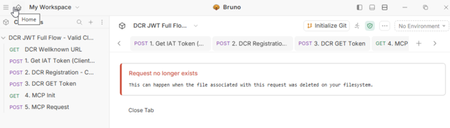
Introduction Managing OAuth client registrations manually at scale is tedious. Every new application needs an admin to log in, configure a client entry, hand off credentials, and hope nothing drifts out of sync. It works fine when you have five clients. It doesn't work when you have fifty or when AI Agents and Apps need to onboard programmatically as part of an automated pipeline. That's the problem Dynamic Client Registration (DCR) solves. BIG-IP ZTA's DCR support lets OAuth client applications register with BIG-IP ZTA’s authorization server dynamically, at runtime, without manual admin intervention for each one. The authorization server exposes a registration endpoint, a client sends its metadata, and APM creates the client entry and returns credentials on the spot. The client is automatically tied to the OAuth profile it registered against. Clean, automated, and auditable. I see it too, exposing the registration endpoint and it's an intentional move. You can't just hit the registration endpoint and create clients freely. Every registration request requires a valid Initial Access Token (IAT). That token comes from a specially designated client application, one that exists solely to issue IATs and can't be used for anything else. No authorization code flows, no resource owner password grants just IAT issuance. This separation keeps the registration endpoint controlled even as client onboarding scales out. The result is a model that works well for Zero Trust architecture, where you want programmatic, policy-controlled access rather than static configurations that age poorly. DCR gives you the automation; the IAT mechanism gives you the guardrails. How it looks in production Thanks to Matt_Dierick for building this lab up Starting with the end in mind, let’s see how this looks in production. In our setup we have an MCP client communicating with MCP server protected by BIG-IP ZTA. MCP Client Run Bruno to start API request for MCP client registration Request an IAT token to ZTA in order to register a new client Register the new client with the previous IAT token, and the output are a Client_ID and Client_Secret Request The JWT token that will be use to call the MCP Server Now, let’s send a valid request to MCP server through BIG-IP ZTA Now we have a clear picture of how the flow starts from client point of view to obtain the JWT token that allows further calls to the protected OAuth resource Let’s build it from BIG-IP ZTA BIG-IP ZTA Dynamic Client Registration flow In this flow the client uses the initial access token to start the process of automatic registration. As observed in the flow diagram below, The client initiates a POST to /register OAuth endpoint with the IAT access token BIG-IP ZTA responds back with the client_id and client secret. The client uses the client_id and client secret to request the JWT Access token Once Authenticated the client is now registered and able to perform future operations. Considerations for Dynamic Client Registration Dynamically registered clients are automatically associated with the OAuth profile Only authorized client applications can perform dynamic registration Clients can be identified as static or dynamic in the UI, similar to the below Below are the steps to build that flow Create Token configurations, Key configurations and JWT provider and provider list 2. Create the OAuth scope 3. Configure Oauth Claim Setting up OAuth profile 1. Navigate to: Main tab → Access → Federation → OAuth Authorization Server → OAuth Profiles 2. Select an OAuth profile. 3. Enable Dynamic Client Registration. 4. Configure the following settings: - IAT Client Applications, It specifies the client applications that can obtain an Initial Access Token (IAT) required to register dynamic clients. Only applications selected here can generate the token used during dynamic registration. - Allowed Grant Types , Supported Scopes, Client Authentication Method, Client Secret Location and Dynamic Client Registration Flow BIG-IP ZTA Dynamic OAuth client access With the client automatically registered, it’s time to see how the client access the protected resource through BIG-IP ZTA. The flow diagram below shows the traffic flow after client obtaining the JWT Access token. - The client uses the JWT Access token to access the protected resources. - BIG-IP ZTA validates the JWT signature, claim and scope and enforce the configured policy. Let’s explore the API protection profile settings below, 1- Create an API protection profile that makes use of both BIG-IP ZTA and BIG-IP Advanced WAF. 2- Let’s explore the API profiles Access settings Add OAuth Scope check subroutine. Define OAuth scope Add the subroutine to the main path in the per-request policy. 3- The scope validation step Optionally part of the API protection profile, you can enable BIG-IP Advanced WAF to protect the API requests. Conclusion If you're running any kind of modern application environment whether AI agents calling protected APIs, microservices spinning up on demand, or third-party integrations that can't wait for a manual provisioning ticket, static client registration is already a bottleneck. BIG-IP ZTA's DCR implementation gives you a clean answer to that problem. Clients register themselves. The IAT-gated endpoint keeps that process from becoming a free-for-all. And because every dynamically registered client is tied to an OAuth profile from the moment it's created, your policy enforcement travels with it automatically. Related content Using APM as an OAuth 2.0 Authorization Server91Views1like0CommentsHTTP Load Balancer Routes on F5 Distributed Cloud
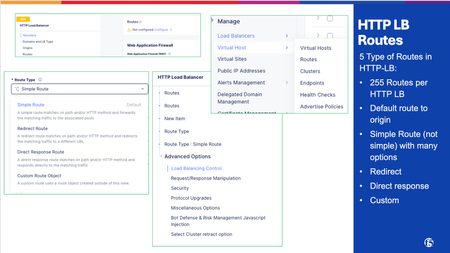
Route misconfiguration is one of the most common configuration mistakes we see that can cause incidents on F5 Distributed Cloud (F5 XC). The four route types look deceptively simple in the console, but they have distinct behaviors, ordering rules, and gotchas. This article covers all four types with real field names, decision guidance, and the mistakes that actually happen in production. What Routes Do in F5 XC HTTP Load Balancer An HTTP Load Balancer in F5 XC is a full L7 proxy running at the Regional Edge (RE) and depending on the deployment model, Customer Edge (CE). We will use the Regional Edge as a deployment model for this article. When a request arrives, the RE evaluates the route list in order and applies the first matching route. That route determines what happens to the request: forward it to an origin, redirect the client, return a synthetic response, or apply advanced routing logic. Routes can be configured inside the HTTP Load Balancer configuration which opens a new Route Options window: Multi-Cloud App Connect > Load Balancers > HTTP Load Balancers > [your LB] > Routes > Route Options The four route types map to three underlying route actions: XC Route Type Route Action Traffic Goes To Simple Route route Origin Pool Redirect Route redirect Client (3xx response) Direct Response Route direct_response Client (fixed response body) Custom Route route / redirect / direct_response Depends on configuration Route Matching: How XC Evaluates Routes Route evaluation is sequential, stops on first match, and has no automatic specificity ranking. The order you set is the order XC uses. Evaluation Order The HTTP Load Balancer evaluates routes sequentially, top to bottom. The first route that matches the incoming request wins. No further routes are evaluated. This means: More specific routes must appear before broader ones. A catch-all route (prefix /) at the top will swallow everything. Nothing below it will ever match. Path Match Types Three path match types are available across all route types: Match Type Field Behavior Prefix path_prefix Path must begin with the specified string Exact exact Path must equal the value exactly (query string excluded) Regex regex Entire path (minus query string) must match the regex pattern Prefix matching pitfall: The prefix /api matches /api/v1/users but also /apikeys and /api-internal. If you want to match a path segment boundary, use /api/ (trailing slash) or switch to regex. Additional Matching Criteria Beyond path, routes can match on: HTTP methods: GET, POST, PUT, DELETE, etc. Request headers: presence, exact value, regex Query parameters: Retain, Remove, or Replace Combining criteria (e.g., path prefix + method + header) creates an AND condition: all specified criteria must match. Route Type 1: Simple Routes Simple routes are the workhorse of most HTTP Load Balancer configurations. They match a path (and optionally method/headers) and forward traffic to an Origin Pool. When to Use Standard application traffic forwarding Path-based routing to different backend services API versioning (/v1/ → pool A, /v2/ → pool B) Microservice fanout from a single domain Key Configuration Fields Field Description Path match type Prefix / Exact / Regex HTTP Method Any, GET, POST, PUT, etc... Origin Pool The backend pool receiving the request Host Rewrite Method Disable/ Hostname / Header value: rewrites the Host header sent to origin Query Parameters Retain, Remove, Replace Advanced Options Worth Knowing Path rewriting (under Advanced Options): Disabled: path sent to origin unchanged Prefix Replacement: replaces the matched prefix with a new string (e.g., strip /api/v1 prefix before sending to origin) Regex-based: full regex substitution on the path Retry policy: The default retry policy is 1 retry on 5xx responses. Set this explicitly for your application in every route: Disabled: no retries; required for write operations Default: 1 retry on 5xx Custom: specify retry conditions, count, and interval Per-route WAF override: Each simple route can attach its own WAF App Firewall policy. This completely replaces the load balancer-level WAF for matching requests; it is not additive. Use this to enforce stricter rules on sensitive paths (e.g., /admin/) or to relax inspection on certain paths. Example: API Path Routing Route 1: Prefix /api/v2/ → origin-pool-v2 (exact origin for v2) Route 2: Prefix /api/v1/ → origin-pool-v1 (legacy backend) Route 3: Prefix /api/ → origin-pool-api (catch-all for API paths) Route 4: Prefix / → origin-pool-web (catch-all for everything else) Order matters here. If route 3 or 4 appeared first, routes 1 and 2 would never fire. Route Type 2: Redirect Routes Redirect routes return an HTTP 3xx response directly to the client. No origin pool is involved: the RE handles the response entirely. When to Use HTTP → HTTPS redirect (though XC has a dedicated LB-level toggle for this) Domain canonicalization (www.example.com → example.com) Legacy URL migrations (/old-path/ → /new-path/) Temporary redirects during maintenance or A/B migrations Key Configuration Fields Field Description Protocol HTTP or HTTPS Host Target FQDN; supports non-standard ports Redirect Path / URI Target path; if left unset, original URI is preserved (including query string) Response Code 301 (Permanent), 302 (Temporary), 307, 308 Redirect Behavior: URI Preservation When you leave the redirect path unset, XC preserves the original URI path and query string in the Location header. This is useful for protocol/host-only redirects where you just want to change the scheme or domain without touching the path. Example: Redirect all HTTP traffic to HTTPS on the same host: Protocol: HTTPS Host: same-as-request (leave blank or match domain) Path: (unset — preserve original URI) Code: 301 Redirect Route Limitations Simple redirect routes (defined directly on the LB) do not support custom header manipulation on the redirect response. If you need to inject headers (e.g., Cache-Control: no-store on the redirect response), use a Custom Route object instead. Route Type 3: Direct Response Routes Direct response routes return a fully synthetic HTTP response to the client. The request never reaches an origin pool: the RE generates the response itself. When to Use Health check endpoints that should always return 200 (e.g., /healthz) without touching the app Maintenance mode pages: serve a 503 with a message body while origin is down Blocking specific paths with a meaningful error body (vs. a generic deny) Canary or feature-flag placeholders that return 404 before the feature ships Robots.txt or security.txt served from the edge without an origin Key Configuration Fields Field Description HTTP Status Code Any valid HTTP status code (200, 403, 503, etc.) Response Body Static text or HTML body returned to client Path match Same prefix/exact/regex options as other route types Example: Edge-Served Health Check Path: Exact /healthz Method: GET Action: Direct Response Status: 200 Body: OK This responds to health probes from AWS ALB, Kubernetes ingress controllers, or uptime monitors without any load on the backend. Particularly useful during blue/green deployments when the app might not yet be healthy. Route Type 4: Custom Routes Custom routes reference standalone Route objects created separately in XC and attached to one or more HTTP Load Balancers. Unlike the other three types, they follow a service-mesh model rather than a traditional LB model. When to Use Custom Routes Weighted traffic splitting between origin pools (canary releases, blue/green) Request/response header manipulation not available on simple routes Advanced retry policies with specific conditions and intervals Traffic mirroring (shadow traffic to a secondary backend for testing) Reusable route logic shared across multiple load balancers Architecture: Route Objects vs. Inline Routes Inline routes (simple, redirect, direct response) are defined directly on the HTTP Load Balancer. Custom route objects are: Created as standalone objects under Multi-Cloud App Connect Referenced by the HTTP Load Balancer Reusable: multiple LBs can reference the same route object Weighted Clusters Custom routes enable weighted traffic splitting across multiple upstream clusters, equivalent to BIG-IP pool ratio weights or AWS ALB weighted target groups. Route: Prefix /api/ Cluster A (origin-pool-v2): weight 90 Cluster B (origin-pool-v1): weight 10 This is the correct mechanism for canary deployments and gradual traffic shifts on F5 XC. The weights are percentage-based and must sum to 100. Header Manipulation Custom routes support header operations at the route level, applied before forwarding to origin: Operation Direction Example Add header Request X-Forwarded-For: {client-ip} Remove header Request Strip Authorization before certain paths Add header Response Strict-Transport-Security: max-age=31536000 Remove header Response Strip Server header from responses Header manipulation runs in order: route-level → virtual host-level → route configuration-level. Retry Policies Route retry policies take complete precedence over any virtual host-level retry policy. Configure explicitly: Field Description Retry on Conditions: 5xx, gateway-error, reset, connect-failure, retriable-4xx Number of retries Integer Per-try timeout Timeout applied to each individual retry attempt Retry interval Base interval between retries Traffic Mirroring Mirror policies shadow a copy of each request to a secondary cluster. The mirrored request is fire-and-forget. Example: Testing a new backend version against live traffic without affecting users Security analysis pipelines Route Ordering and Priority Route order is the most common source of routing bugs in XC deployments. There is no automatic specificity ranking; you own the order. The Rules Routes evaluate top to bottom. First match wins. Evaluation stops. Disabling a route (via the Route Activation Status toggle) does not remove it: traffic falls through to the next matching route. Recommended Ordering Pattern Order routes from most specific to least specific: Exact paths first Exact /api/v2/auth/token 2. Specific prefixes next Prefix /api/v2/ 3. Broader prefixes after Prefix /api/ 4. Path-specific exceptions Exact /healthz 5. Catch-all last Prefix / Common Ordering Mistakes Mistake Symptom Fix Catch-all prefix / first All traffic hits one origin; other routes never fire Move catch-all to last position /api prefix before /api/v2/ V2 traffic hits wrong origin Reverse the order Disabled/Unused route above active route Traffic silently hits next route with different behavior Remove disabled routes; don't rely on toggle for permanent changes Redirect route below a prefix match Redirect never fires Move redirect above the prefix that would match it first Common Mistakes and Gotchas Prefix /api matches /apikeys. The prefix match does not anchor to path segment boundaries. /api matches /api/, /api/v1/, and also /apikeys, /api-docs. Use /api/ (trailing slash) or regex if segment boundary matters. Per-route WAF is a full replacement, not additive. Attaching a WAF policy to a route does not stack with the LB-level WAF. It replaces it entirely for that route. If your LB WAF is in blocking mode and you attach a route-level WAF in monitoring mode, that route is now in monitoring mode only. Custom routes enforce TLS: test before production. If your origin uses a self-signed certificate and you switch from a simple route to a custom route without uploading the Root CA, connections will fail. Test in a staging environment first. Header manipulation on redirect requires a custom route object. Simple redirect routes in XC do not support response header injection. If you need Cache-Control or Vary headers on your redirects, you must use a standalone custom route object with redirect action. Regex route performance at scale. Regex routes require full path evaluation on every request. At high request volumes, a large number of regex routes adds measurable CPU overhead compared to prefix or exact routes. Use regex only where prefix or exact matching is insufficient. FAQ Q: What is the difference between a Simple Route and a Custom Route? A: Simple routes are inline on the HTTP Load Balancer and forward traffic directly to an Origin Pool. Custom routes are standalone objects that use an Endpoints → Clusters → Routes model, support weighted traffic splits, header manipulation, and mirroring, but cannot reference Origin Pools directly. Q: Why is my catch-all route matching everything instead of the specific routes below it? A: Route evaluation stops at the first match. If your catch-all prefix (/) is above more specific routes, it wins every time. Move the catch-all to the last position in the list. Q: Can I use a Custom Route to send traffic directly to an F5 XC Origin Pool? A: No. Custom routes do not support Origin Pools directly. They use an Endpoints → Clusters → Routes abstraction. If you need weighted splitting with Origin Pool support, custom routes are not the right fit; simple routes forward to Origin Pools but do not support weighted clusters. Q: My POST requests are creating duplicate records and I traced it to XC retries. What is happening? A: The default retry policy on simple routes is "1 retry on 5xx." A POST that hits a 500 gets retried once, potentially double-writing. Set the retry policy to Disabled on any route handling non-idempotent operations (POST, PUT, PATCH, DELETE). Q: Does attaching a WAF policy to a route add rules on top of my LB-level WAF? A: No. Per-route WAF replaces the LB-level WAF entirely for requests matching that route. If your LB WAF is in blocking mode and the route WAF is in monitoring mode, those requests are evaluated in monitoring mode only. Q: My Custom Route TLS connections to origin are failing but the same origin works fine on a Simple Route. Why? A: Custom routes enforce strict TLS with no skip-verify option. Simple routes do not have this requirement. For custom routes, upload the Root CA certificate for your origin, or use the use_volterra_trusted_ca_url flag via the API for public CAs. Self-signed certs without the Root CA uploaded will fail silently. Q: I disabled a route in the console but traffic behavior changed unexpectedly. What happened? A: Disabling a route via the Route Activation toggle does not remove it from evaluation. Traffic falls through to the next matching route in the list. If that route is a broad catch-all, the behavior shift may look correct until something that depends on specific routing breaks. Remove routes you no longer need rather than toggling them off.508Views3likes4CommentsR5600 LAG question
Is is recommended to add ports into LAG from different pipelines? If we configure a LAG with port 3 from pipeline 1 and port 7 from pipeline 2. What will happen if port 3 from pipeline 1 goes down? Would it impact the traffic? I am trying to understand pros and cons of adding ports into LAG from same pipeline and different pipelines. I could not find a clear F5 reference document or SK article.103Views0likes2Comments
F5OS rSeries 5600 LAG.
Configure a LAG for ha-interconnect between two F5OS rSeries, is it require to associate a vlan to the lag or can it be configure without a vlan. How does the LAG works behind the chassis. Can one lag be presented to multiple tenants to be use for ha-interconnect?90Views0likes1Comment
APM Portal access and ECMAScript compatibility
I notice that ECMAScript (ES13) is supported as stated in version 21.1 release note https://techdocs.f5.com/en-us/bigip-21-1-0/big-ip-release-notes/big-ip-new-features.html#portal-access-ecmascript-es13-support-for-modern-javascript-applications As I know, latest version in 17.1 can also use the latest cache-fm-Modern.js file. Does it imply that latest version in 17.1, say 17.1.3.2, also support ECMAScript (ES13)? https://my.f5.com/manage/s/article/K000148786203Views0likes3Comments