deployment
323 TopicsHow to get a F5 BIG-IP VE Developer Lab License
(applies to BIG-IP TMOS Edition) To assist operational teams teams improve their development for the BIG-IP platform, F5 offers a low cost developer lab license. This license can be purchased from your authorized F5 vendor. If you do not have an F5 vendor, and you are in either Canada or the US you can purchase a lab license online: CDW BIG-IP Virtual Edition Lab License CDW Canada BIG-IP Virtual Edition Lab License Once completed, the order is sent to F5 for fulfillment and your license will be delivered shortly after via e-mail. F5 is investigating ways to improve this process. To download the BIG-IP Virtual Edition, log into my.f5.com (separate login from DevCentral), navigate down to the Downloads card under the Support Resources section of the page. Select BIG-IP from the product group family and then the current version of BIG-IP. You will be presented with a list of options, at the bottom, select the Virtual-Edition option that has the following descriptions: For VMware Fusion or Workstation or ESX/i: Image fileset for VMware ESX/i Server For Microsoft HyperV: Image fileset for Microsoft Hyper-V KVM RHEL/CentoOS: Image file set for KVM Red Hat Enterprise Linux/CentOS Note: There are also 1 Slot versions of the above images where a 2nd boot partition is not needed for in-place upgrades. These images include _1SLOT- to the image name instead of ALL. The below guides will help get you started with F5 BIG-IP Virtual Edition to develop for VMWare Fusion, AWS, Azure, VMware, or Microsoft Hyper-V. These guides follow standard practices for installing in production environments and performance recommendations change based on lower use/non-critical needs for development or lab environments. Similar to driving a tank, use your best judgement. Deploying F5 BIG-IP Virtual Edition on VMware Fusion Deploying F5 BIG-IP in Microsoft Azure for Developers Deploying F5 BIG-IP in AWS for Developers Deploying F5 BIG-IP in Windows Server Hyper-V for Developers Deploying F5 BIG-IP in VMware vCloud Director and ESX for Developers Note: F5 Support maintains authoritative Azure, AWS, Hyper-V, and ESX/vCloud installation documentation. VMware Fusion is not an official F5-supported hypervisor so DevCentral publishes the Fusion guide with the help of our Field Systems Engineering teams.182KViews14likes153CommentsImplementing SSL Orchestrator - High Level Considerations
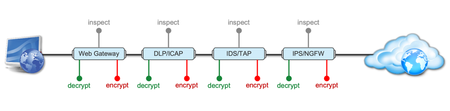
Introduction This article is the beginning of a multi-part series on implementing BIG-IP SSL Orchestrator. It includes high availability and central management with BIG-IQ. Implementing SSL/TLS Decryption is not a trivial task. There are many factors to keep in mind and account for, from the network topology and insertion point, to SSL/TLS keyrings, certificates, ciphersuites and on and on. This article focuses on pre-deployment tasks and preparations for SSL Orchestrator. This article is divided into the following high level sections: Solution Overview Customer Use Case Architecture & Network Topology Please forgive me for using SSL and TLS interchangeably in this article. Software versions used in this article: BIG-IP Version: 14.1.2 SSL Orchestrator Version: 5.5 BIG-IQ Version: 7.0.1 Solution Overview Data transiting between clients (PCs, tablets, phones etc.) and servers is predominantly encrypted with Secure Socket Layer (SSL) and its evolution Transport Layer Security (TLS)(ref. Google Transparency Report). Pervasive encryption means that threats are now predominantly hidden and invisible to security inspection unless traffic is decrypted. The decryption and encryption of data by different devices performing security functions potentially adds overhead and latency. The picture below shows a traditional chaining of security inspection devices such as a filtering web gateway, a data loss prevention (DLP) tool, and intrusion detection system (IDS) and next generation firewall (NGFW). Also, TLS/SSL operations are computationally intensive and stress the security devices’ resources. This leads to a sub-optimal usage of resource where compute time is used to encrypt/decrypt and not inspect. F5’s BIG-IP SSL Orchestrator offers a solution to optimize resource utilization, remove latency, and add resilience to the security inspection infrastructure. F5 SSL Orchestrator ensures encrypted traffic can be decrypted, inspected by security controls, then re-encrypted—delivering enhanced visibility to mitigate threats traversing the network. As a result, you can maximize your security services investment for malware, data loss prevention (DLP), ransomware, and next-generation firewalls (NGFW), thereby preventing inbound and outbound threats, including exploitation, callback, and data exfiltration. The SSL Orchestrator decrypts the traffic and forwards unencrypted traffic to the different security devices for inspection leveraging its optimized and hardware-accelerated SSL/TLS stack. As shown below the BIG-IP SSL Orchestrator classifies traffic and selectively decrypts traffic. It then forwards it to the appropriate security functions for inspection. Finally, once duly inspected the traffic is encrypted and sent on its way to the resource the client is accessing. Deploying F5 and inline security tools together has the following benefits: Traffic Distribution for load sharing Improve the scalability of inline security by distributing the traffic across multiple Security appliances, allowing them to share the load and inspect more traffic. Agile Deployment Add, remove, and/or upgrade Security appliances without disrupting network traffic; converting Security appliances from out-of-band monitoring to inline inspection on the fly without rewiring. Customer Use Case This document focuses on the implementation of BIG-IP SSL Orchestrator to process SSL/TLS encrypted traffic and forward it to a security inspection/enforcement devices. The decryption and forwarding behavior are determined by the security policy. This ensures that only targeted traffic is decrypted in compliance with corporate and regulator policy, data privacy requirements, and other relevant factors. The configuration supports encrypted traffic that originates from within the data center or the corporate network. It also supports traffic originating from clients outside of the security perimeter accessing resources inside the corporate network or demilitarized zone (DMZ) as depicted below. The decrypted traffic transits through different inspection devices for inbound and outbound traffic. As an example, inbound traffic is decrypted and processed by F5’s Advanced Web Application Firewall (F5 Advanced WAF) as shown below. * Can be encrypted or cleartext as needed As an example, outbound traffic is decrypted and sent to a next generation firewall (NGFW) for inspection as shown in the diagram below. The BIG-IP SSL Orchestrator solution offers 5 different configuration templates. The following topologies are discussed in Network Insertion Use Cases. L2 Outbound L2 Inbound L3 Outbound L3 Inbound L3 Explicit Proxy Existing Application In the use case described herein, the BIG-IP is inserted as layer 3 (L3) network device and is configured with an L3 Outbound Topology. Architecture & Network Topology The assumption is that, prior to the insertion of BIG-IP SSL Orchestrator into the network (in a brownfield environment), the network looks like the one depicted below. It is understood that actual networks will vary, that IP addressing, L2 and L3 connectivity will differ, however, this is deemed to be a representative setup. Note: All IP addressing in this document is provided as examples only. Private IP addressing (RFC 1918) is used as in most corporate environments. Note: the management network is not depicted in the picture above. Further discussion about management and visibility is the subject of Centralized Management below. The following is a description of the different reference points shown in the diagram above. a. This is the connection of the border routers that connect to the internet and other WAN and private links. Typically, private IP addressing space is used from the border routers to the firewalls. b. The border switching connects to the corporate/infrastructure firewall. Resilience is built into this switching layer by implementing 2 link aggregates (LAG or Port Channel ®). c. The “demilitarized zone”(DMZ) switches are connected to the firewall. The DMZ network hosts application that are accessible from untrusted networks such as the Internet. d. Application server connect into the DMZ switch fabric. e. Firewalls connect into the switch fabric. Typically core and distribution infrastructure switching will provide L2 and L3 switching to the enterprise (in some case there may be additional L3 routing for larger enterprises/entities that require dynamic routing and other advanced L3 services. f. The connection between the core and distribution layers are represented by a bus on the figure above because the actual connection schema is too intricate to picture. The writer has taken the liberty of drawing a simplified representation. Switches actually interconnect with a mixture of link aggregation and provide differentiated switching using virtualization (e.g. VLAN tagging, 802.1q), and possibly further frame/packet encapsulation (e.g. QinQ, VxLAN). g. The core and distribution switching are used to create 2 broadcast domains. One is the client network, and the other is the internal application network. h. The internal applications are connected to their own subnet. The BIG-IP SSL Orchestrator solution is implemented as depicted below. In the diagram above, new network connections are depicted in orange (vs. blue for existing connections). Similarly to the diagram showing the original network, the switching for the DMZ is depicted using a bus representation to keep the diagram simple. The following discusses the different reference points in the diagram above: a. The BIG-IP SSL Orchestrator is connected to the core switching infrastructure A new VLAN and network are created on the core switching infrastructure to connect to the firewalls (North) to the BIG-IP SSL Orchestrator devices. b. The client network (South) is connected to the BIG-IP via a second VLAN and network. c. The SSL Orchestrator devices are connected to a newly created inspection network. This network is kept separate from the rest of the infrastructure as client traffic transits through the inspection devices unencrypted. As an example, Web Application Firewalls (BIG-IP ASM) are used to filter inbound traffic. d. The LAN configuration for the connection to the BIG-IP ASM is as depicted below. e. The NGFW is connected to the INSPECTION switching network in such a manner that traffic traverses it when the BIG-IP SSL Orchestrator is configured to push traffic for inspection. Summary This article should be a good starting point for planning your initial SSL Orchestrator deployment. We covered the solution overview and use cases. The network topology and architecture was explained with the help of diagrams. Next Steps Click Next to proceed to the next article in the series5.3KViews7likes4CommentsAgentic AI with F5 BIG-IP v21 using Model Context Protocol and OpenShift
Introduction to Agentic AI Agentic AI is the capability of extending the Large Language Models (LLM) by means of adding tools. This allows the LLMs to interoperate with functionalities external to the LLM. Examples of these are the capability to search a flight or to push code into github. Agentic AI operates proactively, minimising human intervention and making decisions and adapting to perform complex tasks by using tools, data, and the Internet. This is done by basically giving to the LLM the knowledge of the APIs of github or the flight agency, then the reasoning of the LLM makes use of these APIs. The external (to the LLM) functionality can be run in the local computer or in network MCP servers. This article focuses in network MCP servers, which fits in the F5 AI Reference Architecture components and the insertion point indicated in green of the shown next: Introduction to Model Context Protocol Model Context Protocol (MCP) is a universal connector between LLMs and tools. Without MCP, it is needed that the LLM is programmed to support the different APIs of the different tools. This is not a scalable model because it requires a lot of effort to add all tools for a given LLM and for a tool to support several LLMs. Instead, when using MCP, the LLM (or AI application) and the tool only need to support MCP. Without further coding, the LLM model automatically is able to use any tool that exposes its functionalities through MCP. This is exhibit in the following figure: MCP example workflow In the next diagram it is exposed the basic MCP workflow using the LibreChat AI application as example. The flow is as follows: The AI application queries agents (MCP servers) which tools they provide. The agents return a list of the tools, with a description and parameters required. When the AI application makes a request to the AI model it includes in the request information about the tools available. When the AI model finds out it doesn´t have built-in what it is required to fulfil the request, it makes use of the tools. The tools are accessed through the AI application. The AI model composes a result with its local knowledge and the results from the tools. Out of the workflow above, the most interesting is step 1 which is used to retrieve the information required for the AI model to use the tools. Using the mcpLogger iRule provided in this article later on, we can see the MCP messages exchanged. Step 1a: { "method": "tools/list", "jsonrpc": "2.0", "id": 2 } Step 1b: { "jsonrpc": "2.0", "id": 2, "result": { "tools": [ { "name": "airport_search", "description": "Search for airport codes by name or city.\n\nArgs:\n query: The search term (city name, airport name, or partial code)\n\nReturns:\n List of matching airports with their codes", "inputSchema": { "properties": { "query": { "type": "string" } }, "required": [ "query" ], "type": "object" }, "outputSchema": { "properties": { "result": { "type": "string" } }, "required": [ "result" ], "type": "object", "x-fastmcp-wrap-result": 1 }, "_meta": { "_fastmcp": { "tags": [] } } } ] } } Note from the above that the AI model only requires a description of the tool in human language and a formal declaration of the input and output parameters. That´s all!. The reasoning of the AI model is what will make good use of the API described through MCP. The AI models will interpret even the error messages. For example, if the AI model miss-interprets the input parameters (typically because of wrong descriptor of the tool), the AI model might correct itself if the error message is descriptive enough and call the tool again with the right parameters. Of course, the MCP protocol is more than this but the above is necessary to understand the basis of how tools are used by LLM and how the magic works. F5 BIG-IP and MCP BIG-IP v21 introduces support for MCP, which is based on JSON-RPC. MCP protocol had several iterations. For IP based communication, initially the transport of the JSON-RPC messages used HTTP+SSE transport (now considered legacy) but this has been completely replaced by Streamable HTTP transport. This later still uses SSE when streaming multiple server messages. Regardless of the MCP version, in the F5 BIG-IP it is just needed to enable the JSON and SSE profiles in the Virtual Server for handling MCP. This is shown next: By enabling these profiles we automatically get basic protocol validation but more relevantly, we obtain the ability to handle MCP messages with JSON and SSE oriented events and functions. These allows parsing and manipulation of MCP messages but also the capability of doing traffic management (load balancing, rate limiting, etc...). Next it can be seen the parameters available for these profiles, which allow to limit the size of the various parts of the messages. Defaults are fine for most of the cases: Check the next links for information on iRules events and commands available for the JSON and SSE protocols. MCP and persistence Session persistence is optional in MCP but when the server indicates an Mcp-Session-Id it is mandatory for the client. MCP servers require persistence when they keep a context (state) for the MCP dialog. This means that the F5 BIG-IP must support handling this Mcp-Session-Id as well and it does by using UIE (Universal) persistence with this header. A sample iRule mcpPersistence is provided in the gitHub repository. Demo and gitHub repository The video below demonstrate 3 functionalities using the BIG-IP MCP functionalities, these are: Using MCP persistence Getting visibility of MCP traffic by logging remotely the JSON-RPC payloads of the request and response messages using High Speed Logging. Controlling which tools are allowed or blocked, and logging the allowed/block actions with High Speed Logging. These functionalities are implemented with iRules available in this GitHub repository and deployed in Red Hat OpenShift using the Container Ingress Services (CIS) controller which automates the deployment of the configuration using Kubernetes resources. The overall setup is shown next: In the next embedded video we can see how this is deployed and used. Conclusion and next steps F5 BIG-IP v21 introduces support for MCP protocol and thanks to F5 CIS these setups can be automated in your OpenShift cluster using the Kubernetes API. The possibilities of Agentic AI are infinite, thanks to MCP it is possible to extend the LLM models to use any tool easily. The tools can be used to query or execute actions. I suggest to take a look to repositories of MCP servers and realize the endless possibilities of Agentic AI: https://mcpservers.org/ https://www.pulsemcp.com/servers https://mcpmarket.com/server https://mcp.so/ https://github.com/punkpeye/awesome-mcp-servers 1.9KViews5likes0Comments
Where SASE Ends and ADSP Begins, The Dual-Plane Zero Trust Model
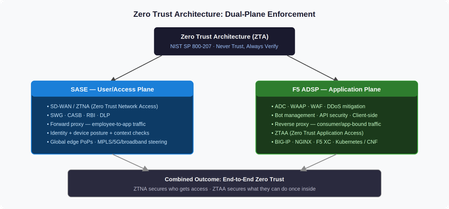
Introduction Zero Trust Architecture (ZTA) mandates “never trust, always verify”, explicit policy enforcement across every user, device, network, application, and data flow, regardless of location. The challenge is that ZTA isn’t a single product. It’s a model that requires enforcement at multiple planes. Two converged platforms cover those planes: SASE at the access edge, and F5 ADSP at the application edge. This article explains what each platform does, where the boundary sits, and why both are necessary. Two Planes, One Architecture SASE and F5 ADSP are both converged networking and security platforms. Both deploy across hardware, software, and SaaS. Both serve NetOps, SecOps, and PlatformOps through unified consoles. But they enforce ZTA at different layers, and at different scales. SASE secures the user/access plane: it governs who reaches the network and under what conditions, using ZTNA (Zero Trust Network Access), SWG, CASB, and DLP. F5 ADSP secures the application plane: it governs what authenticated sessions can actually do once traffic arrives, using WAAP, bot management, API security, and ZTAA (Zero Trust Application Access). The NIST SP 800-207 distinction is useful here: SASE houses the Policy Decision Point for network access; ADSP houses the Policy Enforcement Point at the application layer. Neither alone satisfies the full ZTA model. The Forward/Reverse Proxy Split The architectural difference comes down to proxy direction. SASE is a forward proxy. Employee traffic terminates at an SSE PoP, where identity and device posture are checked before content is retrieved on the user’s behalf. SD-WAN steers traffic intelligently across MPLS, broadband, 5G, or satellite based on real-time path quality. SSE enforces CASB, RBI, and DLP policies before delivery. F5 ADSP is a reverse proxy. Traffic destined for an application terminates at ADSP first, where L4–7 inspection, load balancing, and policy enforcement happen before the request reaches the backend. ADSP understands application protocols, session behavior, and traffic patterns, enabling health monitoring, TLS termination, connection multiplexing, and granular authorization across BIG-IP (hardware, virtual, cloud), NGINX, BIG-IP Next for Kubernetes (BNK), and BIG-IP CNE. The scale difference matters: ADSP handles consumer-facing traffic at orders of magnitude higher volume than SASE handles employee access. This is why full platform convergence only makes sense at the SMB scale, enterprise organizations operate them as distinct, specialized systems owned by different teams. ZTA Principles Mapped to Each Platform ZTA requires continuous policy evaluation, not just at initial authentication, but throughout every session. The table below maps NIST SP 800-207 principles to how each platform implements them. ZTA Principle SASE F5 ADSP Verify explicitly Identity + device posture evaluated per session at SSE PoP L7 authz per request: token validation, API key checks, behavioral scoring Least privilege ZTNA grants per-application, per-session access, no implicit lateral movement API gateway enforces method/endpoint/scope, no over-permissive routes Assume breach CASB + DLP monitors post-access behavior, continuous posture re-evaluation WAF + bot mitigation inspects every payload; micro-segmentation at service boundaries Continuous validation Real-time endpoint compliance; access revoked on posture drift ML behavioral baselines detect anomalous request patterns mid-session Use Case Breakdown Secure Remote Access SASE enforces ZTNA, validating identity, MFA, and endpoint compliance before granting access. F5 ADSP picks up from there, enforcing L7 authorization continuity: token inspection, API gateway policy, and traffic steering to protected backends. A compromised identity that passes ZTNA still faces ADSP’s per-request behavioral inspection. Web Application and API Protection (WAAP) SASE pre-filters known malicious IPs and provides initial TLS inspection, reducing volumetric noise. F5 ADSP delivers full-spectrum WAAP in-path, signature, ML, and behavioral WAF models simultaneously, where application context is fully visible. SASE cannot inspect REST API schemas, GraphQL mutation intent, or session-layer business logic. ADSP can. Bot Management SASE blocks bot C2 communications and applies rate limits at the network edge. F5 ADSP handles what gets through: JavaScript telemetry challenges, ML-based device fingerprinting, and human-behavior scoring that distinguishes legitimate automation (CI/CD, partner APIs) from credential stuffing and scraping, regardless of source IP reputation. AI Security SASE applies CASB and DLP policies to block sensitive data uploads to external AI services and discover shadow AI usage across the workforce. F5 ADSP protects custom AI inference endpoints: prompt injection filtering, per-model, rate limiting, request schema validation, and encrypted traffic inspection. The Handoff Gap, and How to Close It The most common zero trust failure in hybrid architectures isn’t within either platform. It’s the handoff between them. ZTNA grants access, but session context (identity claims, device posture score, risk level) doesn’t automatically propagate to the application plane. The fix is explicit context propagation: SASE injects headers carrying identity and posture signals; ADSP policy engines consume them for L7 authorization decisions. This closes the gap between “who is allowed to connect” and “what that specific session is permitted to do.” Conclusion SASE and F5 ADSP are not competing platforms. They are complementary enforcement planes. SASE answers: can this user reach the application? ADSP answers: What can this session do once it arrives? Organizations that deploy only one leave systematic gaps. Together, with explicit context propagation at the handoff, they deliver the end-to-end zero trust coverage that NIST SP 800-207 actually requires. Related Content Why SASE and ADSP are complementary platform391Views4likes0CommentsModernizing F5 BIG-IP Synchronized HA Pairs with Ansible Validated Content
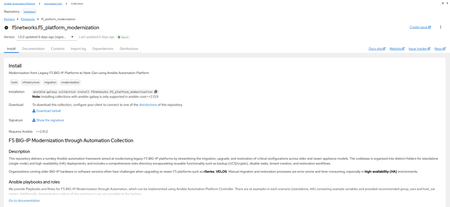
I wanted to provide an update to a previous article I released a few months ago where we developed Ansible Automation Platform code to help with migrating Standalone Legacy platforms (non-iSeries, iSeries and Viprion Instances) to our Modern Architectures (rSeries and Velos) using F5OS Tenant instances. I am happy to announce that the code for Synchronized HA pairs has been completed, and we have uploaded it to Ansible Automation Hub as Validated Content. What is Ansible Automation Hub Validated Content? Ansible validated content collections contain pre-built YAML content (such as playbooks or roles) to address the most common automation use cases. You can use Ansible validated content out-of-the-box or as a learning opportunity to develop your skills. It's a trusted starting point to bootstrap your automation: use it, customize it, and learn from it. Due to the focus on customization and the intent for this content to be modified, it is not subject to the same support requirements as our certified collections. To this end, any issues with this content should be filed directly at the source repository for that collection. Why Synchronized HA Pairs? This is a very common use case for a lot of our customers who want resiliency and redundancy, especially for their applications and services. The biggest issue with migrating an HA Pair is that because of the way they are set up, things like Management IP Addresses and Master Keys are essential to the transition process. Even mismatched versions during upgrades cannot synchronize during the process of upgrading to major/minor releases. What does the updated Validated Code do? Standalone Migrations – Where you can change the Management IP, due to the nature of being a standalone device, an outage will occur during the transition period. o There are 2 options for Playbooks Single Playbook for the full migration 2 Parts where Part 1 – Does backups and does a big start stop of the unit Part 2 – Migrates the standalone device HA Pairs – Combined – This code is designed for a customer who just needs to transition both HA Units but isn’t concerned about an outage window. It will migrate both units at the same time to F5OS Tenants. The Playbooks for this Code are broken apart in specific areas Part 1 – Backup the Information Part 2 – Ensure Both Units are offline and Migrate both units at the same time. HA Pairs – Sequential – This code is designed for customers who need to migrate one unit at a time and maintain availability of their applications. It will migrate the Standby Unit first as part of the code When ready to transition the active unit, it will place it in Standby and make the Transitioned Standby unit the Active Node transferring services to it Then the previously Active Unit (now standby) will be migrated There are playbooks to the Code to break apart specific areas of the transition Part 1 – Backup the Information Part 2 – Ensure the Standby Devices are offline (via Management IP) and Migrate the Standby Unit Part 3 – Transition the Standby to become the Active Unit and Begin Transitioning the New Standby Unit (Previously Active Unit) similarly to Part 2 This code has been tested and validated against many different platforms, and there are plans to continue testing for other use cases. The Transition can be Like-for-Like versioning (i.e. 16.1.x to 16.1.x) within the same family tree or can be an upgrade at the same time (i.e. 15.1.10 à 17.5.1.3 or even 21.0.0) These are Ansible Playbooks with supporting roles tailored for Red Hat Ansible Automation Platform. It’s built to perform a lift-and-shift migration of a F5 BIG-IP configuration from one device to another—with optional OS upgrades included. What is the future of the code? I plan on adding some Validation code to separate roles/playbooks so customers could have points of references for testing, i.e. (ping tests and pool tests) before and after the transition, QKView Backups, and other information provided on the state of the unit prior to transition to ensure when migrated it can be validated that everything is the way it was. Notes about the Code The code is not designed to handle Non-VLANed infrastructure (F5OS is designed to be multi-tenant and setup with VLANs to deal with Multi-Tenancy) If your BIG-IPs use Untagged networks, they will need to be migrated to VLANed prior to using this code. Has not been validated/tested with FIPS-based environments Has not been validated/tested F5 DNS environments – Coming Soon HA Pairs must retain the Management IP address from source to destination; the code will ensure that the source device is powered off prior to transitioning it. Cool Additions Override variables are allowed as extra_vars to create flexibility in your deployment override_cpu - This allows you to set the CPUs of the Tenant OS. If the memory override isn’t set, it will be set to the same formula that the F5OS Gui would calculate. DEFAULT is set to 4 CPU override_disk_size - This allows you to set the Disk Space of the Tenant OS. DEFAULT is set to 120GB override_memory - This allows you to set the Memory of the Tenant OS. Be warned if over-provisioned, the Tenant may not start. DEFAULT is calculated by the CPU counts formula used in the GUI. tenant_nodes - This allows you to set the slot for the Tenant OS if there are multiple slots associated with your F5OS Partition. DEFAULT is an array object and it is set to [1] cryptos - This allows you to set the Crypto on the Tenant OS to either enabled or disabled. DEFAULT is set to enabled Variables for deployments – the code is designed to utilize specific hostnames and group names to execute the code. These variables allow connectivity to BIGIP and F5OS Tenants. When creating these hosts, you will need to provide When creating hosts in AAP, you will need to provide the following information ansible_host: - This is the IP Address of the device of the host ansible_user: - This is the username to login to the device ansible_password: - this is the password to login to the device; if using a credential in AAP, you would associate that variables information here as a reference. i.e. Standalone deployments host_vars f5_destination_partition – This is the F5OS Partition information f5_destination_tenant – This is the F5OS Tenant information f5_source – This is the source device HA Pair Deployments group_vars ha_pair_destination_chassis – contains a group of 2 hosts for the destination tenants to be deployed to (can be 2 hosts with the same information or different) ha_pair_source – contains a group of 2 hosts for the source BIG-IP Devices in a synchronized HA Pair. ha_pair_source_dynamic - this group is created automatically throughout the code to program the new Tenant OSes after deployment (DOES NOT NEED TO BE CREATED) Demos/Information We have uploaded a new demo video below, you’ll see an migration of a synchronized HA Pair of BIG-IPs running as Viprion Tenants on F5 B2250 Blades running 15.1.10 transitioning to a pair of rSeries R5800s Tenant OSs running 17.5.1.x — demonstrating a smooth modernization process. Watch the synchronized HA migration Demo Video If you want to check out the information and demo video on the Standalone migrations, check out my other article at – Modernizing F5 Platforms with Ansible | DevCentral You can access the validated content via Ansible Automation Hub (Need Red Hat Account with AAP) https://console.redhat.com/ansible/automation-hub/repo/validated/f5networks/f5_platform_modernization/ Or you can access the direct code from our GitHub Repository https://github.com/f5devcentral/f5-bd-ansible-platform-modernization This project is built for the community/partners/system integrators — so as I always say, feel free to take it, fork it, and expand it. Let’s make F5 platform modernization as seamless and automated as possible!316Views4likes0CommentsHow I did it.....again "High-Performance S3 Load Balancing with F5 BIG-IP"
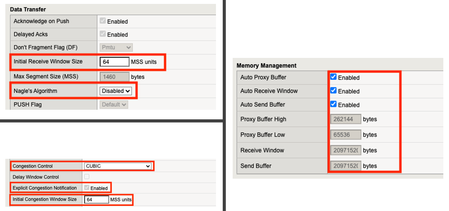
Introduction Welcome back to the "How I did it" series! In the previous installment, we explored the high‑performance S3 load balancing of Dell ObjectScale with F5 BIG‑IP. This follow‑up builds on that foundation with BIG‑IP v21.x’s S3‑focused profiles and how to apply them in the wild. We’ll also put the external monitor to work, validating health with real PUT/GET/DELETE checks so your S3-compatible backends aren’t just “up,” they’re truly dependable. New S3 Profiles for the BIG-IP…..well kind of A big part of why F5 BIG-IP excels is because of its advanced traffic profiles, like TCP and SSL/TLS. These profiles let you fine-tune connection behavior—optimizing throughput, reducing latency, and managing congestion—while enforcing strong encryption and protocol settings for secure, efficient data flow. Available with version 21.x the BIG-IP now includes new S3-specific profiles, (s3-tcp and s3-default-clientssl). These profiles are based off existing default parent profiles, (tcp and clientssl respectively) that have been customized or “tuned” to optimize s3 traffic. Let’s take a closer look. Anatomy of a TCP Profile The BIG-IP includes a number of pre-defined TCP profiles that define how the system manages TCP traffic for virtual servers, controlling aspects like connection setup, data transfer, congestion control, and buffer tuning. These profiles allow administrators to optimize performance for different network conditions by adjusting parameters such as initial congestion window, retransmission timeout, and algorithms like Nagle’s or Delayed ACK. The s3-tcp, (see below) has been tweaked with respect to data transfer and congestion window sizes as well as memory management to optimize typical S3 traffic patterns (i.e. high-throughput data transfer, varying request sizes, large payloads, etc.). Tweaking the Client SSL Profile for S3 Client SSL profiles on BIG-IP define how the system terminates and manages SSL/TLS sessions from clients at the virtual server. They specify critical parameters such as certificates, private keys, cipher suites, and supported protocol versions, enabling secure decryption for advanced traffic handling like HTTP optimization, security policies, and iRules. The s3-default-clientssl has been modified, (see below) from the default client ssl profile to optimize SSL/TLS settings for high-throughput object storage traffic, ensuring better performance and compatibility with S3-specific requirements. Advanced S3-compatible health checking with EAV Has anyone ever told you how cool BIG-IP Extended Application Verification (EAV) aka external monitors are? Okay, I suppose “coolness” is subjective, but EAVs are objectively cool. Let me prove it to you. Health monitoring of backend S3-compatible servers typically involves making an HTTP GET request to either the exposed S3 ingest/egress API endpoint or a liveness probe. Get a 200 and all's good. Wouldn’t it be cool if you could verify a backend server's health by verifying it can actually perform the operations as intended? Fortunately, we can do just that using an EAV monitor. Therefore, based on the transitive property, EAVs are cool. —mic drop The bash script located at the bottom of the page performs health checks on S3-compatible storage by executing PUT, GET, and DELETE operations on a test object. The health check creates a temporary health check file with timestamp, retrieves the file to verify read access, and removes the test file to clean up. If all three operations return the expected HTTP status code, the node is marked up otherwise the node is marked down. Installing and using the EAV health check Import the monitor script Save the bash script, (.sh) extension, (located at the bottom of this page) locally and import the file onto the BIG-IP. Log in to the BIG-IP Configuration Utility and navigate to System > File Management > External Monitor Program File List > Import. Use the file selector to navigate to and select the newly created. bash file, provide a name for the file and select 'Import'. Create a new external monitor Navigate to Local Traffic > Monitors > Create Provide a name for the monitor. Select 'External' for the type, and select the previously uploaded file for the 'External Program'. The 'Interval' and 'Timeout' settings can be modified or left at the default as desired. In addition to the backend host and port, the monitor must pass three (3) additional variables to the backend: bucket - The name of an existing bucket where the monitor can place a small text file. During the health check, the monitor will create a file, request the file and delete the file. access_key - S3-compatible access key with permissions to perform the above operations on the specified bucket. secret_key - corresponding S3-compatible secret key. Select 'Finished' to create the monitor. Associate the monitor with the pool Navigate to Local Traffic > Pools > Pool List and select the relevant backend S3 pool. Under 'Health Monitors' select the newly created monitor and move from 'Available' to the 'Active'. Select 'Update' to save the configuration. Additional Links How I did it - "High-Performance S3 Load Balancing of Dell ObjectScale with F5 BIG-IP" F5 BIG-IP v21.0 brings enhanced AI data delivery and ingestion for S3 workflows Overview of BIG-IP EAV external monitors EAV Bash Script #!/bin/bash ################################################################################ # S3 Health Check Monitor for F5 BIG-IP (External Monitor - EAV) ################################################################################ # # Description: # This script performs health checks on S3-compatible storage by # executing PUT, GET, and DELETE operations on a test object. It uses AWS # Signature Version 4 for authentication and is designed to run as a BIG-IP # External Application Verification (EAV) monitor. # # Usage: # This script is intended to be configured as an external monitor in BIG-IP. # BIG-IP automatically provides the first two arguments: # $1 - Pool member IP address (may be IPv6-mapped format: ::ffff:x.x.x.x) # $2 - Pool member port number # # Additional arguments must be configured in the monitor's "Variables" field: # bucket - S3 bucket name # access_key - Access key for authentication # secret_key - Secret key for authentication # # BIG-IP Monitor Configuration: # Type: External # External Program: /path/to/this/script.sh # Variables: # bucket="your-bucket-name" # access_key="your-access-key" # secret_key="your-secret-key" # # Health Check Logic: # 1. PUT - Creates a temporary health check file with timestamp # 2. GET - Retrieves the file to verify read access # 3. DELETE - Removes the test file to clean up # Success: All three operations return expected HTTP status codes # Failure: Any operation fails or times out # # Exit Behavior: # - Prints "UP" to stdout if all checks pass (BIG-IP marks pool member up) # - Silent exit if any check fails (BIG-IP marks pool member down) # # Requirements: # - openssl (for SHA256 hashing and HMAC signing) # - curl (for HTTP requests) # - xxd (for hex encoding) # - Standard bash utilities (date, cut, sed, awk) # # Notes: # - Handles IPv6-mapped IPv4 addresses from BIG-IP (::ffff:x.x.x.x) # - Uses AWS Signature Version 4 authentication # - Logs activity to syslog (local0.notice) # - Creates temporary files that are automatically cleaned up # # Author: [Gregory Coward/F5] # Version: 1.0 # Last Modified: 12/2025 # ################################################################################ # ===== PARAMETER CONFIGURATION ===== # BIG-IP automatically provides these HOST="$1" # Pool member IP (may include ::ffff: prefix for IPv4) PORT="$2" # Pool member port BUCKET="${bucket}" # S3 bucket name ACCESS_KEY="${access_key}" # S3 access key SECRET_KEY="${secret_key}" # S3 secret key OBJECT="${6:-healthcheck.txt}" # Test object name (default: healthcheck.txt) # Strip IPv6-mapped IPv4 prefix if present (::ffff:10.1.1.1 -> 10.1.1.1) # BIG-IP may pass IPv4 addresses in IPv6-mapped format if [[ "$HOST" =~ ^::ffff: ]]; then HOST="${HOST#::ffff:}" fi # ===== S3/AWS CONFIGURATION ===== ENDPOINT="http://$HOST:$PORT" # S3 endpoint URL SERVICE="s3" # AWS service identifier for signature REGION="" # AWS region (leave empty for S3 compatible such as MinIO/Dell) # ===== TEMPORARY FILE SETUP ===== # Create temporary file for health check upload TMP_FILE=$(mktemp) printf "Health check at %s\n" "$(date)" > "$TMP_FILE" # Ensure temp file is deleted on script exit (success or failure) trap "rm -f $TMP_FILE" EXIT # ===== CRYPTOGRAPHIC HELPER FUNCTIONS ===== # Calculate SHA256 hash and return as hex string # Input: stdin # Output: hex-encoded SHA256 hash hex_of_sha256() { openssl dgst -sha256 -hex | sed 's/^.* //' } # Sign data using HMAC-SHA256 and return hex signature # Args: $1=hex-encoded key, $2=data to sign # Output: hex-encoded signature sign_hmac_sha256_hex() { local key_hex="$1" local data="$2" printf "%s" "$data" | openssl dgst -sha256 -mac HMAC -macopt "hexkey:$key_hex" | awk '{print $2}' } # Sign data using HMAC-SHA256 and return binary as hex # Args: $1=hex-encoded key, $2=data to sign # Output: hex-encoded binary signature (for key derivation chain) sign_hmac_sha256_binary() { local key_hex="$1" local data="$2" printf "%s" "$data" | openssl dgst -sha256 -mac HMAC -macopt "hexkey:$key_hex" -binary | xxd -p -c 256 } # ===== AWS SIGNATURE VERSION 4 IMPLEMENTATION ===== # Generate AWS Signature Version 4 for S3 requests # Args: # $1 - HTTP method (PUT, GET, DELETE, etc.) # $2 - URI path (e.g., /bucket/object) # $3 - Payload hash (SHA256 of request body, or empty hash for GET/DELETE) # $4 - Content-Type header value (empty string if not applicable) # Output: pipe-delimited string "Authorization|Timestamp|Host" aws_sig_v4() { local method="$1" local uri="$2" local payload_hash="$3" local content_type="$4" # Generate timestamp in AWS format (YYYYMMDDTHHMMSSZ) local timestamp=$(date -u +"%Y%m%dT%H%M%SZ" 2>/dev/null || gdate -u +"%Y%m%dT%H%M%SZ") local datestamp=$(date -u +"%Y%m%d") # Build host header (include port if non-standard) local host_header="$HOST" if [ "$PORT" != "80" ] && [ "$PORT" != "443" ]; then host_header="$HOST:$PORT" fi # Build canonical headers and signed headers list local canonical_headers="" local signed_headers="" # Include Content-Type if provided (for PUT requests) if [ -n "$content_type" ]; then canonical_headers="content-type:${content_type}"$'\n' signed_headers="content-type;" fi # Add required headers (must be in alphabetical order) canonical_headers="${canonical_headers}host:${host_header}"$'\n' canonical_headers="${canonical_headers}x-amz-content-sha256:${payload_hash}"$'\n' canonical_headers="${canonical_headers}x-amz-date:${timestamp}" signed_headers="${signed_headers}host;x-amz-content-sha256;x-amz-date" # Build canonical request (AWS Signature V4 format) # Format: METHOD\nURI\nQUERY_STRING\nHEADERS\n\nSIGNED_HEADERS\nPAYLOAD_HASH local canonical_request="${method}"$'\n' canonical_request+="${uri}"$'\n\n' # Empty query string (double newline) canonical_request+="${canonical_headers}"$'\n\n' canonical_request+="${signed_headers}"$'\n' canonical_request+="${payload_hash}" # Hash the canonical request local canonical_hash canonical_hash=$(printf "%s" "$canonical_request" | hex_of_sha256) # Build string to sign local algorithm="AWS4-HMAC-SHA256" local credential_scope="$datestamp/$REGION/$SERVICE/aws4_request" local string_to_sign="${algorithm}"$'\n' string_to_sign+="${timestamp}"$'\n' string_to_sign+="${credential_scope}"$'\n' string_to_sign+="${canonical_hash}" # Derive signing key using HMAC-SHA256 key derivation chain # kSecret = HMAC("AWS4" + secret_key, datestamp) # kRegion = HMAC(kSecret, region) # kService = HMAC(kRegion, service) # kSigning = HMAC(kService, "aws4_request") local k_secret k_secret=$(printf "AWS4%s" "$SECRET_KEY" | xxd -p -c 256) local k_date k_date=$(sign_hmac_sha256_binary "$k_secret" "$datestamp") local k_region k_region=$(sign_hmac_sha256_binary "$k_date" "$REGION") local k_service k_service=$(sign_hmac_sha256_binary "$k_region" "$SERVICE") local k_signing k_signing=$(sign_hmac_sha256_binary "$k_service" "aws4_request") # Calculate final signature local signature signature=$(sign_hmac_sha256_hex "$k_signing" "$string_to_sign") # Return authorization header, timestamp, and host header (pipe-delimited) printf "%s|%s|%s" \ "${algorithm} Credential=${ACCESS_KEY}/${credential_scope}, SignedHeaders=${signed_headers}, Signature=${signature}" \ "$timestamp" \ "$host_header" } # ===== HTTP REQUEST FUNCTION ===== # Execute HTTP request using curl with AWS Signature V4 authentication # Args: # $1 - HTTP method (PUT, GET, DELETE) # $2 - Full URL # $3 - Authorization header value # $4 - Timestamp (x-amz-date header) # $5 - Host header value # $6 - Payload hash (x-amz-content-sha256 header) # $7 - Content-Type (optional, empty for GET/DELETE) # $8 - Data file path (optional, for PUT with body) # Output: HTTP status code (e.g., 200, 404, 500) do_request() { local method="$1" local url="$2" local auth="$3" local timestamp="$4" local host_header="$5" local payload_hash="$6" local content_type="$7" local data_file="$8" # Build curl command with required headers local cmd="curl -s -o /dev/null --connect-timeout 5 --write-out %{http_code} \"$url\"" cmd="$cmd -X $method" cmd="$cmd -H \"Host: $host_header\"" cmd="$cmd -H \"x-amz-date: $timestamp\"" cmd="$cmd -H \"x-amz-content-sha256: $payload_hash\"" # Add optional headers [ -n "$content_type" ] && cmd="$cmd -H \"Content-Type: $content_type\"" cmd="$cmd -H \"Authorization: $auth\"" [ -n "$data_file" ] && cmd="$cmd --data-binary @\"$data_file\"" # Execute request and return HTTP status code eval "$cmd" } # ===== MAIN HEALTH CHECK LOGIC ===== # ===== STEP 1: PUT (Upload Test Object) ===== # Calculate SHA256 hash of the temp file content UPLOAD_HASH=$(openssl dgst -sha256 -binary "$TMP_FILE" | xxd -p -c 256) CONTENT_TYPE="application/octet-stream" # Generate AWS Signature V4 for PUT request SIGN_OUTPUT=$(aws_sig_v4 "PUT" "/$BUCKET/$OBJECT" "$UPLOAD_HASH" "$CONTENT_TYPE") AUTH_PUT=$(cut -d'|' -f1 <<< "$SIGN_OUTPUT") DATE_PUT=$(cut -d'|' -f2 <<< "$SIGN_OUTPUT") HOST_PUT=$(cut -d'|' -f3 <<< "$SIGN_OUTPUT") # Execute PUT request (expect 200 OK) PUT_STATUS=$(do_request "PUT" "$ENDPOINT/$BUCKET/$OBJECT" "$AUTH_PUT" "$DATE_PUT" "$HOST_PUT" "$UPLOAD_HASH" "$CONTENT_TYPE" "$TMP_FILE") # ===== STEP 2: GET (Download Test Object) ===== # SHA256 hash of empty body (for GET requests with no payload) EMPTY_HASH="e3b0c44298fc1c149afbf4c8996fb92427ae41e4649b934ca495991b7852b855" # Generate AWS Signature V4 for GET request SIGN_OUTPUT=$(aws_sig_v4 "GET" "/$BUCKET/$OBJECT" "$EMPTY_HASH" "") AUTH_GET=$(cut -d'|' -f1 <<< "$SIGN_OUTPUT") DATE_GET=$(cut -d'|' -f2 <<< "$SIGN_OUTPUT") HOST_GET=$(cut -d'|' -f3 <<< "$SIGN_OUTPUT") # Execute GET request (expect 200 OK) GET_STATUS=$(do_request "GET" "$ENDPOINT/$BUCKET/$OBJECT" "$AUTH_GET" "$DATE_GET" "$HOST_GET" "$EMPTY_HASH" "" "") # ===== STEP 3: DELETE (Remove Test Object) ===== # Generate AWS Signature V4 for DELETE request SIGN_OUTPUT=$(aws_sig_v4 "DELETE" "/$BUCKET/$OBJECT" "$EMPTY_HASH" "") AUTH_DEL=$(cut -d'|' -f1 <<< "$SIGN_OUTPUT") DATE_DEL=$(cut -d'|' -f2 <<< "$SIGN_OUTPUT") HOST_DEL=$(cut -d'|' -f3 <<< "$SIGN_OUTPUT") # Execute DELETE request (expect 204 No Content) DEL_STATUS=$(do_request "DELETE" "$ENDPOINT/$BUCKET/$OBJECT" "$AUTH_DEL" "$DATE_DEL" "$HOST_DEL" "$EMPTY_HASH" "" "") # ===== LOG RESULTS ===== # Log all operation results for troubleshooting #logger -p local0.notice "S3 Monitor: PUT=$PUT_STATUS GET=$GET_STATUS DEL=$DEL_STATUS" # ===== EVALUATE HEALTH CHECK RESULT ===== # BIG-IP considers the pool member "UP" only if this script prints "UP" to stdout # Check if all operations returned expected status codes: # PUT: 200 (OK) # GET: 200 (OK) # DELETE: 204 (No Content) if [ "$PUT_STATUS" -eq 200 ] && [ "$GET_STATUS" -eq 200 ] && [ "$DEL_STATUS" -eq 204 ]; then #logger -p local0.notice "S3 Monitor: UP" echo "UP" fi # If any check fails, script exits silently (no "UP" output) # BIG-IP will mark the pool member as DOWN1.2KViews4likes0CommentsExtend visibility - BIG-IP joins forces with CrowdStrike
Introduction The traditional focus in cybersecurity has prioritized endpoints like laptops and mobiles with EDR, as they are key entry points for intrusions. Modern threats target the full network infrastructure, like routers, ADCs, firewalls, servers, VMs, and cloud instances, as interconnected endpoints. All network software is a potential target in today’s sprawling attack surface. Summarizing some of those blind points below, Servers, including hardware, VMs, and cloud instances: Often under-monitored, rapid spin-up creates ephemeral risks for exfiltration and lateral movement. Network appliances: Enable traffic redirection, data sniffing, or backdoors, if compromised. Application delivery components: Vulnerable to session hijacking, code injection, or DDoS, due to high-traffic processing. Falcon sensor integration In this section, we go through download and installation steps, and observe how the solution works with detecting/blocking malicious packages. For more information, follow our KB articles, https://my.f5.com/manage/s/article/K000157015 Related content K000157015: Getting Started with Falcon sensor for BIG-IP K000156881: Install Falcon sensor for BIG-IP on the BIG-IP system K000157014: F5 Support for Falcon for BIG-IP https://www.f5.com/partners/technology-alliances/crowdstrike 374Views4likes0Comments
Quick Deployment: Deploy F5 CIS/F5 IngressLink in a Kubernetes cluster on AWS
Summary This article describes how to deploy F5 Container Ingress Services (CIS) and F5 IngressLink with NGINX Ingress Controller on AWS cloud quickly and predictably. All you need to begin with are your AWS credentials. (15-35 mins). Problem Statement Deploying F5 IngressLink is quick and simple. However, to do so, you must first deploy the following resources: AWS resources such as VPC, subnets, security groups and more. A Kubernetes cluster on AWS A BIG-IP Instance F5 Container Ingress Services, CIS NGINX Ingress Controller Application pods Many times, we want to spin up a Kubernetes cluster with the resources listed above for a quick demo, educational purposes, experimental testing or to simply run a command to view its output. However, the creation and deletion processes are both however error prone and time consuming. In addition, we don't want the overhead and cost of maintaining the cluster and keeping the instances/virtual machines running. And we'd like to tear down the deployment as soon as we're done. Solution We need to automate and integrate predictably the creation steps described in F5 Clouddocs: To deploy BIG-IP CIS and F5 IngressLink. NGINX documentation: To deploy NGINX Ingress Controller. Refer to my GitHub repository to perform this using either: Disclaimer: The deployment in the GitHub repository is for demo or experimental purposes and not meant for production use or supported by F5 Support. For example, the Kubernetes nodes are configured to have public elastic IP addresses for easy access for troubleshooting. kops: kops takes about 6-8 mins to deploy a Kubernetes cluster on AWS. You can complete the BIG-IP CIS/Ingress Link deployment in about 15 mins. OR eksctl: eksctl takes about 25-28mins to deploy an EKS cluster on AWS. You can complete the BIG-IP CIS/Ingress Link deployment in about 35mins. If you don't need the Kubernetes resources eksctl creates, such as an EKS cluster managed by Amazon's EKS control plane and at least two subnets in different availability zones for resilience and so on, kops is a faster option. For any bugs, please raise an issue on GitHub.1.9KViews4likes2Comments
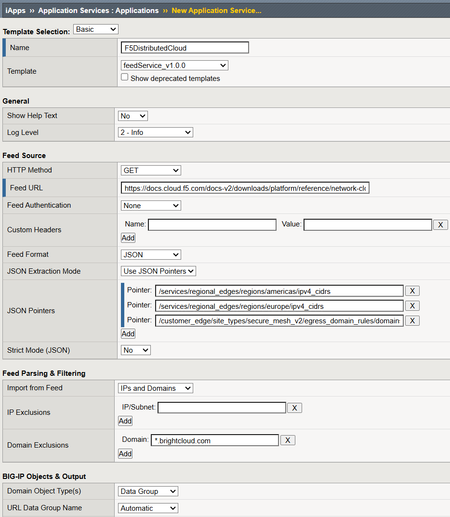
feedService: Automate Threat Feed and Blocklist Ingestion on BIG-IP (iApp + Python)
feedService is an iApp- and Python-based automation solution for F5 BIG-IP that automatically downloads, validates, normalizes, and imports feed data into native BIG-IP constructs — with intelligent data classification, change detection, and scheduled updates via iCall.70Views3likes0CommentsThree Things I've Learned Recently While Deploying F5 CIS on OpenShift
Not every CIS deployment issue is actually a CIS issue. This article walks through three lessons learned from recent OpenShift deployments where the real culprit turned out to be NetworkPolicies, image selection, and version management rather than the controller itself.107Views3likes0Comments