bigip
56 TopicsDisplaying Application Study Tool (AST) Dashboards in Your Own Grafana Instance
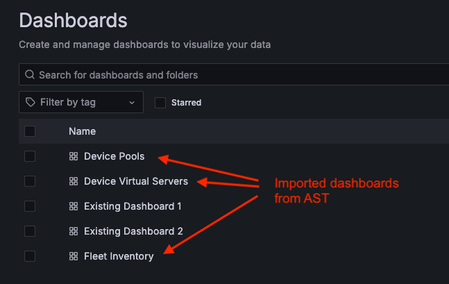
The Application Study Tool (AST) has its own Prometheus and Grafana instances. These instances run as containers and are designed to coexist with other Prometheus and Grafana instances in your environment, even on the same host. However, during demos and discussions with customers, many have expressed the desire to use their existing Grafana instance to display AST dashboards. Although it may not be obvious to new Grafana users, this process is straightforward. This blog will walk you through launching a second generic Grafana container instance, connecting it to the AST instance of Prometheus (the data source), importing a dashboard from the AST instance of Grafana, and displaying it in the new Grafana instance. If you already have a non-AST instance of Grafana running in your environment, the steps to launch a second Grafana container are optional. However, you may want to run it in order to test the import functionality and make your own customizations before importing it again into your “production” Grafana instance. Here is an example of a dashboard folder in a non-AST Grafana instance after importing three dashboards from AST: Launch a Second (Generic) Grafana Container If you already have a Grafana instance, you may skip this step. However, if you don’t, or you would like to use a “sandbox” for testing customizations before importing the dashboard into your “production“ Grafana instance, you can use the following steps to launch a new Grafana container. The following assumptions are made for the steps that follow: You are using Docker as your container runtime. (If you are using Podman, simply substitute “podman” for “docker” in each of the following commands. Other container runtimes may also work for this exercise, but I have not tested them.) You have sufficient privileges to run containers. If you don’t, you may need to run these commands with “sudo”. If that fails due to permissions errors, you will need to request the necessary privileges from your Linux administrator. We want to run Grafana version 11.5.2. Any recent version should work. However, this is the latest version as of the writing of this blog. The IP address of the host where you are running these containers is 192.168.0.15. Yours will likely be different. Use your own host’s IP when you run “curl” inside the grafana2 container. In my testing, I used MacOS. This will also work on any current Linux distribution and should work on Windows. First, launch the Grafana container. I set this new instance of Grafana to listen on port 3002 (the default for Grafana is 3000) to avoid conflicts with the AST instance, if they are running on the same host. $ docker run -d --name=grafana2 -p 3002:3000 grafana/grafana:11.5.2 Next, exec into the container to ensure it can connect to the AST instance of Prometheus. You can instead check connectivity from the Grafana UI, but the below method is a good way to troubleshoot any connectivity errors you may encounter. $ docker exec -it grafana2 bash You are now running a Bash shell inside the new Grafana container. Run a curl command to confirm the new Grafana container can reach the Prometheus application, which listens on port 9090, by default. (The IP address, 192.168.0.15, is used as an example. Use your own host's IP address here.) 5d3e8256af3d:/usr/share/grafana$ curl 192.168.0.15:9090 <a href="/graph">Found</a>. Now, it is time to test the new Grafana instance. Open a web browser and navigate to the host where this new Grafana container is running, at port 3002. If you are running on your local machine, it will be http://localhost:3002/. The default credentials are admin/admin. When first logging in, Grafana will prompt you to change the password. You may choose to change it now or click “skip” to leave it as is. Now you can export one of the dashboards from AST and import it into this instance. Export a Dashboard from AST Now that you have launched a second instance of Grafana (or you are running your own non-AST instance), it is time to import a dashboard from AST. You can import just one dashboard of your choosing (i.e., BigIP - Device Device >> Virtual Servers), or several (or even all) dashboards from AST. For this example, we will only import one dashboard, BigIP - Device Device >> Virtual Servers. If you wish to import other dashboards, the steps are the same. Navigate to the dashboard you would like to import into your Grafana instance. For the example used here, navigate to Dashboards >> BigIP – Device >> Device Virtual Servers. Click the blue "Share" button near the upper-right corner. In the pop-up box, click the Export tab. Click the blue "Save to file" button to download the JSON file representing the dashboard. Two notes: If you wish to use your own non-AST instance of Prometheus, you will need to move the slider for “Export for sharing externally” (available in the Share pop-up box, under the Export tab) to the right to enable it. This will allow you to select your own Prometheus instance as the data source when importing the dashboard into the alternate Grafana instance. The default JSON for these dashboards is also available in “dashboards” folder of the repo: https://github.com/f5devcentral/application-study-tool/tree/main/services/grafana/provisioning/dashboards. This version has the “Export for sharing externally” option enabled, so you will need to select the desired Prometheus data source – either your own or the AST instance – when importing the dashboard into the alternate Grafana instance. Import the Dashboard into the New (or Existing) Grafana Instance If you have just launched a new, generic Grafana container using the instructions in the above section, Launch a Second (Generic) Grafana Container, you can now launch the UI from a web browser by navigating to http://localhost:3002/ (assuming you are running on your local machine). The default login credentials are admin/admin. If this is just a temporary test instance, you may click “skip” when prompted to “Update your password”. (For a production instance or any instance that will be used more than just briefly, we recommend changing this to a stronger password.) If you are using an existing Grafana instance, navigate to it and log in. Connect the New Grafana Instance to the AST Prometheus Instance From this non-AST Grafana instance, verify the Prometheus data source is reachable from Grafana, and then connect to it by following these steps: In the menu bar on the left, click Connections >> Data sources. If this is a new instance of Grafana, the “Add data source” button will appear in the middle of the screen. If this is an existing instance with pre-existing data sources, the button will be in the upper-right corner of the screen and will say “Add new data source”. Click on it. Select Prometheus from the list of data sources. You may have to scroll down or enter “prometheus” in the search bar. Fill in a name (for example, “ast-prometheus”), and the URL to connect to the Prometheus instance. In my case, it was my host's private IP address, 192.168.0.15, and the port Prometheus is listening on (9090 by default): http://192.168.0.15:9090. Set the “Interval behaviour >> Scrape interval” to be the same as the value used for the collection_interval setting in your AST configuration. If you did not explicitly change it when configuring AST, it will be the default value of 60s. Click the blue "Save & test" button and ensure you get the message, “Successfully queried the Prometheus API” at the bottom of the screen. Import the Dashboard into the New Grafana Instance Click on “Dashboards” in the menu on the left. Click the blue “New” button in the upper-right and, from the drop-down, select "Import". Click on "Upload dashboard JSON file" and upload the JSON file you previously exported from the original AST dashboard. Give it a name (under Name). Under the Prometheus drop-down, select your Prometheus data source. (In the example above, it is called "ast-prometheus". If you accept the default name, it will just be “prometheus”.) Click Import. Voilà! You are now taken to the newly imported Grafana dashboard. Conclusion The Application Study Tool offers excellent observability for F5 BIG-IP systems and the traffic they handle. If you have your own Grafana instance with your own set of dashboards, there is no need to manage two separate instances. You can combine the two so you have all your dashboards in one place. The flexibility of Grafana also allows it to be highly customizable, so you can modify any of the out-of-the-box dashboards AST provides and even create your own. If you have gotten value from customizing some of the default AST dashboards, feel free to post what you did below, as many of our readers will find this valuable.1.9KViews10likes1CommentEnhancing AI Data Pipelines with BIG-IP v21: Discover S3 Integration
F5 BIG-IP v21 revolutionizes AI data pipelines with advanced support for S3-compatible object storage, enabling enterprises to optimize, secure, and scale AI and analytics workflows seamlessly. By introducing S3-tuned traffic profiles, intelligent load balancing, and robust health monitoring, BIG-IP ensures predictable performance, resiliency, and protection against protocol-specific threats. This transformative delivery layer empowers businesses to handle complex workloads efficiently, making AI-driven innovation faster, smoother, and more reliable than ever.
245Views2likes0CommentsMitigating OWASP Web Application Insecure Design using F5 BIG-IP Advanced WAF
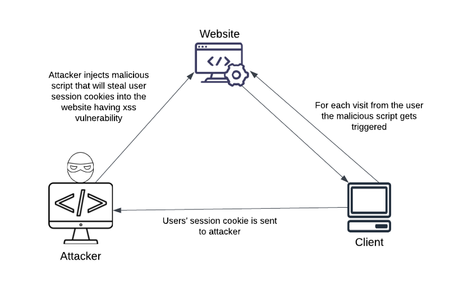
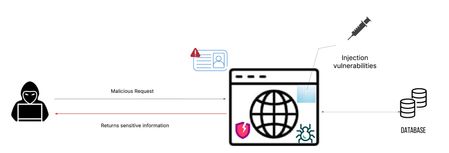
This article provides OWASP Top 10 Insecure Design caused due to improper planning, logic in the application. These risks allows Web crawlers, automated bots etc. to cause web scraping attack. This article also provides mitigation steps by F5 BIG-IP using Advanced WAF protection.479Views2likes1CommentHow I did it - “Delivering Kasm Workspaces three ways”
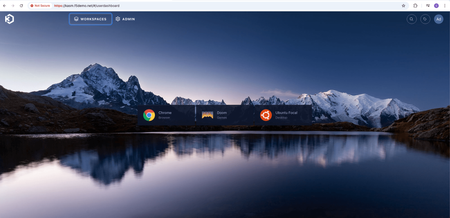
Securing modern, containerized platforms like Kasm Workspaces requires a robust and multi-faceted approach to ensure performance, reliability, and data protection. In this edition of "How I did it" we'll see how F5 technologies can enhance the security and scalability of Kasm Workspaces deployments.1.4KViews2likes0CommentsExplicit write control for iRules subtables
Note to the reader...apparently what is old is new again. There are some threads here on DevCentral that have already solved for this, albeit in different ways. The few brought to my attention by MVP Kai_Wilke are included in the list below for your benefit to read through. That said, the journey of discovery here in this article is worth your time to understand the nuances of how data is passed in a multi-TMM system. Dealing with iRule $variables for HTTP2 workload while HTTP MRF Router is enabled | DevCentral https://github.com/KaiWilke/F5-iRule-RADIUS-Server-Stack SPDY/HTTP2 Profile Impact on Variable Use | DevCentral The TL;DR TMM subtables on BIG-IP are partitioned across TMMs by hashing the subtable name. Writing to a subtable from a non-owner TMM is roughly 1000x slower than writing from the owner...single-digit clock clicks vs. tens of thousands. If you want fast per-TMM local storage, you cannot pick the subtable name yourself; you have to *discover* a locally-owned name by timing trial writes. Deterministic naming schemes do not work, even when they look obviously correct. The Problem A colleague had an iRule that maintained per-connection state across many CLIENT_DATA events. The natural data structure was a TMM session subtable. His quick experimenting showed the writes were slow enough to push the system CPU under modest load and needed to understand why before scaling further. There's an example proc library from Nat_Thirasuttakorn "LOCALDB" that uses a clever timing trick: it generates a random subtable name, times a probe write, and only keeps the name if the write completes under some threshold (50 clock clicks in the original). The implication was that most random names produce slow writes and only a few are fast. I read the code, figured I understood it, and rewrote it "cleanly" using deterministic per-TMM names: `localdb_tmm_0`, `localdb_tmm_1`, `localdb_tmm_2`, ... one per TMM, no probing required. Each TMM would write only to its own name. Done, right? Wrong. The diagram above is the mental model the rest of this post leans on. Two independent hashes are happening: the DAG hashes the inbound 4-tuple to choose which TMM accepts the connection, and TMOS separately hashes the subtable name to choose which TMM *owns* the storage for that name. A write succeeds only when both hashes agree; when the TMM that received the connection is also the owner of the subtable being written to. When they disagree, the write costs roughly 7000x more. The Investigation The deterministic version "worked" — writes succeeded, distribution looked plausible, throughput was decent. Then I added timing instrumentation per TMM and looked at the percentiles: TMM samples min avg max 0 74 121 64855.6 229089 1 34 136 71536.3 236204 2 38 121 88516.9 293259 3 62 3 13.3 25 TMM 3 was writing in 3-25 clicks. Every other TMM was averaging tens of thousands, which is a 5,000-7,000x gap! Something was very wrong. The diagnosis came from a `/probe` endpoint I'd added for unrelated reasons: hit the same subtable name from many connections, time each write, count which TMM responds fast. Probing each of the four "deterministic" names produced: localdb_tmm_0 → owner is TMM 2 localdb_tmm_1 → owner is TMM 2 localdb_tmm_2 → owner is TMM 3 localdb_tmm_3 → owner is TMM 3 Visualizing the result for one of those probes makes the signal unambiguous: Two of the four names hashed to TMM 2, the other two hashed to TMM 3. TMMs 0 and 1 didn't own any of the subtables I'd "assigned" to them. This is the key insight: **the subtable name `localdb_tmm_3` doesn't get owned by TMM 3 just because its name ends in 3.** TMOS hashes the whole name string and assigns ownership based on that hash. The hash is opaque, and it's stable, but it has no relationship to the content of the name. My deterministic scheme was generating four unique names, which guaranteed no key collisions across TMMs — but it didn't guarantee, and couldn't guarantee, that name N landed on TMM N. Why The Original Trick Was Right Going back to the LOCALDB proc library pattern from DevCentral: while { $try < $maxtry } { set name [expr rand()] set before [clock clicks] table set -subtable $name test_$name $name 5 set after [clock clicks] set diff [expr {$after - $before}] if { $diff < $maxdiff } { break } incr try } Generate a random name. Probe it. If it's fast, keep it; if not, throw it away and try another. Each TMM independently does this, and on average needs ~N tries on an N-TMM system to find a name it owns. The probe is the *only* reliable way to know. The randomness is load-bearing. The timing measurement is load-bearing. Neither is decorative. My "elegant" rewrite removed both and produced a system that looked fine but was burning 99% of its potential throughput shipping writes between TMMs. How to Verify A timing histogram per TMM is the diagnostic. The test workflow: Add a `/probe?name=X` endpoint that times a single `table set` against an arbitrary subtable name and reports clicks + the responding TMM Hit it many times from a multi-threaded client Aggregate per-TMM: hits, OWNER count (writes under threshold), NON_OWNER count, min/avg/max clicks The owner of name X will show up as ~all-OWNER with consistently low clicks; everyone else shows ~all-NON_OWNER with high clicks A handful of stray "OWNER" tags on non-owners is just noisy variance in `clock clicks` measurement. The real signal is overwhelming: 50+ OWNER tags vs 0-3 OWNER tags, and average clicks differing by 1000-10000x. Lessons About TMM Subtables A few things worth internalizing if you work with these: Names are global; storage is partitioned Two TMMs writing the same name reach the same logical subtable, but only the owner stores it locally. Non-owners pay an inter-TMM coordination tax on every operation. This is fundamentally a sharding scheme where the shard key is the subtable name and the shard map is hidden from you. Construction can't replace discovery Anywhere a system uses an opaque hash to assign ownership of named resources, you cannot construct a locally-owned name, you can only find one by trying. This pattern shows up well beyond TMOS: Cassandra token ranges, Redis Cluster slots, Kafka partition assignments, consistent-hashing rings in general. Discovery beats construction whenever the mapping function is hidden. O(n) reads in hot paths kill throughput I had a `count` proc that called `table keys -subtable X` and ran `llength` on the result. With per-TMM subtables of ~25k entries, that's 25k strings to enumerate per request. Throughput decayed from 3300/s to 600/s over a 40k-record run, a perfect 1/n curve. Maintaining the count incrementally in a `static::` variable made it O(1) and throughput stayed flat. The fix is obvious in hindsight; the bug is invisible without per-second throughput measurement. Static variables are per-TMM This is great when you want it (per-TMM owned-subtable name, per-TMM counters) and confusing when you don't (you can't share state across TMMs through statics alone). The variables are also persistent across rule reloads in some versions, which means a rule update that adds a new static can leave you with TMMs running the new code but missing the new state. Defensive existence checks at the top of every proc are worthwhile. Sampling debug logs is mandatory at scale Logging every write to `/var/log/ltm` for a million-record load is 1M log lines, hundreds of MB, and enough log I/O to tank throughput on its own. Sample 1-in-N (where N grows with load size), and gate calling-rule logs on the same sample point so the log narrative stays coherent. A `should_log` helper proc shared between the library and its callers keeps this clean. Test harnesses should reset, not reload I initially "reset" between runs by reloading the iRule. `RULE_INIT` re-ran and statics reset, but the *subtable contents* persisted in TMM session memory because they're indexed by name, not by rule. Each rule reload picked a new random name and orphaned the old subtable's entries. Over many runs, memory accumulated. A `/reset` endpoint that walks `table keys` and deletes them is the right abstraction. What "Done" Looked Like After the fix, a 100k-record run on a 4-TMM system: TMM samples min avg max 0 98 3 17.4 71 1 101 4 18.9 88 2 99 3 16.8 77 3 102 4 19.1 91 Throughput stayed flat at ~3000/s for the entire run. Every TMM in the same low-clicks range. No `SLOW` tags in the sampled logs. The before-and-after chart (log scale) makes the impact unmistakable: TMM 3 is interesting on its own. Under the broken design it was already fast (averaging 13.3 clicks) because the deterministic names happened to hash to it, meaning every other TMM was ferrying its writes over to TMM 3. Under the fix, TMM 3 stops being a single hot point and instead does roughly the same work as everyone else, on its own subtable. The fact that TMM 3's "broken" bar isn't dramatically taller is what makes this kind of bug survive a smoke test: writes were succeeding, throughput looked plausible, *one* TMM was even fast. The percentile breakdown is what gave it away. The Validated Test Session Here is the actual end-to-end verification run, command by command, on a 4-TMM lab BIG-IP. This is the workflow that I ended up codifying in the project's `USAGE.md` — it both validates that the fix works and demonstrates each tool's role. Step 1: Verify Every TMM Picked a Unique Subtable After deploying the LOCALDB rule and the calling rule, hit `/whoami` enough times that fresh TCP connections fan out across all TMMs: $ for i in $(seq 1 30); do curl -s http://10.0.2.49/whoami; done | sort -u tmm 0 subtable localdb_tmm_0_865802 total_tmms 4 writes 0 entries 0 tmm 1 subtable localdb_tmm_1_922743 total_tmms 4 writes 0 entries 0 tmm 2 subtable localdb_tmm_2_5946 total_tmms 4 writes 0 entries 0 tmm 3 subtable localdb_tmm_3_441563 total_tmms 4 writes 0 entries 0 Four things to read out of this: Four unique TMMs (0, 1, 2, 3) responded meaning full coverage. With `Connection: close` from curl, each request gets a fresh ephemeral source port and the BIG-IP's DAG re-hashes; 30 requests against 4 TMMs is essentially guaranteed to hit all of them. Four unique subtable names, each with the responding TMM number as a prefix and a random suffix. The TMM-number prefix is just a label for human readability. The random suffix is what `init_table` actually iterates on during timing-probe discovery, throwing away names that hash to other TMMs and keeping the first one whose write completes under the threshold. `total_tmms=4` is consistent on every row. `TMM::cmp_count` is reporting the cluster size correctly. writes=0 entries=0` everywhere. Clean baseline before any load. Step 2: Reset to a Clean Baseline $ python tbl-loader.py reset --host 10.0.2.49 --port 80 Discovering TMM count from 10.0.2.49:80/info ... BIG-IP reports 4 TMMs. Sending 200 /reset requests with 32 workers... Reset summary: TMM hits first_deleted total_deleted ------------------------------------------ 0 50 0 0 1 47 0 0 2 55 0 0 3 48 0 0 All 4 TMMs cleared. Total entries removed (first-hit): 0 200 reset requests, 50 / 47 / 55 / 48 distribution across the four TMMs. That's essentially perfect uniform. Expected mean is 50, observed range is 47-55, which is well within the natural variance of a fair hash. Worth confirming because the same DAG is what'll spread the load run; uneven reset distribution would predict uneven load distribution, which complicates the analysis. `first_deleted=0` everywhere because the previous step's `whoami` had already shown empty subtables. After a load run, this column tells you exactly how many entries each TMM was holding. Step 3: Run the Load $ python tbl-loader.py load --host 10.0.2.49 --port 80 --count 100000 --workers 64 ... completed=100,000/100,000 (100.0%) rate=4376/s coverage=4/4 missing=[] errors=0 Done. completed=100,000 errors=0 elapsed=22.9s rate=4375/s Final distribution: tmm 0: 25,198 writes (25.20%) tmm 1: 24,782 writes (24.78%) tmm 2: 24,914 writes (24.91%) tmm 3: 25,106 writes (25.11%) Three numbers worth lingering on: Sustained 4,375/s throughput, completely flat Earlier in the project, before the O(1) `count` fix, the equivalent run started at 3,300/s and decayed to 600/s by the 40k-record mark, a perfect 1/n curve from the hidden `table keys` + `llength` cost in the calling rule. With `static::LOCALDB_entries` maintained incrementally, the per-write work is genuinely constant and throughput stays where it starts. Distribution within ±0.25% of perfect uniform 25.20% / 24.78% / 24.91% / 25.11% is what fair hashing produces over 100k samples. The DAG is doing its job; nothing is being funneled through one TMM the way the broken-locality version was. Zero errors over 100k fresh TCP connections No TIME_WAIT exhaustion on the client (the ephemeral port range is wide enough), no rate limiting on the BIG-IP, no socket timeouts. Suggests the workload is well within both ends' capacity. The 22.9 second elapsed time works out to ~5 microseconds per write end-to-end, including the full TCP setup/teardown for each request. The actual `table set` is in the tens of clock clicks (single-digit microseconds), so HTTP and TCP overhead dominate, which is the right answer when the iRule work itself is fast and local. Step 4: Verify Per-TMM Locality from the Logs The throughput and distribution numbers tell us writes are happening evenly, but they don't directly prove each write is *local*. For that, pull the sampled timing lines from the BIG-IP's log and run them through the analyzer. Filter to the test window so earlier (broken) runs don't pollute the stats: $ ssh [email protected] "grep '^May 6 16' /var/log/ltm | grep 'sampled'" \ | python3 timing_stats.py Sample rate: 1/1000 Locality threshold: 100 clicks TMM n FAST SLOW min p50 avg p95 p99 max ------------------------------------------------------------------------------ 0 25 25 0 3 5 5.5 10 11 11 1 24 24 0 3 5 6.1 11 18 18 2 24 24 0 2 6 6.1 10 11 11 3 25 25 0 2 6 6.5 12 13 13 ------------------------------------------------------------------------------ Total: 98 samples across 4 TMMs FAST_LOCAL=98 SLOW=0 OK: all TMMs have average write timing below 100 clicks. Per-TMM locality is working. This is the centerpiece of the validation. Reading it line by line: Sample counts 25 / 24 / 24 / 25 samples per TMM matches the 25.20% / 24.78% / 24.91% / 25.11% write distribution from the load output, which is what you'd expect if the BIG-IP is logging 1-in-1000 of all writes uniformly. Timing Single-digit minimums (2-3 clicks). Averages of 5.5-6.5 clicks. p99s of 11-18. Max of 18 across all 98 samples. Compare to the broken run earlier in the project (shown at the top of the article in the investigation section), on the same hardware with the same workload but the wrong `init_table`. That's a **10,000x improvement on three of the four TMMs** between the two runs. The only thing that changed was `init_table` switching from deterministic naming to timing-probe discovery. Tag tally 98 FAST_LOCAL, 0 SLOW. Not a single sampled write missed the locality threshold. The 100-click threshold has plenty of headroom, the actual max was 18, an order of magnitude below. Verdict The script's automated check confirms locality is working. This is the line you'd grep for in CI if you wanted regression coverage. Step 5: Spot-Check Ownership of a Discovered Name The timing report proves writes were fast, but it doesn't prove that the *names* each TMM picked are actually owned by those TMMs (only that their writes were fast for whatever reason). To close that gap, take one of the names from `whoami` and probe it directly: $ python tbl-loader.py probe --host 10.0.2.49 --port 80 --name localdb_tmm_2_5946 --requests 200 ... Results for subtable 'localdb_tmm_2_5946': TMM hits OWNER NON_OWNER min_clicks avg_clicks max_clicks ---------------------------------------------------------------- 0 55 0 55 286 5139.9 19814 1 70 0 70 127 12475.3 52544 2 8 8 0 3 8.6 20 3 67 0 67 238 7126.6 51939 Likely owner of subtable 'localdb_tmm_2_5946': TMM 2 (avg 8.6 clicks, tagged OWNER 8 times) This is unambiguous: TMM 2 wrote in 3-20 clicks, average 8.6 Consistent with the 6.1 average from `timing_stats.py` during the load. Small differences, both well under threshold, both unambiguously local. TMMs 0, 1, 3 took 127-52,544 clicks, averages 5,139 / 12,475 / 7,126 Roughly 600x to 1,500x slower than TMM 2 on the same operation. They're paying the inter-TMM coordination tax because the subtable is owned by TMM 2. Zero stray OWNER tags on non-owning TMMs Earlier probe runs against fresh subtables sometimes had 1-3 stray OWNER tags from non-owners due to `clock clicks` jitter on small subtables. With this subtable now containing ~25k entries, the non-owner penalty is large enough (mins of 127-286 clicks) that no stray write made it under the 100-click threshold. The bigger the subtable, the cleaner the signal. TMM 2 only got 8 hits That's just sampling variance. The DAG hashed inbound connections 55 / 70 / 8 / 67, which over 200 requests is a normal-looking spread. With 1000 requests you'd see ~250 hits per TMM. The 8 hits TMM 2 did get were unanimous on OWNER, which is what matters. A run against any of the other discovered names (`localdb_tmm_0_865802`, `localdb_tmm_1_922743`, `localdb_tmm_3_441563`) produces the same shape of result with the corresponding TMM as owner. What This Validates Step 1 proves every TMM ran `init_table` and picked a unique name. Step 2 proves clean baseline and even DAG distribution. Step 3 proves throughput is sustained and writes spread evenly across TMMs at scale. Step 4 proves every write was fast at the time it happened. Step 5 proves the names each TMM picked are genuinely owned by those TMMs. Together they're a complete proof of the design: the timing-probe discovery in `init_table` correctly identifies a locally-owned subtable name on each TMM, and operations against those names cost ~10 clock clicks instead of ~70,000. The cost gap is the entire reason the per-TMM-subtable pattern exists, and it's now empirically demonstrated end-to-end. This validation run took maybe three minutes of wall time. It's the kind of verification I should have been running before believing the original "deterministic naming" rewrite worked, not after watching it fail under load. Pushing Throughput: Per-Write to Bulk-POST The validated workflow above writes one key per HTTP request. That's the right shape for testing locality (each write is a clean, isolated trial), but it makes TCP connection setup the dominant cost. At ~4,375 writes per second on a 4-TMM box, the iRule is spending most of its time accepting connections, parsing headers, and tearing down sockets, not writing to subtables. The natural next step is to batch many writes into a single HTTP request. A separate `/bulk_load` endpoint accepts a POST body of newline-separated keys (UUIDs in our test case), collects the body via `HTTP::collect`, and walks the lines in a tight loop calling `LOCALDB::set_unique` on each. One TCP connection now writes 15,625 keys instead of one. Per-batch timing comes back in the response so the loader can aggregate it client-side. The throughput result is striking: Same hardware, same iRule logic, same per-TMM locality — the 30× gap is purely TCP setup cost saved. The per-write timing inside the iRule barely changed (3-6 clicks per `LOCALDB::set_unique` either way), but the request-level overhead collapsed because we stopped paying it 1M times. A few things worth noting about this bulk path that aren't obvious: Locality holds inside the loop A `/bulk_load` request that lands on TMM 2 will do all 15,625 of its writes against TMM 2's local subtable. There's no opportunity for a single batch to "leak" writes to other TMMs, because the connection is pinned to one TMM by DAG and the subtable name is fixed by `static::LOCALDB_name`. So the locality verdict from the per-write test carries over without needing re-verification and the loader's per-batch `clicks_per_write` measurement confirms it stays in the 3-6 click range. DAG fan-out still distributes work With 64 fresh POSTs, each gets its own ephemeral source port, so the DAG hashes them across TMMs the same way it did with single-write requests. After enough batches, the per-TMM POST counts converge. In one of the runs, 4 TMMs each took exactly 16 of 64 POSTs. Body size matters for HTTP::collect The `/bulk_load` handler reads `Content-Length` and calls `HTTP::collect $cl` to buffer the entire body before processing. We cap at 16 MiB to protect TMM memory; that's plenty of headroom (~400k UUIDs per batch) but it's a real ceiling worth knowing about. The default of 15,625 UUIDs is ~580 KiB, which is well within bounds. An aside: log volume kills throughput at this rate Our first three bulk-post runs showed throughput drifting downward across consecutive runs...163k/s, then 129k/s, then 122k/s on the same hardware with no other state changes between them. The cause turned out to be the calling rule's logging itself. The `/bulk_load` and `/reset` handlers each had unconditional `log local0.` statements, producing 64 + 200 = 264 syslog writes per test cycle on top of the LOCALDB sample logs. After silencing those handlers (the response bodies already carried the per-batch timing data, so we lost no visibility), runs stabilized at ~133k writes/s ± 4% and survived 60-second sleeps with no warmup penalty. The lesson generalizes: at high write rates, the rule path needs to be quiet, not just "not chatty." Even gated log statements run their gate evaluation on every request, and unconditional ones write to syslog regardless of intent. When the per-write iRule cost is in the single-digit microseconds, *any* per-request work shows up. The rule of thumb that emerged: log statements that fire once per HTTP request are fine for diagnostics (`/probe`, `/whoami`) but should be sampled or removed entirely from the hot path (`/load`, `/bulk_load`, `/reset`). The loader can carry timing data back in response bodies and aggregate it client-side, which is both faster and more useful for analysis. Worth flagging that the absolute throughput numbers here (130-160k writes/s) reflect the test environment: a BIG-IP VE running on an Intel NUC under VMware, sharing the host with the load generator and other VMs. Those are not headroom numbers; they're contention-dominated. A 16-vCPU appliance without that contention should comfortably scale 5-10× from these figures, putting bulk-load throughput into the millions of writes per second on real hardware. The Code The updated `LOCALDB.tcl`, the test harness `subtable_test_updates.tcl`, the Python loader/prober/timing-analyzer, and the USAGE.md are all in the irules-subtable-discovery repo out on Github. Two key bits to study: The `init_table` proc that does the timing-probe discovery, including the fallback path that logs a WARNING and uses a slow name rather than failing silently when discovery exhausts its tries. The 200-try ceiling is sized for 16+ TMMs; on a 4-TMM box you'll typically find a local name in 1-3 tries. The `/probe` endpoint and the loader's `probe` mode. Together they let you take any subtable name and identify which TMM owns it in seconds. Worth keeping in your toolkit; it's the cleanest way I've found to interrogate TMOS's hash assignments. Closing Thoughts The whole episode reinforced something I keep relearning: when a working pattern looks weirdly complicated, the complications are usually load-bearing. The original LOCALDB rule looked over-engineered with its random names and timing probes and retry loops. It was actually exactly as engineered as it needed to be. My "cleaner" rewrite was simpler because I'd quietly assumed something untrue about how TMOS assigns ownership. The truth was readable from a 6-line timing report; I just hadn't generated one yet. If you're going to deviate from a working pattern, the deviation should be the thing you instrument first. Note: the original LocalDB proc library I built this from has been updated by the author in a couple different ways since I shared my work with him. I didn't fold that work in here, but I'll post those updates along with the original when I get permission to do so.99Views1like0CommentsMitigating OWASP API Security Risk: Excessive Data Exposure using F5 BIG-IP
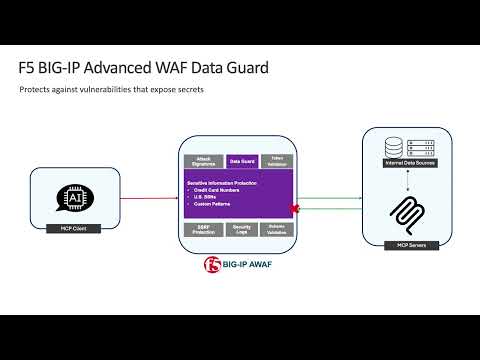
Excessive Data Exposure vulnerability leaks the sensitive data of the user results in serious concerns to an organization security. F5 BIG IP Advanced WAF or ASM protects the web application or server from Excessive Data Exposure vulnerability and provides feasibility to block/mask valuable data like Social Security Number (SSN), Credit Card Number (CCN). Personally Identifiable Information (PII) and Phone Number as well. This protects from attackers and leverages system security.403Views1like1Comment