big-ip
1348 TopicsHow to get a F5 BIG-IP VE Developer Lab License
(applies to BIG-IP TMOS Edition) To assist operational teams teams improve their development for the BIG-IP platform, F5 offers a low cost developer lab license. This license can be purchased from your authorized F5 vendor. If you do not have an F5 vendor, and you are in either Canada or the US you can purchase a lab license online: CDW BIG-IP Virtual Edition Lab License CDW Canada BIG-IP Virtual Edition Lab License Once completed, the order is sent to F5 for fulfillment and your license will be delivered shortly after via e-mail. F5 is investigating ways to improve this process. To download the BIG-IP Virtual Edition, log into my.f5.com (separate login from DevCentral), navigate down to the Downloads card under the Support Resources section of the page. Select BIG-IP from the product group family and then the current version of BIG-IP. You will be presented with a list of options, at the bottom, select the Virtual-Edition option that has the following descriptions: For VMware Fusion or Workstation or ESX/i: Image fileset for VMware ESX/i Server For Microsoft HyperV: Image fileset for Microsoft Hyper-V KVM RHEL/CentoOS: Image file set for KVM Red Hat Enterprise Linux/CentOS Note: There are also 1 Slot versions of the above images where a 2nd boot partition is not needed for in-place upgrades. These images include _1SLOT- to the image name instead of ALL. The below guides will help get you started with F5 BIG-IP Virtual Edition to develop for VMWare Fusion, AWS, Azure, VMware, or Microsoft Hyper-V. These guides follow standard practices for installing in production environments and performance recommendations change based on lower use/non-critical needs for development or lab environments. Similar to driving a tank, use your best judgement. Deploying F5 BIG-IP Virtual Edition on VMware Fusion Deploying F5 BIG-IP in Microsoft Azure for Developers Deploying F5 BIG-IP in AWS for Developers Deploying F5 BIG-IP in Windows Server Hyper-V for Developers Deploying F5 BIG-IP in VMware vCloud Director and ESX for Developers Note: F5 Support maintains authoritative Azure, AWS, Hyper-V, and ESX/vCloud installation documentation. VMware Fusion is not an official F5-supported hypervisor so DevCentral publishes the Fusion guide with the help of our Field Systems Engineering teams.182KViews14likes153CommentsWhat Is BIG-IP?
tl;dr - BIG-IP is a collection of hardware platforms and software solutions providing services focused on security, reliability, and performance. F5's BIG-IP is a family of products covering software and hardware designed around application availability, access control, and security solutions. That's right, the BIG-IP name is interchangeable between F5's software and hardware application delivery controller and security products. This is different from BIG-IQ, a suite of management and orchestration tools, and F5 Silverline, F5's SaaS platform. When people refer to BIG-IP this can mean a single software module in BIG-IP's software family or it could mean a hardware chassis sitting in your datacenter. This can sometimes cause a lot of confusion when people say they have question about "BIG-IP" but we'll break it down here to reduce the confusion. BIG-IP Software BIG-IP software products are licensed modules that run on top of F5's Traffic Management Operation System® (TMOS). This custom operating system is an event driven operating system designed specifically to inspect network and application traffic and make real-time decisions based on the configurations you provide. The BIG-IP software can run on hardware or can run in virtualized environments. Virtualized systems provide BIG-IP software functionality where hardware implementations are unavailable, including public clouds and various managed infrastructures where rack space is a critical commodity. BIG-IP Primary Software Modules BIG-IP Local Traffic Manager (LTM) - Central to F5's full traffic proxy functionality, LTM provides the platform for creating virtual servers, performance, service, protocol, authentication, and security profiles to define and shape your application traffic. Most other modules in the BIG-IP family use LTM as a foundation for enhanced services. BIG-IP DNS - Formerly Global Traffic Manager, BIG-IP DNS provides similar security and load balancing features that LTM offers but at a global/multi-site scale. BIG-IP DNS offers services to distribute and secure DNS traffic advertising your application namespaces. BIG-IP Access Policy Manager (APM) - Provides federation, SSO, application access policies, and secure web tunneling. Allow granular access to your various applications, virtualized desktop environments, or just go full VPN tunnel. Secure Web Gateway Services (SWG) - Paired with APM, SWG enables access policy control for internet usage. You can allow, block, verify and log traffic with APM's access policies allowing flexibility around your acceptable internet and public web application use. You know.... contractors and interns shouldn't use Facebook but you're not going to be responsible why the CFO can't access their cat pics. BIG-IP Application Security Manager (ASM) - This is F5's web application firewall (WAF) solution. Traditional firewalls and layer 3 protection don't understand the complexities of many web applications. ASM allows you to tailor acceptable and expected application behavior on a per application basis . Zero day, DoS, and click fraud all rely on traditional security device's inability to protect unique application needs; ASM fills the gap between traditional firewall and tailored granular application protection. BIG-IP Advanced Firewall Manager (AFM) - AFM is designed to reduce the hardware and extra hops required when ADC's are paired with traditional firewalls. Operating at L3/L4, AFM helps protect traffic destined for your data center. Paired with ASM, you can implement protection services at L3 - L7 for a full ADC and Security solution in one box or virtual environment. BIG-IP Hardware BIG-IP hardware offers several types of purpose-built custom solutions, all designed in-house by our fantastic engineers; no white boxes here. BIG-IP hardware is offered via series releases, each offering improvements for performance and features determined by customer requirements. These may include increased port capacity, traffic throughput, CPU performance, FPGA feature functionality for hardware-based scalability, and virtualization capabilities. There are two primary variations of BIG-IP hardware, single chassis design, or VIPRION modular designs. Each offer unique advantages for internal and collocated infrastructures. Updates in processor architecture, FPGA, and interface performance gains are common so we recommend referring to F5's hardware page for more information.96KViews3likes3CommentsGet Started with BIG-IP and BIG-IQ Virtual Edition (VE) Trial
Welcome to the BIG-IP and BIG-IQ trials page! This will be your jumping off point for setting up a trial version of BIG-IP VE or BIG-IQ VE in your environment. As you can see below, everything you’ll need is included and organized by operating environment — namely by public/private cloud or virtualization platform. To get started with your trial, use the following software and documentation which can be found in the links below. Upon requesting a trial, you should have received an email containing your license keys. Please bear in mind that it can take up to 30 minutes to receive your licenses. Don't have a trial license? Get one here. Or if you're ready to buy, contact us. Looking for other Resources like tools, compatibility matrix... BIG-IP VE and BIG-IQ VE When you sign up for the BIG-IP and BIG-IQ VE trial, you receive a set of license keys. Each key will correspond to a component listed below: BIG-IQ Centralized Management (CM) — Manages the lifecycle of BIG-IP instances including analytics, licenses, configurations, and auto-scaling policies BIG-IQ Data Collection Device (DCD) — Aggregates logs and analytics of traffic and BIG-IP instances to be used by BIG-IQ BIG-IP Local Traffic Manager (LTM), Access (APM), Advanced WAF (ASM), Network Firewall (AFM), DNS — Keep your apps up and running with BIG-IP application delivery controllers. BIG-IP Local Traffic Manager (LTM) and BIG-IP DNS handle your application traffic and secure your infrastructure. You’ll get built-in security, traffic management, and performance application services, whether your applications live in a private data center or in the cloud. Select the hypervisor or environment where you want to run VE: AWS CFT for single NIC deployment CFT for three NIC deployment BIG-IP VE images in the AWS Marketplace BIG-IQ VE images in the AWS Marketplace BIG-IP AWS documentation BIG-IP video: Single NIC deploy in AWS BIG-IQ AWS documentation Setting up and Configuring a BIG-IQ Centralized Management Solution BIG-IQ Centralized Management Trial Quick Start Azure Azure Resource Manager (ARM) template for single NIC deployment Azure ARM template for three NIC deployment BIG-IP VE images in the Azure Marketplace BIG-IQ VE images in the Azure Marketplace BIG-IQ Centralized Management Trial Quick Start BIG-IP VE Azure documentation Video: BIG-IP VE Single NIC deploy in Azure BIG-IQ VE Azure documentation Setting up and Configuring a BIG-IQ Centralized Management Solution VMware/KVM/Openstack Download BIG-IP VE image Download BIG-IQ VE image BIG-IP VE Setup BIG-IQ VE Setup Setting up and Configuring a BIG-IQ Centralized Management Solution Google Cloud Google Deployment Manager template for single NIC deployment Google Deployment Manager template for three NIC deployment BIG-IP VE images in Google Cloud Google Cloud Platform documentation Video: Single NIC deploy in Google Other Resources AskF5 Github community (f5devcentral, f5networks) Tools to automate your deployment BIG-IQ Onboarding Tool F5 Declarative Onboarding F5 Application Services 3 Extension Other Tools: F5 SDK (Python) F5 Application Services Templates (FAST) F5 Cloud Failover F5 Telemetry Streaming Find out which hypervisor versions are supported with each release of VE. BIG-IP Compatibility Matrix BIG-IQ Compatibility Matrix Do you have any comments or questions? Ask here85KViews9likes24CommentsTransparent Load Balancing in Azure
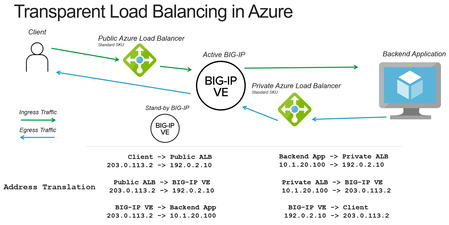
When deploying a BIG-IP load balancer in Azure you often need to apply both source and destination address translation to work with the Azure load balancers. The following is how to reduce the amount of address translation to make it possible for a backend application to see the original client IP address and make it easier to correlate logs to public IP addresses. Deployment Scenario The following example makes use of several Azure and BIG-IP features to reduce the amount of address translation that is required. Use Azure “Floating IP” to preserve the destination IP address to the BIG-IP Set SNAT (source network address translation) to None on the BIG-IP to preserve the source IP address Make use of Azure “HA Ports” to send the return traffic from the backend application to the correct BIG-IP device How the pieces fit together Preserving Destination IP Address When you use the Azure Load Balancer there is an option to configure a “Floating IP”. Enabling this option causes ALB to no longer rewrite the destination IP address to the private address of the BIG-IP. Preserving the Client IP Address ALB will forward the connection with the original client IP address. The BIG-IP can be configured to also forward the client IP address by selecting the option of setting SNAT to None. This will cause the BIG-IP to still rewrite the destination IP to the pool member (otherwise how would the packet get there?), but preserve the source IP. Getting the return traffic via ALB Earlier we did not rewrite the client IP address, that creates a new problem of how do we respond to the original client with the correct source IP address (previously rewritten by the BIG-IP). In Azure you can configure a route table (or UDR) to point to a private address on an internal Azure Load Balancer (no public IP address). The ALB can then be configured to forward the connection back to the BIG-IP. This is the Azure equivalent of pointing the default gateway of a backend server to the BIG-IP (common “two-arm” deployment of BIG-IP on-prem). Staying Active A potential issue is that Azure load balancer will send to all the backends. To keep traffic symmetric (only flow through a single device) we configure Azure health monitors to monitor a health probe on the BIG-IP that will only respond on the "active" device. Unusual Traffic Flow Taking a look at the final picture of traffic flow we can see that we have created a meandering path of traffic. First stop, external ALB, next stop BIG-IP, on to the backend app, back to an internal ALB, return to the BIG-IP, and all the way back to the client. This “works” because the traffic always knows where to go next. Should I be doing this? This solution works well in situations where the backend application MUST see the original client IP address. Otherwise, it’s a bit complicated and reduces you to an Active/Standby architecture instead of a more scalable Active/Active deployment. Alternate approaches would be to use an X-Forwarded-For header and/or Proxy Protocol. You can also do this architecture without using an Azure load balancer and using the Cloud Failover Extension to move Azure Public IPs and Route Tables via API calls. Using the Azure load balancer makes it simpler to do this type of topology. I hope this cleared things up for you.58KViews0likes3CommentsAutomate Let's Encrypt Certificates on BIG-IP
To quote the evil emperor Zurg: "We meet again, for the last time!" It's hard to believe it's been six years since my first rodeo with Let's Encrypt and BIG-IP, but (uncompromised) timestamps don't lie. And maybe this won't be my last look at Let's Encrypt, but it will likely be the last time I do so as a standalone effort, which I'll come back to at the end of this article. The first project was a compilation of shell scripts and python scripts and config files and well, this is no different. But it's all updated to meet the acme protocol version requirements for Let's Encrypt. Here's a quick table to connect all the dots: Description What's Out What's In acme client letsencrypt.sh dehydrated python library f5-common-python bigrest BIG-IP functionality creating the SSL profile utilizing an iRule for the HTTP challenge The f5-common-python library has not been maintained or enhanced for at least a year now, and I have an affinity for the good work Leo did with bigrest and I enjoy using it. I opted not to carry the SSL profile configuration forward because that functionality is more app-specific than the certificates themselves. And finally, whereas my initial project used the DNS challenge with the name.com API, in this proof of concept I chose to use an iRule on the BIG-IP to serve the challenge for Let's Encrypt to perform validation against. Whereas my solution is new, the way Let's Encrypt works has not changed, so I've carried forward the process from my previous article that I've now archived. I'll defer to their how it works page for details, but basically the steps are: Define a list of domains you want to secure Your client reaches out to the Let’s Encrypt servers to initiate a challenge for those domains. The servers will issue an http or dns challenge based on your request You need to place a file on your web server or a txt record in the dns zone file with that challenge information The servers will validate your challenge information and notify you You will clean up your challenge files or txt records The servers will issue the certificate and certificate chain to you You now have the key, cert, and chain, and can deploy to your web servers or in our case, to the BIG-IP Before kicking off a validation and generation event, the client registers your account based on your settings in the config file. The files in this project are as follows: /etc/dehydrated/config # Dehydrated configuration file /etc/dehydrated/domains.txt # Domains to sign and generate certs for /etc/dehydrated/dehydrated # acme client /etc/dehydrated/challenge.irule # iRule configured and deployed to BIG-IP by the hook script /etc/dehydrated/hook_script.py # Python script called by dehydrated for special steps in the cert generation process # Environment Variables export F5_HOST=x.x.x.x export F5_USER=admin export F5_PASS=admin You add your domains to the domains.txt file (more work likely if signing a lot of domains, I tested the one I have access to). The dehydrated client, of course is required, and then the hook script that dehydrated interacts with to deploy challenges and certificates. I aptly named that hook_script.py. For my hook, I'm deploying a challenge iRule to be applied only during the challenge; it is modified each time specific to the challenge supplied from the Let's Encrypt service and is cleaned up after the challenge is tested. And finally, there are a few environment variables I set so the information is not in text files. You could also move these into a credential vault. So to recap, you first register your client, then you can kick off a challenge to generate and deploy certificates. On the client side, it looks like this: ./dehydrated --register --accept-terms ./dehydrated -c Now, for testing, make sure you use the Let's Encrypt staging service instead of production. And since I want to force action every request while testing, I run the second command a little differently: ./dehydrated -c --force --force-validation Depicted graphically, here are the moving parts for the http challenge issued by Let's Encrypt at the request of the dehydrated client, deployed to the F5 BIG-IP, and validated by the Let's Encrypt servers. The Let's Encrypt servers then generate and return certs to the dehydrated client, which then, via the hook script, deploys the certs and keys to the F5 BIG-IP to complete the process. And here's the output of the dehydrated client and hook script in action from the CLI: # ./dehydrated -c --force --force-validation # INFO: Using main config file /etc/dehydrated/config Processing example.com + Checking expire date of existing cert... + Valid till Jun 20 02:03:26 2022 GMT (Longer than 30 days). Ignoring because renew was forced! + Signing domains... + Generating private key... + Generating signing request... + Requesting new certificate order from CA... + Received 1 authorizations URLs from the CA + Handling authorization for example.com + A valid authorization has been found but will be ignored + 1 pending challenge(s) + Deploying challenge tokens... + (hook) Deploying Challenge + (hook) Challenge rule added to virtual. + Responding to challenge for example.com authorization... + Challenge is valid! + Cleaning challenge tokens... + (hook) Cleaning Challenge + (hook) Challenge rule removed from virtual. + Requesting certificate... + Checking certificate... + Done! + Creating fullchain.pem... + (hook) Deploying Certs + (hook) Existing Cert/Key updated in transaction. + Done! This results in a deployed certificate/key pair on the F5 BIG-IP, and is modified in a transaction for future updates. This proof of concept is on github in the f5devcentral org if you'd like to take a look. Before closing, however, I'd like to mention a couple things: This is an update to an existing solution from years ago. It works, but probably isn't the best way to automate today if you're just getting started and have already started pursuing a more modern approach to automation. A better path would be something like Ansible. On that note, there are several solutions you can take a look at, posted below in resources. Resources https://github.com/EquateTechnologies/dehydrated-bigip-ansible https://github.com/f5devcentral/ansible-bigip-letsencrypt-http01 https://github.com/s-archer/acme-ansible-f5 https://github.com/s-archer/terraform-modular/tree/master/lets_encrypt_module (Terraform instead of Ansible) https://community.f5.com/t5/technical-forum/let-s-encrypt-with-cloudflare-dns-and-f5-rest-api/m-p/292943 (Similar solution to mine, only slightly more robust with OCSP stapling, the DNS instead of HTTP challenge, and with bash instead of python)33KViews6likes19Comments
Understanding IPSec IKEv2 negotiation on Wireshark
Related Articles: Understanding IPSec IKEv1 negotiation on Wireshark 1 The Big Picture There are just 4 messages: Summary: IKE_SA_INIT: negotiate security parameters to protect the next 2 messages (IKE_AUTH) Also creates a seed key (known as SKEYSEED) where further keys are produced: SK_e (encryption): computed for each direction (one for outbound and one for inbound) to encrypt IKE_AUTH messages SK_a (authentication): computed for each direction (one for outbound and one for inbound) to hash (using HMAC) IKE_AUTH messages SK_d (derivation): handed to IPSec to generate encryption and optionally authentication keys for production traffic IKE_AUTH: negotiates security parameters to protect production traffic (CHILD_SA) More specifically, the IPSec protocol used (ESP or AH - typically ESP as AH doesn't support encryption), the Encryption algorithm (AES128? AES256?) and Authentication algorithm (HMAC_SHA256? HMAC_SHA384?). 2 IKE_SA_INIT First the Initiator sends a Security Association —> Proposal —> Transform, Transform... payloads which contains the required security settings to protect IKE_AUTH phase as well as to generate the seed key (SK_d) for production traffic (child SA): In this case here the Initiator only sent one option for Encryption, Integrity, Pseudo-Random Function (PRF) and Diffie Hellman group so there are only 4 corresponding transforms but there could be more. Responder picked the 4 available security options also confirmed in Security Association —> Proposal —> Transform, Transform… payloads as seen above. 3 IKE_AUTH These are immediately applied to next 2 IKE_AUTH messages as seen below: The above payload is Encrypted using SK_e and Integrity-protected using SK_a (these keys are different for each direction). The first IKE_AUTH message negotiates the security parameters for production traffic (child SAs), authenticates each side and informs what is the source/destination IP/Port that is supposed to go through IPSec tunnel: Now, last IKE_AUTH message sent by Responder confirms which security parameters it picked (Security Association message), repeats the same Traffic Selector messages (if correctly configured) and sends hash of message using pre-master key (Authentication message) Note that I highlighted 2 Notify messages. The INITIAL_CONTACT signals to Initiator that this is the only IKE_SA currently active between these peers and if there is any other IKE_SA it should be terminated in favour of this one. The SET_WINDOW_SIZE is a flow control mechanism introduced in IKEv2 that allows the other side to send as many outstanding requests as the other peer wants within the window size without receiving any message acknowledging the receipt. From now on, if additional CHILD_SAs are needed, a message called CREATE_CHILD_SA can be used to establish additional CHILD_SAs It can also be used to rekey IKE_SA where Notification payload is sent of type REKEY_SA followed by CREATE_CHILD_SA with new key information so new SA is established and old one is subsequently deleted.29KViews3likes0Comments
What is Shape Security?
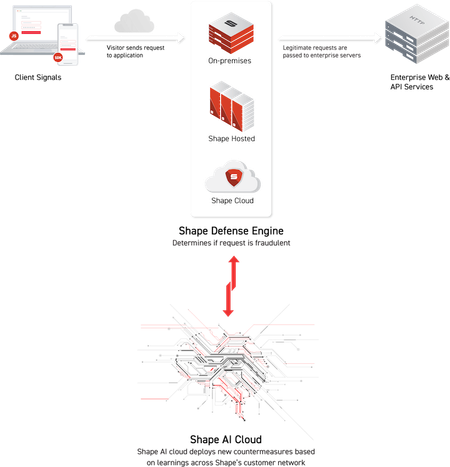
What is Shape Security? You heard the news that F5 acquired Shape Security, but what is Shape Security? Shape defends against malicious automation targeted at web and mobile applications. Why defend against malicious automation? Attackers use automation for all sorts of nefarious purposes. One of the most common and costly attacks is credential stuffing. On average, over eight million usernames and passwords are reported spilled or stolen per day. Attackers attempt to use these credentials across many websites, including those of financial institutions, retail, airlines, hospitality, and other industries. Because many people reuse usernames and passwords across many sites, these attacks are remarkably successful. And given the volume of the activity, criminals rely on automation to carry it out. (See the Shape 2018 Credential Spill Report.) Other than credential stuffing, attackers use automation for fake account creation, scraping, verifying stolen credit cards, and all manner of fraud. Losses include system downtime from heavy bot load, financial liability from account takeover, and loss of customer trust. What makes automation distinct as an attack vector? Traditional attacks on websites from XSS to SQL injection depend upon malformed inputs and vulnerabilities in apps that allow such inputs through. In contrast, malicious automation scripts send well-formed inputs, inputs that are indistinguishable from what is sent by valid users. Even if an application checks user inputs, even if the developers have followed secure programming practices, the app remains vulnerable to malicious automation. Even though the inputs may not vary from those of valid users, the attackers can achieve great damage ranging from account takeover to other forms of online fraud and abuse. What about traditional means of stopping bots? (CAPTCHAs and IP Rate Limits) We all dislike CAPTCHAs, those annoying puzzles that force us to prove we’re human. As it turns out, machine learning algorithms are now better at solving these puzzles than we humans. Other than adding friction for real customers, CAPTCHAs accomplish little. (See How Cybercriminals Bypass CAPTCHA.) Advanced attackers are also adept at bypassing IP rate limits. These criminals disguise their attacks through proxy services that make it look as if their requests are coming from thousands of valid residential IP addresses. Research by Shape shows that attackers reused IP addresses during a campaign only 2.2 times on average, well below any feasible rate limit. (See 5 Rando Stats from Watching eCrime All Day Every Day.) Many of these IP addresses are shared by real users because of NATing performed by ISPs. Therefore, blacklisting these IPs may interfere with real customers but will not stop sophisticated attackers. Why is it so difficult to stop malicious automations? With HTTP requests arriving from so many valid IP addresses containing inputs identical to valid requests, stopping malicious automation is no easy task. Attackers go to great lengths to simulate real users, from deploying real browsers to copying natural mouse movements to subtle randomization of behavior. With so much money at stake, attackers persist, retool, and continuously probe. The reality is that there is no silver bullet to stop such attacks, no one defense that will last for long. Shape’s ever learning, ever adapting system. Rather than depend upon a single countermeasure, Shape’s system is strategically designed for continuous learning and adaptation. Shape instruments mobile and web apps with code to collect signals that cover both browser environments and user behavior. A real-time rules engine processes these signals to detect bot activity and mitigate attacks. These signals feed into a data system that fuels multiple machine learning systems, the findings of which, guided by data scientists and domain experts, drive the development of new signals and new rules, ever improving the quality of data and decisions. As Shape has defended much of Fortune 500 for several years now, battling the most advanced, persistent attackers, it has gone through many learning cycles, developing an extremely rich signal and rule set and refining the learning process. Stopping bots depends on a network effect gained from defending many enterprises and analyzing massive quantities of data. How does the Shape system work? What are the components? The Shape system for continuous learning and adaptation consists of four main components: Shape Defense Engine, Client Signals, Shape AI Cloud, and Shape Protection Manager. At the core of the Shape system is a Layer 7 scriptable reverse proxy, the Shape Defense Engine. Deployed as clusters either on premises or in the cloud, the Shape Defense Engine processes traffic, applies real-time rules for bot detection, serves Shape’s JavaScript to browsers and mobile devices, and transmits telemetry to the Shape AI Cloud. Shape’s Client Signals are collected by JavaScript that utilizes remarkably sophisticated obfuscation. Based on a virtual machine implemented in JavaScript with opcodes randomized at frequent intervals, this technology makes reengineering both extremely difficult and minimizes the window for exploitation. The obfuscation hides from attackers what signals Shape collects, leaving them groping in the dark to solve a complex multivariate problem. In addition to the JavaScript for web, Shape offers mobile SDKs for integration into iOS and Android devices. The SDKs utilize JavaScript loaded in web views to ensure that the signals collected can evolve without requiring new integrations and forced app upgrades. The JavaScript collects signal data on the environment and user behavior that it attaches to HTTP requests to protected resources, such as login paths, paths for account creation, or paths that return data desired by scrapers. These requests with the signal data are routed through the Shape Defense Engine to determine whether the request is from a human or a bot. The Shape Defense Engine sends telemetry to the Shape AI Cloud, a highly secure data system, where it is analyzed by multiple machine learning algorithms for the detection of patterns of automation and of fraud more broadly. The insights gained enable Shape to generate new rules for bot detection and to offer rich security intelligence reports to its customers. The Shape Protection Manager (SPM), a web console, provides tools for deploying, configuring, and monitoring the Shape Defense Engine and viewing analytics from the Shape AI Cloud. From the SPM, you can dig into attack traffic, see when and how often attackers retool, see what paths attackers target, see which browsers and IP addresses they spoof. The SPM is the customer’s window into the Shape system and the toolset for managing it. What is next? Deploying Shape involves routing protected HTTP traffic through the Shape Defense Engine, which is often done through the configuration of BIG-IP and Nginx. In the next article in this series introducing Shape Security, we’ll learn best practices for integrating Shape. Related Information F5 Bot Defense and Management F5 Fraud and Risk Mitigation (Distributed Cloud) OWASP Top-21 Automated Threats (Distributed Cloud) F5 XC Bots & Fraud OWASP Automated Threats28KViews6likes2CommentsUnderstanding IPSec IKEv1 negotiation on Wireshark
Related Articles: Understanding IPSec IKEv2 negotiation on Wireshark 1. The Big Picture First 6 Identity Protection (Main Mode) messages negotiate security parameters to protect the next 3 messages (Quick Mode) and whatever is negotiated in Phase 2 is used to protect production traffic (ESP or AH, normally ESP for site-site VPN). We call first 6 messages Phase 1 and last 3 messages as Phase 2. Sample pcap: IPSEC-tunnel-capture-1.pcap (for instructions on how to decrypt it just go to website where I got this sample capture: http://ruwanindikaprasanna.blogspot.com/2017/04/ipsec-capture-with-decryption.html) 2. Phase 1 2.1 Policy Negotiation Both peers add a unique SPI just to uniquely identify each side's Security Association (SA): In frame #1, the Initiator (.70) sends a set of Proposals containing a set of security parameters (Transforms) that Responder (.71) can pick if it matches its local policies: Fair enough, in frame #2 the Responder (.71) picks one of the Transforms: 2.2 DH Key Exchange Then, next 2 Identity Protection packets both peers exchange Diffie-Hellman public key values and nonces (random numbers) which will then allow both peers to agree on a shared secret key: With DH public key value and the nonce both peers will generate a seed key called SKEYID. A further 3 session keys will be generated using this seed key for different purposes: SKEYID_d (d for derivative): not used by Phase 1. It is used as seed key for Phase2 keys, i.e. seed key for production traffic keys in Plain English. SKEYID_a (a for authentication): this key is used to protect message integrity in every subsequent packets as soon as both peers are authenticated (peers will authenticate each other in next 2 packets). Yes, I know, we verify the integrity by using a hash but throwing a key into a hash adds stronger security to hash and it's called HMAC. SKEYID_e (e for encryption): you'll see that the next 2 packets are also encrypted. As selected encryption algorithm for this phase was AES-CBC (128-bits) then we use AES with this key to symmetrically encrypt further data. Nonce is just to protect against replay attacks by adding some randomness to key generation 2.3 Authentication The purpose of this exchange is to confirm each other's identity. If we said we're going to do this using pre-shared keys then verification consists of checking whether both sides has the same pre-shared key. If it is RSA certificate then peers exchange RSA certificates and assuming the CA that signed each side is trusted then verification complete successfully. In our case, this is done via pre-shared keys: In packet #5 the Initiator sends a hash generated using pre-shared key set as key material so that only those who possess pre-master key can do it: The responder performs the same calculation and confirms the hash is correct. Responder also sends a similar packet back to Initiator in frame #6 but I skipped for brevity. Now we're ready for Phase 2. 3. Phase 2 The purpose of this phase is to establish the security parameters that will be used for production traffic (IPSec SA): Now, Initiator sends its proposals to negotiate the security parameters for production traffic as mentioned (the highlighted yellow proposal is just a sample as the rest is collapsed - this is frame #7): Note: Identification payload carries source and destination tunnel IP addresses and if this doesn't match what is configured on both peers then IPSec negotiation will not proceed. Then, in frame #8 we see that Responder picked one of the Proposals: Frame #9 is just an ACK to the picked proposal confirming that Initiator accepted it: I just highlighted the Hash here to reinforce the fact that since both peers were authenticated in Phase 1, all subsequent messages are authenticated and a new hash (HMAC) is generated for each packet.27KViews1like0CommentsWelcome to the F5 BIG-IP Migration Assistant - Now the F5 Journeys App
The older F5 BIG-IP Migration Assistant is deprecated and is replaced by F5 Journeys. Welcome to the F5 Journeys App - BIG-IP Upgrade and Migration Utility F5 Journeys App Readme @ Github What is it? The F5® Journeys BIG-IP upgrade and migration utility is a tool freely distributed by F5 to facilitate migrating BIG-IP configurations between different platforms. F5 Journeys is a downloadable assistant that coordinates the logistics required to migrate a BIG-IP configuration from one BIG-IP instance to another. Why do I need it? JOURNEYS is an application designed to assist F5 Customers with migrating a BIG-IP configuration to a new F5 device and enable new ways of migrating. Supported journeys: Full Config migration - migrating a BIG-IP configuration from any version starting at 11.5.0 to a higher one, including VELOS and rSeries systems. Application Service migration - migrating mission critical Applications and their dependencies to a new AS3 configuration and deploying it to a BIG-IP instance of choice. What does it do? It does a bunch of stuff: Loading UCS or UCS+AS3 source configurations Flagging source configuration feature parity gaps and fixing them with provided built-in solutions Load validation Deployment of the updated configuration to a destination device, including VELOS and rSeries VM tenants Post-migration diagnostics Generating detailed PDF reports at every stage of the journey Full config BIG-IP migrations are supported for software paths according to the following matrix: DEST X 11.x 12.x 13.x 14.x 15.x 16.x <11.5 X X X X^ X^ 12.x X X X X^ SRC 13.x X X X 14.x X X X 15.x X X 16.x How does it work? F5 Journeys App manages the logistics of a configuration migration. The F5 Journeys App either generates or accepts a UCS file from you, prompts you for a destination BIG-IP instance, and manages the migration. The destination BIG-IP instance has a tmsh command that performs the migration from a UCS to a running system. F5 Journeys uses this tmsh command to accomplish the migration using the platform-migrate option (see more details K82540512) . The F5 Journeys App prompts you to enter a source BIG-IP (or upload a UCS file), the master key password, and destination BIG-IP instance. Once the tool obtains this information, it allows you to migrate the source BIG-IP configuration to the destination BIG-IP instance either entirely or in a per-application depending what you choose. Where do I obtain it? F5 Journeys App Readme @ Github What can go wrong? Bug reporting Let us know if something went wrong. By reporting issues, you support development of this project and get a chance of having it fixed soon. Please use bug template available here and attach the journeys.log file from the working directory ( /tmp/journeys by default) Feature requests Ideas for enhancements are welcome here For questions or further discussion please leave your comments below. Enjoy!25KViews3likes38CommentsWhat is Load Balancing?
tl;dr - Load Balancing is the process of distributing data across disparate services to provide redundancy, reliability, and improve performance. The entire intent of load balancing is to create a system that virtualizes the "service" from the physical servers that actually run that service. A more basic definition is to balance the load across a bunch of physical servers and make those servers look like one great big server to the outside world. There are many reasons to do this, but the primary drivers can be summarized as "scalability," "high availability," and "predictability." Scalability is the capability of dynamically, or easily, adapting to increased load without impacting existing performance. Service virtualization presented an interesting opportunity for scalability; if the service, or the point of user contact, was separated from the actual servers, scaling of the application would simply mean adding more servers or cloud resources which would not be visible to the end user. High Availability (HA) is the capability of a site to remain available and accessible even during the failure of one or more systems. Service virtualization also presented an opportunity for HA; if the point of user contact was separated from the actual servers, the failure of an individual server would not render the entire application unavailable. Predictability is a little less clear as it represents pieces of HA as well as some lessons learned along the way. However, predictability can best be described as the capability of having confidence and control in how the services are being delivered and when they are being delivered in regards to availability, performance, and so on. A Little Background Back in the early days of the commercial Internet, many would-be dot-com millionaires discovered a serious problem in their plans. Mainframes didn't have web server software (not until the AS/400e, anyway) and even if they did, they couldn't afford them on their start-up budgets. What they could afford was standard, off-the-shelf server hardware from one of the ubiquitous PC manufacturers. The problem for most of them? There was no way that a single PC-based server was ever going to handle the amount of traffic their idea would generate and if it went down, they were offline and out of business. Fortunately, some of those folks actually had plans to make their millions by solving that particular problem; thus was born the load balancing market. In the Beginning, There Was DNS Before there were any commercially available, purpose-built load balancing devices, there were many attempts to utilize existing technology to achieve the goals of scalability and HA. The most prevalent, and still used, technology was DNS round-robin. Domain name system (DNS) is the service that translates human-readable names (www.example.com) into machine recognized IP addresses. DNS also provided a way in which each request for name resolution could be answered with multiple IP addresses in different order. Figure 1: Basic DNS response for redundancy The first time a user requested resolution for www.example.com, the DNS server would hand back multiple addresses (one for each server that hosted the application) in order, say 1, 2, and 3. The next time, the DNS server would give back the same addresses, but this time as 2, 3, and 1. This solution was simple and provided the basic characteristics of what customer were looking for by distributing users sequentially across multiple physical machines using the name as the virtualization point. From a scalability standpoint, this solution worked remarkable well; probably the reason why derivatives of this method are still in use today particularly in regards to global load balancing or the distribution of load to different service points around the world. As the service needed to grow, all the business owner needed to do was add a new server, include its IP address in the DNS records, and voila, increased capacity. One note, however, is that DNS responses do have a maximum length that is typically allowed, so there is a potential to outgrow or scale beyond this solution. This solution did little to improve HA. First off, DNS has no capability of knowing if the servers listed are actually working or not, so if a server became unavailable and a user tried to access it before the DNS administrators knew of the failure and removed it from the DNS list, they might get an IP address for a server that didn't work. Proprietary Load Balancing in Software One of the first purpose-built solutions to the load balancing problem was the development of load balancing capabilities built directly into the application software or the operating system (OS) of the application server. While there were as many different implementations as there were companies who developed them, most of the solutions revolved around basic network trickery. For example, one such solution had all of the servers in a cluster listen to a "cluster IP" in addition to their own physical IP address. Figure 2: Proprietary cluster IP load balancing When the user attempted to connect to the service, they connected to the cluster IP instead of to the physical IP of the server. Whichever server in the cluster responded to the connection request first would redirect them to a physical IP address (either their own or another system in the cluster) and the service session would start. One of the key benefits of this solution is that the application developers could use a variety of information to determine which physical IP address the client should connect to. For instance, they could have each server in the cluster maintain a count of how many sessions each clustered member was already servicing and have any new requests directed to the least utilized server. Initially, the scalability of this solution was readily apparent. All you had to do was build a new server, add it to the cluster, and you grew the capacity of your application. Over time, however, the scalability of application-based load balancing came into question. Because the clustered members needed to stay in constant contact with each other concerning who the next connection should go to, the network traffic between the clustered members increased exponentially with each new server added to the cluster. The scalability was great as long as you didn't need to exceed a small number of servers. HA was dramatically increased with these solutions. However, since each iteration of intelligence-enabling HA characteristics had a corresponding server and network utilization impact, this also limited scalability. The other negative HA impact was in the realm of reliability. Network-Based Load balancing Hardware The second iteration of purpose-built load balancing came about as network-based appliances. These are the true founding fathers of today's Application Delivery Controllers. Because these boxes were application-neutral and resided outside of the application servers themselves, they could achieve their load balancing using much more straight-forward network techniques. In essence, these devices would present a virtual server address to the outside world and when users attempted to connect, it would forward the connection on the most appropriate real server doing bi-directional network address translation (NAT). Figure 3: Load balancing with network-based hardware The load balancer could control exactly which server received which connection and employed "health monitors" of increasing complexity to ensure that the application server (a real, physical server) was responding as needed; if not, it would automatically stop sending traffic to that server until it produced the desired response (indicating that the server was functioning properly). Although the health monitors were rarely as comprehensive as the ones built by the application developers themselves, the network-based hardware approach could provide at least basic load balancing services to nearly every application in a uniform, consistent manner—finally creating a truly virtualized service entry point unique to the application servers serving it. Scalability with this solution was only limited by the throughput of the load balancing equipment and the networks attached to it. It was not uncommon for organization replacing software-based load balancing with a hardware-based solution to see a dramatic drop in the utilization of their servers. HA was also dramatically reinforced with a hardware-based solution. Predictability was a core component added by the network-based load balancing hardware since it was much easier to predict where a new connection would be directed and much easier to manipulate. The advent of the network-based load balancer ushered in a whole new era in the architecture of applications. HA discussions that once revolved around "uptime" quickly became arguments about the meaning of "available" (if a user has to wait 30 seconds for a response, is it available? What about one minute?). This is the basis from which Application Delivery Controllers (ADCs) originated. The ADC Simply put, ADCs are what all good load balancers grew up to be. While most ADC conversations rarely mention load balancing, without the capabilities of the network-based hardware load balancer, they would be unable to affect application delivery at all. Today, we talk about security, availability, and performance, but the underlying load balancing technology is critical to the execution of all. Next Steps Ready to plunge into the next level of Load Balancing? Take a peek at these resources: Go Beyond POLB (Plain Old Load Balancing) The Cloud-Ready ADC BIG-IP Virtual Edition Products, The Virtual ADCs Your Application Delivery Network Has Been Missing Cloud Balancing: The Evolution of Global Server Load Balancing25KViews1like1Comment