big-ip
10560 TopicsBIG-IP Ingress Controller Guide
Hi there Wrote a guide on how to get started with the BIG-IP Ingress Controller and covered some troubleshooting steps if something goes wrong. At the moment it only covers Network load balancing without TLS termination but the installation steps are pretty much the same no matter what. You can find the article here: https://loadbalancing.se/2021/03/28/installing-troubleshooting-and-running-bigip-ingress-controller/ Hope it helps someone else. Kind regards, Patrik593Views4likes2Comments2026 is Almost Here
As we are in the final days of 2025 I would like to know what everyone's F5 or DevCentral related resolutions are for 2026. Are you looking forward to advancing certifications or learning about products you don't work with? Maybe you want to contribute more in CodeShare or Community Articles? Leave a comment with your resolution so we can all come together and root for each other in the new year! I am looking forward to cheering on all our members on in 2026. -Melissa131Views3likes0Comments
Authenticate user of native mobile app with OpenId Connect
Does F5 Big IP Access Manager support mobile apps authenticating over OpenId Connect with custom URI redirect_uri? Our native mobile app (iOS and Android) authenticates the user using the Authorization Code Grant flow. How it Works. Our redirect_uri (ie callback uri) is: com.mckesson.wfm.ansos2go://signin We are a software vendor in the Healthcare domain. Our customer who uses F5 Big IP says that this URI is considered invalid by F5 when configuring the OpenId Connect Service Provider. Is that true? If so, how do native mobile app developers perform OIDC authentication with F5? Thanks, Scott UPDATE: I got word from my customer that they set up a rewrite policy, so they could enter the redirect_uri as https:/com.mckesson.wfm.ansos2go://signin. Then, they strip off the https:// in the response to the initial 'authorize' call. This is NUTS! Why does F5 Big IP Access Manager require redirect_uri to be https://...? This totally breaks the OpenId Connect specification which says "The Redirection URI MAY use an alternate scheme, such as one that is intended to identify a callback into a native application." https://openid.net/specs/openid-connect-core-1_0.html#AuthorizationEndpoint901Views3likes0Comments
ASM Custom Blocking page - Variables
Hi all, I would like to ask you a question regarding ASM blocking page and variables that can be used in order to present a more extensive content.I know that <%TS.request.ID()%> variable can be used in order to present the support ID to the client.Is there any way to include more variables such as source IP address or XFF header on the html response page ? For example:The requested URL was rejected.Your support ID is: <%TS.request.ID()%>. Your IP is :<%TS.remote-ip-address.ID()%>. I'm using version 13.1.0. Any help would be appreciated. Thanks1.2KViews3likes5Comments
Lab Guide: How To Build Your Own F5 Lab Environment
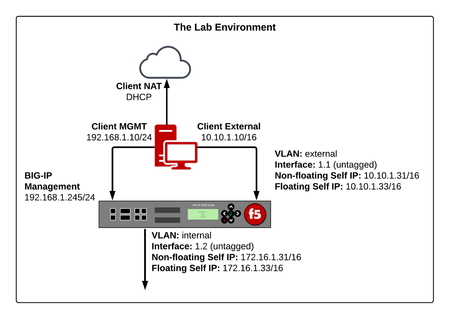
Introduction There are numerous of reasons why you should set up your own lab environment. Perhaps you are new to F5 or you might be studying for one of their exams. You might even want to evaluate one of their products. Setting up a lab environment is not always straight forward and currently there aren’t that many guides out there that starts from scratch. That is why I have put together this guide in order to assist you with building your first lab environment. This lab will be installed on your local computer using free for non-commercial use applications. The download components are hosted on https://www.f5books.eu which is an organization I’m running together with Steven Iveson. If you run into any problems using this guide or you find any errors, please comment below or contact me at [email protected]. Together we can keep this document updated. :) The Lab Architecture So, what are we building? It’s pretty simple yet covers all our needs. These are the computing components; A Linux client running Lubuntu, allowing the use of CLI and GUI based tools and software such as ping, PuTTY (SSH), Filezilla (FTP) and a web browser. A BIG-IP VE running version 13.1.1 A Linux server running the Tomcat Apache web server, configured with five virtual hosts, listening on different IP addresses and TCP ports. We’ll be using these networks; Management - used for configuring the BIG-IP. External - the client-side network connecting the Linux client and BIG-IP; this will be a private (internal) network. Internal - the server-side network connecting the BIG-IP and Linux server; this will be another private (internal) network Client NAT – In order to gain Internet access on the client, we have assigned an interface that operates in NAT mode. Using that interface, we can download additional applications and also assist when we license our BIG-IP through the manual method. Here’s a diagram to help you visualize the end state: The full guide is located at the following download mirrors: Google Drive Dropbox Microsoft OneDrive I hope you find this guide helpful! :)8.1KViews2likes10CommentsiRule Developer Tools
Hi All, I've made a set of developer tools for Tcl including iRules, https://github.com/bitwisecook/tcl-lsp This includes LSP server Editor integrations for VSCode, Sublime Text, Zed, Jetbrains, Helix, neovim, emacs and more (though I've only really hammered on vscode there) MCP server Claude skills cli tool Semantic token highlighting Hover docs Format string interpreters AI tools for creating, explaing, validating, documenting, diagramming iRules and Tcl full optimising compiler chain with 26 optimiser passes 27 iRule specific diagnostics and optimisations Security warnings through taint tracking (use of user input tracked through the code) Shimmer detection with inline type hints (know when a variable type is being reinterpreted) Code formatting Code minification Compiler explorer to look at how your code is interpreted A full iRule testing framework and more. This is only based on publicly available information and my memory, though I have deployed enough iRules. This is the tool I always wanted. I could do with help expanding and improving the profile -> event / command maps, and the iRule event graph, and with generally finding bugs, so please, open issues. I will be away on holiday for a couple of weeks so please bear in mind I may take a little time to get back to you. cheers, Jim 🇬🇧🇦🇺419Views2likes3CommentsUpgrade Verification - CLI tips and tricks
I mentioned recently in a conversation that I use to use the CLI to generate a snapshot of the bigip run state for pre/post comparison after an upgrade. By accident, I ran across these scripts today so here they are for your enjoyment. They are circa big-ip v12 so update as needed, feel free to post updated versions in the reply and i will tick them as the answer even. Pre-Change (Now supports partitions) # tmsh -c "cd /; show ltm virtual recursive" | awk '/Ltm::Virtual/ { printf $NF } /(Availability|State)/ { printf ":"$NF } /Reason/ { print ":"$NF} ' > bigip-virtual-state.pre # tmsh -c "cd /; show ltm pool recursive" | awk '/Ltm::Pool/ { printf $NF } /(Availability|State)/ { printf ":"$NF } /Reason/ { print ":"$NF} ' > bigip-pool-state.pre Post Change # tmsh -c "cd /; show ltm virtual recursive" | awk '/Ltm::Virtual/ { printf $NF } /(Availability|State)/ { printf ":"$NF } /Reason/ { print ":"$NF} ' > bigip-virtual-state.post # tmsh -c "cd /; show ltm pool recursive" | awk '/Ltm::Pool/ { printf $NF } /(Availability|State)/ { printf ":"$NF } /Reason/ { print ":"$NF} ' > bigip-pool-state.post Comparison # diff bigip-virtual-state.pre bigip-virtual-state.post # diff bigip-pool-state.pre bigip-pool-state.post758Views2likes1CommentTCP 3-WAY Handshake vs TCP Half-Open
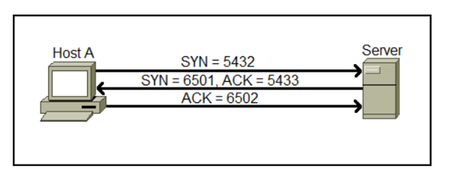
1. TCP 3-Way handshake – TCP is a connection-oriented protocol, a connection needs to be established before two devices can communicate. TCP uses a process called three-way handshake to negotiate the sequence and acknowledgment fields and start the session. Here is a graphical representation of the process. The three way handshake process consists of three steps: a. Host A initiates the connection by sending the TCP SYN packet to the destination host. The packet contains the random sequence number (e.g. 5432) which marks the beginning of the sequence numbers for data that the Host A will transmit. b. The Server receives the packet and responds with its own sequence number. The response also includes the acknowledgment number, which is Host A’s sequence number incremented by 1 (in our case, that would be 5433). a. Host A acknowledges the response of the Server by sending the acknowledgment number, which is the Server’s sequence number incremented by 1. Post TCP 3 way handshake, the data transfer starts. After the data transmission process is finished, the connection will get terminated by sending FIN (FINISHED) flag which does graceful termination of connection. TCP Half Open connection – TCP connections are called Half Open connections when the third step of the 3-Way handshake sending final ACK to the server fails (as shown in below figure) or if one of the hosts closes the connection without acknowledging the other. Half Open connection process is given below – 1. Host initializes the request by sending SYN packet. 2. Server replies to the client with SYN_ACK, and at this point server reserves some resource for the client and waits for the final ACK to arrive (Acknowledgment message). 3. However, the client does not respond to the server with final Acknowledgment. So an established connection is said to be "half-open" if one of the TCPs has closed or aborted the connection at its end without the knowledge of the other, or if the two ends of the connection have become desynchronized owing to a crash that resulted in loss of memory. Such connections will automatically become reset if an attempt is made to send data in either direction. However, half-open connections are expected to be unusual. F5 TCP-Half Open monitor – F5 also have TCP-Half Open monitor available under Local trafficàMonitors. Tcp_half_open monitor is most widely used for gateway monitoring when you just need to ensure the socket is responding to connection requests and desire the lowest overhead on the monitoring target. The tcp_half_open monitor sends a SYN packet to the pool member, and if a SYN-ACK is received from the server in response, the pool member is marked UP. There are few use cases to use TCP-half open monitor as given below – For example, a webserver would be less impacted by a half open connection request that is immediately reset than a connection that completes the entire open and close handshake sequence. Another common use for the tcp_half_open monitor is to prevent the application from spewing a bunch of log messages indicating connections were opened but not used. It should be noted that some applications cannot gracefully handle the half open connection and subsequent reset, so some testing should be done in order before implementing this monitor. There is option available to test same under ‘Test’ tab shown in above image. Under Test tab, you can put webserver IP alongwith its associated port. And it will show Test results and it can be confirmed if application supports TCP-Half open or not. Do test same in your environment and share your observations. I hope, this article helps you. Your inputs, suggestions or questions are always welcome. MayurSolved21KViews2likes8Comments