application delivery
575 Topics
Weblogic JSessionID Persistence
Problem this snippet solves: Contributed by: unRuleY, Summarized by: deb Note: The previous version of this iRule contained escaped newlines following the session command, which in versions 10.0 - 10.2.0 causes TMM to core as documented in CR135937 / SOL11427. This was fixed in 10.2.1. See this related Codeshare example for details on how to take advantage of session replication on the WebLogic servers with targeted node failover in an iRule. Provides persistence on the jsessionid value found in either the URI or a cookie. When a request is received, the iRule first looks for a "jsessionid" cookie, and if not found, for a "jsessionid" parameter in the requested URI. If either is found, a persistence record is created if it doesn't already exist, or followed if it does. If neither is found, the request is load balanced according to the load balancing method applied to the virtual server and persisted based on the client's IP address. In order to ensure the second and subsequent requests follow the first, LTM must create a persistence record indicating the pool member to which the first request was load balanced. If the server is setting the jsessionid in a cookie, the persistence key value may be extracted from the server response to create the persistence record. If the server is setting the jsessionid in the URLs, source address persistence with a short timeout is recommended to track the original destination until the jsessionid is sent. How to use this snippet: To ensure a new persistence record is followed when a request is re-load balanced in a client-side Keep-Alive connection, apply a OneConnect profile to the virtual server. The iRule assumes the jsessionid is in upper case when used as a cookie name. If this isn't the case, please update the example. To persist on jsessionid, create the iRule below and create a custom Universal persistence profile, with Match Across Services enabled, that uses the iRule. Then use this custom Universal persistence profile as the Default Persistence profile on your Virtual Server. Applying a Fallback Persistence profile of type Source Address Affinity with a host mask and a short timeout (the default source_addr persistence profile will do the trick) to your Virtual Server is also recommended. Attention, if you are running firmware 11.0 - 11.2.1 and enabled "Match Across Services"! There is a bug inside. SOL14061 This iRule requires LTM v10. or higher. Code : when HTTP_REQUEST { # Log details for the request set log_prefix "[IP::client_addr]:[TCP::client_port]" log local0. "$log_prefix: Request to [HTTP::uri] with cookie: [HTTP::cookie value JSESSIONID]" # Check if there is a JSESSIONID cookie if { [HTTP::cookie "JSESSIONID"] ne "" }{ # Persist off of the cookie value with a timeout of 1 hour (3600 seconds) persist uie [string tolower [HTTP::cookie "JSESSIONID"]] 3600 # Log that we're using the cookie value for persistence and the persistence key if it exists. log local0. "$log_prefix: Used persistence record from cookie. Existing key? [persist lookup uie [string tolower [HTTP::cookie "JSESSIONID"]]]" } else { # Parse the jsessionid from the path. The jsessionid, when included in the URI, is in the path, # not the query string: /path/to/file.ext;jsessionid=1234?param=value set jsess [findstr [string tolower [HTTP::path]] "jsessionid=" 11] # Use the jsessionid from the path for persisting with a timeout of 1 hour (3600 seconds) if { $jsess != "" } { persist uie $jsess 3600 # Log that we're using the path jessionid for persistence and the persistence key if it exists. log local0. "$log_prefix: Used persistence record from path: [persist lookup uie $jsess]" } } } when HTTP_RESPONSE { # Check if there is a jsessionid cookie in the response if { [HTTP::cookie "JSESSIONID"] ne "" }{ # Persist off of the cookie value with a timeout of 1 hour (3600 seconds) persist add uie [string tolower [HTTP::cookie "JSESSIONID"]] 3600 log local0. "$log_prefix: Added persistence record from cookie: [persist lookup uie [string tolower [HTTP::cookie "JSESSIONID"]]]" } }6.2KViews2likes9CommentsF5 BIG-IP Multi-Site Dashboard
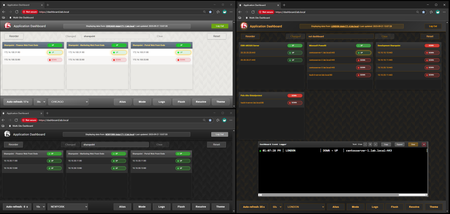
Code is community submitted, community supported, and recognized as ‘Use At Your Own Risk’. A comprehensive real-time monitoring dashboard for F5 BIG-IP Application Delivery Controllers featuring multi-site support, DNS hostname resolution, member state tracking, and advanced filtering capabilities. A 170KB modular JavaScript application runs entirely in your browser, served directly from the F5's high-speed operational dataplane. One or more sites operate as Dashboard Front-Ends serving the dashboard interface (HTML, JavaScript, CSS) via iFiles, while other sites operate as API Hosts providing pool data through optimized JSON-based dashboard API calls. This provides unified visibility across multiple sites from a single interface without requiring even a read-only account on any of the BIG-IPs, allowing you to switch between locations and see consistent pool, member, and health status data with almost no latency and very little overhead. Think of it as an extension of the F5 GUI: near real-time state tracking, DNS hostname resolution (if configured), advanced search/filtering, and the ability to see exactly what changed and when. It gives application teams and operations teams direct visibility into application pool state without needing to wait for answers from F5 engineers, eliminating the organizational bottleneck that slows down troubleshooting when every minute counts. https://github.com/hauptem/F5-Multisite-Dashboard562Views4likes2CommentsF5OS using Ansible Linux Shell with remote users as iCall replacement(works with banner as well).
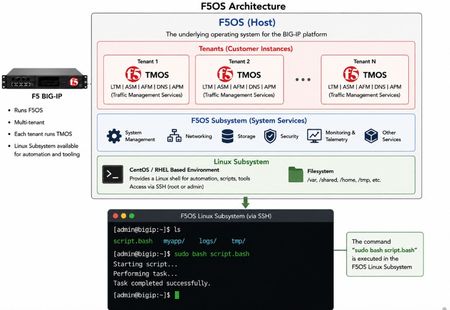
(AI Made picture so don't take it as 100% truth) In F5OS 1.8.0 and up remote users can automatically enter the Linux Shell if they have the correct remote group parameters and if this is system level enabled as shown in https://clouddocs.f5.com/training/community/rseries-training/html/rseries_security.html#superuser-role The superuser role if enabled can still trigger F5OS commands with "f5sh" that is similar to "tmsh" in TMOS and described in https://my.f5.com/manage/s/article/K000148922 . Code version: The code was tested on F5OS 1.8.4 rSeries 5900 Ansible Example without banner: --- - name: Restart docker container hosts: f5os gather_facts: no vars: container_name: tcpdumpd_manager tasks: - name: Restart the specified docker container ansible.builtin.shell: | docker restart {{ container_name }} become: false args: executable: /bin/bash Cronjobs also can be edited through shell Ansible playbook for scheduling transferred scripts. - name: Add cron job ansible.builtin.shell: | (crontab -l 2>/dev/null | grep -Fv '/opt/check_service.sh'; \ echo '*/5 * * * * /opt/check_service.sh') | crontab - become: false args: executable: /bin/bash Great Ansible F5OS automation article with cool examples that even has file transfer for transferring script file to the F5OS: Five Ways to Automate F5OS with Ansible: A Practical Guide | DevCentral Ansible Example with banner: The F5OS ssh banner is inserted between the username and password and that breaks the shell module as I did found out. I suspect that Ansible uses the PEXPECT Python package that spans SSH session and it is similar to TCL EXPECT and most people dealing with iRules will find this interesting. You need to add sudo in-front of each command. - name: Restart container hosts: localhost gather_facts: false tasks: - name: Run docker command ansible.builtin.expect: command: >- ssh -tt -o StrictHostKeyChecking=no -o ConnectTimeout=10 -o ServerAliveInterval=5 -o ServerAliveCountMax=2 {{ ansible_user }}@{{ ansible_host }} responses: '(?i)password:': {{ ansible_pass }} '(?m)\$\s*$': "sudo docker restart {{ container_name }}\nexit\n" timeout: 20 echo: true delegate_to: localhost register: out Also SCP file transfer can be done through the EXPEC module. From Linux bash you can use f5sh to trigger F5OS commands. Examples are f5sh "show interface" and to chain commands f5sh "config; vlan 500; commit; exit" . If you just write f5sh, you will enter the F5os from the Linux. This is like tmsh for TMOS. Summary! This is great feature. TMOS also has cronjobs but after upgrade the cronjob is lost but not on F5OS, this is why icall scripts still are better for TMOS Tenants. iCall has the option to be triggered by logs and that in F5OS will be harder as it will need a bash script that is sitting as a background process as to monitor the logs and a cronjob can check if the script is still running as a device reboot will cause the script to stop running. The script can be transferred and started the way I have shown with RESTCONF REST-API with Ansible/AWX as the best option.168Views2likes1CommentAdvanced WAF IP Exceptions Manager
This solution introduces a dedicated Python-based GUI tool for managing IP whitelist exceptions in F5 BIG-IP Advanced WAF policies. The tool was developed to simplify a common operational workflow: searching WAF policies, adding IP or CIDR-based exceptions, checking whether an IP already exists across policies, deleting outdated exceptions, applying policy changes, and tracking actions through an activity log. The solution is especially useful in large environments where manual exception handling can create operational overhead, inconsistent policy configuration, or audit challenges. It demonstrates how focused automation can deliver practical value without requiring a large orchestration platform or full CI/CD pipeline.155Views1like0CommentsBIG-IP Report
Problem this snippet solves: Overview This is a script which will generate a report of the BIG-IP LTM configuration on all your load balancers making it easy to find information and get a comprehensive overview of virtual servers and pools connected to them. This information is used to relay information to NOC and developers to give them insight in where things are located and to be able to plan patching and deploys. I also use it myself as a quick way get information or gather data used as a foundation for RFC's, ie get a list of all external virtual servers without compression profiles. The script has been running on 13 pairs of load balancers, indexing over 1200 virtual servers for several years now and the report is widely used across the company and by many companies and governments across the world. It's easy to setup and use and only requires auditor (read-only) permissions on your devices. Demo/Preview Interactive demo http://loadbalancing.se/bigipreportdemo/ Screen shots The main report: The device overview: Certificate details: How to use this snippet: Installation instructions BigipReport REST This is the only branch we're updating since middle of 2020 and it supports 12.x and upwards. Downloads: https://github.com/net-utilities/BigIPReport/releases Documentation, installation instructions and troubleshooting: https://net-utilities.github.io/BigIPReport/ BIG-IP Report (Legacy) Older version of the report that only runs on Windows and is depending on a Powershell plugin originally written by Joe Pruitt (F5). The documentation for this will stay on loadbalancing.se. BIG-IP Report (only download this if you have v10 devices): https://github.com/net-utilities/BigIPReport/releases/download/v5.8.0/bigipreport-5.4.0-beta.zip iControl Snapin https://github.com/net-utilities/BigIPReport/releases/download/v5.8.0/f5-icontrol.zip Got issues/problems/feedback? Still have issues? Drop a comment below. We usually reply quite fast. Any bugs found, issues detected or ideas contributed makes the report better for everyone, so it's always appreciated. --- Join us on Discord: https://discord.gg/7JJvPMYahA Tested this on versions: 12, 13, 14, 15, 16, 17 (probably works on later versions too)20KViews21likes102CommentsIntent-Based Load Balancing for AI Traffic on BIG-IP
Intent-Based Load Balancing is a native BIG-IP AI Gateway project that routes OpenAI-compatible traffic based on user intent, Virtual Keys, routing policy, and backend model configuration. It uses iApps LX, iRules, iRules LX, and BIG-IP LTM pools to classify, route, block, or locally respond to AI requests without requiring an external control-plane service. 165Views1like0Comments
Radware config translation
Problem this snippet solves: This is a simple Python script that translates Radware text configuration file and outputs as config snippet and certificate files. $ ./rad2f5 Usage: rad2f5 <filename> [partition] Example: ./rad2f5 radwareconfig.txt MyPartition Using partition /MyPartition/ IP routes:46 Non-floating IP interfaces:26 Floating IP interfaces:19 Monitors:349 Virtual Servers:430 Pools:152 Certificates: 31 SSL profiles: 17 WARNING! Found L7 Regular Expression at "appdirector l7 farm-selection method-table setCreate l7Rule-Redirect" Layer 7 rules:12 Layer 7 policies:4 !! Copy all certificate files to BIG-IP /var/tmp and use load_certs.sh to load !! # Configuration #--------------------------------------# ltm policy /MyPartition/l7rule-Redirect { controls { forwarding } requires { http } rules { Redirect { actions { 0 { forward select pool SORRYPOOL } } ordinal 1 } } net route /MyPartition/10.20.30.40_32 { network 10.20.30.40/32 gateway 10.1.1.1 } How to use this snippet: This includes translation of routes and non-floating self-IPs, monitors, pools, virtual servers, certificates, SSL profiles and some layer 7 rules. To install, either download the file attached here, extract and run it or use pip: pip install rad2f5 To load the configuration to the f5 device, output to a file eg ./rad2f5 filename>newcfg.txt , remove the statistics header from the file with a text editor, upload the file into /var/tmp on the BIG-IP and test loading with tmsh load sys config merge file /var/tmp/<filename> verify . Fix any issues and load with tmsh load sys config merge file /var/tmp/<filename> The script will also output the certificates and keys which should be uploaded to the BIG-IP /var/tmp directory and run file check_certs.sh and load_certs.sh to check and load the certs and keys. Works with Python v2 and v3. If you want something to be added then message me with details of the text and i will try to add it. Feel free to add or change anything Code : #!/usr/bin/env python # v1.1 14/3/2018 Deal with lack of text in monitors ( line 157 ) # v2 3/1/2019 Updated after changes suggested by Avinash Piare # v3 6/11/2019 Updated to deal with \\r\n at the end of the line # v3.1 6/11/2019 Minor changes to handle VS names with spaces # 3.4 18/4/2020 Fixed minor issues # Peter White 6/11/2019 # usage ./rad2f5 [partition] import sys import re import textwrap import ipaddress print ("Running with Python v" + sys.version) # Set debug to true to output the workings of the script ie the arrays etc debug = False def parse_options(options): # Function to split options and return a dict containing option and value # Example: -pl 27 -v 123 -pa 172.28.1.234 # Return: { 'pl':'27', 'v':'123', 'pa':'172.28.1.234' } output = dict() # Deal with non-quotes eg -b 12345 for r in re.finditer(r'-(\w{1,3}) (\S+)',options): output[r.group(1)] = r.group(2) # Deal with quotes eg -u "User Name" for v in re.finditer(r'-(\w{1,3}) (".+")',options): output[v.group(1)] = v.group(2) return output def splitvars(vars): # Split a string on | and then =, return a dict of ABC=XYZ # eg HDR=User-Agent|TKN=Googlebot-Video/1.0|TMATCH=EQ| # Return is { 'HDR':'User-Agent','TKN': 'Googlebot-Video/1.0', 'TMATCH': 'EQ' } vlist = vars.split("|") o = {} for v in vlist: if v == '': continue w = v.split("=") if len(w) > 1: o[w[0]] = w[1] else: o[w[0]] = '' return o def array_add(a,d): # Function to safely add to an array #global a if not len(a): a = [ d ] else: a.append( d ) return a def setup_pools(name): global pools if not name in pools: pools[name] = { 'destinations': [], 'member-disabled': [], 'member-ids': [], 'priority-group': [] } else: if not 'destinations' in pools[name]: pools[name]['destinations'] = [] if not 'member-disabled' in pools[name]: pools[name]['member-disabled'] = [] if not 'member-ids' in pools[name]: pools[name]['member-ids'] = [] if not 'priority-group' in pools[name]: pools[name]['priority-group'] = [] def getVsFromPool(poolname): # This retrieves the names of virtual servers that use a specific pool global farm2vs if poolname in farm2vs: return farm2vs[poolname] else: return False def is_ipv6(ip): if ':' in ip: return True else: return False # Check there is an argument given if not len(sys.argv) > 1: exit("Usage: rad2f5 [partition]") if len(sys.argv) > 2: # Second command-line variable is the partition partition = "/" + sys.argv[2] + "/" print ("Using partition " + partition) else: partition = "/Common/" # Check input file fh = open(sys.argv[1],"r") if not fh: exit("Cannot open file " + argv[1]) rawfile = fh.read() # v2 # Remove any instances of slash at the end of line # eg health-monitoring check create\ # HC_DNS -id 5 -m DNS -p 53 -a \ #HOST=ns.domain.com|ADDR=1.1.1.1| -d 2.2.2.2 #file = re.sub('^security certificate table\\\\\n','',rawfile) file = re.sub('\\\\\n','',rawfile) file = re.sub('\\\\\r\n','',file) ################ LACP trunks ########################## # # # ############################################################# #net linkaggr trunks set T-1 -lap G-13,G-14 -lam Manual -lat Fast -law 3 -laa 32767 trunks = {} for r in re.finditer(r'net linkaggr trunks set (\S+) (.+)',file): name = r.group(1) options = parse_options(r.group(2)) if 'lap' in options: # Manage interfaces ints = options['lap'].split(',') trunks[name] = { 'interfaces': ints } print ("LACP trunks:" + str(len(trunks))) if debug: print('DEBUG LACP trunks: ' + str(trunks)) ################ IP routes ########################## # # # ############################################################# routes = {} for r in re.finditer(r'net route table create (\S+) (\S+) (\S+) (\S+)',file): if r.group(1) == '0.0.0.0': name = 'default' else: name = r.group(1) + "_" + r.group(2) routes[name] = { 'network': r.group(1), 'mask': r.group(2), 'gateway': r.group(3), 'interface': r.group(4)} print ("IP routes:" + str(len(routes))) if debug: print('DEBUG routes: ' + str(routes)) ################ Non-floating self-IPs ############### # # # # ############################################################# selfIpNonFloating = {} for s in re.finditer(r'net ip-interface create (\S+) (\S+) (.+)',file): output = { 'interface': s.group(2) } opts = parse_options(s.group(3)) if 'pl' in opts: output['mask'] = opts['pl'] if 'v' in opts: output['vlan'] = opts['v'] if 'pa' in opts: output['peerAddress'] = opts['pa'] selfIpNonFloating[s.group(1)] = output print ("Non-floating IP interfaces:" + str(len(selfIpNonFloating))) if debug: print("DEBUG non-floating IPs: " + str(selfIpNonFloating)) ################ Floating self-IPs ################### # # # ############################################################# selfIpFloating = {} for s in re.finditer(r'redundancy vrrp virtual-routers create (\S+) (\S+) (\S+) (.+)',file): output = { 'version': s.group(1),'interface': s.group(3), 'ipAddresses': []} opts = parse_options(s.group(4)) #if 'as' in opts: # Enabled - assume all are enabled if 'pip' in opts: output['peerIpAddress'] = opts['pip'] selfIpFloating[s.group(2)] = output # Retrieve IP addresses for Floating self-IPs # for s in re.finditer(r'redundancy vrrp associated-ip create (\S+) (\S+) (\S+) (\S+)',file): selfIpFloating[s.group(2)]['ipAddresses'] = array_add(selfIpFloating[s.group(2)]['ipAddresses'],s.group(4)) print ("Floating IP interfaces:" + str(len(selfIpFloating))) if debug: print("DEBUG Floating IPs: " + str(selfIpFloating)) ################ Monitors ########################### # # -m XYZ is the monitor type may or may not be present ( not present for icmp type ) # -id is the monitor ID, -p is the port, -d is the destination # ############################################################# monitors = {} for m in re.finditer(r'health-monitoring check create (\S+) (.+)',file): output = { 'name': m.group(1) } opts = parse_options(m.group(2)) if 'id' in opts: id = opts['id'] else: print ("No ID for monitor " + m.group(1)) continue if 'm' in opts: output['type'] = opts['m'] else: output['type'] = 'icmp' if 'a' in opts: output['text'] = opts['a'] else: # Added in v2 output['text'] = '' if 'p' in opts: output['port'] = opts['p'] else: output['port'] = '' monitors[id] = output print ("Monitors:" + str(len(monitors))) if debug: print("DEBUG Monitors:" + str(monitors)) ################ Virtual Servers ##################### # # 0 = name, 1= IP, 2=protocol, 3=port, 4=source 5=options # -ta = type, -ht = http policy, -fn = pool name, -sl = ssl profile name, -ipt = translation? # -po = policy name # ############################################################# farm2vs = {} virtuals = {} snatPools = {} for v in re.finditer(r'appdirector l4-policy table create (\S+) (\S+) (\S+) (\S+) (\S+) (.*)',file): # Puke if VS has quotes if v.group(1).startswith('"'): name = v.group(1).strip('"').replace(' ','_') + v.group(2).strip('"').replace(' ','_') address,protocol,port = v.group(3),v.group(4),v.group(5) source = v.group(6).split(' ')[0] options = ' '.join(v.group(6).split(' ')[1:]) else: name,address,protocol,port,source,options = v.group(1),v.group(2),v.group(3),v.group(4),v.group(5),v.group(6) opts = parse_options(options) # Get rid of ICMP virtual servers if protocol == 'ICMP': continue print ("Name " + name + " has quotes, address: " + address + " protocol: " + protocol) if port == 'Any': port = '0' output = {'source': source, 'destination': address + ":" + port, 'protocol': protocol, 'port': port } if 'fn' in opts: output['pool'] = opts['fn'] if not opts['fn'] in farm2vs: farm2vs[opts['fn']] = [] farm2vs[opts['fn']].append(name) output['port'] = port if 'po' in opts: output['policy'] = opts['po'] if 'ipt' in opts: output['snat'] = 'snatpool_' + opts['ipt'] if not 'snatpool_' + opts['ipt'] in snatPools: #Create snatpool snatPools['snatpool_' + opts['ipt']] = { 'members': [opts['ipt']] } # Set the correct profiles profiles = [] # Layer 4 if protocol == "TCP" or protocol == "UDP": profiles.append(protocol.lower()) else: profiles.append('ipother') # http if port == '80' or port == '8080': profiles.append('http') profiles.append('oneconnect') # ftp if port == '21': profiles.append('ftp') # RADIUS if port == '1812' or port == '1813': profiles.append('radius') # SSL if 'sl' in opts: profiles.append(opts['sl']) profiles.append('http') profiles.append('oneconnect') output['profiles'] = profiles # virtuals[name] = output print ("Virtual Servers:" + str(len(virtuals))) if debug: print("DEBUG Virtual Servers:" + str(virtuals)) #print("DEBUG Farm to VS Mapping:" + str(farm2vs)) ################ Pools ############################### # # Pools config options are distributed across multiple tables # This sets the global config such as load balancing algorithm # -dm This sets the distribution method. cyclic = Round Robin, Fewest Number of Users = least conn, Weighted Cyclic = ratio, Response Time = fastest # -as this is the admin state # -cm is the checking method ie monitor # -at is the activation time ############################################################# pools = {} for p in re.finditer(r'appdirector farm table setCreate (\S+) (.*)',file): name = p.group(1) setup_pools(name) opts = parse_options(p.group(2)) output = {} # Admin state output['poolDisabled'] = False if 'as' in opts: if opts['as'] == 'Disabled': output['poolDisabled'] = True # Deal with distribution methods method = 'round-robin' if 'dm' in opts: if opts['dm'] == '"Fewest Number of Users"': method = 'least-conn' elif opts['dm'] == 'Hashing': method = 'hash' else: method = 'round-robin' output['lbMethod'] = method if 'at' in opts: output['slowRamp'] = opts['at'] pools[name] = output # This sets the pool members # 0=name, 1=node, 2=node address, 3=node port, 4=? -id =id -sd ? -as admin state eg Disable, -om operation mode eg Backup ( fallback server ), -rt backup server address 0.0.0.0 for p in re.finditer(r'appdirector farm server table create (\S+) (\S+) (\S+) (\S+) (\S+) (.*)',file): name,node,node_address,node_port,node_hostname = p.group(1),p.group(2),p.group(3),p.group(4),p.group(5) opts = parse_options(p.group(6)) setup_pools(name) if node_port == 'None': node_port = '0' pools[name]['destinations'] = array_add(pools[name]['destinations'],node_address + ":" + node_port) # Manage monitor if node_port == '80' or node_port == '8080': monitor = 'http' elif node_port == '443': monitor = 'https' elif node_port == '53': monitor = 'dns' elif node_port == '21': monitor = 'ftp' elif node_port == '0': monitor = 'gateway-icmp' else: monitor = 'tcp' pools[name]['monitor'] = monitor # Retrieve pool member ID if 'id' in opts: pools[name]['member-ids'] = array_add(pools[name]['member-ids'],opts['id']) else: print ("ID not found for pool " + name) # Check if member is disabled if 'as' in opts and opts['as'] == 'Disabled': # This pool member is disabled pools[name]['member-disabled'] = array_add(pools[name]['member-disabled'],True) else: pools[name]['member-disabled'] = array_add(pools[name]['member-disabled'],False) # Check if member is backup ie Priority Groups if 'om' in opts and opts['om'] == 'Backup': pools[name]['priority-group'] = array_add(pools[name]['priority-group'],20) else: pools[name]['priority-group'] = array_add(pools[name]['priority-group'],0) print ("Pools:" + str(len(pools)) ) if debug: print("DEBUG pools: " + str(pools)) ################ SSL certificates ################### # # #Name: certificate_name \ #Type: certificate \ #-----BEGIN CERTIFICATE----- \ #MIIEcyFCA7agAwIAAgISESFWs9QGF # ############################################################# certs = {} for r in re.finditer(r'Name: (\S+) Type: (\S+) (-----BEGIN CERTIFICATE-----.+?-----END CERTIFICATE-----)',file): name,type,text = r.group(1),r.group(2),r.group(3) certs[name] = { 'type': type,'text': text.replace(' \\\r\n','') } # Print out to file or something print ("SSL Certificates: " + str(len(certs))) if debug: print("DEBUG certs: " + str(certs)) ################ SSL Keys ################### # # #Name: New_Root_Cert Type: key Passphrase: -----BEGIN RSA PRIVATE KEY----- Proc-Type: 4,ENCRYPTED DEK-Info: [key] [key] -----END RSA PRIVATE KEY----- \ # ############################################################# keys = {} # Keys with passphrase for r in re.finditer(r'Name: (\S+) Type: key Passphrase: (\S+) (-----BEGIN RSA PRIVATE KEY-----.+?-----END RSA PRIVATE KEY-----)',file): name,passphrase,text = r.group(1),r.group(2),r.group(3) keys[name] = { 'passphrase': passphrase,'text': text.replace(' \\\r\n','') } # Keys without passphrase for r in re.finditer(r'Name: (\S+) Type: key (-----BEGIN RSA PRIVATE KEY-----.+?-----END RSA PRIVATE KEY-----)',file): name,text = r.group(1),r.group(2) keys[name] = { 'text': text.replace(' \\\r\n','') } print ("SSL Keys: " + str(len(keys))) if debug: print("DEBUG SSL keys: " + str(keys)) ################ SSL profiles ######################## # # -c is cert, -u is ciphers, -t is chain cert, -fv - versions ############################################################## sslProfiles = {} for s in re.finditer(r'^appdirector l4-policy ssl-policy create (\S+) (.+)',file.replace('\\\r\n',''),re.MULTILINE): name = s.group(1) output = {} opts = parse_options(s.group(2)) if 'c' in opts: # Certificate output['certificate'] = opts['c'] if 't' in opts: # Chain cert output['chaincert'] = opts['t'] if 'fv' in opts: # TLS Version output['version'] = opts['fv'] if 'u' in opts: # User-defined Ciphers output['cipher'] = opts['u'] if 'lp' in opts: # ? output['lp'] = opts['lp'] if 'pa' in opts: # ? output['pa'] = opts['pa'] if 'cb' in opts: # ? output['cb'] = opts['cb'] if 'i' in opts: # Backend SSL Cipher -> Values: Low, Medium, High, User Defined output['i'] = opts['i'] if 'bs' in opts: # Backend SSL in use ie serverSSL output['serverssl'] = opts['bs'] sslProfiles[name] = output print ("SSL profiles: " + str(len(sslProfiles))) if debug: print("DEBUG SSL Profiles: " + str(sslProfiles)) ################ SNAT pools ########################## # # Note that this only works for addresses in the same /24 subnet ############################################################# for s in re.finditer(r'appdirector nat client address-range create (\S+) (\S+)',file): name = s.group(1) if sys.version.startswith('2'): start = ipaddress.ip_address(unicode(name,'utf_8')) end = ipaddress.ip_address(unicode(s.group(2),'utf_8')) else: start = ipaddress.ip_address(name) end = ipaddress.ip_address(s.group(2)) current = start ipAddresses = [] while current <= end: ipAddresses.append(str(current)) current += 1 snatPools['snatpool_' + name] = { 'members': ipAddresses } print ("SNAT Pools:" + str(len(snatPools))) if debug: print("DEBUG SNAT Pools: " + str(snatPools)) #################################################################### ################ Layer 7 functions ########################## # # #################################################################### l7rules = { } for r in re.finditer(r'appdirector l7 farm-selection method-table setCreate (\S+) (.+)',file): name = r.group(1) l7rules[name] = { 'match': [], 'action': [] } opts = parse_options(r.group(2)) if 'cm' in opts and opts['cm'] == '"Header Field"' and 'ma' in opts: # This is a rule to insert a header params = splitvars(opts['ma']) if 'HDR' in params and 'TKN' in params: if params['TKN'] == "$Client_IP": params['TKN'] = '[IP::client_addr]' l7rules[name]['action'].append("http-header\ninsert\nname " + params['HDR'] + "\nvalue " + params['TKN']) if 'cm' in opts and opts['cm'] == 'URL' and 'ma' in opts: # This does a match on Host and URL params = splitvars(opts['ma']) if 'HN' in params: l7rules[name]['match'].append("http-host\nhost\nvalues { " + params['HN'] + " }") if 'P' in params: l7rules[name]['match'].append("http-uri\npath\nvalues { " + params['P'] + " }") if 'cm' in opts and opts['cm'] == '"Regular Expression"' and 'ma' in opts: params = splitvars(opts['ma']) if 'EXP' in params and params['EXP'] == '.': # This is a regex which matches everything print ("REGEX: " + name) else: print ("WARNING! Found L7 Regular Expression at \"appdirector l7 farm-selection method-table setCreate " + name + "\". Manually set the match in output config.") # Note that there can be multiple entries ie multiple rules per policy l7policies = {} for p in re.finditer(r'appdirector l7 farm-selection policy-table setCreate (\S+) (\d+) (.+)',file): name = p.group(1) precedence = p.group(2) opts = parse_options(p.group(3)) if 'fn' in opts: farm = opts['fn'] else: farm = '' if 'm1' in opts: rule = opts['m1'] if 'pa' in opts: # Retain HTTP Persistency (PRSST)-If the argument is ON (or undefined), AppDirector maintains HTTP 1.1 # HTTP Redirect To (RDR)-Performs HTTP redirection to the specified name or IP address. # HTTPS Redirect To (RDRS)-AppDirector redirects the HTTP request to the specified name or IP address and modifies the request to a HTTPS request. # Redirection Code (RDRC)-Defines the code to be used for redirection. # RDRC=PRMN stand for Permanent I assume , as in HTTP 301 # SIP Redirect To (RDRSIP)-Performs SIP redirection to the specified name or IP address. params = splitvars(opts['pa']) if 'RDR' in params: url = 'http://' + params['RDR'] elif 'RDRS' in params: url = 'https://' + params['RDRS'] else: url = '' if not name in l7policies: l7policies[name] = [] if rule in l7rules: if farm != '': l7rules[rule]['action'].append("forward\nselect\npool " + farm) elif url != '': l7rules[rule]['action'].append("http-redirect\nhost " + url) l7policies[name].append({ 'precedence': precedence, 'farm': farm, 'rule': rule }) print ("Layer 7 rules:" + str(len(l7rules))) print ("Layer 7 policies:" + str(len(l7policies))) if debug: print("DEBUG L7 rules: " + str(l7rules)) print("DEBUG L7 policies: " + str(l7policies)) # # We have retrieved the required configuration from the input file # Now start outputting the config ################# output SSL certificates import script ###################### # # ######################################################################## if len(certs): print ("-- Creating SSL certs and keys --") with open("load_certs.sh",'w') as loadScript: loadScript.write("#!/bin/bash\n# Script to load SSL certs and keys from /var/tmp\n") ##### Manage Certificates ######## for cert in certs: # Write certs to load_certs.sh if certs[cert]['type'] == 'certificate' or certs[cert]['type'] == 'interm': loadScript.write("tmsh install sys crypto cert " + partition + cert + ".crt from-local-file /var/tmp/" + cert + ".crt\n") # Create the certificate files with open(cert + ".crt","w") as certFile: for m in re.finditer(r'(-----BEGIN CERTIFICATE-----)\s?(.+)\s?(-----END CERTIFICATE-----)',certs[cert]['text']): certFile.write(m.group(1) + "\n") certFile.write(textwrap.fill(m.group(2),64) + "\n") certFile.write(m.group(3) + "\n") print ("Created SSL certificate file " + cert + ".crt") ##### Manage Keys ################# for key in keys: # Write keys to load_certs.sh loadScript.write("tmsh install sys crypto key " + partition + key + ".key") if 'passphrase' in keys[key]: loadScript.write(" passphrase " + keys[key]['passphrase']) loadScript.write(" from-local-file /var/tmp/" + key + ".key\n") # Create the key files with open(key + ".key","w") as keyFile: for n in re.finditer(r'(-----BEGIN RSA PRIVATE KEY-----)(.+)(-----END RSA PRIVATE KEY-----)',keys[key]['text']): keyFile.write(n.group(1) + "\n") if 'Proc-Type:' in n.group(2) and 'DEK-Info:' in n.group(2): # File is encrypted, separate the first lines for o in re.finditer(r'(Proc-Type: \S+) (DEK-Info: \S+) (.+)',n.group(2)): keyFile.write(o.group(1) + "\n") keyFile.write(o.group(2) + "\n\n") keyFile.write(textwrap.fill(o.group(3),64) + "\n") else: # File is not encrypted, output as it is keyFile.write(textwrap.fill(n.group(2),64) + "\n") keyFile.write(n.group(3) + "\n") print ("Created SSL key file " + key + ".key") print ("-- Finished creating SSL certs and keys --") print ("!! Copy all .crt and .key SSL files to BIG-IP /var/tmp and use load_certs.sh to load !!" ) ####################################################################### ################# output SSL certificates checking script ###################### # # ######################################################################## with open("check_certs.sh",'w') as checkScript: checkScript.write("#!/bin/bash\n# Script to check SSL certs and keys\n") checkScript.write("\n# Check SSL Certs\n") for cert in certs: if certs[cert]['type'] == 'certificate' or certs[cert]['type'] == 'interm': checkScript.write("openssl x509 -in " + cert + ".crt -noout || echo \"Error with file " + cert + ".crt\"\n") checkScript.write("\n# Check SSL Keys\n") for key in keys: checkScript.write("openssl rsa -in " + key + ".key -check || echo \"Error with file " + key + ".key\"\n") print ("!! Run the check_certs.sh script to check the certificates are valid !!" ) ####################################################################### # # # # # # # # print ("\n\n\n\n\n\n# Configuration \n#--------------------------------------#") ################# output policy config ##################### # # ############################################################# #print ("L7 rules: " + str(l7rules)) for i in l7policies.keys(): output = "ltm policy " + partition + i + " {\n\tcontrols { forwarding }\n\trequires { http }\n\t" output += "rules {\n\t" ordinal = 1 for j in l7policies[i]: output += "\t" + j['rule'] + " { \n" if len(l7rules[j['rule']]['match']): # Deal with conditions output += "\t\t\tconditions { \n" l = 0 for k in l7rules[j['rule']]['match']: output += "\t\t\t\t" + str(l) + " { \n\t\t\t\t\t" + k.replace('\n','\n\t\t\t\t\t') l += 1 output += "\n\t\t\t\t }\n" output += "\n\t\t\t }\n" if len(l7rules[j['rule']]['action']): # Deal with actions output += "\t\t\tactions { \n" m = 0 for n in l7rules[j['rule']]['action']: output += "\t\t\t\t" + str(m) + " { \n\t\t\t\t\t" + n.replace('\n','\n\t\t\t\t\t') m += 1 output += "\n\t\t\t\t }\n" output += "\n\t\t\t }\n" output += "\t\tordinal " + str(ordinal) output += "\n\t\t}\n\t" ordinal += 1 output += "\n\t}\n}\n" print (output) ################# output LACP trunk config ############## # # ############################################################# for trunk in trunks.keys(): output = "net trunk " + partition + trunk + " {\n" if 'interfaces' in trunks[trunk]: output += "\tinterfaces {\n" for int in trunks[trunk]['interfaces']: output += "\t\t" + int + "\n" output += "\t}\n" output += "}\n" print (output) ################# output vlan config ############## # # ############################################################# for ip in selfIpNonFloating.keys(): output = "" if 'vlan' in selfIpNonFloating[ip]: vlanName = "VLAN-" + selfIpNonFloating[ip]['vlan'] output += "net vlan " + partition + vlanName + " {\n" if 'interface' in selfIpNonFloating[ip]: output += "\tinterfaces {\n" output += "\t\t" + selfIpNonFloating[ip]['interface'] + " {\n" output += "\t\t\ttagged\n\t\t}\n" output += "\t}\n" output += "\ttag " + selfIpNonFloating[ip]['vlan'] + "\n}\n" print(output) ################# output non-floating self-ip config ####### # # ############################################################# for ip in selfIpNonFloating.keys(): output = "" if 'mask' in selfIpNonFloating[ip]: mask = "/" + selfIpNonFloating[ip]['mask'] else: if is_ipv6(ip): mask = "/64" else: mask = "/32" if 'vlan' in selfIpNonFloating[ip]: vlanName = "VLAN-" + selfIpNonFloating[ip]['vlan'] else: continue output += "net self " + partition + "selfip_" + ip + " {\n\taddress " + ip + mask + "\n\t" output += "allow-service none\n\t" output += "traffic-group traffic-group-local-only\n" output += "\tvlan " + vlanName + "\n" output += "}\n" print (output) ################# output network route config ############## # # ############################################################# for route in routes.keys(): network,mask,gateway = routes[route]['network'],routes[route]['mask'],routes[route]['gateway'] output = "net route " + partition + route + " {\n\tnetwork " + network + "/" + mask + "\n\t" output += "gateway " + gateway + "\n}" print (output) ################# output SSL profiles config ########################## # # ######################################################################## for s in sslProfiles: #print (str(sslProfiles[s])) output = "ltm profile client-ssl " + partition + s + " {\n" output += "\tcert-key-chain { " + s + " { cert " output += sslProfiles[s]['certificate'] + ".crt " output += " key " output += sslProfiles[s]['certificate'] + ".key " if 'chaincert' in sslProfiles[s]: output += "chain " + sslProfiles[s]['chaincert'] output += " }\n\tdefaults-from /Common/clientssl\n}\n" print (output) if 'serverssl' in sslProfiles[s]: print("WARNING: VSs using Client SSL profile " + s + " should have Server SSL profile assigned") ################# output monitor config #################### # # ############################################################# for m in monitors.keys(): if monitors[m]['type'] == '"TCP Port"': output = "ltm monitor tcp " + partition + monitors[m]['name'] + " {\n\tdefaults-from /Common/tcp\n}\n" if monitors[m]['type'] == '"UDP Port"': output = "ltm monitor udp " + partition + monitors[m]['name'] + " {\n\tdefaults-from /Common/udp\n}\n" if monitors[m]['type'] == 'HTTP': ''' https://webhelp.radware.com/AppDirector/v214/214Traffic%20Management%20and%20Application%20Acceleration.03.001.htm https://webhelp.radware.com/AppDirector/v214/HM_Checks_Table.htm Arguments: Host name - HOST=10.10.10.53 path - PATH=/hc.htm HTTP Header HTTP method - MTD=G (G/H/P) send HTTP standard request or proxy request - PRX=N use of no-cache - NOCACHE=N text for search within a HTTP header and body, and an indication whether the text appears Username and Password for basic authentication NTLM authentication option - AUTH=B Up to four valid HTTP return codes - C1=200 -a PATH=/hc.htm|C1=200|MEXIST=Y|MTD=G|PRX=N|NOCACHE=N|AUTH=B| ''' output = "ltm monitor http " + partition + monitors[m]['name'] + " {\n\tdefaults-from /Common/http\n" vars = splitvars(monitors[m]['text']) output += "\tsend \"" if 'MTD' in vars: if vars['MTD'] == 'G': output += "GET " elif vars['MTD'] == 'P': output += "POST " elif vars['MTD'] == 'H': output += "HEAD " else: output += "GET " if 'PATH' in vars: output += vars['PATH'] + ' HTTP/1.0\\r\\n\\r\\n"\n' if 'C1' in vars: output += "\trecv \"^HTTP/1\.. " + vars['C1'] + "\"\n" output += "}\n" if monitors[m]['type'] == 'HTTPS': output = "ltm monitor https " + partition + monitors[m]['name'] + " {\n\tdefaults-from /Common/https\n" vars = splitvars(monitors[m]['text']) output += "\tsend \"" if 'MTD' in vars: if vars['MTD'] == 'G': output += "GET " elif vars['MTD'] == 'P': output += "POST " elif vars['MTD'] == 'H': output += "HEAD " else: output += "GET " if 'PATH' in vars: output += vars['PATH'] + ' HTTP/1.0\\r\\n\\r\\n"\n' output += "}\n" if monitors[m]['type'] == 'LDAP': ''' The Health Monitoring module enhances the health checks for LDAP servers by allowing performing searches in the LDAP server. Before Health Monitoring performs the search, it issues a Bind request command to the LDAP server. After performing the search, it closes the connection with the Unbind command. A successful search receives an answer from the server that includes a "searchResultEntry" message. An unsuccessful search receives an answer that only includes only a "searchResultDone" message. Arguments: Username A user with privileges to search the LDAP server. Password The password of the user. Base Object The location in the directory from which the LDAP search begins. Attribute Name The attribute to look for. For example, CN - Common Name. Search Value The value to search for. Search scope baseObject, singleLevel, wholeSubtree Search Deref Aliases neverDerefAliases, dereflnSearching, derefFindingBaseObj, derefAlways USER=cn=healthcheck,dc=domain|PASS=1234|BASE=dc=domain|ATTR=cn|VAL=healthcheck|SCP=1|DEREF=3| ''' output = "ltm monitor ldap " + partition + monitors[m]['name'] + " {\n\tdefaults-from /Common/ldap\n" vars = splitvars(monitors[m]['text']) if 'BASE' in vars: output += "\tbase \"" + vars['BASE'] + "\"\n" if 'USER' in vars: output += "\tusername \"" + vars['USER'] + "\"\n" if 'PASS' in vars: output += "\tpassword \"" + vars['PASS'] + "\"\n" output += "}\n" if monitors[m]['type'] == 'icmp': output = "ltm monitor gateway-icmp " + partition + monitors[m]['name'] + " {\n\tdefaults-from /Common/gateway-icmp\n}\n" if monitors[m]['type'] == 'DNS': output = "ltm monitor dns " + partition + monitors[m]['name'] + " {\n\tdefaults-from /Common/dns\n" vars = splitvars(monitors[m]['text']) if 'HOST' in vars: output += "\tqname \"" + vars['HOST'] + "\"\n" if 'ADDR' in vars: output += "\trecv \"" + vars['ADDR'] + "\"\n" output += "}\n" if monitors[m]['type'] == '"Radius Accounting"': output = "ltm monitor radius-accounting " + partition + monitors[m]['name'] + " {\n\tdefaults-from /Common/radius-accounting\n" vars = splitvars(monitors[m]['text']) if 'USER' in vars: output += "\tusername \"" + vars['USER'] + "\"\n" #if 'PASS' in vars: if 'SECRET' in vars: output += "\tsecret \"" + vars['SECRET'] + "\"\n" output += "}\n" if monitors[m]['type'] == '"Radius Authentication"': output = "ltm monitor radius " + partition + monitors[m]['name'] + " {\n\tdefaults-from /Common/radius\n" vars = splitvars(monitors[m]['text']) if 'USER' in vars: output += "\tusername \"" + vars['USER'] + "\"\n" #if 'PASS' in vars: if 'SECRET' in vars: output += "\tsecret \"" + vars['SECRET'] + "\"\n" output += "}\n" print (output) ################# output SNAT pool config ###################### # # ############################################################# for s in snatPools.keys(): output = "ltm snatpool " + partition + s + " {\n\t" output += "members {\n" #run through pool range and add members as individual IP addresses below each other for member in snatPools[s]['members']: output += "\t " + member + "\n" output += "\t}" output += "\n}" print (output) ################# output pool config ###################### # # ############################################################# for p in pools.keys(): output = "ltm pool " + partition + p + " {\n\t" if 'monitor' in pools[p]: output += "monitor min 1 of { " + pools[p]['monitor'] + " }\n\t" if 'lbMethod' in pools[p]: output += "load-balancing-mode " + pools[p]['lbMethod'] + "\n\t" output += "members {\n" if 'destinations' in pools[p] and len(pools[p]['destinations']): for i,v in enumerate(pools[p]['destinations']): d = re.sub(':\d+$','',v) output += "\t\t" + v + " {\n\t\t\taddress " + d + "\n" if pools[p]['member-disabled'][i]: output += "\t\t\tstate down\n" output += "\t\t\tpriority-group " + str(pools[p]['priority-group'][i]) + "\n" output += "\t\t}\n" output += "\t}\n}" print (output) ################# output virtual server config ###################### # # ###################################################################### for v in virtuals: output = "ltm virtual " + partition + v + " {\n" output += "\tdestination " + virtuals[v]['destination'] + "\n" output += "\tip-protocol " + virtuals[v]['protocol'].lower() + "\n" if 'pool' in virtuals[v] and virtuals[v]['pool']: output += "\tpool " + virtuals[v]['pool'] + "\n" if 'profiles' in virtuals[v] and len(virtuals[v]['profiles']): output += "\tprofiles {\n" for p in virtuals[v]['profiles']: output += "\t\t" + p + " { }\n" output += "\t}\n" if 'snat' in virtuals[v]: output += "\tsource-address-translation {\n\t" if virtuals[v]['snat'] == 'automap': output += "\ttype automap\n\t" else: output += "\ttype snat\n\t" output += "\tpool " + virtuals[v]['snat'] + "\n\t" output += "}\n" if 'policy' in virtuals[v]: output += "\tpolicies {\n\t" output += "\t" + virtuals[v]['policy'] + " { }\n\t}\n" output += "}" print (output) Tested this on version: 12.03.4KViews0likes31CommentsComplete MFA solution with GA stored in Active Directory
Problem this snippet solves: All modern business applications require Multi-Factor Authentication (MFA) to be used for remote access by employees. There are many vendors on market selling enterprise MFA solutions that may be utilised with F5 BIG-IP Access Policy Manager (APM). Those solutions are complex and allow customers to create flexible policies which allow them to decide when and whom will be authorised to access protected applications. But what about those customers which have no needs for using complex enterprise solutions or does not have adequate budget for such spendings? How to use this snippet: For those customers I would like to present my One-Time Password (OTP) application which requires BIG-IP LTM/APM/iRulesLX. Shared secret value is stored in Active Directory and QR code is generated in user's browser. All you need after implementing this application on your BIG-IP is. to ask your users to get any OTP-compatible mobile application, like Google Authenticator or Microsoft Authenticator Please see https://github.com/akhmarov/f5_otp/ for instructions UPDATE 1: New version now support APM 15.1+ Modern Customization UPDATE 2: Added trusted device support UPDATE 3: Added multi-tenancy support Tested this on version: 15.11.9KViews1like9Comments
FTP Session Logging
Problem this snippet solves: This iRule logs FTP connections and username information. By default connection mapping from client through BIG-IP to server is logged as well as the username entered by the client. Optionally you can log the entire FTP session by uncommenting the log message in CLIENT_DATA. Code : # This iRule logs FTP connections and username information. # By default connection mapping from client through BIG-IP to server is logged # as well as the username entered by the client. Optionally you can log the # entire FTP session by uncommenting the log message in CLIENT_DATA. when CLIENT_ACCEPTED { set vip [IP::local_addr]:[TCP::local_port] set user "unknown" } when CLIENT_DATA { # uncomment for full session logging #log local0. "[IP::client_addr]:[TCP::client_port]: collected payload ([TCP::payload length]): [TCP::payload]" # check if payload contains the string we want to replace if { [TCP::payload] contains "USER" } { # use a regular expression to save the user name ## regex modified by arkashik regexp "USER \(\[a-zA-Z0-9_-]+)" [TCP::payload] all user # log connection mapping from client through BIG-IP to server log local0. "FTP connection from $client. Mapped to $inside -> $node, user $user" TCP::release TCP::collect } else { TCP::release TCP::collect } } when SERVER_CONNECTED { set client "[IP::client_addr]:[TCP::client_port]" set node "[IP::server_addr]:[TCP::server_port]" set inside "[serverside {IP::local_addr}]:[serverside {TCP::local_port}]" TCP::collect } when SERVER_DATA { TCP::release clientside { TCP::collect } }1.7KViews1like5Comments- 1.1KViews3likes7Comments