application delivery
2336 TopicsF5 Distributed Cloud - Customer Edge Site - Deployment & Routing Options
F5 Distributed Cloud Customer Edge (CE) software deployment models for scale and routing for enterprises deploying multi-cloud infrastructure. Today's service delivery environments are comprised of multiple clouds in a hybrid cloud environment. How your multi-cloud solution attaches to your existing on-prem and cloud networks can be the difference between a successful overlay fabric, and one that leave you wanting more out of your solution. Learn your options with F5 Distributed Cloud Customer Edge software.15KViews19likes3CommentsF5 Distributed Cloud - Regional Decryption with Virtual Sites
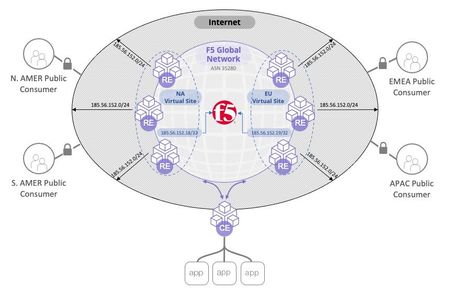
In this article we discuss how the F5 Distributed Cloud can be configured to support regulatory demands for TLS termination of traffic to specific regions around the world. The article provides insight into the F5 Distributed Cloud global backbone and application delivery network (ADN). The article goes on to inspect how the F5 Distriubted Cloud is able to achieve these custom topologies in a multi-tenant architecture while adhearing to the "rules of the internet" for route summarization. Read on to learn about the flexibility of F5's SaaS platform providing application delivery and security solutions for your applications.7.5KViews17likes2CommentsF5 Distributed Cloud - Listener Logic
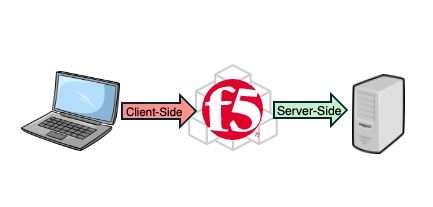
In a proxy, there is a client-side and server-side connection. In this article, we'll focus on how the proxy "picks-up" or "listens" for traffic on the client-side. There are many options and creative ideas that adapt to enterprises business needs. First, we need to know the mechanics and what is possible, and this article covers those basics.3.2KViews16likes1CommentDevCentral's Featured Member for November - Mohamed Salah
Our Featured Member series is a way for us to show appreciation and highlight active contributors in our community. Communities thrive on interaction and our Featured Series gives you some insight on some of our most engaged folks. F5 Community Member Mohamed Salah is our DevCentral Featured Member for November! He's been helping many other members with some great tips so let's catch up with Mohamed!2.2KViews15likes7CommentsHow to get a F5 BIG-IP VE Developer Lab License
(applies to BIG-IP TMOS Edition) To assist operational teams teams improve their development for the BIG-IP platform, F5 offers a low cost developer lab license. This license can be purchased from your authorized F5 vendor. If you do not have an F5 vendor, and you are in either Canada or the US you can purchase a lab license online: CDW BIG-IP Virtual Edition Lab License CDW Canada BIG-IP Virtual Edition Lab License Once completed, the order is sent to F5 for fulfillment and your license will be delivered shortly after via e-mail. F5 is investigating ways to improve this process. To download the BIG-IP Virtual Edition, log into my.f5.com (separate login from DevCentral), navigate down to the Downloads card under the Support Resources section of the page. Select BIG-IP from the product group family and then the current version of BIG-IP. You will be presented with a list of options, at the bottom, select the Virtual-Edition option that has the following descriptions: For VMware Fusion or Workstation or ESX/i: Image fileset for VMware ESX/i Server For Microsoft HyperV: Image fileset for Microsoft Hyper-V KVM RHEL/CentoOS: Image file set for KVM Red Hat Enterprise Linux/CentOS Note: There are also 1 Slot versions of the above images where a 2nd boot partition is not needed for in-place upgrades. These images include _1SLOT- to the image name instead of ALL. The below guides will help get you started with F5 BIG-IP Virtual Edition to develop for VMWare Fusion, AWS, Azure, VMware, or Microsoft Hyper-V. These guides follow standard practices for installing in production environments and performance recommendations change based on lower use/non-critical needs for development or lab environments. Similar to driving a tank, use your best judgement. Deploying F5 BIG-IP Virtual Edition on VMware Fusion Deploying F5 BIG-IP in Microsoft Azure for Developers Deploying F5 BIG-IP in AWS for Developers Deploying F5 BIG-IP in Windows Server Hyper-V for Developers Deploying F5 BIG-IP in VMware vCloud Director and ESX for Developers Note: F5 Support maintains authoritative Azure, AWS, Hyper-V, and ESX/vCloud installation documentation. VMware Fusion is not an official F5-supported hypervisor so DevCentral publishes the Fusion guide with the help of our Field Systems Engineering teams.103KViews14likes152CommentsF5 Distributed Cloud - Service Policy - Header Matching Logic & Processing
Learn about the F5 Distributed Cloud service policy feature and how to apply logic to your match criteria (and/or). This understanding of the logic structures within service policies unlocks endless combinations of application security services.2.8KViews13likes2Comments
AS3 Best Practice
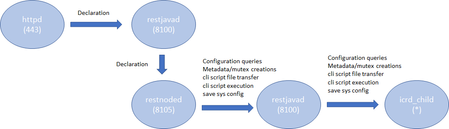
Introduction AS3 is a declarative API that uses JSON key-value pairs to describe a BIG-IP configuration. From virtual IP to virtual server, to the members, pools, and nodes required, AS3 provides a simple, readable format in which to describe a configuration. Once you've got the configuration, all that's needed is to POST it to the BIG-IP, where the AS3 extension will happily accept it and execute the commands necessary to turn it into a fully functional, deployed BIG-IP configuration. If you are new to AS3, start reading the following references: Products - Automation and orchestration toolchain (f5.com; Product information) Application Services 3 Extension Documentation (clouddocs; API documentation and guides) F5 Application Services 3 Extension (AS3) (GitHub; Source repository) This article describes some considerations in order to efficiently deploy the AS3 configurations. Architecture In the TMOS space, the services that AS3 provides are processed by a daemon named 'restnoded'. It relies on the existing BIG-IP framework for deploying declarations. The framework consists of httpd, restjavad and icrd_child as depicted below (the numbers in parenthesis are listening TCP port numbers). These processes are also used by other services. For example, restjavad is a gateway for all the iControl REST requests, and is used by a number of services on BIG-IP and BIG-IQ. When an interaction between any of the processes fails, AS3 operation fails. The failures stem from lack of resources, timeouts, data exceeding predefined thresholds, resource contention among the services, and more. In order to complete AS3 operations successfully, it is advised to follow the Best Practice outlined below. Best Practice Your single source of truth is your declaration Refrain from overwriting the AS3-deployed BIG-IP configurations by the other means such as TMSH, GUI or iControl REST calls. Since you started to use the AS3 declarative model, the source of truth for your device's configurations is in your declaration, not the BIG-IP configuration files. Although AS3 tries to weigh BIG-IP locally stored configurations as much as it can do, discrepancy between the declaration and the current configuration on BIG-IP may cause the AS3 to perform less efficiently or error unexpectedly. When you wish to change a section of a tenant (e.g., pool name change), modify the declaration and submit it. Keep the number of applications in one tenant to a minimum AS3 processes each tenant separately. Having too many applications (virtual servers) in a single tenant (partition) results in a lengthy poll when determining the current configuration. In extreme cases (thousands of virtuals), the action may time out. When you want to deploy a thousand or more applications on a single device, consider chunking the work for AS3 by spreading the applications across multiple tenants (say, 100 applications per tenant). AS3 tenant access behavior behaves as BIG-IP partition behavior. A non-Common partition virtual cannot gain access to another partition's pool, and in the same way, an AS3 application does not have access to a pool or profile in another tenant. In order to share configuration across tenants, AS3 allows configuration of the "Shared" application within the "Common" tenant. AS3 avoids race conditions while configuring /Common/Shared by processing additions first and deletions last, as shown below. This dual process may cause some additional delay in declaration handling. Overwrite rather than patching (POSTing is a more efficient practice than PATCHing) AS3 is a stateless machine and is idempotent. It polls BIG-IP for its full configuration, performs a current-vs-desired state comparison, and generates an optimal set of REST calls to fill the differences. When the initial state of BIG-IP is blank, the poll time is negligible. This is why initial configuration with AS3 is often quicker than subsequent changes, especially when the tenant contains a large number of applications. AS3 provides the means to partially modify using PATCH (see AS3 API Methods Details), but do not expect PATCH changes to be performant. AS3 processes each PATCH by (1) performing a GET to obtain the last declaration, (2) patching that declaration, and (3) POSTing the entire declaration to itself. A PATCH of one pool member is therefore slower than a POST of your entire tenant configuration. If you decide to use PATCH, make sure that the tenant configuration is a manageable size. Note: Using PATCH to make a surgical change is convenient, but using PATCH over POST breaks the declarative model. Your declaration should be your single source of truth. If you include PATCH, the source of truth becomes "POST this file, then apply one or more PATCH declarations." Get the latest version AS3 is evolving rapidly with new features that customers have been wishing for along with fixes for known issues. Visit the AS3 section of the F5 Networks Github. Issues section shows what features and fixes have been incorporated. For BIG-IQ, check K54909607: BIG-IQ Centralized Management compatibility with F5 Application Services 3 Extension and F5 Declarative Onboarding for compatibilities with BIG-IQ versions before installation. Use administrator Use a user with the administrator role when you submit your declaration to a target BIG-IP device. Your may find your role insufficient to manipulate BIG-IP objects that are included in your declaration. Even one authorized item will cause the entire operation to fail and role back. See the following articles for more on BIG-IP user and role. Manual Chapter : User Roles (12.x) Manual Chapter : User Roles (13.x) Manual Chapter : User Roles (14.x) Prerequisites and Requirements (clouddocs AS3 document) Use Basic Authentication for a large declaration You can choose either Basic Authentication (HTTP Authorization header) or Token-Based Authentication (F5 proprietary X-F5-Auth-Token) for accessing BIG-IP. While the Basic Authentication can be used any time, a token obtained for the Token-Based Authentication expires after 1,200 seconds (20 minutes). While AS3 does re-request a new token upon expiry, it requires time to perform the operation, which may cause AS3 to slow down. Also, the number of tokens for a user is limited to 100 (since 13.1), hence if you happen to have other iControl REST players (such as BIG-IQ or your custom iControl REST scripts) using the Token-Based Authentication for the same user, AS3 may not be able to obtain the next token, and your request will fail. See the following articles for more on the Token-Based Authentication. Demystifying iControl REST Part 6: Token-Based Authentication (DevCentral article). iControl REST Authentication Token Management (DevCentral article) Authentication and Authorization (clouddocs AS3 document) Choose the best window for deployment AS3 (restnoded daemon) is a Control Plane process. It competes against other Control Plane processes such as monpd and iRules LX (node.js) for CPU/memory resources. AS3 uses the iControl REST framework for manipulating the BIG-IP resources. This implies that its operation is impacted by any processes that use httpd (e.g., GUI), restjavad, icrd_child and mcpd. If you have resource-hungry processes that run periodically (e.g., avrd), you may want to run your AS3 declaration during some other time window. See the following K articles for a list of processes K89999342 BIG-IP Daemons (12.x) K05645522 BIG-IP Daemons (v13.x) K67197865 BIG-IP Daemons (v14.x) K14020: BIG-IP ASM daemons (11.x - 15.x) K14462: Overview of BIG-IP AAM daemons (11.x - 15.x) Workarounds If you experience issues such as timeout on restjavad, it is possible that your AS3 operation had resource issues. After reviewing the Best Practice above but still unable to alleviate the problem, you may be able to temporarily fix it by applying the following tactics. Increase the restjavad memory allocation The memory size of restjavad can be increased by the following tmsh sys db commands tmsh modify sys db provision.extramb value <value> tmsh modify sys db restjavad.useextramb value true The provision.extramb db key changes the maximum Java heap memory to (192 + <value> * 8 / 10) MB. The default value is 0. After changing the memory size, you need to restart restjavad. tmsh restart sys service restjavad See the following article for more on the memory allocation: K26427018: Overview of Management provisioning Increase a number of icrd_child processes restjavad spawns a number of icrd_child processes depending on the load. The maximum number of icrd_child processes can be configured from /etc/icrd.conf. Please consult F5 Support for details. See the following article for more on the icrd_child process verbosity: K96840770: Configuring the log verbosity for iControl REST API related to icrd_child Decrease the verbosity levels of restjavad and icrd_child Writing log messages to the file system is not exactly free of charge. Writing unnecessarily large amount of messages to files would increase the I/O wait, hence results in slowness of processes. If you have changed the verbosity levels of restjavad and/or icrd_child, consider rolling back the default levels. See the following article for methods to change verbosity level: K15436: Configuring the verbosity for restjavad logs on the BIG-IP system14KViews13likes2CommentsBIG-IP Scale-out/Multi-tier構成のポイント解説
はじめに BIG-IPは、1台で負荷分散、SSLアクセラレータ、フォワードプロキシ、ネットワーク保護、ウェブアプリケーション保護、リモートアクセス等の複数機能の提供が可能で、システムを集約させることが可能ですが、以下のようなケースで複数のBIG-IPに処理を分散させることも可能です。 - 高スペックな1台のBIG-IPで処理しきれない非常に多量のトラフィックを複数のBIG-IPに分散 - スモールスタートし、トラフィックや利用ユーザー数の増加に合わせて、BIG-IPを追加 しかしながら、複数BIG-IPで処理を行う場合は、以下のことも考慮の必要があります。 - 複数BIG-IPの負荷分散の考慮 - BIG-IPでSNATの構成を利用しない場合、構成の検討が必要 これらの検討事項は、BIG-IPをMulti-tier構成にすることで、実現が可能です。 本ブログでは、Scale-out/Multi-tier構成にする場合のネットワーク構成、HA構成、ライセンスによる注意事項を解説します。 1. ネットワーク構成につきまして Tier1 - Tier2とTier2 - Tier3間のVLANは別にすることをお勧めします。 また、戻りのTrafficのためにTier2とTier3のBIG-IPでは、Auto Last Hopは有効にします。 2. HA構成 Tier1/Tier3に相当する機器は、耐障害性を高めるためにActive-Standbyをお勧めします。 Tier2に相当する機器は、Standaloneを並べることも可能ですが、Active-Activeの構成でもメリットがあると考えられます。 Active-Activeにするメリットとしては以下が考えられます。 - ConfigをSyncさせることによって複数台の設定が容易になること - Active-Activeにすることにより、障害時は、すぐに別のリソースに切り替わること (Tier1でHealth Monitorと併用すれば障害時の切り替えの時に、よりメリットがあると考えられます) Active-Activeにした場合には、Traffic GroupのFailover Methodに以下の設定も追加して、特定のBIG-IPにActiveのリソースが偏らないようにします。 - Failover using Preferred Device Order and then Load Aware - Always Failback to First Device if it is Available 3. ライセンスによる注意事項 APMの場合、Active-Activeはサポートしておりませんので、Tier2をAPMにする場合は、Standaloneの機器を並べることになります。 4.まとめ 本ブログでは、Scale-out/Multi-tier構成を実施する場合の、考慮点等を解説しました。 Multi-tier構成については、Scale-out構成との組み合わせだけではなく、それぞれのtierで別のモジュールを動作させること等柔軟な構成が考えられます。 負荷分散、SSLアクセラレータ、フォワードプロキシ、ネットワーク保護、ウェブアプリケーション保護、リモートアクセス等様々なシーンで適用できますのでBIG-IPをぜひご活用ください。1.4KViews12likes0CommentsIntroducing the F5 Application Study Tool (AST)
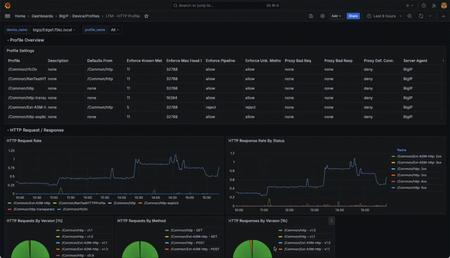
In the ever-evolving world of application delivery and security, gaining actionable insights into your infrastructure and applications has become more critical than ever. The Application Study Tool (AST) is designed to help technical teams and administrators leverage the power of open-source telemetry and visualization tools to enhance their monitoring, diagnostics, and analysis workflows.19KViews11likes14Comments