apm
4 TopicsUpdate an ASM Policy Template via REST-API - the reverse engineering way
I always want to automate as many tasks as possible. I have already a pipeline to import ASM policy templates. Today I had the demand to update this base policies. Simply overwriting the template with the import tasks does not work. I got the error message "The policy template ax-f5-waf-jump-start-template already exists.". Ok, I need an overwrite tasks. Searching around does not provide me a solution, not even a solution that does not work. Simply nothing, my google-foo have deserted me. Quick chat with an AI, gives me a solution that was hallucinated. The AI answer would be funny if it weren't so sad. I had no hope that AI could solve this problem for me and it was confirmed, again. I was configuring Linux systems before the internet was widely available. Let's dig us in the internals of the F5 REST API implementation and solve the problem on my own. I took a valid payload and removed a required parameter, "name" in this case. The error response changes, this is always a good signal in this stage of experimenting. The error response was "Failed Required Fields: Must have at least 1 of (title, name, policyTemplate)". There is also a valid field named "policyTemplate". My first thought: This could be a reference for an existing template to update. I added the "policyTemplate" parameter and assigned it an existing template id. The error message has changed again. It now throws "Can't use string (\"ox91NUGR6mFXBDG4FnQSpQ\") as a HASH ref while \"strict refs\" in use at /usr/local/share/perl5/F5/ASMConfig/Entity/Base.pm line 888.". An perl error that is readable and the perl file is in plain text available. Looking at the file at line 888: The Perl code looks for an "id" field as property of the "policyTemplate" parameter. Changing the payload again and added the id property. And wow that was easy, it works and the template was updated. Final the payload for people who do not want to do reverse engineering. Update POST following payload to /mgmt/tm/asm/tasks/import-policy-template to update an ASM policy template: { "filename": "<username>~<filename>", "policyTemplate": { "id": "ox91NUGR6mFXBDG4FnQSpQ" } } Create POST following payload /mgmt/tm/asm/tasks/import-policy-template to create an ASM policy template: { "name": "<name>", "filename": "<username>~<filename>" } Hint: You must upload the template before to /var/config/rest/downloads/<username>~<filename>". Conclusion Documentation is sometimes overrated if you can read Perl. Missed I the API documentation for this endpoint and it was just a exercise for me?611Views2likes8CommentsSharing User Credentials Between SAML IDP and SP Policies in F5 APM
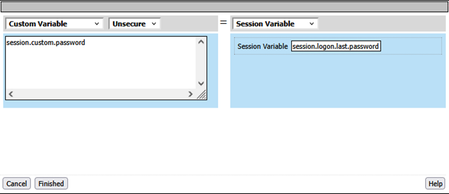
In F5 APM environments with one SAML Identity Provider (IDP) and multiple Service Providers (SPs), SP policies may need access to user credentials (like passwords) for SSO mechanisms such as NTLM or RDP. Since SAML doesn't transmit passwords, this solution enables secure credential sharing by storing the password in a custom session variable on the IDP side and passing the IDP session ID to the SP as a SAML attribute. An iRule on the SP side then uses this session ID to retrieve the password from the IDP session, making it available for SSO credential mapping. This approach maintains security by avoiding password exposure in the SAML assertion and leverages internal session sharing between policies.681Views3likes3CommentsBypass Azure Login Page with OAuth login_hint on F5 BIG-IP APM
Overview This article demonstrates how to enhance the user experience between F5 BIG-IP APM (OAuth Client) and Azure AD (OAuth Authorization Server) by implementing the login_hint parameter. This approach eliminates the need for users to enter their credentials twice, once on the F5 login page and again on the Azure login page. Problem Statement When users access applications protected by F5 APM that authenticate against Azure AD using OAuth/OIDC, they often encounter a suboptimal experience: User enters credentials on the F5 login page (often using their familiar sAMAccountName) F5 redirects to Azure AD for OAuth authentication Azure AD presents another login page asking for the same credentials (expecting UPN/email format) This creates additional friction because users may not know their User Principal Name (UPN) and typically use their sAMAccountName for domain authentication. The login_hint parameter solves this by allowing F5 APM to translate the user's sAMAccountName to their UPN and pre-populate the Azure login page, effectively bypassing the redundant login prompt. Alternative approach The same functionality can be achieved using SAML, as described here. However, I find the OAuth approach cleaner, as it eliminates the need for an iRule and also allows you to include the prompt parameter. This can be useful when you want to force authentication in Azure instead of relying on an existing session. See herefor details. Prerequisites F5 BIG-IP with APM Azure AD tenant with application registration Basic OAuth/OIDC configuration between F5 and Azure AD (as outlined in https://my.f5.com/manage/s/article/K53313351) Implementation Steps Step 1: Complete Basic OAuth Setup Follow the standard F5 APM OAuth configuration with Azure AD: Configure OAuth Server Object Navigate to Access ›› Federation ›› OAuth Client/Resource Server ›› OAuth Server Create a new OAuth server configuration for Azure AD Set the provider type to "Microsoft Identity Platform 2.0" Configure Access Profile Create an access profile with OAuth Client agent Configure authentication redirect and token requests Step 2: Create Custom Authentication Redirect Request The key modification involves creating a custom authentication redirect request that includes the login_hint parameter: Navigate to Request Configuration Access ›› Federation ›› OAuth Client/Resource Server ›› Request Clone the Default Request Find the existing /Common/MSIdentityPlatform2.0AuthRedirectRequest Create a copy Name it something descriptive like MSIdentityPlatform2.0AuthRedirectRequest_LoginHint and the same parameters as /Common/MSIdentityPlatform2.0AuthRedirectRequest Add login_hint Parameter Parameter Name: login_hint Parameter Type: custom Parameter Value: %{session.ad.last.attr.userPrincipalName} or any other variable containing user’s UPN based on your environment and Authentication configuration In the Parameters section, click Add Configure the new parameter: Step 3: Update VPE OAuth Configuration Access the Visual Policy Editor Go to Access ›› Profiles/Policies ›› Access Profiles (Per-Session Policies) Edit your access profile Click Edit to open the VPE Modify OAuth Client Agent Locate the OAuth Client agent in your policy Edit the OAuth Client agent properties In the Authentication Redirect Request dropdown, select your new custom request: MSIdentityPlatform2.0AuthRedirectRequest_LoginHint Apply Access Policy Click Apply Access Policy to save changes Step 4: Session Variable Configuration and UPN Translation The key to successful login_hint implementation is ensuring the proper session variable is populated with a UPN-formatted email address. F5 APM can automatically translate sAMAccountName to UPN during AD authentication. Complete Policy Flow Example Start ↓ Logon Page (user enters: DOMAIN\john.doe or john.doe) ↓ AD Auth (authenticate and populate session variables) ↓ AD Query (to fetch user attributes) ↓ OAuth Client (with custom redirect request including [email protected]) ↓ Azure AD (pre-populated with UPN, bypasses login prompt) ↓ Application Access Troubleshooting Common Issues login_hint Parameter Not Working Verify the session variable contains a valid email address Check that the custom request is selected in the OAuth Client agent Ensure the parameter type is set to "custom" Session Variable Empty or Wrong Format Verify AD authentication and query occurs before OAuth redirect Check AD attribute mapping configuration Confirm the userPrincipalName attribute exists in your AD schema Ensure domain suffix matches Azure AD tenant domain Azure AD Still Prompts for Login Verify the email format matches Azure AD expectations Check Azure AD application configuration for login_hint support Ensure the user exists in the Azure AD tenant Debugging Tips Enable APM debug logging: tmsh modify sys db log.apm.level value debug Use browser developer tools to inspect the OAuth redirect URL Verify session variables using Variable Assign agents in VPE Security Considerations The login_hint parameter only pre-populates the username field; users still must provide valid credentials This is a user experience enhancement, not a security bypass Ensure session variables don't contain sensitive information beyond the username/email Conclusion Implementing login_hint with OAuth on F5 BIG-IP APM significantly improves user experience by eliminating redundant login prompts. The key advantage is that F5 APM can seamlessly translate users' familiar sAMAccountName credentials to the UPN format required by Azure AD, allowing users to authenticate once with their domain credentials while Azure AD receives the properly formatted UPN for the login_hint. This approach maintains security while providing a seamless user experience, particularly beneficial in environments where: Users are more familiar with their sAMAccountName than their UPN Organizations want to minimize authentication friction Azure itself is also federated to another IDP and you want transparent rederiction The solution leverages F5 APM's AD integration capabilities to handle the username format translation automatically, making it transparent to end users.681Views3likes2CommentsProtecting APIs with Access Policy Manager and custom iRules
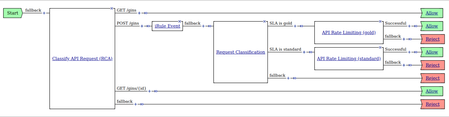
The problem: Unprotected API - Vulnerable to Overload Without Rate-Limiting Enforcement Our customer in the B2B sector is encountering a challenge with their public API. Despite having implemented a custom method for generating long-lived API keys, they find themselves unable to enforce rate-limiting effectively. This absence of rate-limiting mechanisms poses significant challenges, potentially resulting in the overloading of their system due to excessive requests or the exploitation of their API by unauthorized users. Without proper rate-limiting controls in place, the customer faces risks to both the performance and security of their API infrastructure, necessitating a solution to mitigate these concerns and ensure the smooth operation of their services for their clients. Our customers wants to offer two tiers of service level agreements (SLAs) - gold and standard. Complicating matters further, the API key, integral to authentication, is transmitted via a custom HTTP header. The solution: BIG-IP APM and Custom iRules for Effective Rate-Limiting My solution involves leveraging the API Protection feature of BIG-IP APM in conjunction with a custom iRule. By utilizing this combination, our customer can effectively extract the API Keys from HTTP requests and enforce rate limiting on specific API endpoints. As for now they only want to enforce rate limiting on the POST endpoints. This approach empowers the customer to secure their API while efficiently managing and controlling access to critical endpoints, ensuring optimal performance and safeguarding against abuse or overload. With this iRule we can to extract the API key from the HTTP Requests and store it in a variable, that can later be used by the API Protection feature of the APM. API Keys and the associated SLA level are stored in a Data Group of the type string. # Enable (1) or disable (0) logging globally when RULE_INIT { set static::debug 1 } # Access and analyze the HTTP header data for SLA value when HTTP_REQUEST { set sla [class lookup [HTTP::header value apikey] dg_apikeys] if { $static::debug } {log local0. "Made it to HTTP_REQUEST event with SLA value $sla."} } # Evaluate SLA value during per-request access policy execution when ACCESS_PER_REQUEST_AGENT_EVENT { set id [ACCESS::perflow get perflow.irule_agent_id] if { $id eq "read-sla" } { if { $static::debug } {log local0. "Made it to iRule agent in perrequest policy with SLA value $sla."} ACCESS::perflow set perflow.custom "$sla" } } And this is how the Per Request Policy in the API Protection profile looks. It uses the value of the API Key (extracted with the help of the the iRule) and the Source IP of the client to enforce Rate Limiting on the POST endpoints, using two different SLAs. In the APM log you should see the following message, once the client exceeds his quota defined in the SLA. Apr 28 20:12:42 ltm-apm-16.mylab.local notice tmm[11094]: 01870075:5: (null):/Common: API request with weight (1) violated the quota in rate limiting config(/Common/demo_api_ratelimiting_auto_rate_limiting_standard). Apr 28 20:12:42 ltm-apm-16.mylab.local notice tmm[11094]: 0187008d:5: /Common/demo_api_ratelimiting_ap:Common:6600283561834577940: Execution of per request access policy (/Common/demo_api_ratelimiting_prp) done with ending type (Reject) Further reading: You can find a more detailed write-up on my GitHub page: https://github.com/webserverdude/f5_APM_API_Protection There you can find the Per Request Policy explained in all details. The Data Group with for the iRule. A demo API for testing my solution. A Postman Collection for working with my demo API.281Views2likes0Comments