ai
105 TopicsOne Quick Step to Make your website AI-Agent/MCP Ready with an iRule
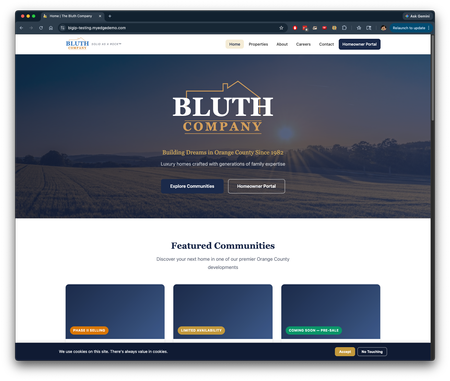
The Problem Nobody Warned You About Here’s the thing about the AI agent explosion: GPTBot, ClaudeBot, PerplexityBot, and a dozen other crawlers are hitting your web applications today. And they’re getting back the same bloated HTML that your browser gets, complete with navigation bars, cookie banners, SVG icons, inline JavaScript, and CSS that means absolutely nothing to an LLM, other than a hit to your token usage. These agents don’t need your <nav> with 47 links. They don’t need your cookie consent modal. They definitely don’t need 200+ lines of minified CSS & JS. They need the content. The headings, the paragraphs, the links, the data. If you, or anyone, are using an agent to access and utilize the data on the page, it’s burning through a massive amount of tokens, generally ~2k per GET. But what if your BIG-IP could intercept these requests, see that the client is an AI agent, and transform that HTML response into clean markdown before it ever leaves your network? BTW, there is plenty of room for improvement here, and a small disclaimer at the end! The Approach The iRule works in three phases across three HTTP events. Here’s the flow: Client Request => HTTP_REQUEST (detect agent, strip Accept-Encoding) Origin Response => HTTP_RESPONSE (check HTML, collect body) Body Received => HTTP_RESPONSE_DATA (convert HTML => Markdown, replace body) Client receives clean markdown with Content-Type: text/plain Detection: Who’s an AI Agent? This example is set up to detect agents three ways; because different agents announce themselves differently, and we want to give humans a way to trigger it too (mostly I used this for testing, notes on that later). when HTTP_REQUEST { set is_ai_agent 0 set ua [string tolower [HTTP::header "User-Agent"]] # The usual suspects if { $ua contains "gptbot" || $ua contains "chatgpt-user" || $ua contains "claudebot" || $ua contains "claude-web" || $ua contains "perplexitybot" || $ua contains "cohere-ai" || $ua contains "google-extended" || $ua contains "applebot-extended" || $ua contains "bytespider" || $ua contains "ccbot" || $ua contains "amazonbot" } { set is_ai_agent 1 } # Explicit opt-in via header if { [HTTP::header "X-Request-Format"] eq "markdown" } { set is_ai_agent 1 } # Content negotiation (the standards-correct way) if { [HTTP::header "Accept"] contains "text/markdown" } { set is_ai_agent 1 } Why three methods? User-Agent detection handles the common crawlers automatically. The X-Request-Format header lets any client explicitly request markdown. And Accept: text/markdown is proper HTTP content negotiation, the way it should work once the ecosystem matures. The Demo Path: /md/ Prefix I added one more trigger that’s purely for demos: set orig_uri [HTTP::uri] if { $orig_uri starts_with "/md/" } { set is_ai_agent 1 set new_uri [string range $orig_uri 3 end] if { $new_uri eq "" } { set new_uri "/" } HTTP::uri $new_uri } Visit /md/ in your browser and you get the markdown version of the upstream site. This is great for showing the capability to someone without having to modify your User-Agent string or install curl. Preventing Compressed Responses This one bit me during testing. And if you could believe it, Kunal Anand is the one who gave me a tip to actually find the resolution. If the origin returns gzip-compressed HTML, HTTP::payload gives you binary garbage. The fix: if { $is_ai_agent } { HTTP::header replace "Accept-Encoding" "identity" } We just need to strip the Accept-Encoding header on the request side so the origin sends us uncompressed HTML. And I added a safety net in HTTP_RESPONSE: when HTTP_RESPONSE { if { $is_ai_agent } { if { [HTTP::header "Content-Type"] contains "text/html" } { set ce [HTTP::header "Content-Encoding"] if { $ce ne "" } { if { $ce ne "identity" } { set is_ai_agent 0 HTTP::header insert "X-Markdown-Skipped" "compressed-response" return } } } } If the upstream ignores our Accept-Encoding override and sends gzip anyway, we bail gracefully instead of serving corrupted content. Defense in-depth! The Conversion: Where the Magic Happens This is HTTP_RESPONSE_DATA, the body has been collected and we have the raw HTML. Now we convert it to markdown through a series of regex passes. Phase 1: The Multiline Problem Tcl's . in regex doesn't match newlines. Every <script>, <style>, and <nav> block in real HTML spans multiple lines. So this won’t work: # This silently fails on multiline <script> blocks! regsub -all -nocase {<script[^>]*>.*?</script>} $html_body "" html_body The fix, again, another hint from Kunal: collapse all newlines to a sentinel character before stripping block elements, then restore them after: set NL_MARK "\x01" set html_body [string map [list "\r\n" $NL_MARK "\r" $NL_MARK "\n" $NL_MARK] $html_body] # NOW these work, everything is one "line" regsub -all -nocase "<script\[^>\]*>.*?</script>" $html_body "" html_body regsub -all -nocase "<style\[^>\]*>.*?</style>" $html_body "" html_body regsub -all -nocase "<nav\[^>\]*>.*?</nav>" $html_body "" html_body # ... strip footer, header, noscript, svg, comments, forms, cookie banners # Restore newlines set html_body [string map [list $NL_MARK "\n"] $html_body] This is the single biggest quality improvement. Without it, you get raw JavaScript and CSS bleeding into your markdown output. Phase 2: Converting Structure With the junk stripped and newlines restored, we convert HTML elements to markdown syntax. Here’s the key insight that took a few iterations: Use [^<]* instead of .*? for tag content. # BAD: .*? crosses newlines in Tcl and matches across multiple tags regsub -all -nocase {<a[^>]*href="(/[^"]*)"[^>]*>(.*?)</a>} ... # GOOD: [^<]* stops at the next tag boundary regsub -all -nocase {<a[^>]*href="(/[^"]*)"[^>]*>([^<]*)</a>} ... This matters when you have two <a> tags on adjacent lines. The .*? version matches from the first <a> opening all the way to the second </a> closing, one giant broken link. The [^<]* version correctly matches each link individually. Here’s the conversion order (it matters): # 1. Headings regsub -all -nocase {<h2[^>]*>([^<]*)</h2>} $html_body "\n## \\1\n\n" html_body # 2. Emphasis BEFORE links (so **bold** inside links works) regsub -all -nocase {<strong[^>]*>([^<]*)</strong>} $html_body {**\1**} html_body # 3. Links with relative URL resolution regsub -all -nocase {<a[^>]*href="(/[^"]*)"[^>]*>([^<]*)</a>} \ $html_body "\[\\2\](https://${http_request_host}\\1)" html_body # 4. Tables, code, lists, paragraphs, blockquotes, images... # 5. Strip ALL remaining tags regsub -all {<[^>]+>} $html_body "" html_body # 6. Decode HTML entities regsub -all {“} $html_body {"} html_body regsub -all {’} $html_body {'} html_body # ... 20+ entity decodings Emphasis before links is important. If you have <a href="/pricing"><strong>$149,900</strong></a>, converting emphasis first gives you <a href="/pricing">$149,900</a>, which then converts to [$149,900](/pricing). Do it the other way, and the bold markers end up orphaned. URL Resolution AI agents need absolute URLs. A relative link like /properties is useless to a bot that doesn’t know what host it’s talking to. We capture $http_request_host in HTTP_REQUEST and use it during link conversion: # Relative to absolute regsub -all -nocase {<a[^>]*href="(/[^"]*)"[^>]*>([^<]*)</a>} \ $html_body "\[\\2\](https://${http_request_host}\\1)" html_body # Absolute stays absolute regsub -all -nocase {<a[^>]*href="(https?://[^"]*)"[^>]*>([^<]*)</a>} \ $html_body "\[\\2\](\\1)" html_body Same treatment for images. Dynamic Table Separators (Yet another place Kunal offered some tips) This one is kind of tricky to solve, because of common HTML table structure standards. Markdown tables need a separator row between the header and body: | Name | Price | Status | |------|-------|--------| | Unit A | $500k | Available | The separator needs the right number of columns. We count <th> tags in the <thead> and build it dynamically (but what if there is no thead? I try to account for that, too): set col_count 0 set thead_check $html_body if { [regsub -nocase {<thead[^>]*>(.*?)</thead>} $thead_check "\\1" first_thead] } { set col_count [regsub -all -nocase {<th[^>]*>} $first_thead "" _discard] } if { $col_count > 0 } { set sep "\n|" for { set c 0 } { $c < $col_count } { incr c } { append sep "---|" } append sep "\n" } If we can’t count the columns in thead, then we default to 6 columns, which could still use some work. But we end up without a hardcoded 2-column separator, breaking our 5-column tables. Performance Considerations This iRule runs in TMM. Every CPU cycle it uses is a cycle not processing other connections. So I built in several guardrails (could be better still): Size limit: Pages over 512KB skip conversion entirely. The regex chain gets expensive on large documents and the output quality degrades anyway. if { $content_length > 524288 } { set is_ai_agent 0 HTTP::header insert "X-Markdown-Skipped" "body-too-large" } Targeted Accept-Encoding: By stripping Accept-Encoding only for AI agent requests, normal browser traffic still gets compressed responses. No performance impact on human users. Logging: Every conversion logs the byte reduction to /var/log/ltm so you can monitor the overhead: markdown: converted 15526 bytes -> 4200 bytes (73% reduction) What This Doesn’t Do (And I Think That’s OK) I will be honest about the limitations: No DOM parsing. This is regex-based conversion. Complex nested structures (a <strong> that wraps three <div>s) won't convert perfectly. You need a real DOM parser for that, and iRules doesn't have one. I avoided using iRulesLX for this project entirely. Multiline tags within content blocks. The newline collapse trick handles <script> and <style>, but a <p> tag with inline markup that spans lines will partially match. The [^<]* pattern helps, but it can't capture text that contains child tags. Tables without <thead>. It detects column count from <th> tags. Tables that use plain <tr><td> with no header get a fallback separator. For 80% of web pages, the output is surprisingly good. For the other 20%, consider iRulesLX (Node.js sidecar with a real DOM parser) or a sideband approach with compiled-language HTML parsing. The Complete iRule Here it is, attach it to your virtual server and you're done: when HTTP_REQUEST { set is_ai_agent 0 set ua [string tolower [HTTP::header "User-Agent"]] if { $ua contains "gptbot" || $ua contains "chatgpt-user" || $ua contains "claudebot" || $ua contains "claude-web" || $ua contains "perplexitybot" || $ua contains "cohere-ai" || $ua contains "google-extended" || $ua contains "applebot-extended" || $ua contains "bytespider" || $ua contains "ccbot" || $ua contains "amazonbot" } { set is_ai_agent 1 } if { [HTTP::header "X-Request-Format"] eq "markdown" } { set is_ai_agent 1 } if { [HTTP::header "Accept"] contains "text/markdown" } { set is_ai_agent 1 } set orig_uri [HTTP::uri] if { $orig_uri starts_with "/md/" } { set is_ai_agent 1 set new_uri [string range $orig_uri 3 end] if { $new_uri eq "" } { set new_uri "/" } HTTP::uri $new_uri } elseif { $orig_uri eq "/md" } { set is_ai_agent 1 HTTP::uri "/" } set http_request_host [HTTP::host] if { $is_ai_agent } { HTTP::header replace "Accept-Encoding" "identity" } } when HTTP_RESPONSE { if { $is_ai_agent } { if { [HTTP::header "Content-Type"] contains "text/html" } { set ce [HTTP::header "Content-Encoding"] if { $ce ne "" } { if { $ce ne "identity" } { set is_ai_agent 0 HTTP::header insert "X-Markdown-Skipped" "compressed-response" return } } set content_length [HTTP::header "Content-Length"] set do_collect 1 if { $content_length ne "" } { if { $content_length > 524288 } { set is_ai_agent 0 set do_collect 0 HTTP::header insert "X-Markdown-Skipped" "body-too-large" } } if { $do_collect } { if { $content_length ne "" } { if { $content_length > 0 } { HTTP::collect $content_length } } else { HTTP::collect 524288 } } } } } when HTTP_RESPONSE_DATA { if { $is_ai_agent } { set html_body [HTTP::payload] set orig_size [string length $html_body] # Phase 1: Collapse newlines for multiline tag stripping set NL_MARK "\x01" set html_body [string map [list "\r\n" $NL_MARK "\r" $NL_MARK "\n" $NL_MARK] $html_body] regsub -all -nocase "<script\[^>\]*>.*?</script>" $html_body "" html_body regsub -all -nocase "<style\[^>\]*>.*?</style>" $html_body "" html_body regsub -all -nocase "<nav\[^>\]*>.*?</nav>" $html_body "" html_body regsub -all -nocase "<footer\[^>\]*>.*?</footer>" $html_body "" html_body regsub -all -nocase "<header\[^>\]*>.*?</header>" $html_body "" html_body regsub -all -nocase "<noscript\[^>\]*>.*?</noscript>" $html_body "" html_body regsub -all -nocase "<svg\[^>\]*>.*?</svg>" $html_body "" html_body regsub -all "<!--.*?-->" $html_body "" html_body regsub -all -nocase "<form\[^>\]*>.*?</form>" $html_body "" html_body # Phase 2: Restore newlines, convert structure set html_body [string map [list $NL_MARK "\n"] $html_body] regsub -all -nocase {<h1[^>]*>([^<]*)</h1>} $html_body "# \\1\n\n" html_body regsub -all -nocase {<h2[^>]*>([^<]*)</h2>} $html_body "\n## \\1\n\n" html_body regsub -all -nocase {<h3[^>]*>([^<]*)</h3>} $html_body "\n### \\1\n\n" html_body regsub -all -nocase {<h4[^>]*>([^<]*)</h4>} $html_body "\n#### \\1\n\n" html_body regsub -all -nocase {<strong[^>]*>([^<]*)</strong>} $html_body {**\1**} html_body regsub -all -nocase {<b[^>]*>([^<]*)</b>} $html_body {**\1**} html_body regsub -all -nocase {<em>([^<]*)</em>} $html_body {*\1*} html_body regsub -all -nocase {<i>([^<]*)</i>} $html_body {*\1*} html_body regsub -all -nocase {<a[^>]*href="(/[^"]*)"[^>]*>([^<]*)</a>} $html_body "\[\\2\](https://${http_request_host}\\1)" html_body regsub -all -nocase {<a[^>]*href="(https?://[^"]*)"[^>]*>([^<]*)</a>} $html_body "\[\\2\](\\1)" html_body regsub -all -nocase {<a[^>]*>([^<]*)</a>} $html_body {\\1} html_body regsub -all -nocase {<th[^>]*>([^<]*)</th>} $html_body "| \\1 " html_body regsub -all -nocase {<td[^>]*>([^<]*)</td>} $html_body "| \\1 " html_body regsub -all -nocase {</tr>} $html_body "|\n" html_body regsub -all -nocase {<code>([^<]*)</code>} $html_body {`\1`} html_body regsub -all -nocase {<li[^>]*>([^<]*)</li>} $html_body "- \\1\n" html_body regsub -all -nocase {</?[uo]l[^>]*>} $html_body "\n" html_body regsub -all -nocase {<p[^>]*>([^<]*)</p>} $html_body "\\1\n\n" html_body regsub -all -nocase {<br\s*/?>} $html_body "\n" html_body regsub -all -nocase {<hr\s*/?>} $html_body "\n---\n\n" html_body regsub -all -nocase {<blockquote[^>]*>} $html_body "> " html_body regsub -all -nocase {</blockquote>} $html_body "\n\n" html_body regsub -all -nocase {<cite>([^<]*)</cite>} $html_body "-- *\\1*\n" html_body regsub -all {<[^>]+>} $html_body "" html_body regsub -all {&} $html_body {\&} html_body regsub -all {<} $html_body {<} html_body regsub -all {>} $html_body {>} html_body regsub -all {"} $html_body {"} html_body regsub -all { } $html_body { } html_body regsub -all {“} $html_body {"} html_body regsub -all {”} $html_body {"} html_body regsub -all {‘} $html_body {'} html_body regsub -all {’} $html_body {'} html_body regsub -all {—} $html_body {--} html_body regsub -all {–} $html_body {-} html_body regsub -all {…} $html_body {...} html_body regsub -all {&#[0-9]+;} $html_body {} html_body regsub -all {\n +} $html_body "\n" html_body regsub -all {\n{3,}} $html_body "\n\n" html_body regsub -all {([^\n])\n\n([^#\n\[>*-])} $html_body "\\1\n\\2" html_body set html_body [string trim $html_body] HTTP::payload replace 0 [HTTP::payload length] $html_body HTTP::header replace "Content-Type" "text/plain; charset=utf-8" HTTP::header replace "Content-Length" [string length $html_body] HTTP::header insert "X-Markdown-Source" "bigip-irule" } } Testing / Demoing It # Normal browser request, HTML as usual curl https://your-site.example.com/ # AI agent simulation curl -H "User-Agent: GPTBot/1.0" https://your-site.example.com/ # Explicit markdown request curl -H "X-Request-Format: markdown" https://your-site.example.com/ # Browser-friendly demo curl https://your-site.example.com/md/ # (or just visit it in your browser) What's Next This is a solid starting point for making your existing sites AI-agent ready without touching application code. A few directions to take it: Agent discovery files: serve /llms.txt and /.well-known/ai-plugin.json so agents can programmatically discover your markdown capability iRulesLX upgrade path: When regex-based conversion isn't enough, move the HTML parsing to a Node.js sidecar with a real DOM parser (cheerio, jsdom). Same detection logic, better conversion quality. The AI agent wave isn't coming. It’s here. Your BIG-IP already sees every request. Might as well make those responses useful. Disclaimer! The iRule in this article was developed as part of a proof-of-concept for edge-layer HTML-to-Markdown conversion. It's been tested on BIG-IP 17.5.1+. Your mileage may vary on complex single-page applications, but for content-heavy sites, it works remarkably well for something that's "just regex."841Views9likes3CommentsAPIs First: Why AI Systems Are Still API Systems
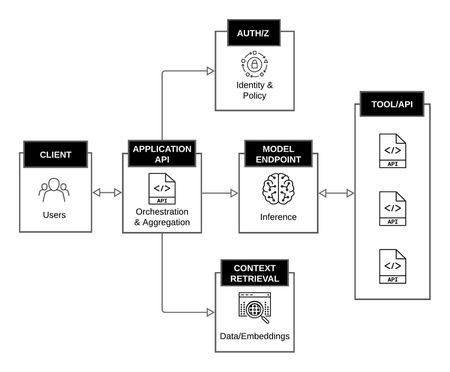
AI and APIs Over the past several years, the industry has seen an explosion of interest in large language models and AI driven applications. Much of the discussion has focused on the models themselves: their size, their capabilities, and their apparent ability to reason, summarize, and generate content. In the process, it is easy to overlook a more fundamental reality. Modern AI systems are still API systems. Despite new abstractions and new terminology, the underlying mechanics of AI applications remain familiar. Requests are sent, responses are returned. Identities are authenticated, authorization decisions are made, data is retrieved, and actions are executed. These interactions happen over APIs, and the reliability, security, and scalability of AI systems are constrained by the same architectural principles that have always governed distributed systems. What is new is not the presence of APIs, but the nature of the consumer calling them. In traditional systems, API consumers are deterministic. They are code written by engineers who read the documentation and invoke endpoints in predictable ways. In AI systems, the consumer is increasingly a model, a probabilistic component that infers behavior from schemas, chains calls dynamically, and produces traffic patterns that were not explicitly programmed. That single shift is what makes every downstream concern in this series, including MCP design, token budgets, authorization, and operations, behave differently than in traditional API platforms. Understanding this relationship is critical, not only for building AI systems, but for operating and securing them in production. AI Applications as API Orchestration Platforms At a high level, an AI application is best understood not as a single model invocation, but as an orchestration layer that coordinates multiple API interactions. A typical request may involve: A client calling an application API Authentication and authorization checks Retrieval of contextual data from internal or external services One or more calls to a model inference endpoint Follow-on tool or service calls triggered by the model’s output Aggregation and formatting of the final response From an architectural perspective, this is not fundamentally different from any other multi-service application. Routing, observability, traffic management, and trust boundaries remain as relevant here as in any traditional platform. What has changed is that the decision logic, meaning when to call which service and with what parameters, is increasingly driven by model output rather than static application code. That shift does not eliminate APIs. It increases their importance. AI Application as an Orchestration Platform Models as API Endpoints, Not Black Boxes In production environments, models are consumed almost exclusively through APIs. Whether hosted by a third party or deployed internally, a model is exposed as an endpoint that accepts structured input and returns structured output. Treating models as API endpoints clarifies several important points. A model does not "see" your system. It receives a request payload, processes it, and returns a response. Everything the model knows about your environment arrives through an API boundary. What distinguishes model endpoints from conventional APIs is not their interface, but their operational profile. Responses are frequently streamed rather than returned as a single payload, which changes how load balancers, proxies, and timeouts behave. Payload sizes are highly variable, with both requests and responses ranging from a few hundred bytes to many megabytes depending on context and output length. Rate limits are often expressed in tokens per minute rather than requests per second, which complicates capacity planning and quota enforcement. Self-hosted models introduce additional concerns around GPU scheduling, cold start latency, and memory pressure that do not exist for traditional stateless services. These characteristics do not change the fundamental nature of a model as an API endpoint. They do mean that the operational assumptions built into the existing API infrastructure may not hold without adjustment. Tools, Retrieval, and Data Access Are Still APIs As AI systems evolve beyond simple prompt-and-response interactions, they increasingly rely on tools: databases, search systems, ticketing platforms, code repositories, and internal business services. These tools are almost always accessed through APIs. Retrieval-augmented generation, for example, is often described as a novel AI pattern. In practice, it is a sequence of API calls: An embedding service is called to encode a query A vector database is queried for relevant results A document store is accessed to retrieve source material The retrieved data is passed to the model as context Each step carries the usual concerns: latency, authorization, data exposure, and error handling. The model may influence when these calls occur, but it does not change their fundamental nature. Why API Design Matters More in AI Systems If AI systems are built on APIs, why do they feel harder to manage? The answer lies in amplification. Model-driven systems tend to: Chain API calls dynamically Surface data in ways developers did not explicitly anticipate Expand the blast radius of a misconfigured authorization Increase sensitivity to payload size and response shape A poorly designed API that returns excessive data may be tolerable in a traditional application. In an AI system, that same response can overflow context limits, leak sensitive information into prompts, or cascade into additional unintended tool calls. This amplification rarely stays within a single domain. A schema decision that looks like an application concern becomes a traffic and routing concern when responses grow unpredictably, and an authorization concern when a model uses that response to drive the next call. Design choices that were once contained within one team’s scope now propagate across the stack. In this sense, AI does not introduce entirely new architectural risks. It magnifies existing ones. Introducing MCP as an API Coordination Layer As models gain the ability to invoke tools directly, the need for consistent, structured access to APIs becomes more pressing. This is where Model Context Protocol (MCP) enters the picture. At a conceptual level, MCP does not replace APIs. It standardizes how AI systems discover, describe, and invoke API-backed tools. MCP servers typically sit in front of existing services, exposing them in a model-friendly way while relying on the same underlying API infrastructure. Seen through this lens, MCP is not a departure from established architecture patterns. It is an adaptation, one that acknowledges models as active participants in API-driven systems rather than passive consumers of text. But it is also the introduction of a new coordination layer, a tool plane, with its own operational, network, and security properties that do not map cleanly onto the API layer beneath it. The rest of this series examines what that means for the systems you build, run, and secure. Looking Ahead If AI systems are still API systems, then the familiar disciplines of API architecture, security, and operations remain essential. What changes is where decisions are made, how data flows, and how quickly small design flaws can propagate. The next article looks more closely at MCP itself, examining how it standardizes tool access on top of APIs and why treating it as a tool plane helps clarify both its power and its risks. From there, the series turns to tokens as a first-class design constraint that shapes tool schemas, response shaping, and traffic behavior. The fourth article addresses authorization and the security implications of letting models invoke tools directly, including identity, delegation, and the expanded blast radius MCP introduces. The series closes with a look at operating MCP-enabled systems in production, where reliability, cost, and safety have to be enforced rather than assumed. Resources: Article Series: MCP, APIs, and Tokens: Building and Securing the Tool Plane of AI Systems (Intro) MCP, APIs, and Tokens (Part 1 - APIs First: Why AI Systems Are Still API Systems) MCP, APIs, and Tokens (Part 2 - MCP as the Tool Plane: Standardizing Access Across APIs) MCP, APIs, and Tokens (Part 3 - Tokens as a Design Constraint for MCP and APIs) MCP, APIs, and Tokens (Part 4 - Securing the Tool Plane: MCP, APIs, and Authorization) MCP, APIs, and Tokens (Part 5 - Designing for the Inference Track: Safe, Scalable MCP Systems)931Views7likes2CommentsIntroducing F5 AI Red Team
F5 AI Red Team simulates adversarial attacks such as prompt injection and jailbreaks at unprecedented speed and scale, allowing for continuous assessment throughout the application lifecycle, providing insights into threats and integrating with F5 AI Guardrails to convert these insights into security policies. 1KViews7likes1Comment
Just Announced! Attend a lab and receive a Raspberry Pi
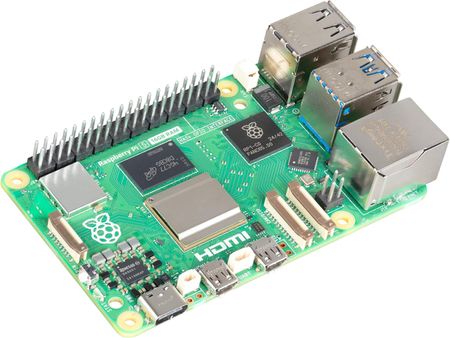
Have a Slice of AI from a Raspberry Pi Services such as ChatGPT have made accessing Generative AI as simple as visiting a web page. Whether at work or at home, there are advantages to channeling your user base (or family in the case of at home) through a central point where you can apply safeguards to their usage. In this lab, you will learn how to: Deliver centralized AI access through something as basic as a Raspberry Pi Learn basic methods for safeguarding AI Learn how users might circumvent basic safeguards Learn how to deploy additional services from F5 to enforce broader enterprise policies Register Here This lab takes place in an F5 virtual lab environment. Participants who complete the lab will receive a Raspberry Pi* to build the solution in their own environment. *Limited stock. Raspberry Pi is exclusive to this lab. To qualify, complete the lab and join a follow-up call with F5.1.1KViews7likes2CommentsHey DeepSeek, can you write iRules?
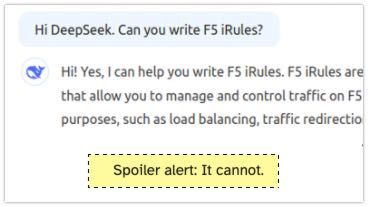
Back in time... Two years ago I asked ChatGPT whether it could write iRules. My conclusion after giving several tasks to ChatGPT was, that it can help with simple tasks but it cannot write intermediate or complex iRules. A new AI enters the competition Two weeks ago DeepSeek entered the scene and thought it's a good idea to ask it about its capabilities to write iRules. Spoiler alert: It cannot. New AI, same challenges I asked DeepSeek the same questions I asked ChatGPT 2 years ago. Write me an iRule that redirects HTTP to HTTPS Can you write an iRule that rewrites the host header in HTTP Request and Response? Can you write an iRule that will make a loadbalancing decision based on the HTTP Host header? Can you write an iRule that will make a loadbalancing decision based on the HTTP URI header? Write me an iRule that shows different ASM blocking pages based on the host header. The response should include the support ID. I stopped DeepSeek asking after the 5th question, DeepSeek is clueless about iRules. The answer I got from DeepSeek to 1, 2, 4 and 5 was always the same: when HTTP_REQUEST { # Check if the request is coming to port 80 (HTTP) if { [TCP::local_port] equals 80 } { # Construct the HTTPS URL set host [HTTP::host] set uri [HTTP::uri] set redirect_url "https://${host}${uri}" # Perform the redirect HTTP::redirect $redirect_url } } While this is a solution to task 1, it is plain wrong for 2, 3, 4 and 5. And even for the first challenge this is not a good. Actually it hurts me reading this iRule... Here for example task 2, just wrong... For task 3 DeepSeeks answer was: ChatGPT in 2025 For completeness, I gave the same tasks from 2023 to ChatGPT again. Briefly said - ChatGPT was OK in solving tasks 1-4 in 2023 and still is. It improved it's solution for task 5, the ASM iRule challenge. In 2023 I had two more tasks related to rewriting and redirecting. ChatGPT still failed to provide a solid solution for those two tasks. Conclusion DeepSeek cannot write iRules and ChatGPT still isn't good at it. Write your own iRules or ask the friendly people here on devcentral to help you.1.2KViews7likes14CommentsSecuring Generative AI: Defending the Future of Innovation and Creativity
Protect your organization's generative AI investments by mitigating security risks effectively. This comprehensive guide examines the assets of AI systems, analyzes potential threats, and offers actionable recommendations to strengthen security and maintain the integrity of your AI-powered applications.2.5KViews7likes2CommentsF5 Distributed Cloud WAF AI/ML Model to Suppress False Positives
Introduction: Web Application Firewall (WAF) has evolved to protect web applications from attack. A signature-based WAF responds to threats through the implementation of application-specific detection rules which block malicious traffic. These managed rules work extremely well for patterns of established attack vectors, as they have been extensively tested to minimize both false negatives and false positives. Most of the Web Applications development is concentrated to deliver services seamlessly rather than integrating security services to tackle recent or every security attack. Some applications might have a logic or an operation that looks suspicious and might trigger a WAF rule. But that is how applications are built and made to behave depending on their purpose. Under these circumstances WAF considers requests to these areas as attack, which is truly not, and the respective attack signature is invoked which is called as False Positive. Though the requests are legitimate WAF blocks these requests. It is tedious to update the signature rule set which requires greater human effort. AI/ML helps to solve this problem so that the real user requests are not blocked by WAF. This article aims to provide configuration of WAF along with Automatic attack signature tuning to suppress false positives using AI/ML model. A More Intelligent Solution: F5 Distributed Cloud (F5 XC) AI/ML model uses self-learning probabilistic machine learning model that suppresses false positives triggered by Signature Engine. AI/ML is a tool that identifies the false positives triggered by signature engine and acts as an additional layer of intelligence, which automatically suppresses false positives based on a Machine learning model without human intervention. This model minimizes false positives and helps to determine the probability that triggered the particular signature is evidence of an attack or just an error or a change in how users interact with the application. This model is trained using vast amount of benign and an attack traffic of real time customer log. AI/ML model does not rely on human involvement to understand operational patterns and user interactions with Web Application. Hence it saves a lot of human effort. Step by step procedure to enable attack signature tuning to supress false positives These are the steps to enable attack signatures and its accuracy Create a firewall by enabling Automatic attack signatures Assign the firewall to Load Balancer Step 1: Create an App Firewall Navigate to F5 XC Console Home > Load Balancers > Security > App Firewall and click on Add App Firewall Enter valid name for Firewall and Navigate to Detection Settings Select Security Policy as “Custom” with in the Detection settings and select Automatic Attack Signatures Tuning “Enable” as shown below, Select Signature Selection by Accuracy as “High and Medium” from the dropdown. Scroll down to the bottom and click on “Save and Exit” button. Steps 2: Assigning the Firewall to the Load Balancer From the F5 XC Console homepage, Navigate to Load Balancers > Manage > Load Balancers > HTTP load balancer Select the load balancer to which above created Firewall to be assigned. Click on menu in Actions column of app Load Balancer and click on Manage Configurations as shown below to display load balancer configs. Once Load Balancer configurations are displayed click on Edit configuration button on the top right of the page. Navigate to Security Configuration settings and choose Enable in dropdown of Web Application Firewall (WAF) Assign the Firewall to the Load Balancer which is created in step 1 by selecting the name from the Enable dropdown as shown below, Scroll down to the bottom and click on “Save and Exit” button, with this Firewall is assigned to Load Balancer. Step 3: Verify the auto supressed signatures for false positives From the F5 XC Console homepage, Navigate to Web App and API Protection > Apps & APIs > Security and select the Load Balancer Select Security Events and click on Add filter Enter the key word Signatures.states and select Auto Supressed. Displayed logs shows the Signatures that are auto supressed by AI/ML Model. "Nature is a mutable cloud, which is always and never the same." - Ralph Waldo Emerson We might not wax that philosophically around here, but our heads are in the cloud nonetheless! Join the F5 Distributed Cloud user group today and learn more with your peers and other F5 experts. Conclusion: With the additional layer of intelligence to the signature engine F5 XC's AI/ML model can automatically suppresses false positives without human intervention. Customer can be less concerned about their activities of application that look suspicious which in turns to be actual behaviour and hence the legitimate requests are not blocked by this model. Decisions are based on enormous amount of real data fed to the system to understand application and user’s behaviour which makes this model more intelligent.7.6KViews7likes9CommentsSecure, Deliver and Optimize Your Modern Generative AI Apps with F5
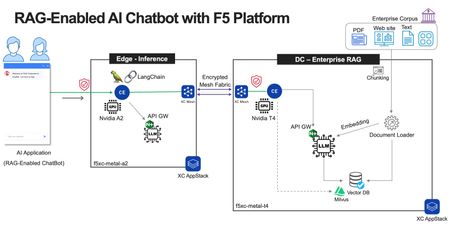
In this demo, Foo-Bang Chan explores how F5's solutions can help you implement, secure, and optimize your chatbots and other AI applications. This will ensure they perform at their best while protecting sensitive data. One of the AI frameworks showed is Enterprise Retrieval-Augmented Generation (RAG). This demo leverages F5 Distributed Cloud (XC) AppStack, Distributed Cloud WAAP, NGINX Plus as API Gateway, API-Discovery, API-Protection, LangChain, Vector databases, and Flowise AI.764Views6likes1Comment