F5 Sites
  • F5.com
  • F5 Labs
  • MyF5
  • NGINX
  • Partner Central
  • Education Services Portal (ESP)
Contact
  • Under Attack?
  • F5 Support
  • DevCentral Support
  • F5 Sales
  • NGINX Sales
  • F5 Professional Services
Open Side Menu
Skip to contentBrand Logo
Forums
CrowdSRC
Articles
GroupsEventsSuggestionsHow Do I...?
RegisterSign In
  1. DevCentral
  2. CrowdSRC
  3. CodeShare

BigIP Report Old

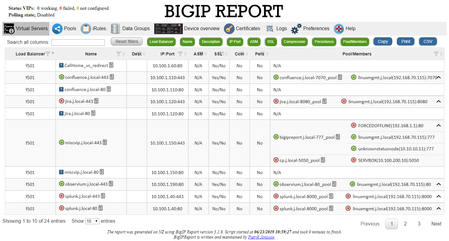
Problem this snippet solves: This codeshare has been deprecated due to a hosting platform corruption. I have moved code and conversation to a new record (on the same original URL) https://devcentra...
Updated Dec 08, 2022
Version 2.0
application delivery
devops
iControl
LTM
microsoft powershell with icontrol
Patrik_Jonsson's avatar
Patrik_Jonsson
Icon for MVP rankMVP
Joined January 16, 2009
View Profile
TimRiker's avatar
TimRiker
Icon for Cirrocumulus rankCirrocumulus
May 15, 2018

Jeff Allen

I copy the xml file to another new xml name, ie:

all.xml
and then I add all device groups into that one xml. New updates replace the default xml, but not the
all.xml
. On updates I can compare the two and migrate over changes. Run the script passing the config on the command line:

PS C:\Whereever\> ./bigipreport-5.1.5.ps1 all.xml

I've not tested the csv output lately. It looks like it only exports the current visible set, so you should show ALL rows first. I'm curious how people use this. The total virtual servers included in the report are in

./json/virtualservers.json
already. Does that file fit your needs?

Are you running a search before doing the export?

Device overview is also in a json file:

./json/loadbalancers.json

Help guide the future of your DevCentral Community!

What tools do you use to collaborate? (1min - anonymous)

ABOUT DEVCENTRAL

DevCentral NewsTechnical ForumTechnical ArticlesTechnical CrowdSRCCommunity GuidelinesDevCentral EULAGet a Developer Lab LicenseBecome a DevCentral MVP

RESOURCES

Product DocumentationWhite PapersGlossaryCustomer StoriesWebinarsFree Online CoursesTraining & Certification

SUPPORT

Manage SubscriptionsProfessional ServicesCreate a Service RequestSoftware DownloadsSupport Portal

PARTNERS

Find a Reseller PartnerTechnology AlliancesBecome an F5 PartnerLogin to Partner Central

©2026 F5, Inc. All rights reserved.
TrademarksPoliciesPrivacyCalifornia PrivacyDo Not Sell My Personal Information
