Forum Discussion

 Cirrus
LTM Policy usecase Scenario
Hello Connection !!
🤖 Problem Statement :
The application team is requesting me to perform a redirection method for a specific condition to be matched with a URL link, and I'm not sure how to do it in F5.
💎Solution :
Simple, this can be accomplished through the use of policy or the i-rule method.
Example - https://lnkd.in/gEXwhUD5
Accountopening -> Word should match and Redirect to testweb-4354 backend pool members in F5
F5 Standard VS configuration:
ltm virtual CUNAME-test.goog.com-443 {
destination 10.X.X.X%1:https
ip-protocol tcp
mask 255.255.255.255
partition Public
persist {
    /Common/cookie {
      default yes
    }
  }
  policies {
    CUNAME-PROD.test.goog.com_NewAccountOpening { }
  }
  profiles {
    /Common/STAR.goog.com {
      context clientside
    }
    /Common/http-**bleep**-HTTPS { }
    /Common/tcp { }
    PUBLIC-Analytic { }
    TCP-Public { }
  }
  serverssl-use-sni disabled
  source 0.0.0.0/0
  source-address-translation {
    type automap
  }
  translate-address enabled
  translate-port enabled
  vs-index 67
}
Policy Configuration:
ltm policy CUNAME-PROD.goog.com_NewAccountOpening {
controls { forwarding }
  partition Public
  requires { http }
  rules {
    "AccountOpening Admin" {
      actions {
        0 {
          forward
          select
          pool testweb-4354
        }
      }
      conditions {
        0 {
          http-uri
          path
          starts-with
          values { /AccountOpeningAdmin }
        }
      }
      ordinal 1
    }
    API-AccountOpening {
      actions {
        0 {
          forward
          select
          pool testweb-4355
        }
      }
      conditions {
        0 {
          http-host
          host
          contains
          values { api }
        }
        1 {
          http-uri
          path
          starts-with
          values { /AccountOpening }
        }
      }
    }
    AccountOpening {
      actions {
        0 {
          forward
          select
          pool testweb-4352
        }
      }
      conditions {
        0 {
          http-uri
          path
          starts-with
          values { /AccountOpening }
        }
      }
      ordinal 2
    }
  }
  status published
  strategy /Common/first-match
}
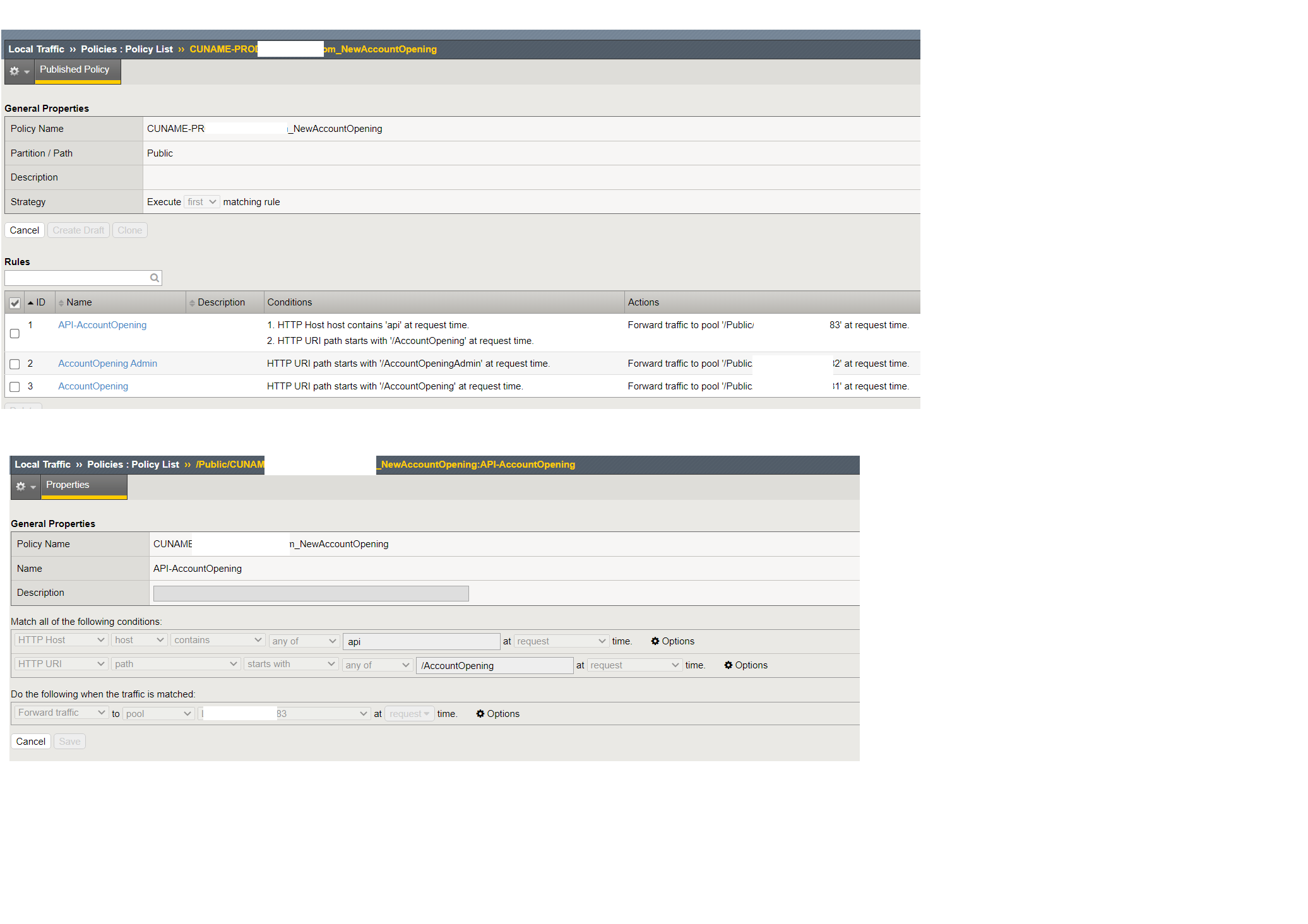
Note - Please see the attached screenshot to see how the matching conditions parameter used..
1 Reply
- Leslie_HubertusRet. Employee
Thanks for this info, Srirengaa - we always appreciate when users share knowledge and experience here, and I'm sure it'll come in handy for others.




Recent Discussions
Related Content
* Getting Started on DevCentral
* Community Guidelines
* Community Terms of Use / EULA
* Community Ranking Explained
* Community Resources
* Contact the DevCentral Team
* Update MFA on account.f5.com