Forum Discussion

 Nimbostratus
LDAP resource assign not working - AMP VPE-

 Employee
A few things:
-
I don't know if there's official configuration instructions on this. Those seem to be missing.
-
The functionality is, in a nutshell, a resource assignment agent based on AD/LDAP group membership. You could certainly have done this before with branch rules and simple resource assignment, but this agent is intended to make the process more straight forward.
-
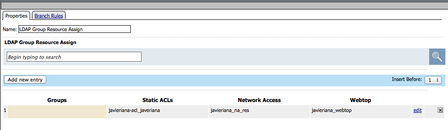
After a successful LDAP query, add the LDAP Group Resource Assignment agent. Click the Add New Entry button, and then manually add the name of a group as it would appear in the directory. With that, select any portal access, network access, webtop, remote desktop, static pool, etc. as required.
-
The search button that you're referring to is used within the UI itself, not to query AD/LDAP as you might have expected.
-
If it's still failing, you may need to take a closer look at a) what group membership data is being returned per user, and b) what you're looking for in the group assignment.



Recent Discussions
Related Content
* Getting Started on DevCentral
* Community Guidelines
* Community Terms of Use / EULA
* Community Ranking Explained
* Community Resources
* Contact the DevCentral Team
* Update MFA on account.f5.com